Here at Eval Academy we are big fans of keeping evaluation simple and that includes how we present our evaluation timelines. While the level of detail you require is likely different whether you are using the timeline for your own planning purposes or are sharing it with others, these four simple ideas use basic software (think Microsoft Word, Excel, and PowerPoint) to create clean and easy to understand timelines.
-
Calendar
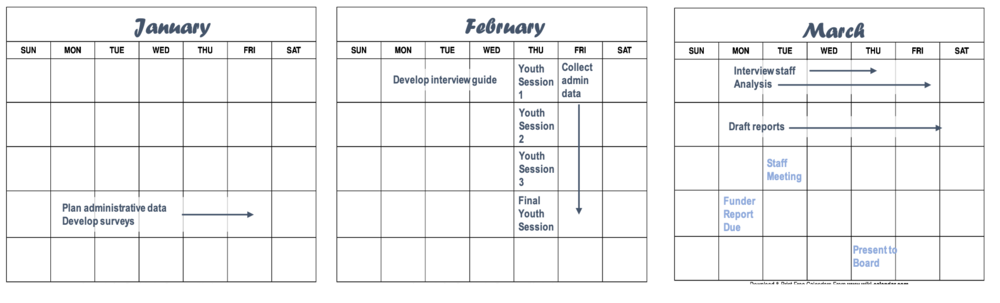
Plot out what needs to happen visually using calendars. A quick online search of “free calendar [month] and [year]” provides you with a plethora of free calendar templates with dates already slotted in. You can add in evaluation milestones and important dates using text boxes and shapes in PowerPoint (or your preferred image editing software), then copy the image into your evaluation plan document.
This method of visualizing evaluation timelines becomes visually crowded for long projects or overly complicated schedules requiring a lot of detail. Minimizing clutter is the key to a successful calendar visualization (perhaps all visualizations, really).
2. Line Graph
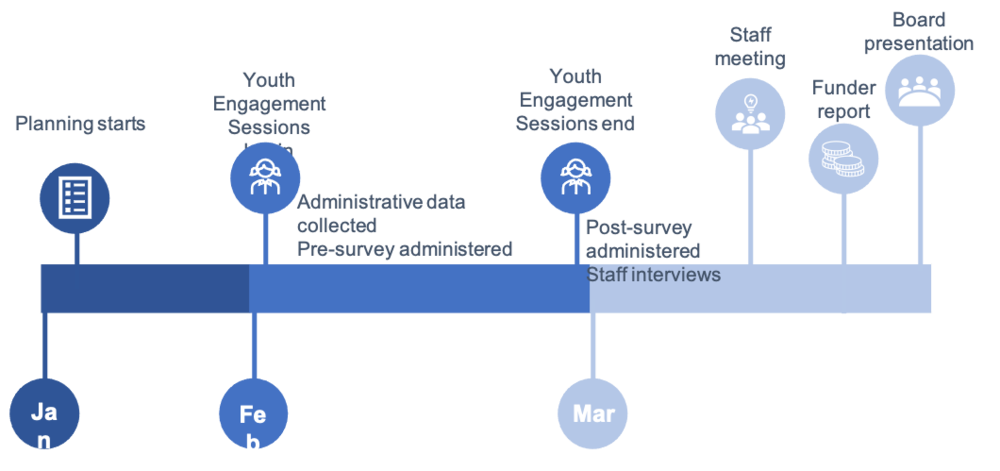
A few line and circle shapes put together in PowerPoint or creating an actual line graph in excel can work to highlight key project milestones and high-level timelines. This method of visualizing your evaluation timelines works well when exact dates have yet to be nailed down or in a developmental evaluation where key program milestones will dictate evaluation timing. It’s also great for clients who only need a high-level representation of the work you have planned.
3. Gantt Chart
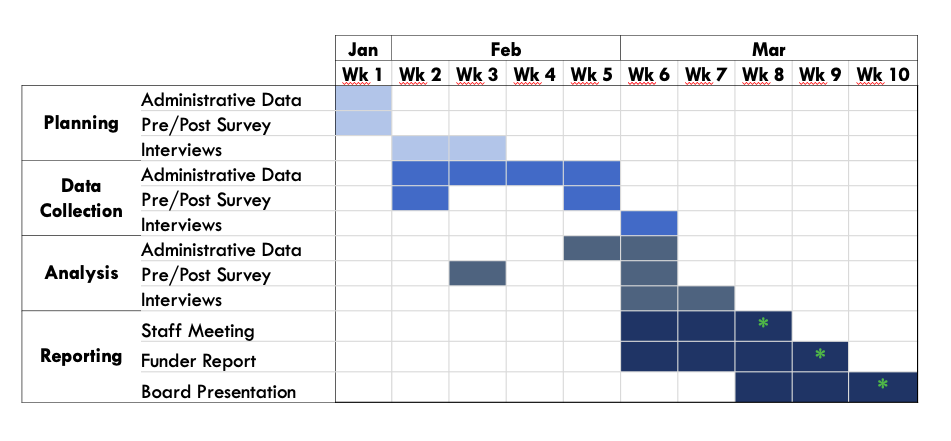
Perhaps the most typical method of visualizing project timelines, we prefer a simpler approach than a typical Gantt chart with lines, dependencies, durations, etc. We build ours in excel, slotting in the appropriate timeframes as column headers and use rows for evaluation tasks. We then shade in the corresponding cells to indicate when each task will occur. This method works well when your evaluation timelines change and you can simply copy and paste your cells over to adjust. If you like to get a little fancier, there are some simple Gantt chart templates that are free download, or you can build your own bar chart using Youtube tutorials or your own ingenuity.
4. Chronological List
Maybe not the most visually appealing, but this method of visualization evaluation timelines checks the box for simple and easy to create. Putting the information into a table, then hiding the borders gives your list some easy structure. If you want to get fancy, you can add in colour coding or icons.
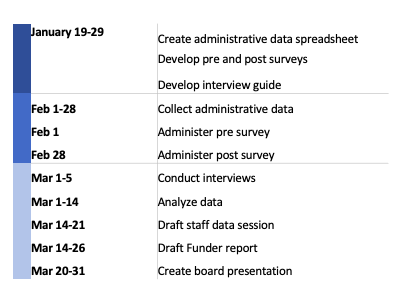
As you can see, a chronological list is easy to understand and you can customize the columns to provide the level of detail required. At Three Hive, we tend to use this method during the budgeting and initial planning process, dividing the tasks into each of our three phases and attaching a cost to each of the items.
Hopefully these four ways to visualization evaluation timelines have demonstrated how simple it is to communicate what you’ve planned for the evaluation and have inspired your creativity for the next time you need to communicate timelines to your team or client.
Want more tips on how to plan your evaluation timelines? Check out this article.
Sign up for our newsletter
We’ll let you know about our new content, and curate the best new evaluation resources from around the web!
We respect your privacy.
Thank you!
 English
 Afrikaans
 Shqip
Shqip አማርኛ
አማርኛ العربية
 Հայերեն
 Azərbaycan dili
 Euskara
 Беларуская мова
 বাংলা
বাংলা Bosanski
 Български
 Català
 Cebuano
 Chichewa
 简体中文
简体中文 繁體中文
繁體中文 Corsu
Corsu Hrvatski
 Čeština
 Dansk
Dansk Nederlands
 Esperanto
 Eesti
Eesti Filipino
 Suomi
Suomi Français
 Frysk
Frysk Galego
 ქართული
 Deutsch
 Ελληνικά
 ગુજરાતી
 Kreyol ayisyen
 Harshen Hausa
 Ōlelo Hawaiʻi
 עִבְרִית
 हिन्दी
 Hmong
Hmong Magyar
 Íslenska
 Igbo
Igbo Bahasa Indonesia
 Gaeilge
 Italiano
 日本語
日本語 Basa Jawa
 ಕನ್ನಡ
ಕನ್ನಡ Қазақ тілі
 ភាសាខ្មែរ
 한국어
한국어 كوردی
كوردی Кыргызча
 ພາສາລາວ
 Latin
Latin Latviešu valoda
 Lietuvių kalba
 Lëtzebuergesch
 Македонски јазик
 Malagasy
 Bahasa Melayu
 മലയാളം
 Maltese
 Te Reo Māori
 मराठी
मराठी Монгол
 ဗမာစာ
ဗမာစာ नेपाली
 Norsk bokmål
 پښتو
پښتو فارسی
فارسی Polski
 Português
 ਪੰਜਾਬੀ
 Română
 Русский
 Samoan
 Gàidhlig
 Српски језик
 Sesotho
 Shona
Shona سنڌي
سنڌي සිංහල
සිංහල Slovenčina
 Slovenščina
 Afsoomaali
 Español
 Basa Sunda
 Kiswahili
 Svenska
 Тоҷикӣ
 தமிழ்
தமிழ் తెలుగు
 ไทย
ไทย Türkçe
 Українська
 اردو
اردو O‘zbekcha
 Tiếng Việt
 Cymraeg
 isiXhosa
 יידיש
יידיש Yorùbá
 Zulu
Zulu