Just because I’m pro-graph, I’m not anti-table.
Technical tables have so much value, especially as visual appendices for reports.
In this blog post, you’ll get ideas for bringing your technical tables to life.
Before
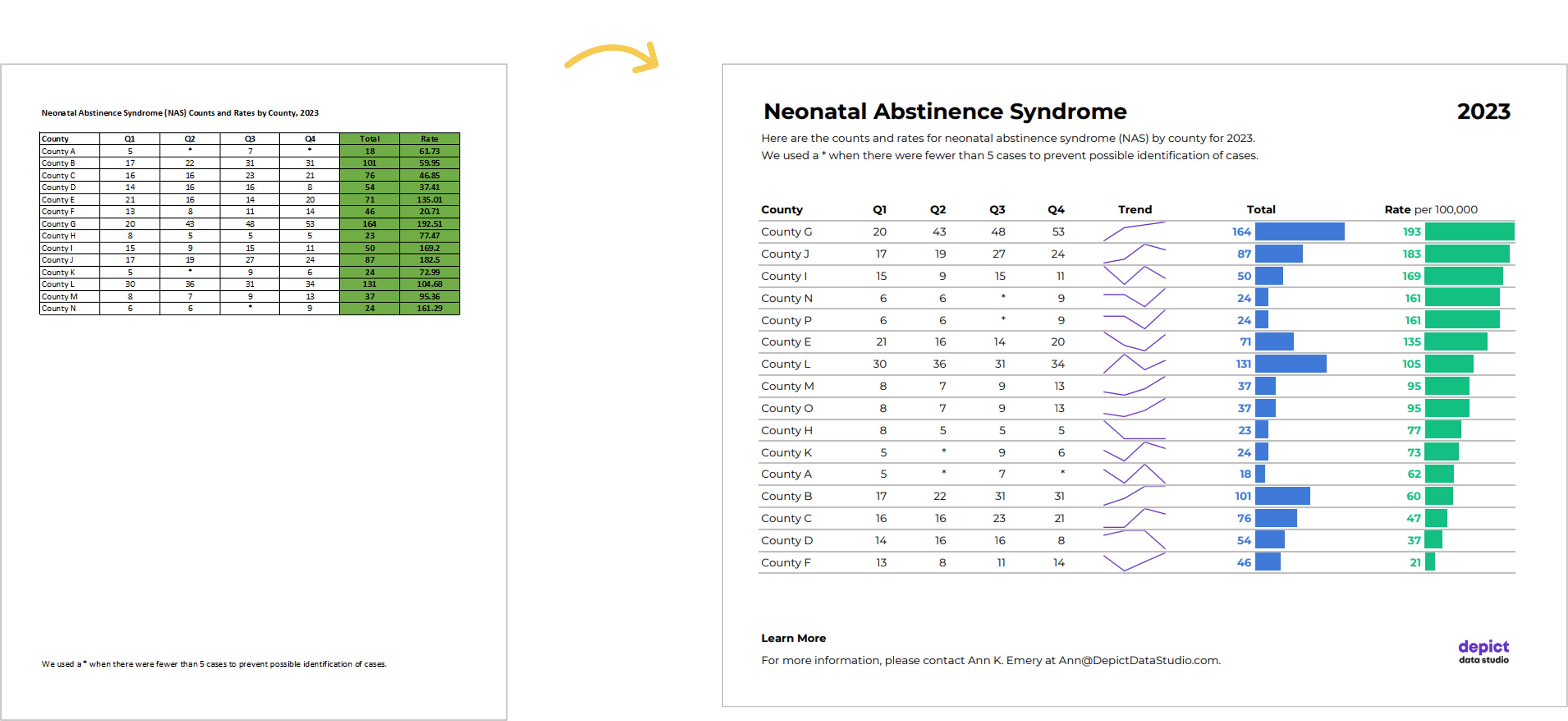
Here’s what the “before” version of some technical tables looked like.
These are made-up numbers, but you get the idea.
The public health staff wanted to look at quarterly numbers, the total annual number, and the rate (the number of cases per 100,000 live births).
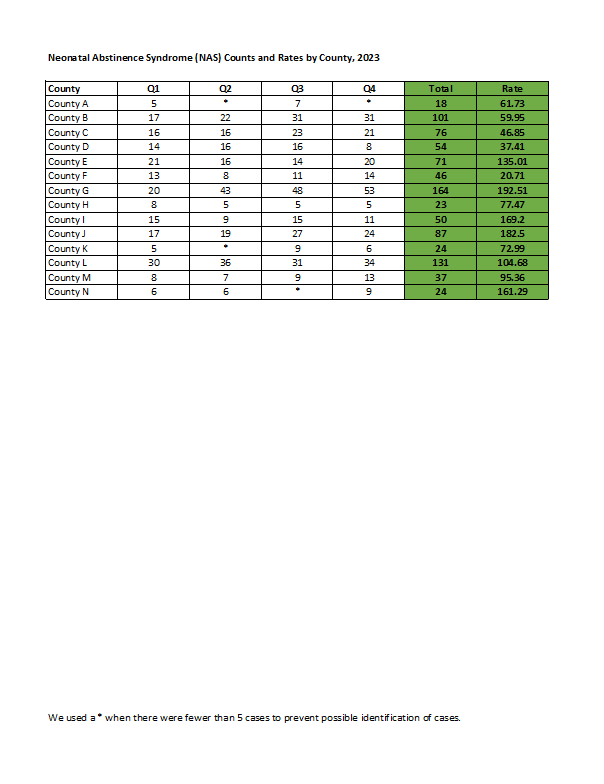
Even if you’re not measuring neonatal abstinence syndrome, I bet there are numbers that you track each quarter. You might even want to look at the total annual number, too. Get some inspiration from this blog post, and then adapt the ideas to your own workplace.
Re-Created in Excel
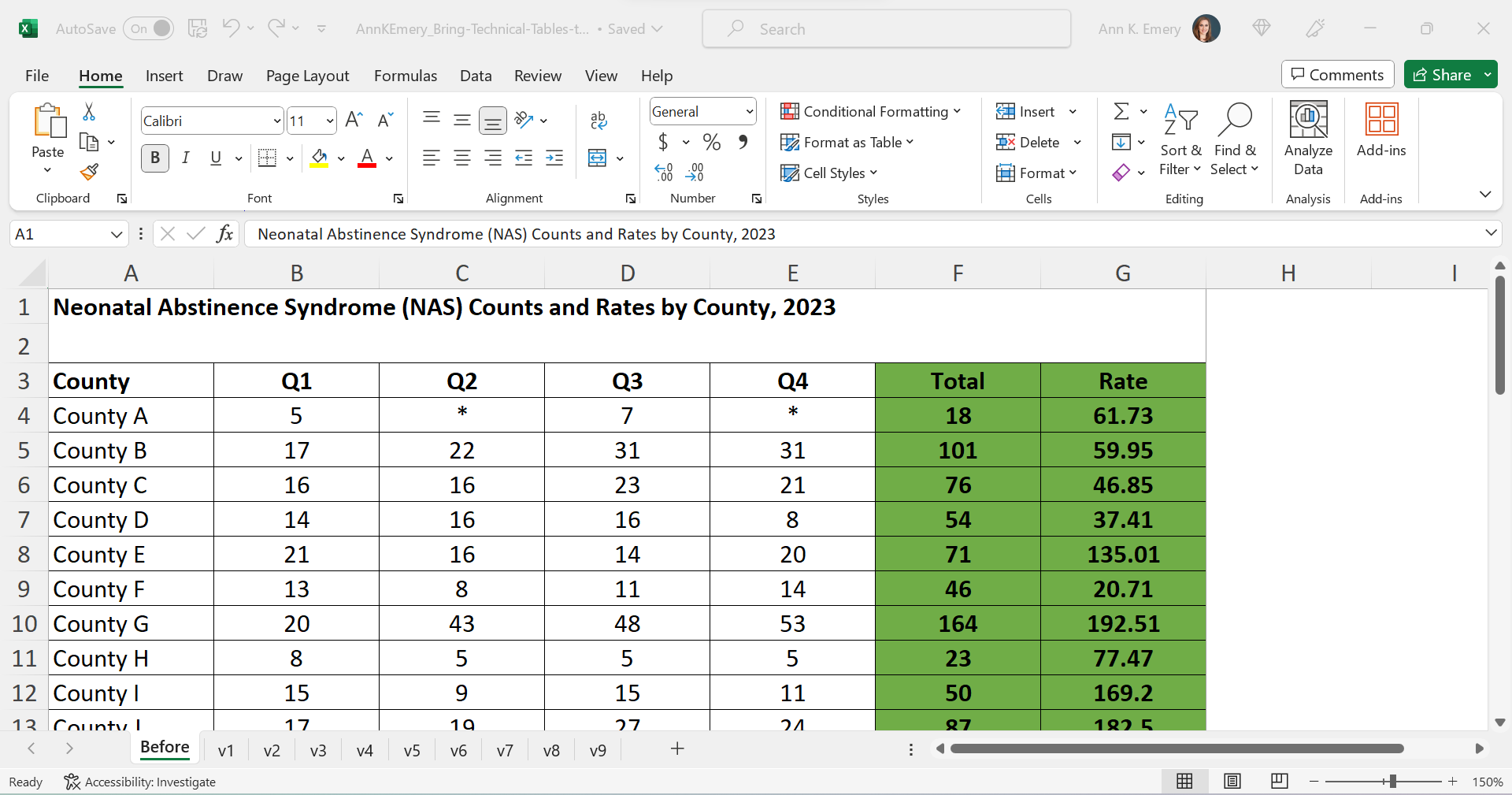
First, I re-made their table in good ol’ Excel.
The finished product will be a PDF, but the most efficient way to bring technical tables to life is to keep the numbers inside Excel the entire time. We’re not going to transfer anything to Word.
Declutter
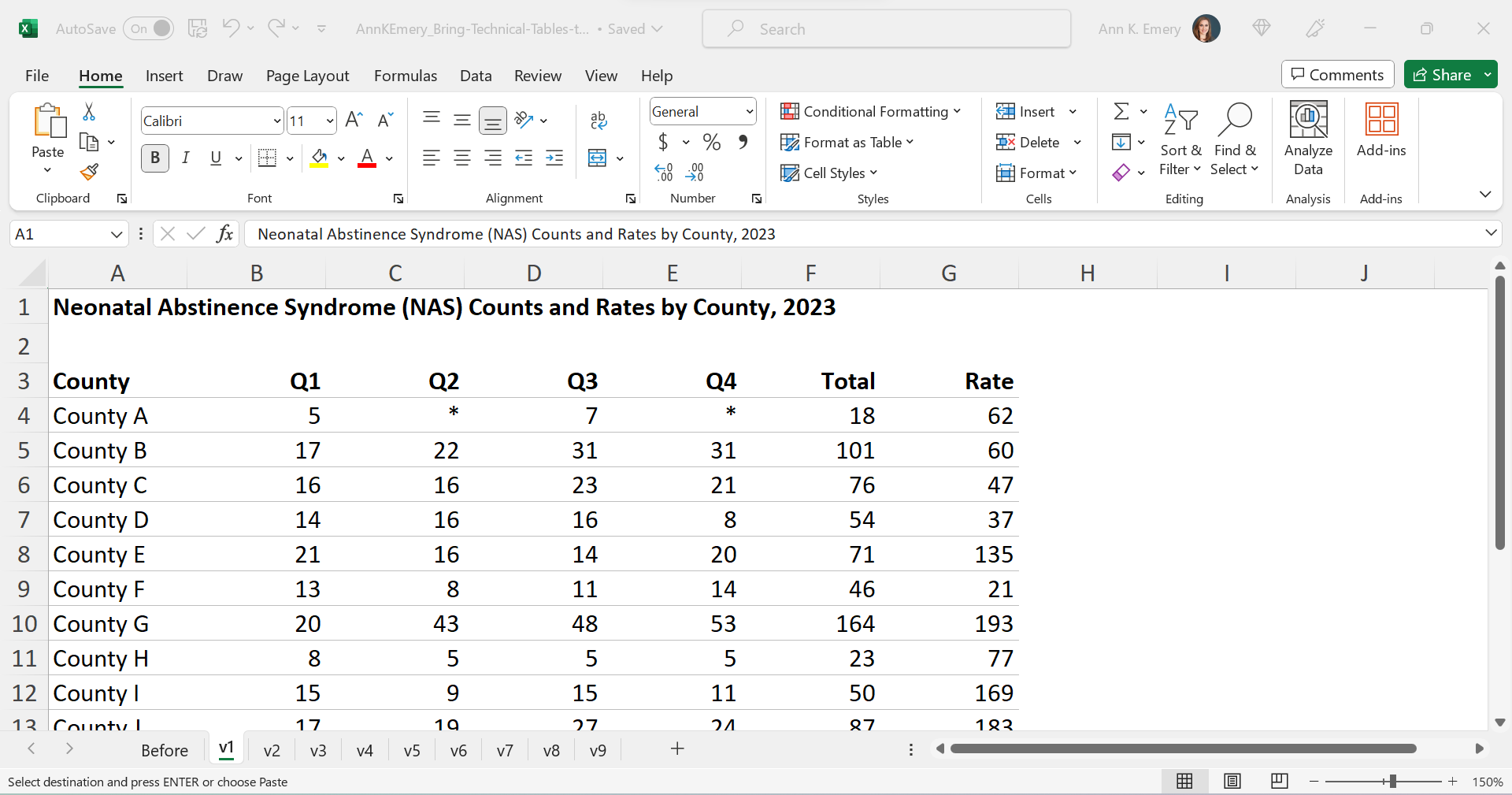
Let’s tackle the easy edits, such as:
- removing all the borders;
- adding back just the gray horizontal borders;
- removing the background fill; and
- left-aligning the text and right-aligning the numbers.
Add Trendlines
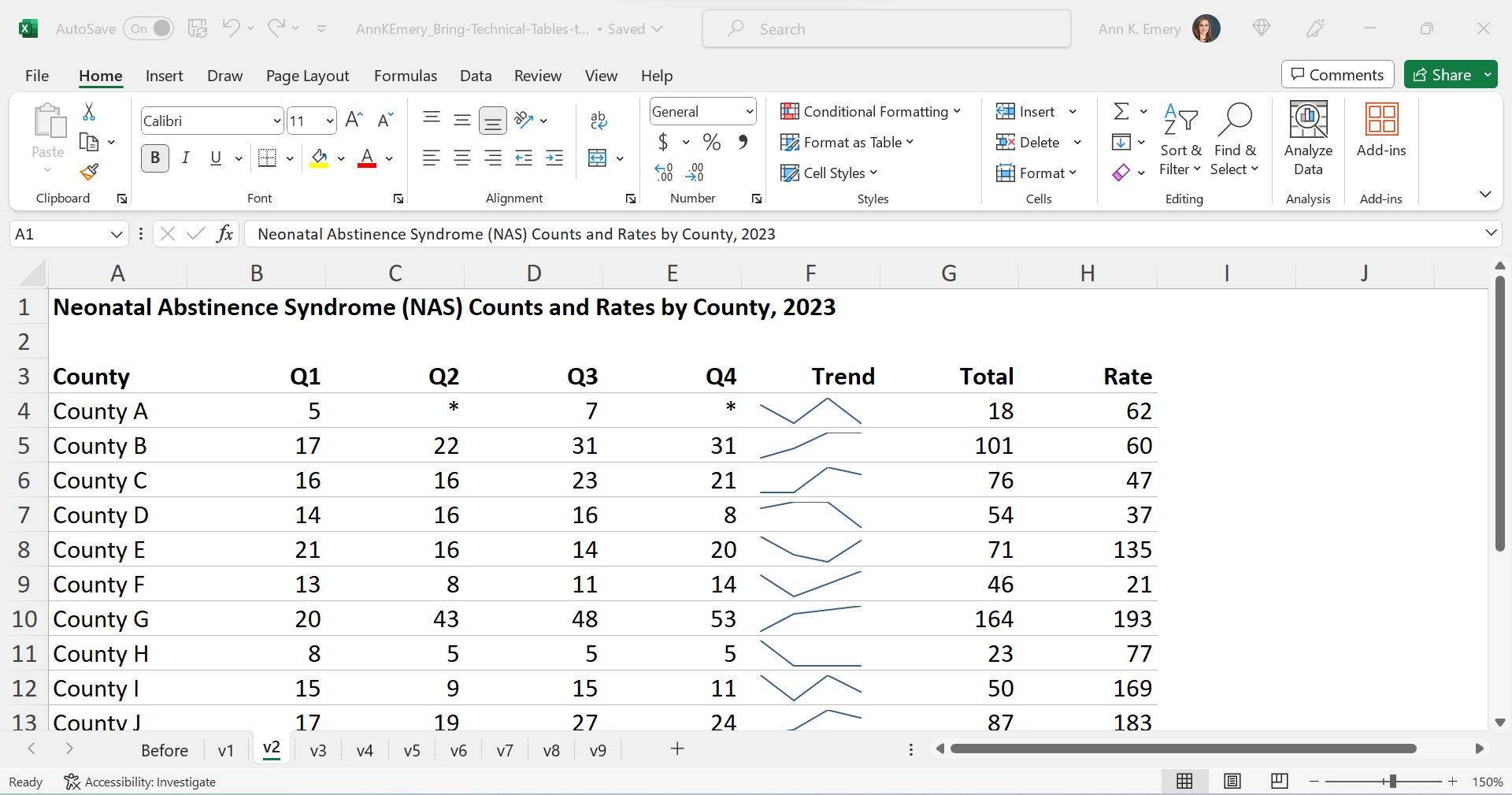
We’ll bring the quarterly trends to life with sparklines.
Add Bars
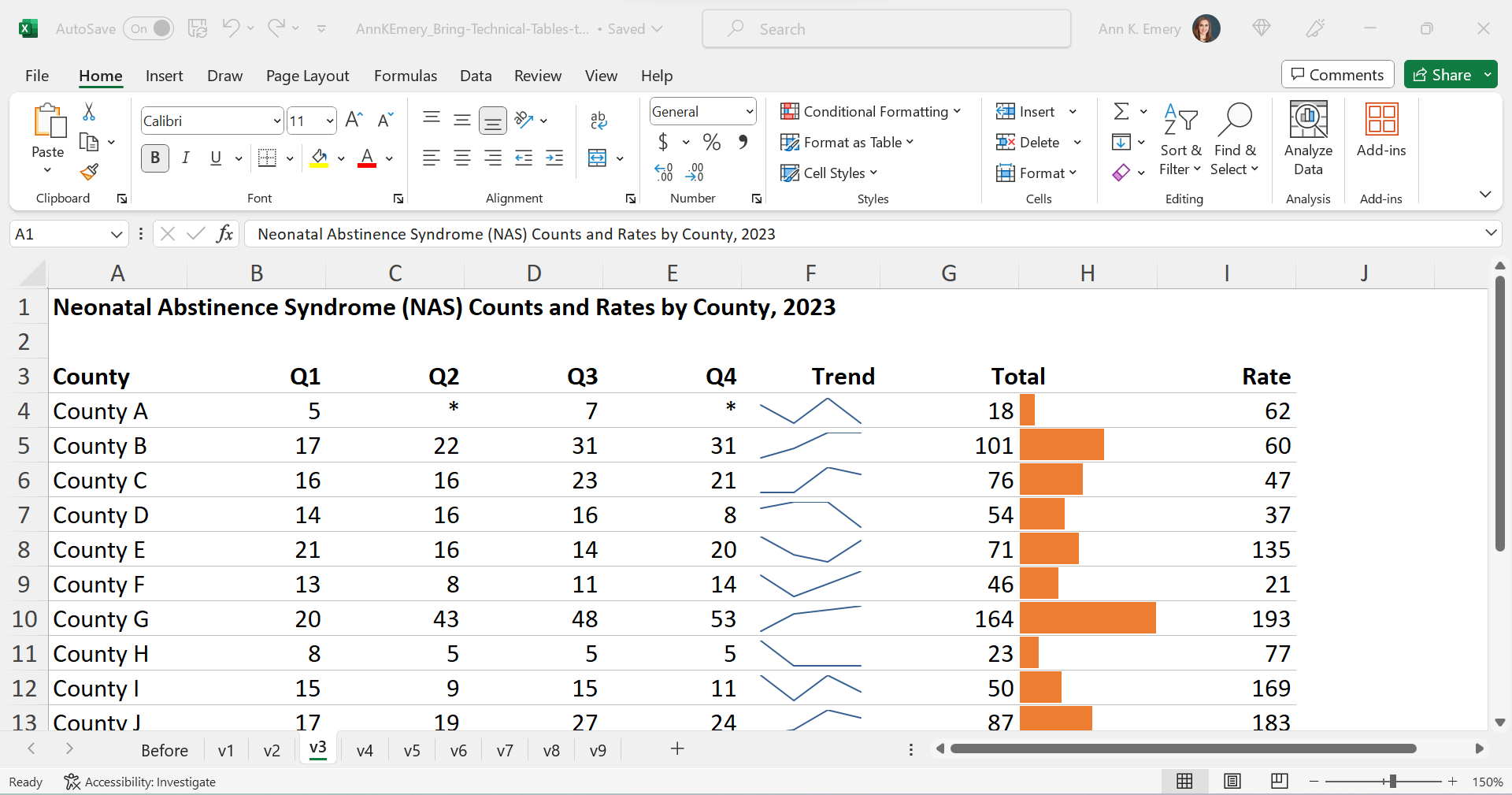
We’ll bring the annual totals to life with data bars:
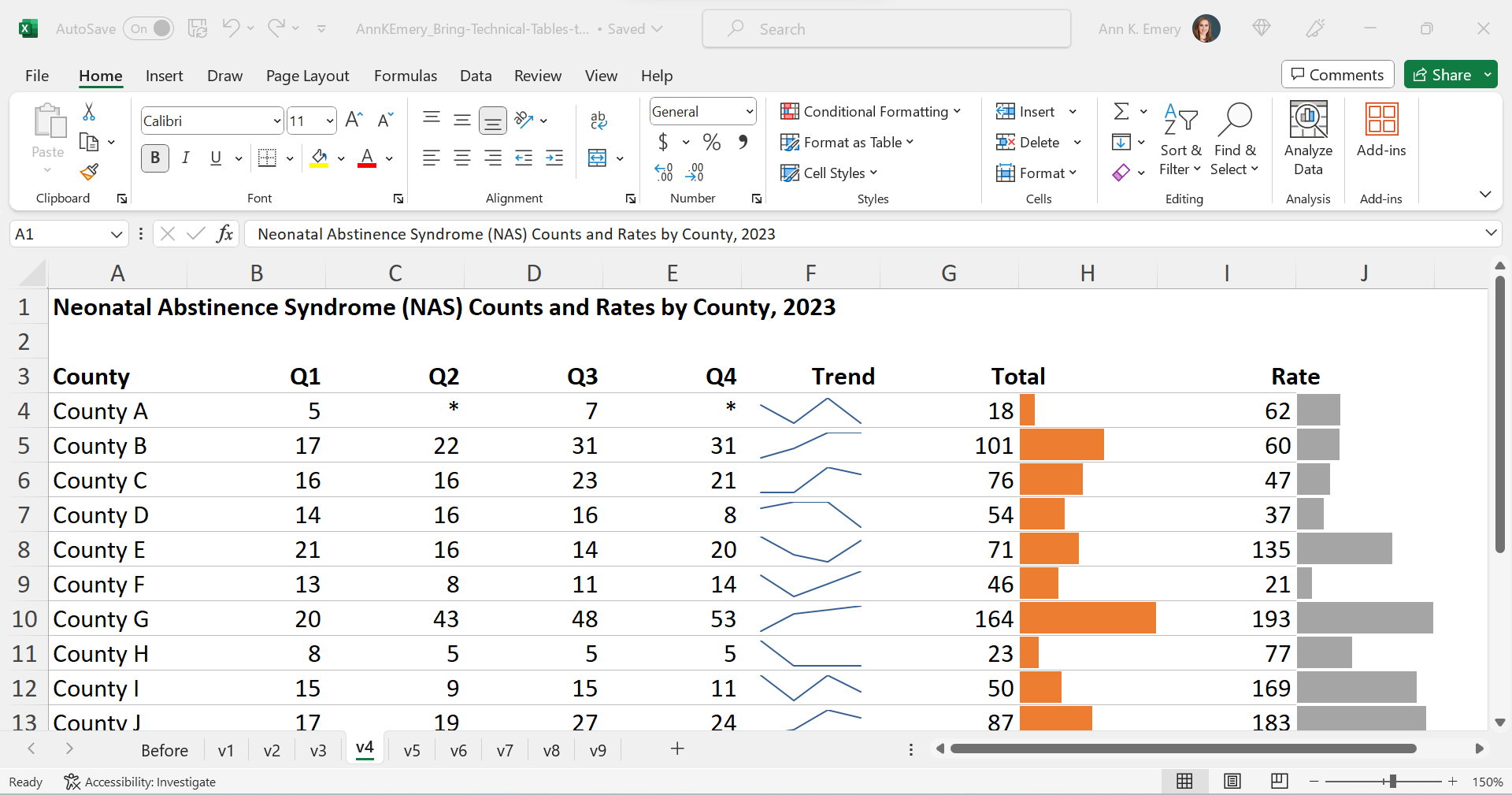
We’ll bring the rates to life with data bars, too:
Brand Colors & Brand Fonts
Time to format!
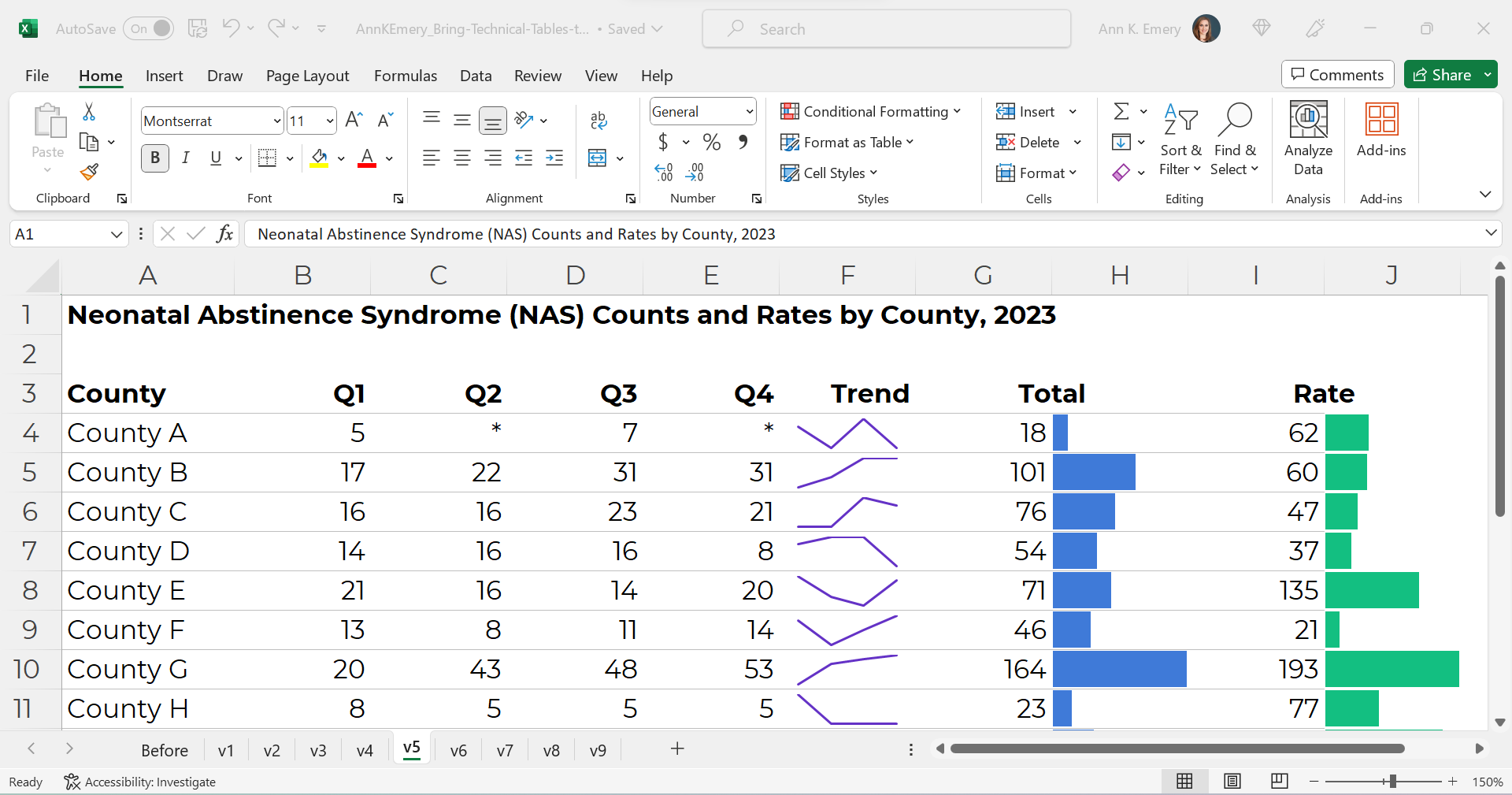
We’ll apply brand colors and brand fonts:
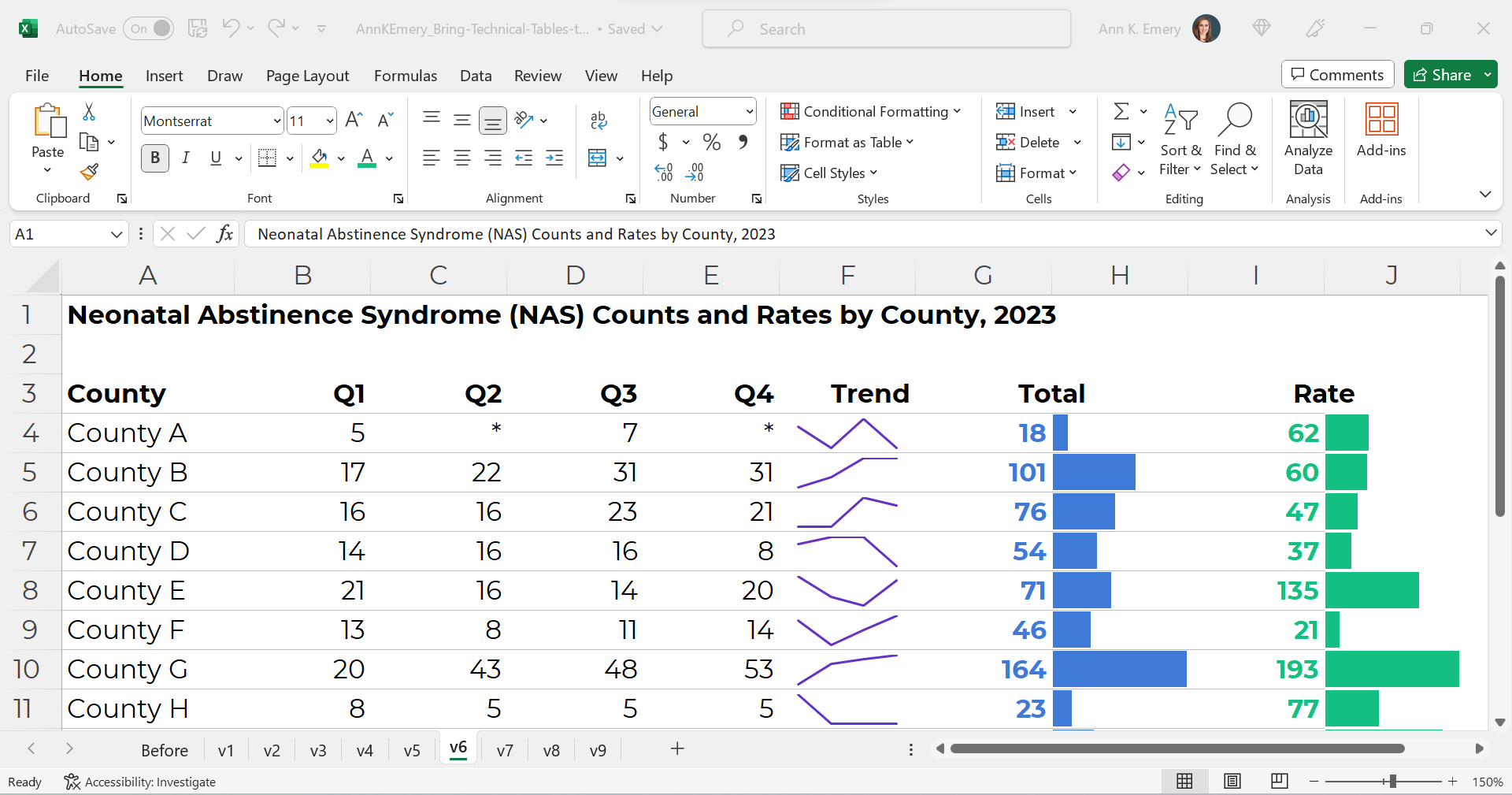
We’ll color-code the text to match the bars.
(Sometimes the table’s columns get so narrow that it’s tricky to tell which number corresponds to which bar. That’s where color-coding comes to the rescue.)
As a general rule of thumb, colored font should be bold so that it passes 508/ADA color contrast guidelines.
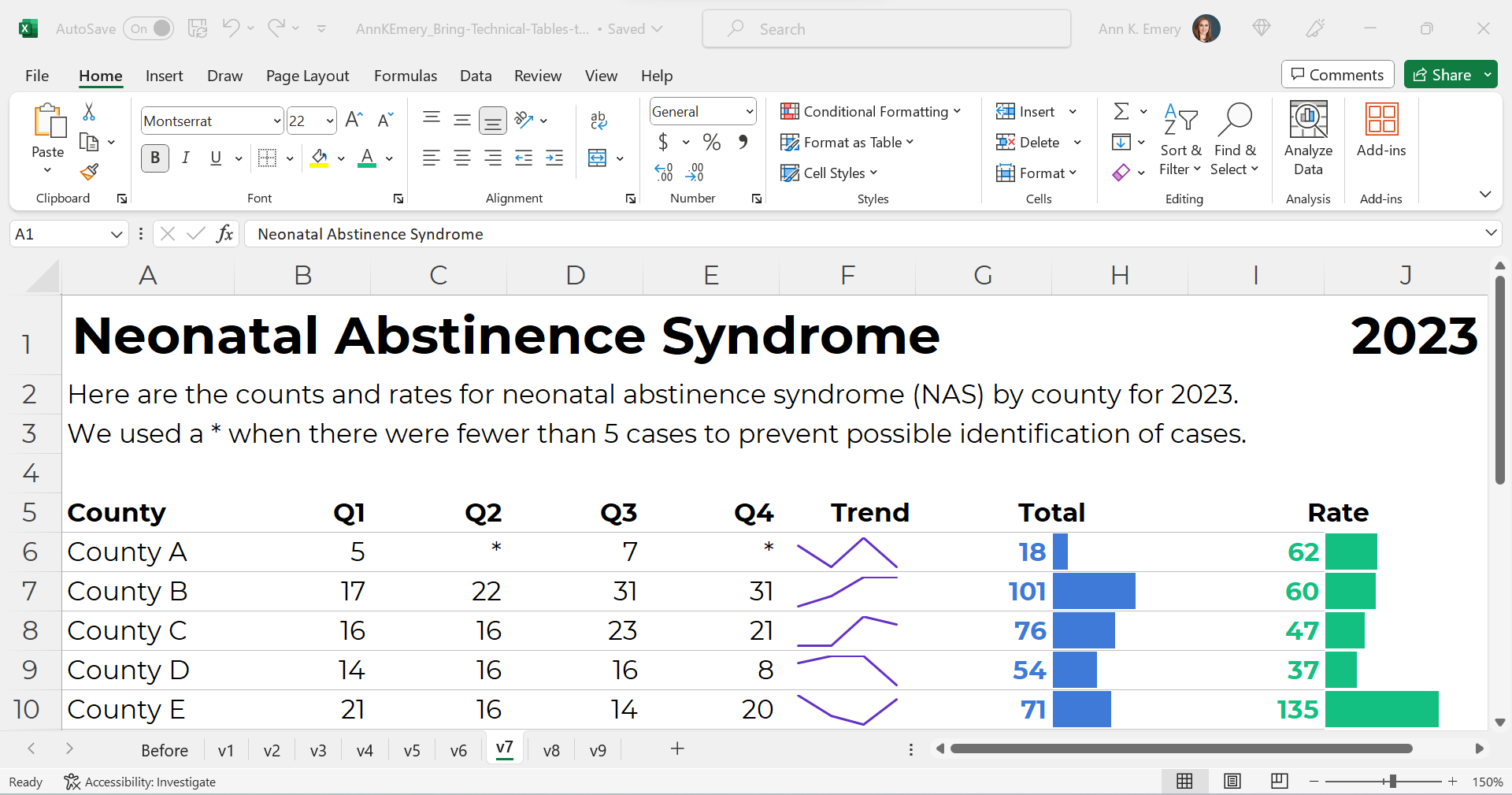
Text Hierarchy & Intro Sentences
A text hierarchy means the title should be largest, boldest, and darkest so that it’s easiest to spot. (Followed by H1s and H2s if we had them.) We’re developing a hierarchy of information so our readers can stay organized.
As a general rule of thumb, I make sure headings are twice as big as body font. The body font is size 11, so this title is size 22 and bold.
We’ll also add intro sentences, and move that footnote info about the asterisks to the top. (People need to read that sentence before the table, not after.)
PDF- and Printer-Friendly
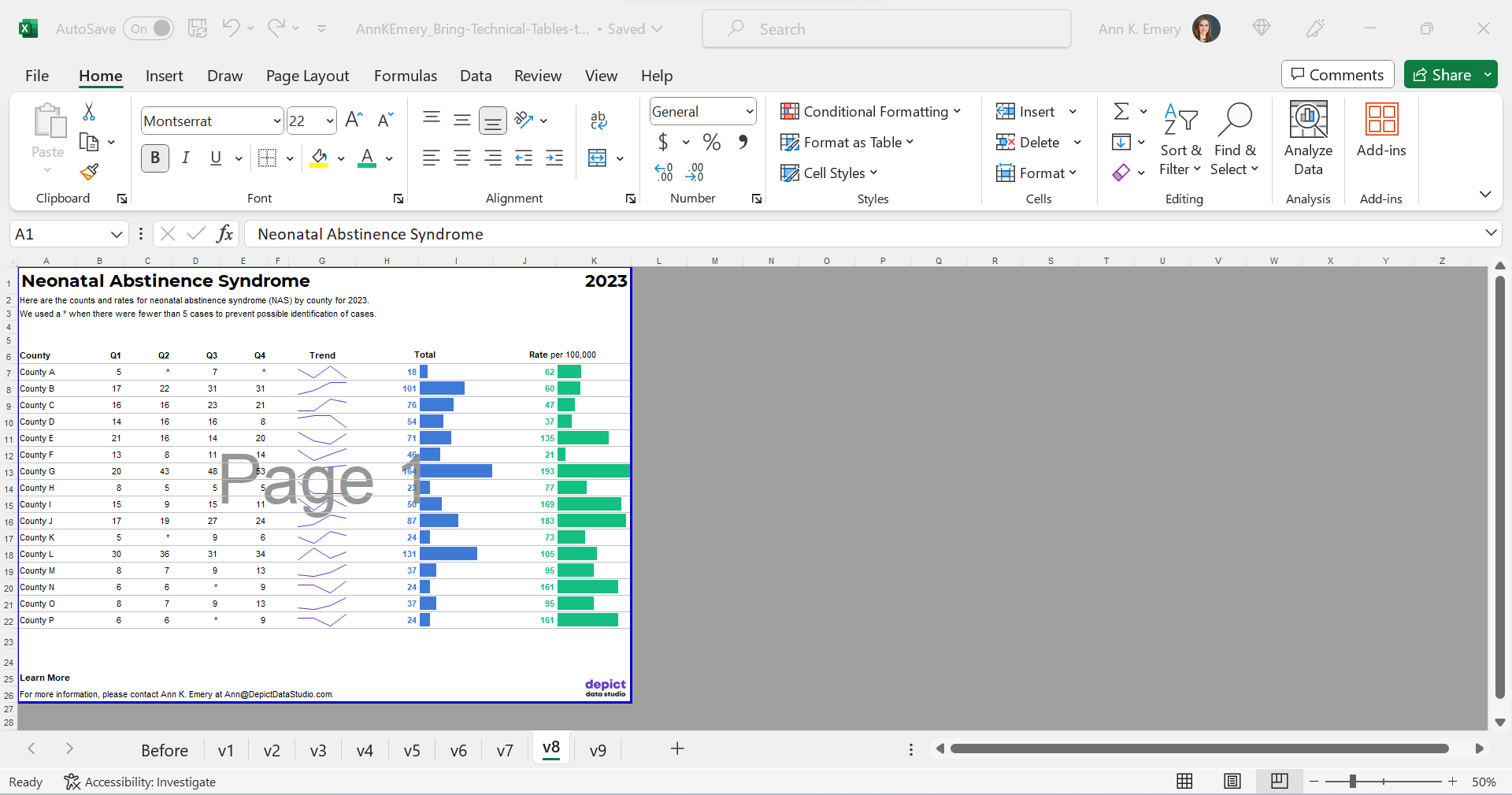
We’ve kept everything in Excel — that’s the only way to add the spark lines and data bars, and pasting tables into Word is a waste of time — but the final version will be shared with others as a PDF.
In the real version of this project, the PDF was about 15 pages long. There were various tabulations on various topics, not just neonatal abstinence syndrome.
We’ll need to:
- set the Print Area;
- adjust the Page Layout (portrait to landscape for easier on-screen reading);
- adjust the margins (0.5 to 1 inches is sufficient);
- add contact info and a logo so people can get in touch with questions; and
- adjust the column widths and row heights so everything fits juuust right.
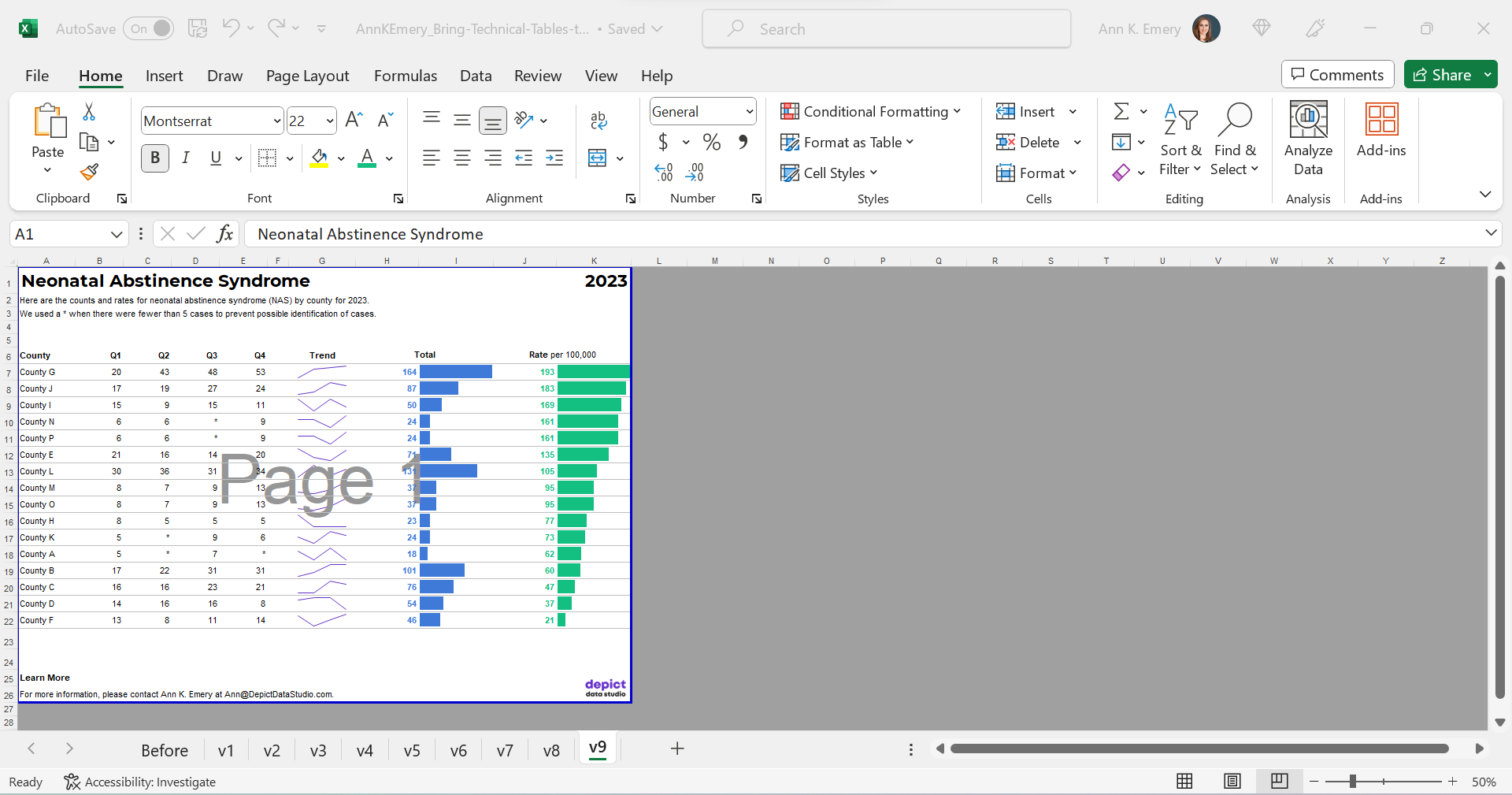
Optional: Sort by Rates, Not Alphabetically
Finally, we might choose to sort the table by the most important column (rates, in this example) instead of alphabetically by county name.
I’m usually a fan of sorting. But I’m on the fence here. I also see the value in the leaving the counties alphabetized so readers can search for their own county. Hmm.
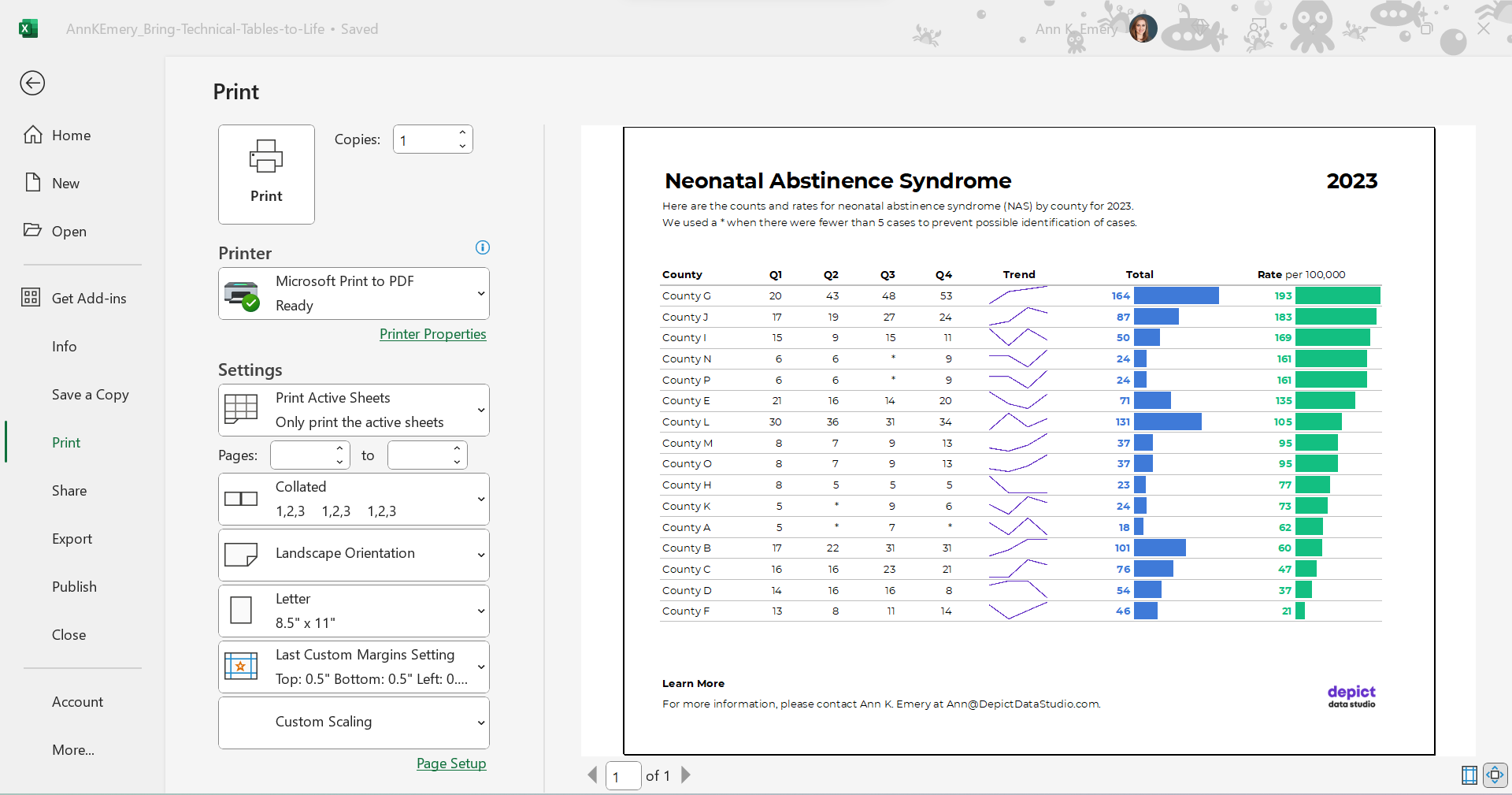
The Final Version
The visuals help us spot the patterns (thanks, Picture Superiority Effect).
The branding will help us look more professional to outside audiences (so we don’t look Frankensteined — when all our colleagues use different colors and fonts, and we put everything together in one doc, and it’s a hot mess).
The PDF’d appendices can be merged with the PDF’d report (thanks, Adobe Acrobat).
The Before-After Transformation
Once you’ve got intermediate/advanced Excel vizardry skills, the whole process will take less than an hour.
Really, this should take you less than 15 minutes!
If not, you’ll simply need to brush up on your Excel skills.
Dataviz is supposed to be fast and easy.
Bonus: Download the Materials
Want to explore my spreadsheet? Download my Excel file and adapt it for your own project.
 English
 Afrikaans
 Shqip
Shqip አማርኛ
አማርኛ العربية
 Հայերեն
 Azərbaycan dili
 Euskara
 Беларуская мова
 বাংলা
বাংলা Bosanski
 Български
 Català
 Cebuano
 Chichewa
 简体中文
简体中文 繁體中文
繁體中文 Corsu
Corsu Hrvatski
 Čeština
 Dansk
Dansk Nederlands
 Esperanto
 Eesti
Eesti Filipino
 Suomi
Suomi Français
 Frysk
Frysk Galego
 ქართული
 Deutsch
 Ελληνικά
 ગુજરાતી
 Kreyol ayisyen
 Harshen Hausa
 Ōlelo Hawaiʻi
 עִבְרִית
 हिन्दी
 Hmong
Hmong Magyar
 Íslenska
 Igbo
Igbo Bahasa Indonesia
 Gaeilge
 Italiano
 日本語
日本語 Basa Jawa
 ಕನ್ನಡ
ಕನ್ನಡ Қазақ тілі
 ភាសាខ្មែរ
 한국어
한국어 كوردی
كوردی Кыргызча
 ພາສາລາວ
 Latin
Latin Latviešu valoda
 Lietuvių kalba
 Lëtzebuergesch
 Македонски јазик
 Malagasy
 Bahasa Melayu
 മലയാളം
 Maltese
 Te Reo Māori
 मराठी
मराठी Монгол
 ဗမာစာ
ဗမာစာ नेपाली
 Norsk bokmål
 پښتو
پښتو فارسی
فارسی Polski
 Português
 ਪੰਜਾਬੀ
 Română
 Русский
 Samoan
 Gàidhlig
 Српски језик
 Sesotho
 Shona
Shona سنڌي
سنڌي සිංහල
සිංහල Slovenčina
 Slovenščina
 Afsoomaali
 Español
 Basa Sunda
 Kiswahili
 Svenska
 Тоҷикӣ
 தமிழ்
தமிழ் తెలుగు
 ไทย
ไทย Türkçe
 Українська
 اردو
اردو O‘zbekcha
 Tiếng Việt
 Cymraeg
 isiXhosa
 יידיש
יידיש Yorùbá
 Zulu
Zulu