A few months ago, one of my favorite students brought this graph to Office Hours:
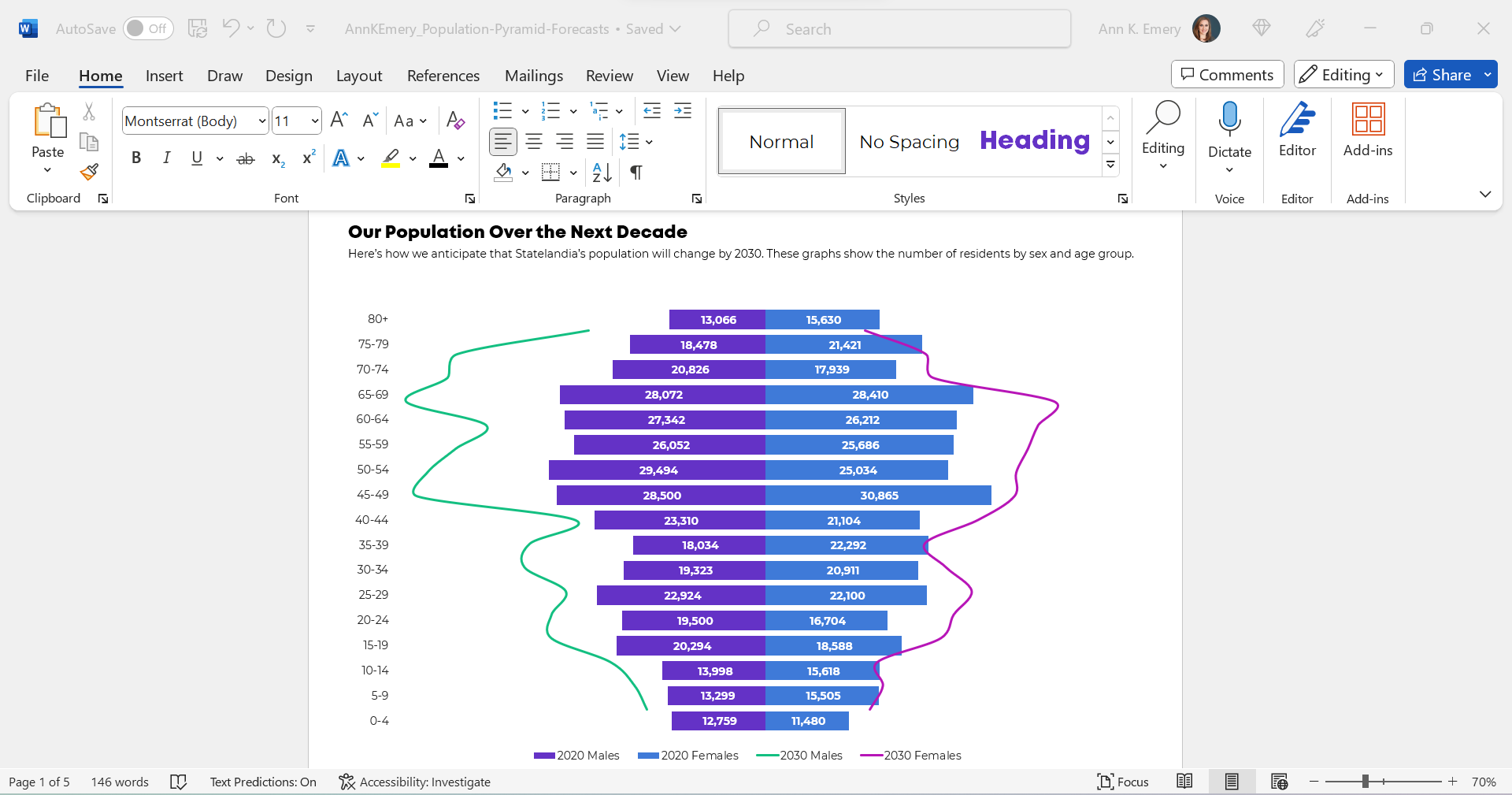
(These aren’t the exact numbers, age ranges, or years. But you get the idea.)
She already knew how to make population pyramids in Excel. Population pyramids require Level 4 vizardy skills. Woohoo!
But she wanted to take the population pyramid a step further, and she wanted to show how the population might change over time, especially for older adults.
So, she followed this online tutorial to add those curvy lines. (Yep, it’s made with a combo chart in Excel.)
Bare-Minimum Edits
As usual, we tackled the bare-minimum edits first:
- We removed the legend and directly labeled the data, which helps the graph pass “Big A Accessibility” rules (a.k.a. 508/ADA compliance).
- We nudged the bars closer together by reducing the gap width to make more of a smoothed-out histogram.
- We outlined the touching filled-in rectangles in white, a small detail that helps with grayscale printing.
- We used fewer colors. Before, there were 4 different hues: for 2020 males, 2030 males, 2020 females, and 2030 females. That’s a lot to keep track of! Instead, we color-coded by category (one hue for males, and another hue for females).
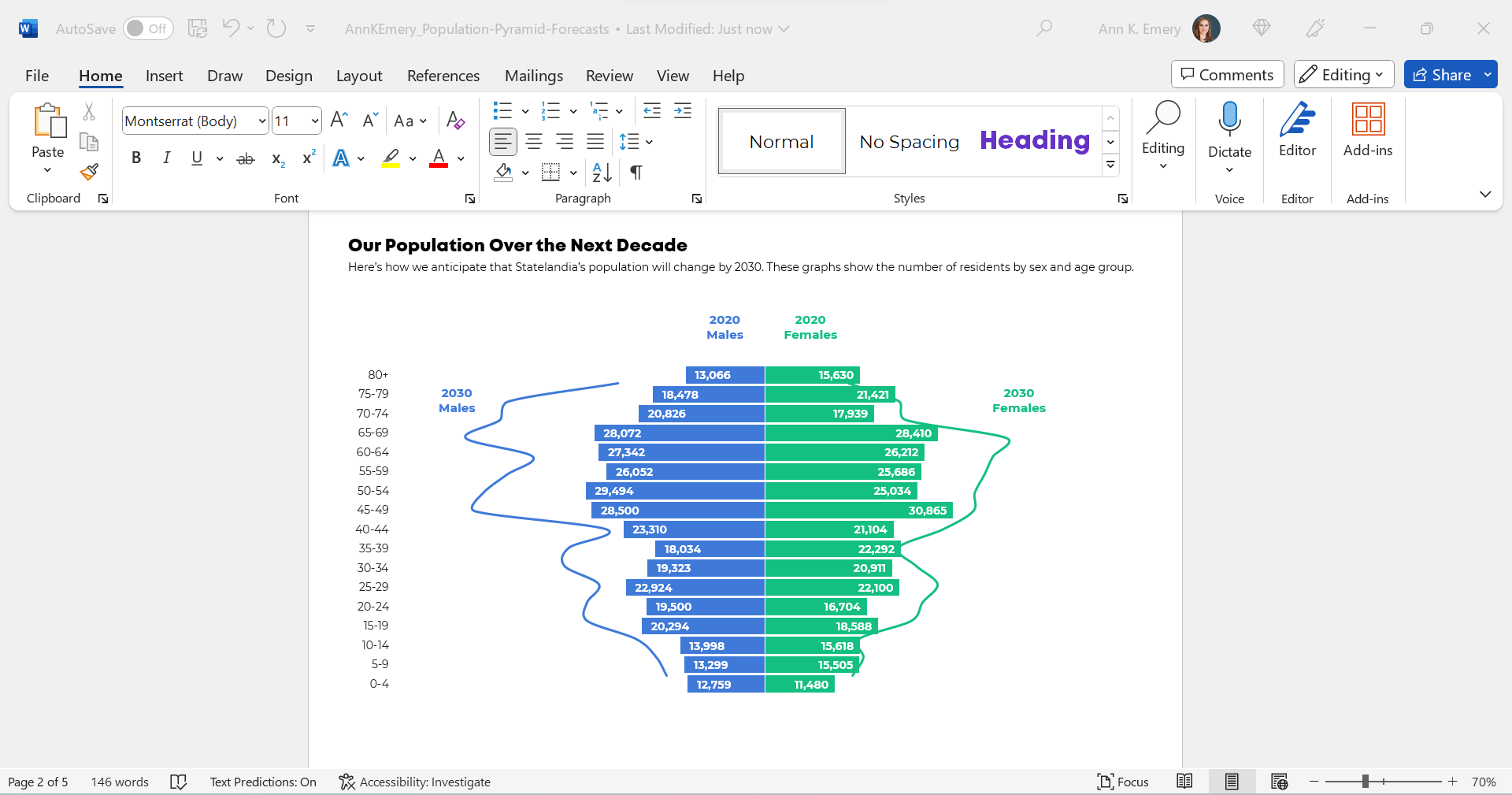
We also tried color-coding by year, instead of color-coding by sex, like this:
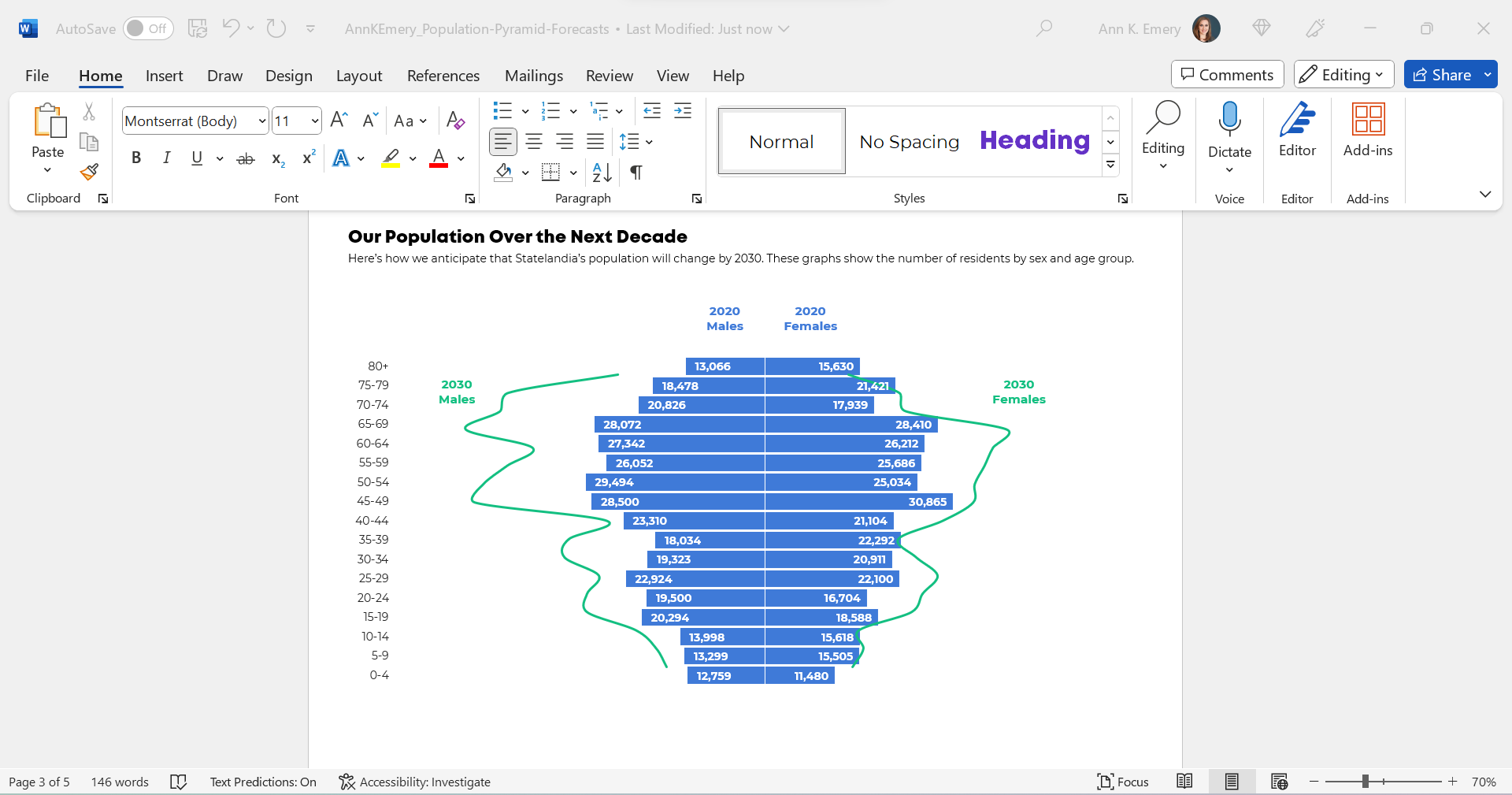
We were getting closer!
But we wanted to make sure that the forecasted numbers for 2030 were extremely obvious to viewers. For most of us, this isn’t a chart type that we see every day.
I was hesitant to keep the combo chart. This was an apples-to-apples comparison, so I wanted to use all bars.
(The bars/lines combo seemed more like an apples-to-oranges comparison, which this isn’t.)
Small Multiples Population Pyramids
Here’s a Dataviz Rule of Thumb:
Anytime your graph feels too dense… try creating more graphs.
Small multiples layouts can save the day!
The Traditional Version
We tried traditional and storytelling versions of a small multiples population pyramid.
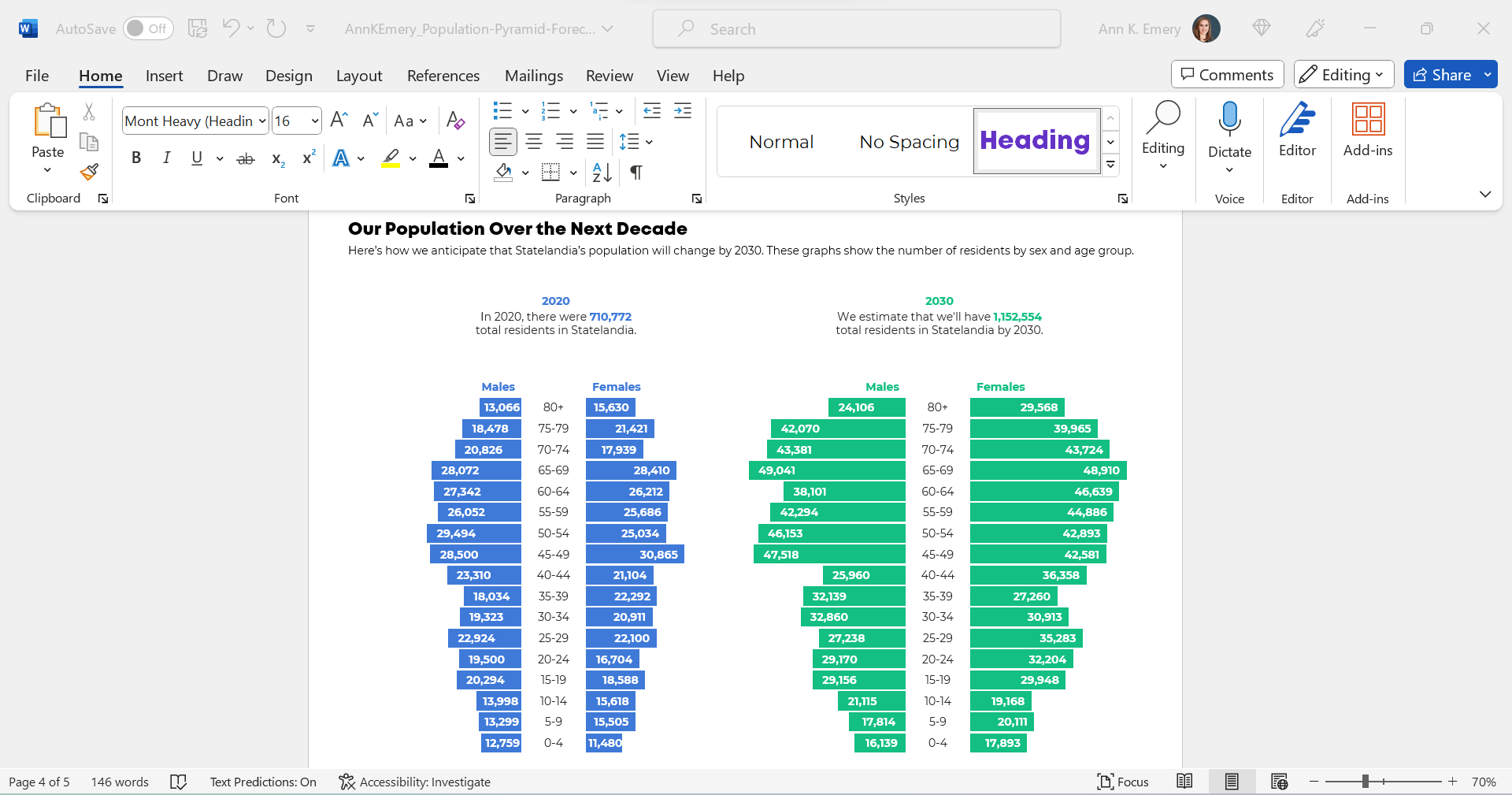
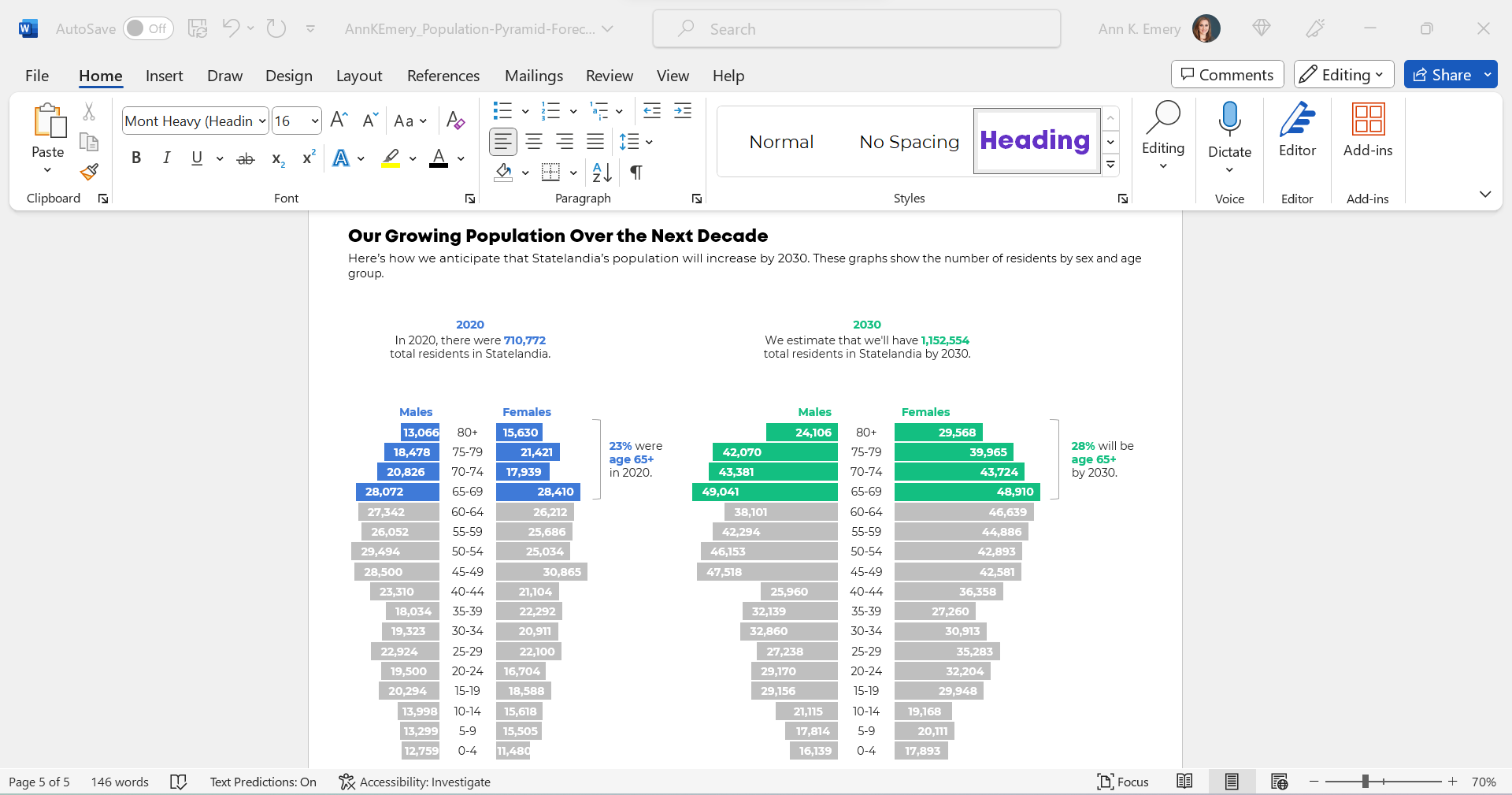
Here’s what the traditional version would look like inside her report.
You’ll notice the topical titles, color-coding by category (one hue per year), and how the graphs are all one color.
The Storytelling Version
And here’s what the storytelling version would look like inside her report.
This version draws attention to the 65+ age group, which she wanted.
You’ll notice the takeaway title, the color-coding by category (one hue per year), the dark-light contrast (highlighting the residents who are ages 65+), and the annotations.
The Bottom Line
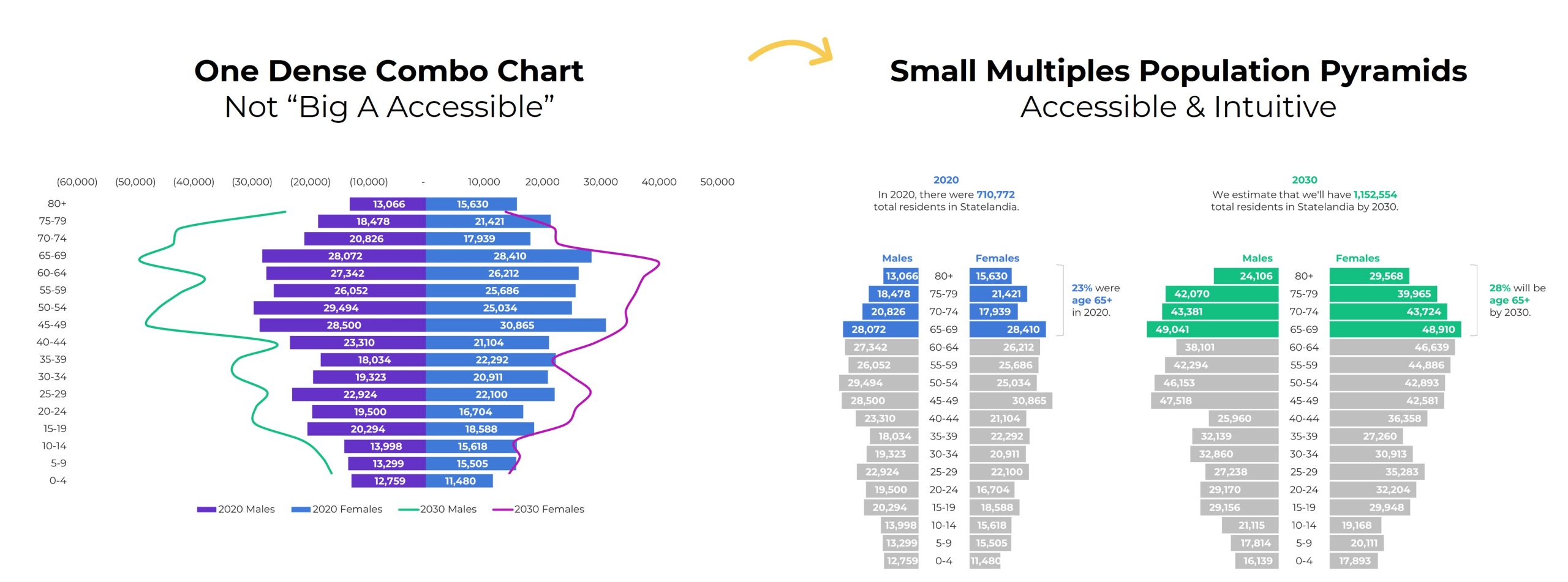
Even with the bare-minimum edits, I wasn’t a fan of the original combo chart. The bar-line combo was suggesting an apples-to-oranges comparison.
Instead, anytime your chart feels too dense (when there are literally lines and bars combined within one chart), try a small multiples layout instead!
We can format the chart as a traditional or storytelling version. In this case, storytelling was a perfect fit because we especially wanted to highlight the 65+ age group.
 English
 Afrikaans
 Shqip
Shqip አማርኛ
አማርኛ العربية
 Հայերեն
 Azərbaycan dili
 Euskara
 Беларуская мова
 বাংলা
বাংলা Bosanski
 Български
 Català
 Cebuano
 Chichewa
 简体中文
简体中文 繁體中文
繁體中文 Corsu
Corsu Hrvatski
 Čeština
 Dansk
Dansk Nederlands
 Esperanto
 Eesti
Eesti Filipino
 Suomi
Suomi Français
 Frysk
Frysk Galego
 ქართული
 Deutsch
 Ελληνικά
 ગુજરાતી
 Kreyol ayisyen
 Harshen Hausa
 Ōlelo Hawaiʻi
 עִבְרִית
 हिन्दी
 Hmong
Hmong Magyar
 Íslenska
 Igbo
Igbo Bahasa Indonesia
 Gaeilge
 Italiano
 日本語
日本語 Basa Jawa
 ಕನ್ನಡ
ಕನ್ನಡ Қазақ тілі
 ភាសាខ្មែរ
 한국어
한국어 كوردی
كوردی Кыргызча
 ພາສາລາວ
 Latin
Latin Latviešu valoda
 Lietuvių kalba
 Lëtzebuergesch
 Македонски јазик
 Malagasy
 Bahasa Melayu
 മലയാളം
 Maltese
 Te Reo Māori
 मराठी
मराठी Монгол
 ဗမာစာ
ဗမာစာ नेपाली
 Norsk bokmål
 پښتو
پښتو فارسی
فارسی Polski
 Português
 ਪੰਜਾਬੀ
 Română
 Русский
 Samoan
 Gàidhlig
 Српски језик
 Sesotho
 Shona
Shona سنڌي
سنڌي සිංහල
සිංහල Slovenčina
 Slovenščina
 Afsoomaali
 Español
 Basa Sunda
 Kiswahili
 Svenska
 Тоҷикӣ
 தமிழ்
தமிழ் తెలుగు
 ไทย
ไทย Türkçe
 Українська
 اردو
اردو O‘zbekcha
 Tiếng Việt
 Cymraeg
 isiXhosa
 יידיש
יידיש Yorùbá
 Zulu
Zulu