Colors can make or break a chart.
Colors direct our eye movements, and therefore our brains and attention.
It’s up to you: will you help or hinder your reader’s understanding?
Step 1: Start with Your Brand Colors
Otherwise, your graphs, slides, and dashboards will be Frankensteined.
I’ve written about brand colors and brand presents in other posts.
Some of those resources include:

Step 2: Do Your Accessibility Testing
I’ve written about colorblindness, color contrast, grayscale printing in other posts.
Some of those resources include:
Then, your accessibility testing “results” should go inside your organization’s Dataviz Style Guide.
Step 3: Apply Those Brand Colors According to the Data & Variables
Now, it’s time to apply those branding colors to ensure that your graph is intuitive.
Look at your graph: Is your variable binary, sequential, diverging, or categorical?
Or, do you want to tell a story with a dark-light contrast?

Binary Variables Get Binary Color Schemes
Binary variables include yes/no data, such as:
- yes/no survey questions
- people who speak Portuguese as their primary language vs. people who don’t
- people who own a home vs. people who don’t
- people who graduated from program on time vs. people who didn’t
- people diagnosed with an illness vs. people who don’t have it
For binary variables, choose one brand color. The “presence” of the attribute gets the darker color, and the “absence” of the attribute gets the lighter color.
Here’s an example:

Sequential Variables Get Sequential Color Schemes
a.k.a. ordinal
Sequential variables have a natural order.
Examples include:
- age ranges (5-9 year olds, 10-14 year olds, and 15-19 year olds)
- income levels
- highest educational level completed (some high school, high school diploma, some college, etc.)
- years (Year 1, Year 2, and Year 3 of a project)
- semesters (fall, spring, fall, spring…)
- cohorts (first cohort of participants, second cohort, etc.)
For sequential variables, choose one brand color, and use a light-dark gradation of that color.
Here’s an example:

Categorical Variables Get Categorical Color Schemes
a.k.a. nominal
Categorical variables include:
- race/ethnicity (African American, Asian, Hispanic/Latin@, White, etc.)
- gender (male, female, nonbinary, genderfluid, etc.)
- chapters of a report
- sections of a presentation
- categories of a dashboard
For categorical variables, use a different brand color for each category.
Here’s an example:

Diverging Variables Get Diverging Color Schemes
Diverging variables are opposites.
Examples include:
- agree/disagree scales on surveys
- changes over time (e.g., “50 percent decrease” or “70 percent increase”)
For diverging variables, choose two brand colors, and place the darkest shades on the poles.
Here’s an example:

Combining these Techniques
In most real-life projects, we need to combine these color techniques.
In this map makeover, for example, we needed to:
- use brand colors, not software defaults;
- use two brand colors, one for each category; and
- apply a dark-light gradation to each map, because these are ordinal variables.

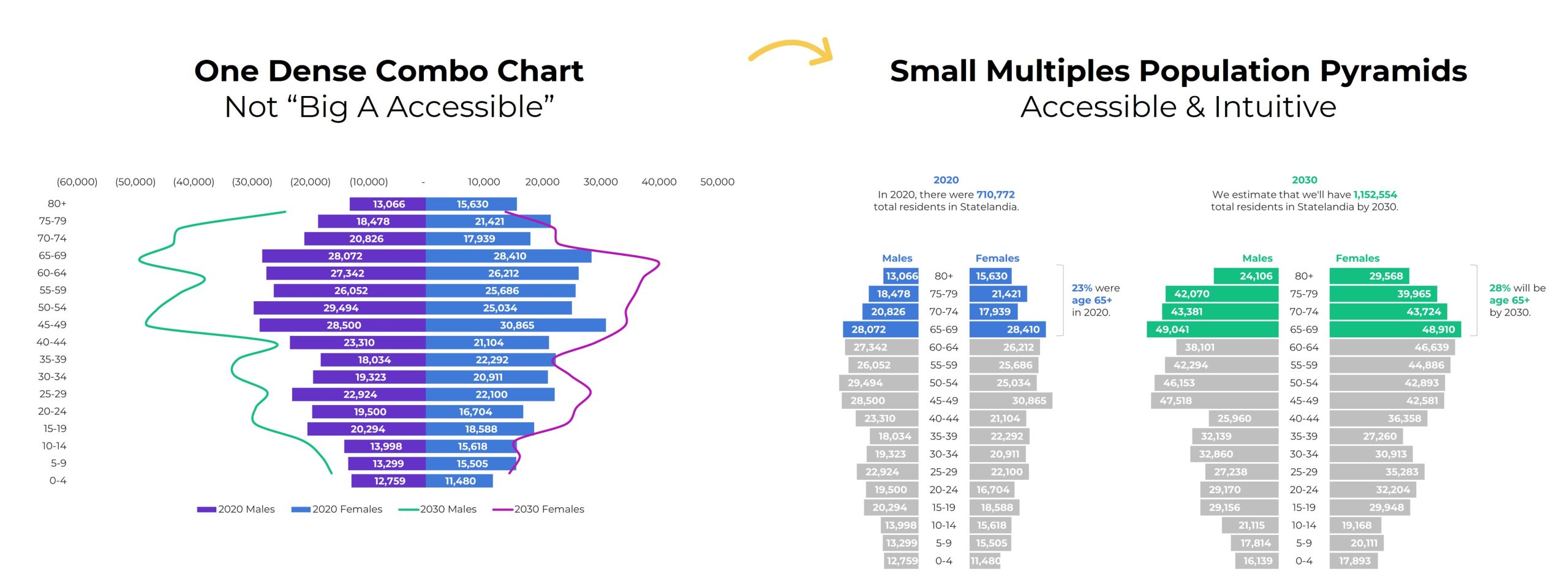
In this population pyramid makeover, we needed to:
- use two brand colors, one for each timeframe, and
- apply a dark-light storytelling emphasis to each pyramid.
Your Turn
What types of color questions do you have? Comment below..
 English
 Afrikaans
 Shqip
Shqip አማርኛ
አማርኛ العربية
 Հայերեն
 Azərbaycan dili
 Euskara
 Беларуская мова
 বাংলা
বাংলা Bosanski
 Български
 Català
 Cebuano
 Chichewa
 简体中文
简体中文 繁體中文
繁體中文 Corsu
Corsu Hrvatski
 Čeština
 Dansk
Dansk Nederlands
 Esperanto
 Eesti
Eesti Filipino
 Suomi
Suomi Français
 Frysk
Frysk Galego
 ქართული
 Deutsch
 Ελληνικά
 ગુજરાતી
 Kreyol ayisyen
 Harshen Hausa
 Ōlelo Hawaiʻi
 עִבְרִית
 हिन्दी
 Hmong
Hmong Magyar
 Íslenska
 Igbo
Igbo Bahasa Indonesia
 Gaeilge
 Italiano
 日本語
日本語 Basa Jawa
 ಕನ್ನಡ
ಕನ್ನಡ Қазақ тілі
 ភាសាខ្មែរ
 한국어
한국어 كوردی
كوردی Кыргызча
 ພາສາລາວ
 Latin
Latin Latviešu valoda
 Lietuvių kalba
 Lëtzebuergesch
 Македонски јазик
 Malagasy
 Bahasa Melayu
 മലയാളം
 Maltese
 Te Reo Māori
 मराठी
मराठी Монгол
 ဗမာစာ
ဗမာစာ नेपाली
 Norsk bokmål
 پښتو
پښتو فارسی
فارسی Polski
 Português
 ਪੰਜਾਬੀ
 Română
 Русский
 Samoan
 Gàidhlig
 Српски језик
 Sesotho
 Shona
Shona سنڌي
سنڌي සිංහල
සිංහල Slovenčina
 Slovenščina
 Afsoomaali
 Español
 Basa Sunda
 Kiswahili
 Svenska
 Тоҷикӣ
 தமிழ்
தமிழ் తెలుగు
 ไทย
ไทย Türkçe
 Українська
 اردو
اردو O‘zbekcha
 Tiếng Việt
 Cymraeg
 isiXhosa
 יידיש
יידיש Yorùbá
 Zulu
Zulu