• Skip to main content
  • Skip to footer
  • Home

The May 13 Group

the next day for evaluation

  • Get Involved
  • Our Work
  • About Us
You are here: Home / Archives for cplysy

cplysy

Feb 09 2023

Going Beyond Asking Why: A New Look at 5 Why’s

Why ask Why?

We’ve used the 5 Why’s as a powerful, simple vehicle for fostering conversations about why we do things. Often, particularly with well-established programs and services, we lose the connection between the rationale behind why something was done and what value it brings.

A technique called the 5 Why’s could help us get closer to this core reason and explanation. We wrote an explainer of this technique.

While useful, the technique can sometimes feel repetitive and draw people away when it seems like we’re all just emulating a 5-year-old asking “why” all the time.

John Nash has written a great Twitter thread that provides some creative, valuable alternatives to using ‘why’ questions to follow-up our initial queries. These can be helpful in making the most of the method in your next design exploration.

His prompts include:

  • What feels critical about that?
  • Why is that, do you think?
  • Tell me more about why that’s important to you.
  • I see. How so?
  • What makes that important?
  • Can you give me your perspective on why that is crucial?
  • Why do you feel that way?
  • Can you share more about why that is a priority?
  • What makes that critical?
  • Why do you think that is a key consideration?
  • Can you describe why that is essential?
  • Can you elaborate on why that matters to you?
  • Why does that feel important?
  • Can you expand on why that’s a must-have?
  • What makes that a high-priority item for you?
  • Why is that a concern for you?

Thanks, John, for such an outstanding contribution to the field and extending the method. Try these for your next journey into the why of designing your services and strategy.

If you’re looking to find or clarify your why’s and build strategy and great services around them, let’s chat. We can help you.

Image credit:  Jon Tyson on Unsplash

The post Going Beyond Asking Why: A New Look at 5 Why’s appeared first on Cense Ltd. .
Written by cplysy · Categorized: cameronnorman

Feb 09 2023

Surviving Awkward Facilitation Moments

Plan, reflect, and prepare for next time. As the world continues to reopen, conferences and meetings that transitioned from in-person to online during the COVID-19 pandemic are returning as in-person events. As a core component of my work, facilitating meetings and workshops occurs frequently. Whether for a client meeting or more publicly in a workshop setting, […]

The post Surviving Awkward Facilitation Moments appeared first on Nicole Clark Consulting.

Written by cplysy · Categorized: nicoleclark

Feb 08 2023

Where we Fail

In today’s post I want to address one those elephants in the room. It’s about the biggest reason why data people have trouble producing creative work.

We are all creative, but some of us have way more practice.

You want to know what I’ve learned in my decade long transition from data analyst to information designer?

We all have the capacity to improve our creative work. It requires a bit of training, regular practice, inspiration, and support. Just like everything else you want to learn.

And if you are like most of the people who follow this blog. People who come out of institutions of higher education with graduate degrees in social sciences. You almost certainly have not had the creative training or years of practice necessary to expect professional results.

Increasing Creative Expectations

In the days before the internet you could write longer reports. You could deliver somewhat dull presentations. You could share executive summaries in black and white that didn’t include any pictures.

And nobody would complain. And it wouldn’t feel like the wrong thing to do.

Now don’t get me wrong, like now it wasn’t the best way to share your findings. But nobody expected you to do anything different. You could have quite a successful career just doing your data work and leaving the creative stuff to other people.

Times have changed.

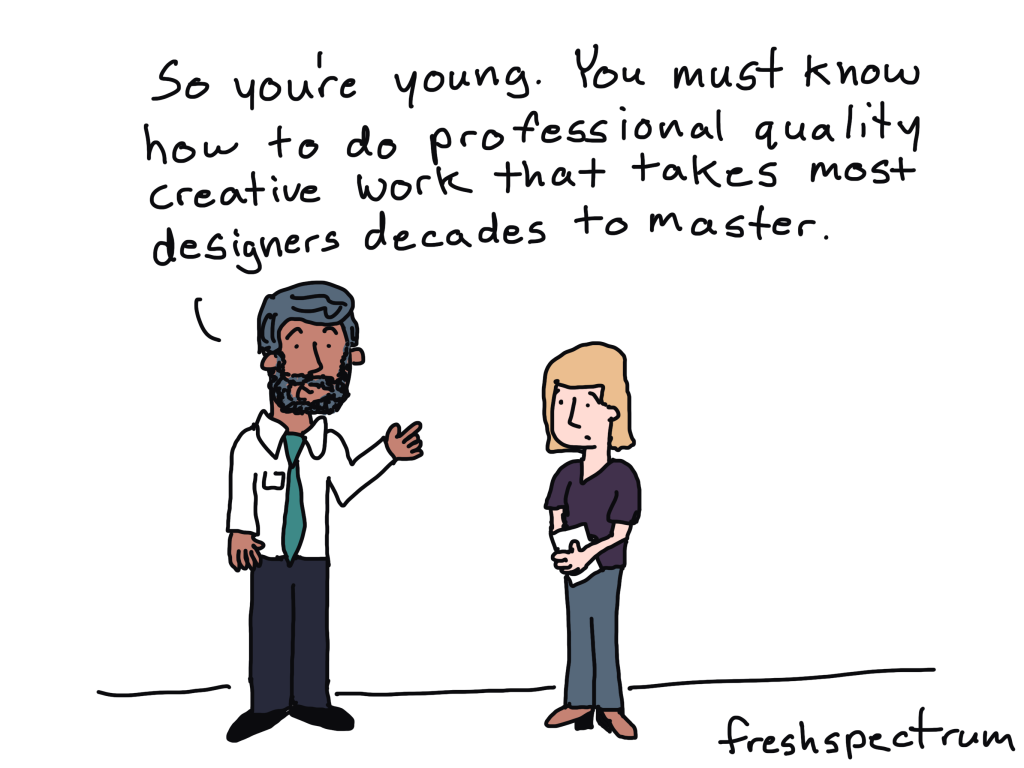
Increasingly researchers and evaluators of all ages are being asked to produce professional quality creative work. This includes well-designed visual reports, infographics, visual presentations, and sometimes even things like video and web design.

And while I think this is ultimately a good thing, there is one big problem.

Our Fields Offer Next to Zero Creative Training

When you were in college or grad school, did you take any design courses?

  • Did you take a course in user experience design, human centered design, or the principles of graphic design?
  • How about any courses on digital communications or content strategy?
  • Did you learn how to report like a journalist or how to effectively share your work through email and social media?

For most of us in the research and evaluation world, the answer to all those questions is “no.”

To all the managers out there in the world, no more excuses.

If you want your research and evaluation employees to produce professional quality creative work you need to give them the proper creative training and support.

Our education systems and academic programs will take a lot longer to change and adapt. And even when they do, it will be years and years before you see the change reflected in your talent.

And if you want somewhere to send them to get that support and training, that’s why I do what I do.

Written by cplysy · Categorized: freshspectrum

Feb 06 2023

Embedded Legends Aren’t Enough

I see these graphs a lot:

The graph title tells us which line is which.

In dataviz lingo, we call it “embedding the legend” in the graph title.

What a clever style!

But it’s not colorblind-friendly or grayscale-friendly.

Let’s compare embedded legends (on the left, YUCK) with direct labels (on the right, YAY).

Ann K. Emery shows two graphs. The graph on the left has color-coded words in the title (a.k.a. embedding the legend). The graph on the right also has direct labels.

Not Legible for Colorblind People

Although embedding the legend in the graph title is popular, it’s not colorblind-friendly.

Here’s a preview of what the two styles would look like for someone with red-green colorblindness. (I uploaded a screenshot to https://www.color-blindness.com/coblis-color-blindness-simulator/.)

Ann K. Emery shows how to test your draft to see if it's colorblind-friendly.

If you’re required to follow 508 compliance in your workplace (if your project is funded by the U.S. Federal government), then embedding the legend in the graph title isn’t 508 compliant, either.

One of the 508 guidelines goes something like this: Viewers shouldn’t have to rely on color alone to understand the graphic.

In the embedded legend version, we are asking our audience to rely on color alone. Oops! That’s where the direct labels save the day.

“But Ann, just choose colors that are colorblind-friendly!”

No no no no. I don’t think we should be choosing random colors for our graphs.

I want you to use your organization’s brand colors in your graphs. Brand colors remove guesswork. No more sitting down to think about which colors look like. Brand colors also help us avoid Frankensteined graphs. No more pages 1-5 of your document in colors that Bob likes, followed by pages 6-10 in colors that Joe likes.

Not Legible in Grayscale

Embedding the legend isn’t grayscale-printing friendly, either. We wouldn’t want our audience to guess which shade of gray is which.

(Again, I uploaded a screenshot to https://www.color-blindness.com/coblis-color-blindness-simulator/.)

Ann K. Emery shows how to test your draft to see if it's grayscale-friendly.

How to Directly Label Graphs in Excel, PowerPoint, or Word

“Ann, how do I directly label the graph in Excel??”

I don’t recommend using text boxes. They’re such a pain! It takes forever to add the text boxes, align them, and group them. When we re-size the graph—making it taller or smaller, for example—the text boxes have to be re-aligned. Ugh.

There’s a better way.

Add the Numeric Labels

In today’s example, I’m using PowerPoint. You can do this through Excel and Word, too.

And in today’s example, I’m labeling the endpoints. Sometimes labeling every. single. point. pulls our audience into the weeds when we need them to be thinking at a higher, strategic level.

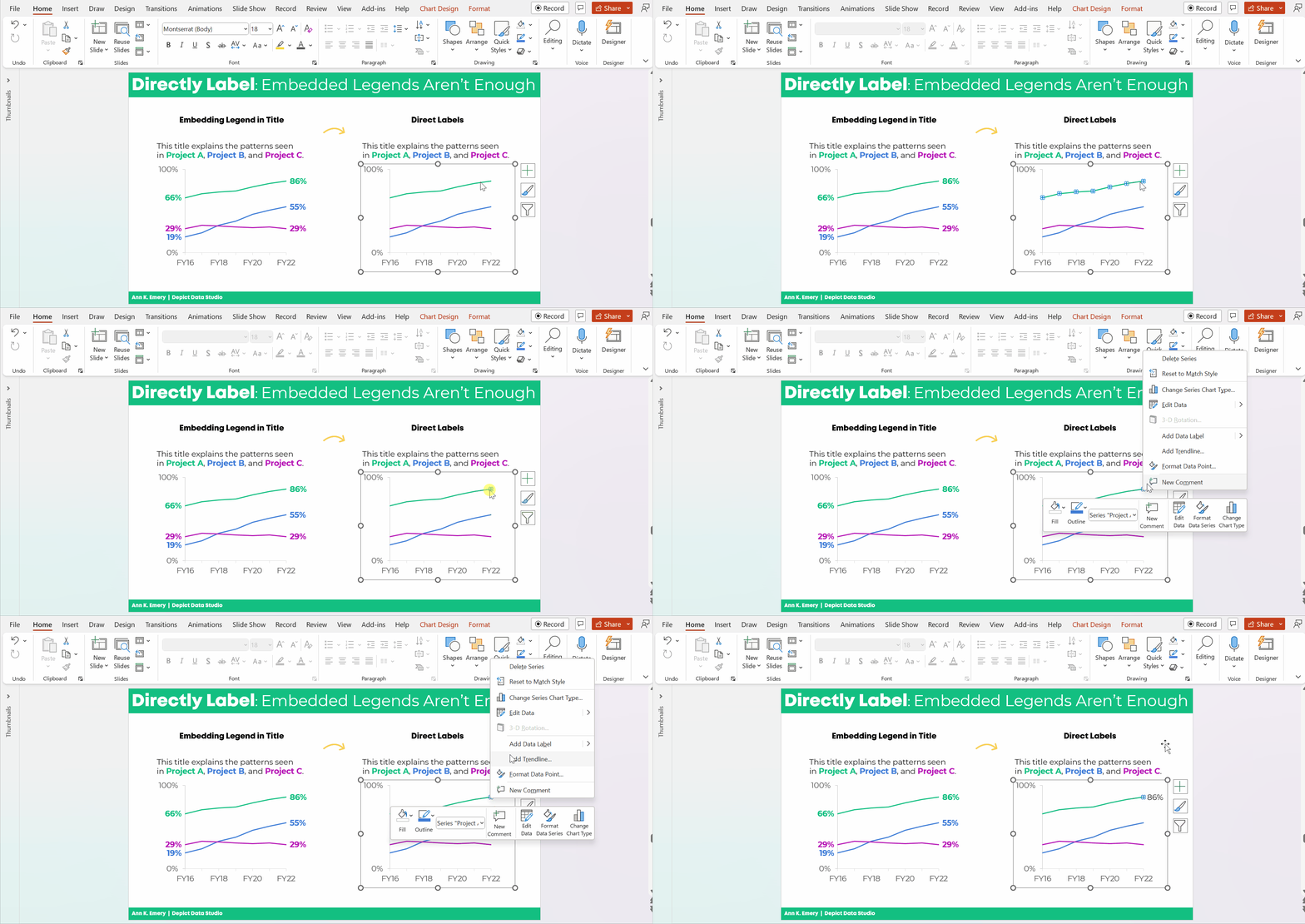
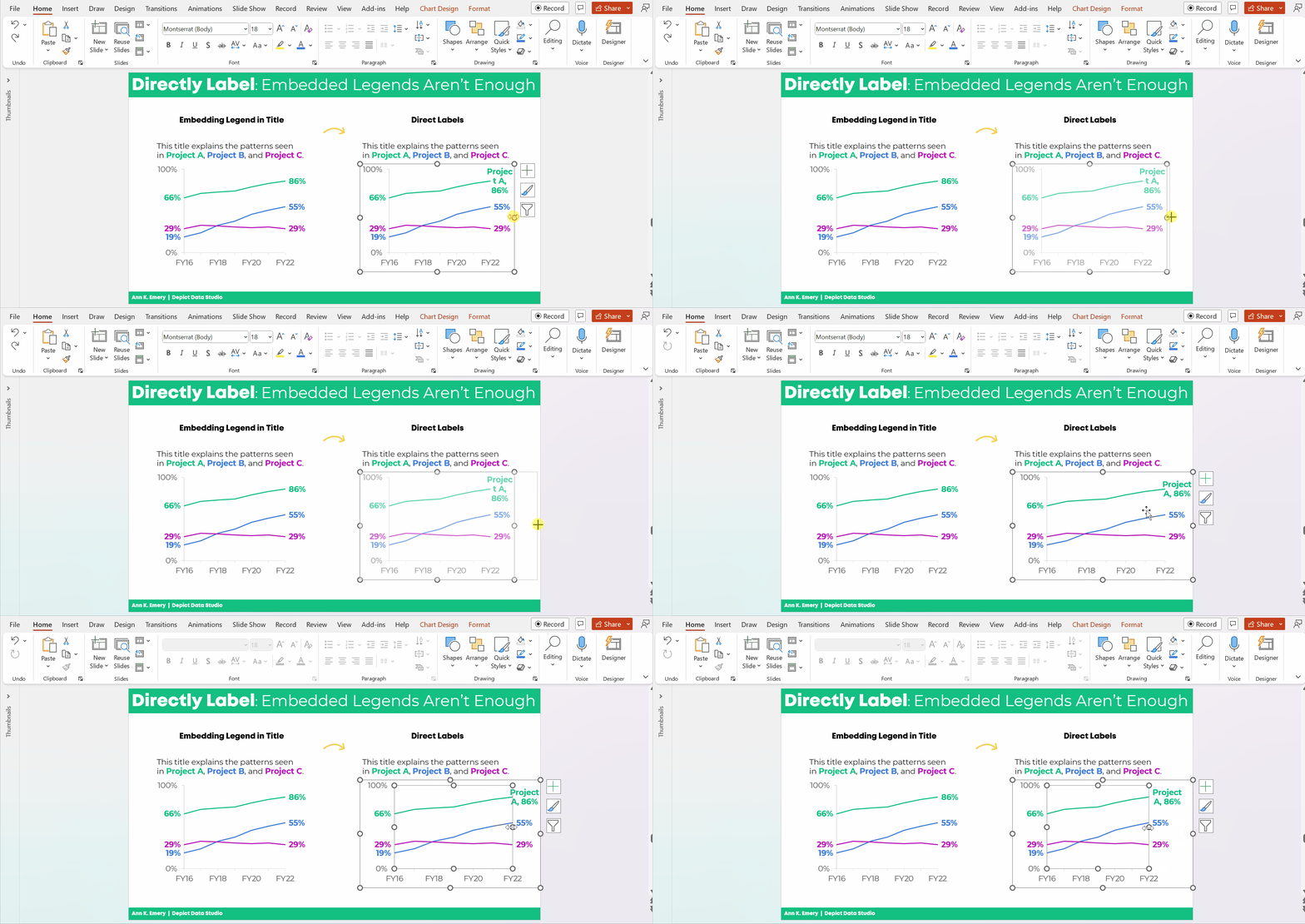
Here’s how to add percentages to the endpoints.

Click on the line once. All the dots will be selected.

Click on the right-most point again. Only the right-most point will be selected.

Right-click on that right-most point. On the pop-up window, choose Add Data Label. It should be singular (Add Data Label) and not plural (Add Data Labels). If you see the plural version, it means you’ve still got all the points selected.

Ann K. Emery's GIF showing you how to directly label your line graphs in Microsoft Excel.

Then, do the same thing to the left-most point.

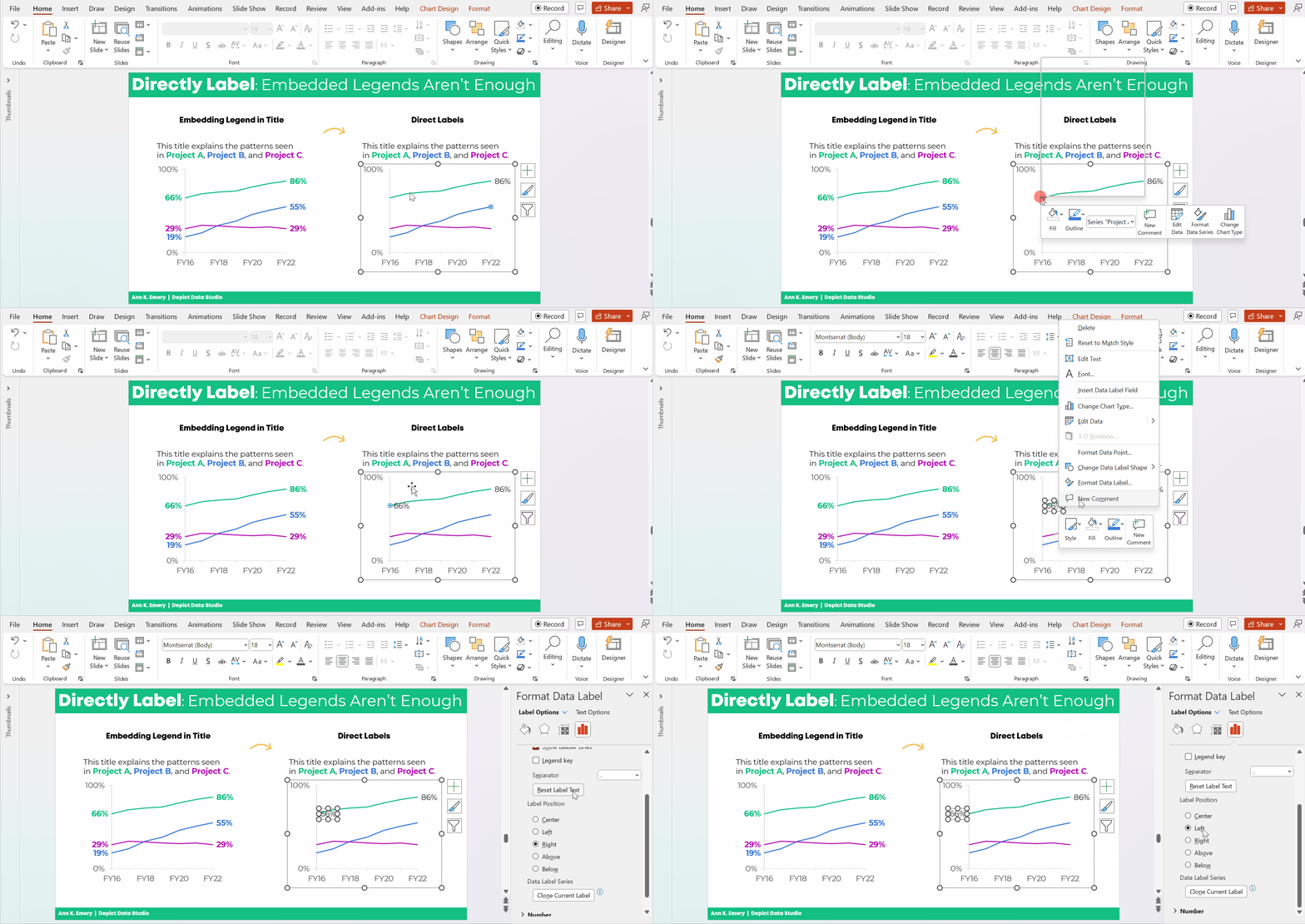
Don’t forget to move the label to the left of the point.

Here’s how: Once you’ve got the percentage label, click on it again, twice. Right-click and choose Format Data Label. In the sidebar, go to Label Position and choose Left.

Ann K. Emery's GIF showing you how to directly label your line graphs in Microsoft Excel.

Repeat the steps to add percentages to the other lines.

Color-Code the Labels to Match the Lines

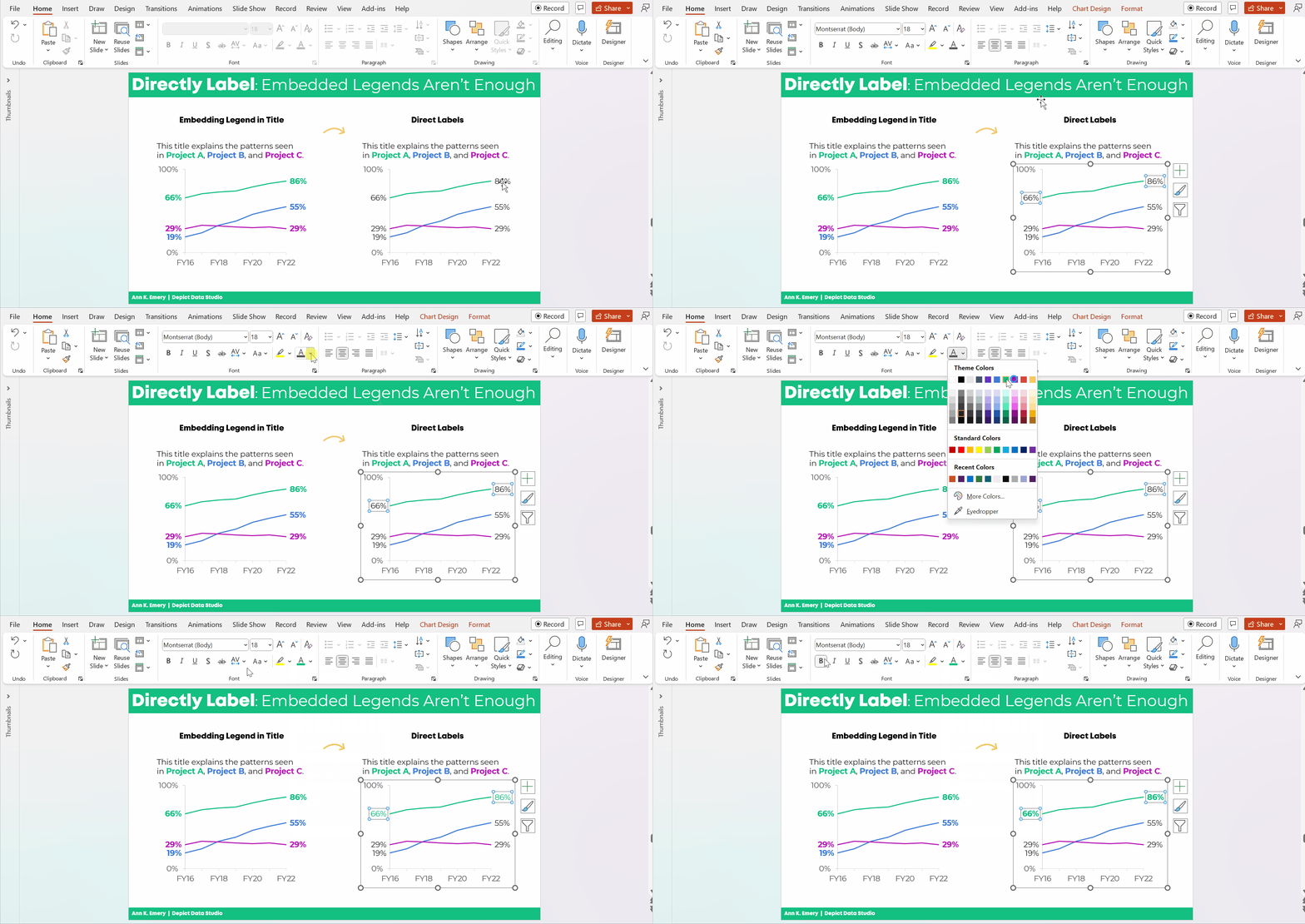
This is an extra visual cue for our audience. We want them to know which label belongs with which line.

Click on the labels to activate them.

Go to the Home tab and change the font color just as you normally would.

Make sure that colored fonts are bold, not regular. A good rule of thumb for color contrast accessibility is that colored fonts should be bold.

(It’s harder to read colored font than black font, so the way we make the colored font easier to read is to make the letters thicker. You can learn more about color contrast rules at https://webaim.org/resources/contrastchecker/.)

Ann K. Emery's GIF showing you how to directly label your line graphs in Microsoft Excel.

Add the Category Label

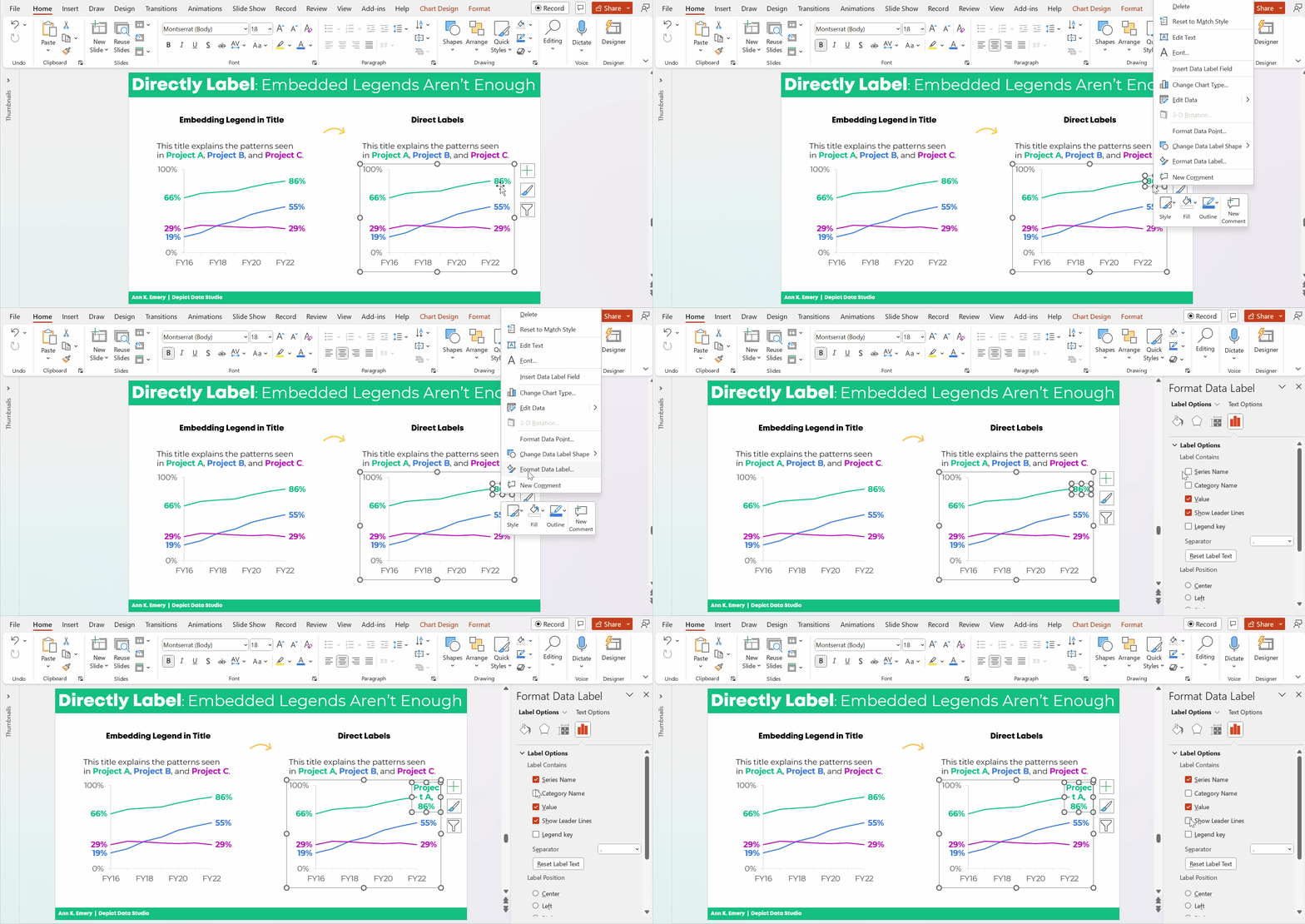
Click on that right-most percentage, twice.

Right-click and choose Format Data Label.

Check the box for either Series Name or Category Name. (Series Name vs. Category Name depends on how your data table is organized. Just check and uncheck the boxes until you get the right label.)

Make sure to un-check the Leader Lines box, too. Otherwise you’ll get cluttered connecting lines later on.

Ann K. Emery's GIF showing you how to directly label your line graphs in Microsoft Excel.

Make Sure the Labels Fit

The wrapped text is awkward and hard to read.

We need to make the graph wider.

Sometimes I need to expand the interior of the chart, too. In Excel lingo, this inner border is called the Plot Area.

It looks like this:

Ann K. Emery's GIF showing you how to directly label your line graphs in Microsoft Excel.

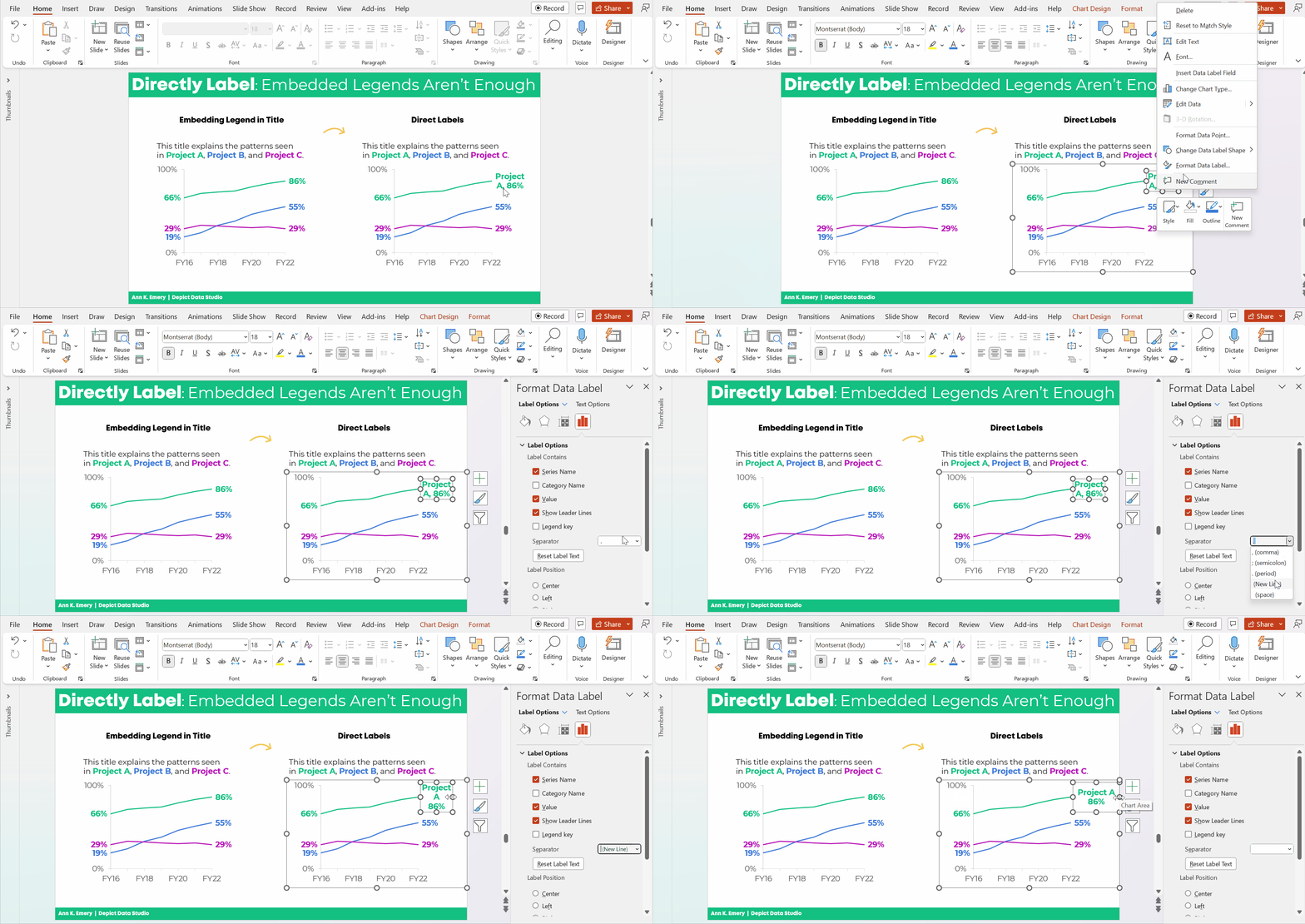
Adjust the Separator

This step is optional.

The “separator” is the comma, period, space, or new line that separates the percentage from the words.

In this example, I’m going to use New Line. The percentage will be on one line, and the words will be on a second line. (I’m controlling the text wrapping.)

To adjust the separator: Click on the right-most label, twice. Right-click and choose Format Label. Go to the Separator drop-down menu.

You’ll see me widening the label, too.

Ann K. Emery's GIF showing you how to directly label your line graphs in Microsoft Excel.

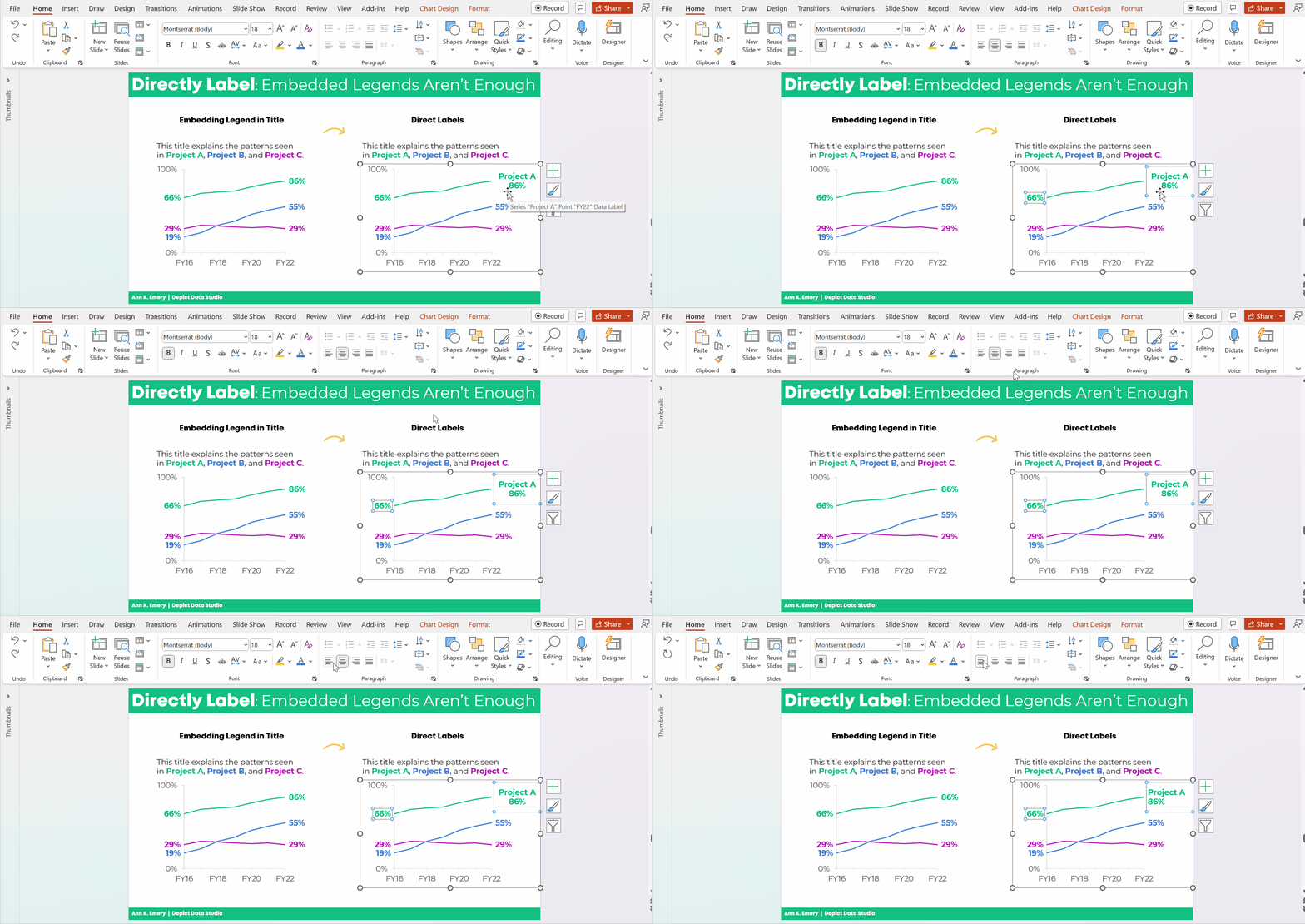
Left-Align the Label

Left-aligned text is faster to read than centered text.

And, left alignment ensures that the label is right beside the line.

Simply select the label, go to the Home tab, and use the alignment button.

Ann K. Emery's GIF showing you how to directly label your line graphs in Microsoft Excel.

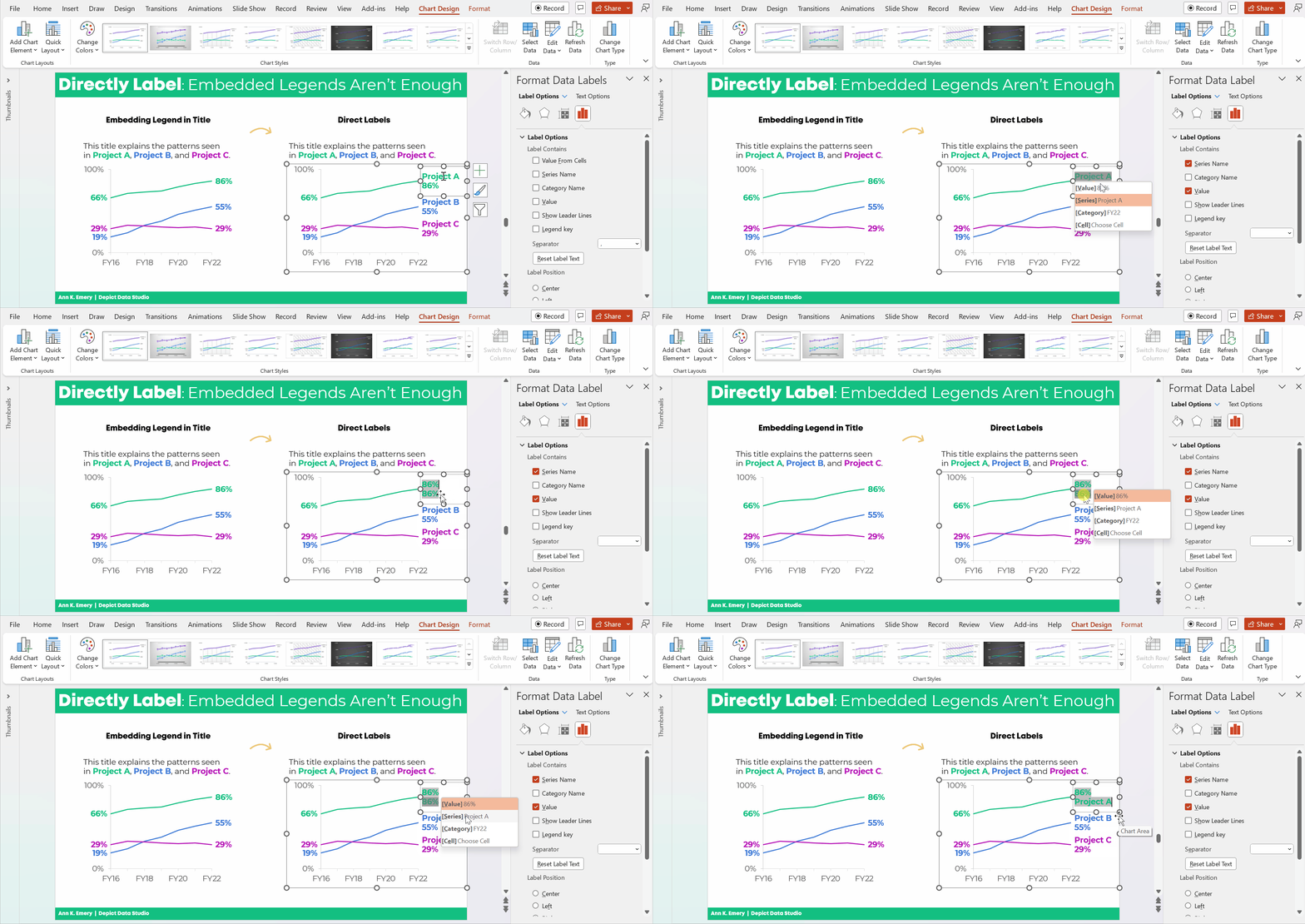
Change Which Comes First: The Percentage or the Words

This step is optional.

We can change which comes first (well, which one’s on top): the percentage or the words.

Kudos to Nick Visscher for teaching me this tip!

Here’s how: You double-click within the label until you see the gray fill around the percentages/words. Then, on the drop-down menu, select which element should come first or second.

Ann K. Emery's GIF showing you how to directly label your line graphs in Microsoft Excel.

That was a lot of steps, sheesh!

I covered them as thoroughly and slowly as possible. In real life, once you get the hang of it, this would take 60 seconds from start to finish.

The Bottom Line

Embedding the legend is fine.

But it’s not enough on its own.

We also need to directly label the data.

Ann K. Emery says that embedding the legend is fine. But it's not enough on its own.

Download the Spreadsheet

Want to explore the graph a bit more? You can download my Excel spreadsheet here: https://depictdatastudio.gumroad.com/l/EmbeddedLegendsArentEnough

Written by cplysy · Categorized: depictdatastudio

Feb 03 2023

Flirting with Burnout

This is one of those oversharing kinds of blog posts filled with me being vulnerable. If you don’t like reading about people’s feelings, please feel free to skip this post.

I love my work.

  • As a consultant I get the chance to work with amazing clients doing work that feels right.  
  • Since I have no boss, I have almost complete control over my schedule.
  • I absolutely love teaching information design and helping data people rediscover their creative passions. 
  • And to top it off, I get to draw cartoons.

But I also struggle.  

  • My creative brain has a way of leading me down rabbit hole after rabbit hole, even when deadlines approach (or especially when deadlines approach).
  • I have a strong desire to help everyone with everything.  And I seek out problems even if I have things I need to get done for myself, my job, or my family.
  • I also cope with regular bouts of anxiety and depression.

When burnout approaches.

It’s now been over six and a half years since I first left the comforts of a stable full time job for the freedom and instability of an independent business.  And over that time I’ve learned a lot more about myself.

I’ve also started to become more aware of the signs of a potential burnout.  And I’ve noticed a few lately.

  • My process starts to break down, and my self-imposed deadlines on things like blog posts and email newsletters start to slide.
  • I feel more exhausted, even though my sleep schedule hasn’t changed.
  • Procrastination, which is always a struggle, becomes even more so.
  • And self-doubt increases.  

Unlike professions such as health care or social work, however, burnout often carries a stigma when it comes to the fields of photography, design, and other professions dismissed by many in the outside world as fun hobbies rather than actual work. In truth, attitudes like these only make recognizing and overcoming burnout all the more challenging, and potentially increase the mental health risks for creative professionals.

How to Combat Creative Burnout

Something’s gotta give.

I’ve decided to take preemptive action to free up some time and mental space.

What I’m keeping

  • I’ll still draw cartoons. It’s fun and therapeutic.  Cartoons help me to create a deeper connection with others in the evaluation world.  
  • I’ll still share those cartoons on LinkedIn.  I love the comments and conversation that they bring.
  • I’ll still write blog posts. Writing for this blog gives me energy and rarely ever feels like a drag.
  • I’ll still be working hard for my current clients.  This is important work and sustains my business.
  • I’ll still be leading the information design academy. This is a passion project that I still dream will one day be my primary thing.  I love it more than anything else I do.

What I’m dropping.

Patreon.  

I love that people support my comics, and my patrons have helped me to power through past struggles.  But Patreon also makes me feel like I’m not doing enough for those that support my work.

This is not based on demands made by my Patrons, because they have been one of the most supportive groups in my life.  But my own feelings are that in order to do Patreon right, I need to put time into building a community and providing continuous value just for my supporters.

It creates a pressure. And I always feel like I’m failing my patrons. And as much as I don’t want to, I feel like I need to let the service go.  So from now on, if you would like to support me and my comics, consider joining my information design academy (or share my academy with your friends and colleagues). 

And if you are currently, or have been in the past, one of my patrons.  Thank you for all the support, it has meant so much. 

Barriers to my Information Design Academy.

I’ve been trying to follow a specific model for my information design academy.  It involves opening quarterly with cohorts and using an application for enrollment.

But as much as I see the potential value in these approaches, they also don’t work for me.  Mostly because they add barriers.  They also add extra administrative work.

Every person who has taken the time to apply for my information design academy has been awesome, each in their own way.  I want every one of them to join the academy if they want, when they want.

I’m also impatient.  I want them to be able to join now if they’d like, or whenever they need it.  I also know that I can help onboard anyone as we go, and the group is very likely to remain small enough to keep that personal touch.

And if it does start to get larger (which I would like) I have the space to schedule more live sessions to keep up the conversations and personal support.

So, I’m taking down the barriers. 

The academy is going to be cheaper again. $599 each year or $179 each quarter. There is a discount and a scholarship if you need to pay less.  I put the coupon codes on the actual registration page so they are impossible to miss.

You can join anytime.  And if you join and don’t think it’s actually right for you, tell me and I’ll give you your money back. You can learn more about the academy here.

The feeling that I need more clients.

My big CDC contract goes through the fall.  And I’ll admit that I am a bit anxious as to what will happen when the cooperative agreement expires.  I should know sometime in the spring what the future may hold.

But for the moment, I’m fine.  I could add zero more clients between now and September and continue to be financially stable.  

I’m tired of letting my fear of an uncertain future rule my present.  So I’m going to try to let it go.

Now for you.

Writing this post made me feel nervous.  It was a whole lot of personal oversharing and will likely lead to a bunch of unsubscribes.

But I know from years of occasional oversharing that this kind of post is valuable.  Because you might also be at risk of burnout.  And sometimes it’s good to know that you’re not alone.

While I appreciate your support, there are many others out there who need it more than I do.  I’ll be okay.  While I’m flirting with burnout, I think I can keep it at bay.

But if you’re flirting with burnout, I hope this post helps you in some small way. Pay attention to the signs and don’t be afraid to ask for help.

Written by cplysy · Categorized: freshspectrum

  • « Go to Previous Page
  • Go to page 1
  • Interim pages omitted …
  • Go to page 100
  • Go to page 101
  • Go to page 102
  • Go to page 103
  • Go to page 104
  • Interim pages omitted …
  • Go to page 304
  • Go to Next Page »

Footer

Follow our Work

The easiest way to stay connected to our work is to join our newsletter. You’ll get updates on projects, learn about new events, and hear stories from those evaluators whom the field continues to actively exclude and erase.

Get Updates

Want to take further action or join a pod? Click here to learn more.

Copyright © 2026 · The May 13 Group · Log in

en English
af Afrikaanssq Shqipam አማርኛar العربيةhy Հայերենaz Azərbaycan dilieu Euskarabe Беларуская моваbn বাংলাbs Bosanskibg Българскиca Catalàceb Cebuanony Chichewazh-CN 简体中文zh-TW 繁體中文co Corsuhr Hrvatskics Čeština‎da Dansknl Nederlandsen Englisheo Esperantoet Eestitl Filipinofi Suomifr Françaisfy Fryskgl Galegoka ქართულიde Deutschel Ελληνικάgu ગુજરાતીht Kreyol ayisyenha Harshen Hausahaw Ōlelo Hawaiʻiiw עִבְרִיתhi हिन्दीhmn Hmonghu Magyaris Íslenskaig Igboid Bahasa Indonesiaga Gaeilgeit Italianoja 日本語jw Basa Jawakn ಕನ್ನಡkk Қазақ тіліkm ភាសាខ្មែរko 한국어ku كوردی‎ky Кыргызчаlo ພາສາລາວla Latinlv Latviešu valodalt Lietuvių kalbalb Lëtzebuergeschmk Македонски јазикmg Malagasyms Bahasa Melayuml മലയാളംmt Maltesemi Te Reo Māorimr मराठीmn Монголmy ဗမာစာne नेपालीno Norsk bokmålps پښتوfa فارسیpl Polskipt Portuguêspa ਪੰਜਾਬੀro Românăru Русскийsm Samoangd Gàidhligsr Српски језикst Sesothosn Shonasd سنڌيsi සිංහලsk Slovenčinasl Slovenščinaso Afsoomaalies Españolsu Basa Sundasw Kiswahilisv Svenskatg Тоҷикӣta தமிழ்te తెలుగుth ไทยtr Türkçeuk Українськаur اردوuz O‘zbekchavi Tiếng Việtcy Cymraegxh isiXhosayi יידישyo Yorùbázu Zulu