• Skip to main content
  • Skip to footer
  • Home

The May 13 Group

the next day for evaluation

  • Get Involved
  • Our Work
  • About Us
You are here: Home / Archives for allblogs / freshspectrum

freshspectrum

Sep 03 2025

Understanding AI: Intelligence versus Wisdom

Summary: This new series is a kind of travelogue. It’s a way for me to document my experiences with AI. Today’s question, can an AI tool be wise?

Missing point of view.

I think it’s important to find ways to differentiate how conversational AI works compared to human beings. Because there are times when it seems frightfully similar.

One area is perspective.

Right now pretty much all the leading conversational AI tools are built to have a kind of generic point of view. They’re all trying to be helpful and guide their users through their own discovery process. This isn’t the way people work. Not only do we have knowledge, but we also have a point of view. That point of view is developed over time through experience and socialization.

These different perspectives are part of make diversity so important. Different people with different perspectives will take the same information and come up with different interpretations.

You can actually mimic this through a chat with your favorite AI tool. Ask the tool to take on the persona (or roleplay) as someone. It could be a general persona, like an experienced plumber or a high school social studies teacher. Or it could be a well known person, like an author or public figure. Then ask it a series of questions.

The answers to those questions will change based on the role you give the AI tool, at least to a point. AI is just roleplaying, and sometimes it goes a little overboard. For example here is a prompt where I asked Claude to respond to a basic question as if it were Richard Feynman.

Prompt: Can you give me a definition of evaluation but do so as if you were Richard Feynman?

Claude Sonnet 4:
adjusts in chair and grins

Alright, so you want to know what “evaluation” means? Let me tell you something – most people make this sound terribly complicated when it’s really quite simple.

Evaluation is just figuring out if something is any good or not. That’s it! You’ve got some thing – could be a student’s paper, could be a new theory about atoms, could be whether your car mechanic did a decent job – and you want to know: is this thing worth a damn?

This is just an example from a conversation with Claude.ai, the AI kept going for a bit.

Wisdom is more than a collection of knowledge.

So, most AI tools have access to a lot of information and can generally handle a lot more info than a human can before getting overwhelmed (at least in some respects since they don’t see, or feel, or think about other stuff at the same time, like a human would).

But wisdom is much more than just access to a collection of knowledge. To make it easy to discuss, let’s simplify with a fake equation. Wisdom = Point of View + Knowledge + Time

For an AI tool, Knowledge is generated through a specific training database and a specific training approach.

The default Point of View is the result of the information it was trained on, and the design choices made by/selected by the model development team.

Time is mostly just a snapshot. At least by the time we experience the tool.

A human point of view is going to change considerably over time, ultimately shifting how information is viewed.

Could an AI model be built with wisdom? Perhaps, at least it could imitate wisdom. But I think it’s going to be one of the areas where humans will continue to have an edge.

The race towards the best average.

Right now there are several tools locked up in a very weird race. They are all trying to be more useful than all the other tools at doing all the things. Basically, it’s a race towards being the best average.

I can’t see it staying like this.

There is this story about cockpit design in airplanes. It goes like this, early on in plane design, the air force tried to design a jet cockpit around the idea of an average pilot. The problem is that there is no average pilot. So by creating a cockpit for the average person, you are essentially creating a cockpit for nobody. The better way forward is to build an adjustable cockpit, so you can meet the needs of different people.

This is starting to happen in AI, with different conversational AI models being offered at the same time each trained towards different uses. My guess is that over time we’ll see an increase of specialized AI, built from specific training libraries and trained to serve different needs.

That’s all I got for today. What have you discovered about AI lately?

Written by cplysy · Categorized: freshspectrum

Sep 02 2025

Virtual Community of Practice: Quick Launch Guide

Summary: This guide will walk you through five steps for launching a simple but effective virtual community of practice.

Running a successful Community of Practice can take a significant amount of time and effort. That is if you want actual connections to form between community members. But contrary to popular belief, the biggest challenge is not technical. It’s also not about creating the learning content. The significant time and effort required is in the longer term community building.

Bottom line, you can launch a CoP quickly. In this guide I’ll walk you through a set of five basic steps to get you started.

Step 1. Frame your community.

It won’t be an actual community until your people get to know each other. If they already do, great. If not, that will be your job.

Who are your people? What practice do they have in common? Be really specific about who is meant to be in your community, and who is not.

I run an evaluation community of practice for the CDC’s Overdose Data to Action (OD2A) program. The people in the community are the people charged with evaluating the OD2A program. You don’t have to call yourself an evaluator to be in the CoP. This is a known group. While people do come and go a bit, we already have most of their names and emails already. This makes our community framing easier.

If you have to build your community first, start with a Google form. Ultimately you’ll need a list of names and emails (everything else is just icing on the cake).

Step 2. Start with the most basic CoP platform.

I’ve tried just about all the well known community platform things over the last 20 years (Slack, Buddypress, Circle, Discourse, Discord, Ning, Sharepoint, etc.). You know what the best platform is?

An email newsletter and a Zoom account.

That’s it. It’s cheap and effective. If you want to replace the Zoom account with a Teams account or something else, that’s fine. If you have a small group and just want to send regular emails, that’s fine too.

There are exceptions, but most professionals don’t need another website they have to visit. It’s far easier to get them to block an hour off their calendar each month than try to get them in the habit of visiting some kind of web platform they may or may not feel comfortable using.

Step 3. Meet regularly.

I suggest monthly. You can try staggering times if you need to but it’s easier to just have a specific day and time each month (ex. third Wednesday at 2PM eastern).

Things can get complicated quickly, so at the very least, try not to start complicated.

Step 4. Recruit speakers from within your community.

The power of a community is in its members. One of the mistakes people make is in spending a lot of time building a series of interesting lectures with outside experts that they think will be of interest to the community. But that’s not community building, it’s audience serving.

Having your community members deliver the session content is a win win. Not only do you get highly practical instruction (which is what a CoP is designed to offer), you also get an opportunity to showcase individual members.

I like to approach my sessions in blocks. If I have 60 minutes, that’s three 20 minute blocks. This means we can have an intro (first 20) and two talks (15 minutes of talk, 5 minutes of Q&A). Or we can have an intro (first 20), talk (second 20), and some time for breakout groups (third 20).

Step 5. Encourage connection.

When we meet in person there are all sorts of opportunities for people to connect. People might connect by just sitting next to each other at a table or waiting together in the hall. It can help to have someone connect people, but it’s not always essential. Especially if you have a chatty group or a few extroverts.

Now, if you meet virtually, that’s a different story. It’s really easy as a virtual attendee to take on a passive role. Perhaps you just watch the webinar while eating your lunch with your camera off.

It takes a lot more effort to forge connections between community members in a virtual setting. So you have to be intentional. Occasional breakout groups can help a little, but ultimately, the facilitator should play a kind of matchmaker role.

Last Thoughts.

I said at the beginning of this guide that building an effective virtual community of practice takes a lot of time and effort. It also takes a bit of emotional effort.

One of the hardest things about facilitating an online community is that most people instinctively lurk before they participate. It can be unnerving to lead a presentation without being able to see the faces of your audience.

But if you source your expertise from the community, you’ll start to get to know the people involved. I almost always have a 1-on-1 Zoom with potential speakers sometime before the event. Once you get to know the people in the community it becomes easier and easier to find future speakers and connect members with one another.

Want help launching or facilitating your Community of Practice? I help organizations build and run CoPs. You can learn more about my services by visiting my consulting page.

Written by cplysy · Categorized: freshspectrum

Aug 21 2025

How to Create a Logic Model in Canva

Summary: You don’t need fancy tools to create basic logic models.

In this post I’m going to walk you through the visual creation of a logic model. If you want to learn more about developing the content for a logic model, I suggest starting with this post: What is a Logic Model?

Why Canva for Logic Models?

You can use all sorts of different tools to create logic models, from PowerPoint and Word to Adobe Illustrator and InDesign. But now-a-days I tend to use Canva for just about anything, logic models included. It’s especially nice if you want to add a little visual flair.

In this tutorial I’m going to show you how to create a basic logic model using Canva.

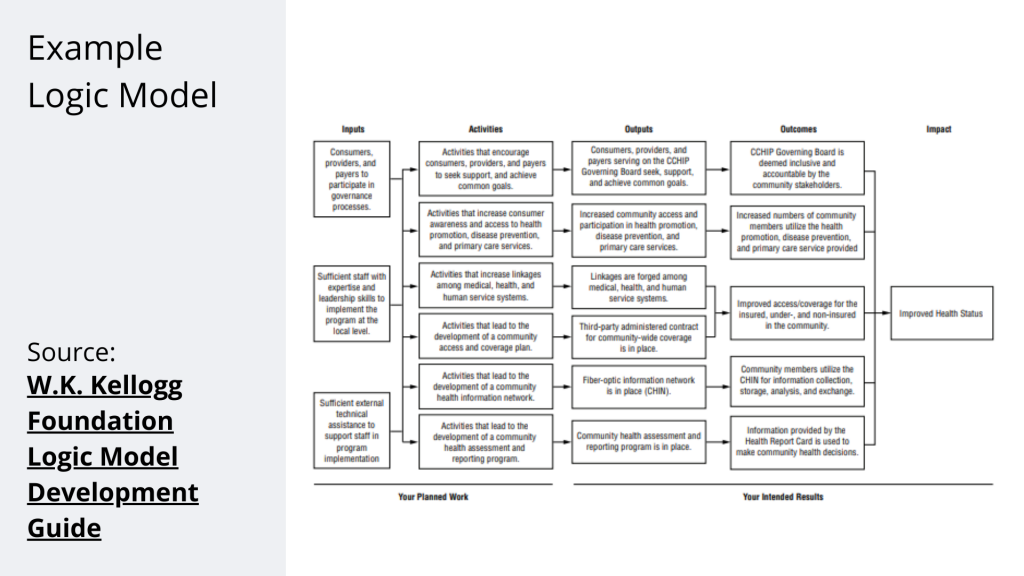
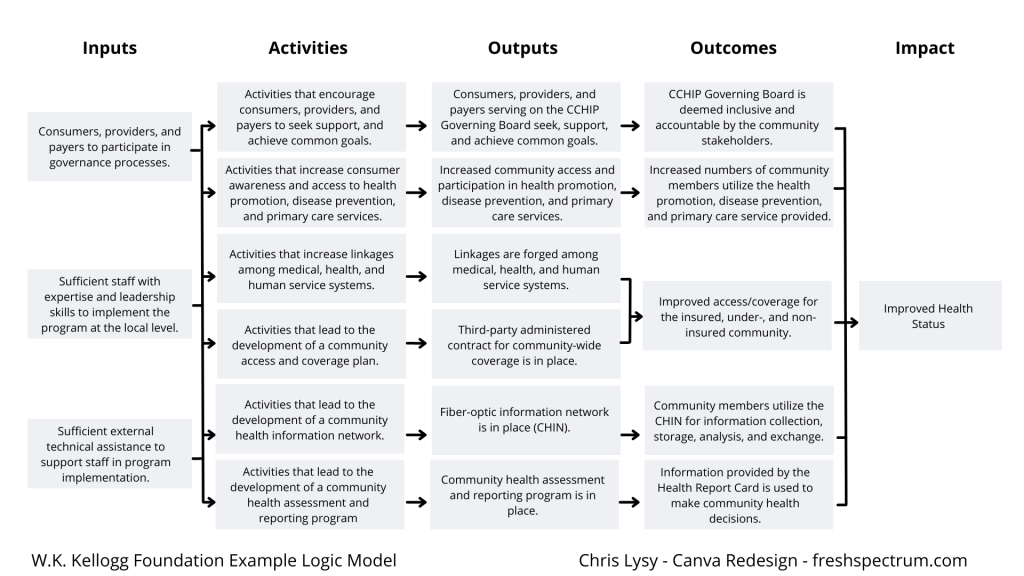
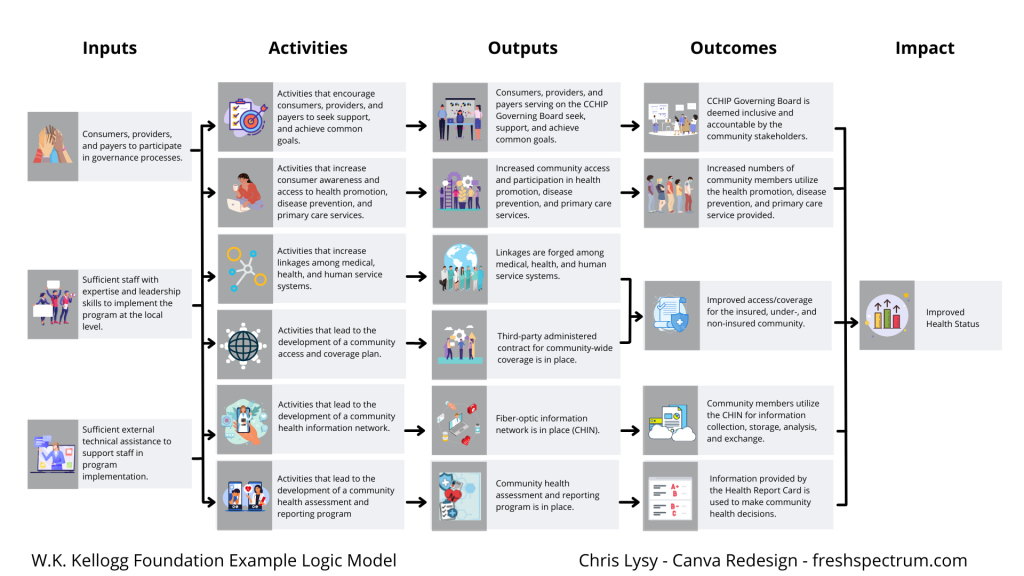
A Simple Results Chain Logic Model – Example from the W.K. Kellogg Foundation

Kellogg Foundation Logic Model Example

Okay, so as a starting point I’m going to use this example logic model found in the Kellogg Foundation logic model guide.

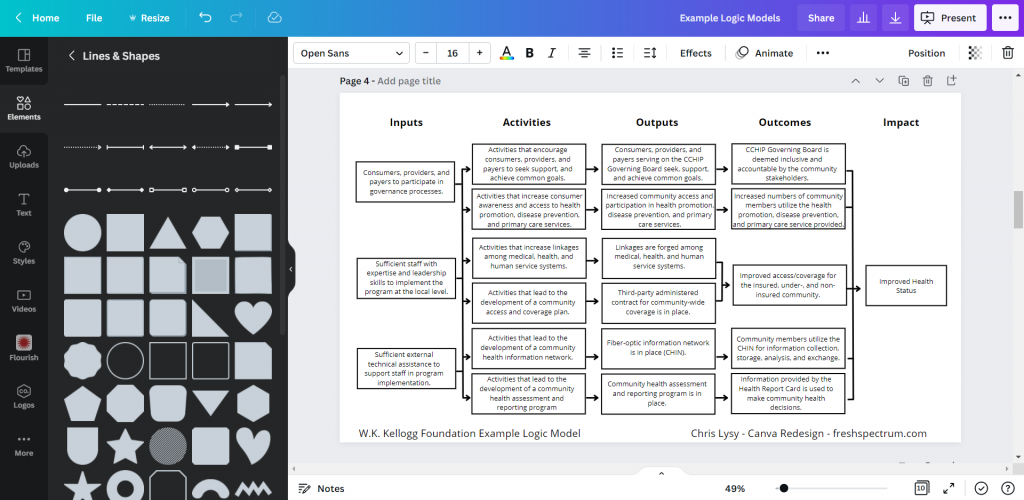
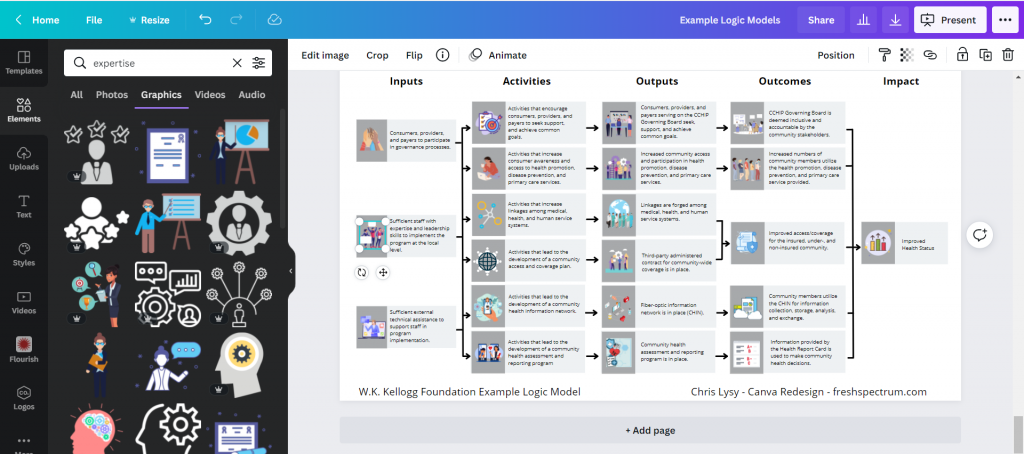
Recreating the Logic Model using Canva

When it comes down to it, most basic logic models are really simple to design. It’s just a bunch of shapes, arrows, and lines.

There are a few ways to do this in Canva.

  • Most rectangles and other shapes in Canva let you click inside them to add text directly to the shape.
  • You can put in all your text using individual text boxes and then add the “background effect” to turn it into a box.
  • You can put in a bunch of hollow rectangles, then add in all of your text using individual text boxes.

I tend to use the hollow rectangles and individual text boxes because it gives me the most visual control.

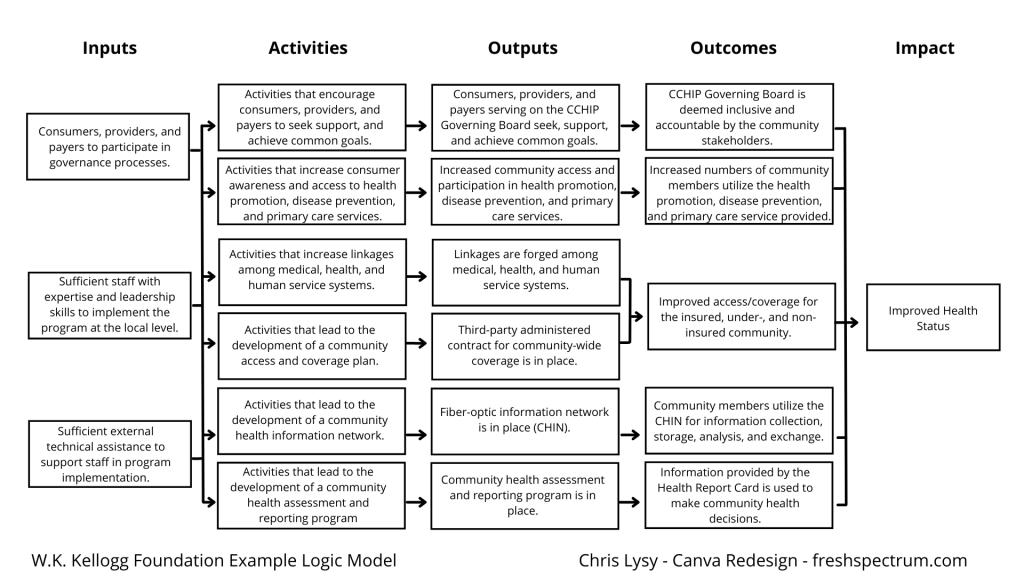
Kellogg Logic Model Created with Canva
Logic Model created in Canva

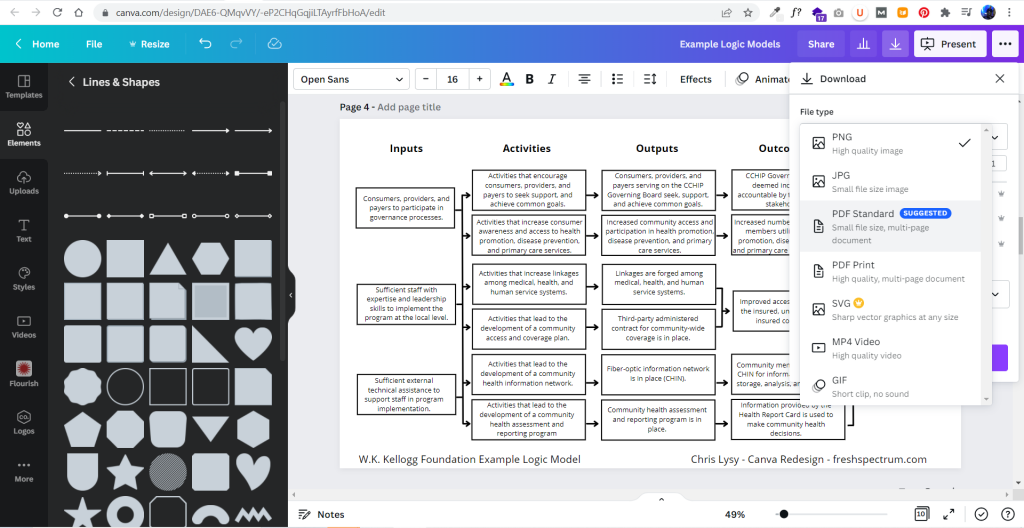
It didn’t take too long to create something that looked really similar to the original. And because it’s now in Canva, I have a lot of download options. If I just want an image I’ll usually download as PNG. If I want something printable, then I’ll download as a PDF Standard.

Exporting the logic model to PDF

Adapting your Canva Logic Model

The nice thing about Canva is that it’s pretty easy to duplicate and adapt your logic model, trying out different styles. I find the outline boxes to be a little visually jarring. So instead I replaced the outline boxes with some solid color light gray boxes.

Alternative Canva Logic Model Style

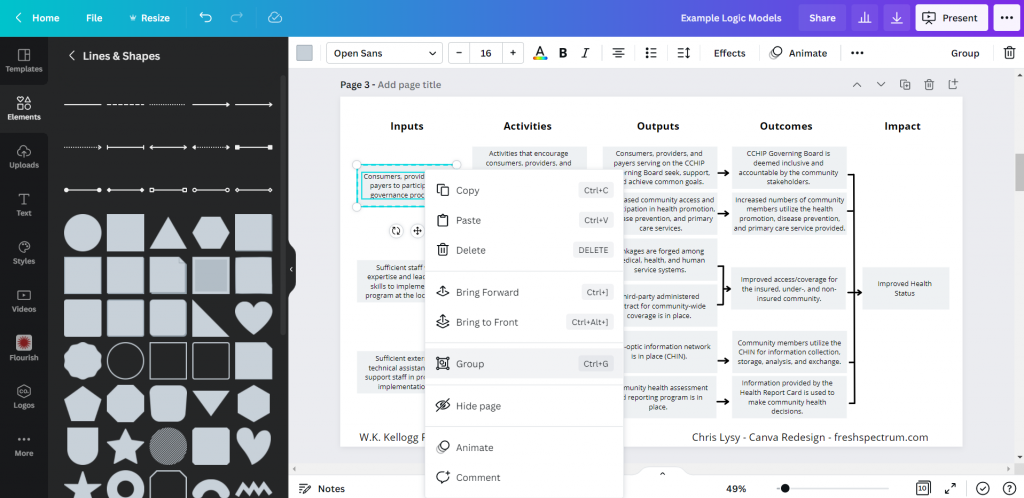
The shapes exist separately from the text, so you just insert the rectangle and send it to the back to set behind the text blocks. If you spend a lot of time moving the boxes around it’s a good idea to group the individual text/shape pairs.

Grouping items in Canva

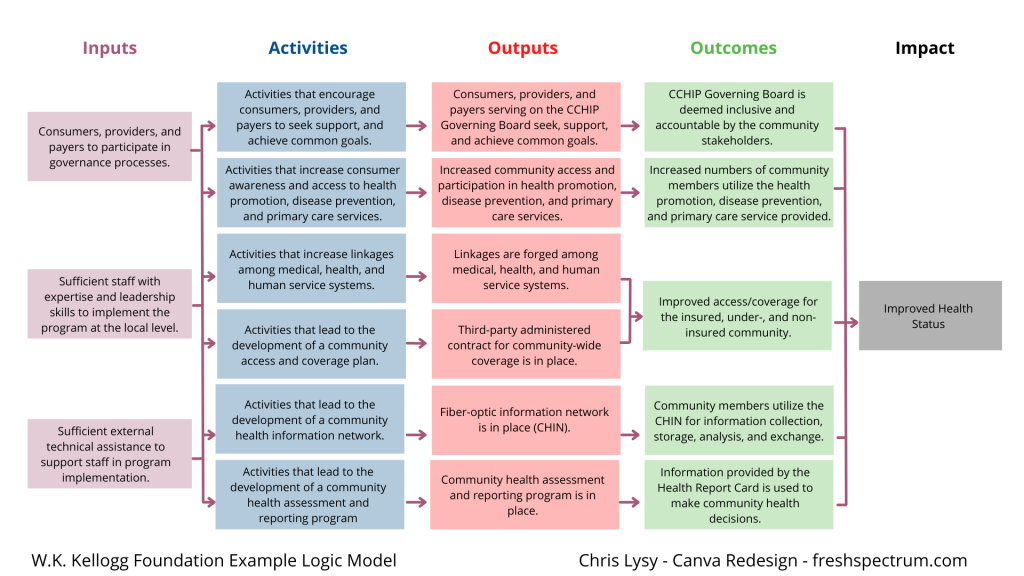
Color coding the logic model.

Once you have the base shape and text there are all sorts of alterations you can do to the design. I know there are a lot of evaluators who like to color code different elements. That’s certainly simple enough to do.

Canva Logic Model Alternative

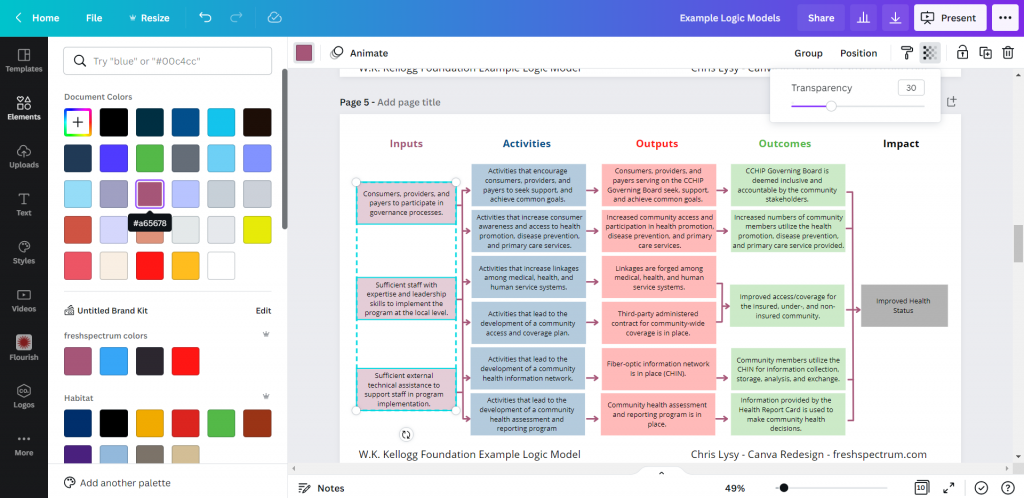
Occasionally you’ll want a softer color, especially for background elements. One way to do that is just make the boxes slightly transparent.

Changing colors in Canva

Photo annotating the logic model.

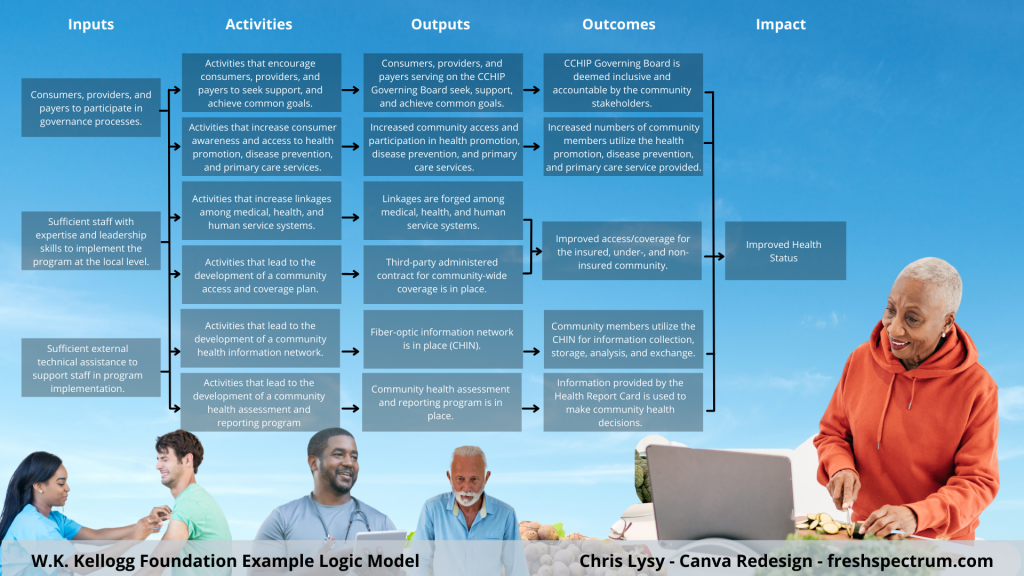
If you find yourself creating a lot of different logic models annotating with some photographs and background elements can really help you to differentiate. Especially if the photographs pair well with the actual project. I created this corny version with just some Canva stock photos.

Canva logic model with photo annotations

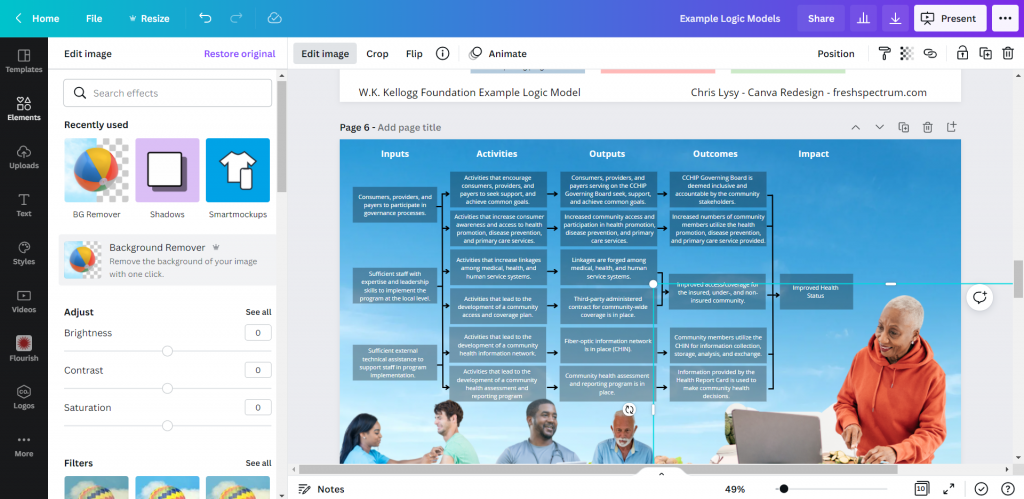
I use a Canva a lot, so I’ve made the investment in a pro account (~$10/month at the time of this post). Given the amount of stock content I use and the bonus features, this is well the worth the subscription cost. One of the features I like to use is the background remover. It’s a nice way to make certain stock images fit almost anywhere.

Background Remover in Canva

Coding Logic Model Elements

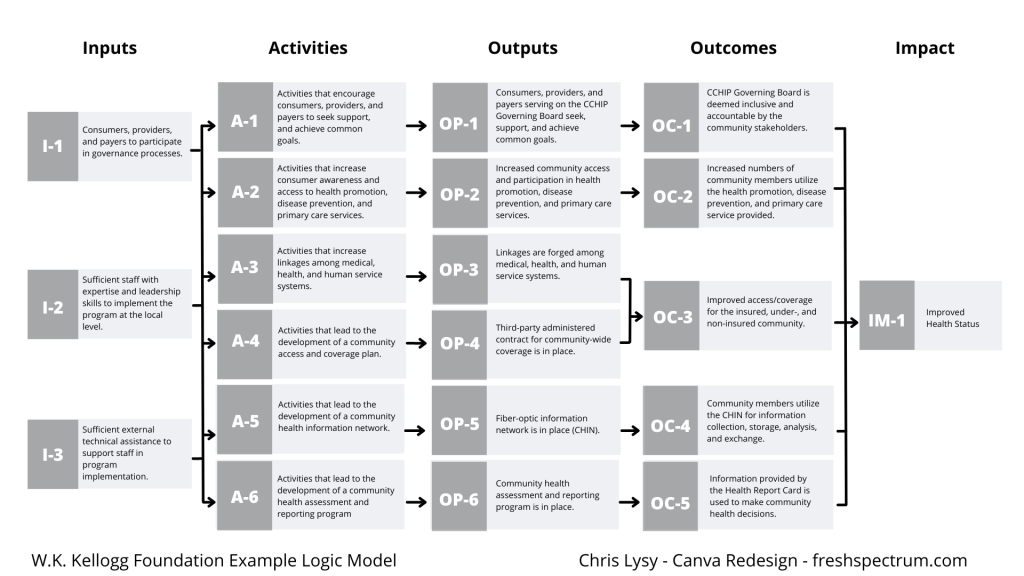
If your logic model is still being developed and fine tuned it can be a good idea to code the individual blocks. This makes it a lot easier to talk about individual elements.

Logic Model element map

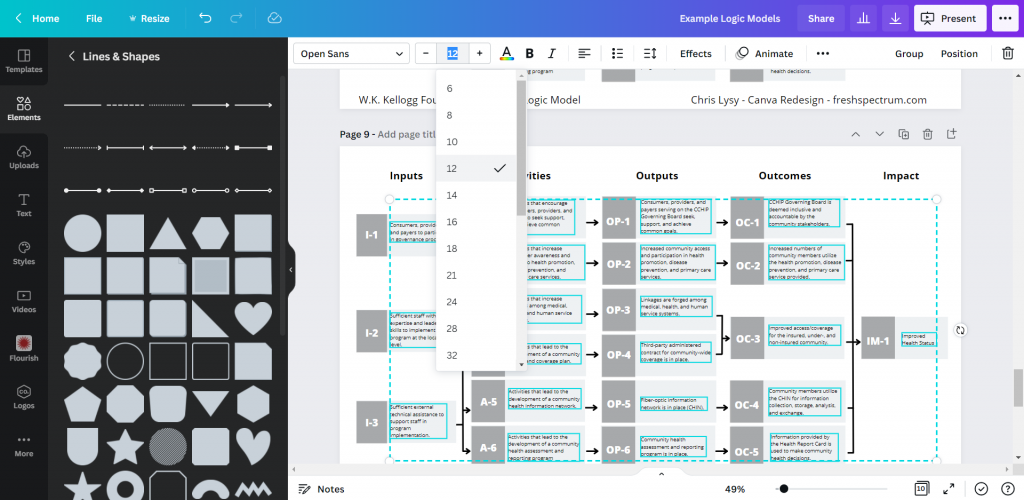
For this I just shrunk the text and offset it to the right of the gray boxes. Then I darkened the side to create a space for codes.

Changing font size in Canva

Icon Illustrating your Logic Model

My favorite way to adapt a logic model is to simply icon illustrate the individual elements.

Icon Illustrated Logic Model

Just move from element to element looking for icons that somewhat illustrate each block of text. There are all sorts of icon styles available within Canva.

Showing how to find icons in canva

Do you want to start with these templates?

I made the Canva file a template file. Just make sure to log in to your Canva account before opening the following template (and if you don’t have a Canva account, create one, it’s free).

What tools do you use to create your logic models?

There is no one perfect tool for anything. Canva has some downsides just like every other tool. So what tool is your favorite?

Written by cplysy · Categorized: freshspectrum

Aug 21 2025

What is a Logic Model?

Summary: A logic model is an attempt to show how your program is supposed to work.

Have you ever gone for a walk or a drive without a particular destination in mind?

I think it’s one of my favorite things. Because there is absolutely no way to get lost. When you wander the only time you can get lost is when you try to find your way home.

On the other hand if you’re trying to solve some kind of big social problem, it’s probably not the time to wander.  You should have a little direction to go with your purpose.

Logic models are tools that lots of evaluators use to visually show how a program is supposed to work.  If we take this action, we should see this result.

A basic logic model just looks like a simple flow chart.

This example comes from the Kellogg Foundation’s Logic Model Development Guide

Reverse engineering a program’s logic.

You might think that most logic models get drawn when a program is being designed. It sure looks like a plan of action. But I don’t think that’s actually true, at least not always, and probably not even most of the time.

Many programs get their start because a person or group is trying to solve a problem. Somebody’s hungry, they give them food.  A family gets evicted, they find them somewhere to stay.  They don’t always have some grand plan for how their actions are going to lead to desired results at a large scale.

If you’re an evaluator being tasked with the job of judging how a program works, you really need to start by asking a very basic question, “how is this program supposed to work?”

And that’s what a logic model does, it gives us a picture of how.  It’s a tool we can build by reverse engineering a program’s logic, usually through collaboration with the program staff.

The basic elements of a logic model.

There are all different types of logic models, but they usually share some similar components.

Inputs > Activities > Outputs > Outcomes

Inputs: What goes in (money, people power, time, etc).

Activities: The stuff you do (actions)

Outputs: Counting the stuff we did or people we served.

Outcomes: The consequences of our actions.

If there is anything that people get hung up on it’s probably knowing the difference between an output and an outcome. 

Let’s say you’re teaching an after school program.  Ten kids show up each night.  That would be an output. Did they actually learn anything, or retain more of what they learned earlier in the day?  That would be an outcome.

Let’s practice with something silly

You can create a logic model out of all sorts of things you do on a daily basis.  So practice creating one with low stakes.

I have a very food motivated dog named Jaina.  If anyone visits the pantry to grab a snack, she hears it and comes running.  Her hope is that the person with the snack might be willing to share with her.

Input: Snack food in pantry (if no snack food, nobody gets snacks).

Activity: After hearing a cracker box opening, join the family member at the pantry door. Give them your most pathetic puppy dog look.

Output: Followed two family members today to the pantry.

Outcome: One of the two family members tossed a delicious cracker that was thoroughly enjoyed.

Learners, what questions do you have?  Evaluators, what am I missing?  

These guides are meant to be conversational and easy to read.  But that means I leave out a bunch of potentially useful stuff.  If you have any lingering questions, or suggestions as to what should be added to this guide, please leave a comment.

Written by cplysy · Categorized: freshspectrum

Aug 21 2025

Formative vs Summative Evaluation: Which One Do You Need?

Summary: A formative evaluation is about improving your program, activity, or intervention.  A summative evaluation is about showing proof that it works.

Let’s say you run a non-profit food kitchen.  You see your job as feeding the hungry people in your community.  You have a pretty basic strategy that involves collecting food from the community and distributing that food through a storefront you rent in a strip mall.

Your local chamber of commerce decides to raise some money to help you.  With some of that money you decide to evaluate your work and see how you could improve your strategy.  

This is what we would call a formative evaluation.  

A little while later you stumbled on some potential grant funding from a local philanthropy.  This group wants an evaluation that shows whether or not your program works.  That the funds they give you are directly leading to fewer hungry people.

This is what we would call a summative evaluation.

A formative evaluation is about improving your program, activity, or intervention.  A summative evaluation is about showing proof that it works.

The soup metaphor and what formative and summative have in common.

When the cook tastes the soup, that’s formative; when the guests taste the soup, that’s summative

Bob Stake

I like this metaphor because it’s simple and useful. It shows us the difference between formative and summative but it also gives us another important element.  

What do both of these examples have in common?

Soup.

I know it sounds kind of silly, but it’s important.  The cook is making soup. The customer is eating soup.  Soup is the “intervention.”

Both formative and summative evaluations generally require an intervention (i.e. something specific to evaluate).  An intervention is a potential solution to a problem.

Back to our food kitchen example.  Let’s say you didn’t have a strategy.  You want to do something for people in your community who might not have enough food to eat.  You don’t quite know what you’re going to do, you just know there is a problem.  

There are certainly evaluation methods that could help, but without a potential solution you’re not ready for either a summative or a formative evaluation. 

Quick Activity: Formative, Summative, or Something Else?

Let’s end with a quick activity to help you determine next steps.  I find that almost everything we do can be broken down into a few basic elements.  See if you can break down one of your own activities.

What is your problem, challenge, or opportunity?

In my food pantry example above, the problem could have been a lack of affordable food options in the community.  In the soup metaphor, the basic challenge was about delivering a tasty meal to a customer.  An opportunity could be that somebody wrote you a big check to help you do something, but they’re letting you decide what that something is.

When we develop programs, activities, and interventions it’s usually in response to something.  So what is that something for you?

What is your solution, activity, or intervention?

In order to show that what you’re doing is working or not, you have to be able to identify the thing that you’re doing (your “soup”).  If you just have a problem, and no solution, then you’re not ready for a formative or summative evaluation.

And if you’re in a testing mode, trying out a variety of different solutions, you’re probably better off with a different type of evaluation approach.

What are your desired outcomes?  

Actions have consequences, positive and negative. An activity, intervention, or solution is a type of action.

A consequence of an action is an outcome.  Ideally, this is the positive change we hope to bring about.  But remember, we could also make things worse.  

Pulling it all together.

Can you fill this out?

We are facing _____ (problem).  Our solution is to ________ (action).  Ultimately that should lead to _______ (outcome).

A formative evaluation will attempt to show how you can improve the action in order to better lead to the desired outcome.  This can help you make the stuff you do better.

A summative evaluation will attempt to show whether or not the action did lead to the desired outcome.  This will show that you have a working solution and help you go and get more money to do more of it.

Learners, what questions do you have?  Evaluators, what am I missing?  

These guides are meant to be conversational and easy to read.  But that means I leave out a bunch of potentially useful stuff.  If you have any lingering questions, or suggestions as to what should be added to this guide, please leave a comment.

Written by cplysy · Categorized: freshspectrum

  • Go to page 1
  • Go to page 2
  • Go to page 3
  • Interim pages omitted …
  • Go to page 54
  • Go to Next Page »

Footer

Follow our Work

The easiest way to stay connected to our work is to join our newsletter. You’ll get updates on projects, learn about new events, and hear stories from those evaluators whom the field continues to actively exclude and erase.

Get Updates

Want to take further action or join a pod? Click here to learn more.

Copyright © 2026 · The May 13 Group · Log in

en English
af Afrikaanssq Shqipam አማርኛar العربيةhy Հայերենaz Azərbaycan dilieu Euskarabe Беларуская моваbn বাংলাbs Bosanskibg Българскиca Catalàceb Cebuanony Chichewazh-CN 简体中文zh-TW 繁體中文co Corsuhr Hrvatskics Čeština‎da Dansknl Nederlandsen Englisheo Esperantoet Eestitl Filipinofi Suomifr Françaisfy Fryskgl Galegoka ქართულიde Deutschel Ελληνικάgu ગુજરાતીht Kreyol ayisyenha Harshen Hausahaw Ōlelo Hawaiʻiiw עִבְרִיתhi हिन्दीhmn Hmonghu Magyaris Íslenskaig Igboid Bahasa Indonesiaga Gaeilgeit Italianoja 日本語jw Basa Jawakn ಕನ್ನಡkk Қазақ тіліkm ភាសាខ្មែរko 한국어ku كوردی‎ky Кыргызчаlo ພາສາລາວla Latinlv Latviešu valodalt Lietuvių kalbalb Lëtzebuergeschmk Македонски јазикmg Malagasyms Bahasa Melayuml മലയാളംmt Maltesemi Te Reo Māorimr मराठीmn Монголmy ဗမာစာne नेपालीno Norsk bokmålps پښتوfa فارسیpl Polskipt Portuguêspa ਪੰਜਾਬੀro Românăru Русскийsm Samoangd Gàidhligsr Српски језикst Sesothosn Shonasd سنڌيsi සිංහලsk Slovenčinasl Slovenščinaso Afsoomaalies Españolsu Basa Sundasw Kiswahilisv Svenskatg Тоҷикӣta தமிழ்te తెలుగుth ไทยtr Türkçeuk Українськаur اردوuz O‘zbekchavi Tiếng Việtcy Cymraegxh isiXhosayi יידישyo Yorùbázu Zulu