• Skip to main content
  • Skip to footer
  • Home

The May 13 Group

the next day for evaluation

  • Get Involved
  • Our Work
  • About Us
You are here: Home / Archives for cplysy

cplysy

May 26 2020

Common Issues When Entering Survey Data (and How to Solve Them)


This article is part of a series: How To Enter Survey Data

Part 1: Three Steps for Painless Survey Data Entry
Part 2: Preventing Mistakes in Survey Data Entry
Part 3: Common Issues with Survey Data Entry (and How to Solve Them)

In a previous article, Three Steps for Painless Survey Data Entry, I shared my system for entering data from paper surveys into a spreadsheet like Microsoft Excel. Here, I share solutions to two challenges you are likely to come across while entering survey data: 1) coding complex question types and 2) dealing with unclear responses. Addressing these challenges will require some advanced coding that I did not cover in my first article.


Entering data from complex survey questions

I recommend setting up the survey codebook in a systematic way because it increases data entry accuracy and speed. As a reminder, your codebook should look something like this:
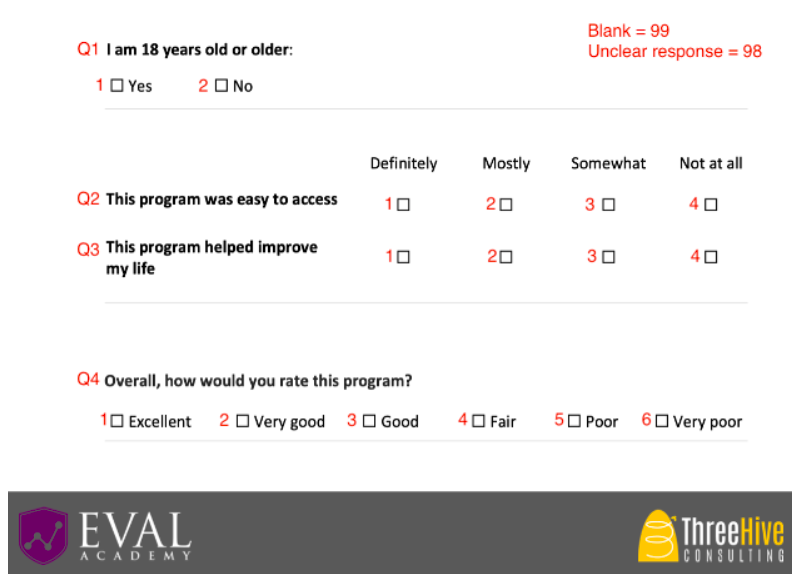
Example survey codebook

Example survey codebook

Moving top to bottom and left to right, simply number the responses sequentially starting at 1. This works when you expect exactly one response to the question (e.g., Yes OR No). However, your survey won’t always be this simple. Below are some examples of how to set up a codebook for more complex questions:


Issue #1: Responses are already numbered

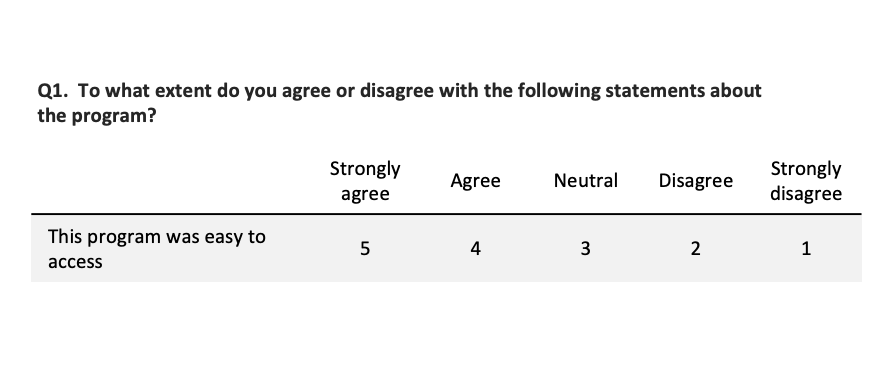
The question options may already be numbered on the survey, and respondents circle the number that applies (like in the image below). In this case, I would recommend following whatever numbering scheme is on the survey for data entry rather than re-numbering the responses. If someone circles 5, enter 5. Simple.
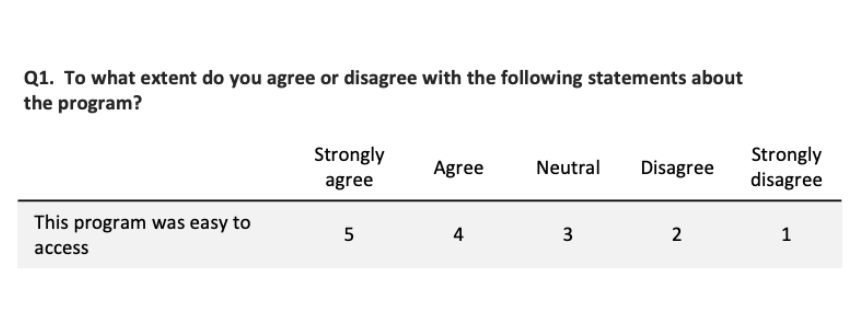
Example survey question: “To what extent do you agree or disagree with the following statements about the program? This program was easy to access.” Responses: Strongly agree (5), Agree (4), Neutral (3), Disagree (2), Strongly disagree (1).

Example survey question: “To what extent do you agree or disagree with the following statements about the program? This program was easy to access.” Responses: Strongly agree (5), Agree (4), Neutral (3), Disagree (2), Strongly disagree (1).

Issue #2: Table or matrix of questions

When you have multi-part questions (like the question matrix below), label each part of the question with lowercase letters starting at “a.” You’ll notice that in this example, there are checkboxes instead of numbers, so I added numbers in red to the codebook from left to right, starting at 1.
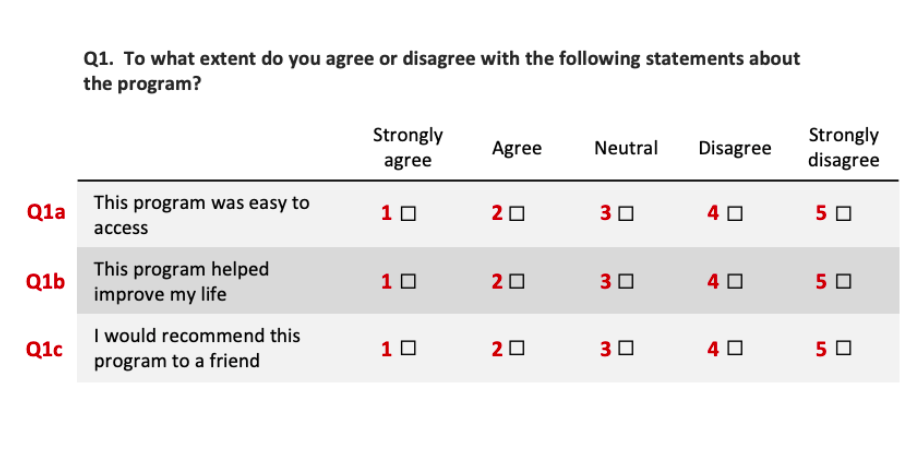
Question 1: To what extent do you agree or disagree with the following statements about the program? This program was easy to access. This program helped improve my life. I would recommend this program to a friend. Responses: Strongly agree (1), Agree (2), Neutral (3), Disagree (4), Strongly disagree (5).

Question 1: To what extent do you agree or disagree with the following statements about the program? This program was easy to access. This program helped improve my life. I would recommend this program to a friend. Responses: Strongly agree (1), Agree (2), Neutral (3), Disagree (4), Strongly disagree (5).

For this question, your data entry spreadsheet would be set up like this:
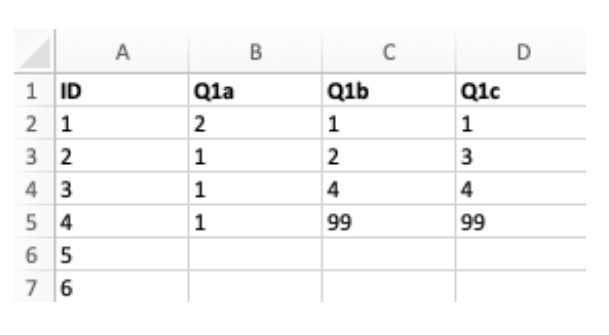
Example data entry spreadsheet

Example data entry spreadsheet


Issue #3: Select all that apply

A common question type is “select all that apply,” for example:
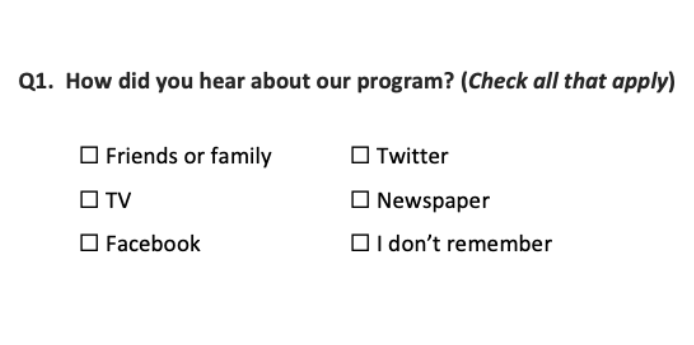
Question: How did you hear about our program? (Check all that apply). Responses: Friends or family, TV, Facebook, Twitter, Newspaper, I don’t remember.

Question: How did you hear about our program? (Check all that apply). Responses: Friends or family, TV, Facebook, Twitter, Newspaper, I don’t remember.

People can check as many options as they like, so the usual system of numbering sequentially will not work. Instead, we treat this question like a question matrix, where each response item is its own “question,” with possible responses being “checked” and “not checked.” The codebook would look like this:
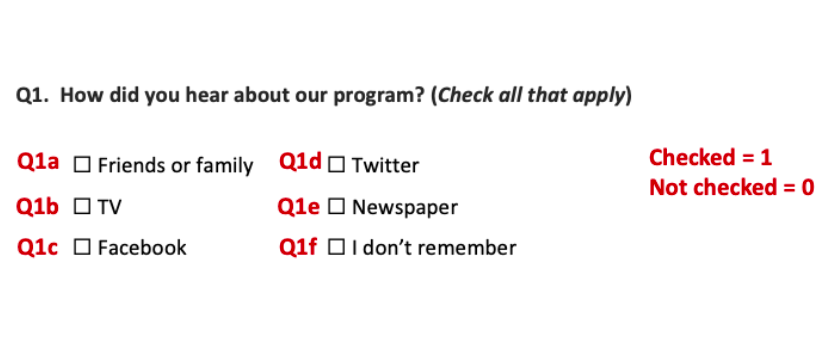
Codebook for question: How did you hear about our program? (Check all that apply). Responses: Friends or family, TV, Facebook, Twitter, Newspaper, I don’t remember.

Codebook for question: How did you hear about our program? (Check all that apply). Responses: Friends or family, TV, Facebook, Twitter, Newspaper, I don’t remember.

This will make more sense with an example. If our survey comes back like this:
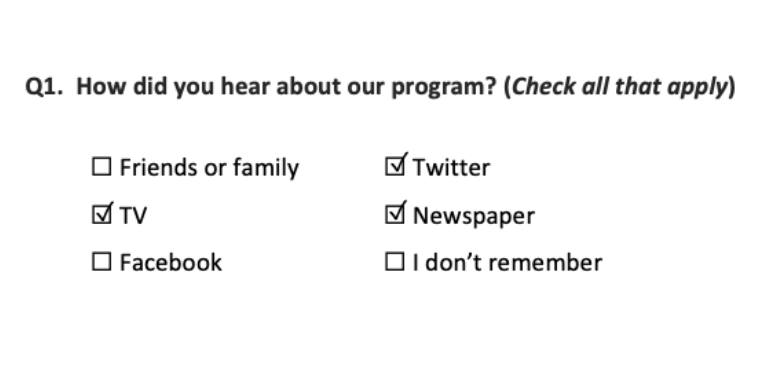
Example of answer to question: How did you hear about our program? (Check all that apply). Responses: Friends or family, TV, Facebook, Twitter, Newspaper, I don’t remember.

Example of answer to question: How did you hear about our program? (Check all that apply). Responses: Friends or family, TV, Facebook, Twitter, Newspaper, I don’t remember.

Reading through the responses in order (from top to bottom, left to right), we get:

  • Friends or family = not checked

  • TV = checked

  • Facebook = not checked

  • Twitter = checked

  • Newspaper = checked

  • I don’t remember = not checked


Using the codebook, these responses translate to:

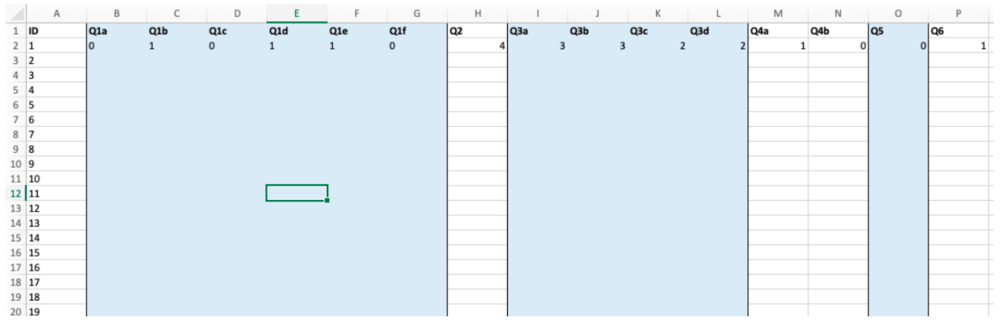
  • Q1a = 0

  • Q1b = 1

  • Q1c = 0

  • Q1d = 1

  • Q1e = 1

  • Q1f = 0


So the data would be entered like this:
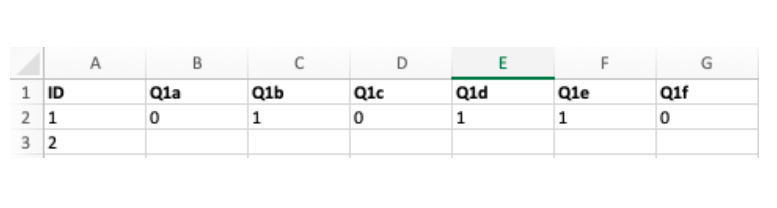
Example codebook

Example codebook


Dealing with unclear responses

If you’ve ever conducted a survey before, you’ve certainly seen some wonky responses. People will circle more than one option when you want them to select only one, they’ll skip questions or even entire pages, they’ll write comments beside their answers, they’ll create new answers and circle those instead… So we need a way to deal with these unclear answers that don’t fit into our nice neat data entry sheet. The key to dealing with wonky responses is to decide on a rule, document it, and apply it consistently.


Issue #4: Circled too many answers

When a respondent selects more than one answer (like checking “Very good” and “Good”), you have a few options:

  1. Code as “unclear” by entering 98. The advantage of doing this is that you do not make any guesses about what the respondent meant. Instead, you mark it as “unclear” and it is excluded from analysis; or

  2. Randomly pick one of the selected answers. You can do this by using a random number generator, or just type “flip a coin” into Google. The advantage of doing this is that you do not exclude as many responses (which may be important if you have a small sample size).


Issue #5: Made up their own answer

Sometimes people will write in their own answer (even when there is not an open-ended question). For example, you might see something like this:
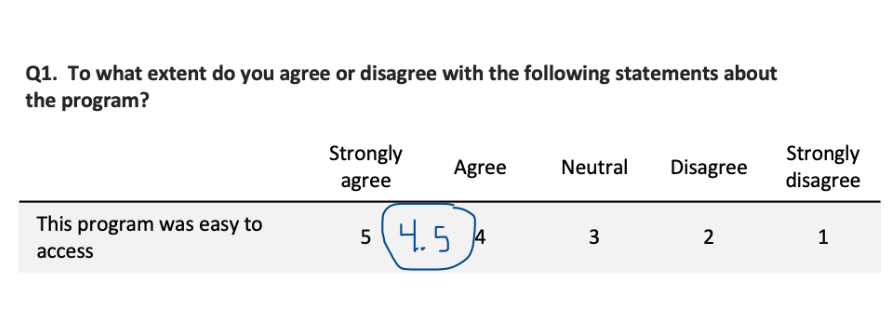
Example of question where the respondent added a new option between “5” and “4” called “4.5” and circled that instead of one of the given responses.

Example of question where the respondent added a new option between “5” and “4” called “4.5” and circled that instead of one of the given responses.

The respondent created their own option (“4.5”) between Strongly agree and Agree (you’d be surprised how common this is). You can’t simply enter 4.5 into the data entry, because that is not one of the allowable responses in the codebook. Instead, you can treat this as if they circled “5” and “4,” and then carry on with the same procedure as when a respondent circles more than one answer. Your options are:

  1. Code as “unclear” by entering 98; or

  2. Randomly pick one of the selected answers (e.g., flip a coin to decide whether to enter “5” or “4”). 

Another example of a respondent creating their own answer is:
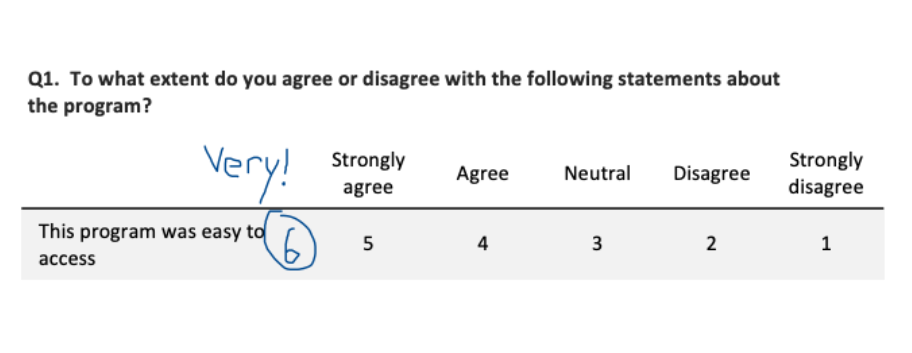
Example of a question where the respondent added a new response after “5” called “6” and wrote “Very!” beside it.

Example of a question where the respondent added a new response after “5” called “6” and wrote “Very!” beside it.

Here, the respondent made an option even higher than “Strongly agree”, which they wrote in as “6” and labeled with “Very!” Your options for data entry are:

  1. Code as “unclear” by entering 98; or

  2. Assume the respondent would “strongly agree” with the statement and enter “5” since it is the next closest response to their answer.


There are a few considerations when choosing an option for this scenario. On the one hand, we want to be careful to maintain the integrity of the original data – “6” is not the same thing as “Strongly agree,” so you may not want to assume that’s what the respondent meant. On the other hand, we might be fairly sure the respondent meant to indicate their agreement – should we try to capture the spirit of their response in the way we code the data? Either way of treating the data could be justified, so it’s important to decide what makes sense for your survey, document the rule, and follow it consistently.


I’ve covered some strategies you can use to overcome common challenges in entering survey data. If you conduct paper surveys, you’re likely to come across complex question types and unclear responses, but with some forethought and planning, you can make sure you’re prepared to deal with these challenges in a consistent way that makes sense for your data. However you choose to deal with complex questions or unclear responses on your survey, the key is to decide on a rule, document your decision (so it can be discussed later in the methods section), and follow it consistently.


Sign up for our newsletter

We’ll let you know about our new content, and curate the best new evaluation resources from around the web!


We respect your privacy.

Thank you!


Written by cplysy · Categorized: evalacademy

May 26 2020

Preventing Mistakes in Survey Data Entry


This article is part of a series: How To Enter Survey Data

Part 1: Three Steps for Painless Survey Data Entry
Part 2: Preventing Mistakes in Survey Data Entry
Part 3: Common Issues with Survey Data Entry (and How to Solve Them)

When entering survey data, it is important that it is accurate, easy to analyze, and fast. The best way to meet these goals is to set yourself (or your data entry people) up for success from the beginning.

The old cliché “garbage in, garbage out” certainly applies to survey data entry. Our analysis can only be as good as our data, so it’s critical that the survey data is accurately translated from paper to spreadsheet. But being extra careful while entering data can only go so far – we get tired, we forget, and we make mistakes. Here are three tools you can use to prevent errors in survey data entry by making your spreadsheet foolproof: 1) data validation, 2) colour-coding columns, and 3) a “count” formula.

If you haven’t already set up your survey codebook and data entry spreadsheet, check out the previous article in this series for instructions on how to do so.


1. Data validation

Data validation is your first defence against data entry errors, and it is very simple to implement. Data validation just means defining which values are allowed in which cells. After you have made the survey codebook and data entry spreadsheet, you can set the validation on a question-by-question basis. I will use this survey question as an example:

Question: To what extent do you agree or disagree with the following statements about the program?  Statement: This program was easy to access.  Responses: Strongly agree (5), Agree (4), Neutral (3), Disagree (2), Strongly disagree (1)

Question: To what extent do you agree or disagree with the following statements about the program?

Statement: This program was easy to access.

Responses: Strongly agree (5), Agree (4), Neutral (3), Disagree (2), Strongly disagree (1)

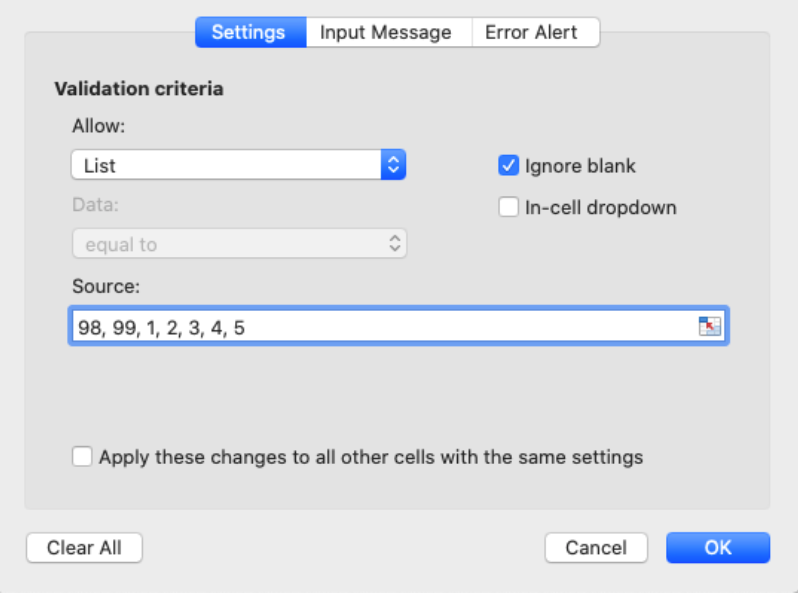
In the spreadsheet for Q1, we want to allow only seven different values to be entered (the five responses 1-5, plus 98 and 99 for “unclear” and “missing/ skipped”). To set up Data Validation in Microsoft Excel, the steps are:

  1. Highlight the Q1 column in your data entry spreadsheet

  2. Click the “Data” tab in the Microsoft Excel Ribbon

  3. Click “Data Validation”

  4. Set Allow to “List”

  5. Set Source to a list of the allowed values separated by commas (see image below)

  6. I choose not to use the “in-cell dropdown” feature because I find it slows down my data entry, but this is up to you.

  7. Click “Ok”

How to set up Microsoft Excel Data Validation to accept a list of allowable responses.

How to set up Microsoft Excel Data Validation to accept a list of allowable responses.

Now that data validation is set up, you will receive a pop-up message warning you if you enter a value that isn’t allowed for that question, which will guard against mis-typed data.


2. Colour-code columns

Colour-coding columns is especially helpful for long surveys. I highlight groups of questions in the same colour (e.g., a matrix containing six questions), which gives your eye a visual cue to make sure you’re still entering data in the correct cells of the spreadsheet. In addition to colours, you can also add borders between sections on the survey. For example:

Excel spreadsheet using colours and borders to differentiate survey sections.

Excel spreadsheet using colours and borders to differentiate survey sections.

By grouping questions together using colour and lines, you provide a visual anchor that helps you keep track of where you are in the data entry spreadsheet.


3. Count cells to make sure you didn’t miss any questions

It’s easy to accidentally skip a question, especially when it is at the end of the page (or maybe the respondent skipped it and you left it blank instead of entering 99). By adding a “count” column at the end of your data entry sheet, you can prevent this mistake. Simply add a column with the Excel formula =COUNTA(*specify the entire row*), then fill this formula down the entire column. This formula will count the number of cells in the row that aren’t blank:

Excel spreadsheet using =COUNTA to ensure all questions have been filled with data.

Excel spreadsheet using =COUNTA to ensure all questions have been filled with data.

In the example, the formula for the first row is =COUNTA(A2:P2). As you can see, if every cell is filled in properly (including the ID column), COUNTA will return the value 16 (because there are 16 non-blank cells). I name the count column “Count (16)” so I don’t forget it is supposed to add up to 16. If you accidentally skip a question, like I did on respondent ID#3 Q1b, the COUNTA value will be less than 16. This is a quick way to check when you reach the end of a survey that you didn’t miss any questions.

If your surveys don’t have ID numbers written on them, it can be very difficult or even impossible to go back and find a survey you made a mistake on. For this reason, I recommend checking the Count column at the end of every survey, or at least every few surveys, so it’s easy to flip back in your stack of surveys and find the culprit. Another option is to write the appropriate ID number on the surveys as you go, which gives you the ability to do quality control more easily.


Bonus Tip: Remember to save!

We all know the gut-wrenching feeling of a program crashing and you can’t remember the last time you saved. To avoid this heartbreak, I do a quick CTRL+S or CMD+S (save shortcut) at the end of every page of a survey – if you’re turning the page, save!


Sign up for our newsletter

We’ll let you know about our new content, and curate the best new evaluation resources from around the web!


We respect your privacy.

Thank you!


Written by cplysy · Categorized: evalacademy

May 26 2020

Three Steps for Painless Survey Data Entry


This article is part of a series: How To Enter Survey Data

Part 1: Three Steps for Painless Survey Data Entry
Part 2: Preventing Mistakes in Survey Data Entry
Part 3: Common Issues with Survey Data Entry (and How to Solve Them)

Arguably the most exciting part about conducting a survey is seeing the results – finally your hard work has come to fruition, and you get to hear what everybody had to say about your program or organization! But before you can get to that step, you need to transform the stack of paper surveys on your desk into useable data.

For some, the thought of survey data entry is a mind-numbing task, but I kind of love it… You get to switch the critical thinking part of your brain off and just focus on one simple task, which isn’t an opportunity we often get in this fast-paced world.

I’m going to share my three-step system for making survey data entry as easy and painless as possible, which comes from my experience designing, entering, and analyzing survey data.

Before you get started entering survey data, you should think about your goals. My priorities for survey data entry are that it is:

  • Accurate,

  • Easy to analyze, and

  • Fast.

The most important job of data entry is that it is accurate. If it isn’t accurate, then forget analysis and speed. Accurate data entry means what ends up in the spreadsheet reflects exactly what was on the survey, every single time.

The next priority is that the survey data is easy to analyze. With some forethought, you can save your data analyst (which might also be you!) a lot of time and headache down the road.

Finally, data entry should be as fast as possible – time is money, after all! But never, ever sacrifice accuracy for speed.

Here are the three steps you can follow to set yourself up for painless survey data entry:

1. Review the survey carefully

Familiarize yourself with the questions on the survey, and the available options. Are there fill in the blanks? Multiple choice? Select all that apply? Most likely there are many question types, and understanding all the different questions is critical to steps 2 and 3. If it’s your first time seeing the particular survey, you might want to sit down and fill out a blank copy as if you were a respondent to get a really good feel for the questions.

2. Create the codebook

You should never be typing out the verbatim responses to each question while entering survey data (e.g., “yes” “yes” “no” “yes”). Instead, assign each response a number (e.g., yes = 1, no = 2) and enter those numbers instead of words. This fulfills all of our data entry priorities: it is more accurate, easier to analyze, and faster.

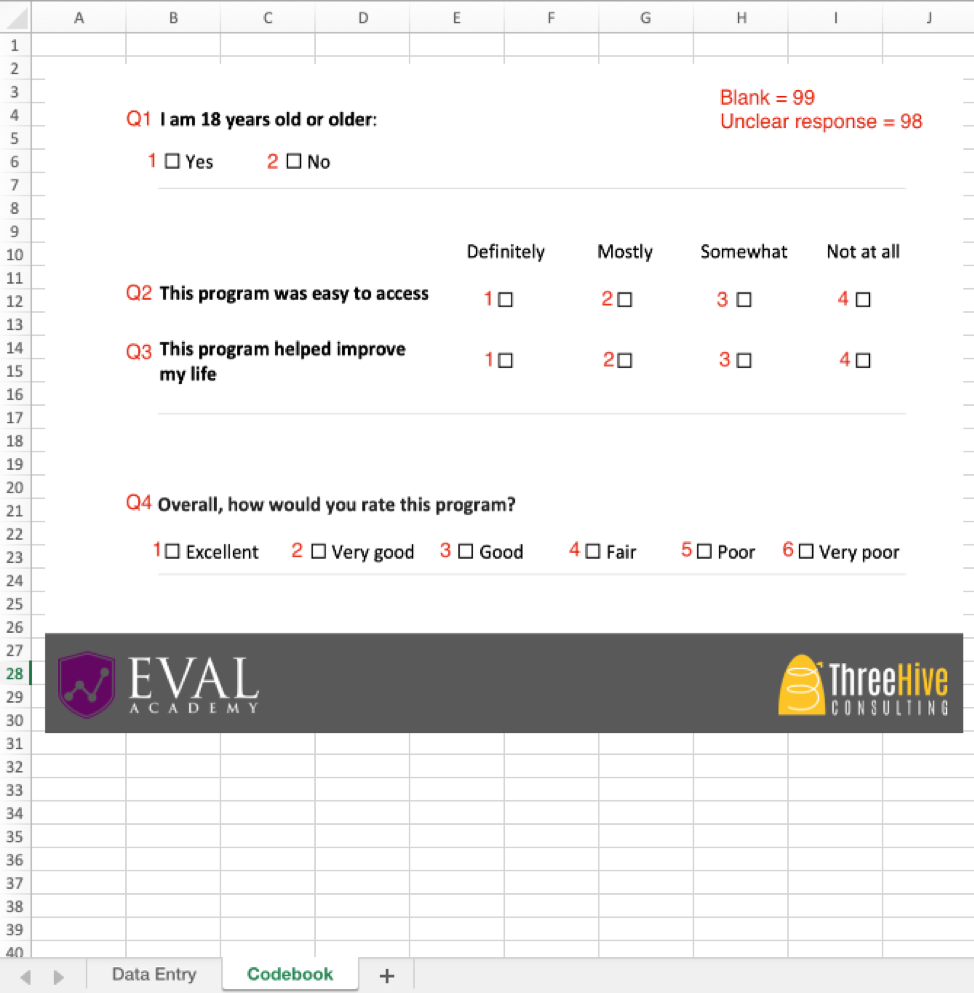
The codebook is your translator between the survey and the data. It tells you (and the analyst) how to turn survey responses into numbers, and back again. A copy of this codebook should live in the same folder as the data entry sheet and be clearly named. For added convenience, I paste a copy of the codebook into the data entry spreadsheet (Step 3) in a tab called Codebook. Here is what a simple codebook looks like:

Example survey codebook

Example survey codebook

The codebook outlines which number should be entered for each response. In this example, if someone answered Yes to Q1, you would enter “1.” If they answered No, enter “2.” You’ll notice I added the question numbers beside the questions – sometimes the paper surveys you receive won’t have the questions numbered, so you should write them into the codebook.

How you assign the response codes is up to you, but I strongly recommend following this system: from left-to-right and top-to-bottom, number the responses sequentially starting from 1. This way, the codes are the same no matter what the question is, which helps you ensure accuracy and speed. By following the same coding system for every question, the data entry person knows that the first response is always “1,” the second is always “2,” and so on. Numbers are faster and more accurate to type than letters because they are all close together on your keyboard’s number pad. Note: there are some exceptions to this rule when it comes to more complex question types, which I will cover in a follow-up article.

When it comes time to analyze the data, you might need to recode the data depending on how it will be analyzed (for example, maybe you want to change all the 1’s back to Yes’s, or change all the 2’s to 0’s). This is quick and easy to do at the analysis stage, and is not very prone to errors as long as you document any changes you make. Trust me, it’s way easier to change all the 1’s to Yes’s at the end than it is to type out “y-e-s” (or even just “y”) during data entry.

You’ll notice that I added “blank = 99 and unclear response = 98.” These are codes you will use when someone skips a question (99) or if they check more boxes than they are supposed to (98). How you deal with missing or unclear responses is up to you – just decide on a rule, document it, and apply it consistently. Entering 99 instead of leaving a blank cell is good practice because then you know for sure that question was skipped by the respondent, and not accidentally missed during data entry. However, do not use 98 and 99 if you are recording a numeric variable like age, because you won’t know if it is supposed to be “99 years old” or “missing data.” In this case, you may want to use 999 for missing data instead. Read more about blanks in data entry in our article “Four Common Data Entry Mistakes (and How to Fix Them)”.

3. Create the data entry spreadsheet

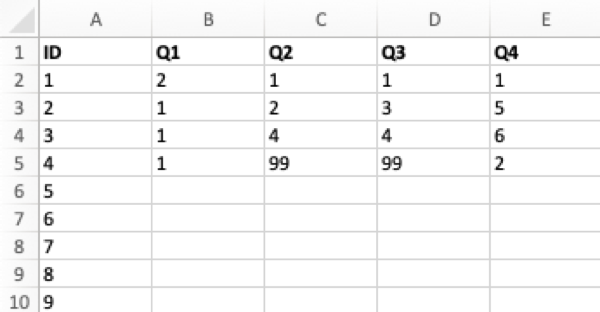
Now that you have the codebook, the data entry spreadsheet is easy to create. Using Microsoft Excel or Google Sheets (or other spreadsheet software) create a new file with one column for each question, plus a column for an identification number (ID#). Each cell will contain one number corresponding to the response to that question. For the above example, the spreadsheet (with some sample data) would look like this:

Example survey data entry spreadsheet

Example survey data entry spreadsheet

In a data entry spreadsheet, each row should always contain all the data for one unique individual. I like to add an ID column and fill the ID numbers all the way down the column before starting data entry. Even if there is no ID number on the survey to begin with, it is a good idea to add it to the spreadsheet because some statistical programs require a unique ID for each respondent. You may also want to manually write the ID numbers on the surveys as you enter them — if you don’t put ID numbers on the surveys, it is very difficult to go back and fix mistakes or do quality control.

When entering data, I keep my right hand on the keyboard’s number pad, and my left hand on the Tab key. Hitting Tab moves you to the right in the spreadsheet (to the next question), and when you get to the end of each survey you hit Enter to move down to the start of the next row. Remember to keep an eye on the screen to make sure you are still entering data in the correct cells.


Now that you’ve familiarized yourself with the survey and set up your codebook and data entry spreadsheet, it’s time to start entering data! This is the part where I turn on a podcast or some music, and let my mind focus solely on the task of data entry. If you follow these steps, you might be surprised at how painless (and even relaxing) data entry can be.

In the next article, I will cover some more advanced survey data entry topics, such as entering complex question types and dealing with unclear responses.


Sign up for our newsletter

We’ll let you know about our new content, and curate the best new evaluation resources from around the web!


We respect your privacy.

Thank you!


Written by cplysy · Categorized: evalacademy

May 25 2020

El cambio de estructural para #Eval4Action: barreras que hacen que nuestro deseo no sea realidad

En Gran #TwitterChat sobre #Eval4Action comenzaba con la pregunta: ¿Por qué la evaluación es un acelerador para lograr los ODS, incluso durante la crisis sanitaria y socioeconómica de COVID-19? Mis respuesta fueron:

La evaluación contribuye a la rendición de cuentas, el aprendizaje y la toma de decisiones basadas en la evidencia en apoyo de (a) la Agenda 2030 y los ODS y (b) de la respuesta #COVID19 a corto, mediano y largo plazo

La #evaluación puede fortalecer aprendizaje y rendición de cuentas para mejorar la relevancia, la coherencia, la eficacia, la eficiencia, la sostenibilidad y el impacto de los procesos hacia los #SDG, incluso durante la crisis sanitaria y socioeconómica #COVID19

Sin embargo, a esta altura del partido, algun@s presentimos ya que solo porque sepamos y comuniquemos (a) lo que tenemos que hacer, e incluso (b) cómo y cuándo se tienen que hacer los cambios, no significa que vayan a hacerse realidad las reformas estructurales para que la evaluación cumpla su teórica función social. Las barreras estructurales están ahí y no son fáciles de sortear.

Aquí algunas de las barreras que hemos ido anotando en este blog, que pueden también aplicarse a las barreras estructurales que no permiten que la función de evaluación cumpla su función social:  barreras (1) para el impacto colectivo, (2) para la colaboración, (3) para la coordinación, (4) para el aprendizaje institucional y la gestión del conocimiento:

(1) Barreras para el impacto colectivo en el sector de ayuda al desarrollo

Hay cuatro barreras importantes e interrelacionadas para el impacto colectivo:

1.“Biznificación” del desarrollo social: La primera barrera es la tendencia del sector del desarrollo de búsqueda de comparaciones en el sector privado, en las dinámicas de los sectores privado y no lucrativo. La principal diferencia es la falta de fuerzas reales competitivas en el sector del desarrollo.

2.Incentivos de medición desalineados: El segundo factor que trabaja en contra de la colaboración es un esfuerzo excesivo en la causalidad y la atribución. Una medida que los líderes de la organización intentan demostrar su responsabilidad y mostrar a sus juntas directivas sus logros, han creado las consecuencias negativas no deseadas.
Esas consecuencias incluyen demasiado enfoque en obtener crédito o en construir una “marca”. Esto ll
eva a un esfuerzo excesivo en la institución individual como la unidad de análisis que en realidad socava la fuerza colectiva.

3.Dinámica de poder: La dinámica de poder entre los financiadores y sus colaboradores más importantes, así como los intermediarios y los beneficiarios, es otro impedimento para una colaboración exitosa. Rodeados de becarios y aspirantes a obtener financiación, las fundaciones viven en una burbuja de positividad.
Esta dinámica se traduce en la forma en la que los usuarios se reparten los problemas compartiendo problemas con sus financiadores. En el peor de los casos, los beneficiarios retienen información crucial de sus financiadores por temor. Los financiadores, a su vez, están protegidos y desconectados, no solo de los beneficiarios, sino también de las personas que deben ser más importantes.

4.Ego: El cuarto factor que conspira para inhibir la colaboración organizacional es el ego pasado de moda:  “Quiero que colabores conmigo, pero no quiero colaborar contigo”. Escuchamos interminables charlas de liderazgo, apalancamiento,  e “influencia sobre otros actores”. Pero  a veces lo que estamos buscando en realidad un buen número de seguidores.
Y aquí está la cuestión: una buena colaboración entre los donantes y  los beneficiarios, del tipo que supera estas cuatro barreras, puede suceder. 
El trabajo colaborativo lleva tiempo y requiere paciencia. En última instancia, superar las barreras para la colaboración tiene que ver con el liderazgo, una concepción de liderazgo que es menos comando y control, más consejo y facilitación.


(2) Algunas barreras para la colaboración: Una de las habilidades de liderazgo clave que se necesitan hoy es la colaboración. Esto no minimiza la importancia del coraje, el optimismo, la motivación, la comunicación, la innovación o el espíritu emprendedor. Pero en el entorno actual, los líderes más exitosos serán aquellos que puedan superar los viejos límites e inspirar a otros a imaginar nuevas formas de colaborar. Esos límites son tanto físicos como mentales, desde la imaginación de nuevas asociaciones, productos y procesos hasta la re-estructuración del flujo de trabajo, el espacio de trabajo, los equipos y los roles.

Para sobresalir en la colaboración, debemos superar algunos obstáculos tradicionales. Los obstáculos de colaboración  pueden existir en cualquier lugar de trabajo, especialmente aquellos con largas historias y tradiciones. Identificar barreras nos ayuda a derribarlas. Aquí están las cuatro barreras para la colaboración:

Distancia: Cuanto mayor es la distancia entre colegas, mayor es la posibilidad de comunicación defectuosa.

Dominio: No colaboramos porque existe una jerarquía real o percibida en el lugar de trabajo. Con los años, el liderazgo ha desarrollado una cultura que parece valorar a un grupo sobre otro.

Disonancia: Se refiere a prioridades en conflicto. Sucede cuando los jefes le dicen a las personas que quieren que todos colaboren, pero, al mismo tiempo, asignan tareas, metas y objetivos a varios individuos y equipos, agendas que varían mucho y pueden variar desde complementarias hasta conflictivas. Las órdenes disonantes desde la gestión son una garantía de que nuestro equipo colapsará.

Incomodidad: Si no te conozco, profesional o personalmente, si no tengo ni idea de cómo haces lo que haces, es menos probable que colabore cómodamente contigo. Puedo ser intimidado por su experiencia o desconocer lo que se necesita para hacer su trabajo. Cuanto más sepamos sobre las habilidades necesarias para todos los aspectos del nuestro sector, mejores colaboradores seremos. L@s gestor@s, se comprometen con una capacitación de calidad. No esperemos que alguien nos invite o nos asigne para  aprender. Todos, comprometemenos a conocer a nuestr@s colegas como personas, no solo como coproductores.


(3) ¿Por qué no nos coordinamos? y  Algunas barreras para la coordinación

Aunque parece intuitiva, “en teoría”, la bondad de la coordinación para contribuir a la eficiencia y eficacia, “en la práctica” normalmente las barreras existentes para la coordinación de los actores de desarrollo son subestimadas. A pesar de la retórica de los grandes manifiestos o agendas, en la práctica, los  impulsores del cambio existentes para la coordinación efectiva de actores implicados no suelen ser suficientes (o suficientemente tenidos en cuenta) para superar estas barreras.

Algunos de estos  impulsores del cambio son: (1) Liderazgo efectivo, (2) Existencia de marcos para el trabajo y capacidades conjuntas, (3) Fortalecimiento de la (a) confianza y continuidad en la comunicación entre los miembros de los espacios de coordinación, (b) seguimiento, evaluación y aprendizaje/gestión del conocimiento de los espacios de coordinación, (c) sistema de incentivos y sanciones a los sujetos de coordinación y (d) transversalización de género en espacios de coordinación.

Una teoría del cambio para hacer que estos impulsores se pongan en juego es crear o fortalecer: (1) En los mandos o gestores senior responsables de la coordinación, por este orden: (a) comprensión, (b) conciencia, (c) apropiación, (d) compromiso y (e) liderazgo para la coordinación, (2) Capacidades / marcos de coordinación conjuntos, (3) Capacidad de autoevaluación de los procesos de coordinación, incluyendo la autoevaluación del adecuado despliegue de incentivos para la coordinación.

La existencia de un marco de responsabilidad mutua (mutual accountability) es un factor clave para que estos incentivos o conductores del cambio para la coordinación funcionen en la correcta dirección.

A continuación enumeramos otras barreras para esa coordinación, y no son pocas:

  • Falta de comprensión colectiva de potenciales objetivos comunes, roles y responsabilidades de los implicados
  • Competición por recursos financieros muy escasos
  • Falta de liderazgo centralizado o descentralizado
  • Demasiados actores
  • Diferentes expectativas (compartir o recibir información, conseguir recursos, controlar…)
  • Falta de valoración en la práctica de la función de coordinación (especialmente por los gestores senior)
  • Falta de valoración de los recursos técnicos, financieros y humanos necesarios (especialmente por los gestores senior): recursos inadecuados
  • Falta de inclusión explícita de la coordinación en los Términos de Referencia del personal
  • Falta de acceso a la información o de gestión de la información/conocimiento
  • Miedo a perder la libertad
  • Falta de confianza
  • Falta de habilidades, conocimiento y experiencia de coordinación
  • Rotación de personal
  • Falta de compromiso con enfoques colaborativos
  • Comportamiento oportunista y preferencia de enfoques bilaterales
  • No inversiones específicas en reforzar la relación de los actores
  • Orientación al corto plazo
  • Pobre capacidad de gestión de relaciones
  • Falta de incentivos o de sanciones
  • Centrado en compartir información y nunca en planificación y ejecución conjunta
  • Todos reconocemos la necesidad de coordinación pero ninguno queremos ser coordinados
  • Falta de seguimiento de los insumos, productos y resultados de los procesos de coordinación
  • Falta de un espacio de mutua rendición de cuentas de los actores implicados

Bueno, pues esto es lo que hace que aunque bonita es, la coordinación es tan quimera…


(4) Barreras culturales para el Aprendizaje Gubernamental e Institucional

En ¿Por qué nuestros gobiernos no aprenden?, todavía a la estela de Nick Milton, observamos que los gobiernos cometen errores, pero ¿por qué no aprenden de estos errores? ¿Por qué seguir repitiendo los mismos errores? Mirando esto en términos de Aprendizaje Organizacional, y comparando con las dimensiones de una Cultura de Aprendizaje, existen varias barreras culturales para el Aprendizaje Gubernamental . Estos son los siguientes:

1.Corto plazo. Este es quizás el mayor problema: que la mayoría o todos los incentivos gubernamentales e institucionales son a corto plazo: La próxima elección, la próxima reunión parlamentaria, el próximo ciclo de noticias. Una semana es mucho tiempo en política, entonces, ¿a quién le molesta pensar con 5 años por delante? Todos los incentivos están a favor de ser decisivos y no deliberativos, de actuar y de ser vistos, y luego seguir adelante. Los incentivos a largo plazo para el aprendizaje y la deliberación simplemente no existen, como lo demuestra la falta de responsabilidad y rendicion de cuentas.

2.Una cultura  del “conocedor/a” en lugar de una cultura “aprendiz/a”. Existen vacíos masivos de habilidades y conocimientos en el gobierno y en las instituciones y, sin embargo,no parece haber un deseo ardiente de llenar estos vacíos. Los tomadores de decisiones parecen confiar en lo que saben que saben, incluso cuando ese conocimiento está desconectado culturalmente y tiene prejuicios intelectuales. Cuando se identifican las lagunas de conocimiento, estas parecen tardar en cubrirse.

3.Falta de honestidad y “decir la verdad al poder”. La naturaleza poderosa, decisiva y ambiciosa de los ministros o dirigentes hace que sea difícil decir “esto nunca funcionará”. Es difícil decirle a un político poderoso lo que no quieren escuchar, o por qué su proyecto favorito está condenado al fracaso.

4.Una falta de desafío a “la verdad o saber aceptados”. Sin este desafío, el problema de el Pensamiento de Grupo nunca desaparece. ¿Dónde estaban los grupos focales, los pilotos, los “defensores de los demonios? ¿Dónde estaba la voluntad de preguntar” nos estamos perdiendo algo”? ¿Nuestras suposiciones resisten el desafío? Sin desafío y discusión, los errores se perpetúan.


Written by cplysy · Categorized: TripleAD

May 25 2020

We Sold (Nearly) Everything to Travel the World with Our 2 Kids. Here’s What Happened Next.

I felt like I had to choose: Be a world-traveling data visualization speaker. Or be a mother.

In spring 2018, we started brainstorming about a lifestyle change.

My speaking opportunities were taking me all over the world—a dream!

But, meanwhile, I had a cute kid at home. And another baby on the way. I didn’t want to miss bath time or bedtime stories.

If only my husband and kids could come along on my trips, I sighed.

Sure, my husband had vacation time. But I traveled almost every single week. Sometimes I’d city-hop, speaking in two, three, or four cities consecutively before heading back home. I wanted to be with my family all the time.

Should I quit my job entirely? We considered it.

Should my husband quit his job entirely? We considered it.

We did the spreadsheet math a dozen times. My husband’s job came with benefits, a pension, and a top secret security clearance. Should he really give up his career… for mine? Would he regret it? Would he resent me? These were months-long discussions.

In the end, my job was more than a job. And his wasn’t.

Realizing We Could Live Anywhere

It took another year of planning until my husband resigned.

Why so long? Freedom can freeze you. With his job out of the picture, we realized we could live anywhere.

We considered staying put in our suburb of Washington, D.C. But after 30 years there, we were both ready for a change.

We considered moving back into our two-bedroom condo in Charlottesville, Virginia. We bought the condo as college students in 2007, and we had rented it out since then, paying extra until it was paid off entirely. It was tempting to move into our paid-off condo, be able to pay the rest of our bills simply off my YouTube money, and just sit around and enjoy life. We entertained this idea for months. In the end, we wanted a new adventure, and decided to sell our condo entirely.

There was also the key issue of my speaking schedule. It didn’t make sense to have a home base if I’d be in a new city every week.

I’ve practically lived out of suitcases for six years, and I’ve loved it. Some people need roots. Others need wings.

We considered full-time RVing. Who doesn’t love the great outdoors?? I dreamed about the national parks we could visit with our kids. We’d taken four cross-country motorcycle trips together in our twenties and the open road was calling. The only obstacles to RVing: I need 24-hour internet. And, I didn’t have the luxury of time to drive around from city to city; I needed to fly between cities.

We wanted to live like RVers… but without the RV.

In January 2019, we decided to become full-time Airbnb-ers! The plan was to travel wherever my job took us for at least two years—until our older daughter started kindergarten. We had the perfect window. We decided to go for it.

Downsizing Our Belongings

In spring 2019, much to our surprise, our rental property and our primary residence both sold within weeks of listing them for sale.

We sold, donated, and discarded as much as possible. We listed items on Facebook Marketplace and Craigslist. We held “indoor yard sales” in our garage on the weekends. We’d been downsizing for five years, since discovering minimalism, but still had so much remaining.

We thought about the handful of items that we’d be willing to pay to store for the 2+ years we’d be traveling, and pared our belongings down to a handful of favorites. My husband’s toolbox. Quilts our mothers had made for us.

We sold our motorcycles. Our bicycles. Nearly all of the kids’ toys (they’d developmentally grow out of those toys after two years of traveling). Couches. Rugs. Picture frames. Two TVs.

We sold my office furniture. My filing cabinets. That spare box of electronics wires that was sitting in the closet for years. I used the dining room table as my desk for two months.

We sold the mattress out from under us, and then slept on camping mats for a week.

I KonMari-d my clothes until my walk-in closet was down to carry-on luggage + a few bins of seasonal items for our storage unit.

I went from dozens of pairs of shoes to three: a pair of everyday tennis shoes, a pair of flip flops, and a pair of black leather shoes for speaking events. I’d been downsizing my closet for years, but there was still so much remaining.

In April 2019, we waved farewell to Dakota’s preschool and said hello to “Daddy School,” aka #WorldSchooling,  which is the term for homeschooling that takes place in and around the world.

A person sitting at a table

Description automatically generated

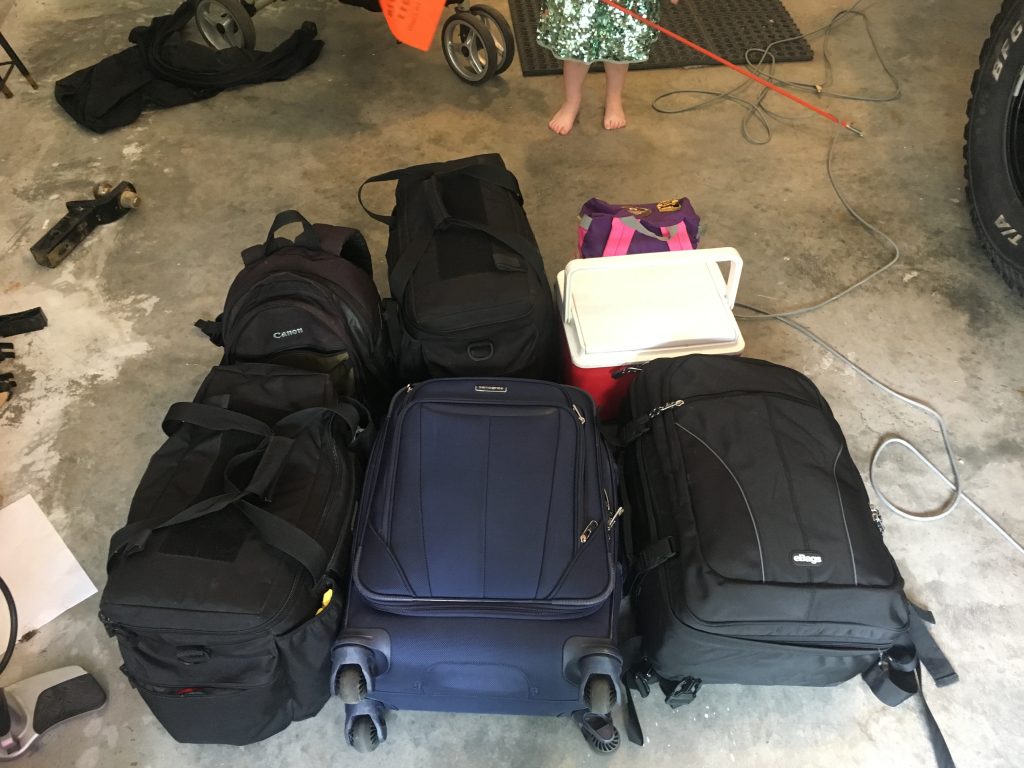
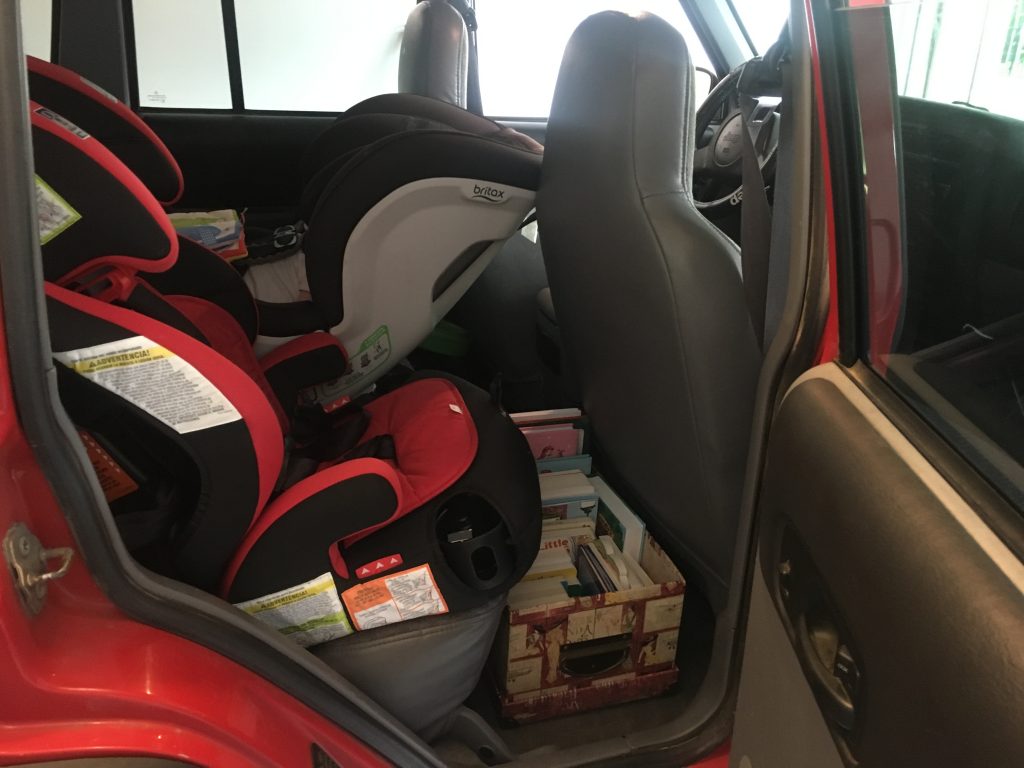
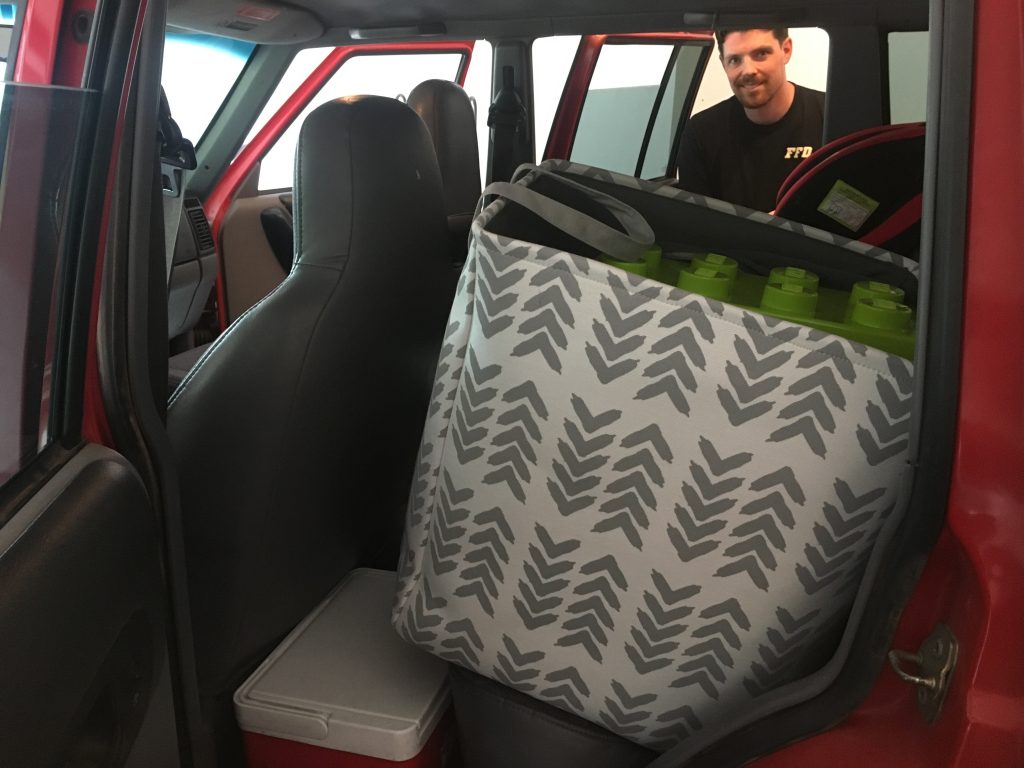
We practice-packed our Jeep to see whether our one-bag-and-one-backpack-each stuff would even fit…

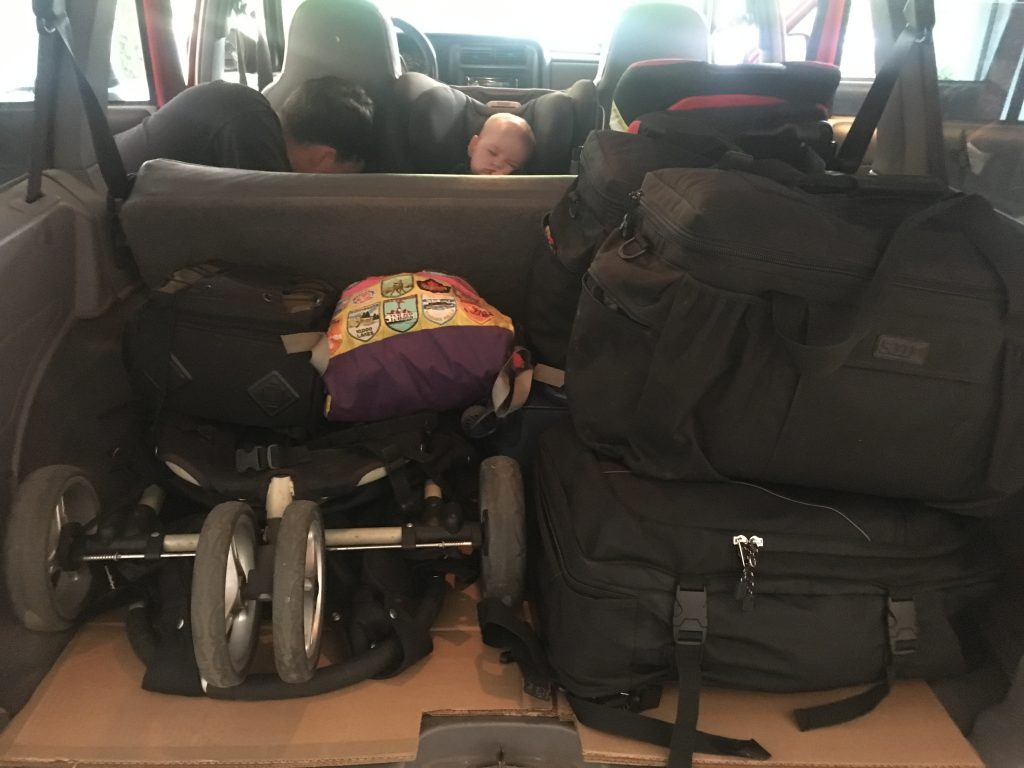
… and we fit all our bags into our Jeep with space to spare. Phew!

We even had space for a box of books…

… and a bin of toys.

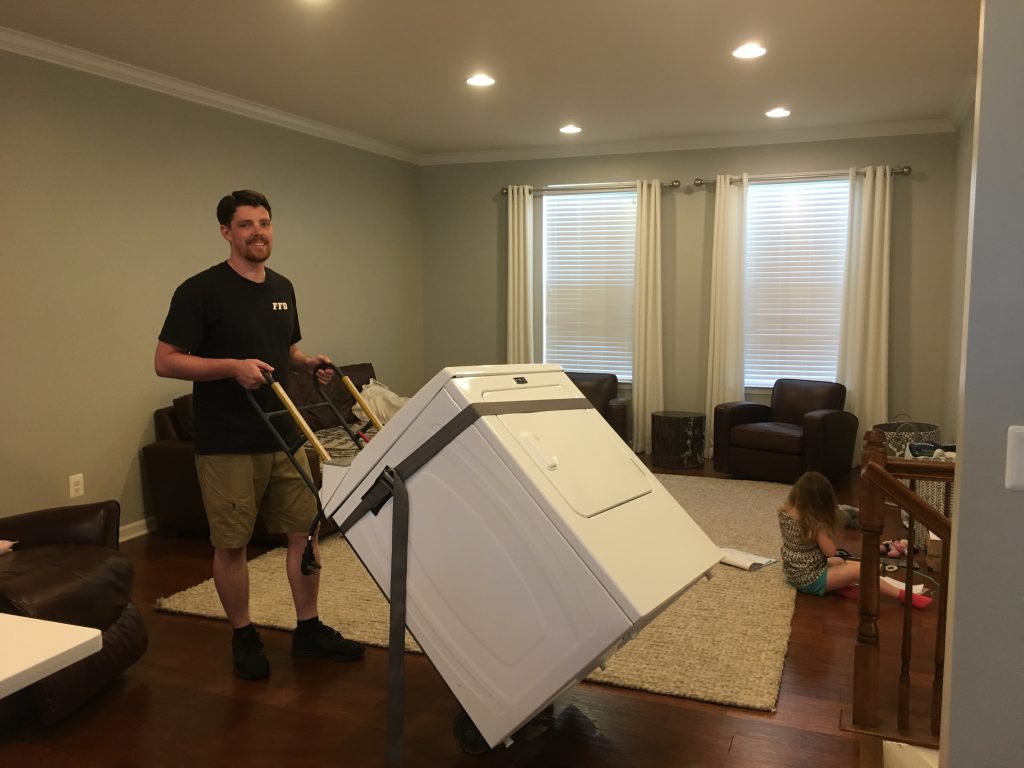
We survived carrying the world’s heaviest washer and dryer down three flights of stairs (with only one little knick in the drywall)… and into a trailer… and across town to their new owners.

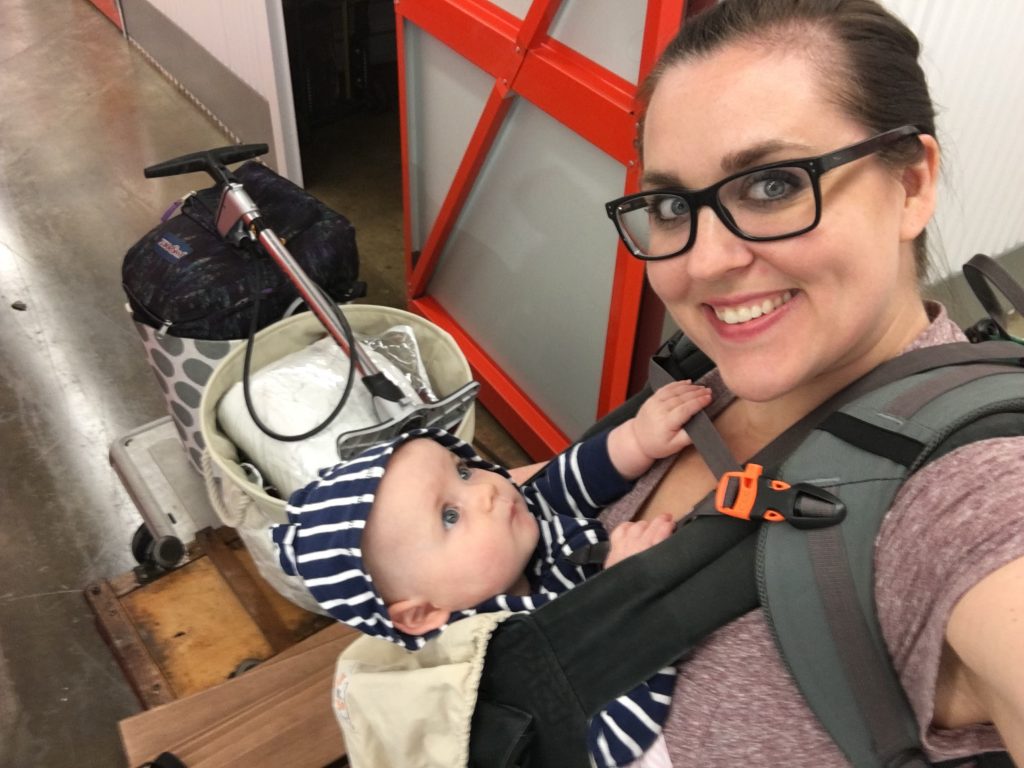
We pushed carts and carried stuff and carried backpacks and carried babies x 1 million to get our remaining stuff into a 10x10x6 storage unit.

Then we closed the door to our storage unit.

We waved goodbye to our home.

And we drove away for the last time.

May 2019: The Beginning of Full-Time Travel

It was time for our biggest adventure yet!

We’d always loved Florida since honeymooning there years earlier. And who doesn’t love Disney? Florida was the perfect place to start our trip.

We spent our first five weeks in Daytona Beach, where I continued running Depict Data Studio from my “home” office at our Airbnb on the beach. I’d work during the day while my husband took the girls on field trips to nature preserves, museums, and libraries.

I took days off so we could visit Disney together.

We watched the minor league baseball team on $1 beer nights.

We toured the local chocolate factory more times than I can count because they always give you free samples at the end. 🙂

We watched a SpaceX launch from our balcony.

Our four-year-old learned to hold her breath underwater in the pool.

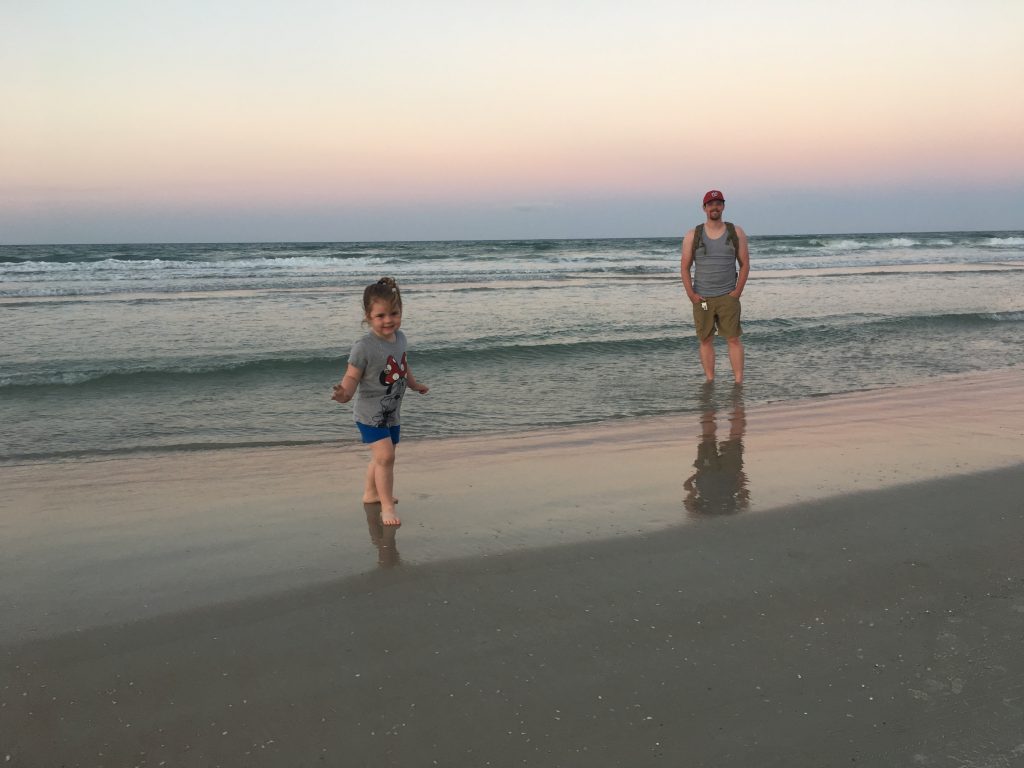
We buried ourselves in sand.

We danced along the beach every night.

And I woke up next to my angels every morning.

We spent a week in Boise for a conference and a client training.

I flew to Indianapolis by myself for a quick 24-hour trip.

We spent two weeks watching the dolphins swim in the bay in St. Petersburg, Florida.

I finished building my Great Graphs: Design Principles course from the Airbnb during the day, and we relaxed in the hot tub at night.

We spent a week in New York while I was there speaking; fell in love with “Lady Liberty;” and still mimic her pose today.

We drooled on our chin in Central Park.

We went back to the D.C. area for my job.

We spent three consecutive weeks in downtown Atlanta while I was there speaking—our fourth trip to Atlanta that year—and took field trips to the most amazing aquarium we’ve ever been to.

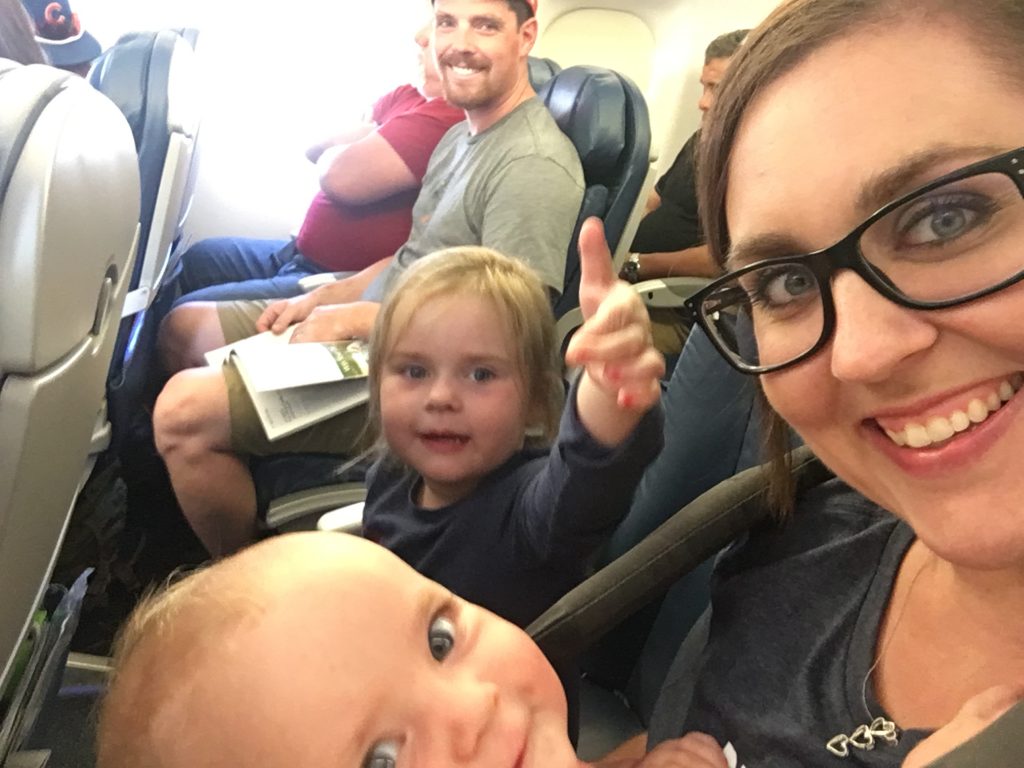
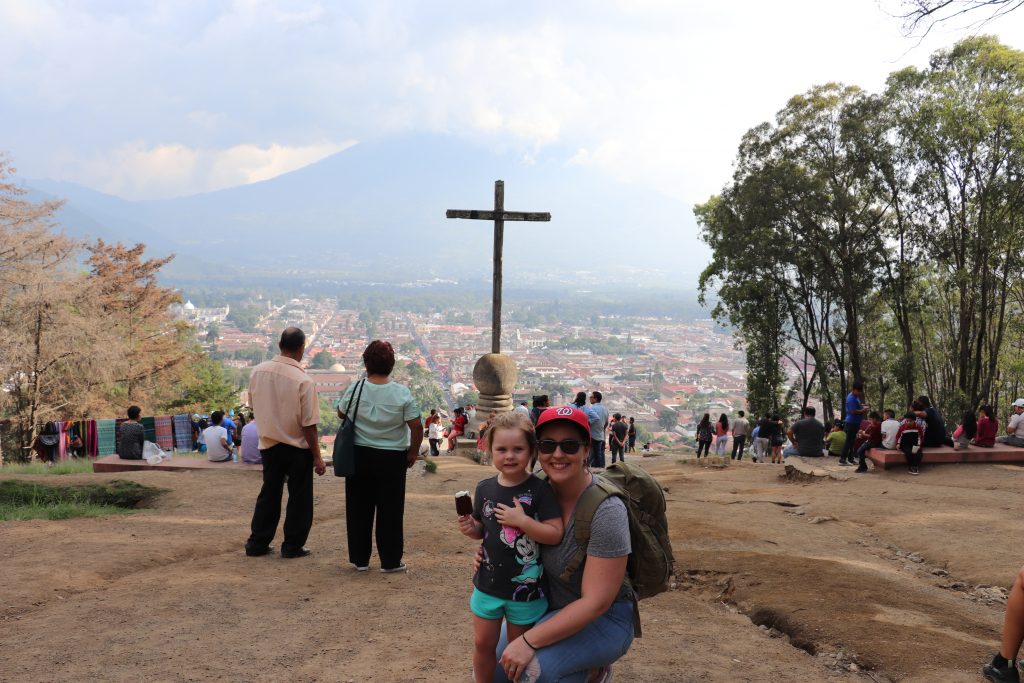
We flew to Guatemala to teach data visualization.

I took a day off to ride horses up the side of Volcan Pacaya, and we roasted marshmallows at the top with our new German friend.

I took another day off to skip rocks in Panajachel.

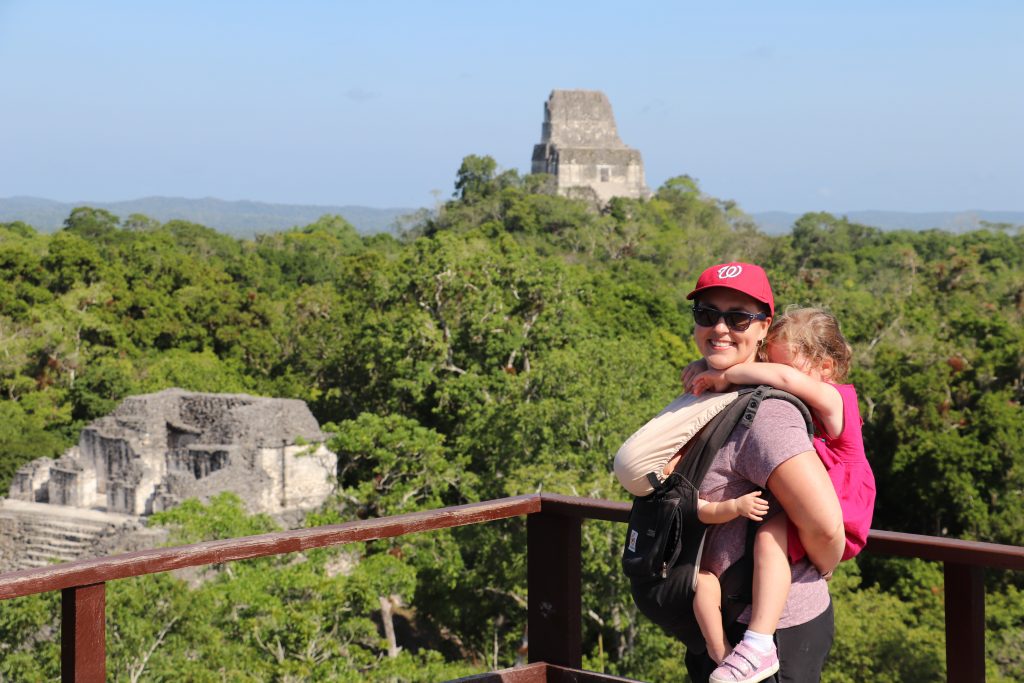
We carried the world’s heaviest children through Tikal because there were just too tired to walk another step.

Our children felt their privilege. A few hours later, we got food poisoning.

We flew back to Atlanta again.

We celebrated my husband’s birthday in Zambia while I was there teaching data visualization. And then he got food poisoning. On his birthday.

We let the Zambian kids touch our girls’ “yellow hair” when they asked, because they’d never felt that texture before.

We flew from Africa to Canada so I could speak with a few groups there. I had–you guessed it–food poisoning. I remember looking at my bloated-so-bad-it-hurts stomach and thinking: “Oh, this what the term distended means.”

We celebrated our girls’ birthdays in Nova Scotia.

We rented a house along the beach, and roasted marshmallows in our fire pit every night.

My dad flew from D.C. to Nova Scotia to spend time with us for two weeks.

I designed and recorded my entire Report Redesign online course while looking out at the ocean.

I woke up next to my angels every morning.

We flew back to Washington, D.C. for work and to see family.

We went trick-or-treating in downtown Madison, Wisconsin while I was there speaking.

We explored childrens’ museums in Illinois while I was there keynoting a conference.

We drove to Chicago and I took a day off for exploring, and then we started our four-month-adventure in Southeast Asia. (!!!)

We packed the essentials. One carry-on suitcase and one backpack each, plus our stroller and baby carrier. We left everything else in our Jeep, which we parked at my dad’s house for the winter.

We enjoyed a stopover in Taipei.

We took the kids on tuk tuks on three different continents.

We watched Frozen 2–several times–at the movie theaters in Thailand.

We took them on field trips to museums and aquariums.

We ate breakfast, lunch, and dinner together every day from food carts.

We learned Thai dancing.

We went to carnivals.

Fish nibbled on our feet.

We celebrated my birthday and Thanksgiving.

I designed and recorded my entire Dashboard Design online course in Bangkok.

We assumed we’d take weekend trips to Thai beaches, but stayed in Bangkok for an entire month straight, because it was that magical.

We made friends in downtown Hanoi while I was there teaching data visualization.

View this post on Instagram

A post shared by Ann K. Emery 📊 (@annkemery) on Dec 7, 2019 at 2:23am PST

We washed our clothes and hung them on the balcony to dry.

Then it started pouring before we put the clothes away, so we re-washed and re-dried again and again and again.

I spent 30 minutes working up the nerve to cross the street to walk to work each morning because there really is that much traffic.

We spent a weekend cruising in Ha Long Bay.

View this post on Instagram

A post shared by Ann K. Emery 📊 (@annkemery) on Dec 9, 2019 at 3:38am PST

I took a day off work to explore the Golden Bridge outside of Da Nang.

View this post on Instagram

A post shared by Ann K. Emery 📊 (@annkemery) on Dec 14, 2019 at 6:39am PST

We made best friends in every city.

We spent our December evenings strolling along the beaches in Da Nang.

We soaked up the magical lanterns in Hoi An.

We figured out Tokyo’s subway system, the most advanced public transportation system we’ve ever seen.

We bought hats and gloves, because after spending the past two months in Thailand and Vietnam, Japan’s winter was freezing.

We cooked dinner on our one-burner stove in our Tokyo apartment.

We didn’t have an oven for our entire four months in Southeast Asia. We had no idea how to cook with the local ingredients. The grown-ups each lost 25 pounds. (Then we gained it back during quarantine.)

We spent Christmas Day in Tokyo Disneyland. And then went back four more times because it was that magical.

We went up the Tokyo Tower, which our four-year-old still refers to as the Eiffel Tower, oops.

I started designing and recording my Powerful Presentations online course.

I woke up early and stayed up late to speak on podcasts and do client consulting calls.

We spent New Year’s Day in Osaka.

View this post on Instagram

A post shared by Ann K. Emery 📊 (@annkemery) on Jan 1, 2020 at 3:51am PST

We drank butter beer at the Wizarding World of Harry Potter in Osaka.

We got our adrenaline pumping in Japan’s reptile cafes.

View this post on Instagram

Practicing living fearlessly, one python at a time 🐍

A post shared by Ann K. Emery 📊 (@annkemery) on Jan 19, 2020 at 4:30am PST

We flew to Seoul and instantly felt at home in the Washington, D.C.-esque vibe.

We marveled at the enormity and sophistication of Seoul.

I recorded more lessons for Simple Spreadsheets in between client consulting projects.

Our four-year-old joined the scooter gang at the playground across the street from our apartment.

We marveled at the parents’ patience as they taught us to say Korean greetings.

We felt so at home in Korea that we considered staying an entire year and enrolling our kids in school there.

And then, as soon as it began, it was time to cut out trip short and come home.

In January, we had become aware of the virus when our trip to Beijing was abruptly canceled.

By early February, Seoul started shutting down. Our Airbnb closed, along with most hotels, and we had nowhere to go. Delta booked us an immediate flight home, we shoved our clothes in our suitcases, and left a few hours later.

We spent three weeks in Oregon to visit my husband’s family.

I recorded interviews with data experts during the day while my husband ran Daddy School and visited his grandma and cousins.

We flew to California where I keynoted a conference, making sure to visit downtown San Francisco for a few hours before we headed to the airport.

I led workshops in the Washington, D.C. area.

Then the world paused.

We hunkered down in Orlando where our healthcare plan is based. If/when we need a hospital stay during this hellish pandemic, it’ll be cheaper to be sick here than anywhere else.

And then we hunkered down some more.

I never had big dreams to collect passport stamps. It was simply more practical to bring the family around the world with me on work trips vs. be homesick and feel like I was missing everyday moments like bath time. So we may not be traveling anywhere exotic right now… but that was never the point.

View this post on Instagram

A post shared by Ann K. Emery 📊 (@annkemery) on Apr 15, 2020 at 8:15pm PDT

What It’s Like Not Having a Home… During a Pandemic

We had initially planned to travel for two years (until our oldest daughter starts kindergarten).

But, one year into our two-year journey, this chapter has closed.

Am I frustrated that the virus ended my dreams of traveling with my family? Yes.

Am I grateful that we had the opportunity to travel at all? Absolutely.

It’s difficult for any family to hunker down and stay indoors for months, but it’s even more difficult when you’re in a rental that’s not your own. I need basic things, like a desk.

With nowhere to go, we’re buying a house!

We envisioned buying a house in Florida after two years of travel, so our timeline has simply been pushed up a year.

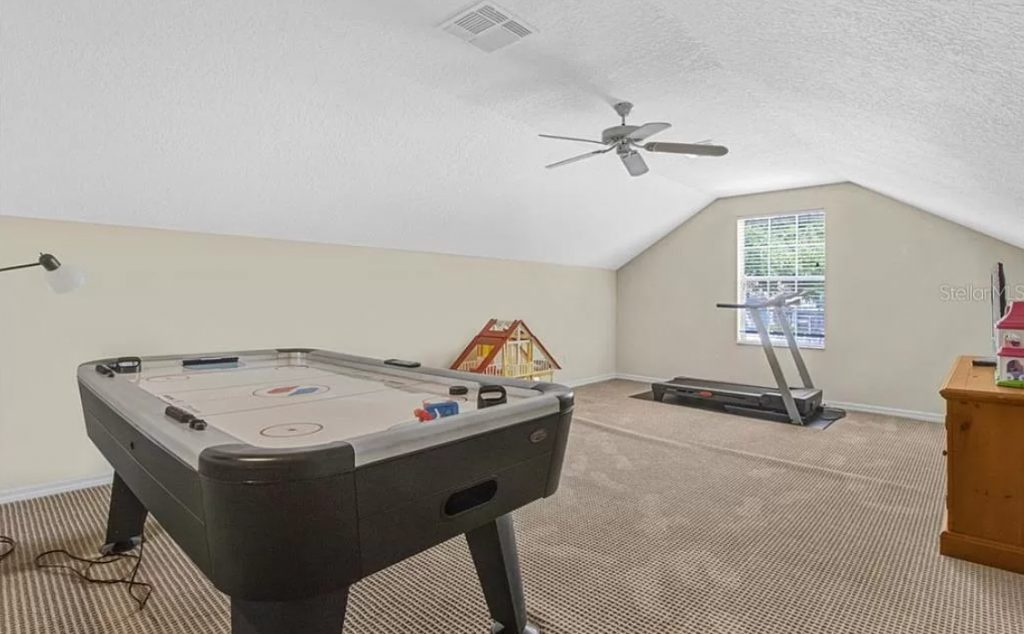
Do you see the window above the garage? Say hello to the new Depict Data Studio world headquarters! I can’t wait to start remodeling the studio space.

My Goal

I’m not here to convince anyone to sell all your stuff and travel the world.

This lifestyle is a perfect fit for my family. It could be a terrible fit for you.

My goal is to open your eyes about what’s possible.

Five years ago, I listened to a podcast where the guests were able to live anywhere they wanted because they could work remotely from their laptops. I was exposed to the terms “geoarbitrage,” “digital nomads,” and “full-time travel” for the first time.  

I remember thinking, “Oh, that’s nice. For them. But that’s n/a for me.”

But then… surprise! A few years later, as we were brainstorming how to continue doing my traveling job and have quality family time, the solution was simple: Geoarbitrage. Digital nomads. Full-time travel.

It’s also terribly sad to close this chapter of our lives so abruptly, and I want to commemorate it before moving on the next stage.

Frequently Asked Questions

Do you have health insurance? Yes, through healthcare.gov. It’s hella expensive, and was the #1 factor that kept my husband in his salaried job for so long. In the end, we decided that life is short. He resigned, and we paid for healthcare out of pocket.

How do you get mail? We pay for a mail forwarding service. There are dozens of companies that handle mail forwarding for nomadic families like RVers and cruise ship employees.

Do you have a driver’s license? Yes, we have domicile in Florida.

Florida—so you don’t pay state income taxes? And we get discounted Disney tickets.

Isn’t it expensive to travel full-time? No, it’s the same price as our previous life in a suburb outside of Washington, D.C. Some things are more expensive and other things are less expensive. For example, Airbnbs cost less than our old mortgage, and we don’t pay for any utilities since they’re included in the Airbnb fee. But healthcare is more expensive. I’m a spreadsheet person so I’ve tracked our household budget for years, and the overall cost of regular life vs. full-time travel is almost identical.

Isn’t it hard to travel with two young kids?? Sometimes, but they’ve figured it out. Kids are stronger and more resilient than we give them credit for.

Aren’t your kids… missing out??? Lololololololololololl what?

You look like you’re actually happy? Because I am.

It doesn’t seem like the pandemic has affected you much. No, aside from stealing my livelihood, cutting my dream of world travel in half, and fearing for the health and safety of everyone on the planet, I’m doing fine.

How did you figure all this out? YouTube and Instagram.

Wait, what? I still have so many questions. I share the behind-the-scenes details of what it’s like to travel and run a business in my Instastories: https://www.instagram.com/annkemery/

Was It Worth It?

I don’t miss our houses.

I don’t miss our cars.

(I do miss my bicycle! And my desk.)

I don’t miss the DVDs or TVs.

I don’t miss my pantyhose, purses, or shoes.

But I would’ve missed their childhood.

A few months of hustling to downsize our belongings… for a lifetime of dancing together on the beach. What a fair trade.

Written by cplysy · Categorized: depictdatastudio

  • « Go to Previous Page
  • Go to page 1
  • Interim pages omitted …
  • Go to page 259
  • Go to page 260
  • Go to page 261
  • Go to page 262
  • Go to page 263
  • Interim pages omitted …
  • Go to page 304
  • Go to Next Page »

Footer

Follow our Work

The easiest way to stay connected to our work is to join our newsletter. You’ll get updates on projects, learn about new events, and hear stories from those evaluators whom the field continues to actively exclude and erase.

Get Updates

Want to take further action or join a pod? Click here to learn more.

Copyright © 2026 · The May 13 Group · Log in

en English
af Afrikaanssq Shqipam አማርኛar العربيةhy Հայերենaz Azərbaycan dilieu Euskarabe Беларуская моваbn বাংলাbs Bosanskibg Българскиca Catalàceb Cebuanony Chichewazh-CN 简体中文zh-TW 繁體中文co Corsuhr Hrvatskics Čeština‎da Dansknl Nederlandsen Englisheo Esperantoet Eestitl Filipinofi Suomifr Françaisfy Fryskgl Galegoka ქართულიde Deutschel Ελληνικάgu ગુજરાતીht Kreyol ayisyenha Harshen Hausahaw Ōlelo Hawaiʻiiw עִבְרִיתhi हिन्दीhmn Hmonghu Magyaris Íslenskaig Igboid Bahasa Indonesiaga Gaeilgeit Italianoja 日本語jw Basa Jawakn ಕನ್ನಡkk Қазақ тіліkm ភាសាខ្មែរko 한국어ku كوردی‎ky Кыргызчаlo ພາສາລາວla Latinlv Latviešu valodalt Lietuvių kalbalb Lëtzebuergeschmk Македонски јазикmg Malagasyms Bahasa Melayuml മലയാളംmt Maltesemi Te Reo Māorimr मराठीmn Монголmy ဗမာစာne नेपालीno Norsk bokmålps پښتوfa فارسیpl Polskipt Portuguêspa ਪੰਜਾਬੀro Românăru Русскийsm Samoangd Gàidhligsr Српски језикst Sesothosn Shonasd سنڌيsi සිංහලsk Slovenčinasl Slovenščinaso Afsoomaalies Españolsu Basa Sundasw Kiswahilisv Svenskatg Тоҷикӣta தமிழ்te తెలుగుth ไทยtr Türkçeuk Українськаur اردوuz O‘zbekchavi Tiếng Việtcy Cymraegxh isiXhosayi יידישyo Yorùbázu Zulu