• Skip to main content
  • Skip to footer
  • Home

The May 13 Group

the next day for evaluation

  • Get Involved
  • Our Work
  • About Us
You are here: Home / Archives for allblogs

allblogs

Feb 15 2022

Finding the Right Sample Size (the Easy Way)

How many respondents do we need to take our survey? Whether it be survey respondents, program participants, or any other group of interest, evaluators are often posed with these “how many” questions. That is, what sample size is required to glean meaningful insight from the data being collected? 

The answer: it depends. 

Sample size determination depends on the questions being asked and the resources (e.g., time and money) allocated to answering these questions. However, there are tools available to calculate an estimated sample size that is large enough to provide statistically viable results, while small enough to be manageable. 

This article will briefly define sample sizes, their importance, and how to calculate them (or how to use a tool to calculate them).

These suggestions are valid for simple project designs (e.g., survey, administration data). Other resources should be consulted for more complex, research-based programs.  


Population v. Sample

Before getting to the calculation of sample sizes, we need to first be clear on the difference between a population and a sample. 

Population

A population includes all observations, or members, within a group of interest. For example, if we are interested in staff engagement within an organization, the population would include all staff within said organization. Further, if we were interested in staff engagement within the marketing department of the same organization, our population now becomes all marketing department employees. 

Sample

A sample is one or more observations (i.e., samples) taken from a population. Using the example above, if the organization employs hundreds of employees, it may be difficult to survey all staff. Therefore, we would take a random sample of staff across the organization in hopes that the sample is representative of the population. 

In most instances, sampling an entire population is not feasible. That is why smaller samples are taken from populations. These samples should be large enough to detect statistical differences within the data, but small enough as to not drain all program resources. The number of samples taken from a population is effectively the sample size. 


The importance of sample sizes 

Sample sizes are important for detecting statistically significant outcomes from your data. Generally, small sample sizes are less representative of the population of interest.

Small sample sizes are more variable and increase the likelihood of rejecting a hypothesis (i.e., fail to detect differences). On the other hand, large sample sizes are more likely to produce better statistical results but come at the cost of increased resource use and, potentially, ethical concerns from sampling more people or subjects than necessary. 

Small sample sizes

Pros:

  • Easier to collect 

  • Less resource intensive 

Cons:

  • Increased variability (e.g., outliers may skew results) 

  • Sampling is less reproducible (e.g., resampling less likely to produce similar results) 

  • Increased likelihood of accepting a false hypothesis (i.e., smaller sample sizes may detect significant differences in the data where no significant difference exists within the population) 

Large Sample Sizes

Pros:

  • Less variability (e.g., outliers less likely to skew results) 

  • Sampling is more reproducible (e.g., resampling likely to produce similar results) 

  • Increased likelihood of accepting the correct hypothesis

Cons:

  • More difficult to collect 

  • More resource intensive 

  • Ethical concerns (i.e., is it ethical to collect data from thousands of people where dozens or hundreds would suffice?) 

However, selecting the appropriate sample size is not as simple as choosing a random number. Sample sizes should be large enough to get accurate, statistically significant results, yet small enough to not overburden the project.


Estimating sample sizes (The Easy Way)

There are numerous methods for calculating sample sizes. The easiest way is to simply use a pre-made tool (check out our free sample size calculator HERE). 


Sample size calculator

Like many online calculators (Calculator.net or Survey Monkey), we use Cochran’s sample size formula (Cochran, W. G., 1977) to estimate sample sizes. Read Finding the right sample size (The Hard Way) for the statistics behind the calculation or use a sample size calculation tool for a quick and hassle-free sample size estimate.  


Sample size is not all that matters

Estimating a statistically significant sample size will help improve the validity of your analysis and results. However, sometimes these sample sizes will not be met due to logistics, ethics, or some other external constraint. Does this mean that your data are not valuable? Not at all. 

There will be times when you are unable to get the desired estimated sample size. While this may limit the statistical power of any statistical tests run on the data, it does not negate the data. The feedback on a survey can provide valuable insights, regardless of statistical significance. And perhaps generalizing to the general population is not necessary. The goal of the survey may be more relevant to a single time point or program, and the results are less about generalizability and more about getting direct feedback from a program. 

For example, when evaluating staff satisfaction using a survey, you may have a population of 100 and an estimated population size of 80 (assuming a 95% confidence level, 50% population proportion, and 5% margin of error). However, when you get the surveys back, you only receive 60 responses. This does not invalidate your results. While running statistical analyses may be limited by the sample size, you are still able to draw some insights from the data. You can get an understanding of satisfaction and dissatisfaction among the respondents which may reflect the current satisfaction of most staff. But generalizability may still be an issue. This is where triangulating your data can help. If you have other data (e.g., other outcome data, interviews, focus groups) that corroborate the results of the survey, you can have more confidence in the validity of the survey results. Tying in other quantitative or qualitative results with the survey data strengthens your findings and provides more confidence that the survey results are generalizable. 

Therefore, sample sizes should be addressed on a case-by-case basis. Make efforts to understand the needs of your evaluation, survey, or program to make the best decision with the data you were able to capture. What questions are you trying to answer and are you looking to generalize these answers at a population level? If not, there is likely some wiggle room in how many samples you should collect. However, using sample size estimate provides a “nice to have” where possible, as it will strengthen the conclusions drawn from your analysis. 


Sample sizes play an important role in detecting statistically significant outcomes. However, many factors play a role in estimating appropriate sample sizes.

This article provides some tools and formulae for estimating sample sizes for most basic project designs, such as surveys and administration data collection.

These tools will provide estimates for collecting appropriate sample sizes to glean meaningful statistical outcomes from the data.


Sign up for our newsletter

We’ll let you know about our new content, and curate the best new evaluation resources from around the web!


We respect your privacy.

Thank you!


References:

Cochran, W. G. (1977) Sampling techniques (3rd edition). New York: John Wiley & Sons. 
 

Written by cplysy · Categorized: evalacademy

Feb 15 2022

What’s in it for Me?: Evaluating Stakeholder Engagement

Last fall, I joined an ad-hoc group to strategize around Black maternal health and abortion access. During our initial meeting, one member asked, “How will this be different from what’s currently being done?” In the marketing and advertising world, there’s the question “What’s in it for me?” (WIIFM for short). “What’s in it for me?” […]

The post What’s in it for Me?: Evaluating Stakeholder Engagement appeared first on Nicole Clark Consulting.

Written by cplysy · Categorized: nicoleclark

Feb 14 2022

Creating Reports for Grant Deliverables Using Excel Dashboards

Josephine Engels is an Evaluation Specialist at Mental Health America of Greater Houston.  She enrolled in our Dashboard Design course and is sharing how she uses her new skills in real life. Thanks for sharing, Josephine! –Ann

—

Are you tired of text heavy reports to summarize grant findings?

Do you want to update the look and feel of your reporting templates?

Save time and energy by using static Excel dashboards to design your grant deliverables. 

Your program data will come to life before your eyes and your readers will thank you. 

Read on to learn more about my journey implementing static dashboards in a non-profit context.

Dashboard Design Course Comes to the Rescue

New to dashboard design, I enrolled in Ann K. Emery’s Dashboard Design course to help tackle an upcoming grant report with many moving parts. 

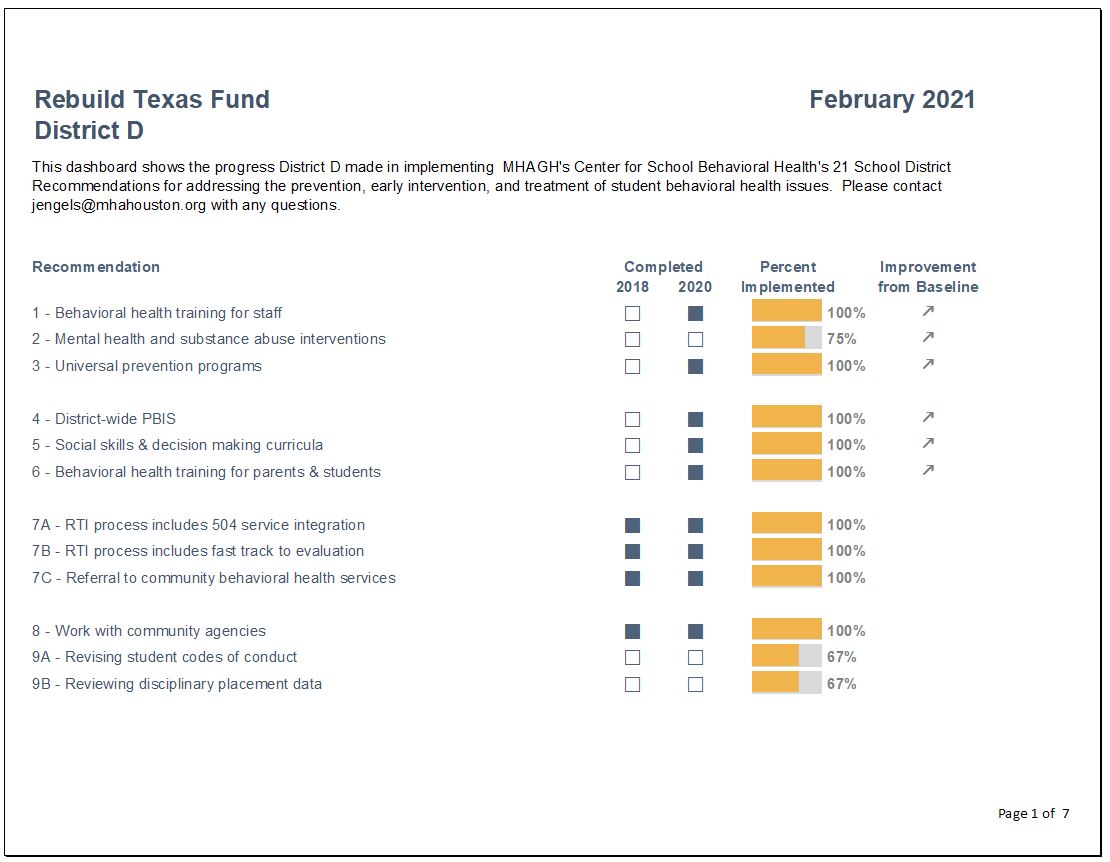
Mental Health America of Greater Houston’s (MHAGH) Center for School Behavioral Health (CSBH) received a two-year grant from the Rebuild Texas Fund in 2018 to help 9 school districts in the Greater Houston Area address emerging behavioral health needs from Hurricane Harvey and improve their ability to respond to future disasters. 

My Challenge: 9 School Districts x 21 Recommendations

To assess school district capacity for addressing student behavioral health needs, CSBH uses a rubric with 21 recommendations for addressing the prevention, early intervention, and treatment of behavioral health issues in students. 

My challenge was to show the progress each of the 9 Rebuild Texas school districts made implementing the 21 recommendations from start to finish of the grant.  

Using Static Dashboards to Track Progress Over Time

Cue the entrance of a tool that saved me time and created a great looking end-product: static Excel dashboards.

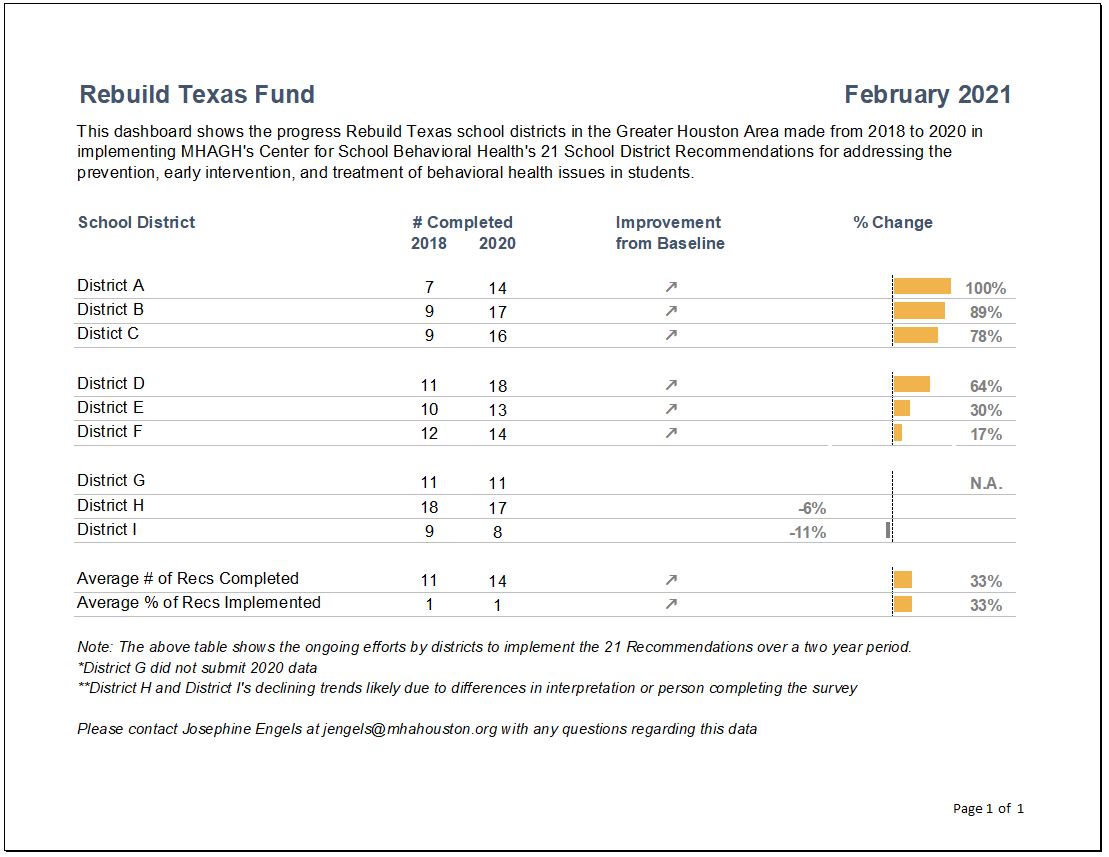
Here’s how I created two different styles of dashboards: A project overview, and individual report cards for each district.

Dashboard Showing the General Overview

To create a general overview tracking school district progress, I did the following:

  • Clustered school districts in groups of 3 and added grey lines for easier reading.
  • Used the start and end years to list how many recommendations were completed.
  • Inserted trend arrows to show which districts had improved.  I decided to remove the arrows for neutral or declining trends to simplify takeaways and make the report less “busy” for the reader.
  • Inserted deviation bars to show percentage of change from start to end.
  • Ordered results from largest to smallest amount of change.

Individual District Report Cards

I then created individual district report cards by:

  • Inserting checkboxes to indicate recommendation completion.
  • Replacing deviation bars with progress bars to show the depth of implementation of each recommendation.
  • Including grey shading in the background of the progress bars to indicate progress remaining.
  • Inserting trend arrows to further indicate improvement since there might have been progress in implementation even though the recommendation was incomplete.

Recommendation-by-Recommendation Summary

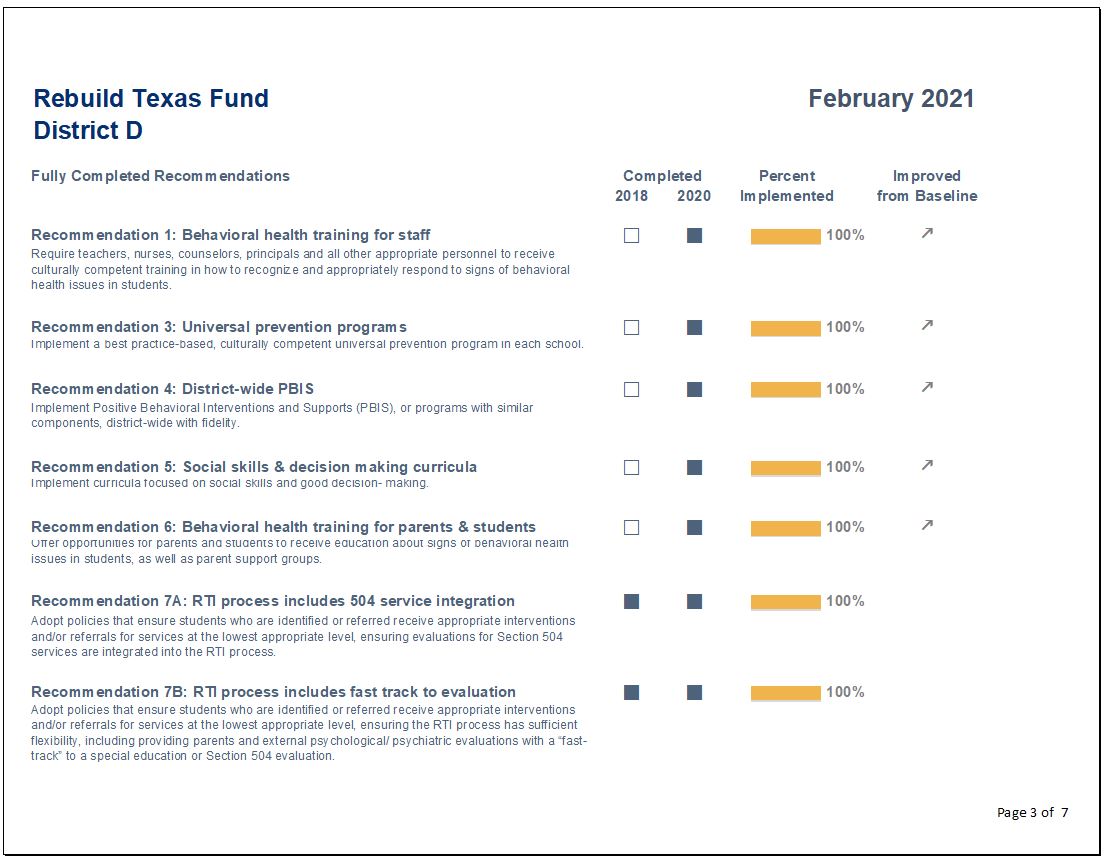
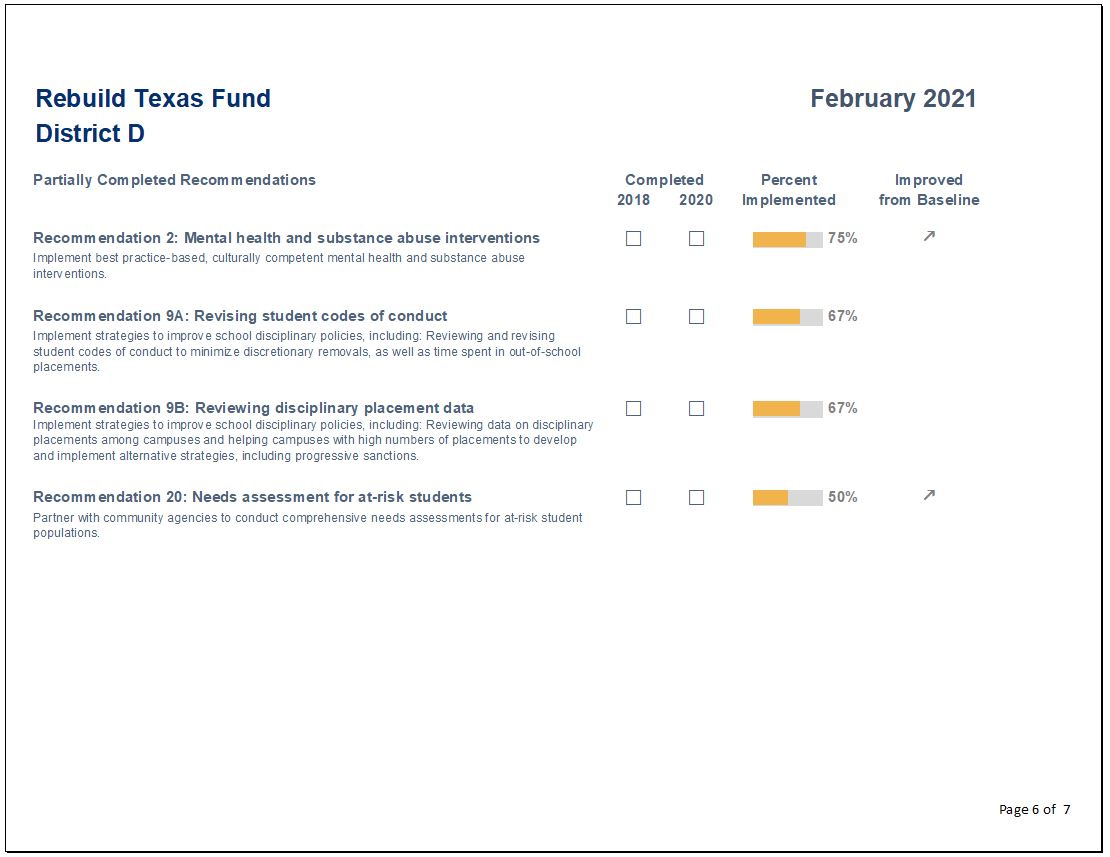
I also included a recommendation-by-recommendation summary, which was categorized by fully and partially completed recommendations.

Conclusions Section

Finally, I created a section for conclusions to inform the reader of the progress made as well as areas for future improvement. 

Lessons Learned

Here are three lessons learned.

Excel is so Versatile

Excel is much more versatile than I thought.

There are so many functions in Excel that I was underutilizing, so many hidden treasures. 

The amount of visualization that can be done with the conditional formatting command alone was eye opening. 

Why pay more for expensive software when Excel can do the work?

Save Time Using Only One Software

Transferring work from Excel into other products can be overkill when you can just do it all in Excel. 

Save time by designing single or multi-page reports in Excel. A cinch after taking the Dashboard Design course.

Formatting Matters

This course helped me break bad habits and reconsider my assumptions. 

Here are some formatting takeaways:

  • There is such a thing as using too much bold text.
  • Consider using landscape view when designing reports. It’s easier on your reader not to have so many items crammed into a narrow portrait view.
  • Use more white space, less is more.
  • Webdings and Wingdings font, who knew?

Colleague Reception

While I enrolled in the Dashboard Design course to help me with a very specific project in mind, I have since designed static dashboards for all of my organization’s program areas and am only getting started! 

My colleagues have given very positive feedback, as the dashboards have made it easier to analyze their program data more comprehensively. 

They especially appreciate one-pagers that can be shared with different stakeholders, including board members and program collaborators. 

Upcoming Goals

Next on my list is using automation to create a series of matching goal tracking dashboards that let programs see their progress toward grant metrics by funder.  I am embracing automation in 2022! 

I’ll also be visualizing accounting data to help programs get a better understanding of their funding use. The areas for application within our organization are endless.

I hope other non-profit professionals working with data will be able to take advantage of this wonderful opportunity. 

Connect with Josephine Engels

LinkedIn: https://www.linkedin.com/in/josephine-engels-mhagh/

Written by cplysy · Categorized: depictdatastudio

Feb 14 2022

How to use Calendly to schedule interviews like a pro

Scheduling can be a nightmare. We have all had the experience of trying to schedule a time to meet with someone and the subsequent cascade of back and forth availability emails that ensue. Now multiply that by the number of people you need to interview in your evaluation (we are currently working on an evaluation where we are interviewing up to 60 people!).

Back in the day, we would have built a healthy line item in our proposal to account for the time required to schedule all those people. However, about three years ago we discovered a tool called Calendly that changed our interview scheduling process for the good.

This article describes how to use Calendly to schedule interviews in three simple steps.


What is Calendly?

But first, a bit more about Calendly. Calendly is a scheduling platform that allows you to set up and book meetings in a seamless, integrated way.

How does it do that you ask? First, Calendly connects to your calendar, so it automatically knows your availability. Second, it allows you to create ‘events’ and specifics around that event. For example, if you need to recruit people for a 30-minute interview you would set up a ’30-minute interview’ event.

Calendly also integrates with a number of other platforms like Microsoft Teams to automatically insert meeting links into meeting invites.

Still not completely sure? Let’s walk through three steps for how to schedule 30-minute individual interviews.


Steps to schedule interviews in Calendly 

Step 1: Create an Event in Calendly 

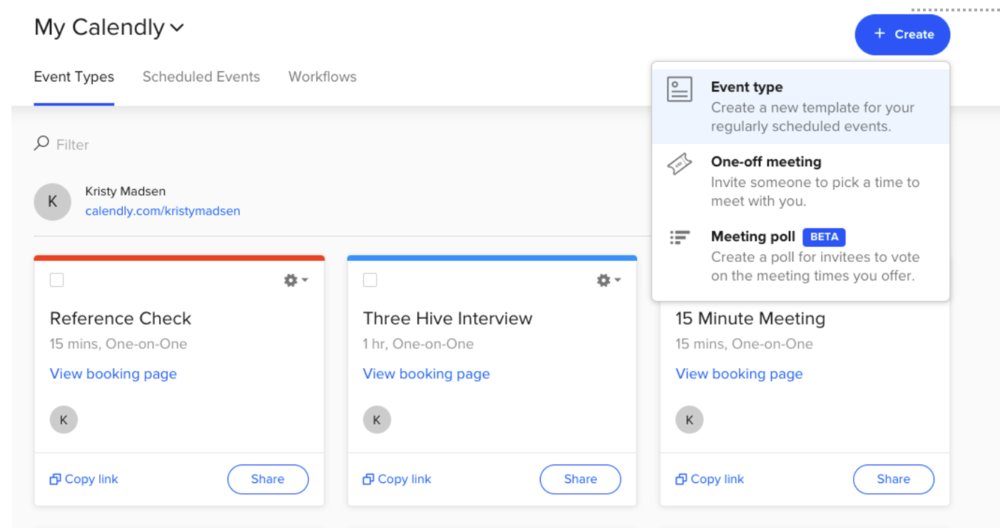
Sign-in to your account. Select the ‘Create’ button. It will give you the option to create an Event, choose a One-off meeting, or create a Meeting poll. Select ‘Event type.’ 

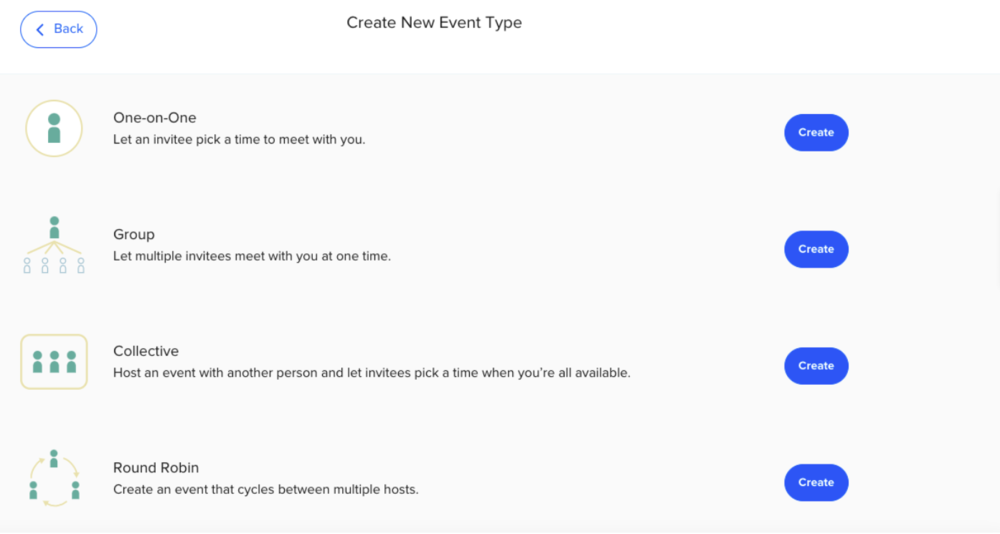
After selecting ‘Event type’ a window will open that will give you four different Event options.

For scheduling one-on-one interviews, you would choose the One-on-One option at the top. However, if you have multiple people on your team who would be conducting the interviews, then you would select the Round Robin feature. The Round Robin feature allows interviewees to see the availability of all the interviewers on your team whose calendars you have synced to Calendly. The other options, Collective and Group, could be used if you were setting up group interviews.  

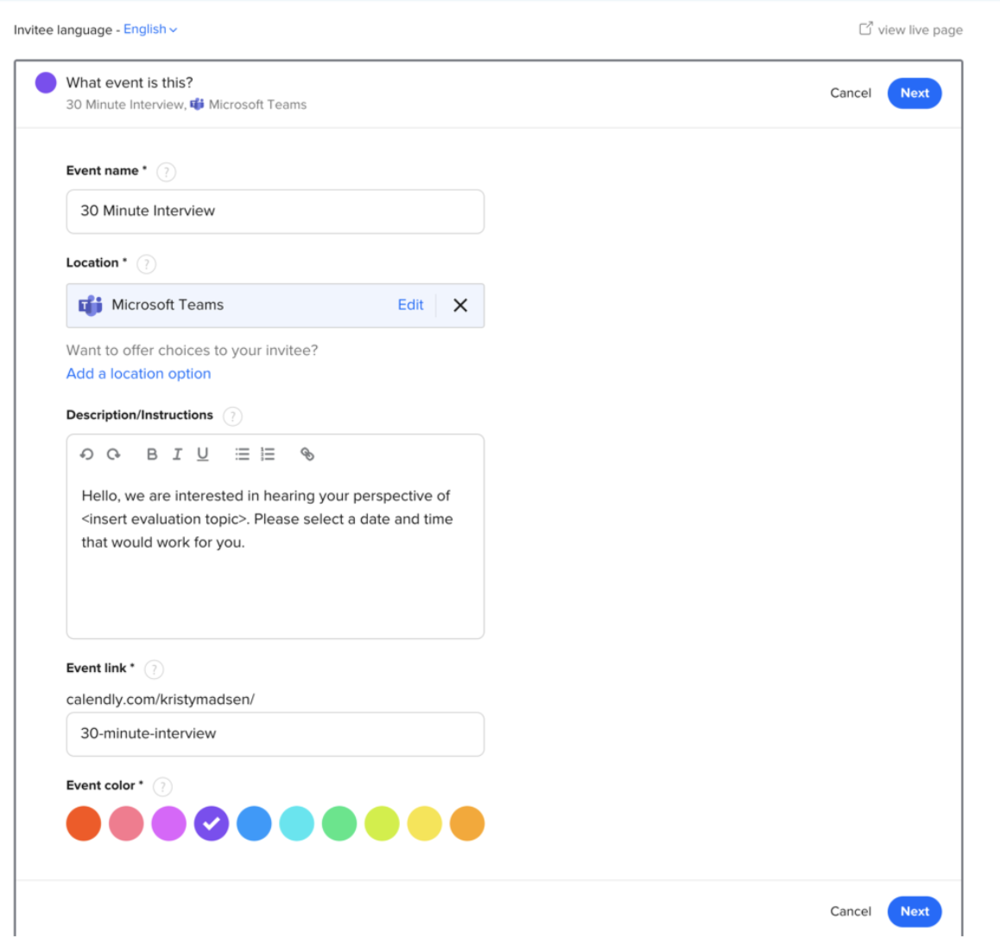
Once you select the One-on-One option, a window will open where you can insert the details of your Event, including the event name, location and description. For the location, a drop down menu will appear that will give you the option to choose a physical location, phone call, or various online options (e.g., Google Meet, Microsoft Teams, Webex, Zoom, GoToMeeting, etc.). Alternatively, you can even select an option that asks the interviewee to select the location (remember when we did things in person?). 

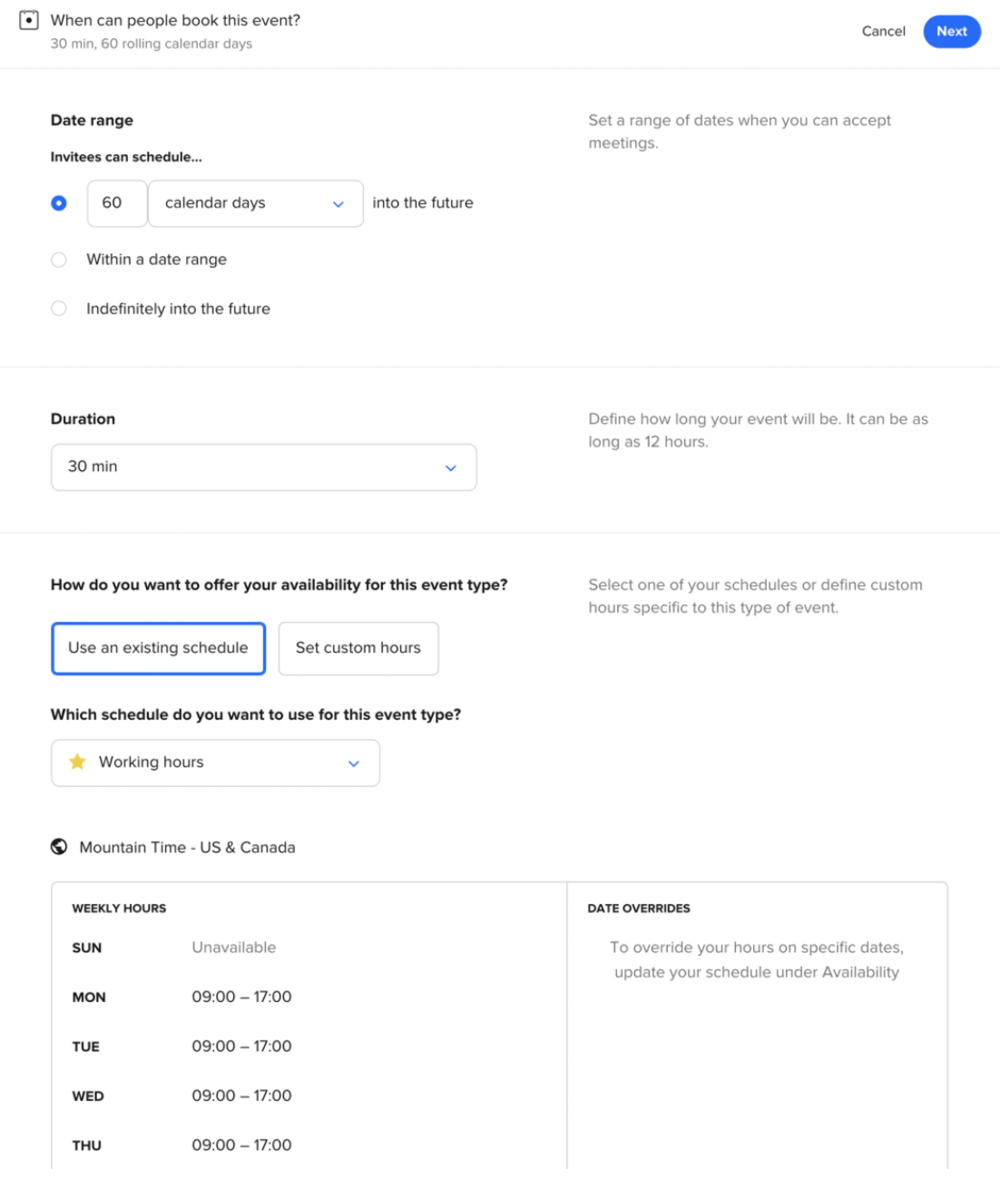
When you hit ‘Next,’ another window will open where you can customize when interviewees book their interview. For example, if you need to complete the interviews in the next 30 days then you could indicate that. This is also where you could set the days and times people could choose for their interview, including date overrides (maybe you plan to take a day off!). You probably don’t want people to book back-to-back interviews, since some interviews can run long. To avoid back-to-back scheduling you can add time before or after an event to give yourself some buffer.

Once you’ve set up all the details for interviews you will have a custom Calendly link that is ready to share with your interviewees.

Step 2: Insert your Calendly link into the interview recruitment material 

When Three Hive conducts interviews, we often prepare an information sheet that outlines the specifics of the interview, including what we are asking interviewees to do (download a template here). This information sheet is a great place to insert the Calendly link.

However, if you are recruiting people via email you will also want to insert the link into the body of the email that goes out to potential interviewees (make sure to bold it and make it visible so people don’t miss it!) An additional option is to add a scheduling page to your website. We haven’t done this for interview scheduling yet, but it is an option in Calendly. 

Step 3: Send out the Calendly link  

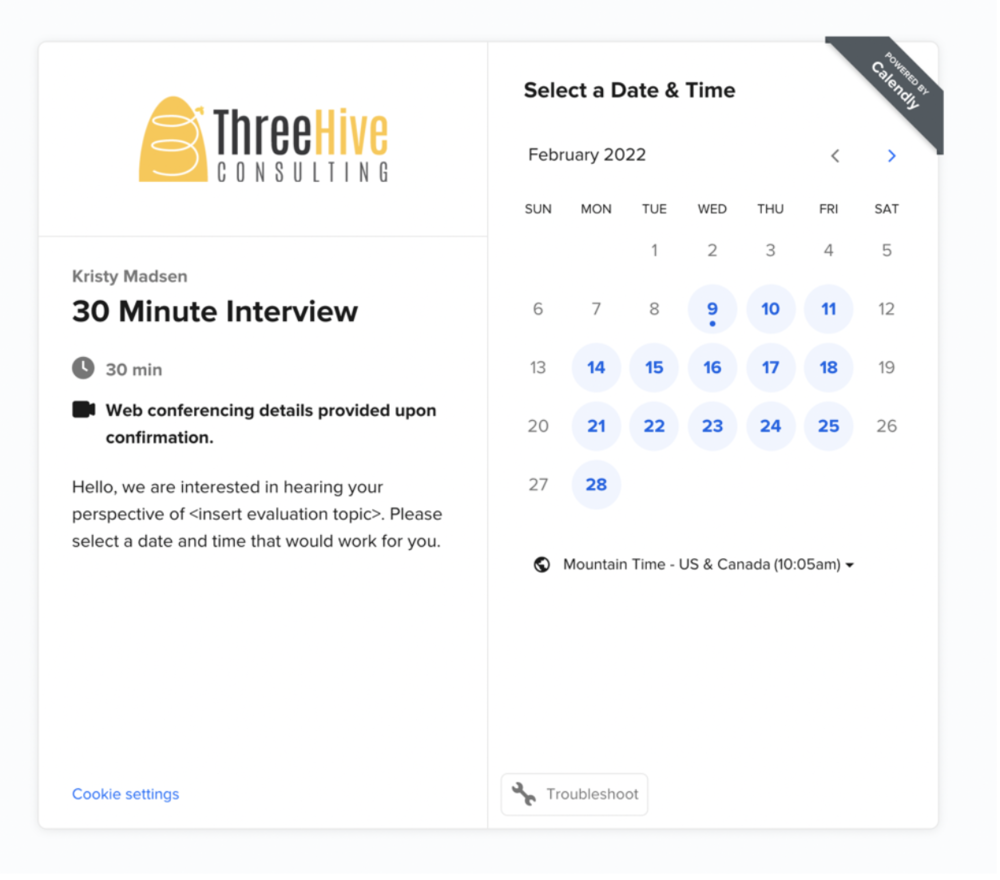
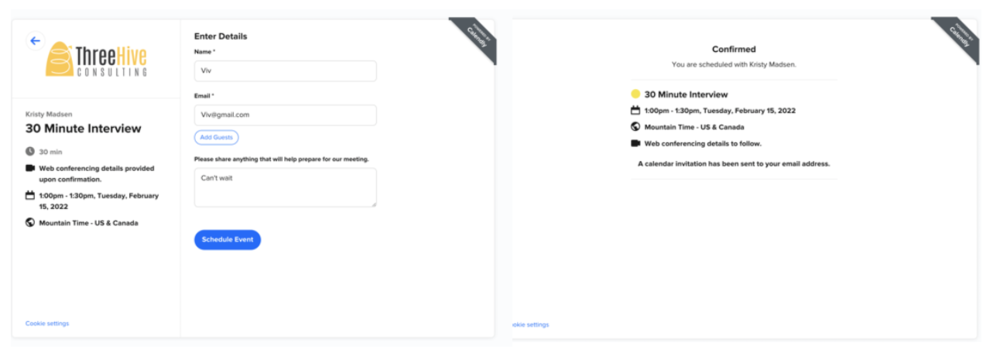
When you send out the link out to your potential interviewees they will click on it (hopefully!) and be brought to your event page that will look something like this: 

Once the person selects the date and time that works for them, they will be brought to a form to enter their name, email and any other information they want to include to prepare for the meeting. The person is also given the option to ‘Add Guests.’

Once all the information is entered correctly they will receive a confirmation page and a calendar invitation that is sent directly to their email. The meeting will show up in the interviewer’s calendar – no back and forth trying to find times and locations.

Calendly also has features that allows you to build in automations, such as email and text notifications and thank you emails. All the interviewee and interviewer need to do is prep and show up for the interview.

Calendly really has been a game-changer for our consultancy. It has saved us so much time, but more importantly, also provided our clients (and evaluation participants) with a more seamless experience. Do you have some upcoming interviews you need to schedule for your evaluation? Give Calendly a try – I promise you won’t go back!


If you’re looking for some other ideas for ways to streamline your evaluation consultancy then check out this Eval Academy article: Business Tools You Need to Run Your Evaluation Consultancy.


Sign up for our newsletter

We’ll let you know about our new content, and curate the best new evaluation resources from around the web!


We respect your privacy.

Thank you!


Written by cplysy · Categorized: evalacademy

Feb 14 2022

Comment on Adopting Inclusive and Non-Violent Language: Part 1 by E Broadbent

Hi
I’m part of a church group discussing ways to defuse political discourse with those we may disagree with – and we’re hoping to find examples of common language “trigger words” that immediately shut down connection and understanding. Many of us realize that as “progressives” living mostly in metropolitan areas, it’s too easy to feel that the gifts of education and our cultural sympathies end up causing a bit of a superiority complex which leads to condescension in our treatment of fellow citizens who we identify as “red-state”, Trump voters, etc.
Do you know of any discussions on this topic and maybe even lists such as the one above contrasting Inclusive with less-inclusive language?
Also… I noted that one of the links in the “Additional Resources” list seems incorrect:
“Using inclusive language Guidelines and examples” links to the home page for Rider University (https://www.rider.edu). If you know where I can find the intended article, I’d appreciate it.
Thanks very much!

Written by cplysy · Categorized: elizabethgrim

  • « Go to Previous Page
  • Go to page 1
  • Interim pages omitted …
  • Go to page 140
  • Go to page 141
  • Go to page 142
  • Go to page 143
  • Go to page 144
  • Interim pages omitted …
  • Go to page 310
  • Go to Next Page »

Footer

Follow our Work

The easiest way to stay connected to our work is to join our newsletter. You’ll get updates on projects, learn about new events, and hear stories from those evaluators whom the field continues to actively exclude and erase.

Get Updates

Want to take further action or join a pod? Click here to learn more.

Copyright © 2026 · The May 13 Group · Log in

en English
af Afrikaanssq Shqipam አማርኛar العربيةhy Հայերենaz Azərbaycan dilieu Euskarabe Беларуская моваbn বাংলাbs Bosanskibg Българскиca Catalàceb Cebuanony Chichewazh-CN 简体中文zh-TW 繁體中文co Corsuhr Hrvatskics Čeština‎da Dansknl Nederlandsen Englisheo Esperantoet Eestitl Filipinofi Suomifr Françaisfy Fryskgl Galegoka ქართულიde Deutschel Ελληνικάgu ગુજરાતીht Kreyol ayisyenha Harshen Hausahaw Ōlelo Hawaiʻiiw עִבְרִיתhi हिन्दीhmn Hmonghu Magyaris Íslenskaig Igboid Bahasa Indonesiaga Gaeilgeit Italianoja 日本語jw Basa Jawakn ಕನ್ನಡkk Қазақ тіліkm ភាសាខ្មែរko 한국어ku كوردی‎ky Кыргызчаlo ພາສາລາວla Latinlv Latviešu valodalt Lietuvių kalbalb Lëtzebuergeschmk Македонски јазикmg Malagasyms Bahasa Melayuml മലയാളംmt Maltesemi Te Reo Māorimr मराठीmn Монголmy ဗမာစာne नेपालीno Norsk bokmålps پښتوfa فارسیpl Polskipt Portuguêspa ਪੰਜਾਬੀro Românăru Русскийsm Samoangd Gàidhligsr Српски језикst Sesothosn Shonasd سنڌيsi සිංහලsk Slovenčinasl Slovenščinaso Afsoomaalies Españolsu Basa Sundasw Kiswahilisv Svenskatg Тоҷикӣta தமிழ்te తెలుగుth ไทยtr Türkçeuk Українськаur اردوuz O‘zbekchavi Tiếng Việtcy Cymraegxh isiXhosayi יידישyo Yorùbázu Zulu