• Skip to main content
  • Skip to footer
  • Home

The May 13 Group

the next day for evaluation

  • Get Involved
  • Our Work
  • About Us
You are here: Home / Archives for allblogs / evalacademy

evalacademy

Aug 29 2023

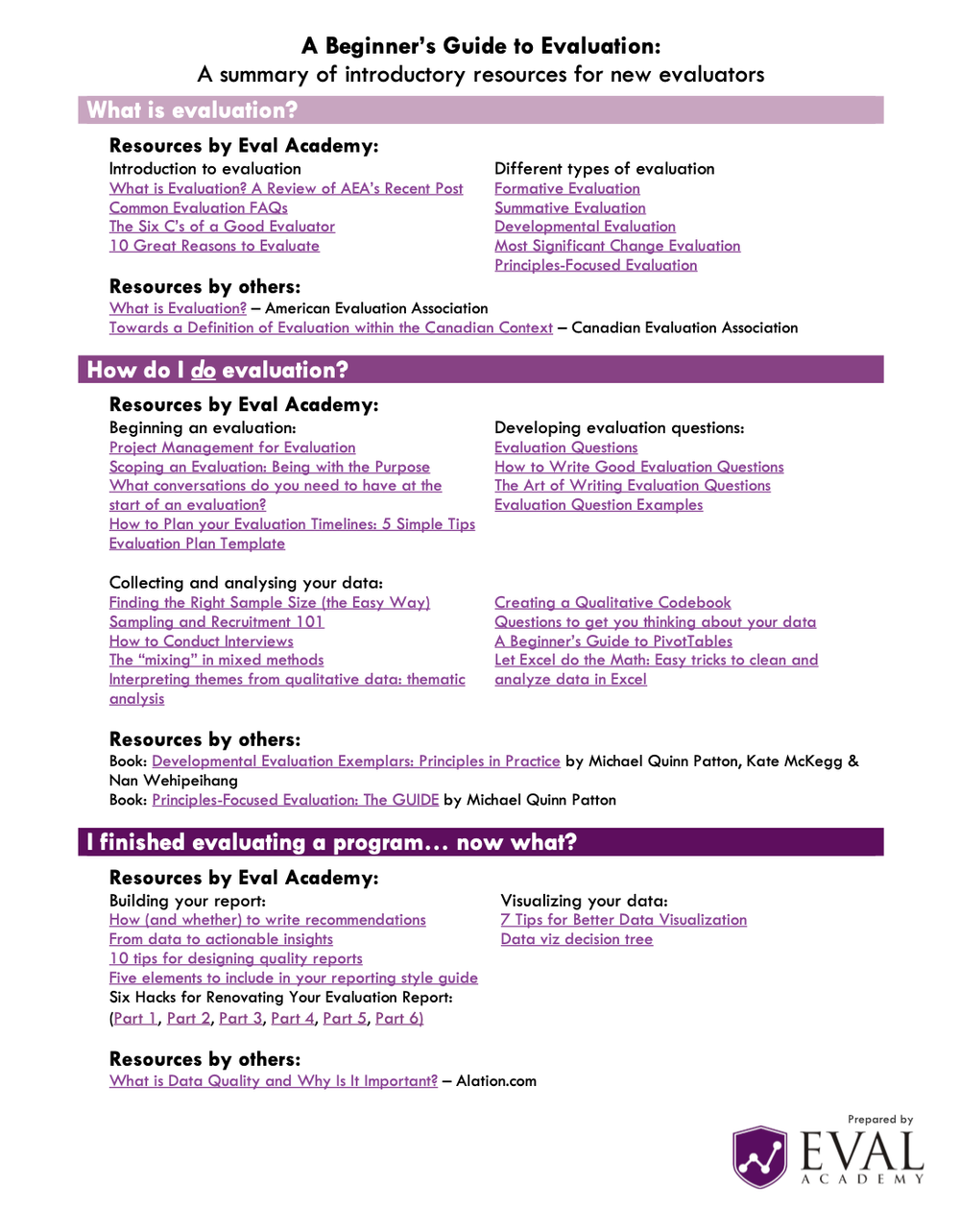
New Infographic: A Beginner’s Guide to Evaluation: A summary of introductory resources for new evaluators

This article is rated as:



Eval Academy has released a new infographic “A Beginner’s Guide to Evaluation: A summary of introductory resources for new evaluators”


Who’s it for?

This infographic is designed for individuals who are new to the field of evaluation and are eager to explore it in more depth.


What’s the purpose?

Our goal with this infographic is to empower newcomers to the world of evaluation by guiding them toward essential resources that address three fundamental questions: 1) What is evaluation? 2) How do I do evaluation? And, 3) I finished evaluating a program…now what?


What’s included?

Within this concise, one-page downloadable PDF, you’ll discover a collection of hyperlinks that lead you to the most relevant resources, helping you quench your curiosity and expand your understanding of evaluation.


Join us in your journey of discovery and growth in the field of evaluation with this comprehensive and user-friendly infographic!



What do you think of our latest infographic? Let us know in the comments below!

Written by cplysy · Categorized: evalacademy

Aug 28 2023

Tools to Write in Plain Language

This article is rated as:


What is Plain Language?

Plain language is writing in a way that is easy for most people to understand. There are many ways to write in plain language. The goal of using plain language is always to be as clear as possible. 

Plain language can be:

  • Using words that most people would know

  • Leaving out extra details that are not needed

  • Using lists instead of blocks of text

  • Using headings to separate your ideas

  • Aiming to write at a grade 8 reading level or lower

  • Using the active voice rather than the passive voice

  • Using short and simple sentences without many commas


Plain language is not:

  • “Dumbing down” your writing

  • Using jargon, many acronyms, and insider language

  • Writing with words that are long and not commonly used

  • Using complex sentence structures and colloquial phrases

  • Something that is only used when writing for “uneducated” people


An example paragraph that does not use plain language:

“The purpose of a plain-language approach in written communications is to convey information that the audience needs to know in a way that they can easily understand. It should not be confused with an oversimplified, condescending style.”

 Written by the Government of Canada Communications Community Office

The same paragraph from the Government of Canada Communications Community Office that was rewritten by Chat GPT to use plain language:

“Using plain language in writing means sharing information in a simple and clear way, so that the audience can easily understand it. But it’s not the same as talking down to people or making things too simple.”

 Re-written by Chat GPT


 Why is it important to write in plain language?

Personally, I think it is always better to write with the goal of being as clear as possible. Why wouldn’t you want people to understand what you are saying? Furthermore, knowledge translation is an important part of being an evaluator. If your clients and the public can understand your evaluation findings, they will be more likely to use them.

 Other important reasons to write in plain language:

  • 48% of adults in Canada struggle with literacy

  • 17.9% of Canadians over 15 years old have a learning disability

  • 1 in 4 Canadians speak a first language that is not English or French

  • Plain language is more accessible for people with disabilities overall, such as those who use screen readers


What are the tools that can help me write in plain language?

You don’t need to be a good writer to be able to write in plain language. These days, there are many tools that can help you. If you work with sensitive information, make sure you check the privacy policy of a tool before using it.


1.     Artificial Intelligence (AI) Writing Tools

Any AI writing tool should be able to help you write in plain language. Many of them act as editors with the goal of making your writing easier to understand. The simplest one to use is probably Chat GPT. You can copy and paste any text into Chat GPT and ask it to rewrite it for you in plain language. It is also free to use. Just make sure that you are not copying and pasting any sensitive information.

 AI writing tools that can help you write in plain language:

  • Chat GPT (free version available)

  • Grammarly (free version available)

  • Microsoft AI Copilot (pending release)


 2.     Readability Tools

There are many tools that can help you check the readability level of your writing. You can use these tools to check on the reading level of your work, as you are writing it. Your goal should be to aim for a grade 8 level of readability. If you use Microsoft Word, you can view your Microsoft Word Readability Statistics for anything you write. It can show you the Flesch-Kincaid Grade Level for your writing. We recommend that you use readability tools as a guideline. Different tools calculate readability differently, so use your own judgement as well when you are writing.

Readability tools that you can use to check the level of your writing:

  • Microsoft Word Readability Statistics (included with any version of MS Word)

  • Hemingway Editor (free)

  • Readable


Where can I find more information?

  • 5 free tools for easy-to-read content

  • A Guide to Using Plain Language in Writing

  • Your guide to communicating clearly and effectively with plain language

  • Demand to Understand: How Plain Language Makes Life Simple


Tag ideas: Communication, Data Driven, Evaluation, Evaluation Practice, Evaluator, Report Writing, Reporting

Written by cplysy · Categorized: evalacademy

Aug 28 2023

New Infographic: Research and Evaluation

This article is rated as:


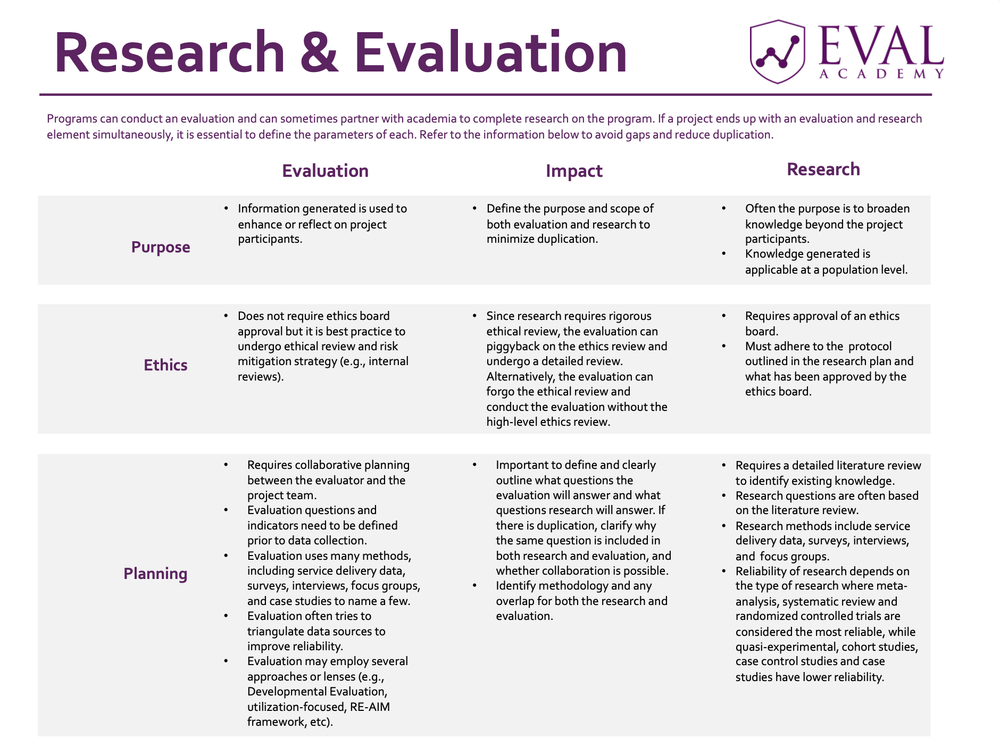
Eval Academy has released a new infographic “Research and Evaluation”!


Who’s it for?

This infographic is designed to offer insight into the distinctions between research and evaluation, catering specifically to individuals interested in programs that encompass both components simultaneously.


 What’s the purpose?

This infographic outlines the key stages of research and evaluation while emphasizing their primary distinctions. Additionally, it offers practical guidance on effectively managing a program that incorporates both these components throughout each of the major stages.


 What’s included?

You will be provided with a downloadable and printable PDF version of the “Research and Evaluation” matrix.


You can learn more about the difference between research and evaluation on Eval Academy through the following links:

  • Common Evaluation FAQs


 What do you think of our latest infographic? Let us know in the comments below!

Written by cplysy · Categorized: evalacademy

Jul 31 2023

A picture is worth a thousand words: Photovoice

This article is rated as:


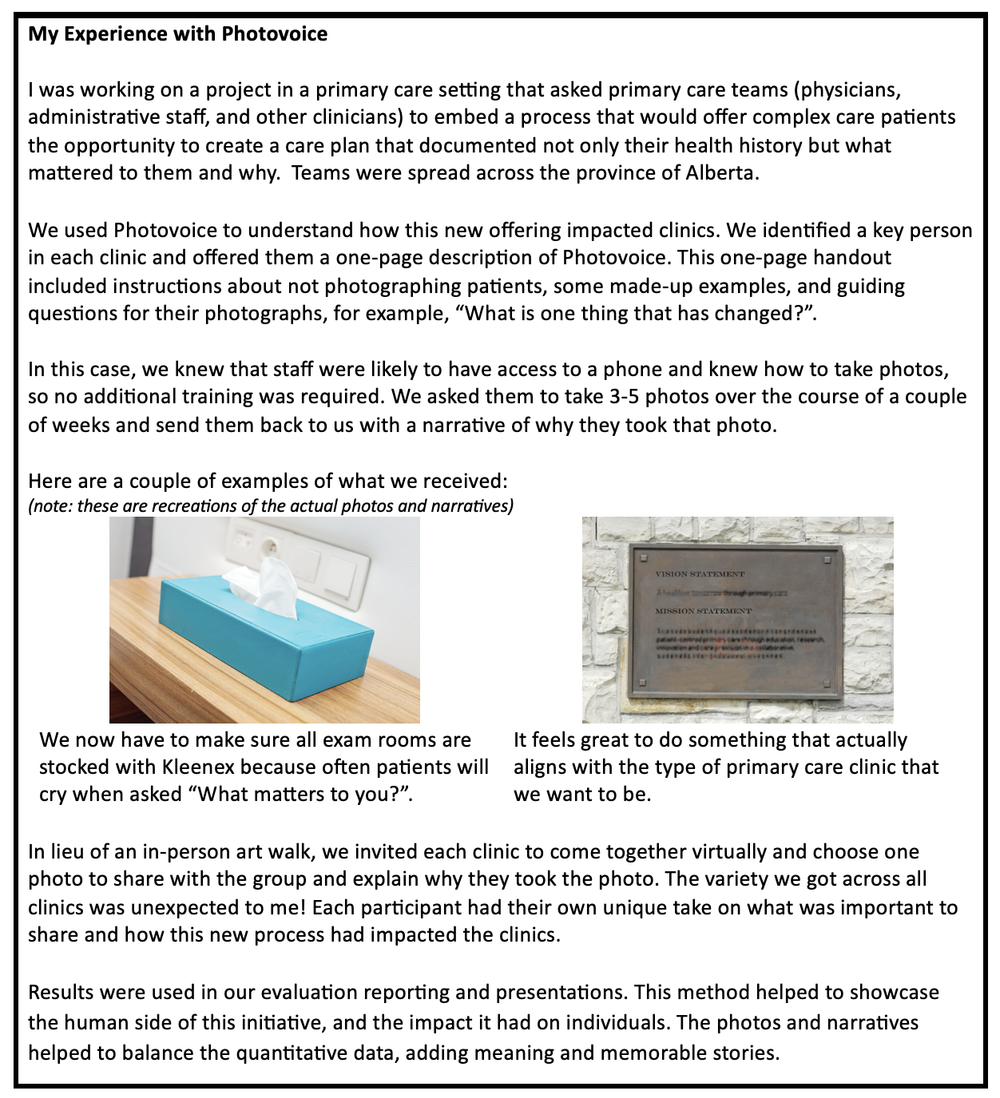
We all know the standard data collection tools in an evaluator’s methodology toolkit: surveys, interviews, focus groups, document review, and maybe even observation. But we also know there is a world of other methodologies out there like participatory and arts-based methods. Photovoice is one of those. I’ll admit, as a veteran evaluator I find myself in the rut of sticking with the tried-and-true methods, perhaps a little too much. In my career, I’ve actually only ever used Photovoice once, and it was on a collaboration project when another evaluator encouraged its use. Although it can be intimidating to try something new, Photovoice (and all those other methods) hold a valuable place in our toolkits and deserve to be used more often than they are.


What is Photovoice?

Photovoice is a qualitative method that uses participant perspective to capture meaningful insights of their lived experience through photography. Usually, the photographer is guided by some prompting questions from the evaluator, and the images are accompanied by a caption or short narrative from the photographer. Together the photo and the narrative tell a story from the perspective of the participant.

Photovoice is considered an accessible data collection method, with limited literacy or language barriers. As such, it is suitable for use among marginalized populations, and with varying age groups, education levels, and abilities.

Photovoice was first developed by Wang and Burris in 1997, who sought to develop a data collection method that would empower participants, invite critical dialogue, and be accessible to change-makers. Photovoice has the potential, and arguably intention, to spur public awareness, reach policymakers, and foster accountability. It has the added benefits of providing a voice to often underrepresented populations and facilitating reflection while empowering individuals.


How to use Photovoice

If you’ve decided to use Photovoice in your evaluation, consider a few things:

  • How likely is it that your participants will have access to a device to take photos (e.g., phone, camera, tablet)? If this is unlikely, how can you facilitate access?

  • How likely is it that your participants will know how to take a photo? If this is unlikely, is there training you’ll need to incorporate?

  • How likely is it that documenting a lived experience may trigger a trauma response in your participants? How can you promote a trauma-informed approach?

In all cases, you’ll want to carefully consider informed consent and ethical use of data.

The informed consent should explain to participants how their photos will be used and who they will be shared with. For example, will there be a public exhibit of the photos? Will the photos be included in reporting?

All participants should have access to some sort of training around appropriate photos. For example, participants should not put themselves in dangerous situations to get a photo. There should be a frank discussion about photographing other people, as they may not have consented to the use of a photo of themselves. Often Photovoice projects will discourage photos of faces.

Once you have your logistics planned, invite your participants to learn about Photovoice. This is likely a session facilitated by the evaluator where you would explain what it is, why you’re using it, and give the opportunity for participants to ask questions.  A handout or one-pager may be helpful, especially if it includes examples. Using Photovoice means you’ll need several connection points with your participants, unlike a one-time interview or focus group. Be clear about the time commitment involved.

As mentioned, usually Photovoice is accompanied by some questions. Depending on the scope of your project, you may want to limit this to less than five questions. These questions could be prompts for your photographers to consider, for example, “What has been the biggest change?” or “What is most impactful?”, or they can be more specific questions, for example, “Take a photograph that shows me a key enabler to this change” or “What has been positive about your experience in using this program or service?”


Art Walk

One of the unique aspects of Photovoice is the option to do an art walk (aka gallery walk, exhibition). Should you have the luxury of all being in the same geographic location this can be done in-person, but you can also set up a virtual art walk. In an art walk, you can showcase the photos and accompanying narratives to all participants collectively. Participants explore other points of view and come together for a discussion. This discussion should be facilitated by the evaluator, likely with some pre-determined questions, for example, “What stood out to you?”, “What did you notice about others’ perspectives?”, “What was the same/different?”, and “Did you notice any patterns or themes?”

It is critically important that an art walk is set up with a trauma-informed lens, creating an environment that is non-judgmental, inclusive, accessible, and respectful. All participants should know exactly what to expect, including whether they will be asked to speak about their photo(s).

This art walk and subsequent discussion are yet another source of information for your evaluation. The discussion, in particular, is a form of participatory data analysis (while the act of taking photos is a form of participatory data collection).


Analysis

Photos can be analyzed in the way you would other qualitative pieces. Many software programs allow you to input photographs and add codes to sections of or the whole photograph. The accompanying narrative or description should also be included in your coding. The discussion from the art walk may help you to form a deductive approach to this analysis.

A caution in the analysis of Photovoice relates to interpretation: the photos and narratives represent the lived experience of one individual and may not be representative of or generalizable to a group. The evaluator or analyst will need to exercise caution not to code the photographs or narratives using their own interpretation and biases, but to attempt to retain the voice of the photographer. Member checking may be useful here.


Reporting

In many evaluations, Photovoice would be one of many methods of a broader evaluation; the results and learnings from Photovoice would be incorporated into your reporting or knowledge translation deliverables. Of course, the photos can be used in your reporting so long as you were explicit in seeking that consent ahead of time.

Sometimes I think of Photovoice as similar to Most Significant Change methodology; the information you are getting may not be as detailed as you might get in a one-on-one interview, but you are getting the information that your participants are telling you matters the most – the biggest change, the top priority, the lived experience.  Photovoice explores context, not depth.


I’m still a newbie to Photovoice and would love to hear about your experiences with using Photovoice! When have you used it and how has it helped?

Written by cplysy · Categorized: evalacademy

Jul 31 2023

New infographic: Data viz decision tree

This article is rated as:


Eval Academy just released a new infographic, “Data Viz Decision Tree”


Who’s it for?

Choosing the right type of chart to display your data can help to improve clarity among your readers and lessens the likelihood that your findings may be misinterpreted. With so many different types of charts and graphs, it can be tough to know where to start. This infographic is for anyone who wants to clearly display their quantitative data in a meaningful way but isn’t sure how to pick the best chart for the job.


What’s the purpose?

This infographic prompts readers to ask themselves questions about the data they want to display and provides chart and graph types to visualize their data appropriately based on their answers. Although not an exhaustive list of all possible visualizations, this resource covers many of the charts and graphs we use most in our own evaluation work, with use case examples for context.


What’s included?

A clickable and printable infographic to help you choose the best chart for your data set, as well as one-page summaries and use case examples of the sixteen most-used charts and graphs in our own work, including:

  • Mosaic Charts

  • Grouped Scatter Plots

  • Bubble Graphs

  • Correlation Heatmaps

  • Simple Line Graphs

  • Waterfall Charts

  • Multiple Line Graphs

  • Area Graphs

  • Simple Bar and Column Charts

  • Gauge Charts

  • Stacked Bar and Column Charts

  • Pie, Donut, and Waffle Charts

  • Treemap Charts

  • Funnel Charts

  • Scatter Plots

  • Dumbbell Charts 


Keep an eye out for our upcoming article on data viz!


You can learn more about charts and presenting data on Eval Academy through the following links:

  • 7 tips for better data visualizations

  • Video: How To Create a Visually Impactful Column Chart

  • Dial down your data

  • Chart Templates: The Time Saver You Should Be Using


 What do you think of our new infographic? Let us know in the comments below!

Written by cplysy · Categorized: evalacademy

  • « Go to Previous Page
  • Go to page 1
  • Interim pages omitted …
  • Go to page 11
  • Go to page 12
  • Go to page 13
  • Go to page 14
  • Go to page 15
  • Interim pages omitted …
  • Go to page 43
  • Go to Next Page »

Footer

Follow our Work

The easiest way to stay connected to our work is to join our newsletter. You’ll get updates on projects, learn about new events, and hear stories from those evaluators whom the field continues to actively exclude and erase.

Get Updates

Want to take further action or join a pod? Click here to learn more.

Copyright © 2026 · The May 13 Group · Log in

en English
af Afrikaanssq Shqipam አማርኛar العربيةhy Հայերենaz Azərbaycan dilieu Euskarabe Беларуская моваbn বাংলাbs Bosanskibg Българскиca Catalàceb Cebuanony Chichewazh-CN 简体中文zh-TW 繁體中文co Corsuhr Hrvatskics Čeština‎da Dansknl Nederlandsen Englisheo Esperantoet Eestitl Filipinofi Suomifr Françaisfy Fryskgl Galegoka ქართულიde Deutschel Ελληνικάgu ગુજરાતીht Kreyol ayisyenha Harshen Hausahaw Ōlelo Hawaiʻiiw עִבְרִיתhi हिन्दीhmn Hmonghu Magyaris Íslenskaig Igboid Bahasa Indonesiaga Gaeilgeit Italianoja 日本語jw Basa Jawakn ಕನ್ನಡkk Қазақ тіліkm ភាសាខ្មែរko 한국어ku كوردی‎ky Кыргызчаlo ພາສາລາວla Latinlv Latviešu valodalt Lietuvių kalbalb Lëtzebuergeschmk Македонски јазикmg Malagasyms Bahasa Melayuml മലയാളംmt Maltesemi Te Reo Māorimr मराठीmn Монголmy ဗမာစာne नेपालीno Norsk bokmålps پښتوfa فارسیpl Polskipt Portuguêspa ਪੰਜਾਬੀro Românăru Русскийsm Samoangd Gàidhligsr Српски језикst Sesothosn Shonasd سنڌيsi සිංහලsk Slovenčinasl Slovenščinaso Afsoomaalies Españolsu Basa Sundasw Kiswahilisv Svenskatg Тоҷикӣta தமிழ்te తెలుగుth ไทยtr Türkçeuk Українськаur اردوuz O‘zbekchavi Tiếng Việtcy Cymraegxh isiXhosayi יידישyo Yorùbázu Zulu