• Skip to main content
  • Skip to footer
  • Home

The May 13 Group

the next day for evaluation

  • Get Involved
  • Our Work
  • About Us
You are here: Home / Archives for allblogs / evalacademy

evalacademy

Jan 31 2024

Enhance Meeting Note-Taking Efficiency with Our Latest Template

This article is rated as:


You may have a program steering committee or an evaluation advisory committee meeting coming up and want to ensure you can track the discussion and any action items. These strategic and planning-type meetings are notorious for complexity, and it may be hard to document the many issues discussed, decisions being made, and action items that need to be followed through. The challenge is, how do we keep track of it all?

Note-taking is just one piece of this puzzle which can include calendars, Gantt charts, and project or task management software like Asana or Microsoft Planner. Here is a template I use to help track notes in project meetings.


Why a note-taking template?

This template helps you to:

  • Document what is important during the meeting;

  • Record key details you need to refer back to or follow up on;

  • Document decisions, challenges, and action items;

  • Increase team accountability by tracking who is responsible for follow-up on action items;

  • Efficiently update other project management tools.


Who’s it for?

This template is for anyone who needs to track updates and action items in project meetings!


What’s included?

The Meeting Notes Template in Microsoft Word is a tool to use when needing to keep track of challenges, changes, and action items discussed in a project meeting. The template captures who is in attendance, changes to the project, what challenges may affect the project, and who is responsible for action items.


How do I use this template?

In preparation for a meeting, I pre-populate the agenda items for the meeting into the Topic column. If any agenda items get added, I add a new row, or if I’m using a printed copy of the template, I write on the back or in a notebook to add these later.

Once completed, it can act as a useful tool to help drive the project forward by clearly listing the action items. Action items can be added to whatever project management or to-do list tracking system you prefer.


Learn more: related articles and links

You can learn more about project management in evaluation through the following links:

Project Management for Evaluation

How to Present Your Evaluation Timelines: 4 Simple Ideas

Written by cplysy · Categorized: evalacademy

Jan 30 2024

Evaluative Thinking: What does it mean and why does it matter?

This article is rated as:



In a world driven by data and outcomes, the ability to think evaluatively has become an important skill for individuals, organizations, and communities. Evaluative thinking goes beyond data analysis alone; it involves a systematic and reflective approach to understanding the effectiveness and impact of actions, programs, and decisions. In this article, we explore what evaluative thinking means, its key components, and why evaluative thinking is important.


What is Evaluative Thinking?

Evaluative thinking is a cognitive process focused on the analysis, interpretation, and judgment of information to guide decision-making. It involves posing critical questions, weighing evidence, and reflecting on experiences to gather insights into the successes or challenges of a project or program. Evaluative thinking is critical to the practice of evaluation and recognizes the importance of continuous learning. Based on a curious mindset and a strong belief in the importance of evidence, evaluative thinking involves tasks like recognizing assumptions and considering different perspectives. As put by Michael Quinn Patton: evaluation is an activity, evaluative thinking is a way of doing business.


Key Components of Evaluative Thinking:

  • Questioning and Inquiry: Evaluative thinking begins with asking the right questions. This includes questioning assumptions, motivations, and expected outcomes behind a project or program. Evaluative thinking is guided by an overall curiosity and a willingness to explore various elements of a change process. This way of thinking encourages us to explore the details of a situation rather than accepting it at face value.

  • ·Data Collection and Analysis: Gathering relevant data is a fundamental aspect of evaluative thinking which has a strong belief in the value of evidence. This could involve quantitative data and qualitative data. The integration of both forms of data enriches the evaluation process, providing a holistic understanding of the topic. Analyzing this data helps us to understand patterns, trends, and potential areas for improvement.

  • Reflection and Interpretation: Taking time to reflect on the collected data and interpreting its meaning is crucial. This goes beyond observation; it involves considering the context and identifying contributing factors and underlying patterns.

  • Continuous Learning and Improvement: At its core, evaluative thinking embraces continuous learning and improvement. Rather than viewing evaluations as endpoints, it positions them as facilitators for growth and improvement. Individuals and organizations committed to evaluative thinking actively seek to take lessons from both successes and setbacks, using these insights to inform future decisions such as refining strategies, reallocating resources, or adapting approaches to achieve intended outcomes.


Why Evaluative Thinking Matters:

  • Informed Decision-Making: Evaluative thinking lays the groundwork for informed decision-making. By systematically analyzing data and reflecting on experiences, individuals and organizations can make decisions rooted in evidence.

  • Accountability and Transparency: Evaluative thinking fosters accountability by creating a culture where individuals and organizations are responsible for their actions and can transparently communicate their results, whether they are successful or present challenges.

  • Resource Optimization: By understanding what works and what doesn’t, evaluative thinking enables the optimization of resources. This involves allocating funds, time, and efforts more efficiently, ensuring that resources are directed toward strategies and initiatives that have proven to be effective while minimizing investments in areas that may not yield the desired outcomes.

  • Adaptability and Innovation: A mindset of evaluative thinking encourages adaptability and innovation. It allows individuals and organizations to adapt strategies based on real-world feedback, fostering a culture of continuous improvement and innovation.

  • Community and Stakeholder Engagement: In community development and social initiatives, evaluative thinking fosters meaningful engagement with stakeholders by deepening our understanding of the program’s impact on communities. This process not only builds trust and collaboration but also propels community engagement, as it prompts an exploration of the “why” and may necessitate collaboration with others to address underlying issues.


To expand your evaluative mindset, incorporate the following practices into your thinking process:

  1. Maintain Curiosity: Expand your curiosity by consistently asking “why.” Fostering a curious mindset deepens your understanding of the world, catalyzing evaluative thinking. This includes asking questions and enriching your understanding by probing into situations, decisions, or information. Ask the less obvious questions to explore what might be causing the situation and uncover potential gaps. Similar to the concept of negative space in art, effective evaluation often involves not only observing what’s evident but also identifying what may be missing or not directly addressed. Consider the cultural context too; for example, in some Indigenous cultures, direct negative feedback might not be given, so it’s important to explore the unspoken, gaining a nuanced understanding of unintended outcomes and cultural nuances.

  2. Rely on Evidence: Base your decisions on collected data, thoroughly reviewing information to underpin your reasoning. Utilize this data to shape recommendations and implement changes, ensuring your choices are well-supported and grounded in thorough analysis.

  3. Reflect on Experiences: Consider your past experiences to evaluate what worked well, identify areas for improvement, and extract valuable lessons for future endeavours. This process may also involve considering diverse viewpoints through perspective-taking and seeking feedback from others.

  4. Embrace Learning Opportunities: Consider challenges as opportunities for growth and improvement. Embrace the opportunity to grow through experiences and continuously seek ways to enhance your skills.


Evaluative thinking is not just a process; it’s a mindset that empowers individuals and organizations to navigate complex challenges with evidence. By adopting evaluative thinking, we can collaboratively make a difference through our work.


How do you adopt evaluative thinking? Let us know in the comments below!

Written by cplysy · Categorized: evalacademy

Dec 20 2023

Stratified Random Sampling in Evaluation

This article is rated as:


In our evaluations, we use varying methods to collect random, representative samples. In most instances, collecting data on all members of a population isn’t feasible (i.e., too expensive and time intensive). Therefore, we rely on sampling methods to make generalizations about our population of interest while minimizing bias. 

Random sampling is one of the simplest sampling methodologies used in evaluations. Random sampling treats all members of the population equally; thus, everyone has an equal chance of being sampled. That is, we randomly sample a specified number of individuals from the overall population. For quantitative data collection, see our “easy” and “hard” guides for finding the right sample size.

However, often our evaluations are interested in differences between population characteristics (e.g., gender or ethnicity). While a random sample of sufficient sample size would likely capture individuals falling within the varying levels of these characteristics, it is not guaranteed that each level of these characteristics is sampled. In these cases, we would employ stratified random sampling.


What is Stratified Random Sampling?

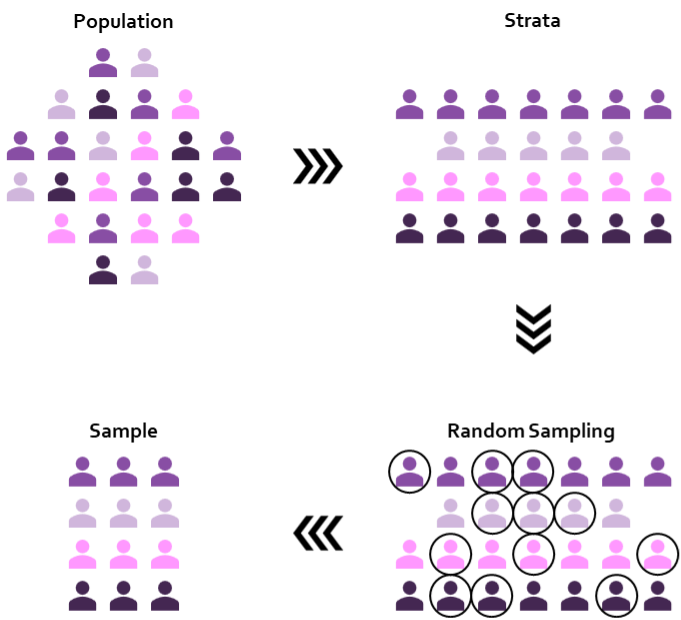
Stratified random sampling is a sampling methodology used to capture a representative cross-section of a population. Rather than randomly selecting from a pool of all members of a population (as in random sampling), stratified sampling divides the population of interest into distinct subgroups or strata based on designated characteristics. With the population stratified, a random sample is taken from each of the stratum. This ensures that each subgroup is adequately represented in the final sample.


Types of Stratified Sampling

Stratified random sampling can be split into two variations: (1) Proportionate stratified sampling and (2) Disproportionate stratified sampling.

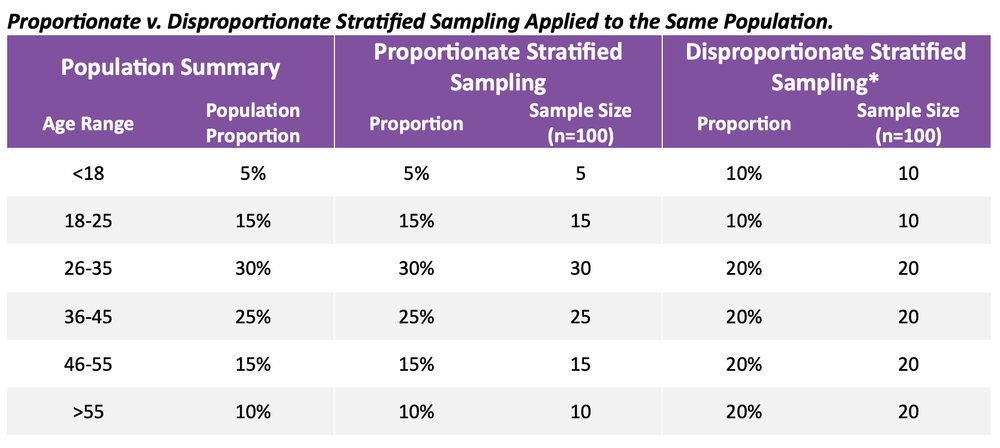
(1)    Proportionate stratified sampling: the size of each sample drawn from each stratum is proportionate to the size of each stratum in the population of interest. 

Example

We want a proportionate stratified sample based on participant age group (youth, adult, and senior). Knowing that our population has 40% youth, 50% adult, and 10% senior participants, our stratified sample should reflect these proportions. That is, if we sample 100 individuals, the sample should contain 40 youth, 50 adult, and 10 senior participants.


(2)    Disproportionate stratified sampling: the size of each sample drawn from each stratum is not proportionateto the size of each stratum in the population of interest.

 Example

Our evaluation wants to better understand Indigenous perspectives related to a given program. However, Indigenous participants are underrepresented within the program accounting for only 20% of all participants. Therefore, to get a better understanding of Indigenous perspectives, if we sample 100 individuals, the sample could contain 50 Indigenous participants and 50 non-Indigenous participants.


Choosing between proportionate and disproportionate stratified sampling depends on the evaluation and the importance of each stratum. Proportionate sampling is effective when we want to maintain the proportionality and representativeness of our population. On the other hand, disproportionate sampling may be more appropriate when certain strata require more in-depth evaluation, particularly for individuals within underrepresented strata.

*Disproportionate stratified sampling may vary depending on the evaluation question. In this example, participants 26 and older are more relevant for the evaluation. Thus, these age groups have larger sample sizes relative to younger age groups, regardless of the actual proportion of each age group within the population as a whole.


Why use Stratified Random Sampling?

Stratified random sampling helps to provide representative samples in our evaluations. By dividing a population into strata and randomly sampling from each stratum, we can better reflect the diversity within our population of interest. Stratified random sampling assists in reducing underrepresentation and overrepresentation within specific groups of our strata, allowing us to better capture important population characteristics that may be missed with a simple random sample. 

Particularly, stratified random sampling is beneficial to evaluate the differences within stratum. That is, stratified random sampling allows us to make better comparisons between different population demographics or characteristics relevant to the evaluation that may otherwise be overlooked. Observing group differences across stratum can also promote diversity, equity and inclusion in evaluation as some groups might be heavily represented in an outcome relative to another group.


Limitations of Stratified Random Sampling

Stratified random sampling is not without limitations. These limitations include, but are not limited to:

  • Misclassification of Strata

    • While demographic strata, such as age range, may be clearly defined, other strata may be more nuanced. For example, ethnicity may not be clear for all members of a population, with some individuals identifying with one or more ethnic groups.

  • Time and Cost

    • When time and cost are limiting factors, splitting a population into appropriate strata while avoiding misclassification can become impractical. Dividing the population into strata and identifying a random sample within stratum require appropriate time and resources for planning and execution that can add to the logistical demands of the overall evaluation.


Wrapping Up

Stratified random sampling can be an effective method to provide comprehensive perspectives about your evaluation population. The key advantage of stratified random sampling lies in its ability to offer a nuanced portrayal of a population, by providing insights from all defined subgroups. The pay-off includes highlighting perspectives of underrepresented groups within the population that may otherwise be overlooked or overshadowed by other overrepresented groups.

While stratified random sampling can be applied to both quantitative and qualitative data collection, it can provide additional support for qualitative data collection, where sample sizes may be limited. For example, think about the time and resources required to conduct a single interview versus having a participant fill out a short survey. We are working on a Stratified Sampling Tool designed specifically for qualitative data collection. Our tool will streamline the qualitative data collection process by providing stratified random samples derived from a defined stratum. Keep an eye out for its release in early 2024.

Written by cplysy · Categorized: evalacademy

Dec 20 2023

Optimizing Excel Charts by Right Justifying Y-Axis Labels

This article is rated as:


The placement of axis labels in our data visualizations plays an important role in enhancing the clarity and impact of our charts. While Excel is a powerful tool for creating impactful data visualizations, its default charts often leave much to be desired. In previous articles (see Data Visualization Best Practices and 7 Tips for Better Data Visualizations) we have discussed methods for improving the overall look our charts, but we have not discussed how to justify y-axis labels in our bar and stacked bar charts. In this article, we will discuss a quick approach for justifying our y-axis labels within the Microsoft suite of applications (e.g., Word and PowerPoint), as well as a workaround for justifying y-axis labels directly in Excel.


The Problem

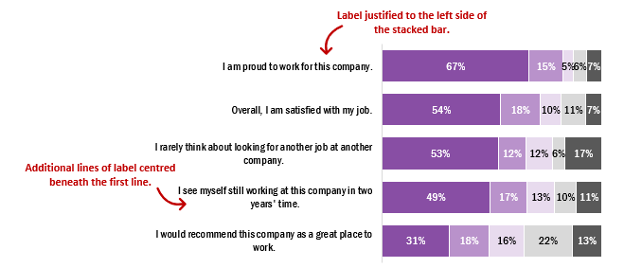
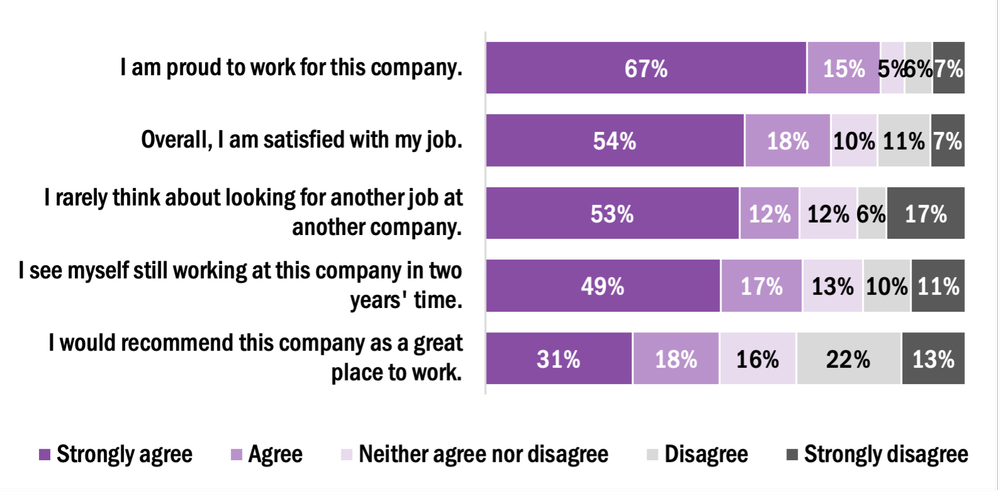
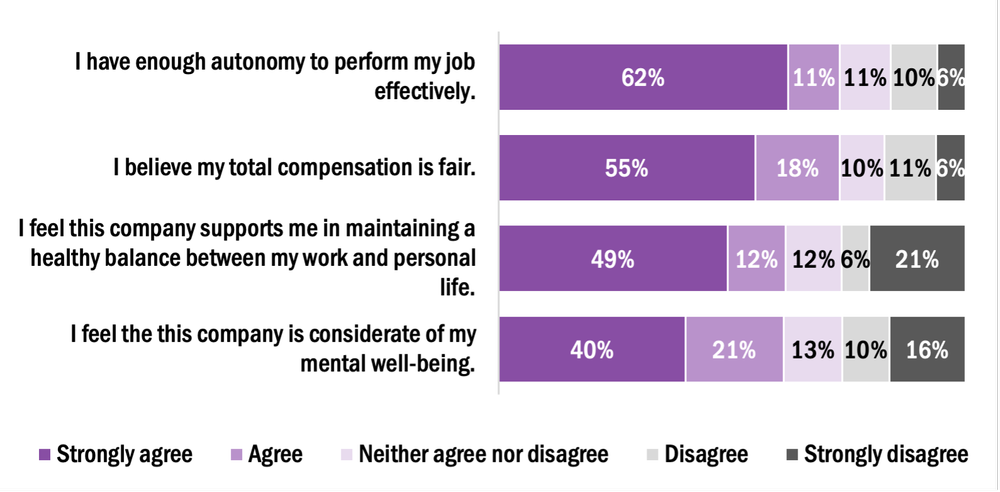
First, it is important to highlight the problem with the default y-axis labels in Excel. On creation of a new chart, whether a bar or stacked bar chart, the first row of text is justified to the left edge of our bars, but subsequent lines are centred below the first line of text. This leads to awkward looking labels that distract from the overall appeal of the chart. While this issue may not be immediately apparent if y-axis labels are short in length or if the chart is large enough to allow sufficient room for the full label to display in a single line, this becomes an issue when we are wanting to plot charts with lengthy y-axis labels. For example, a label may be a survey or evaluation question that is being addressed.

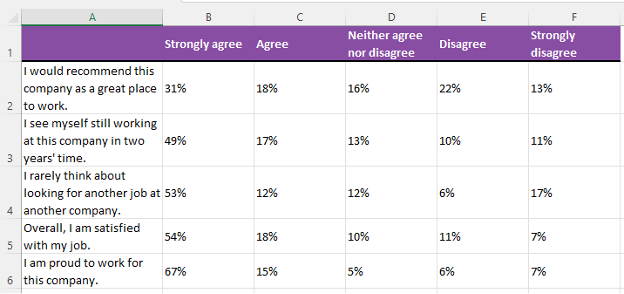
To illustrate this, the example below depicts the default y-axis labels of five staff engagement questions. Some labels will be justified as needed, but others will require editing to improve the overall look of the chart.


The Simple Solution

The simplest solution for justifying the y-axis labels is to leverage other Microsoft suite applications (e.g., Word or PowerPoint), as Excel does not have a simple approach for justifying these labels without additional data preparation.


How to Justify Y-Axis Labels in PowerPoint or Word

  1. Copy & Paste (Ctrl +C, Ctrl + V) the Excel chart into PowerPoint or Word.

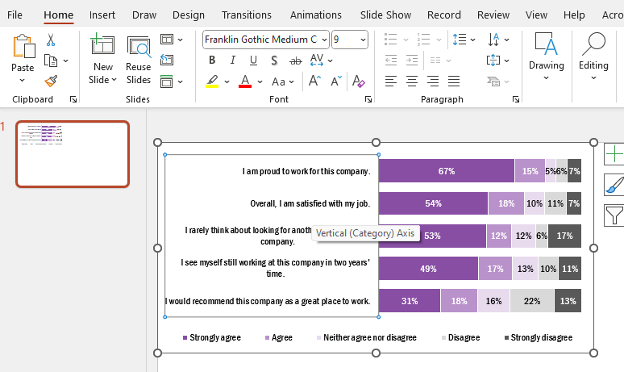
2. Left-click on the y-axis labels (Vertical (Category) Axis).

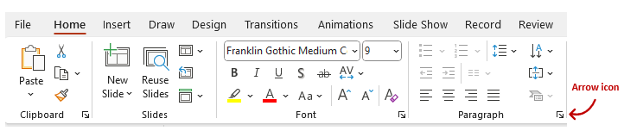
3. Within the Home tab, navigate to the Paragraph section of the top ribbon.

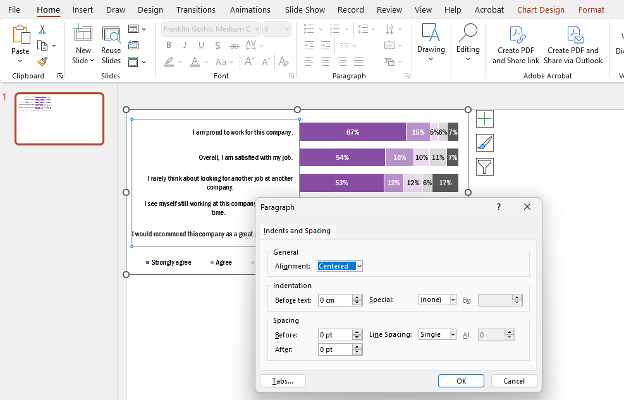
4. Left click on the arrow icon in the bottom right of the Paragraph section. This will open the Paragraph menu.

5. Under General > Alignment the default will be set to Centered.

6. Change the Alignment to Right.

7. The resulting chart will have right justified y-axis labels.


Right-Justifying Labels in Excel using Chart Templates

While justifying labels in Word or PowerPoint accomplishes the goal of improving the overall look of our charts, this process typically needs to be completed manually for each chart. However, we can leverage chart templates in Excel to apply this formatting to all similar charts within our worksheets.


Creating a New Chart Template to Right-Justify Y-Axis Labels

1.     Copy & Paste (Ctrl +C, Ctrl + V) the updated chart back into Excel.

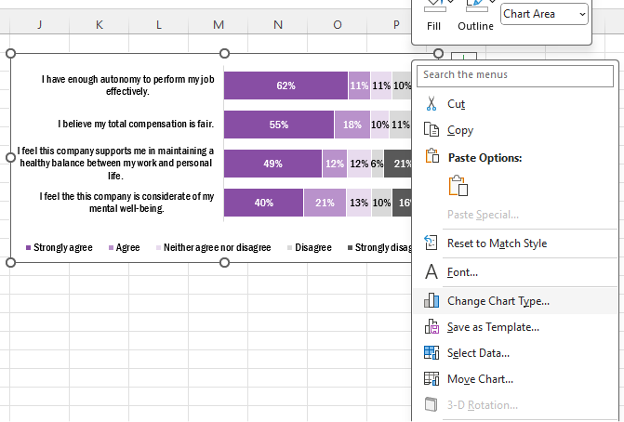
2.     Right click on the formatted chart and Save as Template…

a.     Name the template (e.g., Right justify labels)

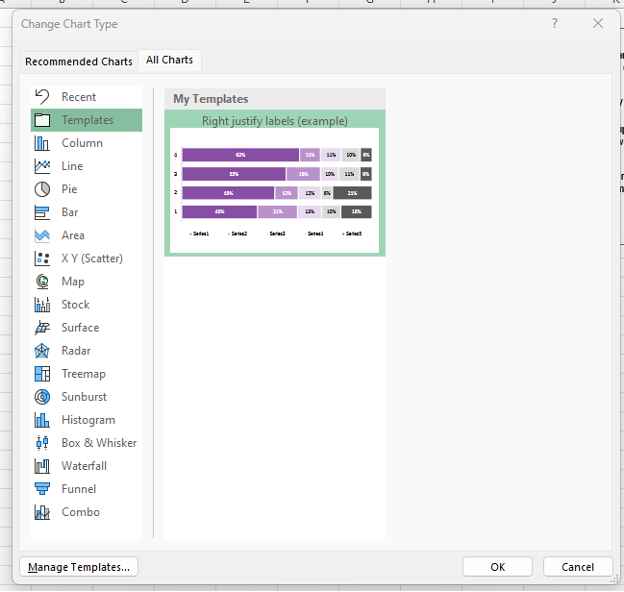
3.     With the template saved, right click on any additional chart requiring formatting.

4.     Navigate to Change Chart Type…

5. Go to your saved Templates at the top left of the All Charts tab.

Note: When applying a chart template to another chart, both charts need to be identical in style. For example, a stacked bar chart with five levels of agreement would need to be identical between the template and the chart for which the template will be applied.

6. Select the template you want to apply and click OK.

7. The new template will be applied to the new chart.


The More Complicated Approach

The following approaches work well when working between Excel and PowerPoint (or Word). However, sometimes you may want to justify the labels entirely within Excel. The workaround requires some additional steps in setting up your data but will allow for complete formatting and control within Excel.


How to Justify Y-Axis Labels in Excel

1.     Prepare your data for charting.

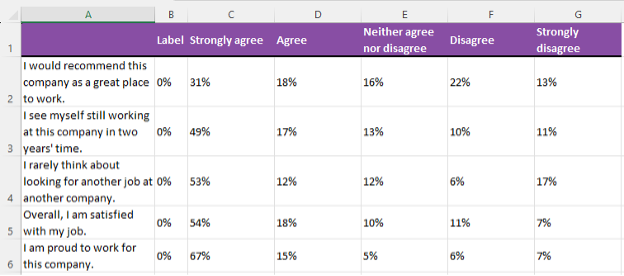
2. Insert a new column to the left of Column B.

a.     Right click on Column B and Insert.

3. Label this new column as ‘Label’ and insert 0% into all cells below.

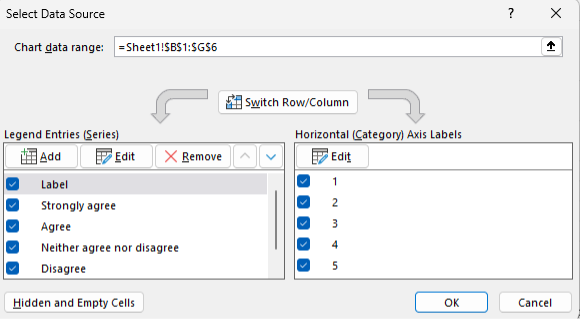
4. Highlight the data from Cell B1 (‘Label’) to Cell G6 (7%).

5. Go to the Insert tab in the top ribbon and insert a 100% Stacked Bar Chart.

a.     Right click the new chart and go to Select data…

b.     Switch Row/ Column to get the data presented properly.

6. Add data labels and format the chart as necessary (see Data Visualization Best Practices).

7. The chart will have 0% labels on the left side of the stacked bars. Right click and Format Data Labels…

a.     Under Label Position select Inside End.

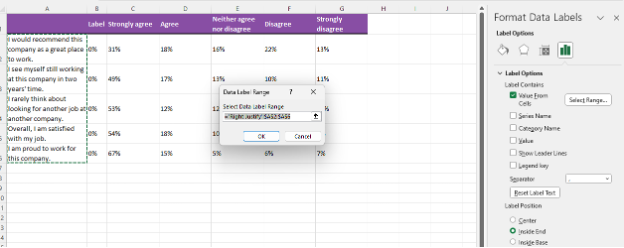
8. Also, within the Format Data Labels menu, navigate to the Label Options and select Values From Cells.

a.     Highlight cells A2:A6 (the axis labels) and click OK.

b.     Toggle off the Value and Show Leader Lines boxes under the Label Options.

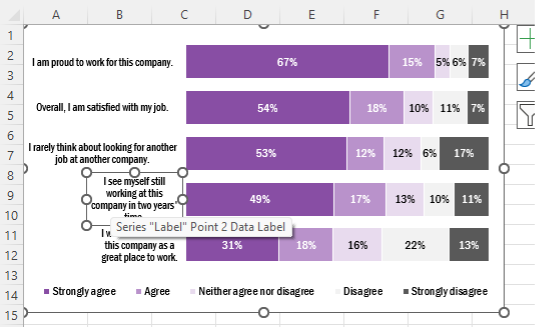
9. Manually adjust the text boxes for each of the labels by dragging the text boxes (use the circles around the text box to resize) to the far left of the chart.

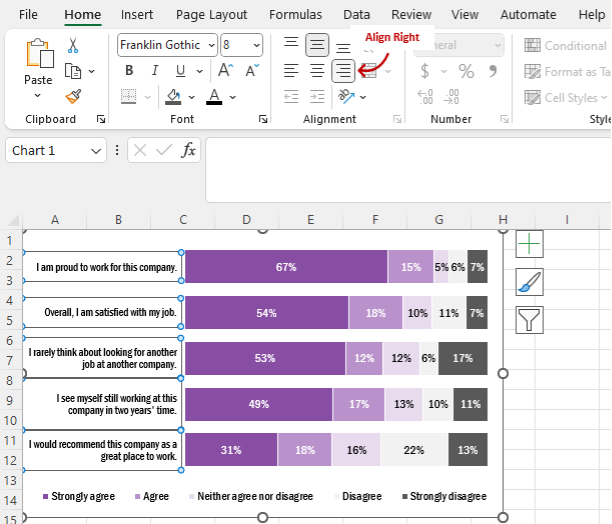
10. Select all the data labels and under the Home tab > Alignment click on the Align Right option.


Wrapping Up

While powerful, Excel has some limitations in its default charting options. However, with the flexibility of the Microsoft suite of applications, as well as additional Excel charting options, it is possible to format engaging charts with a little patience and know-how.

Written by cplysy · Categorized: evalacademy

Dec 19 2023

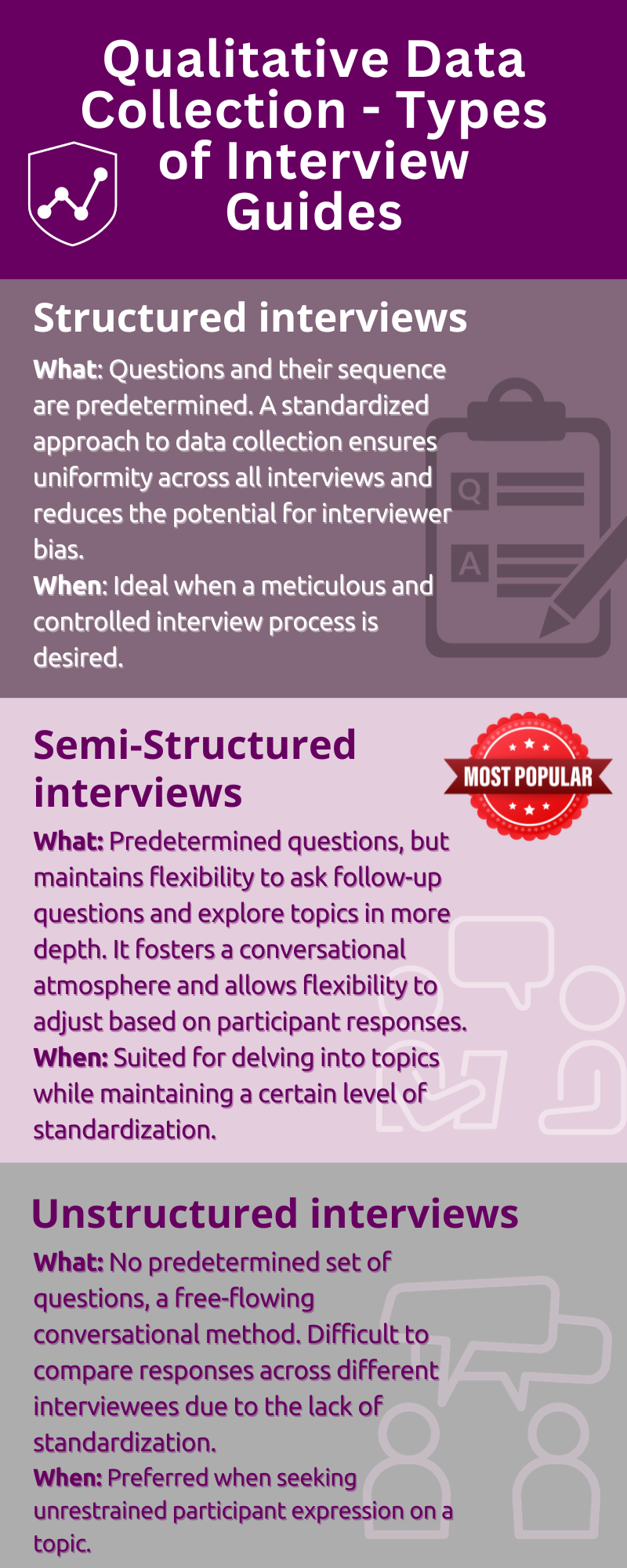
New Infographic: Types of Interview Guides

This article is rated as:


Eval Academy just released a new Infographic: “Types of Interview Guides”


Who’s it for?

This infographic is for anyone looking to learn more about the different types of interviewing or for those who are unsure which type of interview guide to use.


What’s the purpose?

This “Types of Interview Guides” infographic will help you to:

  • Learn about the key characteristics, advantages and potential use of the different types of interview guides.

  • Choose which type of interview guide to use in your qualitative data collection.


What’s included?

A one-page, downloadable infographic as a png file.


Download the “Types of Interview Guides” Infographic now!


Learn more: related articles and links:

You can learn more about collecting data with professional and ethical conduct in the following Eval Academy articles:

  • How to conduct interviews

  • 5 tips for ensuring interviewer safety

  • How to transcribe interviews like a pro

Other Eval Academy resources that you might be interested in checking out:

  • Standard Interview Guide Template

  • Standard Interview Information Letter Template

  • Standard Interview Consent Form Template

  • Tips for conducting interviews

  • Standard Interview Templates Bundle


What do you think of our new template? Let us know in the comments below!

Written by cplysy · Categorized: evalacademy

  • « Go to Previous Page
  • Go to page 1
  • Interim pages omitted …
  • Go to page 7
  • Go to page 8
  • Go to page 9
  • Go to page 10
  • Go to page 11
  • Interim pages omitted …
  • Go to page 43
  • Go to Next Page »

Footer

Follow our Work

The easiest way to stay connected to our work is to join our newsletter. You’ll get updates on projects, learn about new events, and hear stories from those evaluators whom the field continues to actively exclude and erase.

Get Updates

Want to take further action or join a pod? Click here to learn more.

Copyright © 2026 · The May 13 Group · Log in

en English
af Afrikaanssq Shqipam አማርኛar العربيةhy Հայերենaz Azərbaycan dilieu Euskarabe Беларуская моваbn বাংলাbs Bosanskibg Българскиca Catalàceb Cebuanony Chichewazh-CN 简体中文zh-TW 繁體中文co Corsuhr Hrvatskics Čeština‎da Dansknl Nederlandsen Englisheo Esperantoet Eestitl Filipinofi Suomifr Françaisfy Fryskgl Galegoka ქართულიde Deutschel Ελληνικάgu ગુજરાતીht Kreyol ayisyenha Harshen Hausahaw Ōlelo Hawaiʻiiw עִבְרִיתhi हिन्दीhmn Hmonghu Magyaris Íslenskaig Igboid Bahasa Indonesiaga Gaeilgeit Italianoja 日本語jw Basa Jawakn ಕನ್ನಡkk Қазақ тіліkm ភាសាខ្មែរko 한국어ku كوردی‎ky Кыргызчаlo ພາສາລາວla Latinlv Latviešu valodalt Lietuvių kalbalb Lëtzebuergeschmk Македонски јазикmg Malagasyms Bahasa Melayuml മലയാളംmt Maltesemi Te Reo Māorimr मराठीmn Монголmy ဗမာစာne नेपालीno Norsk bokmålps پښتوfa فارسیpl Polskipt Portuguêspa ਪੰਜਾਬੀro Românăru Русскийsm Samoangd Gàidhligsr Српски језикst Sesothosn Shonasd سنڌيsi සිංහලsk Slovenčinasl Slovenščinaso Afsoomaalies Españolsu Basa Sundasw Kiswahilisv Svenskatg Тоҷикӣta தமிழ்te తెలుగుth ไทยtr Türkçeuk Українськаur اردوuz O‘zbekchavi Tiếng Việtcy Cymraegxh isiXhosayi יידישyo Yorùbázu Zulu