• Skip to main content
  • Skip to footer
  • Home

The May 13 Group

the next day for evaluation

  • Get Involved
  • Our Work
  • About Us
You are here: Home / Archives for allblogs

allblogs

Oct 15 2021

Decision Making Model for Nonprofits

Written by cplysy · Categorized: connectingevidence

Oct 13 2021

Ask Nicole: Prepping for Your Consultant/Partner Discovery Call

Have a question you’d like to be featured? Let me know. After searching the internet, asking your networks for referrals, and scouring social media, you’ve finally found someone or a team that you can see your organization working with. Checking out their website, social media presence, and testimonials is the first step. The next step […]

The post Ask Nicole: Prepping for Your Consultant/Partner Discovery Call appeared first on Nicole Clark Consulting.
Written by cplysy · Categorized: nicoleclark

Oct 12 2021

Data Dictionary: the what, why and how


Technological advances have resulted in the collection of large amounts of data and the availability of data continues to skyrocket. To give you a perspective, more data has been collected in the past two years (2019 & 2020) than the entire human history before that.

This post isn’t about big data – we know there are more than enough articles about big data out there. Here, we’ll focus on how evaluators can (and should) clarify details about the data being used for evaluation. In other words, how and why build an evaluation-specific data dictionary.


What is a Data Dictionary?

Definitions of “data dictionary” vary but it is generally understood to be a common language for quantitative data. Data dictionaries provide a precise vocabulary for specific data elements and help to standardize a dataset and ensure that the relevance, and quality of data elements, are the same for all users. Data dictionaries describe the meaning and purpose of data elements within the context of a project and provide guidance on interpretation.

Why Use a Data Dictionary?

It is ideal to have a data dictionary whenever you have quantitative data that will be used and shared by multiple people or groups. Without precise definitions, it is very easy to arrive at different results while using the same dataset. Confusions can be avoided by documenting data definitions and parameters and sharing them with all stakeholders.

Although creating a data dictionary is time-consuming, having precise documentation that can be used by all stakeholders promotes efficiency. Look at the following example for an online health education program:

  • The program team defines the “number of program participants per week” as the total number of participants that completed the online module per week.

  • The IT team defines the “number of program participants per week” as the total number of participants that accessed the online module per week.

As evaluators, if we didn’t examine the definition of “number of program participants per week” meant, we might draw some incorrect conclusions, and risk making unreliable or even dangerous recommendations.

A data dictionary that is prepared collaboratively between the evaluator and stakeholders can prevent confusion and promote alignment. In short, data dictionaries can:

  • Provide consistency in the collection and use of data across multiple users;

  • Make data analysis easier;

  • Promote usability of data; and

  • Increase confidence in the data, results, and decisions.

How to Prepare a Data Dictionary

Before embarking on the task of creating a data dictionary, ask the program team if there’s an existing data dictionary for the dataset. It is a common practice to share a dataset with the data dictionary if there is one. However, the project team/client might not think to share the data dictionary with you. If there is a common, vetted, and documented data dictionary, it may not be necessary to create a new one.  

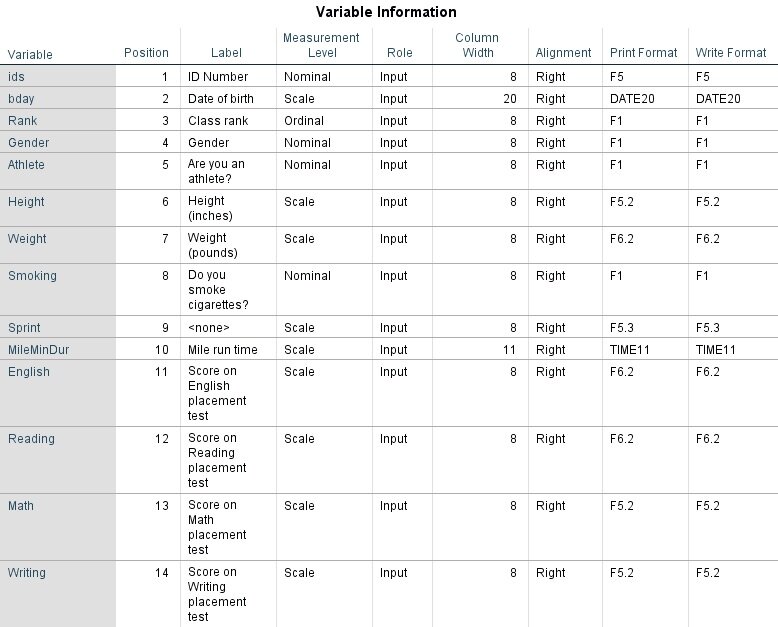
 The built-in active data dictionary can be used in most data management systems including MS Access and SPSS to generate documents as needed. Below is an image of a simple SPSS codebook output.  

Image Source: https://libguides.library.kent.edu/SPSS/Codebooks

Image Source: https://libguides.library.kent.edu/SPSS/Codebooks

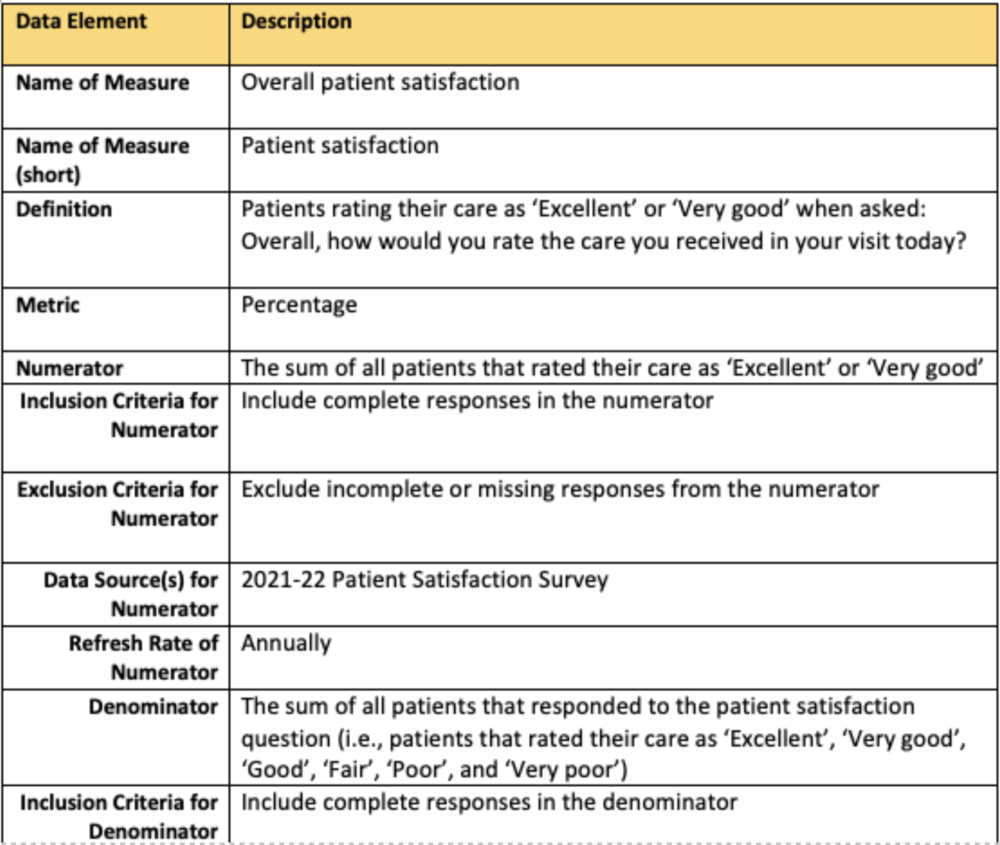
Alternatively, if your data set is in MS Excel, you can use MS Excel or Word for documentation. Creating and managing a data dictionary is an iterative process; the definitions for the data dictionary categories and the relationships need to be revised regularly. Often data dictionaries in program evaluation contain the following:  

  • A list of data objects: names, metrics (measurement units) and definitions; 

  • Inclusion and exclusion criteria: specify cases to be included or excluded; 

  • Data Source(s): specify the source of data;  

  • Data Update: state how frequently the data is updated and available (e.g., weekly, monthly, annually);  

  • Limitations: specify any considerations that would impact the use of the indicator (can comment on reliability and validity of the data and include any other detail); 

  • Missing data: state if there are any missing values and how they were handled;  

  • Technical notes: provide technical details which help interpret the data presented; and 

  • Approval and sign-off: a data dictionary should be created collaboratively with approval from all those that will use the dictionary. After revisions and edits, and it should be signed off by the team leads to finalize the document.   

Screen Shot 2021-10-12 at 3.02.26 PM.png

In summary, a data dictionary is a great evaluation tool for projects with quantitative data. A data dictionary is time-consuming to prepare; however, it can promote efficiency and accuracy in the long run. Try building one for your next evaluation project.

While you’re creating definitions, check out our Performance Measures Definitions template.  


Sign up for our newsletter

We’ll let you know about our new content, and curate the best new evaluation resources from around the web!


We respect your privacy.

Thank you!


Written by cplysy · Categorized: evalacademy

Oct 12 2021

Dashboards for 10-Year-Olds: Connecting Data to Students’ Lived Experience

Bob Coulter is the director of the Litzsinger Road Ecology Center, a 38-acre field site in suburban St. Louis. He’s also a Depict Data Studio student and when he shared his work in our graduation ceremony, I knew it needed to be showcased. Keep up the great work Bob! – Ann

__________________________

For the past few months, I’ve been developing dashboards to support students’ understanding of local ecology and equip them to use that local understanding as a baseline to explore the rest of the world.

Imagine, for example, being a 10-year-old in St. Louis.

Your neighborhood has plenty of trees since you’re at the western edge of the forests typical of the eastern US. This can only happen because the temperature is warm enough and there is enough precipitation to support tree growth.

Heading west from here the ecology shifts pretty quickly to grasslands, with the grass getting shorter as you approach the Rocky Mountains. A quick look at the data shows decreasing levels of precipitation as you head west.

For a more extreme contrast, Yuma, Arizona is much hotter, but the area gets about 10% of the precipitation St. Louis does. How is this heat and lack of precipitation reflected in the plants and animals in southern Arizona?

All of this learning is wrapped under the heading “What’s It Like Where You Live?” – a program I used as a 4th grade teacher 25 years ago, developed by the Missouri Botanical Garden and now undergoing a major reworking.

As we flesh out the curriculum, we’ll be supporting kids’ local field work with dashboards synthesizing climate data and images of plants and animals typically found in different ecoregions.

First Forays

At a basic level, students can compare temperature and precipitation data for their local community with data for other cities around the world. Is it warmer or cooler, wetter or drier?

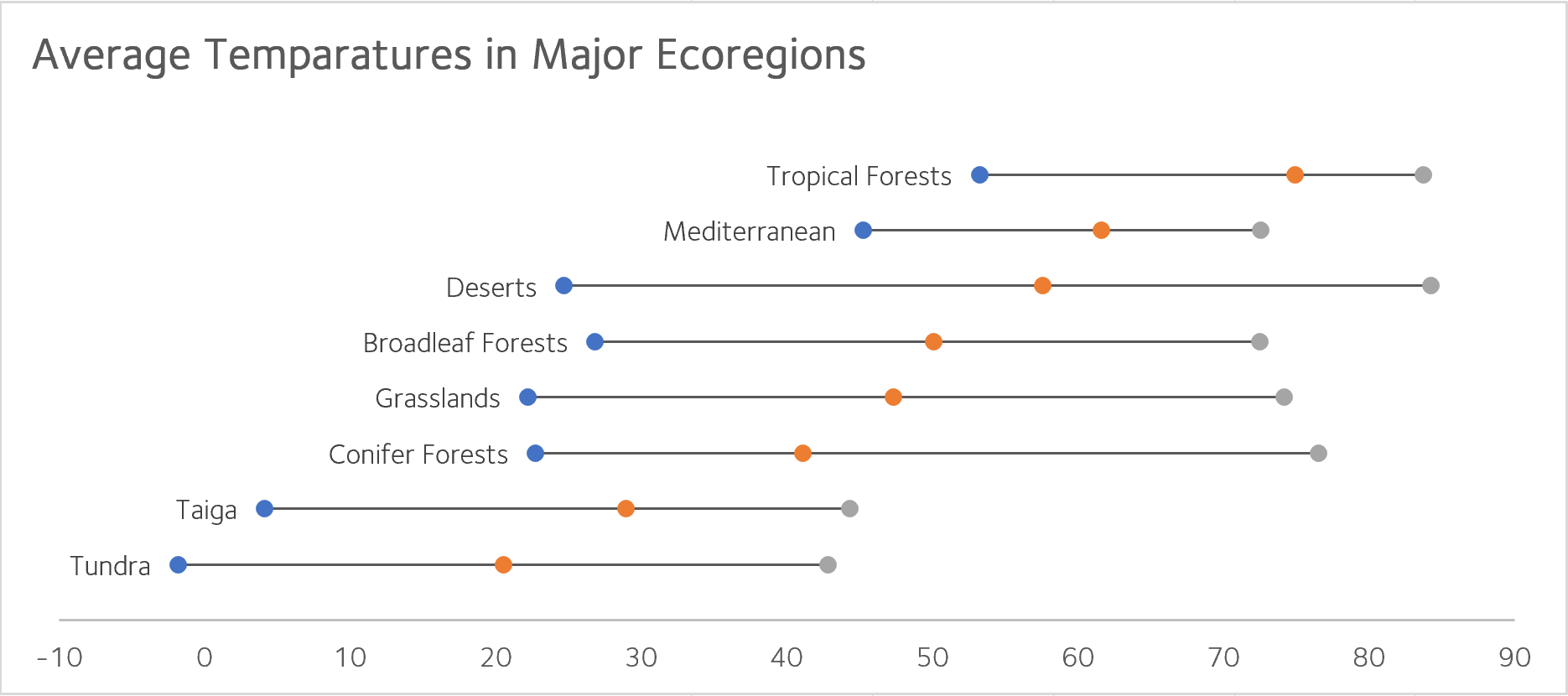
A simple table or a scatter plot serves the purpose quite well. The limit in this approach is the image students often develop when data from one city represents “the desert” or “the rainforest.”

At a basic level, students can compare temperature and precipitation data for their local community with data for other cities around the world.

Resolving this conundrum has opened the door to some exploratory work crafting dashboards which encompass both similarities and variation within an ecoregion. (Mostly I’ve just been geeking out with the data, but “exploratory research and development” sounds so much better!)

Refinements

Taking the data visualizations further has pushed me to walk a fine line between interesting visualizations and the developmental capacities pre-teen students bring to the task.

Most kids have limited experience with data tables and graphs, and what work they have done is pretty specific (such as graphing pizza preferences among class members).

Graphs showing means (or even means of means) risks becoming too abstract without the right supports.

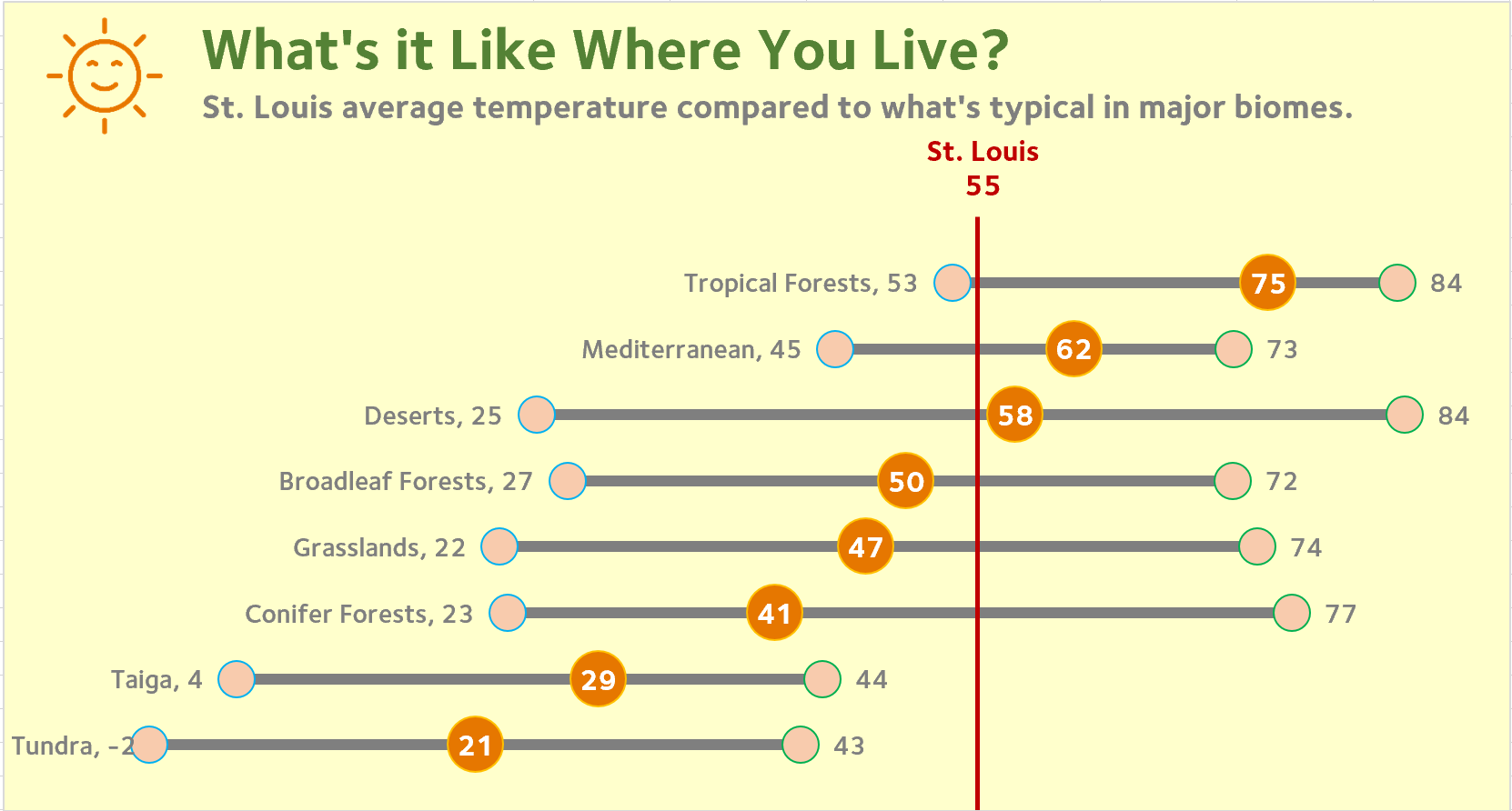
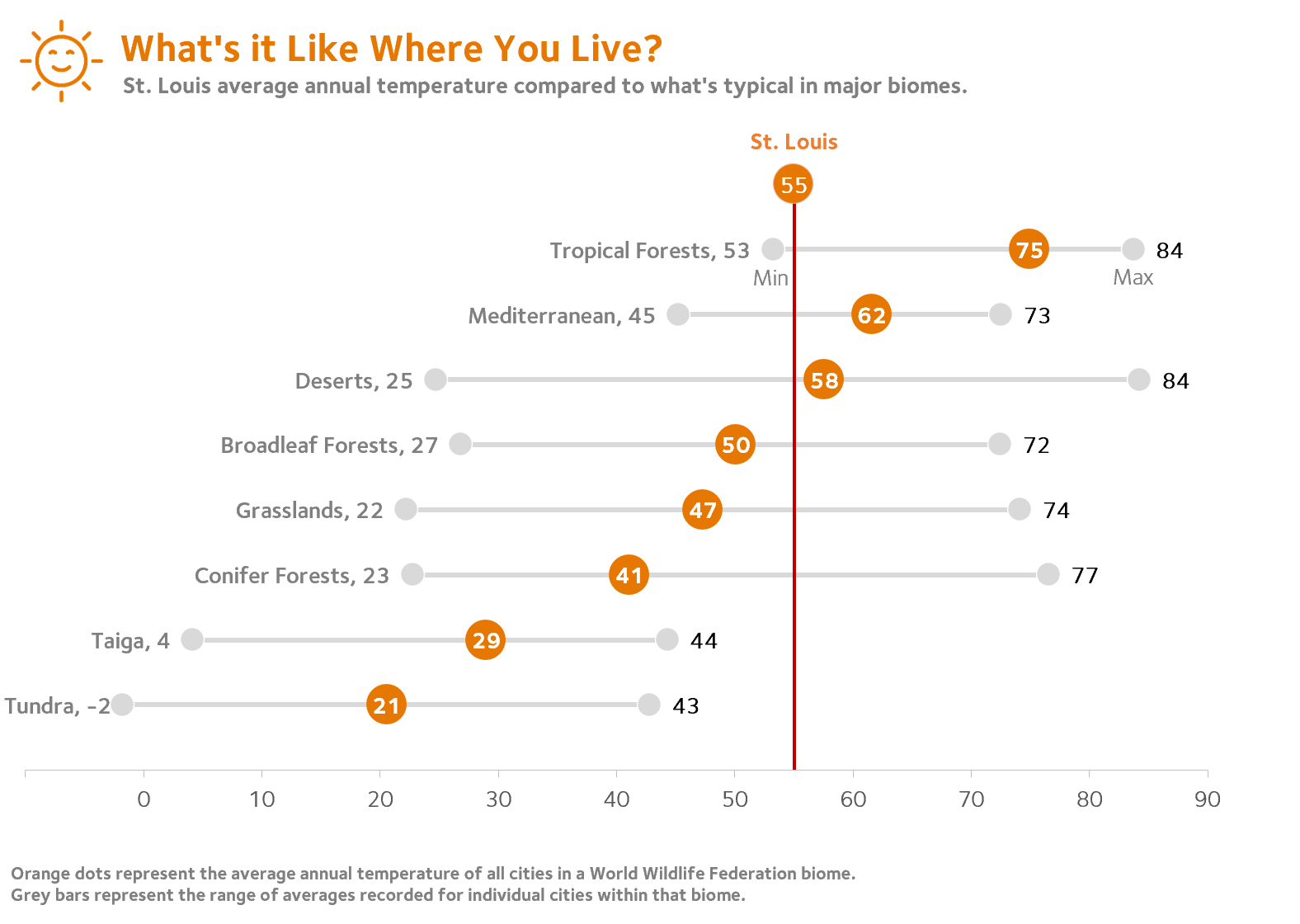
After exploring a few options, I settled on a representation which captured both the spread of data typical of cities in a given ecoregion and the mean value of these cities.

After exploring a few options, I settled on a representation which captured both the spread of data typical of cities in a given ecoregion and the mean value of these cities.

Major thanks are due here to Ann Emery for streamlining the look and feel of this version. Her focused, uncluttered design aesthetic is a perfect match for this work.

Major thanks are due here to Ann Emery for streamlining the look and feel of this version. Her focused, uncluttered design aesthetic is a perfect match for this work.

I’ve tested this out with a few kids with good results, but COVID restrictions have kept me from seeing how a broader pool of students make sense of this display. I’m hopeful that restrictions will be lifted in the new school year so we can move forward with some pilot testing.

Going Further

To be sure students remain connected to their local base, I needed an anchor which is ideally movable so that students in other areas can use the materials.  For this, I’m indebted to Jon Schwabish of the Urban Institute and PolicyViz.

While participating in a workshop he led, a couple of techniques we were using came together. By combining a single point scatter plot and error bars, a reference line can be inserted to mark local conditions.

If this strategy proves useful in our pilot testing, I expect that we will be able to support localization so that students anywhere could enter their own data and have VLOOKUP or a similar procedure to change my St. Louis reference line to one appropriate for any student’s home city.

The work so far has been an enjoyable way to explore data and apply the many things I’ve learned in Ann’s workshops and elsewhere. I’m looking forward to seeing how students use the data when we begin pilot testing. 

Written by cplysy · Categorized: depictdatastudio

Oct 12 2021

Slide Style Infographics – 4 Takeaways [and a free-to-watch workshop session]

Have you ever created an infographic?

No? Why not? Infographics can be a fun way to deliver information to different audiences. They can also be really easy to put together.

Yes? Which type? There are all sorts of different infographic styles and formats.

Today’s post features highlights from one of my pro workshop sessions. During the 33 minute session we walked through the design process for a particular kind of infographic that I call slide style.

  • If you read through this post, I’ll get right to the takeaway points.
  • But I also opened up this particular session recording because I hope it will give you a better idea of how these workshops are structured.
  • To access the session recording, you can find it free-to-watch by clicking this link.
Free-to-Watch Workshop Recording. Slide Style Infographics. Featured Image.
Click here for a free-to-watch version of this session.

Don’t want to watch?

That’s okay, you’ll get the gist by scrolling through this post.

Takeaway #1 An infographic is an audience connection device. Not a report replacement.

Illustrated Image. "Every audience member is different."

One of the biggest mistakes I see a lot is when an organization tries to reach all of their audiences with one report.

People complain, asking for something more visual. So the organization responds by making one infographic. [Facepalm]

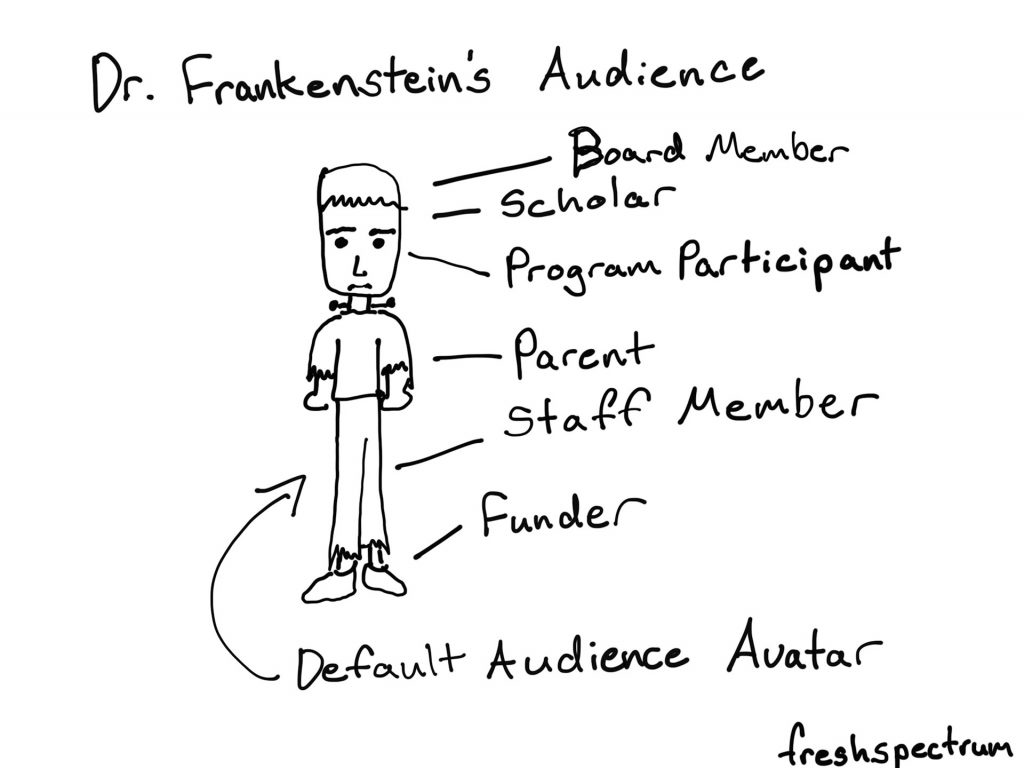
Yes, your report was probably super boring. But it likely also was built for either a non existent audience (something I refer to as Dr. Frankenstein’s Audience) or a very specific audience that does not include the person complaining.

Stop trying to serve everyone with one report.

One of the easiest ways to deliver multiple visual reports is to create a string of infographics designed to meet the needs of separate individual audiences.

Cartoon by Chris Lysy.  Dr. Frankenstein's Audience. Board Member, Scholar, Program Participant, Parent, Staff Member, Funder. All represented as a Default Audience Avatar that looks like Frankenstein's monster.

Takeaway #2 Most infographics are designed using a formulaic process.

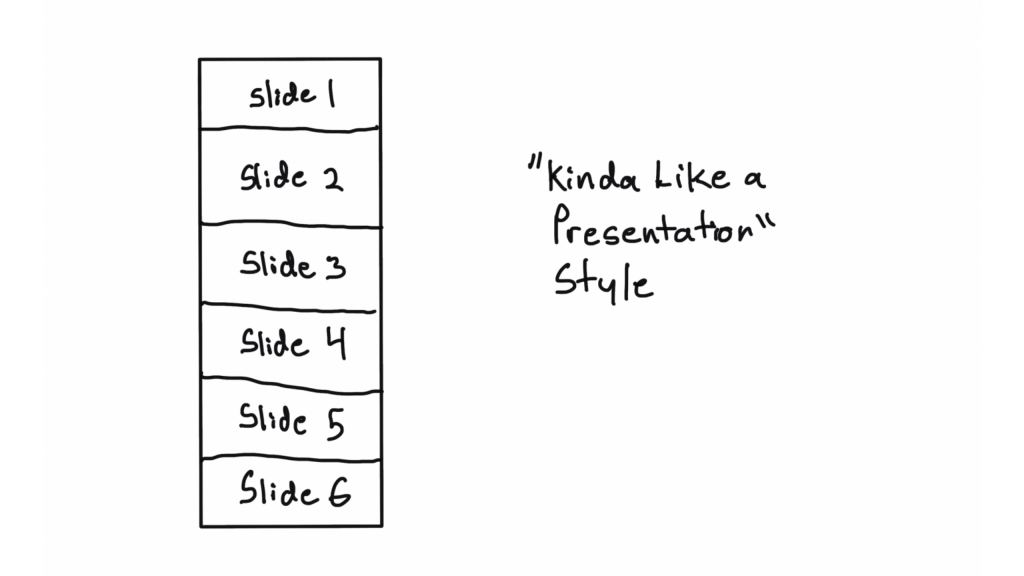
Kinda like a presentation style illustration.  Shows a sequence of 6 slides.
This is just one style of infographic, there are many more. And this won’t be the last time we talk infographics in this workshop.

Have you ever watched a cable TV cooking show, home design show, game show, or pretty much any mass production TV program?

It can get pretty formulaic, can’t it?

For example, every episode of house hunters. Realtor meets with couple searching for home. Shows three homes. One is definitely not what they were looking to find. The second is what they asked for but probably not what they really need, and it’s also way over budget. The third is perfect, just a little over budget but they can stretch…

Formulas are just conventions and structures that make it easier to produce something creative on a deadline. Most infographics are not going to be genre twisting award winners. And unless you’re building a fancy creative portfolio, let your infographics be purposeful communication tools.

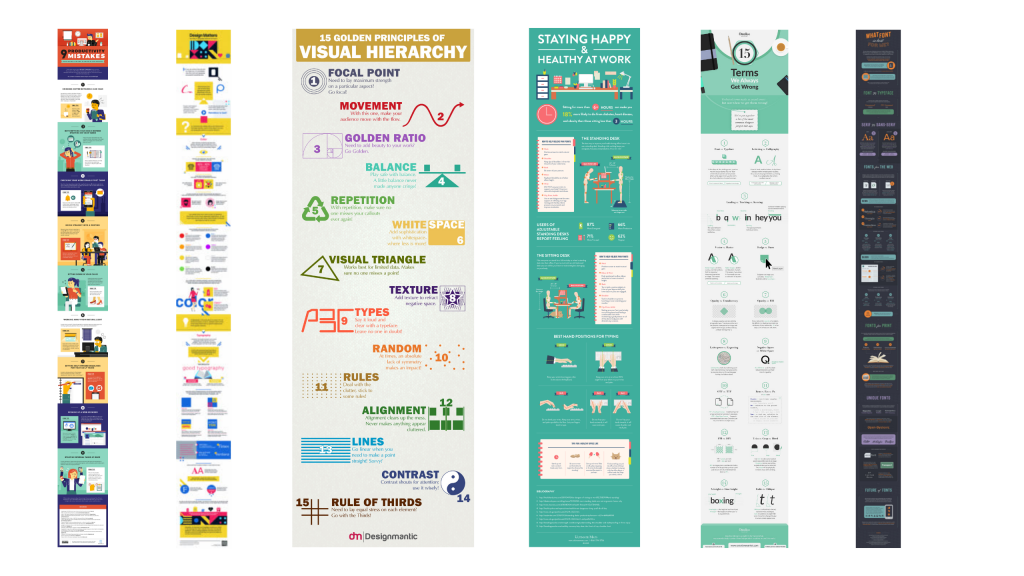
6 Example infographics.
We walk through a string of example sub-types in the full session.

Takeaway #3 Constraints can be useful tools. Especially for something open like an infographic.

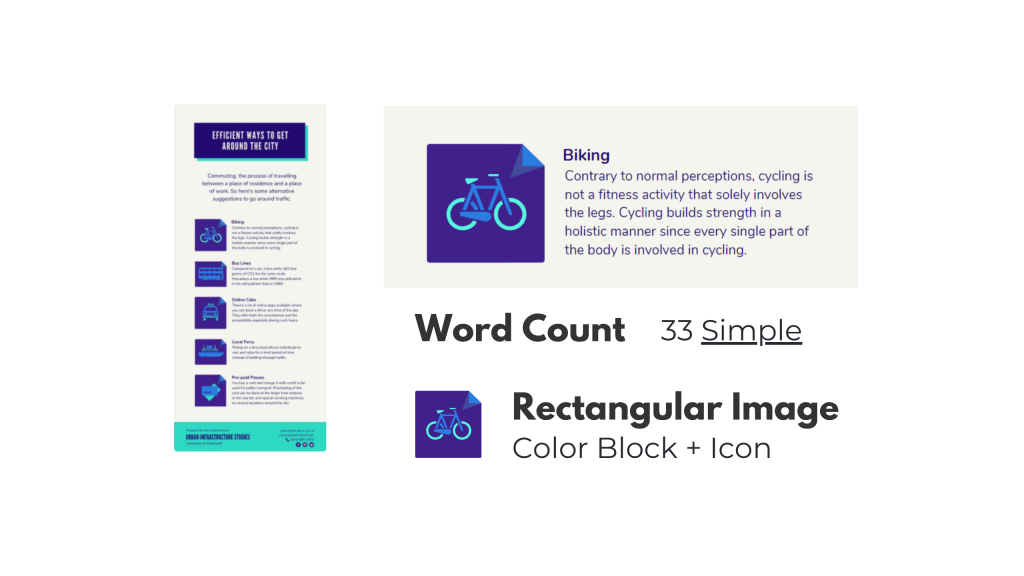
An example of an infographic breakdown.
Another thing we do is walk through a section by section template breakdown and talk about how you can use that to make a group design infographic process easier.

It’s hard to start with a blank canvas. Especially when that blank canvas can be any orientation or size that you can imagine.

Even as someone who spends his life creating stuff, I try to avoid the blank canvas. I also think that adding some constraints can make the design process much easier. Especially for something like infographics.

Looking for examples you like, and breaking down the components, can give you the proper foundation for a good infographic. This is also an effective strategy when working with a team.

Pull some examples, ask the team what they like. After they pick their favorites, tell them the exact word counts they should try not to go over if they want something similar. Also remind them that academic-speak and other jargon tend to have way more characters than the example infographic they probably chose.

Takeaway #4 A simple narrative can also guide your infographic creation.

A story, in five frames.
This is who I am now.
When I was a kid.
Gradual changes.
AND THEN THIS HAPPENED.
Charting a new future.
This is a simple story setup we walk through in the workshop. I use it to create my own infographic.

We hear a lot about telling a story with data visualization. But it’s actually really hard to tell a story in just one frame. Usually you need at a least a few frames to properly set the story and then deliver the twist.

Infographics are hardly ever one frame, and this format gives you a lot of room to build. Considering there is rarely a limit on infographic length (unless you self-impose) you can take your time and develop a full narrative.

Creating and telling good stories takes practice, whether or not you use an infographic. But even telling a simple story can really boost the power of a report.

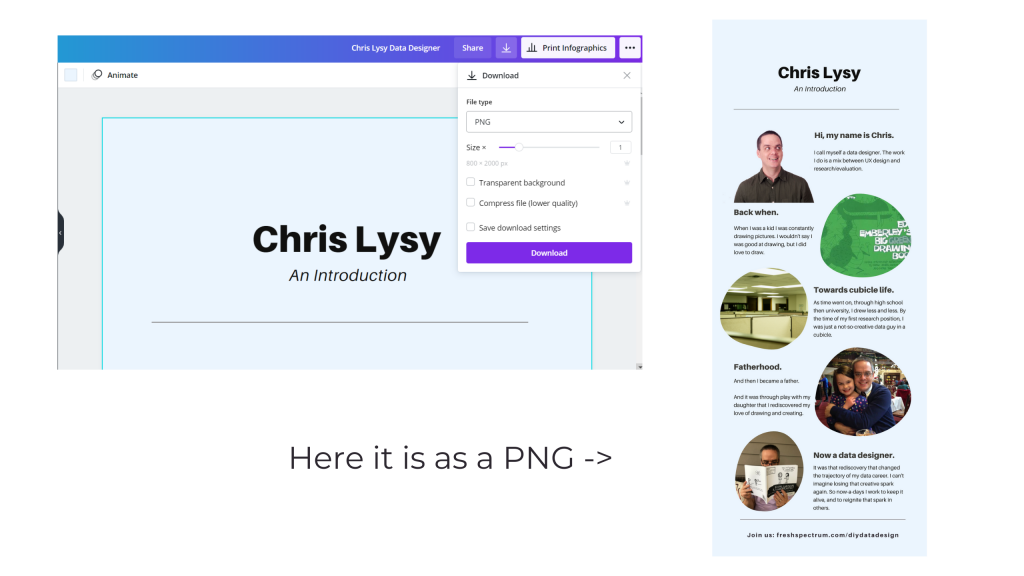
A picture illustrating how to download a PNG in Canva.
This is just showing how to download an infographic from Canva as a PDF. If you want to read my full example infographic, I share it alongside the workshop session.

Activity – Create your own infographic.

Activity - Now it's your turn. Can you write your own story and turn it into an infographic in Canva?

If you do watch the video and decide to create your own infographic, I would love to see it.

Download it as a PNG and then share it on Twitter or LinkedIn. Mention my twitter handle (@clysy on twitter) or mention my name on LinkedIn (linkedin.com/in/clysy/). You can also just share a link in the comments.

DiY Data Design Workshop News

On Wednesday, October 13, we’ll have our 6th session (Splash Model Content Strategy). That means there are 5 other sessions you can watch right now if you join (~2.5 hours of content).

  • Featured Images
  • External Analytics
  • Tableau One-Filter Dashboards
  • Funnel Content Strategy
  • Slide Style Infographics

I’ve also released the next 4 sessions. My plan with this workshop is to just keep presenting, 4 times every month. My goal is to create a large self-paced library with a wide range of workshop sessions you won’t find anywhere else. Then pair it with the kind of community and personal attention you rarely find at this price point.

Upcoming Sessions.

  • 10/13 – Splash Model Content Strategy
  • 10/20 – UX/UI Design Tools
  • 10/27 – Social Media Insights
  • 11/3 – Cartoon Illustration
  • 11/10 – Slidedoc Reporting
  • 11/17 – Personas and User Stories
  • 11/24 – Thanksgiving Break
  • 12/1 – Evaluating Resource Websites

Right now you can still join us at anytime. And at the moment, you can still lock in 20% off. This discount won’t last forever, so join us now!

Written by cplysy · Categorized: freshspectrum

  • « Go to Previous Page
  • Go to page 1
  • Interim pages omitted …
  • Go to page 159
  • Go to page 160
  • Go to page 161
  • Go to page 162
  • Go to page 163
  • Interim pages omitted …
  • Go to page 310
  • Go to Next Page »

Footer

Follow our Work

The easiest way to stay connected to our work is to join our newsletter. You’ll get updates on projects, learn about new events, and hear stories from those evaluators whom the field continues to actively exclude and erase.

Get Updates

Want to take further action or join a pod? Click here to learn more.

Copyright © 2026 · The May 13 Group · Log in

en English
af Afrikaanssq Shqipam አማርኛar العربيةhy Հայերենaz Azərbaycan dilieu Euskarabe Беларуская моваbn বাংলাbs Bosanskibg Българскиca Catalàceb Cebuanony Chichewazh-CN 简体中文zh-TW 繁體中文co Corsuhr Hrvatskics Čeština‎da Dansknl Nederlandsen Englisheo Esperantoet Eestitl Filipinofi Suomifr Françaisfy Fryskgl Galegoka ქართულიde Deutschel Ελληνικάgu ગુજરાતીht Kreyol ayisyenha Harshen Hausahaw Ōlelo Hawaiʻiiw עִבְרִיתhi हिन्दीhmn Hmonghu Magyaris Íslenskaig Igboid Bahasa Indonesiaga Gaeilgeit Italianoja 日本語jw Basa Jawakn ಕನ್ನಡkk Қазақ тіліkm ភាសាខ្មែរko 한국어ku كوردی‎ky Кыргызчаlo ພາສາລາວla Latinlv Latviešu valodalt Lietuvių kalbalb Lëtzebuergeschmk Македонски јазикmg Malagasyms Bahasa Melayuml മലയാളംmt Maltesemi Te Reo Māorimr मराठीmn Монголmy ဗမာစာne नेपालीno Norsk bokmålps پښتوfa فارسیpl Polskipt Portuguêspa ਪੰਜਾਬੀro Românăru Русскийsm Samoangd Gàidhligsr Српски језикst Sesothosn Shonasd سنڌيsi සිංහලsk Slovenčinasl Slovenščinaso Afsoomaalies Españolsu Basa Sundasw Kiswahilisv Svenskatg Тоҷикӣta தமிழ்te తెలుగుth ไทยtr Türkçeuk Українськаur اردوuz O‘zbekchavi Tiếng Việtcy Cymraegxh isiXhosayi יידישyo Yorùbázu Zulu