• Skip to main content
  • Skip to footer
  • Home

The May 13 Group

the next day for evaluation

  • Get Involved
  • Our Work
  • About Us
You are here: Home / Archives for allblogs

allblogs

Dec 30 2020

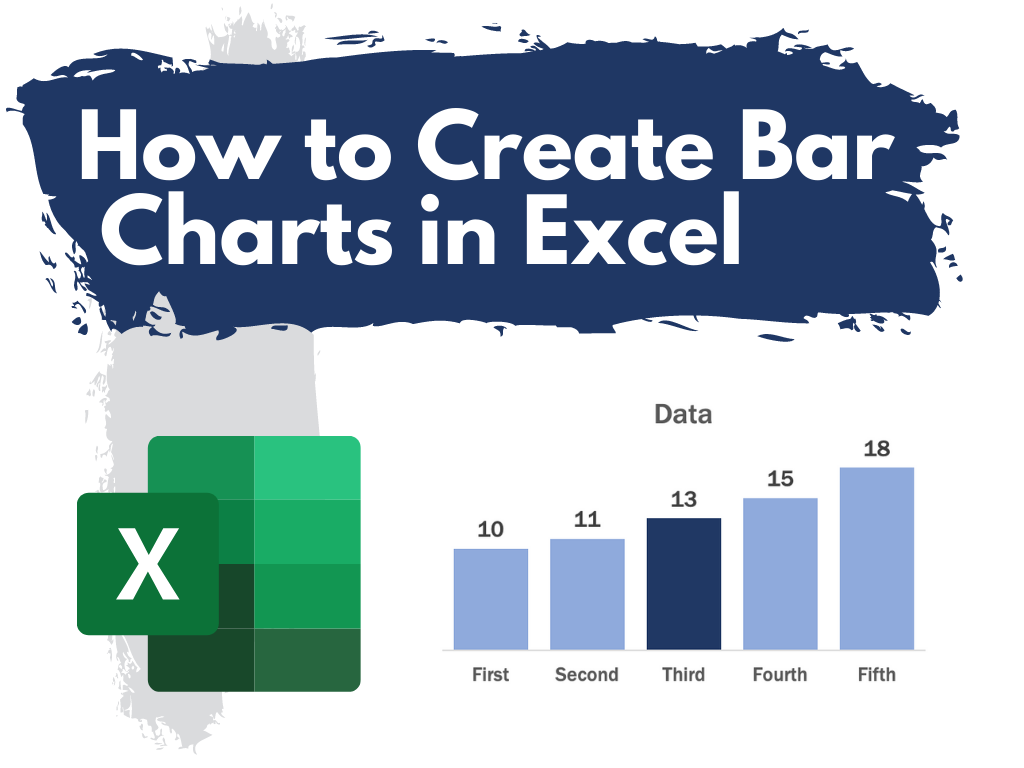
How to Create Bar Charts in Excel

This is the first in a series of posts on chart design in Excel. In each post we will take on a different chart type. Today we start with one of the most ubiquitous and useful charts, the Bar Chart.

What you’ll find in this post:

  • An Oversimplified How To
  • How to create a good looking bar chart.
  • A little bit of inspiration.
  • Some other considerations.
How to Create Bar Charts in Excel

An Oversimplified How To

Creating a bar chart (or column chart) is really simple in Excel. It just takes a column of data and a couple of buttons.
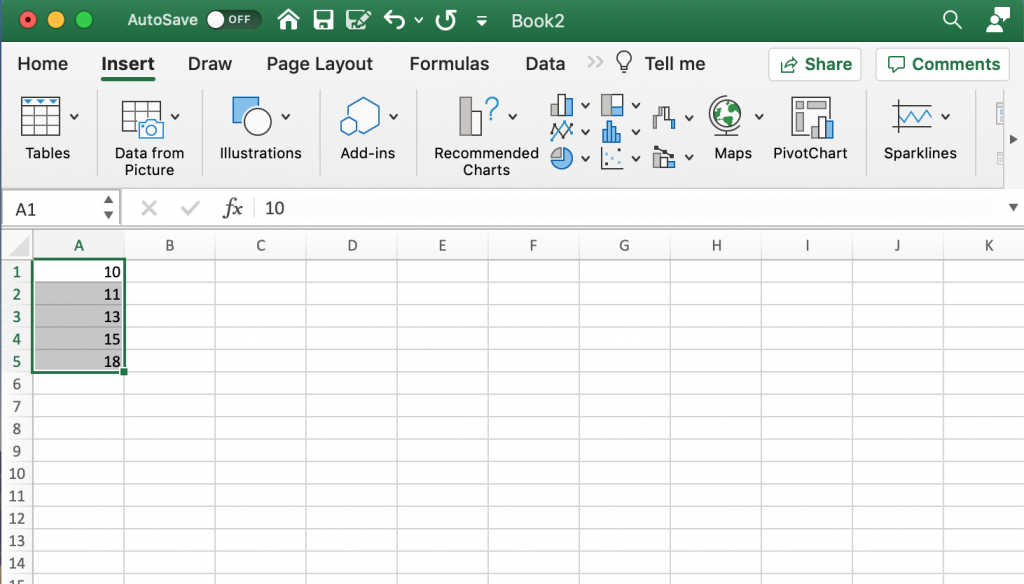
Step 1 in creating a Bar Chart in Excel.

Step 1. Highlight a column of numbers.
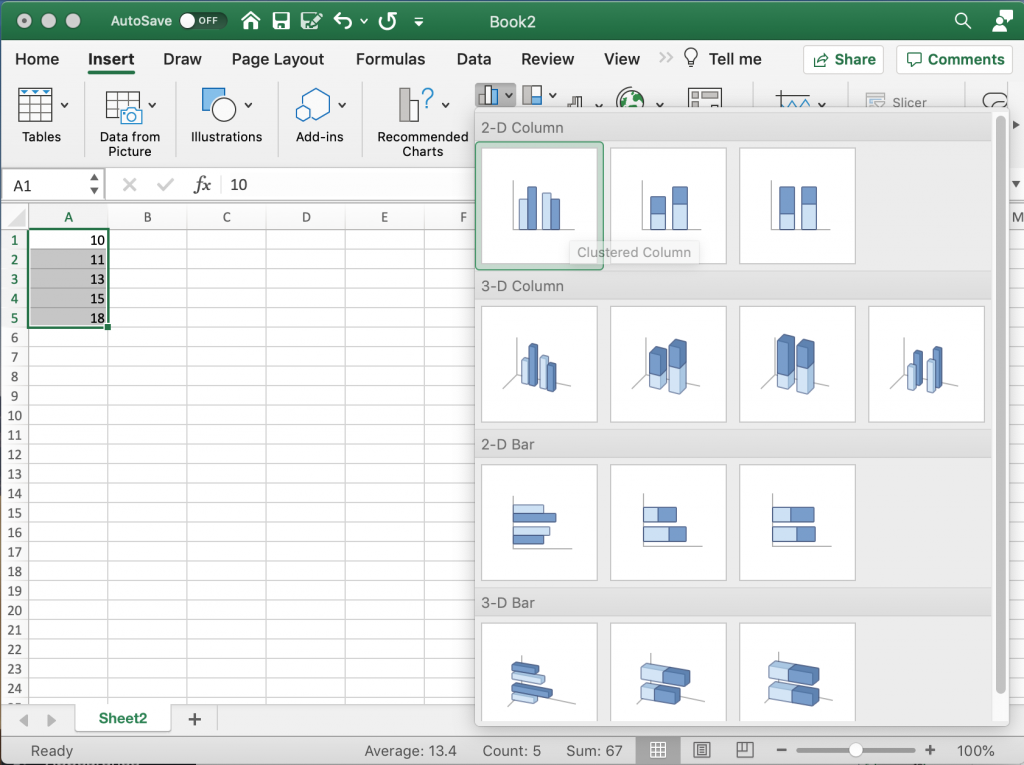
Step 2 in creating a Bar Chart in Excel.

Step 2. Click on the insert tab, then the bar chart icon. Then select the kind of bar chart you would like.

*Note: Avoid the 3-D charts!!!!
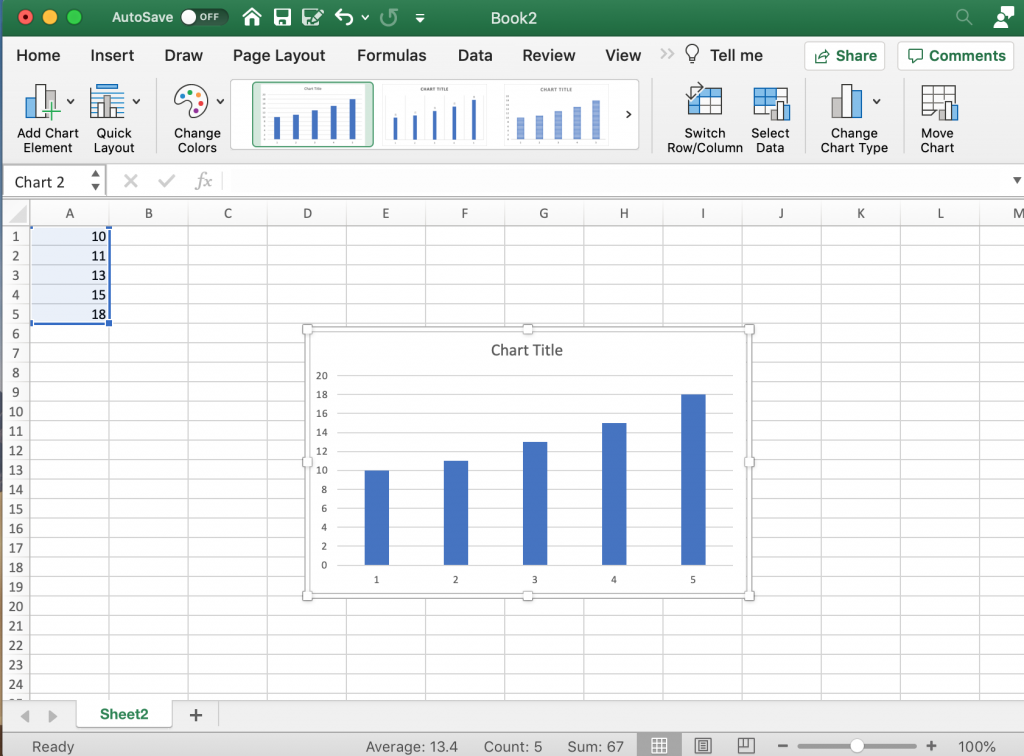
Creating a Bar Chart in Excel.

Step 3. Yay, you did it!

How to create a good looking bar chart.

Okay, so maybe you don’t just want to create a chart, but create a chart that actually looks nice. Here are some more steps you probably want to take.
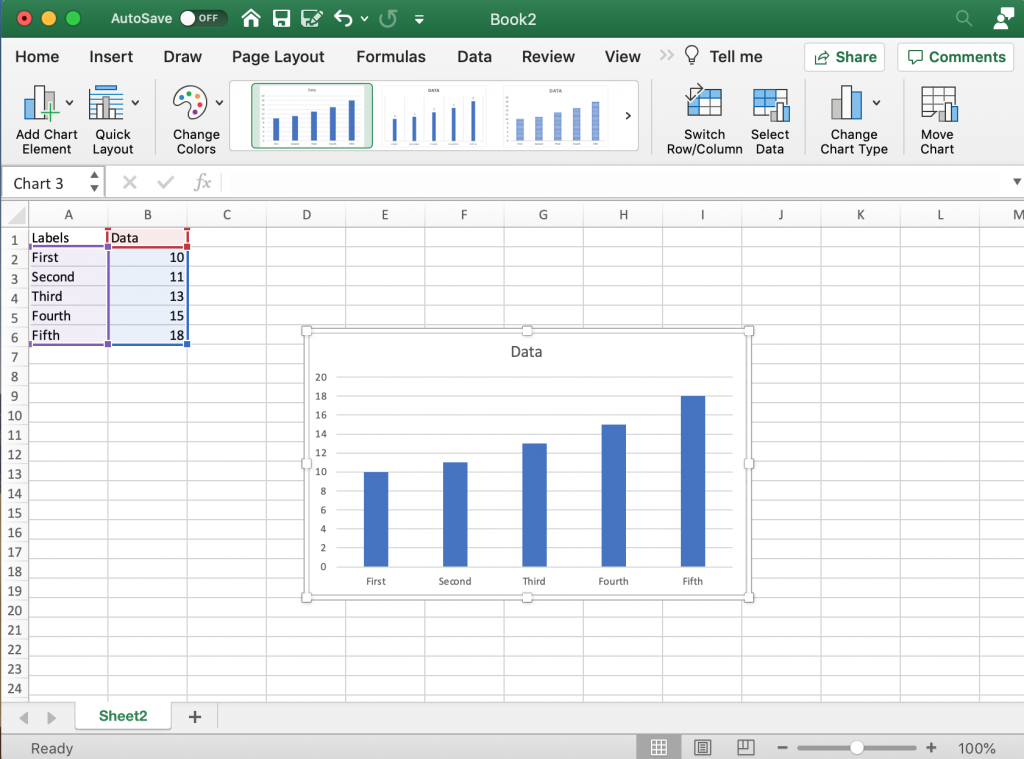
Labeling your bars in Excel.

Labeling your bars.

So in addition to just a column of numbers it’s a good idea to have row labels and column headers. When you go to create your chart, highlight these as well. This way Excel will actually label your bars and your chart.
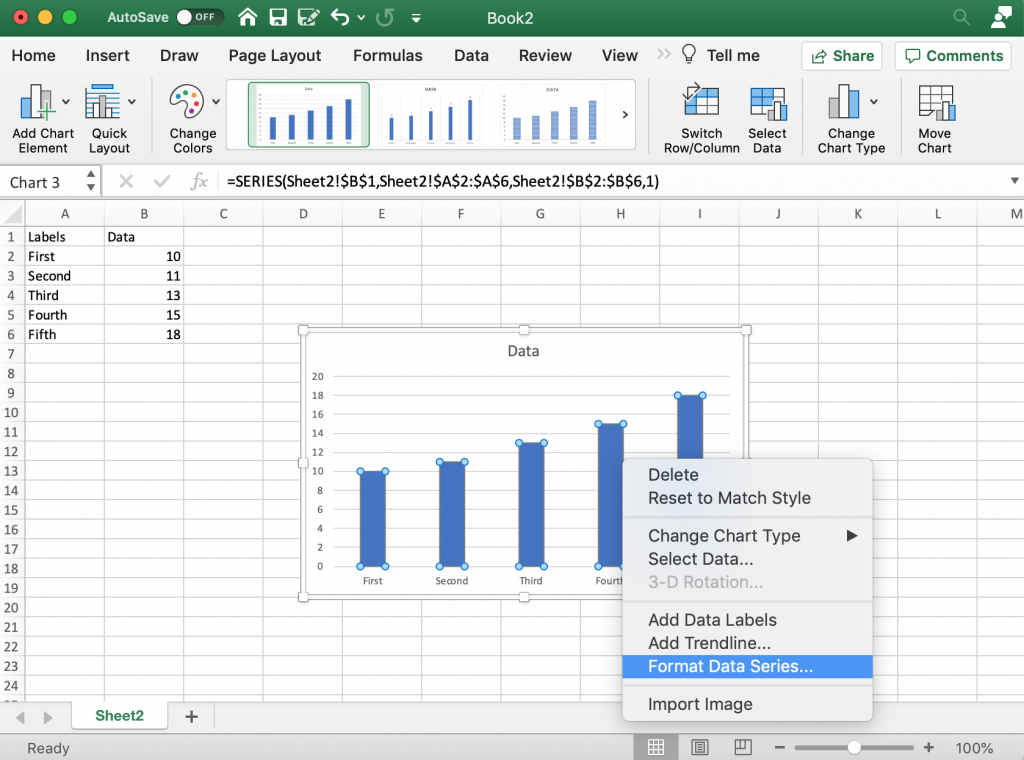
Formatting Menus Bar Chart Excel

The Formatting Menus

There are a few ways to reach formatting menus in Excel. I find the easiest is usually just selecting elements within the chart itself, then right clicking and selecting the format button.
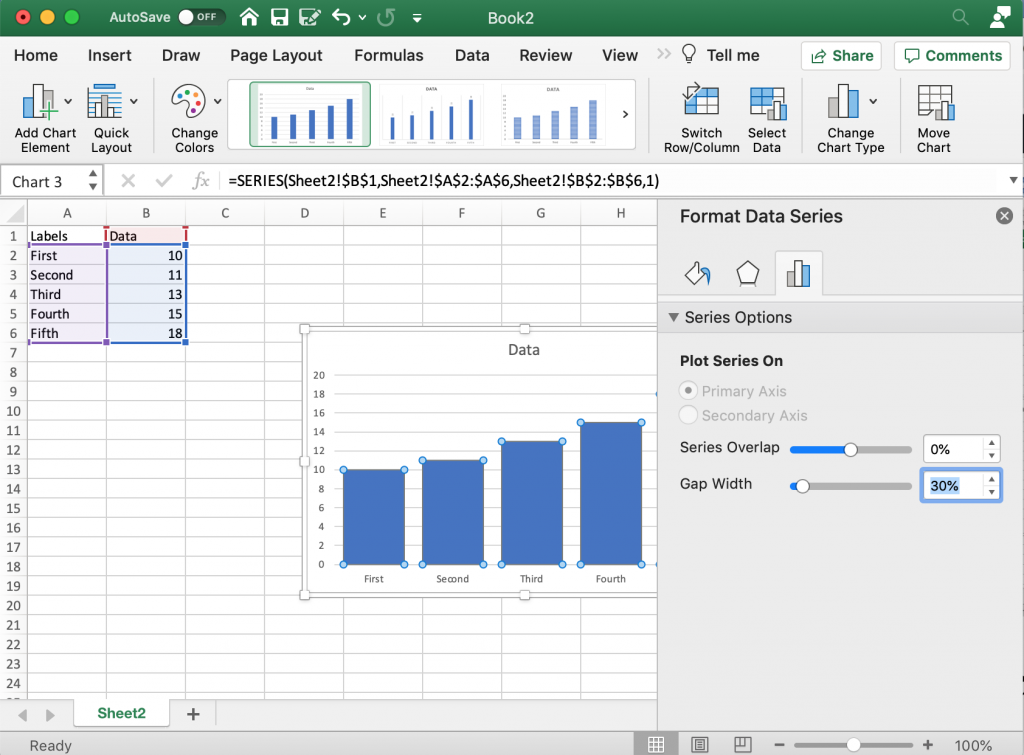
Making the Bars Bigger in Microsoft Excel

Making the Bars “Bigger”

One of the things I always end up doing is reducing the gap between bars. The default makes the bars tiny with a lot of useless empty space in between. Reducing the Gap Width will make your bars bigger.
Creating a Clean Chart in Excel

Creating a Clean Chart

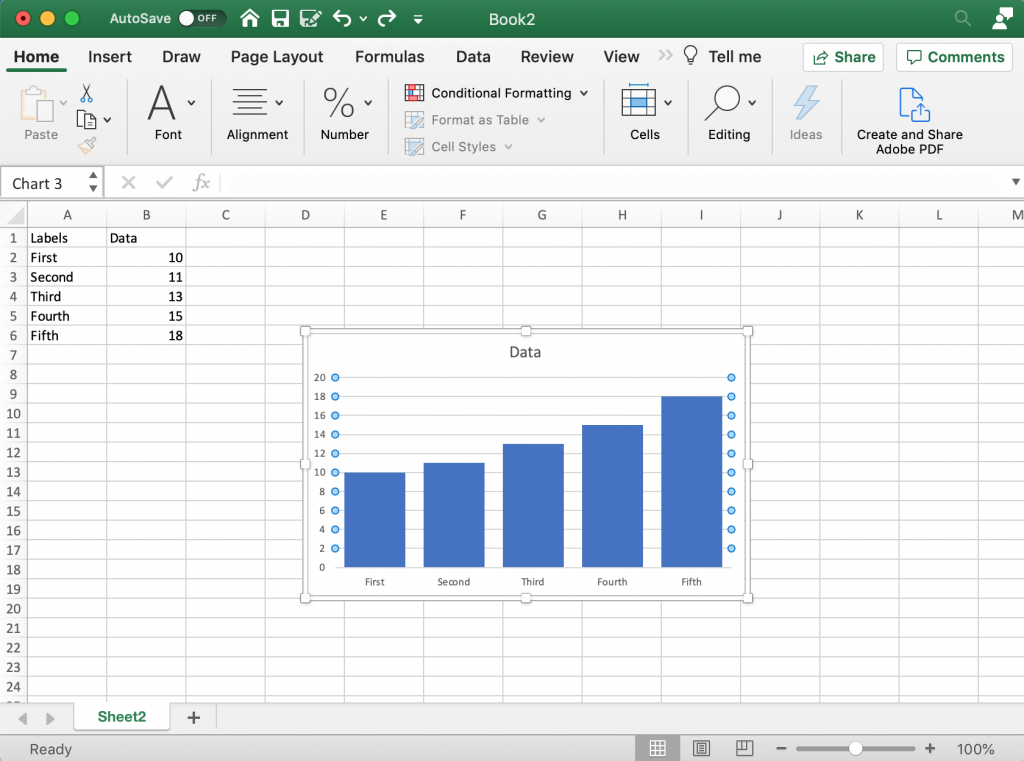
I like a clean bar chart, so often I’ll get rid of the gridlines (which I’ll replace with bar labels). To do this you really just click on the lines and delete them. Since I’ll use bar labels I can also get rid of the y axis labels by selecting them and hitting the delete button.
Increasing the Label Sizes in Excel Bar Charts

Increasing the Label Sizes

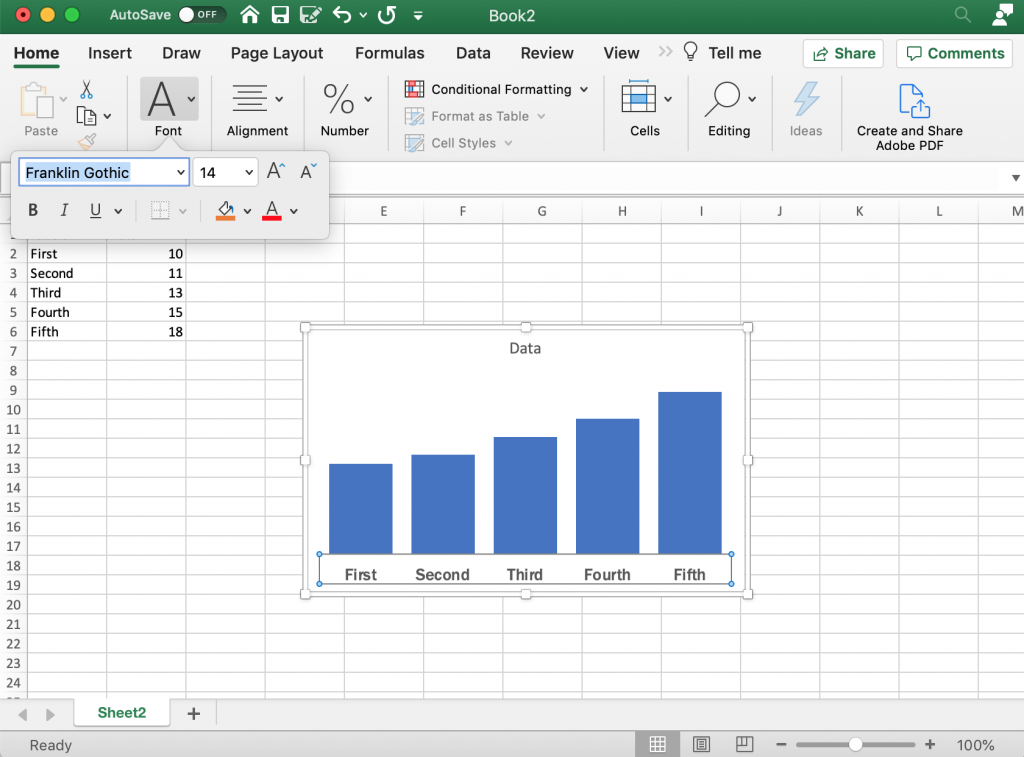
Usually after stripping down the chart a bit I’ll then bump up the label size. Also not a big fan of the default font so I’ll change that up as well.
Changing Bar Colors in Excel Bar Charts

Changing Bar Colors

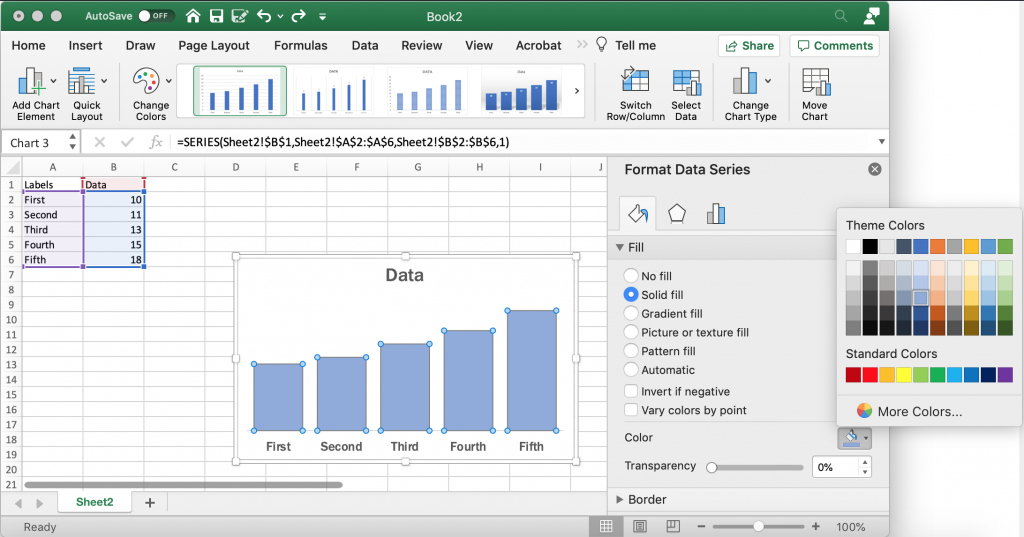
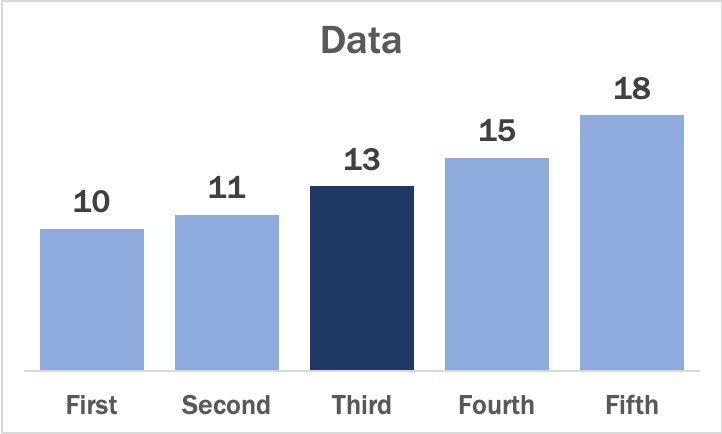
Good data design practice means using color sparingly but deliberately. Long gone are the rainbow color palettes of the past, which didn’t offer any real value. Instead we use single color unless we would like to high something. Once thing I tend to do is bump the shade down a bit. You can find the color options in the Format Data Series menu after selecting the bars.
Setting a Highlight Color in Excel Bar Charts

Highlight Color

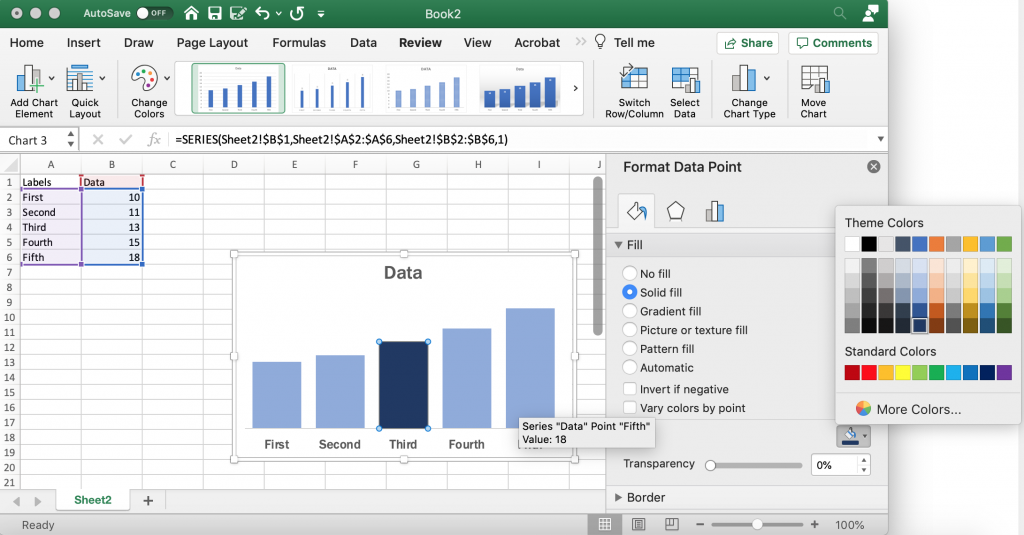
If there is a specific bar you would like to highlight, you can decide to change only that bar’s color. Just click on the individual bar until it’s the only one selected, then change the color. I tend to go with darker shade whether it is the same color or a different color, this helps if the chart is ever printed in black/white.
Adding and Formatting Data Labels in Excel

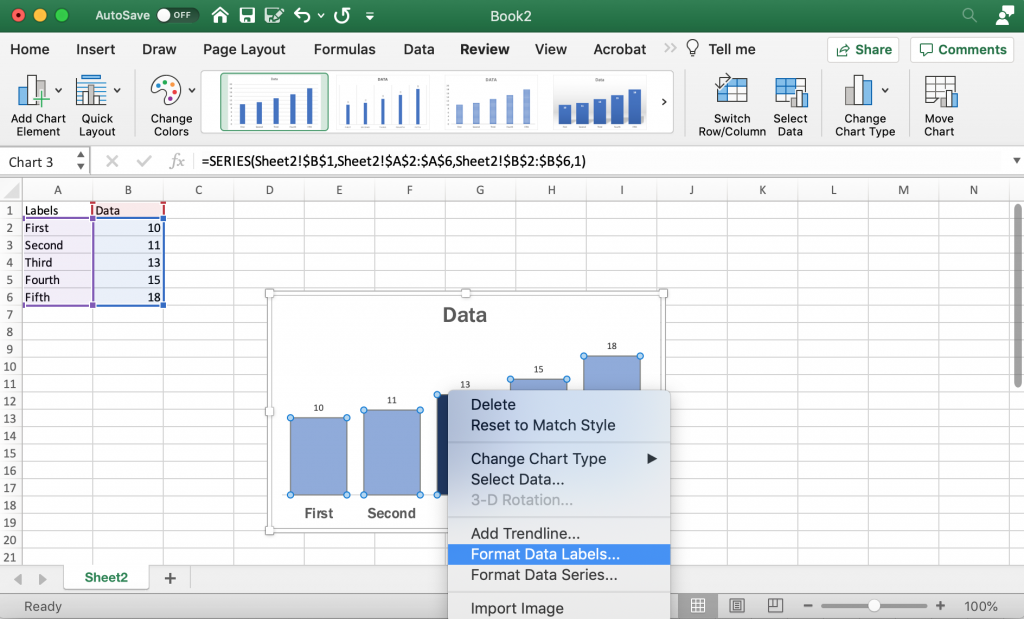
Add and Format Data Labels

I like using data labels instead of an axis/grid lines for most bar charts. You can add labels with a right click on the bars (selecting add data labels). Then I go ahead and format the data labels so that they are bigger and match the font I’m using.
Saving a Bar Chart as a Picture in Excel

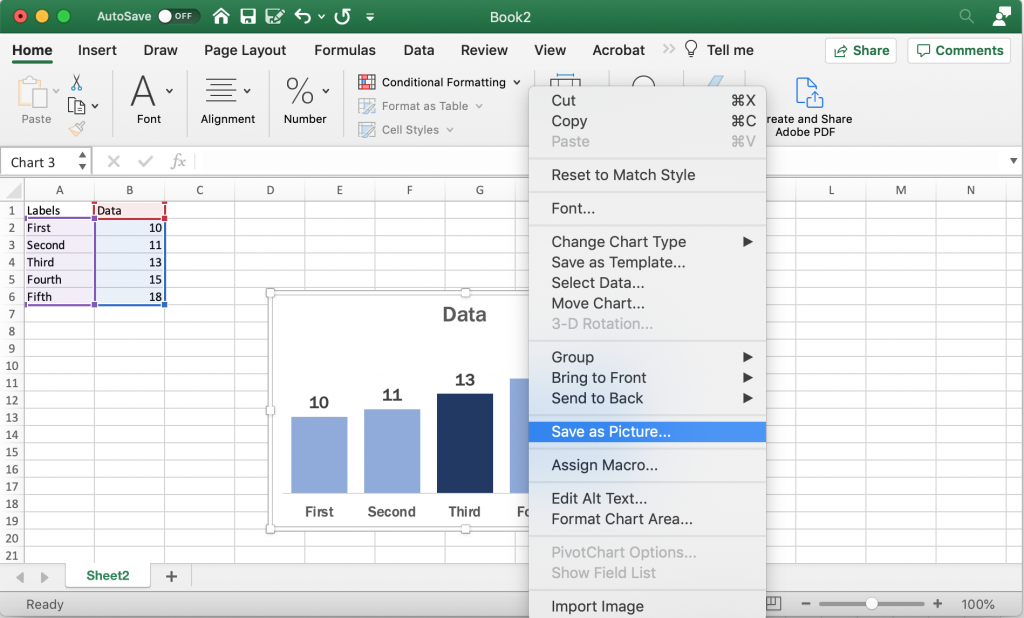
Saving the Image

Once you have made all the changes you want to the chart you can save it as a picture. Just right click on the chart area and click “Save as Picture.”

Alternatively, you can just copy and paste the chart from Excel into Word or PowerPoint. If you’re staying within the Office suite, this is the ideal way to move the image as it retains your full ability to reformat the graphic.
Final Example Bar Chart Created in Excel

Beyond the Basics

This is just the basics. There are all sorts of things you can do with Bar Charts.

Generally though I suggest keeping the chart itself simple and minimalist. You can always add flare through annotations/additional graphics. Doing things like making your charts 3D doesn’t help the presentation, it just makes the chart harder to interpret and can also skew the data.

A little bit of inspiration.

Bar charts go wayyyyy back.

The first bar chart is often credited to William Playfair from all the way back in the early 1800s.
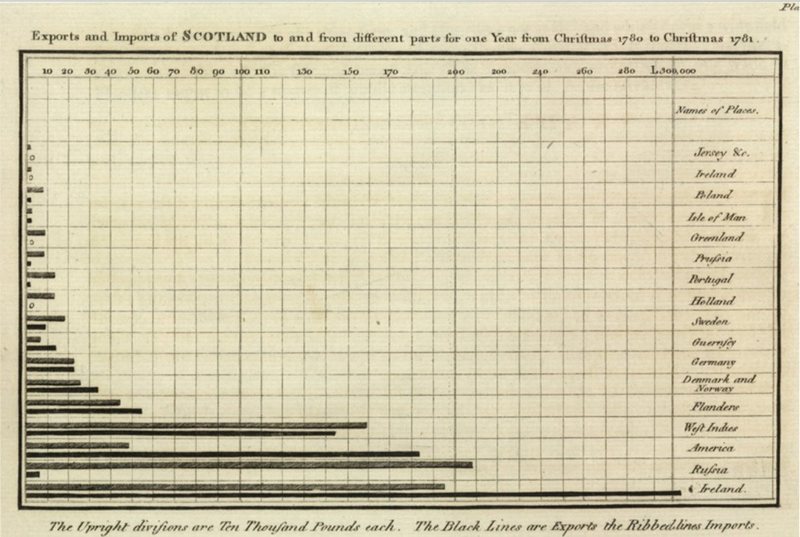
The world's first bar chart, from The Commercial and Political Atlas, shows the relative importance of Scotland's trading partners.
The World’s First Bar Chart created by William Playfair – Read more about William Playfair > Atlas Obscura – The Scottish Scoundrel Who Changed How We See Data

But really we find bar charts (horizontal and vertical) just about everywhere.
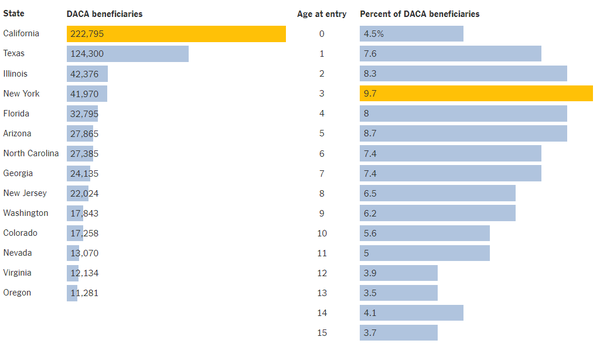
Bar Chart example from the NY Times Learning Network.
From the NY Times: Learning Network – What’s Going On in This Graph? | Dec. 5, 2018

Newspaper sites and modern news blogs provide some of the best examples of clean charts you’ll find on the web. Bar charts are like button up shirts, they might come in all sorts of different colors and sizes but it’s pretty doubtful that they’ll ever fall of style completely.
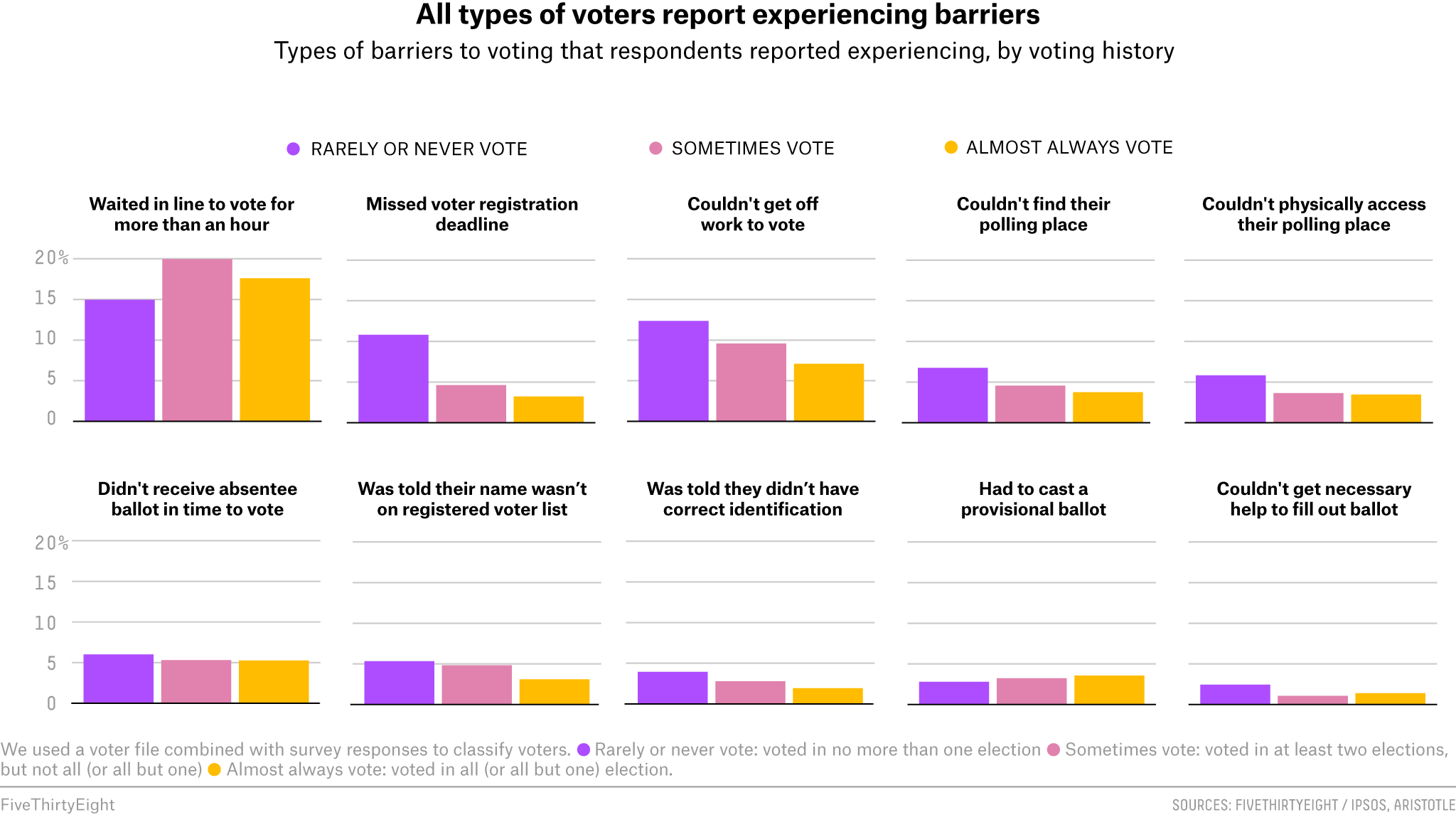
Bar Chart Example from the Five Thirty Eight Blog.
The 40 Weirdest (And Best) Charts We Made In This Long, Strange Year

Some other considerations.

Should you go horizontal or vertical?

I often choose horizontal bar charts because they’re easier to label. But vertical bar charts definitely have their place as well. Try not to overthink it, if you’re in doubt just create two versions and decide which one tells your story better.

Ann K Emery offers a good post on choosing between the two styles on her Depict Studio Blog.
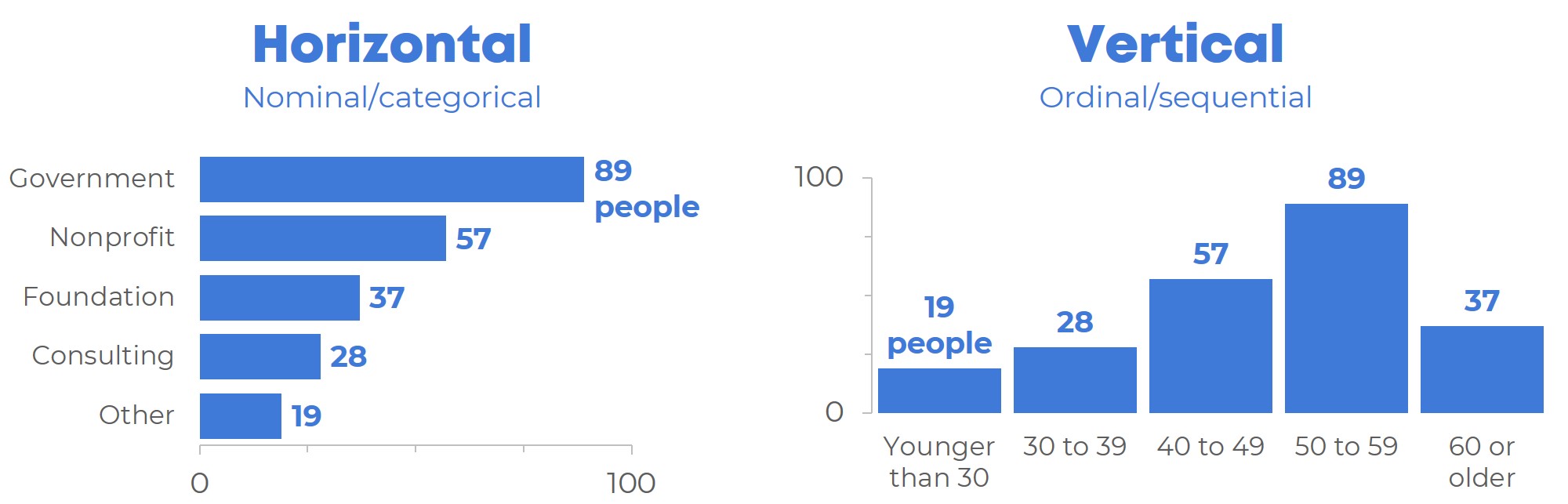
A horizontal bar chart and a vertical column chart.
When to Use Horizontal Bar Charts vs. Vertical Column Charts

What about clusters and stacked bars?

I’ll get into variations on the common bar chart in the future. But for a brief description of the different bar chart variants, this post by Alex Velez on Storytelling with Data does a nice job.
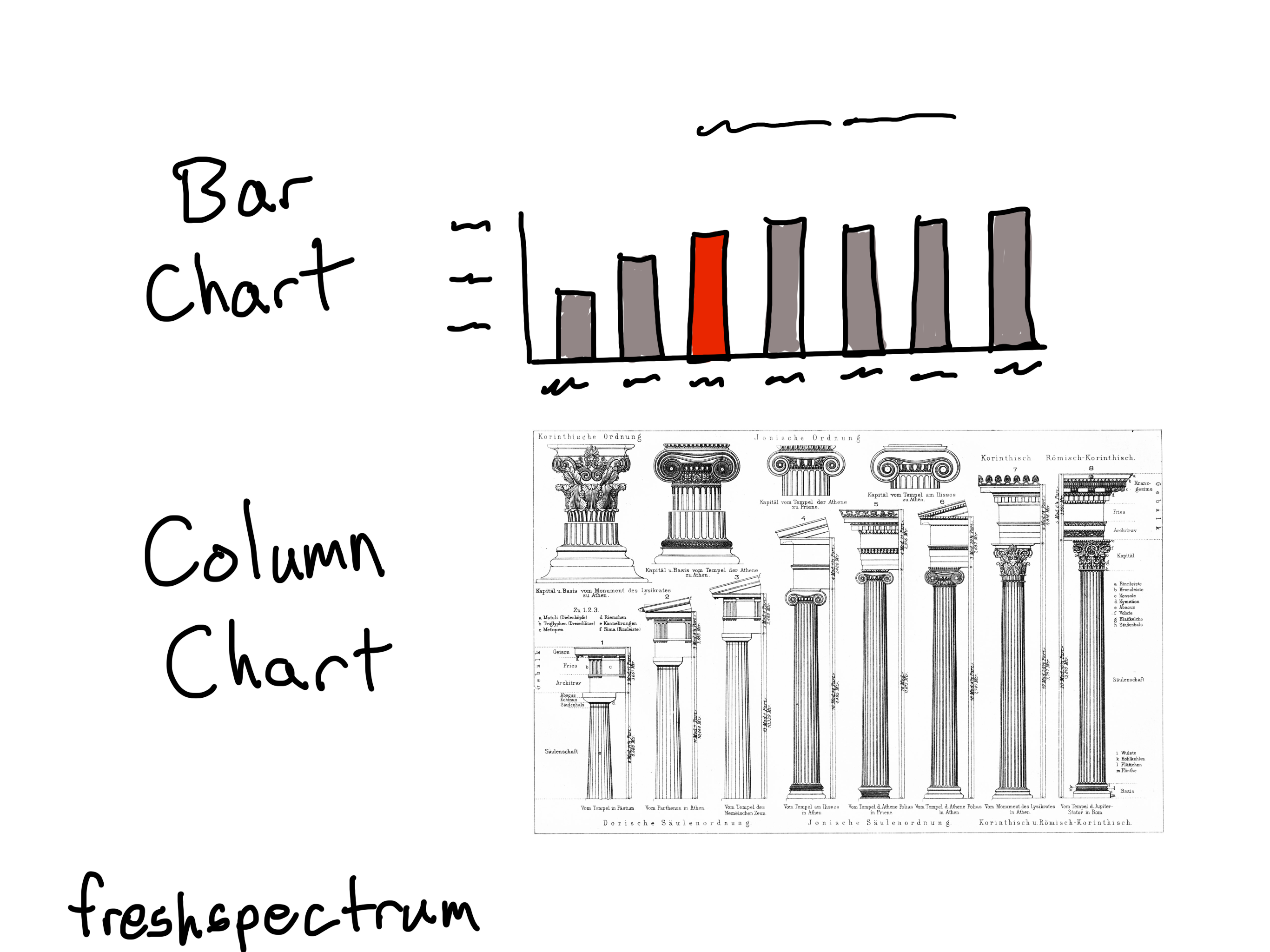

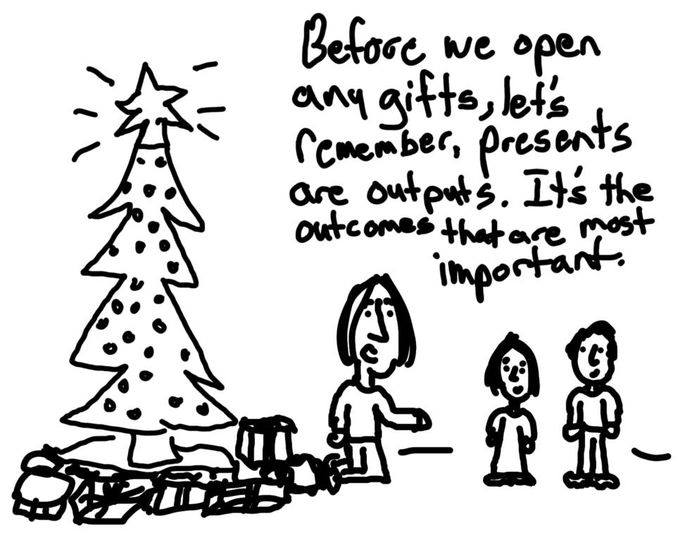
Cartoon showing a bar chart and a chart with columns.

Written by cplysy · Categorized: freshspectrum

Dec 30 2020

Evaluation Roundup – Top Ten Posts from 2020


Welcome to our monthly roundup of new and noteworthy evaluation news and resources. This month’s roundup highlights Eval Academy’s top ten posts from 2020.

What posts would you like to see in 2021? Tweet us @EvalAcademy or connect on LinkedIn!


#10 – How we used an outcome harvest

Coming in at #10 is a post where we share how we used outcome harvesting and what we wished someone had told us before we started.

#9 – Evaluation plan template

At #9 is our evaluation plan template. There is no need to reinvent the wheel when planning your evaluation. Download this customizable template for free!


#8 – 7 tips for better data visualizations

At #8 is an article that outlines seven easy tips for improving your data viz. Practice these tips and you’ll “wow” both colleagues and clients.


#7 – Branding and marketing for evaluation consultants

At #7 is the fourth article in a four-part series that rounds up the American Evaluation Association’s (AEA) “New Directions for Evaluation.” The fourth article in this series is about branding your business, and it’s based on the article by Stephanie Evergreen and Nina Sabarre: “Branding for the Independent Consultant: Basic to Advanced.”


#6 – Program evaluation scoping guide

At #6 is another free guide to download! The program evaluation scoping guide is intended for anyone conducting an evaluation of a program to understand the scope of the evaluation. The guide outlines questions evaluators can ask program managers or other stakeholders to better understand the scope of the program and its evaluation.


#5 – My interviewee is drinking vodka: An evaluation ethics case

At #5 is a real-world ethics case that explores why we chose to interview someone who was chronically intoxicated and the ethical considerations for including her in our evaluation.


#4 – How to kick off your evaluation kick-off meeting

#4 is an oldie but a goodie. This article provides you with some pointers and a sample kick-off meeting agenda to kick your evaluation off on the right foot.


#3 – How to “quantify” qualitative data

#3 is for all the “quants” out there who need to quantify anything and everything. The “quals” may hiss at this post, but the framework provided for quantifying qualitative data is one you’ll want to bookmark.


#2 – JCSEE program evaluation standards in practice

One of our top posts for 2020 is another free digital download. This resource gives you the reflective prompts you need to ensure your next evaluation project incorporates all 30 Program Evaluation Standards developed by the Joint Committee on Standards for Educational Evaluation.


#1 – How to write good evaluation questions

Our top post for 2020 outlines what an evaluation question is and pointers to consider when drafting your evaluation questions.


Keep the roundups coming? Sign up for our monthly roundup here:


Written by cplysy · Categorized: evalacademy

Dec 28 2020

Incorporando el pensamiento evaluativo y la gestión adaptativa en la implementación de los ODS

Fuente: WB site

Dentro de nuestras series sobre “ODS“, “Pensamiento evaluativo” y “Gestión Adaptativa“, y como parte de los muy interesantes boletines sobre evaluación de la OIT (Organización Internacional del Trabajo), tenemos este relevante documento relacionado con los “Mecanismos que incorporan el pensamiento evaluativo y la gestión adaptativa para apoyar la implementación de los ODS ” de 2016, escrito por Robert Lahey.

La introducción de los Objetivos de Desarrollo Sostenible (ODS) ha significado que nuestras organizaciones tengan que mirar tanto hacia adentro como hacia afuera mientras trabajan para optimizar su contribución a los ODS a través de sus propias agendas. La forma de trabajar en esa dirección no debería ser un “negocio como de costumbre” para los miembros de nuestras organizaciones en el futuro. Sin embargo, hay muchos desafíos que enfrentamos con la implementación de los ODS. El pensamiento evaluativo, que involucre a todos los equipos/miembros de la Organización y no solo a los Evaluadores, ofrece una forma útil de ayudar a identificar dónde y cómo los equipos de nuestras organizaciones pueden realizar las intervenciones necesarias para abordar directamente desafíos particulares.

Junto con una filosofía de gestión adaptativa que haría capaces a nuestras organizaciones de reconocer retos y alterar el rumbo cuando se necesitara un cambio, el enfoque propuesto en este documento, apunta a garantizar la implementación efectiva de los ODS.

Si bien existen mecanismos tradicionales para el monitoreo y la evaluación, la estrategia que se recomienda en este documento hace que todos los miembros de la organización (y no simplemente l@s evaluador@s o la función de evaluación) tengan la responsabilidad de emplear el pensamiento evaluativo y la gestión adaptativa como un medio para navegar por el mundo incierto asociado con la implementación de los ODS. Aún se esperaría que l@s evaluador@s realicen estudios de evaluación sistemáticos, pero también se les puede pedir que desempeñen un papel no tradicional en apoyo del pensamiento evaluativo, particularmente en los primeros años de implementación de los ODS. Sin embargo, esto solo tendría éxito si todos los miembros de la organización adoptaran la cultura que refleja el pensamiento evaluativo y la gestión adaptativa.

Estos son algunos de los retos y estrategias que el documento plantea:

I. Retos y Antecedentes: nuestros desafíos y necesidades para contribuir a los ODS

1.Adopción de la Agenda 2030 para el Desarrollo Sostenible: objetivos y metas amplios y ambiciosos

2. Aclarar dónde y cómo los ODS podrían afectar al trabajo/mandato de nuestras organizaciones.

3.La necesidad de resolver la relación entre (a) los resultados de nuestra organización, (b) las metas de los ODS, (c) los indicadores y los datos / información necesarios para el seguimiento, y (d) de qué será responsable nuestra organización.

4.Muchos desafíos a nivel de país: para las organizaciones de desarrollo, el sistema de ayuda y de las Naciones Unidas y cada uno de los países.

5.La necesidad de establecer un formato y mecanismos adecuados para informar sobre la contribución de nuestra organización a los ODS

II. Estrategia propuesta: Este documento propone una estrategia para utilizar el pensamiento evaluativo y la gestión adaptativa para apoyar la implementación efectiva de los ODS / nuestra Agenda organizacional:

ETAPA 1: Comprender el vínculo entre los ODS y nuestra Agenda Organizacional

ETAPA 2: Estrategia y Plan para vincular los ODS y nuestra Agenda Organizacional

ETAPA 3. Actividades organizativas que apoyan la implementación de los ODS

ETAPA 4. Seguimiento de la implementación de los ODS para nuestra organización

ETAPA 5. Presentación de informes sobre la implementación de los ODS

ETAPA 6. Evaluación formativa de los ODS / Nuestra organización – Análisis de evaluabilidad

ETAPA 7. Evaluación de la efectividad de la ejecución de los ODS / nuestra organización

ETAPA 8. Evaluación de resultados e impacto de nuestras intervenciones organizacionales

Written by cplysy · Categorized: TripleAD

Dec 27 2020

El análisis de contribución

En BetterEvaluation profundizan en el Análisis de contribución

El análisis de contribución es un enfoque diseñado para evaluar las preguntas causales e inferir la causalidad en las evaluaciones de la vida real de los programas.

Ofrece un enfoque detallado, diseñado para ayudar a los directores de programas, investigadores y diseñadores de políticas a llegar a conclusiones acerca de la contribución que ha efectuado (o está efectuando) su programa a determinados resultados.

El valor principal del análisis de contribución es que ofrece un enfoque diseñado para reducir la incertidumbre respecto de la contribución que la intervención está haciendo a los resultados observados, a través de (1) una comprensión mejorada de las causas por las cuales los resultados observados han tenido lugar (¡o no!) y (2) los roles desempeñados por la intervención y otros factores internos y externos.

El análisis de contribución:

(1) Es especialmente útil en situaciones en las que un programa no es experimental; es decir, no es apto para proyectos de prueba sino para situaciones en las que el programa ha sido financiado sobre la base de una teoría de cambio más bien claramente definida y donde hay poco o ningún margen para variar la forma en que el programa es implementado.

(2) Ayuda a confirmar o revisar una teoría de cambio; su propósito no es que sea utilizado para sacar a la superficie o descubrir una teoría de cambio que se ha mantenido implícita o inexplícita hasta ahora.

(3) El informe de un análisis de contribución no constituye una prueba definitiva, sino que proporciona evidencia y una línea de razonamiento de las cuales podemos extraer una conclusión plausible en el sentido que, dentro de cierto nivel de confianza, el programa ha realizado una contribución importante a los resultados documentados.

Este texto forma parte de la traducción del post en inglés en BetterEvaluation, como parte de una cooperación entre BetterEvaluation, DEval y ReLAC, con apoyo financiero del Ministerio alemán Federal de Cooperación Economica y Desarrollo.

Written by cplysy · Categorized: TripleAD

Dec 26 2020

Celebrar lo cotidiano y lo sencillo

No hay ninguna descripción de la foto disponible.

Un poco de pensamiento evaluativo en nuestra práctica cotidiana, Fuente: Chris Lysy, Freshspectrum


Ojalá que durante esta Navidad nuestras rutinas se transformen en aventuras, nuestros enfados en sonrisas, nuestro errores en aprendizajes/mejoras y nuestras tristezas en esperanzas.
Este año ha sido muy duro para tod@s pero, tristemente, especialmente duro para l@s más vulnerables.
Empiezan unos días para recordar y agradecer a quienes tenemos y hemos tenido en nuestra vida.
Celebrar lo cotidiano y lo sencillo es ahora más necesario que nunca.
Mis mejores deseos de felicidad para tod@s vosotr@s compañer@s. ¡Feliz Navidad a tod@s!
Disfrutemos de estos días con la compañía de tod@s: cercanos y no cercanos.
¡Ánimo, suerte y este año, sobre todo, mucha salud!

Written by cplysy · Categorized: TripleAD

  • « Go to Previous Page
  • Go to page 1
  • Interim pages omitted …
  • Go to page 213
  • Go to page 214
  • Go to page 215
  • Go to page 216
  • Go to page 217
  • Interim pages omitted …
  • Go to page 310
  • Go to Next Page »

Footer

Follow our Work

The easiest way to stay connected to our work is to join our newsletter. You’ll get updates on projects, learn about new events, and hear stories from those evaluators whom the field continues to actively exclude and erase.

Get Updates

Want to take further action or join a pod? Click here to learn more.

Copyright © 2026 · The May 13 Group · Log in

en English
af Afrikaanssq Shqipam አማርኛar العربيةhy Հայերենaz Azərbaycan dilieu Euskarabe Беларуская моваbn বাংলাbs Bosanskibg Българскиca Catalàceb Cebuanony Chichewazh-CN 简体中文zh-TW 繁體中文co Corsuhr Hrvatskics Čeština‎da Dansknl Nederlandsen Englisheo Esperantoet Eestitl Filipinofi Suomifr Françaisfy Fryskgl Galegoka ქართულიde Deutschel Ελληνικάgu ગુજરાતીht Kreyol ayisyenha Harshen Hausahaw Ōlelo Hawaiʻiiw עִבְרִיתhi हिन्दीhmn Hmonghu Magyaris Íslenskaig Igboid Bahasa Indonesiaga Gaeilgeit Italianoja 日本語jw Basa Jawakn ಕನ್ನಡkk Қазақ тіліkm ភាសាខ្មែរko 한국어ku كوردی‎ky Кыргызчаlo ພາສາລາວla Latinlv Latviešu valodalt Lietuvių kalbalb Lëtzebuergeschmk Македонски јазикmg Malagasyms Bahasa Melayuml മലയാളംmt Maltesemi Te Reo Māorimr मराठीmn Монголmy ဗမာစာne नेपालीno Norsk bokmålps پښتوfa فارسیpl Polskipt Portuguêspa ਪੰਜਾਬੀro Românăru Русскийsm Samoangd Gàidhligsr Српски језикst Sesothosn Shonasd سنڌيsi සිංහලsk Slovenčinasl Slovenščinaso Afsoomaalies Españolsu Basa Sundasw Kiswahilisv Svenskatg Тоҷикӣta தமிழ்te తెలుగుth ไทยtr Türkçeuk Українськаur اردوuz O‘zbekchavi Tiếng Việtcy Cymraegxh isiXhosayi יידישyo Yorùbázu Zulu