• Skip to main content
  • Skip to footer
  • Home

The May 13 Group

the next day for evaluation

  • Get Involved
  • Our Work
  • About Us
You are here: Home / Archives for allblogs

allblogs

Jan 07 2021

We need teachers today.

When I was a senior in high school, I thought the coolest job would be to serve as a member of Congress. 

I was lucky to be part of an amazing course (in a public school, might I add!) called Government and Law-Related Experiences, affectionately known as GALRE.

Our teacher, Doug Martin, a hero of mine, is a Vietnam veteran who continued to serve his country by educating thousands of students about their civic rights and duties, in honor of his friend who didn’t make it home from the war.

He taught us to be good citizens, but more importantly, he modeled for us how to be good people and to enjoy life in the process.

We had frequent guest speakers in the course — GALRE alumni, community leaders, and elected officials on all levels — who would come talk to us and answer our questions.

We also had to complete “outside experiences,” where we immersed ourselves in the local community and political scene. I was canvassing and registering voters before I was old enough to vote myself.

The class culminated in a three-day, whirlwind trip to Washington, DC, where we got to see the federal government operate in real life. 

GALRE inspired me to pursue a degree in Political Science and spend my career in service of others and the common good. 

As I watched the horrific news of the insurgence of white supremacist domestic terrorists on the nation’s Capitol yesterday, I found myself thinking back to our trip to DC, sitting on the steps of the Capitol building with my classmates, imagining working there one day.

More importantly, I keep thinking how safe I felt being with a teacher like Mr. Martin during times of national (9-11 occurred when I was a sophomore) and even personal times of crisis.

That level of security — that my teachers could help me process what was happening and reassure me that, by learning from history, we would pull through any challenge — is something I wish for all students. 

Mr. Martin was a huge inspiration for me when I became a Social Studies teacher in Baltimore.

I brought in guest speakers, helped my students participate in a civics education competition, and took them on field trips to see where history happened in their local communities. Following the guidance of a veteran teacher at my school, I tried my best to teach my students the “real” version of early U.S. history and impart the lessons I learned from Mr. Martin.

As I watched yesterday’s events unfold, I kept thinking about today’s generation of students and all the challenges they have faced over the past year.

I worry about the quality of social studies education they are receiving. 

Are they receiving the white-washed, textbook version of history that will only perpetuate the bigoted culture that we’re seeing on display?

Or are they learning about the suffering and triumph of people from all racial and ethnic groups, the truth about how government has perpetuated inequity, and how they can play a role in making things better?

Worse, are they learning about history at all?

Most of all, I find myself wondering if they have a Mr. Martin in their lives to help them feel safe and make sense of what’s tearing our country apart during this scary time. 

I may not be a social studies teacher anymore, but the lessons I learned in G.A.L.R.E. and my time in the classroom have informed my work today.

I truly believe that we can all begin chipping away at the ills of our society through our own actions: how we support others, how we engage and empower children and families, and how we ensure that everyone gets what they need to thrive. 

To all the social studies (or other!) teachers having difficult conversations with their students today and making them feel safe in an increasingly unstable world, thank you. You are making a difference.
Written by cplysy · Categorized: engagewithdata

Jan 06 2021

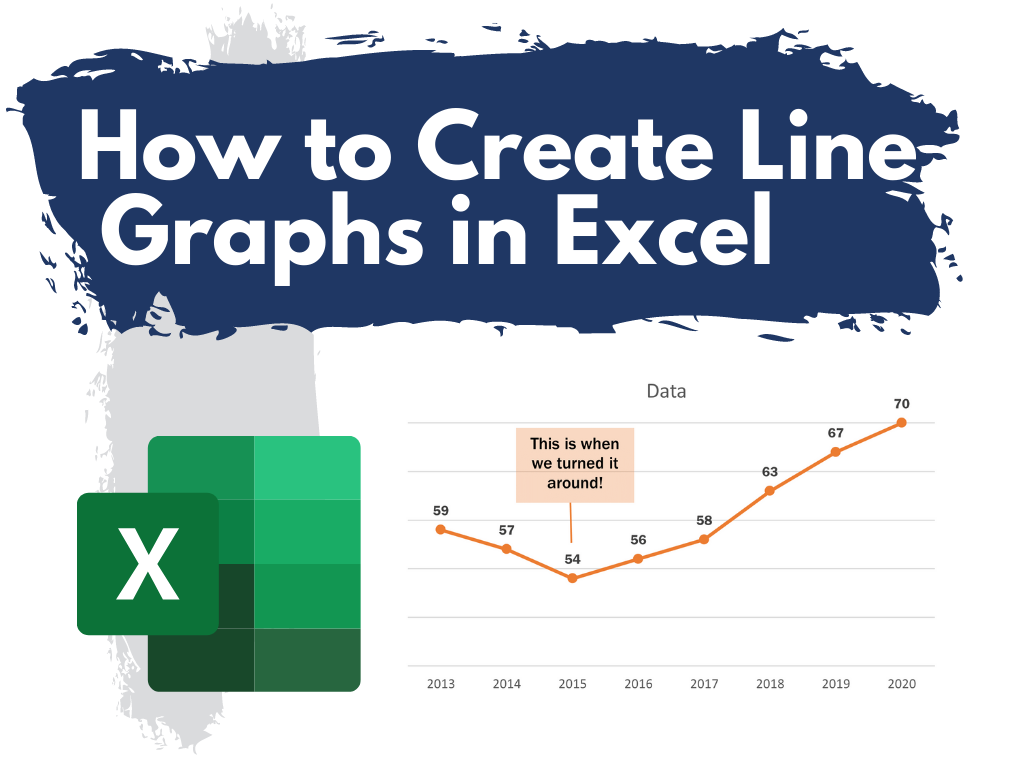
How to Create Line Graphs in Excel

This is the second in a series of posts on chart design in Excel. In each post we will take on a different chart type. Today we’ll go with a chart that almost always tells a story, the line graph.

What you’ll find in this post:

  • An Oversimplified How To
  • How to create a good looking line graph.
  • A little bit of inspiration.
  • Some other considerations.
How to create line graphs in Excel.

An Oversimplified How To

Creating a line chart (a.k.a. line chart) is really simple in Excel. It just takes a column of data and a couple of buttons.

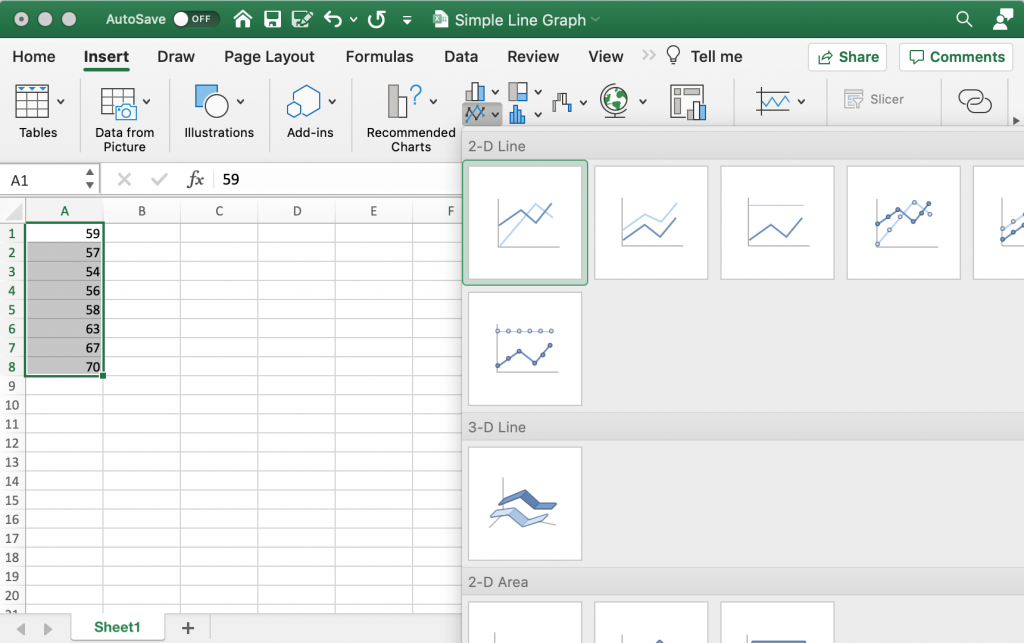
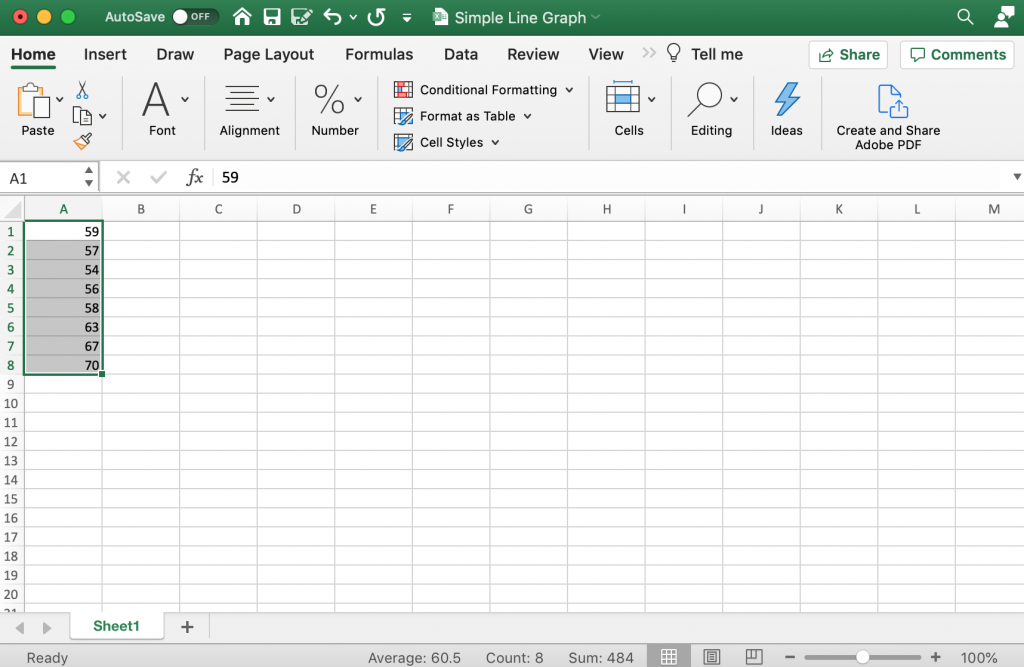
How to create a line graph in Excel - Step 1

Step 1. Highlight a column of numbers.

How to create a line graph in Excel - Step 2

Step 2. Click on the insert tab, then the line chart icon. Then select the first 2-D line.

*Thought: Why oh why would anyone seriously choose a 3-D Line!!!!

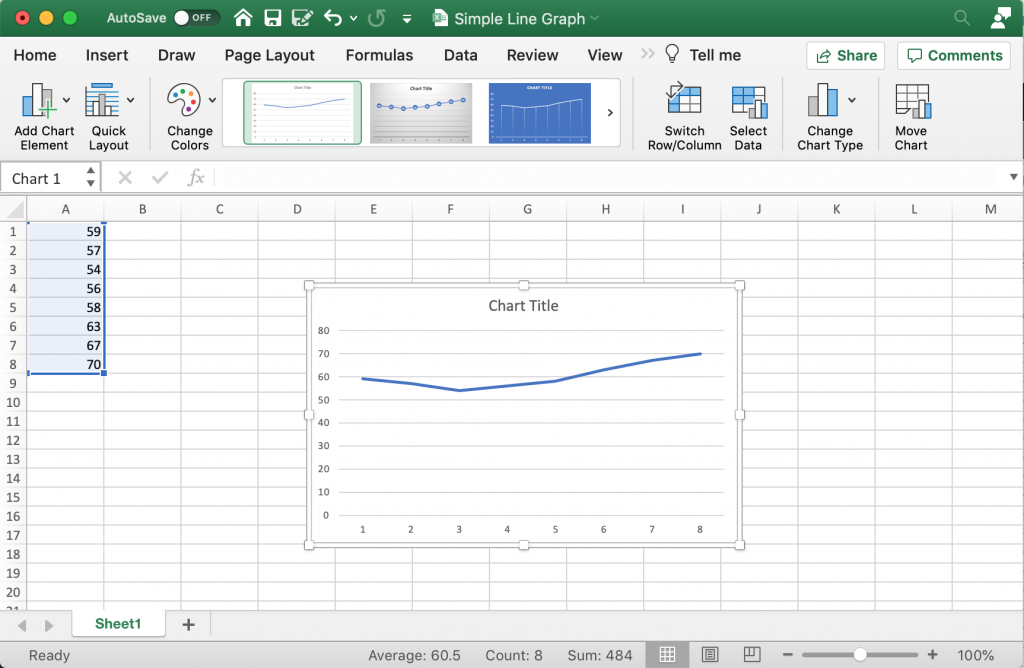
How to create a line graph in Excel - Step 3

Step 3. Woohoo, you created a line graph!

How to create a good looking line graph.

Okay, so that’s the most basic of basics. Here are some more steps you probably want to take to create something worth sharing.

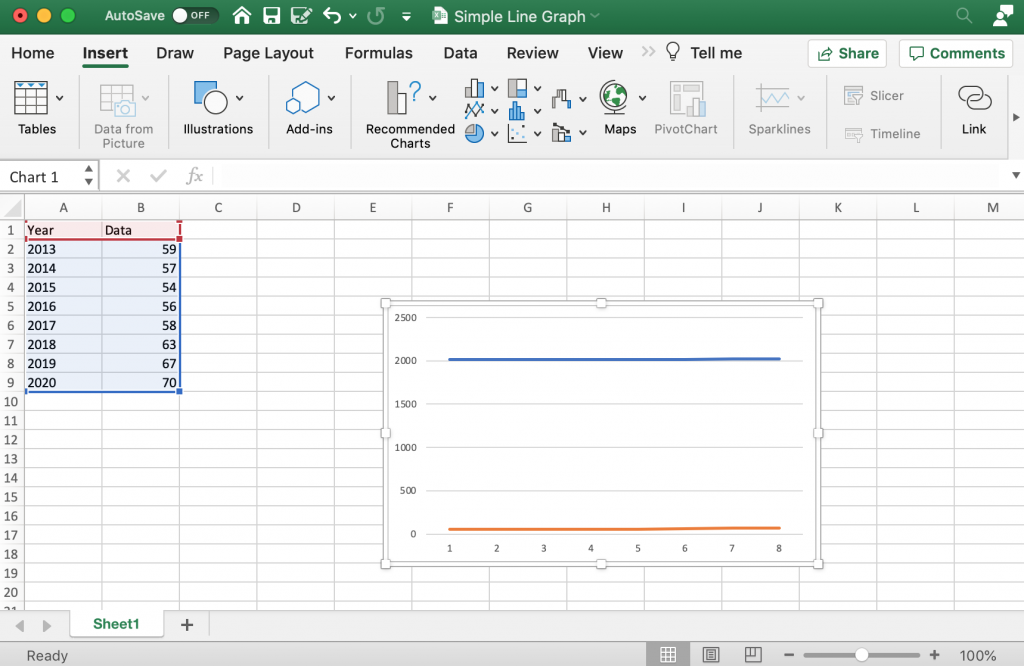
How to create a line graph in Excel - Labeling your graph

Labeling your graph.

So in addition to just a column of numbers it’s a good idea to have row labels and column headers. For line graphs you are going to be dealing with some kind of time element (day, week, month, quarter, year, etc.). I’ll use years for my example, but because this creates a second column of numbers, instead of just showing up as labels Excel will create a second line (not what we want).

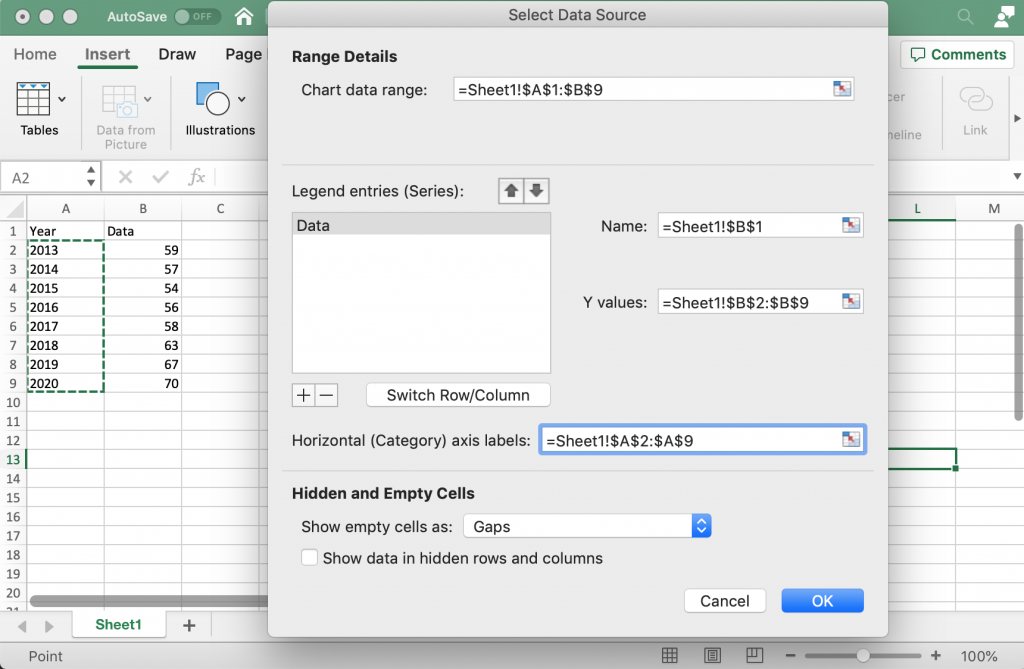
How to create a line graph in Excel -  Select Data Source

Select Data Source

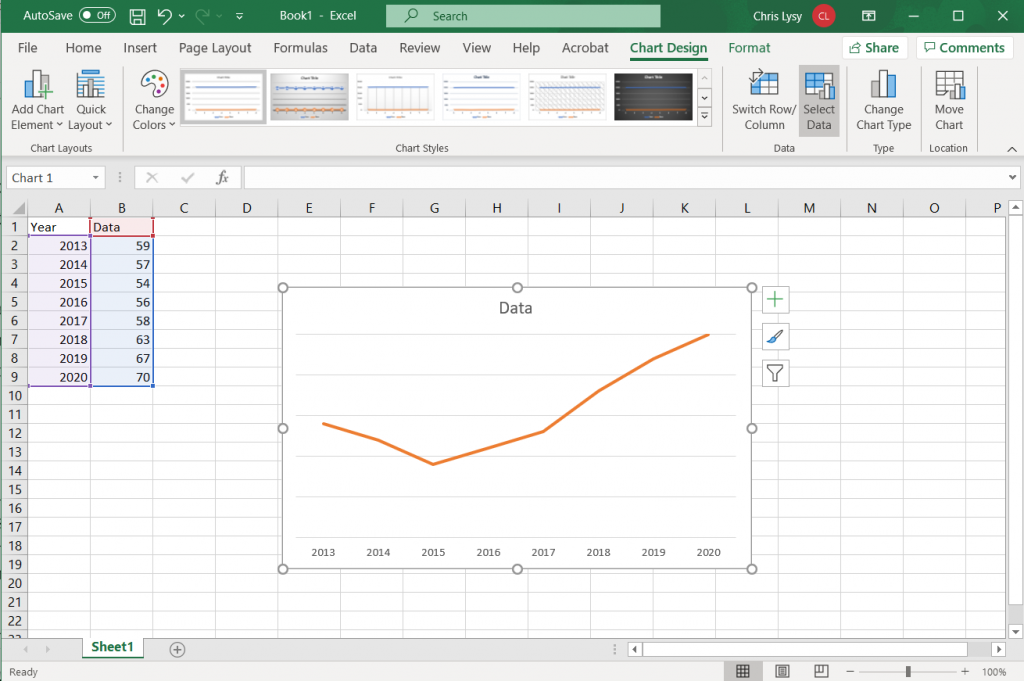
I will go ahead and right click on the chart so I can open up the Select Data Source menu. I only want to see one data series in there, but I’ll use the Horizontal (Category) axis labels space to set the years as a label.

How to create a line graph in Excel - Shrink the Axis

Shrinking the Axis

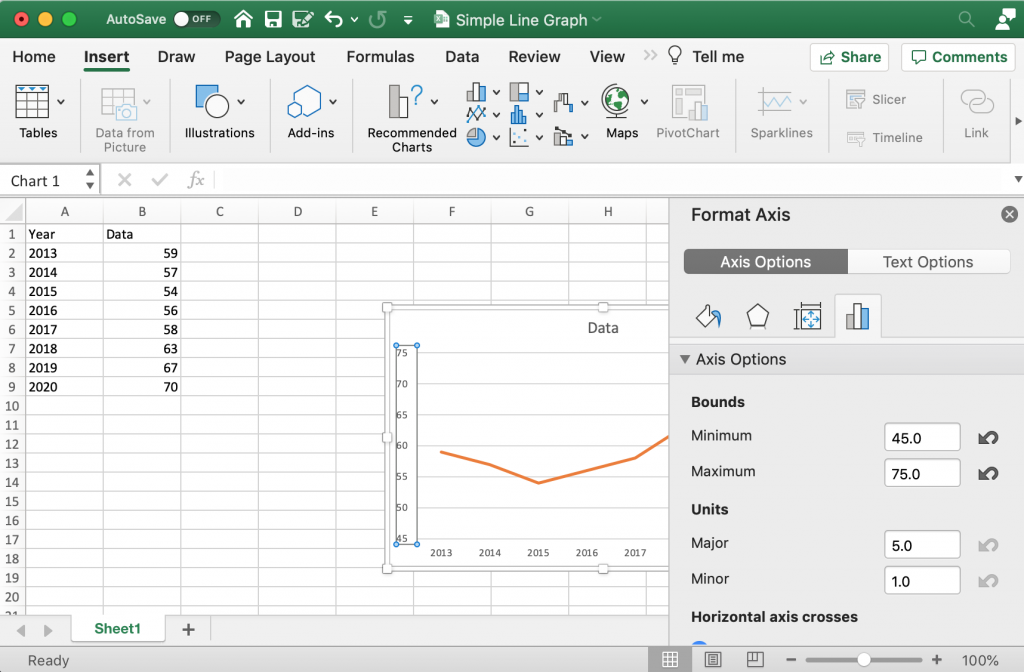
Depending on your data, you don’t always have to start your axis at 0 with line graphs (like you always have to do with bar charts). This fake data I’m using is all within the range of 54-70, so I’ll go with a chart range of 45 to 70. You can get the format axis menu by just right clicking on the chart.

Note: if you have multiple line graphs, be consistent on your axes. And if it makes logical sense to start at zero, then start at zero.

How to create a line graph in Excel - Clean up the Graph

Creating a Clean Graph

I like labeling individual points on the line chart, so the grid lines and y axis are not necessarily required. But given the chart, I kind of like the way the grid lines look with 5 as the major unit.

How to create a line graph in Excel - Add and Format Data Labels

Add and Format Data Labels

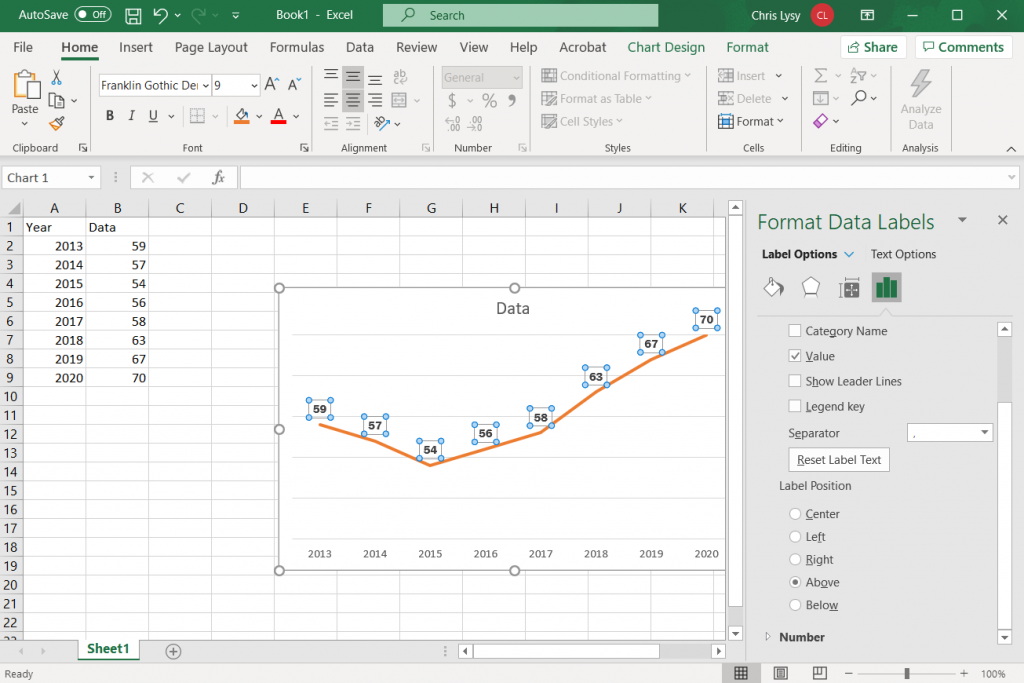
If I only have a simple line graph (with on line) I usually add data labels. Usually I just stick the labels above the chart, but this is just one of the many little design choices you make on the fly. Overall you just want to be consistent.

How to create a line graph in Excel - Add Line Markers

Adding Line Markers

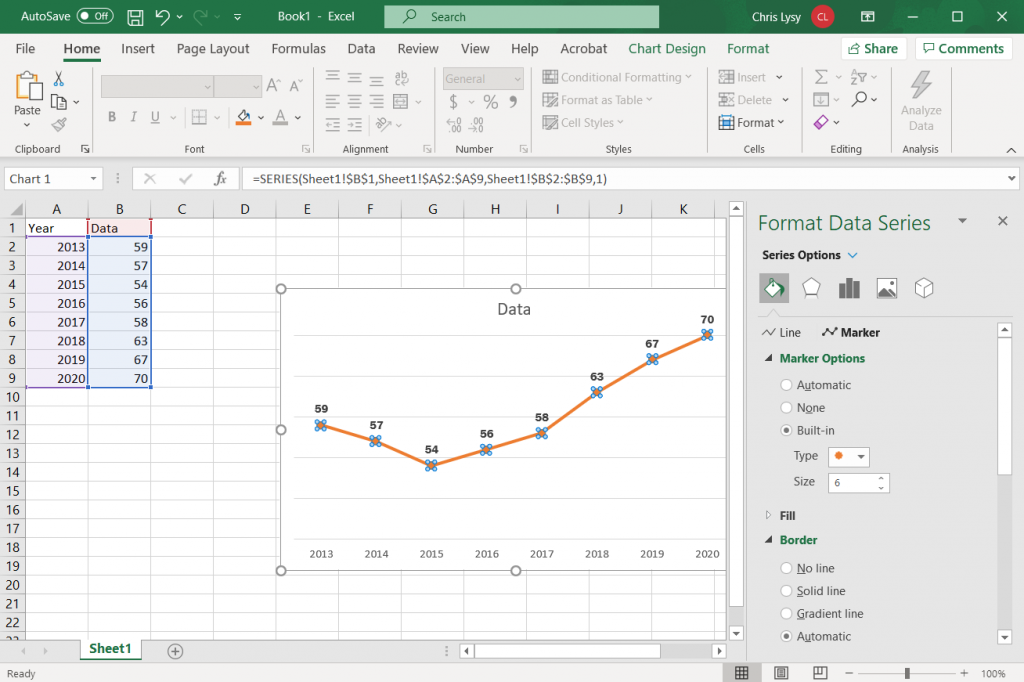
I like using line markers with line graphs. Usually I go with a subtle circle just a little larger than the line. They do have a purpose, showing the markers lets the reader see exactly how many data points the line represents.

If you have multiple lines, I suggest using a highlight color on the one you want your reader to focus on. Then use a gray scale for the rest. This makes for a nice graph that really pops.

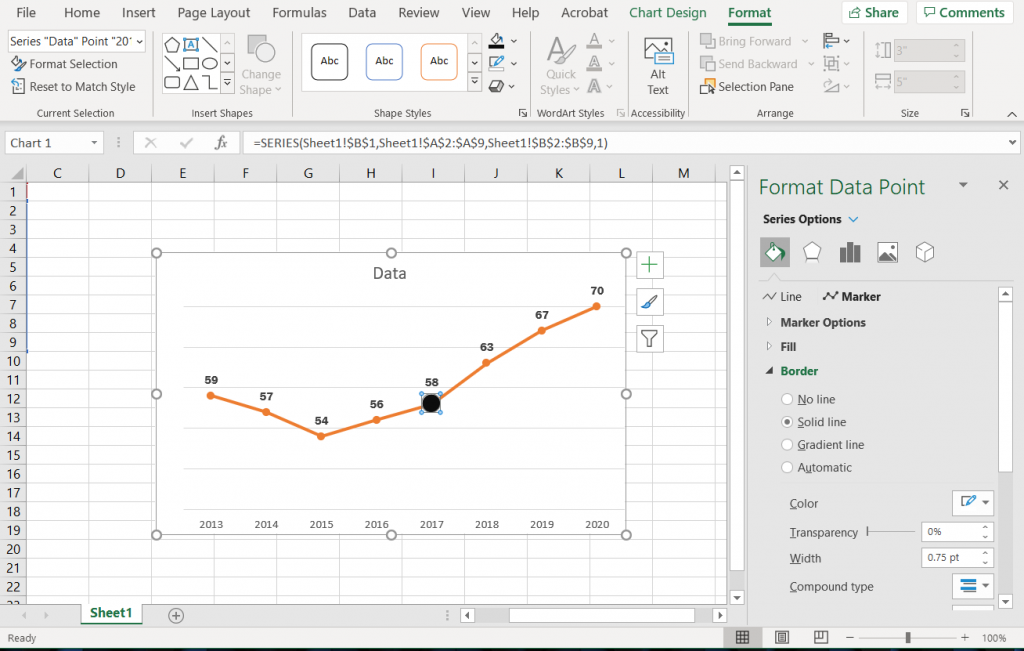
How to create a line graph in Excel - Highlighting an Individual Marker

Highlighting an Individual Marker.

It is possible to change colors/sizes of individual markers. Why might you do that? Perhaps the data was collected differently for that data point, or maybe you just want to add a bit of context and need a way to draw attention to a specific point in the chart.

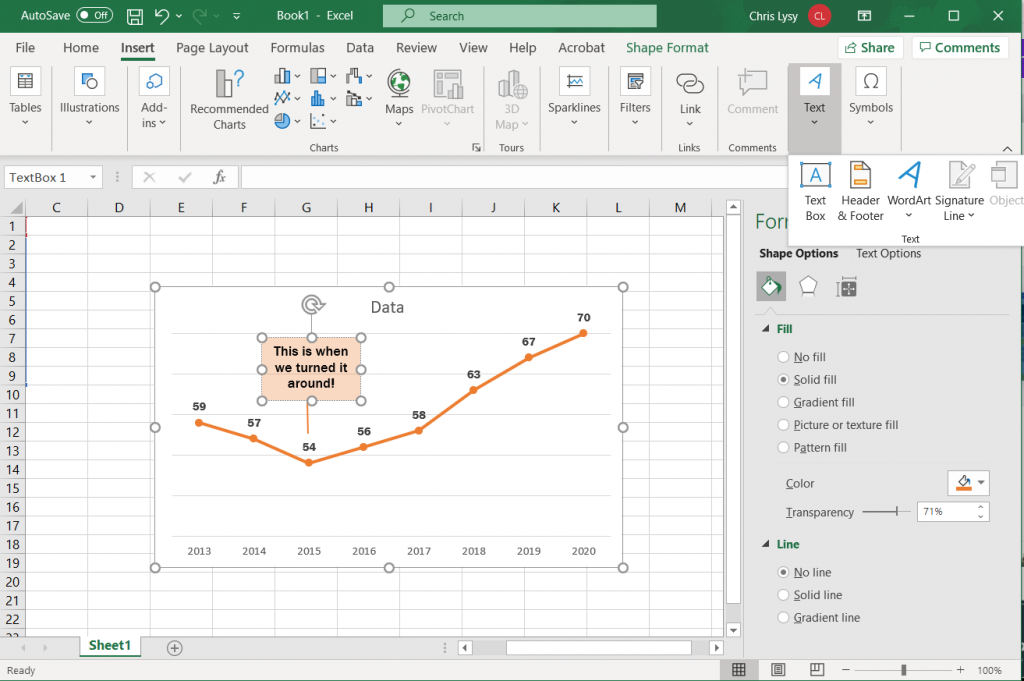
How to create a line graph in Excel - Adding Annotations

Adding Annotations

The best way to add a little focus to a line graph is usually through a simple annotation. Just select the chart, then go to the insert tab. And then insert a text box.

To draw a connection to a specific point on the line, insert a shape (line).

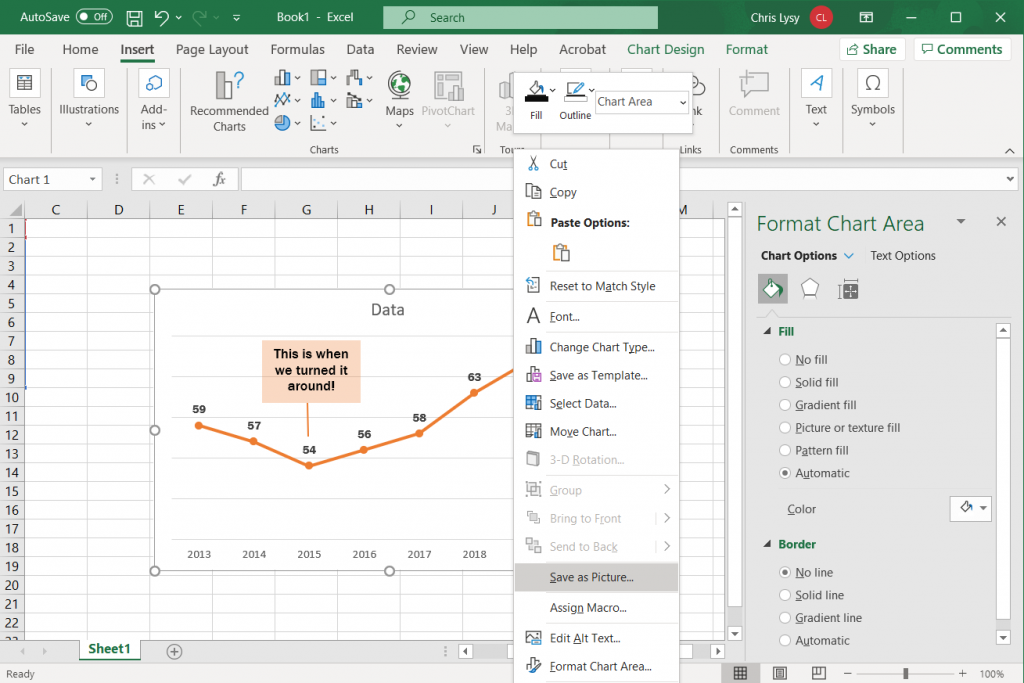
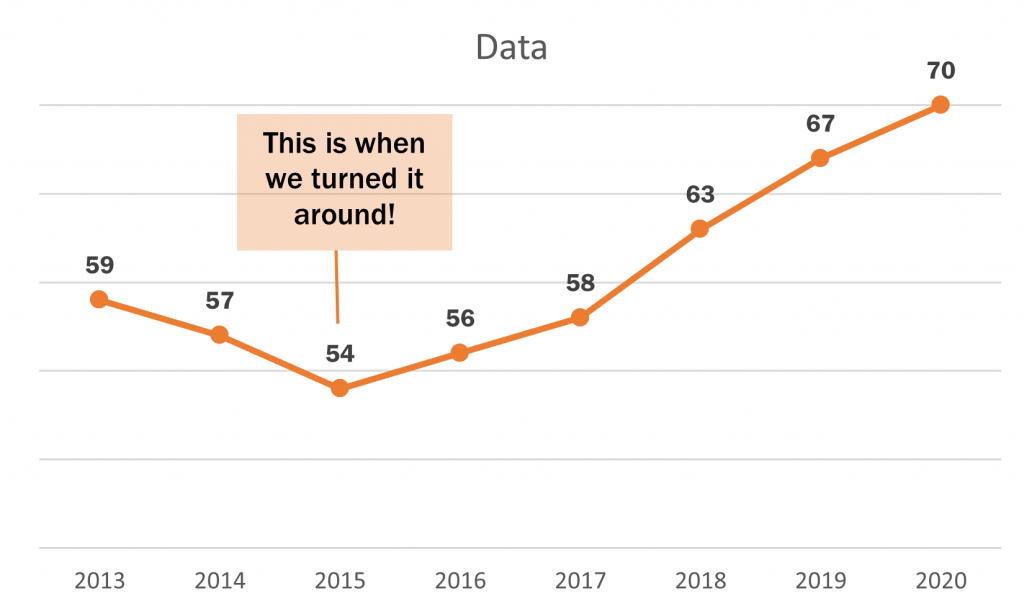
How to create a line graph in Excel - Saving the Image

Saving the Image

Once you have made all the changes you want to the chart you can save it as a picture. Just right click on the chart area and click “Save as Picture.”

Alternatively, you can just copy and paste the chart from Excel into Word or PowerPoint. If you’re staying within the Office suite, this is the ideal way to move the image as it retains your full ability to reformat the graphic.

Also, just a note, if you notice your text box or inserted shape is missing this is why. When you insert a shape you need to have the chart selected. If not, it will live in the spreadsheet but not the actual chart image!

How to create a line graph in Excel - Beyond the Basics

Beyond the Basics

This is just the basics. There are all sorts of things you can do with line graphs.

Generally though I suggest keeping the chart itself simple and minimalist. You can always add flare through annotations/additional graphics. Doing things like making your charts 3D doesn’t help the presentation, it just makes the chart harder to interpret and can also skew the data.

A little bit of inspiration.

Line graphs are another one of those ubiquitous chart types that you find everywhere.

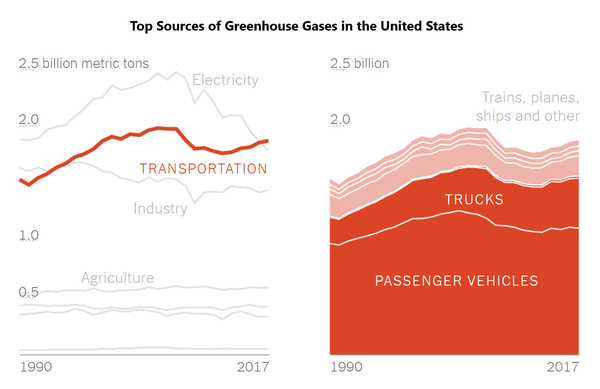
I like this example from the NY Times learning network. It’s a two part line graph. The first gives an overall line for all of transportation greenhouse gas (with other sources in gray for context). The second graph is the same line graph, but broken down as an area chart so you can see the pieces that make up the first.

Top Sources of Greenhouse Gases in the United States
NY Times – Learning Network – What’s Going On in This Graph? | Nov. 20, 2019

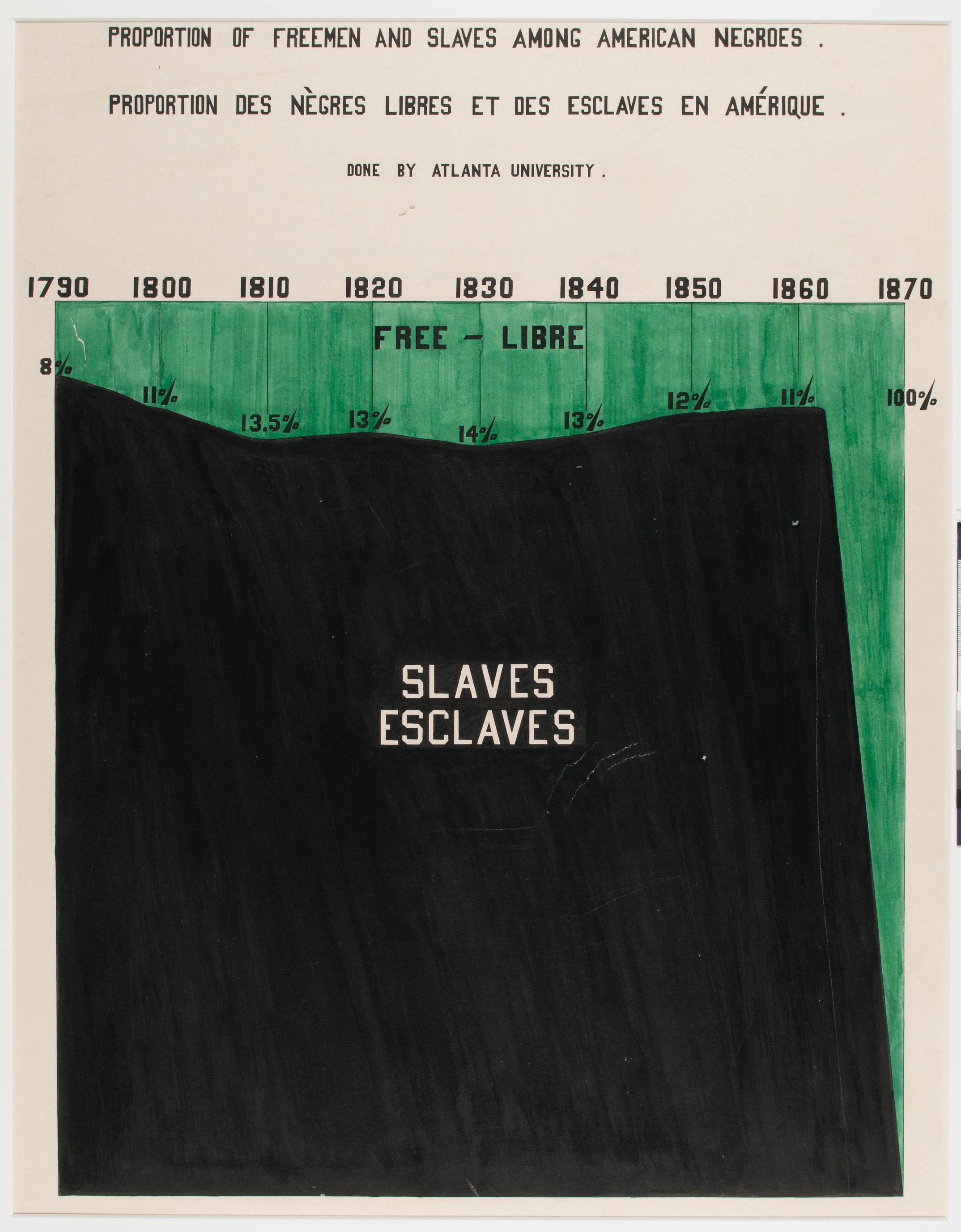
Here is a chart created by a group of students at Atlanta University in the early 1900s under the leadership of W.E.B. DuBois. At it’s core, it’s just a line graph (an upside down one) but the two colors tell the story.

Proportion of Freemen and Slaves Among American Negroes - Done by Atlanta University - W.E.B. DuBois
“Proportion of Freemen and Slaves among American Negroes”, 1900, via Library of Congress Prints and Photographs Division. Read more about these charts > W. E. B. Du Bois’ staggering Data Visualizations are as powerful today as they were in 1900

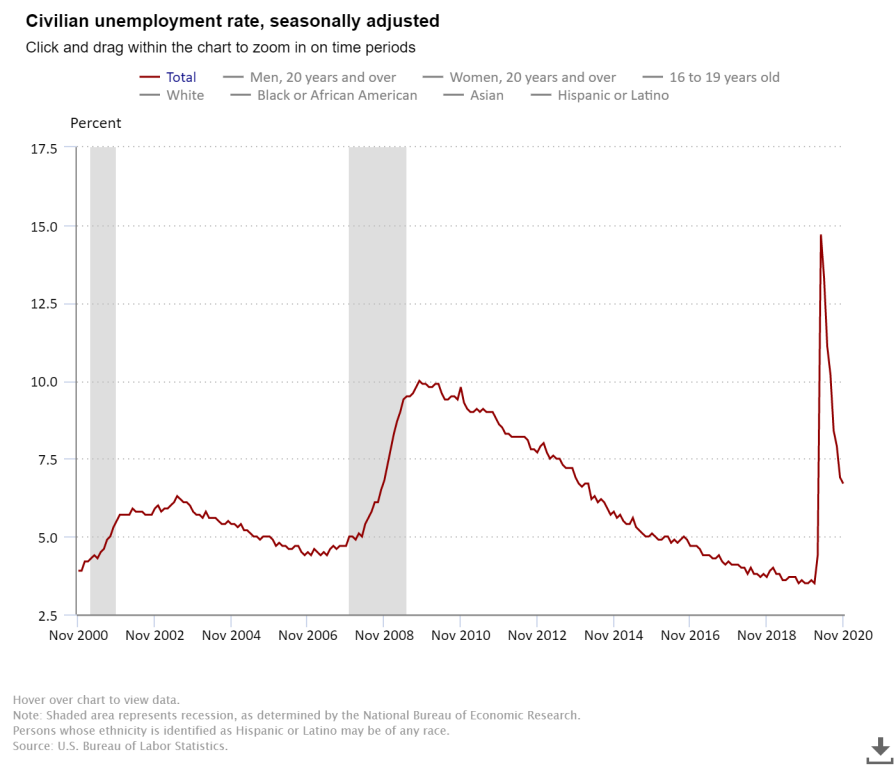
This chart here is just a line graph showing the US unemployment rate over time. Seems like something happened in the year 2020…

Civilian Unemployment Rate Chart U.S. Bureau of Labor Statistics
Civilian Unemployment Rate Chart U.S. Bureau of Labor Statistics – Accessed 12/31/2020

Other Considerations

How do you lie with line graphs?

As with any other chart or graph, you can certainly lie with line graphs. There are a bunch of different ways to do that. One common way is by messing with the axis, illogically flattening or spreading the line. Another way is to cut down the data shown. You might see politicians doing this, where they pick only the stretches of line charts they want to show.

Following Cairo’s “recommendation” for an 8% increase results in a 12:1 aspect ratio that diminishes change.
How to Lie with Charts – Hands On Dataviz

How many lines is too many lines?

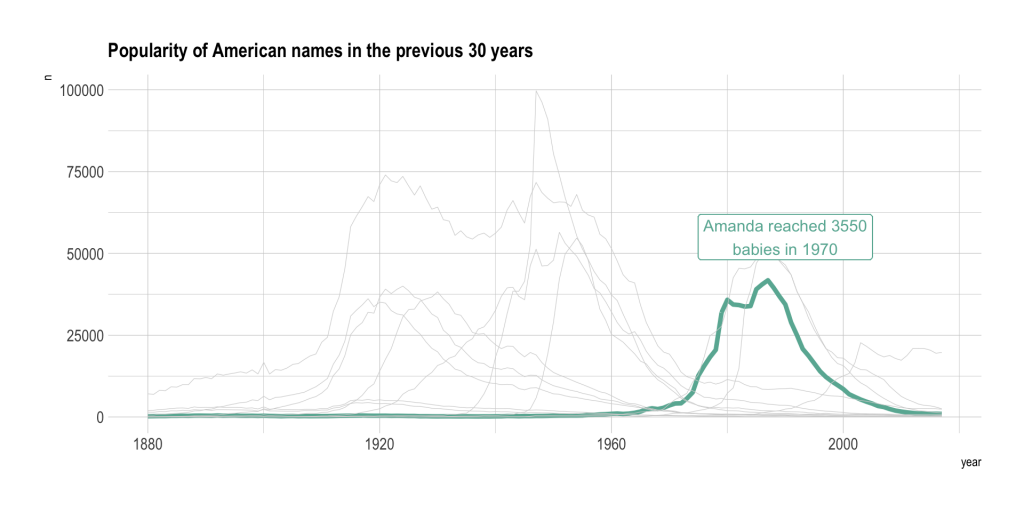
You should try to avoid putting too many lines in a single graph, at least if your goal is for every line to be read. But using gray or semi-transparent lines can add some really nice context.

Using a highlight color in a line graph/.
The Spaghetti Plot – from Data to Viz
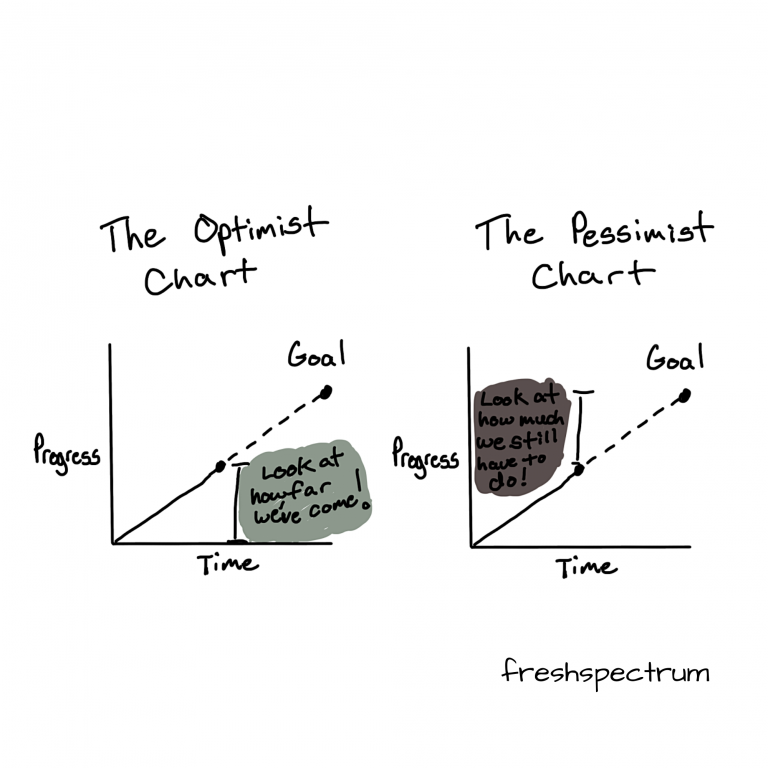
The optimist chart versus the pessimist chart - line graph cartoon  by Chris Lysy

Written by cplysy · Categorized: freshspectrum

Jan 05 2021

Getting Started with Sketchnoting: A Conversation with Emily Mills

I recently had the chance to talk with Emily Mills, who is a professional illustrator and expert in sketchnoting. She is also the founder of the Sketchnote Academy and author of The Art of Visual Notetaking. 

Emily was a guest speaker in our Report Redesign course. She walked us through the basics of sketchnoting, her career, why hand drawn images stop the scroll, the cool brain science behind sketchnoting, and then led us through some drawing exercises. We wanted to share Emily’s tips with you, too!

Watch Our Conversation

What is Sketchnoting?

Emily explained that sketchnoting is when you’re writing and drawing at the same time. “The whole purpose to remember information, and it’s just more engaging and interesting to look at,” she said. 

Sketchnoting is also called:

  • Visual notetaking
  • Graphic recording
  • Visual facilitation
  • Graphic facilitation

What is Sketchnote Academy?

Emily founded Sketchnote Academy in 2018. She offers online courses to help you learn how to sketchnote and then level up your skills. 

Emily Mills founded Sketchnote Academy in 2018. She offers online courses to help you learn how to sketchnote and then level up your skills.

Emily’s Previous Career Experience 

Emily Mills’ background is in graphic design. She was an in-house designer in education, nonprofit, and a healthcare start-up.  “I just get bored doing the same thing year after year like an annual report… again. While the data, pictures and information might change, it was still the same project… year after year,” she said. 

How Emily Got Started with Sketchnotes

Emily fell into sketchnoting from a weekly cartoon that she would draw on a whiteboard outside her office. 

She said that a former co-worker remembered those cartoons. When he went to work at a video studio, he contacted her, saying “We just booked a video client for something called a whiteboard video. We don’t really know what it is, but we need somebody to draw for it. Will you come to Houston and draw for our video?” Emily agreed and created a whiteboard video with them. 

“I was really proud of it and I put it online. Someone found it through keywords and hashtags and they said, “This is so cool! Have you heard of sketchnoting?” I hadn’t but [realized] it was pretty much the same thing,” she said. After that, she attended a sketchnote-specific workshop, and then challenged herself to sketchnote every day for a month. 

Hand-Drawn Images Stop the Scroll

Emily once shared with Ann that hand-drawn art/graphics get more view time than stock photos or computer generated graphics. Ann asked her to tell us more as we’re all trying to create reports that people *actually* want to read. 

Emily explained how hand-drawn images can stop the scroll. 

If you think about your average Instagram feed, she explained, you’re probably seeing mostly pictures, some stock photos,, an inspirational photo with a quote on it. She said that we’re used to those images now, and our brains are automatically thinking, “I’ve seen this before; show me something new.” 

Emily said when you see something different like a hand-drawn cartoon or someone’s artwork, you really stop because of human curiosity. “We keep asking questions,” she said. “Hand-drawn images invoke a lot of our human curiosity and take longer to engage with because you’re asking those questions.”

The Cool Brain Science Behind Sketchnoting

“Drawing is what I call the human language,” Emily said. 

Drawing was around before written language. We’ve been communicating in pictures for thousands of years. 

Studies also show that pairing an image with words also allows for better brain retention than just images or words alone.

Drawing Data Can Help Simplify Data

She gave an example of being at a conference where the speaker has a PowerPoint slide with a huge pie chart with 10 different slides and lots of labels. 

If you’re trying to take visual notes, there’s no way you can capture that entire pie chart, all the data points, and what all the colors mean. 

“But there’s usually one story that you’re trying to communicate with your data,” she said. Focus on just that main point rather than try and capture every single detail. 

Drawing Can Help You Sketch Drafts Quickly

Emily said she was taught in design school that you don’t even touch the design software until you have 50 designs drawn on paper first. 

“The reason is, it’s tracking your progress. I’m forced to go slow because I’m limited by how fast I can draw,” she said. 

She suggested giving yourself 30 seconds to draw what you’re trying to communicate. Then give yourself 10 seconds and then 5 seconds. This will allow you to see what you’re naturally drawn to and what can get cut. 

“See what you’re cutting and what you’re keeping, and that’s your data story. That’s the main point,” she said. 

Sketchnoting with Emily

Materials needed: Pen and paper (preferred) but an iPad is fine too. 

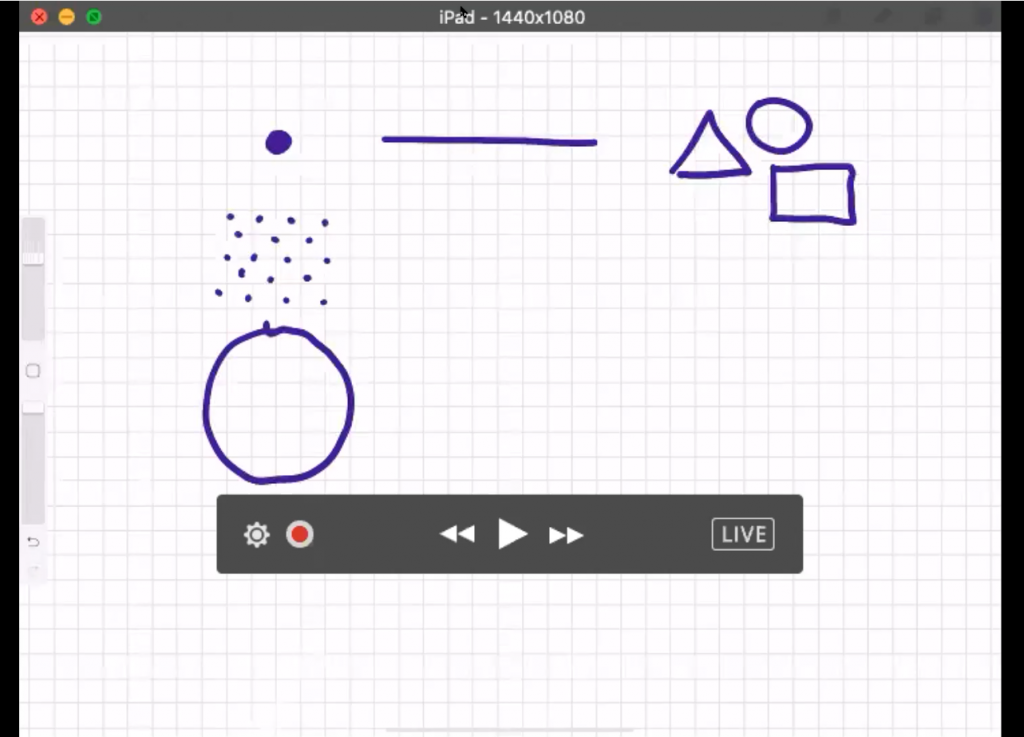
Emily gave us an introduction to drawing that you can follow along with. She said that every single drawing can be condensed into three things:

  1. A dot (a point)
  2. A line (a dot that went on a trip)
  3. A shape (a dot that went on a trip and came back home)
Emily Mills gave us an introduction to drawing and said that every single drawing can be condensed into three things:  a dot, a line and a shape.

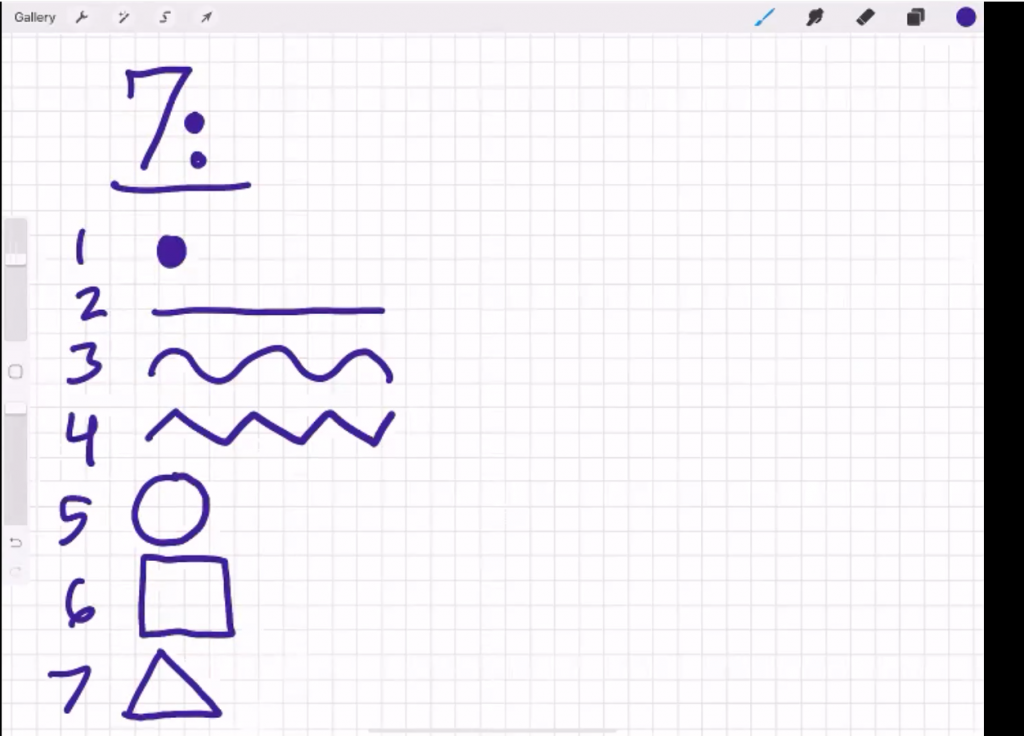
She then shared the seven building blocks of all drawings:

  1. Dot
  2. Straight line
  3. Curvy line
  4. Crooked line
  5. Circle
  6. Square/Rectangle
  7. Triangle
Emily Mills shared the seven building blocks of all drawings:  a dot, a straight line, a curvy line, a crooked line, a circle, a square/rectangle and a triangle.

Her final tip: Go for recognizable rather than realistic. 

Grab your pen and paper and join in! 

Connect with Emily Mills

Instagram: emily_a_mills

SketchnoteAcademy.com 

Free Course: Beginner Sketchnote Drawing

Your Turn

Comment with your favorite part of learning with Emily. 

Written by cplysy · Categorized: depictdatastudio

Dec 31 2020

What is a Theory of Change? Cartoon Glossary

This is a series of posts providing quick of overviews of important topics in research and evaluation. Each post in this series will include 3 cartoons from my archives along with 3 links to recommended resources.

Telling the story of a program.

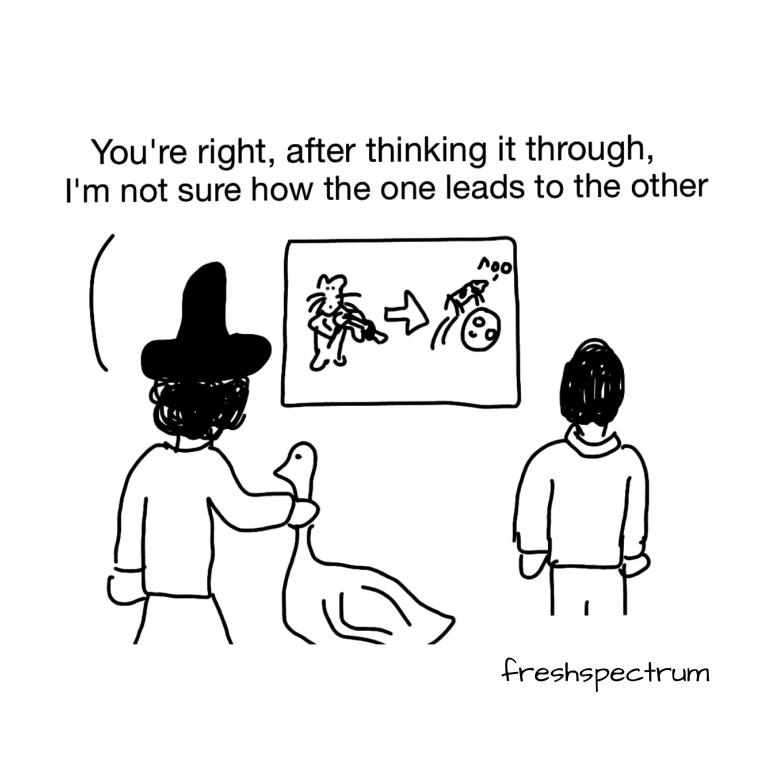
Chris Lysy Cartoon showing Mother Goose looking at a picture of a cat with a fiddle and a cow jumping over the moon.  She says, "You're right, after thinking it through, I'm not sure how the one leads to the other."

A theory of change is a description of why a particular way of working will be effective, showing how change happens in the short, medium and long term to achieve the intended impact. It can be represented in a visual diagram, as a narrative, or both.

NCVO KnowHow – How to build a Theory of Change.

Connecting the Pieces

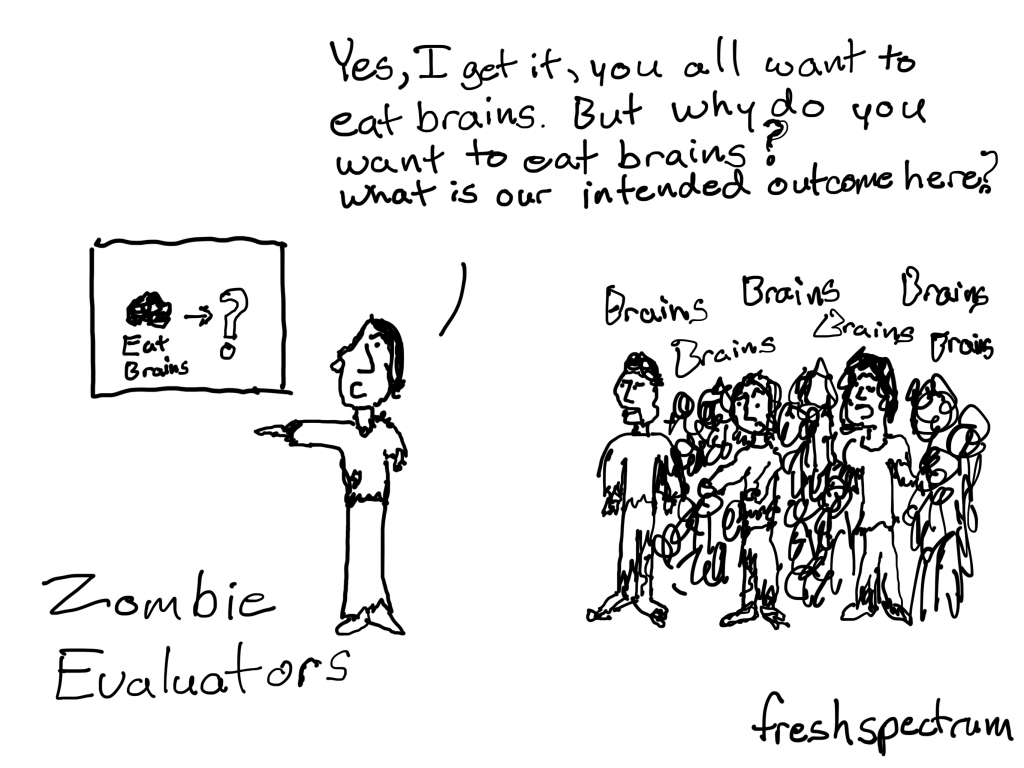
Chris Lysy Cartoon showing a Zombie talking to a group of Zombies.  She says, "Yes, I get it, you all want to eat brains. But why do you want to eat brains? What is our intended outcome here?

Not only does the ToC show the outcomes/preconditions, it also outlines the causal linkages in an intervention between the shorter-term, intermediate, and longer-term outcomes. The identified changes are mapped—as the “outcomes pathway”—showing each outcome in logical relationship to all the others, as well as chronological flow. 

Ideally, every outcome/precondition should be accompanied by at least one indicator to measure success. 

What is this thing called ‘Theory of Change’? by Ann-Murray Brown for the USAID Learning Lab

Too much at stake not to have a clearly defined process.

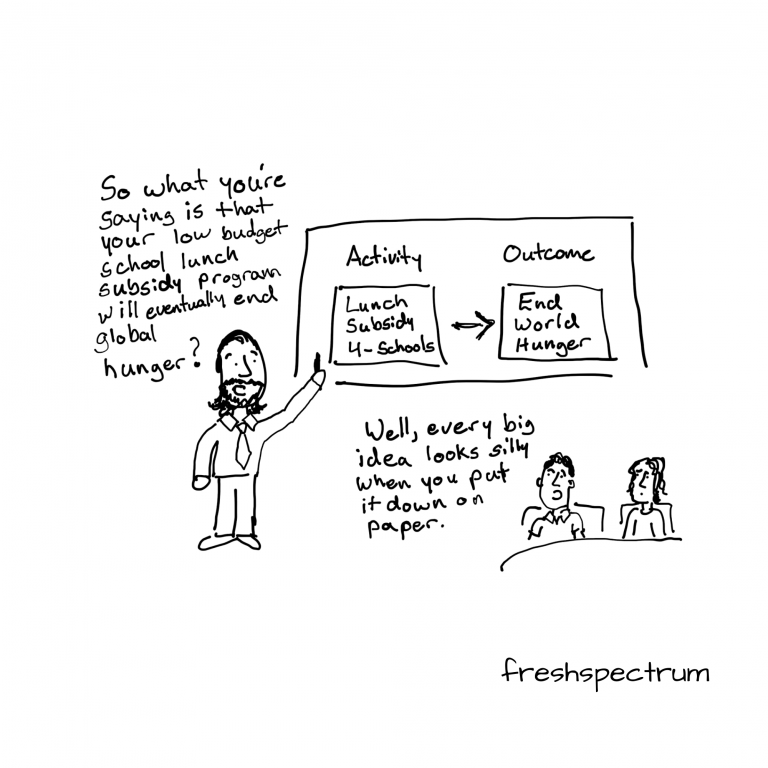
Man giving presentation saying "So what you're saying is that your low budget school lunch subsidy program will eventually end global hunger?" Person responds, "Well, every big idea looks silly when you put it down on paper."

Thinking through a theory of change shows how the work progresses. It doesn’t stop the work.

Some stakeholders may react in frustration to the theory of change development process because they view it as “taking time to think” which takes time away from “doing the work.” However, the thinking involved in developing a theory of change does not in any way preclude doing the work …  it is almost impossible to determine whether progress has occurred in a community change initiative if you have not explicitly identified the steps to progress. Communities have too much at stake to engage in work without a clearly defined purpose.

Theory of Change – A Practical Tool for Action, Results and Learning. The Annie E. Casey Foundation.

Like the cartoons? I create new cartoons regularly for my Patrons > https://www.patreon.com/freshspectrum. Patrons also get access to my private dropbox folder where I store all my cartoons.

Written by cplysy · Categorized: freshspectrum

Dec 31 2020

Comunicando a no evaluador@s: ¿Por qué la evaluación importa?

Fuente: cdn.shrm

Aunque intuitivamente podemos pensar que “la evaluación es esencial para nuestro correcto desarrollo”, en la práctica la evaluación no está muy extendida. Todavía hay desconocimiento, mitos y conceptos erróneos acerca de lo que es y cómo se debe utilizar.

Lo cierto es que a veces estamos tan acostumbrados a dar por supuesta la importancia de la evaluación o a hablar entre nosotr@s mismos, el gremio “friki/geek/nerd” de l@s evaluador@s, que cuando queremos convencer a un/a profan@ sobre nuestro “dogma evaluativo”: “que la evaluación vale la pena, tiene valor añadido”, nos damos cuenta de lo difícil que puede ser comunicar un conjunto complicado de ideas a un público no experto.

El desafío de hablar con diferentes audiencias es paralelo/similar a los desafíos de comunicar los resultados de una evaluación: ¿cómo captar la variación y el matiz, al tiempo que presenta un conjunto conciso de mensajes claros?

Como en el caso de la comunicación de los resultados de las evaluaciones, tenemos que seguir trabajando en el advocacy en evaluación dirigido a diferentes perfiles de audiencia. De otra forma, desde el sector de la evaluación corremos el riesgo de hacer eficientemente (y con cada vez más calidad) “nuestras” cositas en evaluación, aunque l@s no evaluador@s en el fondo lo sigan considerando como irrelevante (u otra carga burocrática – o de control- más)

Con la intención de reflexionar en torno a la “comunicación en evaluación a no evaluador@s“,  retomamos primero el post “Diez cosas que hay que saber sobre evaluación“, basado en la experiencia  (tanto en evaluación, como en su comunicación) del ODI’s Research and Policy in Development Programme (RAPID) , que compilaron “diez cosas que hay que saber sobre evaluación” en 10 infografías. Los mensajes incluían:

  • No podemos mejorar y contribuir al desarrollo sin la evaluación.
  • Todo está en el detalle
  • La evaluación implica a tod@s
  • Seguimiento y evaluación no son lo mismo.
  • Los ‘fallos’ son importantes (fuentes de aprendizaje/mejora)
  • La evaluación se puede dar en diferentes formas y escalas.
  • La evaluación está basada/empieza en preguntas (a priorizar y responder)
  • El contexto es primordial en la evaluación
  • La evaluación no es solo al final.
  • Los hallazgos deben ser comunicados


Written by cplysy · Categorized: TripleAD

  • « Go to Previous Page
  • Go to page 1
  • Interim pages omitted …
  • Go to page 212
  • Go to page 213
  • Go to page 214
  • Go to page 215
  • Go to page 216
  • Interim pages omitted …
  • Go to page 310
  • Go to Next Page »

Footer

Follow our Work

The easiest way to stay connected to our work is to join our newsletter. You’ll get updates on projects, learn about new events, and hear stories from those evaluators whom the field continues to actively exclude and erase.

Get Updates

Want to take further action or join a pod? Click here to learn more.

Copyright © 2026 · The May 13 Group · Log in

en English
af Afrikaanssq Shqipam አማርኛar العربيةhy Հայերենaz Azərbaycan dilieu Euskarabe Беларуская моваbn বাংলাbs Bosanskibg Българскиca Catalàceb Cebuanony Chichewazh-CN 简体中文zh-TW 繁體中文co Corsuhr Hrvatskics Čeština‎da Dansknl Nederlandsen Englisheo Esperantoet Eestitl Filipinofi Suomifr Françaisfy Fryskgl Galegoka ქართულიde Deutschel Ελληνικάgu ગુજરાતીht Kreyol ayisyenha Harshen Hausahaw Ōlelo Hawaiʻiiw עִבְרִיתhi हिन्दीhmn Hmonghu Magyaris Íslenskaig Igboid Bahasa Indonesiaga Gaeilgeit Italianoja 日本語jw Basa Jawakn ಕನ್ನಡkk Қазақ тіліkm ភាសាខ្មែរko 한국어ku كوردی‎ky Кыргызчаlo ພາສາລາວla Latinlv Latviešu valodalt Lietuvių kalbalb Lëtzebuergeschmk Македонски јазикmg Malagasyms Bahasa Melayuml മലയാളംmt Maltesemi Te Reo Māorimr मराठीmn Монголmy ဗမာစာne नेपालीno Norsk bokmålps پښتوfa فارسیpl Polskipt Portuguêspa ਪੰਜਾਬੀro Românăru Русскийsm Samoangd Gàidhligsr Српски језикst Sesothosn Shonasd سنڌيsi සිංහලsk Slovenčinasl Slovenščinaso Afsoomaalies Españolsu Basa Sundasw Kiswahilisv Svenskatg Тоҷикӣta தமிழ்te తెలుగుth ไทยtr Türkçeuk Українськаur اردوuz O‘zbekchavi Tiếng Việtcy Cymraegxh isiXhosayi יידישyo Yorùbázu Zulu