• Skip to main content
  • Skip to footer
  • Home

The May 13 Group

the next day for evaluation

  • Get Involved
  • Our Work
  • About Us
You are here: Home / Archives for allblogs

allblogs

Nov 01 2024

New infographic: “Amplifying the Voices of Emerging and Experienced Evaluators – AEA Poster”

This article is rated as:


Eval Academy just released a new, free infographic: “Amplifying the Voices of Emerging and Experienced Evaluators – AEA Poster”!


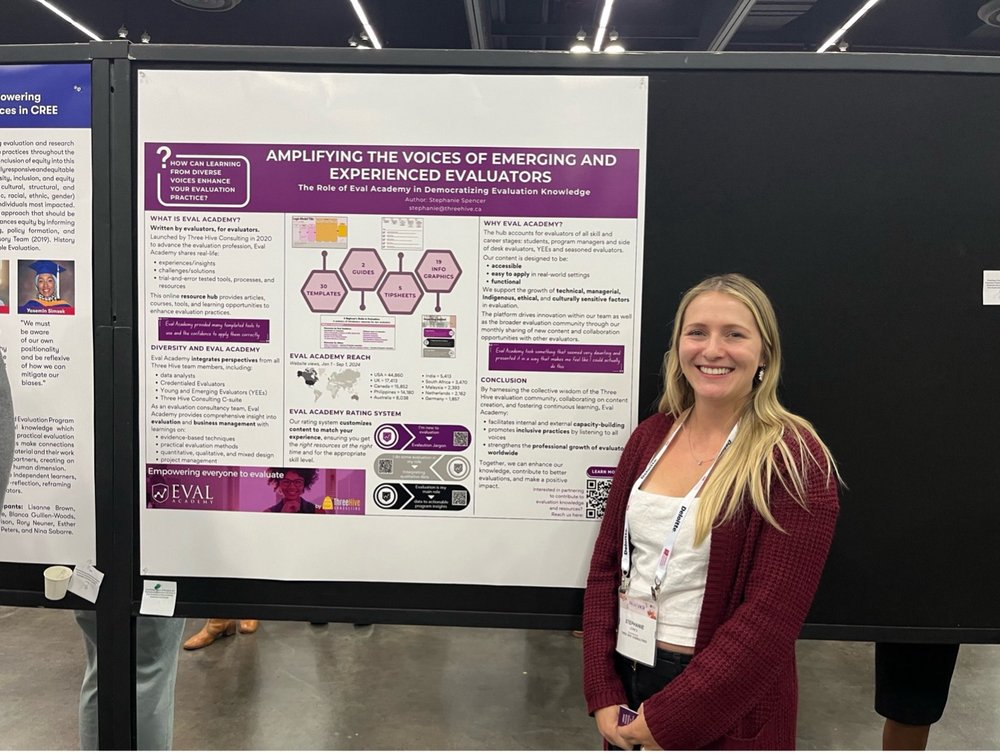
Amplifying the Voices of Emerging and Experienced Evaluators – AEA Poster

Amplifying the Voices of Emerging and Experienced Evaluators – AEA Poster

CA$0.00

Curious about how Eval Academy is democratizing evaluation knowledge? Dive into our new infographic, a downloadable copy of the poster presented at the 2024 AEA Conference in Portland, Oregon.

Who’s it for?

This resource is perfect for anyone passionate about expanding access to evaluation knowledge, including:

  • Students

  • Program Managers

  • New and Emerging Evaluators

  • Seasoned Evaluators

  • CEOs and Decision-Makers

What’s Inside?

This infographic reveals:

  • The mission and impact of Eval Academy

  • How content is crafted to support evaluators at all levels

  • Eval Academy’s reach and resources at a glance


Learn more: related articles and links

  • About Eval Academy

  • Reflections from the AEA Conference 2024: Amplifying and Empowering Voices in Evaluation

  • Information Overview

Written by cplysy · Categorized: evalacademy

Nov 01 2024

Navigating Change: 5 Ways a Master’s in Health Evaluation Supported My Career Pivot

This article is rated as:



As we celebrate National Career Development Month, some of us may be reflecting on our professional journeys and the choices that have shaped our paths. For those considering a shift in their career trajectory, pursuing a master’s degree in health evaluation could be a meaningful step; at least, it was for me. To give you some context, prior to pursuing a graduate degree, my experience was primarily in clinical research. I focused on conducting patient interviews, collecting data, navigating ethics approvals, training research personnel, and ensuring compliance with research protocols. Working in academia, I realized my passion for improving existing initiatives and supporting associated staff with their desired goals and impact. Ultimately, I recognized my desire for a job that prioritized actionable and meaningful change in the community. By chance (or maybe fate), I was introduced to the health evaluation program, saw how it aligned with my goals and haven’t looked back since.

I’m currently completing my practicum at Three Hive Consulting, and in this article, I’ll share my personal experience and explore five key ways this degree has equipped me for a successful career pivot to evaluation. From broadening my analytical skills to expanding my professional network, these insights show how targeted education and a practicum helped me navigate the evolving landscape of my professional career.


1. Shared Language

In the Program Evaluation Foundations course in my Master’s, we learned about evaluation questions, logic models, evaluability assessments, utilization-focused evaluations, and more – not only understanding what they are but also identifying the qualities that make them suitable for a project’s specific needs. The basis of good communication relies on a mutual understanding of what the other person is trying to convey, and I found that having this terminology at my fingertips helped me familiarize myself with a project’s objectives and strategy with ease. More specifically, my practicum equipped me with the tools during onboarding to understand evaluation plans and workplans even without any direct involvement in the planning stages. Shared language enabled clear communication without any misunderstandings, efficiency in conveying complex information without needing extensive explanation, and helped me integrate into regular workflow that much easier.


2. Effective Tools and Sound Techniques

Expanding my quantitative and qualitative skillsets was essential for enhancing my technical competencies in evaluation. While I felt my research methodologies foundation was quite strong due to my background in clinical research, I was surprised by the intricacies of designing reliable and valid data collection tools. Even when it comes to conducting a survey, the technical aspects can be quite complex. Although there isn’t a definitive gold standard for surveys, there are certainly inappropriate methods and pitfalls to avoid. The technical knowledge I gained through my formal education informed task completion and guided my execution process and workflow, helping me feel confident in my quality of work. During my practicum, this came into play as I reviewed surveys, applying my understanding of content validity, scaling items, and avoiding response biases. I offered recommendations and clarifications to ensure a well thought out survey would be sent to the project team for review. Learning about effective tools and sound techniques that lead to the desired answers is important and has personally benefitted my practice and the tasks I come across.


3. Addressing Common Challenges

One aspect I appreciate about my program is the opportunity to learn from the experiences of practicing evaluators, gaining insights from their challenges without having to face those challenges myself. While it’s essential to have the skills needed to perform well in your job, issues are inevitable, and understanding how other evaluators have successfully navigated similar challenges is equally important. For instance, I had never fully considered the impact that political, data, or time constraints could have on an evaluation. Questions such as “How can we navigate existing data constraints while maximizing the validity of our findings?” and “How can we effectively engage stakeholders with varying levels of power and authority to ensure a socially responsible evaluation?” have become relevant considerations in my understanding of evaluation. Learning what can be done in these circumstances or what could have been done to mitigate these situations has been enlightening. These insights and preemptive teaching strategies are what I found beneficial for future evaluation work. As I pursue a career in evaluation, having strategies to reference and prepare for potential obstacles gives me a reassuring sense of security.


4. Hands-on Experience in a Supportive Educational Setting

To me, proactive learning is all about practicing what I am learning. In this case, my practice started in a low-stakes environment where it was acceptable to make mistakes, and I received immediate feedback that encouraged growth and enriched my learning process. I had the opportunity to create deliverables at various stages of an evaluation, from responding to requests for proposals and developing logic models to writing process and outcome evaluations. Our program valued experiential learning, which supported my critical thinking in an evaluative context. This exposure allowed me to understand the processes and considerations necessary for real-world evaluation activities, so when it came time to actually carrying out these responsibilities, it wasn’t the first time I encountered such an intimidating task.


5. Practicum Experience

Although, I’m only halfway through my practicum, I can share my reflections and learnings thus far. While I’m confident we’re all familiar with the benefits of field experience – such as real-world application, skill development and mentorship – there’s a unique advantage to learning from an evaluation consultancy. Onboarding to multiple projects at various stages of evaluation, each with established timelines, is challenging, and I have found it essential to adapt and absorb as much as possible.

While I have prior experience with tasks like conducting interviews, developing surveys, analyzing data, and report writing individually, managing all these responsibilities simultaneously while aligning my focus with the various project goals is challenging. However, this has been a valuable opportunity to utilize all my skills at once within a short timeframe. I’ve gained insights into the field of evaluation from a consulting company lens, working on a wide range of local community programs and provincially established government initiatives. Contributing to program evaluation has provided me with a clearer understanding of how evaluation fits into my career aspirations and how I will fit into the evolving landscape of my professional journey.


Pursuing a graduate degree in health evaluation has enhanced my specialized knowledge by providing a comprehensive understanding of research methodologies, analytical techniques, and evidence-based practices essential for assessing health programs and interventions. Exposure to real-world case studies and collaborative projects allowed me to apply theoretical concepts to practical situations. Additionally, my program has fostered a nuanced understanding of health systems, preparing me to contribute meaningfully to evaluation practices. My graduate school experience has been a positive one, and I believe that it has given me the tools to navigate this change early in my professional career.


If you’re considering pursuing a graduate degree in health evaluation and would like to connect, reach out to us!

Written by cplysy · Categorized: evalacademy

Nov 01 2024

Reflections from the AEA Conference 2024: Amplifying and Empowering Voices in Evaluation

This article is rated as:


The 2024 American Evaluation Association (AEA) annual conference took place from October 21 to 26 in Portland, Oregon, marking my first experience at this event. This year’s theme, “Amplifying and Empowering Voices in Evaluation” connected with me because of its focus on the important role that diverse perspectives play in shaping effective evaluations from planning through to implementation and beyond. In this article, I’ll reflect on a few key takeaways that particularly resonated with my own evaluation practice—and hopefully yours as well!


Understanding the Evaluation Landscape

One of the first activities I participated in at the conference was a deep dive into the evaluation ecosystem in North America, to support young and/or emerging evaluators in making sense of the evaluation landscape. Tools like Eval Youth North America’s Kumu map and the periodic table of evaluation by Sara Vaca (2024) are valuable frameworks for both new and seasoned evaluators, helping us navigate the array of evaluation capacity-building resources available and start to make sense of the frameworks available. These tools serve not only as guides but also as reminders of the interconnectedness within our profession.


 However, diversity within the evaluation sector also reveals challenges. The lack of standardized job titles and definitions—such as “evaluator,” “data analyst,” and “impact strategist”—can create confusion and hinder collaboration. This highlights a pressing need for clear communication and shared understanding among evaluation professionals. By developing a common language, we can foster better partnerships and streamline our practices.

How does this impact me as an evaluator? Reflecting on these discussions, I’ve realized how important it is to clearly explain my role as an evaluator—not just to new clients, but also to friends, family, and other professionals! By sharing what evaluation is all about and how it makes a difference, we can help demystify our work and raise awareness of its value.


Professionalism and Identity in Evaluation

Discussions around professionalism were prominent throughout the conference. The exploration of competency frameworks from the AEA and the Canadian Evaluation Society (CES) prompted important questions: Should evaluators aim to be generalists or specialists? Is advanced formal education, such as a PhD, necessary for success in this field? 

While formal training can enhance skills and knowledge, I believe the core of effective evaluation lies in our ability to engage thoughtfully with diverse contexts and perspectives. This raises the issue of positionality: recognizing the biases and experiences that shape our work. By acknowledging our identities, we can enrich our evaluations and better serve the populations we assess. To learn more about biases, check out our Eval Academy article “Beyond Biases: Insights for Effective Evaluation Reporting”.

How does this impact me as an evaluator? I’m committing to being more open and transparent about my own biases in evaluations. Rather than viewing these biases as solely negative, we should also see them as strengths that can enrich our understanding of the context and results. By acknowledging positionality and learning to overcome these biases, we can better engage with the communities we work with and ensure their voices are heard. For example, this could involve seeking collaboration with others or revisiting methods to make them more participatory. At the same time, I recognize that there may be evaluators who are better positioned to navigate certain contexts or perspectives within projects. In my work as an evaluator on a consulting team, actioning this would include discussing these perspectives at the team development phase in an RFP. This approach will enhance the quality of my work while fostering a more inclusive evaluation process.


Engaging Program Participants: Centering Their Voices

A critical takeaway from the conference for me was the imperative to center the voices of program participants in our evaluations. Often, we become so focused on methodologies and frameworks that we lose sight of the individuals behind the data. Creative engagement strategies, such as using comic strips or storytelling to include participants in making sense of it all, can make evaluations more relatable and impactful. This includes ensuring that participants are fairly compensated for their time. You can read more about incentives for participation in evaluation in our Eval Academy article.

How does this impact me as an evaluator? In our complex world, it’s essential for evaluators to incorporate the voices of all partners, including those of the program participants, from the start to generate meaningful insights and drive real change. We should do a better job as evaluators to make space and time for this level of engagement where we can ensure that participant voices not only inform our evaluations but also shape the planning and process itself. For example, at Three Hive Consulting, we invite diverse perspectives to an evaluation committee that acts as a working group to help plan and support the evaluation. By prioritizing their perspectives, we can create more meaningful and resonant evaluations that truly reflect the experiences of those we serve.


Embracing Technology: Tools for Modern Evaluation

The integration of technology into our evaluation practices was a BIG theme at the conference. AI applications like ChatGPT for data synthesis and tools like DALL-E for creative visualization present exciting possibilities for enhancing our work. However, it is important to remember that technology should augment human connection, not replace it.

The challenge is to balance the efficiency that technology provides with the essential human touch necessary for meaningful analysis. We need to ensure that our evaluations capture the nuances of human experience, allowing us to truly make sense of the data. You can read more about the use of AI in evaluation in our article “Using AI to do an environmental scan”.

How does this impact me as an evaluator? I’ll continue to experiment with ways in which AI can support our evaluations while also creating space for reflection on this work. It’s important to share our experiences—what works, what doesn’t, and the lessons learned along the way—with our colleagues and others in the field. By fostering open conversations about the integration of technology, we can all contribute to a collective understanding of best practices and potential pitfalls.


Building Trust: The Foundation of Successful Evaluation

Over the course of the conference, the topic of trust emerged as a key element for amplifying and empowering voices in evaluation. There was lots of discussion around strategies for cultivating trust with participants and clients through open communication, flexibility, and a commitment to learning. The “triangle of trust” framework which was shared in a presentation by the Laudes Foundation and Convive Collective—anchored in authenticity, empathy, and sound logic—provided a useful lens through which to view our interactions as evaluators.

As evaluators, we often find ourselves in contexts where trust in both the evaluation process and the program itself may be fragile. Acknowledging this reality and engaging in open dialogue with clients is essential. Before delving into the specifics of evaluation, we must take the time to understand our clients as individuals and maintain that relational focus throughout the evaluation process. Slowing down and recognizing our shared humanity can also enhance our interactions. By fostering relationships that encourage vulnerability, we can create a more collaborative atmosphere, leading to richer, more insightful evaluations. Ultimately, this commitment to relationship-building not only strengthens our work but also serves the broader purpose of elevating the evaluation profession as a whole.

How does this impact me as an evaluator? Building strong relationships with clients and participants is essential. We can achieve this through simple actions, such as asking about their weekends before diving into planning or data collection, inquiring about what truly matters to them in the evaluation, and discussing how they define success. Additionally, completing capacity building before launching an evaluation and seeking feedback throughout the evaluation process, not just at the end, helps ensure our work aligns with their expectations.


Conclusion: Looking Ahead

Reflecting on my time at the AEA conference, I feel energized by the diverse community of evaluators dedicated to improving our practices.  Looking ahead, I’m excited to prioritize collaboration, creativity, and inclusivity in my work. By centering the voices of program participants and combining our skills with rapid technological advancements in AI, we can continue to ensure our evaluations not only measure impact but also inspire positive action.

If you attended the AEA this year, I’d love to connect! Share some of your favorite takeaways and experiences in the comments below!

Written by cplysy · Categorized: evalacademy

Oct 29 2024

Adjusting the Outside and Inside Chart Borders in Excel

Is your chart…

  • Too wide?
  • Too narrow?
  • Bars are too short?
  • Weird white space?
  • Labels not showing?
  • Labels wrapped funny?

If so, it’s probably the outside and/or inside border.

If you’re not sure what I mean by outside and inside border, stick around! This video is for you.

Written by cplysy · Categorized: depictdatastudio

Oct 24 2024

How to Put Numbers AND Percentages in Graph Labels in Excel

Want to put both the numbers and the percentages inside your Excel graph’s labels, like this?

Text boxes are clunky and time-consuming.

Instead, we’ll create Helper Cells with concatenated values.

What’s Inside

  • 0:00 Intro
  • 0:33 Dataviz On The Go
  • 0:42 Why not text boxes??
  • 1:42 Pie example
  • 5:42 Donut example
  • 7:42 Bar example
  • 12:28 Advanced: Nested IF with left, mid, right
  • 14:42 Your turn

Materials

Download the Excel file: https://depictdatastudio.ck.page/numbersandpercentagesingraphlabels

Transcript

Ann K. Emery: [00:00:00] How do you put numbers and percentages inside your graph labels? In this video, you’re going to learn how to do this.
We’re going to go through two different workarounds, three different chart types, so you’ll know how to do this for pies, for donuts, for bar charts.
And you can also download the Excel file that I’m using. Just look below the video, you’ll see a link to download it for free. Obviously, you’re going to learn more if you follow along with me and you do it yourself, that’s going to be way better than just watching me do it, which would be really boring too.
I’m Ann Emery. You’re watching Dataviz On The Go, the series where you learn dataviz time savers inside everyday software like Excel.
And speaking of being on the go, I was in South Africa just a few days ago teaching dataviz and one of the participants there raised his hand and he was like, Ann, How do I add the numbers and the percentages inside my chart labels? And I walked over to his laptop and he showed me a [00:01:00] column chart that he had.
It had about 10 different columns going across and he had numbers and percentages and I was like, you already did it. What do I need to help you with? And he was like, well, but then it was text boxes manually put on each of those 10 columns, which must’ve taken him like 10 minutes to do, right? That’s way too much time.
Um, he was explaining how. When he updated the data each month, the text box location didn’t change with the height of the column. So he had to manually adjust the placement and that’s way too much work. So I’m not going to show you how to do this with text boxes. I’m going to show you the better way behind the scenes.
It involves a little bit of a learning curve, but I guarantee you in the long run, it’s going to be way faster. All right. Open up your Excel file if you haven’t already, and let’s go through each of these chart types together. So what you’re going to do along with me is you’re going to highlight the gray section of the table.
It’s a little counterintuitive. You might be tempted to highlight the numbers and the percents. [00:02:00] We’re just going to do the numbers. You’re going to go to Insert, and we’re going to add a 2D pie chart. Okay. These are the default settings that Microsoft gives us, and we’re going to make it look like this one over here.
If you have questions about big A accessibility or little A accessibility, just comment below the video and I will certainly point you in the right direction. I have hundreds of blog posts and YouTube videos and conference presentations all about accessibility in dataviz. This video is just about the labels, so I’m going to try to hold back from talking too much about the formatting and just show you the number percentage combo here.
Okay, so how you do this is you click on any one of the pie slices here, do a right click, add data labels. Then you click on the labels, any one of them, right click, [00:03:00] format data labels. Labels are kind of annoying because you have to add them and then you have to format them. It’s not my choice. That’s just how it is.
It feels like a little more work though, doesn’t it? Right? Add format. When you click format, it’s going to pull up the sidebar and you’re just going to click the percentage box. That’s basically it. The value, a number in this case, and the percentage. There are a few more formatting things that you’re probably going to want to do while we’re in here.
For example, you can add the category name. Okay. So it looks like We’re not going to do the iZigZag, which is also not colorblind friendly or grayscale friendly. We don’t do legends in dataviz. I’m going to delete this built in chart title for now. Okay, it’s getting a little closer to the model right here.
And let me go back to that format menu. We did category, we did value, we did percentage. I’m going to uncheck leader lines. Those [00:04:00] are little gray connecting lines that show up sometimes if you manually drag the label too far away, they just add clutter. I’m going to delete those. The separator. Right now, it’s category, comma, number, comma, percentage.
I’m going to do new line. And the label position, I’m going to put outside end. You might have to manually drag things just a little bit, like maybe you’d have to shrink down your pie chart. Here I am showing you all the edits when I promised myself I wouldn’t, but I didn’t want this one to be cut off, right?
Okay, and then the final thing you might want to do is maybe you make the word Colored and bold. So how you do that, I’ll zoom in to make sure you can see exactly where I’m clicking, cause it’s really small, right? When you click on the label, it looks like nothing happened. You kind of have to like click a couple of times and then depending on where your mouse is, a different section is going to be dark gray.
Can you see that? It’s just, it’s such a slight difference, like a medium gray [00:05:00] versus a light gray. Do you see that? You like, right? The one that’s a little bit darker. So the one that’s a little bit darker, the category label, you can, you have to like, Oh, it’s so hard to click on the right spot. You have to highlight it, highlight the word you have, and then you can make just the word colored.
To match the slice it corresponds to, right? To remove guesswork. And colored font should be bold to make sure it passes accessibility standards. You go through it again, right? Double click on just that first one. Highlight it. That one’s gonna be that second theme color. And bold, etc, etc. Same thing on donut charts.
Okay. Scroll down on your spreadsheet. Let’s practice this again so that it feels more fluent for you. You highlight just the number, you go to insert, you pick out your chart type. Let’s do a 2D donut. If you highlight percentage, if you’re like, duh, [00:06:00] I’ll just do it this way. I’m just going to do it better or something or different.
Um, it’s not going to work. It’s going to show you this nested donut where it has the numbers and then the percentages. And that’s weird. Why would you want your chart to look like that? Okay. We don’t want that. We want just a regular old donut chart. That’s how you highlight just the numbers. You’re going to add the labels and then format them.
So you click on the slices or wedges of the donut, right click, add, click on the labels, right click, format, very similar menu as before. Click category. You’ve got value already. Click percentage, uncheck leader lines, change the separator. We’ll do new line and then Can you place them outside? No, you can’t.
Isn’t that annoying? So you have to manually Right. There’s not the position or location section down here. I just manually drag them, you know, just like a little bit [00:07:00] kind of over here. And then sometimes I get frustrated that this takes a while, but it takes about this long. Delete this part. You’d make it colored, probably delete this, et cetera.
Right. There’s a little bit more formatting to do. You might have to like, I just can’t help but format this for you. Anyway, that’s why I have the completed version. So you can see up to Ann Emery standards, what it should look like. So, pies and donuts. Pretty easy, right? You add the labels, you format them, and you look for the little square checkbox that says percentage.
Pretty darn easy, behind the scenes. Bar charts. They’re a little bit different. We need the second workaround for these. So, for bar charts, we are going to highlight the gray area Just like before, go to insert. This should look familiar, right? Let’s add a 2D bar chart like this, but we want it to look like the number and the [00:08:00] percent.
We can try, we can try the same thing. It’s not going to work, right? Click on the bars, right click, add data labels. Click on the labels. Right click. Format. Where’s the percentage checkbox? It’s not there. That percentage checkbox is only there for pies and donuts. It’s not there for bar charts and a bunch of other chart types.
So we have to use that second workaround. And the workaround is gonna be Helper cells.
We are going to type in exactly what we want here and then whatever is sitting in these cells is going to feed in here. Okay.
Just for kicks, I’ll show you what, uh, what these do. Click on your labels, right click, format. Pulls up the window. Value from cells. This is one of my [00:09:00] favorite boxes. Click that. Ignore this little pop up for a second. All you do is you highlight your helper cells, you click okay, and it shows you the helper cells, comma, the value.
So here is hi at the top of the table, that is hi down there, right? Here is I’m and there’s I’m down there and the value. But you wouldn’t keep this, you would do a little more formatting of course, like you would just remove the value and the leader lines. You can type in whatever there. And it feeds into the label.
Isn’t that nice? So if you want number percent, should I show you the long way? Uh, I’ll show you the long way. And then the short way you could manually, this is a long way. You could manually type in. Uh, this, and then it shows up right there. Whatever’s in the helper cell [00:10:00] goes over there. Now, am I going to tell you to manually type stuff in?
Absolutely not. Absolutely not. You’re going to do a concatenation. You’re going to say equals this and. This ampersand, it is really smushed. It’s the number smush the percent altogether. It’s two, two, four, two, and then it’s 0. 384. It’s all these digits from this division, right? From the numerator and denominator living here behind the scenes.
So you go back in and edit this. If you’ve seen concatenation before, you know how to do this, right? If you’re new to concatenation. Welcome. Hopefully this opens up a whole new world for you of formatting control that you have for your dataviz behind the scenes. Formatting for this would be like, um, what would we have to do?
The number and, uh, quotes. Open parentheses, whoops, quotes, space, open [00:11:00] parentheses, quotes, and the B61 and C61, those are specific locations. Those do not get quotes, but everything else does get quotes. So if I want space, open parentheses, it has to have double quotes around it. And then everything’s just separated by the ampersand, okay?
Number, space, parentheses, percent. It’s not going to be perfect, but we’re getting closer. Number space, open parentheses percent. And you just go back through and you edit it again and again. So let’s add this, uh, let’s do a times a hundred and then we’re going to round this to a decimal place and we’re going to add what else?
Percentage symbol, closing parentheses. Okay, we’re getting closer and closer. Because I do this for a living and I’m very, very picky about my graph labels, I would also go through and do [00:12:00] one more layer of editing where I add the comma, the thousands separator comma, and I would do that using a nested if and left mid and right.
But, That really deserves another video. If you want though, you can look in this answer key and the formula that you’re going to see is going to be much longer because I have nested if and left mid right. Okay. What if, speaking of if, uh, another variation would be what if you have like a Big digits, right?
Like these are little digits, three and four digit numbers. If you have big, big, big digits, like currency, I work on a lot of grant making projects with foundations. They have things like project amounts and they’re often in the millions or tens of millions, sometimes. Same idea where you’d add some helper cells.
This is actually, here’s a really long, there’s, this [00:13:00] nested, if left, mid, right. It gets a lot longer. And the same idea, you could just highlight, insert your bar chart. Does this look familiar now? That’s why I want to show it to you twice. Add the labels, right click, whoops, got to click on them, right click, format, value from cells, select the helper cells you would have made.
Okay, uncheck, uncheck value, uncheck leader lines, and then you do a little bit more formatting so it would look something like this. One downside to using concatenated helper cells is the labels are all the same format. So you can’t make just the number bold and purple or just the percentage. It’s all or nothing.
Um, so I, I don’t love that, but you know, it’s like that, of course there are variations of this, right? Like if you have like really, really, really big numbers, things [00:14:00] like in the millions, you could also write longer formulas, if statements with left, mid and right, so that something like 123 just says 123 K or millions might say 1.
27 M for million. And then your finished version could look, you know, something like this, right? It’s really, really hard to do that, uh, with text boxes. It’s really clunky. You might make typos. You have to manually adjust it all the time. And you can’t just right click and check, check the percentage box.
So I hope that the concatenation, even though there’s a little bit of a learning curve, I think it’s going to save you a lot of time in the end. All right, it’s your turn. Let me know what types of questions you run into. Let me know if you apply it and how this works in your data set.

Written by cplysy · Categorized: depictdatastudio

  • « Go to Previous Page
  • Go to page 1
  • Interim pages omitted …
  • Go to page 30
  • Go to page 31
  • Go to page 32
  • Go to page 33
  • Go to page 34
  • Interim pages omitted …
  • Go to page 310
  • Go to Next Page »

Footer

Follow our Work

The easiest way to stay connected to our work is to join our newsletter. You’ll get updates on projects, learn about new events, and hear stories from those evaluators whom the field continues to actively exclude and erase.

Get Updates

Want to take further action or join a pod? Click here to learn more.

Copyright © 2026 · The May 13 Group · Log in

en English
af Afrikaanssq Shqipam አማርኛar العربيةhy Հայերենaz Azərbaycan dilieu Euskarabe Беларуская моваbn বাংলাbs Bosanskibg Българскиca Catalàceb Cebuanony Chichewazh-CN 简体中文zh-TW 繁體中文co Corsuhr Hrvatskics Čeština‎da Dansknl Nederlandsen Englisheo Esperantoet Eestitl Filipinofi Suomifr Françaisfy Fryskgl Galegoka ქართულიde Deutschel Ελληνικάgu ગુજરાતીht Kreyol ayisyenha Harshen Hausahaw Ōlelo Hawaiʻiiw עִבְרִיתhi हिन्दीhmn Hmonghu Magyaris Íslenskaig Igboid Bahasa Indonesiaga Gaeilgeit Italianoja 日本語jw Basa Jawakn ಕನ್ನಡkk Қазақ тіліkm ភាសាខ្មែរko 한국어ku كوردی‎ky Кыргызчаlo ພາສາລາວla Latinlv Latviešu valodalt Lietuvių kalbalb Lëtzebuergeschmk Македонски јазикmg Malagasyms Bahasa Melayuml മലയാളംmt Maltesemi Te Reo Māorimr मराठीmn Монголmy ဗမာစာne नेपालीno Norsk bokmålps پښتوfa فارسیpl Polskipt Portuguêspa ਪੰਜਾਬੀro Românăru Русскийsm Samoangd Gàidhligsr Српски језикst Sesothosn Shonasd سنڌيsi සිංහලsk Slovenčinasl Slovenščinaso Afsoomaalies Españolsu Basa Sundasw Kiswahilisv Svenskatg Тоҷикӣta தமிழ்te తెలుగుth ไทยtr Türkçeuk Українськаur اردوuz O‘zbekchavi Tiếng Việtcy Cymraegxh isiXhosayi יידישyo Yorùbázu Zulu