• Skip to main content
  • Skip to footer
  • Home

The May 13 Group

the next day for evaluation

  • Get Involved
  • Our Work
  • About Us
You are here: Home / Archives for cplysy

cplysy

Mar 30 2021

El desarrollo de capacidades para la “traducción” de conocimiento

El conocimiento debe destilarse antes de que esté listo para su aplicación. Es esencial sintetizar la información existente para contextualizar e integrar los hallazgos de un estudio de investigación individual dentro de un cuerpo de conocimiento más amplio.

El trabajo de ODI, para traducir el conocimiento y promover debates de políticas más informados por la evidencia, ha arrojado seis lecciones clave:

1. Las capacidades básicas para la traducción de conocimientos deben abordarse de manera integrada.

2. Se necesita un enfoque específico para garantizar que se creen vínculos entre las capacidades a diferentes niveles.

3. La traducción de conocimientos se basa en las capacidades tanto de la oferta como de la demanda para promover la adopción de la investigación.

4. Adaptar las iniciativas a los contextos locales es fundamental para su éxito, por lo que una buena comprensión del contexto político es fundamental.

5. El fortalecimiento de las capacidades para influir en las políticas consiste en fomentar una cultura de aprendizaje y reflexión continuos, lo que requiere desarrollar relaciones lo suficientemente fuertes como para desafiar las dinámicas de poder desiguales.

6. Abordar las motivaciones e incentivos es clave para fortalecer las capacidades de traducción del conocimiento. Convertir a un investigador en un emprendedor de políticas o un instituto de investigación en un grupo de expertos centrado en políticas es extremadamente difícil. Si bien las capacidades funcionales son importantes, la motivación para cambiar es un aspecto crucial, que puede facilitar u obstruir el desarrollo de capacidades. El liderazgo es un factor clave aquí.

Referencia

Nicola Jones, Ajoy Datta y Harry Jones con EDPN partners (2009) Seis dimensiones de la interfaz de políticas de desarrollo y conocimiento. ODI. Box 9: Six key lessons on capacity building for knowledge translation (p.32)
Written by cplysy · Categorized: TripleAD

Mar 30 2021

How to Use Vlookup in Microsoft Excel: Two Step-by-Step Examples for Beginners

Vlookup is my all-time favorite function in Excel!

(Well, the entire lookup family—vlookup, hlookup, index-match, and xlookup.)

In this blog post, you’ll learn:

  • What vlookup is used for;
  • Why vlookup can be tricky; and
  • How to fill in the four pieces of the formula.

What Vlookup Is Used for in Excel

Vlookup helps us merge data from various tables, sheets, and files into a single table that we can use for our analyses.

Why Vlookup is Tricky for Novices

Sometimes Excel novices are hesitant to try vlookup because it requires that you fill in four different pieces of information.

Learning the Excel lingo here is truly like learning a new language. Stick with it and keep practicing, and you’ll be a fluent vlookup user in no time!

Here’s the information that we’ll need to complete: =vlookup(lookup_value,table_array,col_index_num,[range_lookup])

Let’s walk through each of the four segments of the vlookup function.

Our Fictional Scenario

I’ve got five people: Ann, Isaac, Tony, Keely, and Dan. I’ve also got two different tables of data: Favorite Color and Favorite Food.

Let’s pretend I want to create a single dataset that contains both the colors and the foods together.

In a perfect world, I’d be able to copy and paste the colors and foods together.

But in the real world, we’ve typically got different numbers of people in each of the original tables. For example, we’ve got information about Ann, Isaac, Tony, and Dan in our Favorite Color table, but we’ve only got information about Ann, Keely, and Isaac in our Favorite Food table, so a simple copy and paste isn’t possible.

Sure, with just five people, we could fill in this information by hand. But what if our dataset contains information about 50 people? Or 50,000 people? Copying and pasting could take all day, and we’d probably make a million mistakes along the way. Vlookup to the rescue!

How to Use =Vlookup() in Microsoft Excel

Here’s how to fill in each of the four pieces of the vlookup formula.

Step 1: Fill in the lookup_value

First, let’s fill in the lookup_value, which is the first piece of the vlookup function.

The lookup_value is the cell that contains the person’s name or ID number that we’re interested in. These names or ID numbers are the links that connect all the tables together.

The names or ID numbers must be located in the first column of each table–in the first column of your new combined dataset and in the first column of every single table from which you’re pulling data.

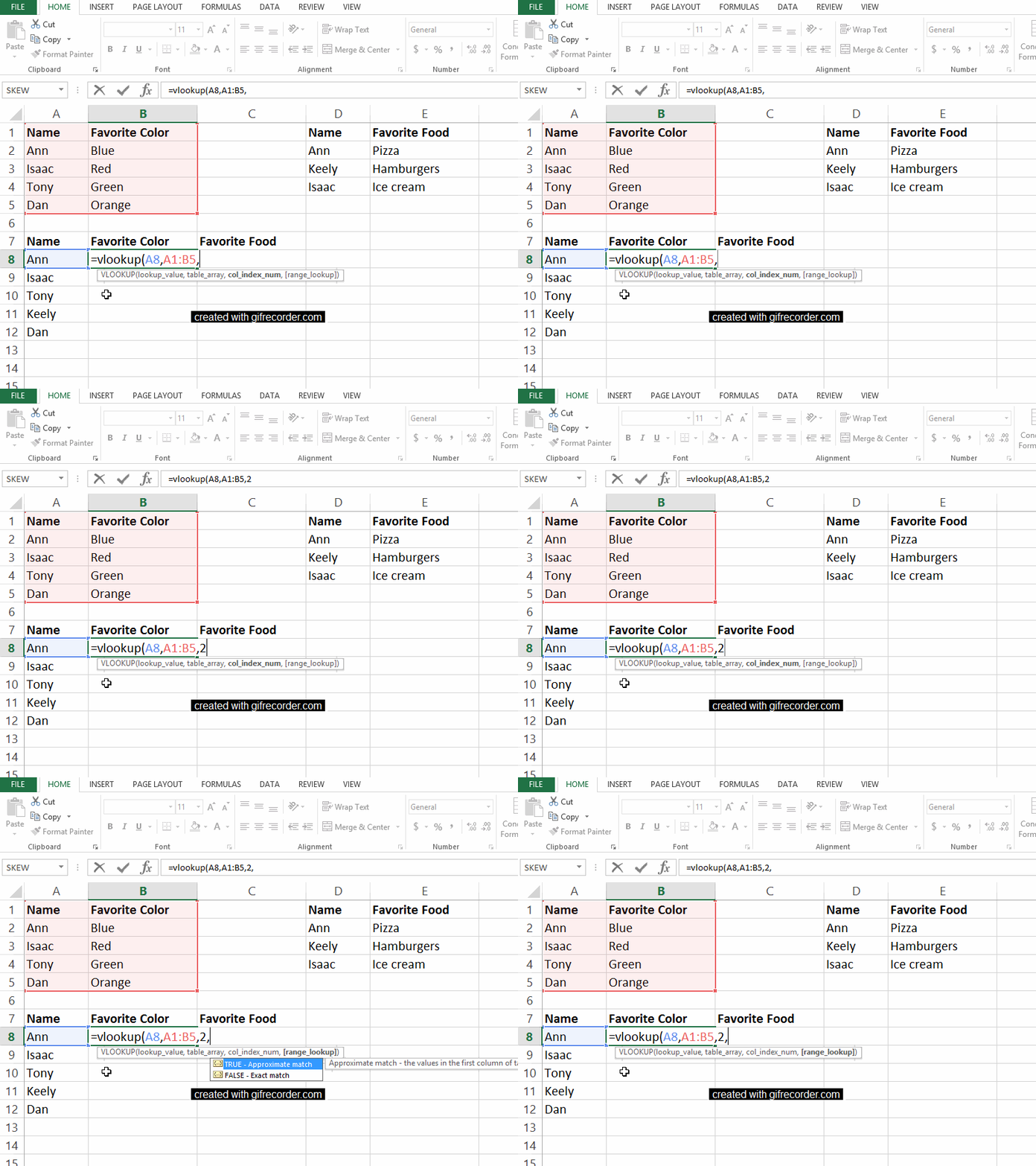
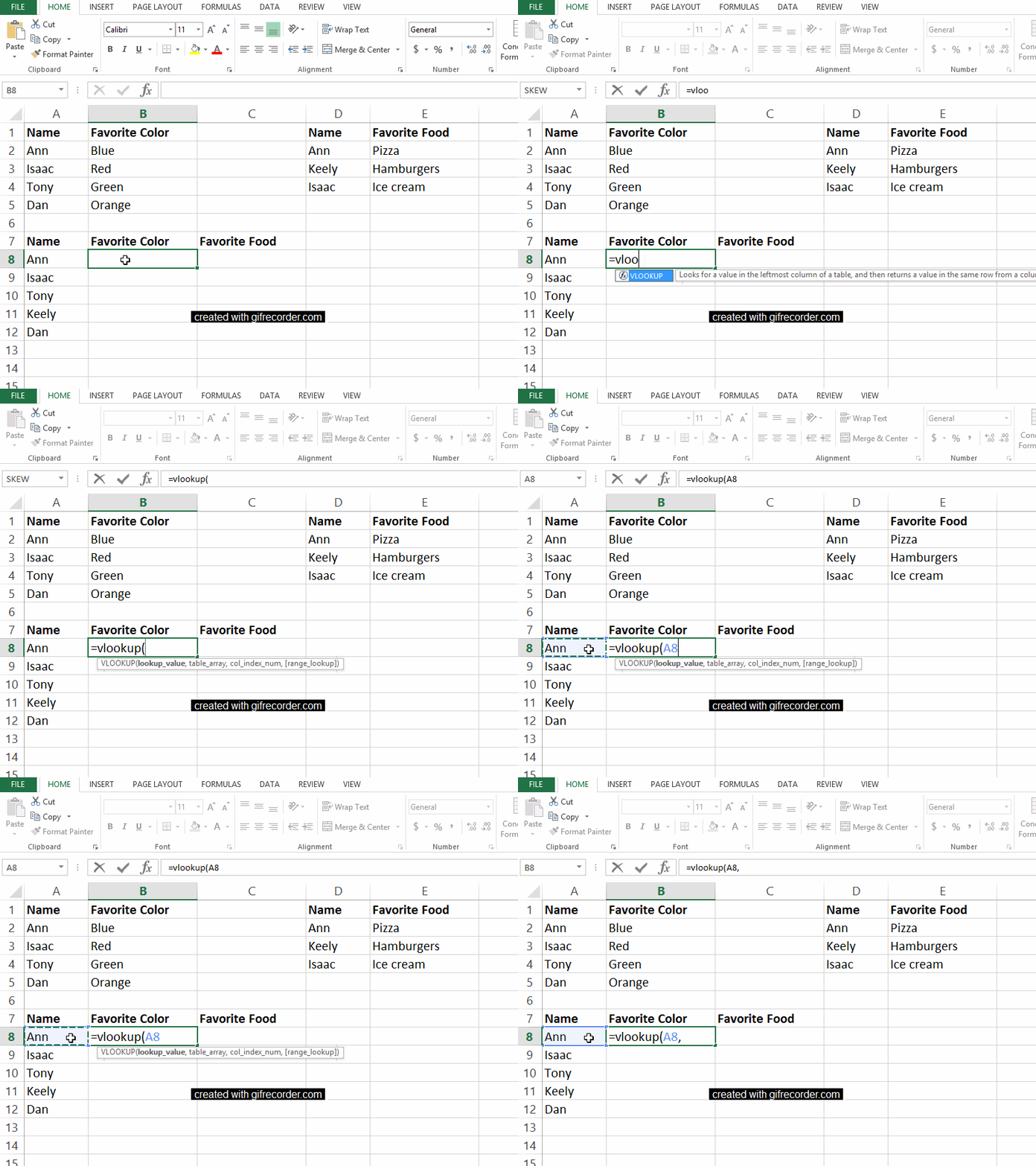
In this example, watch as I type =vlookup( into cell B8. Next, click on the cell that contains the name or ID number that you want to look up in one of your other tables. Then, insert a comma, which moves us on to the second section of the function.

So far, my function reads: =vlookup(A8,

In this example, watch as I type =vlookup( into cell B8. Next, click on the cell that contains the name or ID number that you want to look up in one of your other tables. Then, insert a comma, which moves us on to the second section of the function.

Step 2: Fill in the table_array

Second, we have to indicate the table_array.

The table array is the table or dataset from which we’re pulling data.

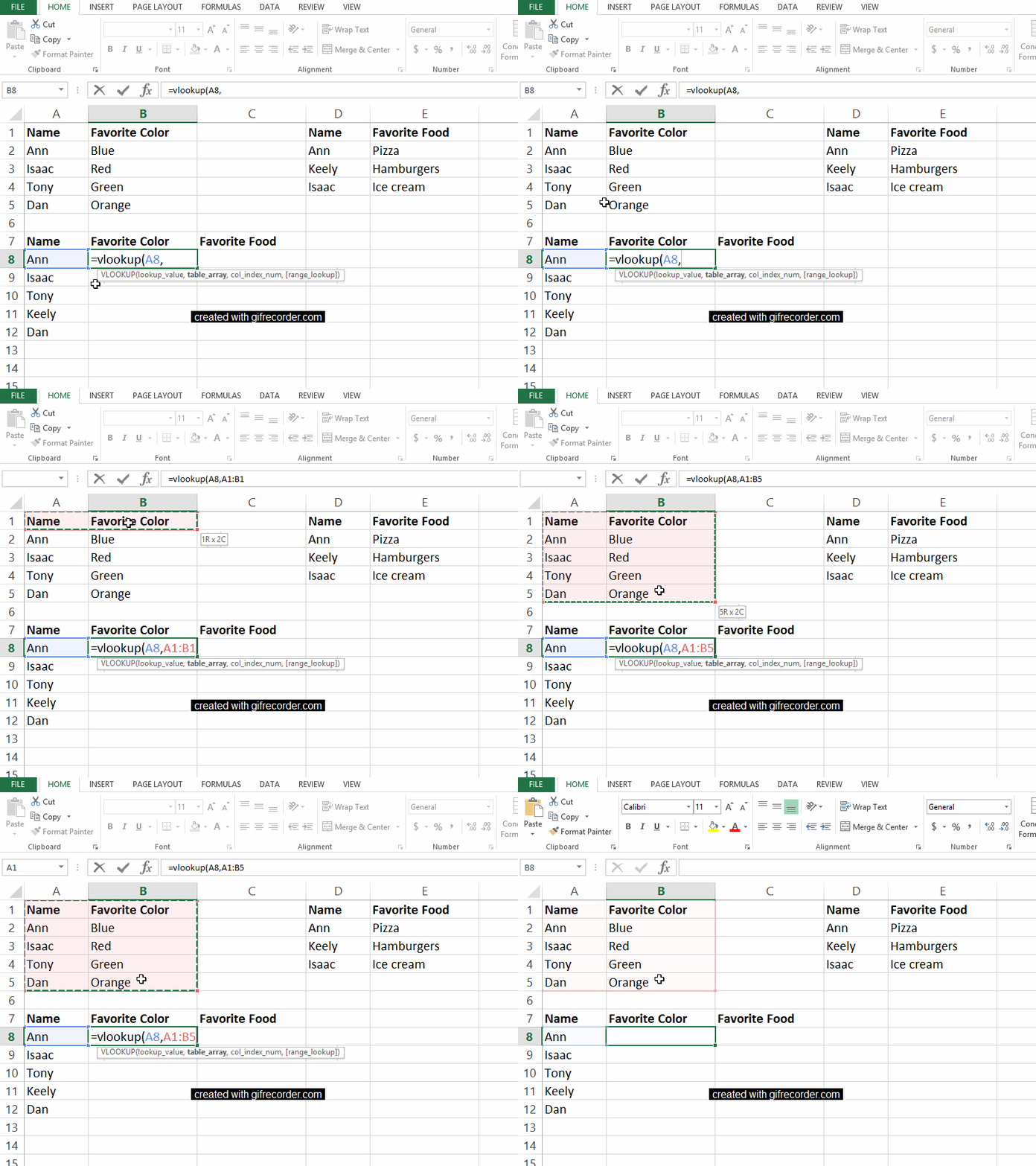
In this example, we want to get information from the Favorite Color table into our master table down below. The table_array for the Favorite Color table is A1:B5. In other words, that table begins in cell A1 and ends in cell B5.

My function reads: =vlookup(A8,A1:B5,

In this example, we want to get information from the Favorite Color table into our master table down below. The table_array for the Favorite Color table is A1:B5. In other words, that table begins in cell A1 and ends in cell B5.

Step 3: Fill in the col_index_num

Third, we have to indicate the col_index_num.

This column index number is the number of the column we care about. Just type in the number of the column you’re interested in.

For example, we want to know favorite colors, which are located in the second column of our Favorite Color table, so we type a 2 into the vlookup function. As usual, conclude with a comma to move on to the fourth and final segment of our function.

My function reads: =vlookup(A8,A1:B5,2,

For example, we want to know favorite colors, which are located in the second column of our Favorite Color table, so we type a 2 into the vlookup function. As usual, conclude with a comma to move on to the fourth and final segment of our function.

Step 4: Fill in the range_lookup

Fourth, we need to indicate the range_lookup..

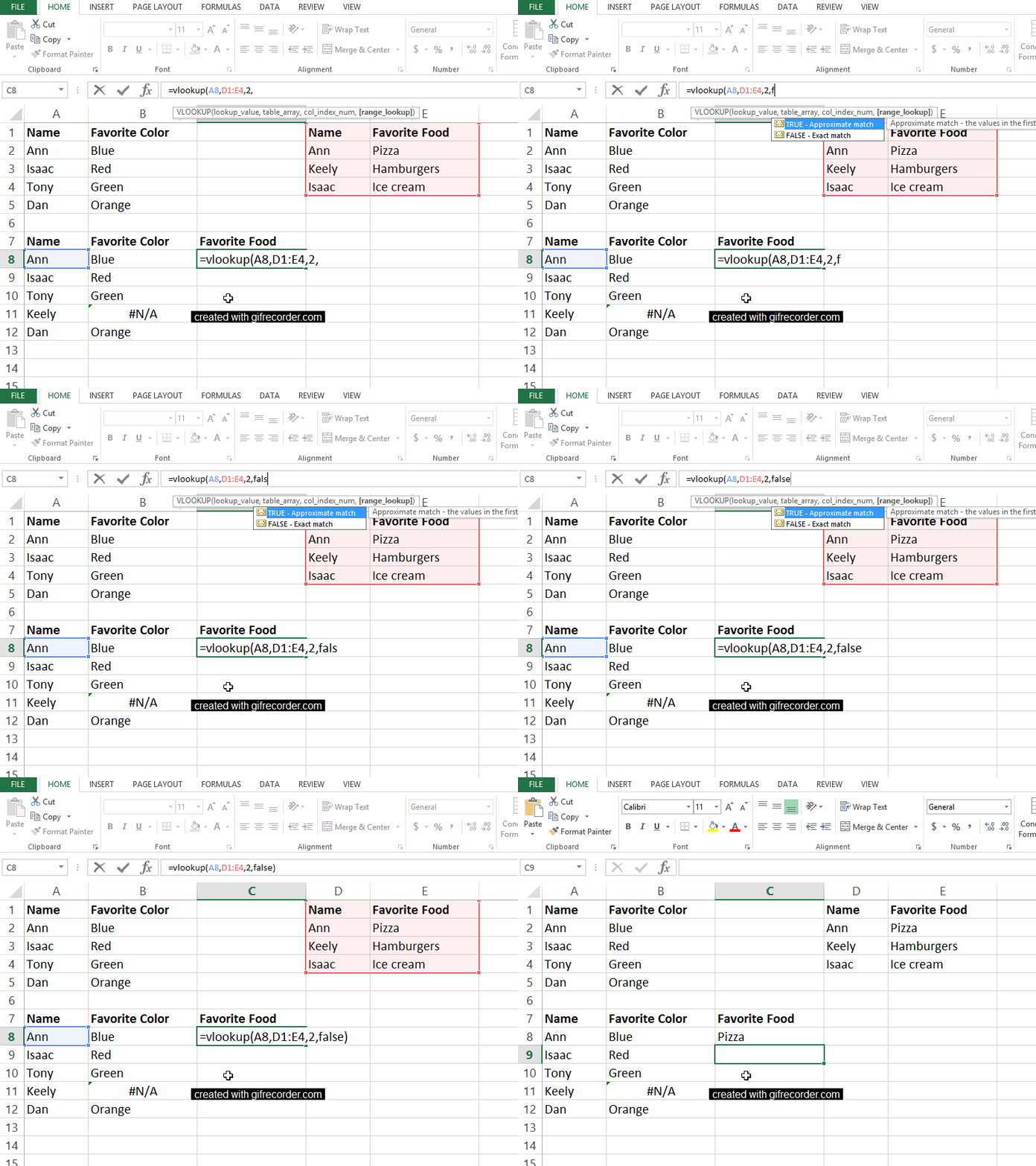
We have to type the word true or false into the fourth and final section of our vlookup function.

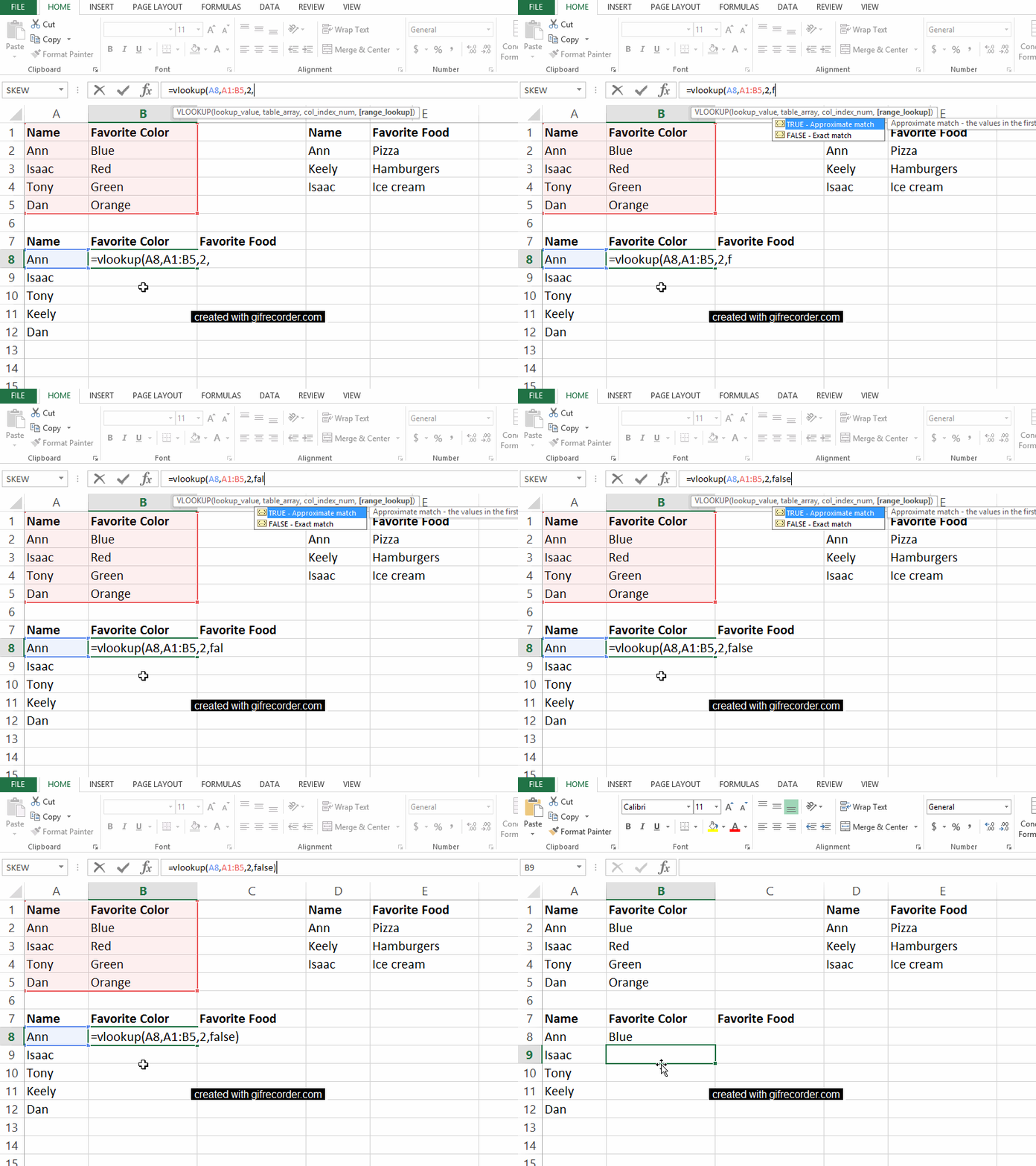
A true will give us an approximate match and a false will give us the exact information we’re looking for. We obviously want precise information, so type false into the function and end with a closing parenthesis.

My completed function reads: =vlookup(A8,A1:B5,2,false)

We can see that Ann’s favorite color is blue.

Fourth, we need to indicate the range_lookup. We have to type the word true or false into the fourth and final section of our vlookup function.

A Second Vlookup Example

Let’s go through a second vlookup example to make sure the four pieces of the function make sense.

We’ll continue creating a master table that combines content from both the Favorite Color and Favorite Food tables into a single table.

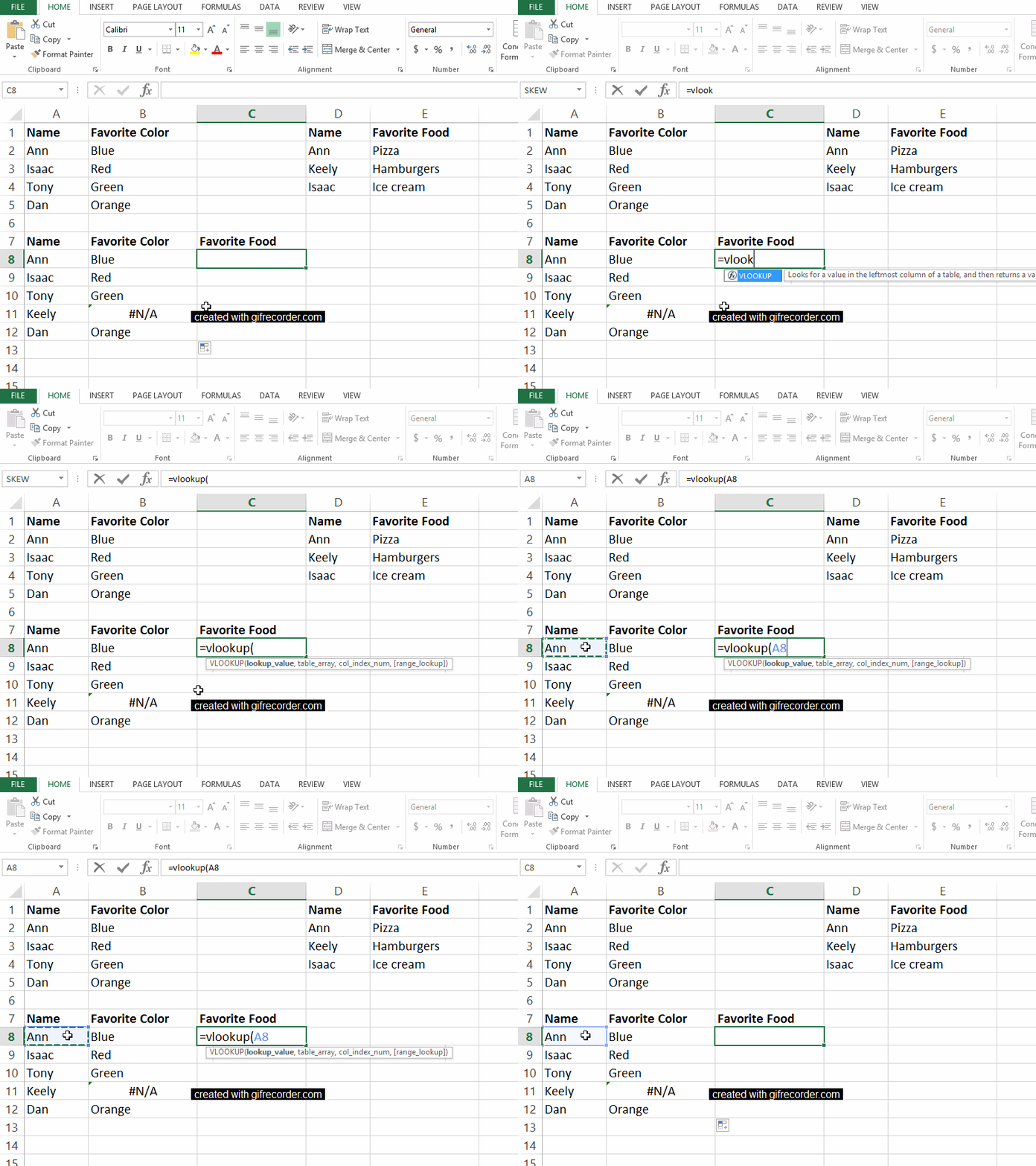
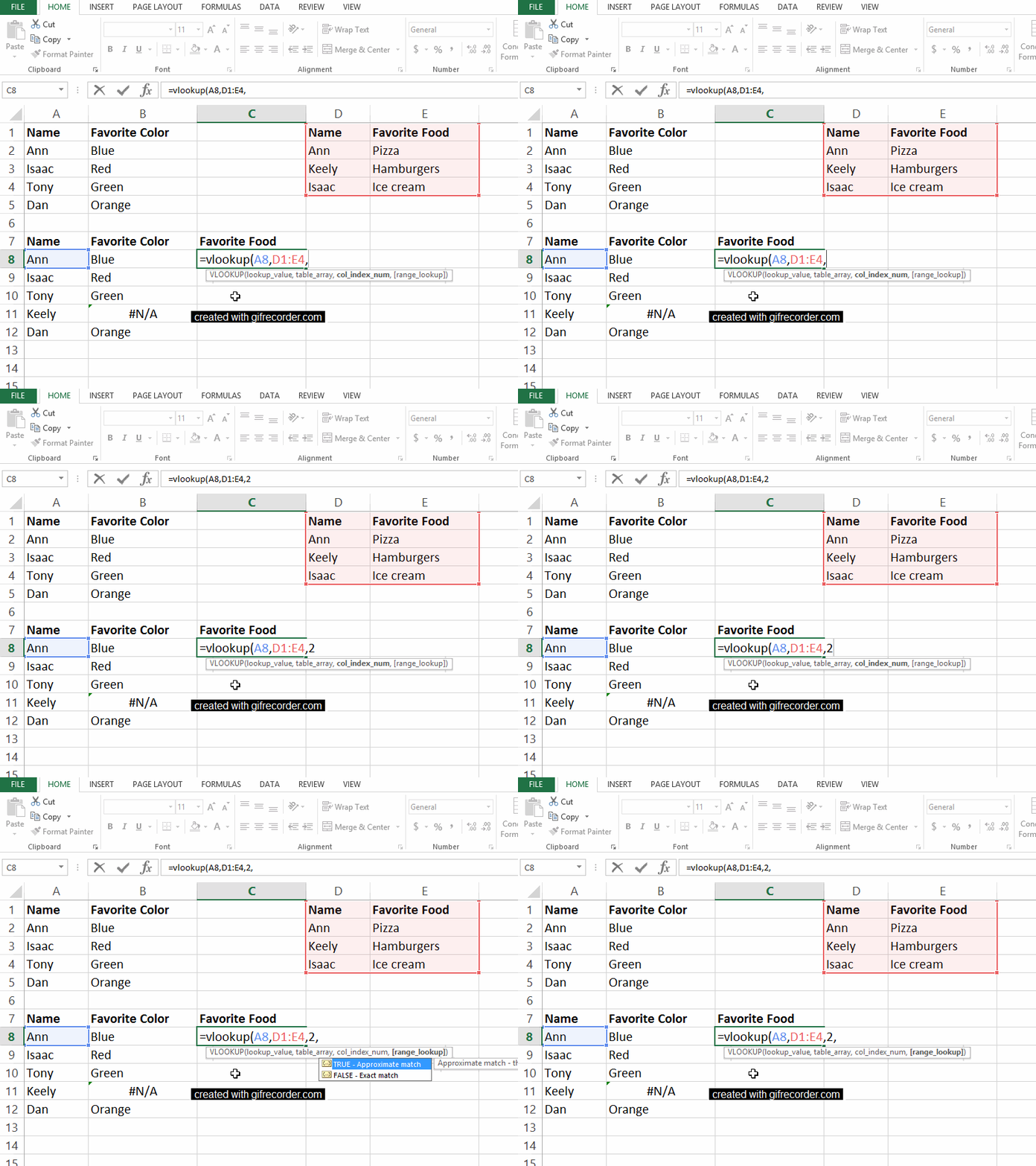
First, in cell C8, type =vlookup(A8, to set the lookup_value as Ann.

First, in cell C8, type =vlookup(A8, to set the lookup_value as Ann.

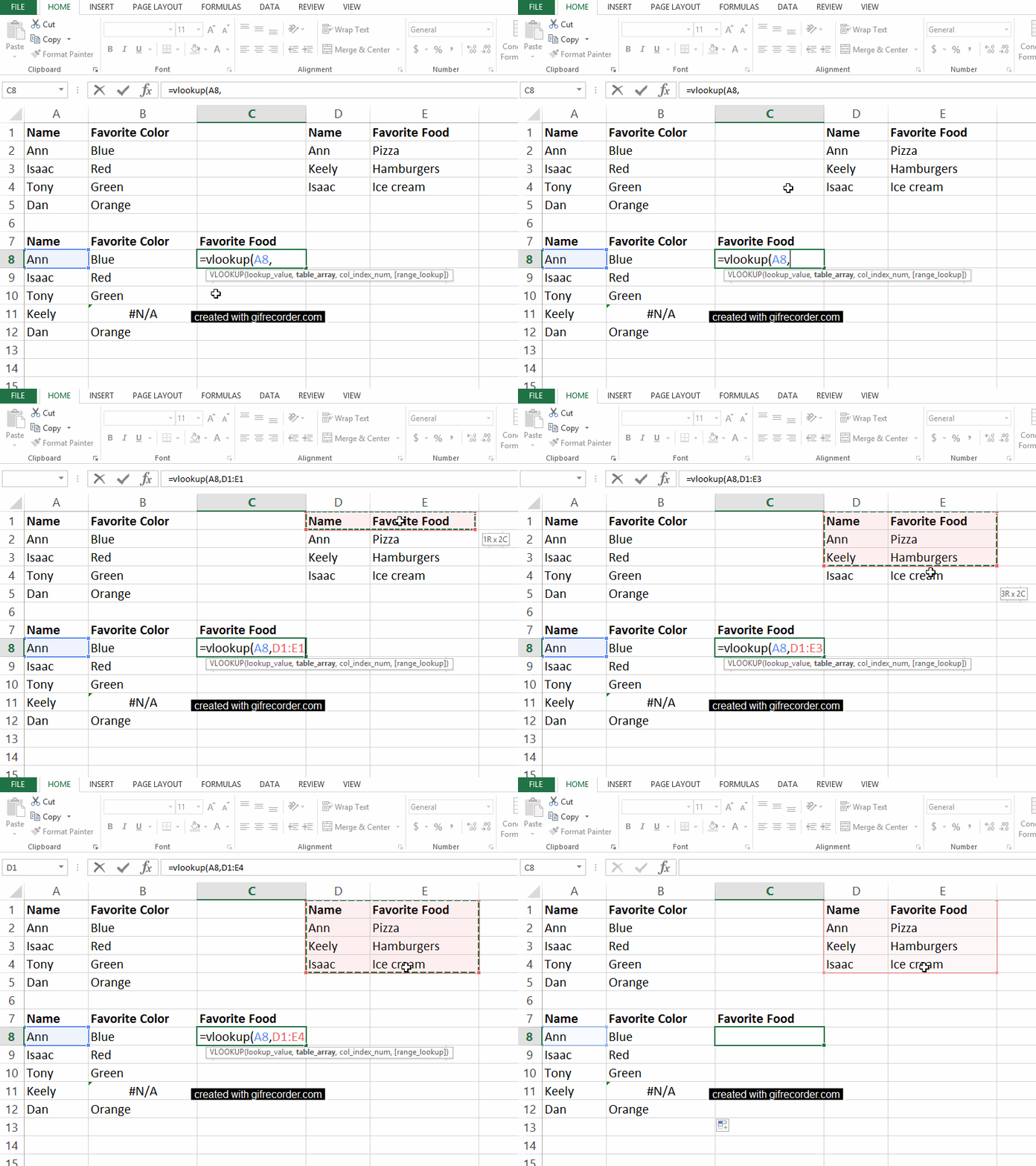
Second, indicate the boundaries of the Favorite Food table that we want to pay attention to. My function now reads =vlookup(A8,D1:E4

Second, indicate the boundaries of the Favorite Food table that we want to pay attention to. My function now reads =vlookup(A8,D1:E4

Third, tell Excel which column of the Favorite Food table to focus on. The foods are listed in the second column of that mini-table, so enter a 2 into the vlookup function. My function says =vlookup(A8,D1:E4,2

Third, tell Excel which column of the Favorite Food table to focus on. The foods are listed in the second column of that mini-table, so enter a 2 into the vlookup function. My function says =vlookup(A8,D1:E4,2

Finally, type false into the function and close your parentheses. The completed function says =vlookup(A8,D1:E4,2,false) and tells us that Ann’s favorite food is pizza. 

Finally, type false into the function and close your parentheses. The completed function says =vlookup(A8,D1:E4,2,false) and tells us that Ann’s favorite food is pizza.

Vlookup takes time to sink in, so go easy on yourself if you don’t “get it” right away. I promise that the time-savings from vlookup are worth the learning curve.

Written by cplysy · Categorized: depictdatastudio

Mar 28 2021

Creating & Labeling Small Multiple Bar Charts in Excel

One of the most popular Excel tricks in my data visualization workshops is creating small multiple bar charts. This post is a guide for how to create this type of chart. It also explains how to go beyond the Excel defaults to automatically add labels on the outside end of each bar.

The post Creating & Labeling Small Multiple Bar Charts in Excel appeared first on Elizabeth Grim.

Written by cplysy · Categorized: elizabethgrim

Mar 25 2021

Aprendizaje sobre la gestión basada en resultados

3267227227_660b6ab4f4_b

Continuando con un post anterior sobre el “sueño del aprendizaje de evaluaciones y revisiones de la gestión basada en resultados“, adentrándonos un poco más en el contenido de este documento, de marzo de 2019, desde la OCDE: “Aprendizaje de evaluaciones y revisiones de la gestión basada en resultados” por Janet Vähämäki y Chantal Verger.

El propósito último de la cooperación al desarrollo es lograr resultados, (1) lo que significa generar un cambio tangible y sostenible para (a) las personas, (b) las sociedades y ( c)  el medio ambiente. (2) Para que esto suceda, la gestión basada en resultados requiere que los actores responsables del desarrollo establezcan: (a) objetivos claros con los resultados esperados, (b) metas e indicadores, y (c) un sistema para medir cómo se están desempeñando en relación con sus metas. También necesitan (3) utilizar la información generada sobre el desempeño y los resultados de la cooperación para el desarrollo (a) para la rendición de cuentas y la comunicación, así como (b) para la toma de decisiones y el aprendizaje.

¿Qué hemos aprendido de la implementación de la gestión basada en resultados en las organizaciones de cooperación al desarrollo durante los últimos 20 años? ¿Qué avances y beneficios se pueden ver? ¿Cuáles son los principales desafíos y efectos no deseados? ¿Existen buenas prácticas para abordar estos desafíos?

Este documento resume y analiza los hallazgos sobre el progreso, los desafíos y las consecuencias no deseadas de la implementación de la gestión basada en resultados (GBR) en la cooperación para el desarrollo. La reseña:

(1) se basa principalmente en los hallazgos de varias evaluaciones y revisiones de los sistemas de GBR realizadas por miembros del Comité de Asistencia para el Desarrollo (CAD), la Secretaría de la OCDE y otros órganos en los últimos cuatro años (2015-2018).

(2) compara estos hallazgos con estudios anteriores y se basa en las lecciones que surgen de los nuevos métodos de gestión de la cooperación al desarrollo que están llevando a cabo varias instituciones e iniciativas mundiales.

El examen de las evaluaciones recientes revela tanto las áreas de progreso como los desafíos pendientes, de la siguiente manera:

• Los proveedores han avanzado en la integración de la GBR en sus sistemas internos (planificación, implementación e informes). Como resultado, (1) están mejor equipados para monitorear e informar sobre datos de productos y datos de resultados a corto plazo, y (2) utilizan cada vez más los datos de resultados para fines de comunicación y rendición de cuentas a nivel nacional.

• Si bien algunas evidencias apuntan a (1) una correlación positiva entre la calidad del seguimiento y la evaluación a nivel de proyecto y las valoraciones de los resultados del proyecto, (2) se observa un progreso desigual en el uso de la información de resultados para la orientación y el aprendizaje. Esto podría reducir la contribución potencial de la GBR a los resultados de desarrollo, un área que debería explorarse más a fondo.

• Los desafíos observados con la implementación de la GBR, a menudo ya mencionados en revisiones anteriores de la GBR, se relacionan con las dimensiones de gestión estratégica, organizativa y técnica. Estos incluyen: i) orientación e incentivos insuficientes sobre la GBR que, combinados con la falta de una cultura de resultados, llevan al personal a interpretar y aplicar la GBR de manera inconsistente; ii) problemas estructurales y de sistema que afectan la cadena de resultados; iii) limitaciones de capacidad; iv) problemas de medición y método, que dificultan la evaluación de cómo las intervenciones contribuyen a los resultados del desarrollo; yv) asimilación limitada de las dimensiones de apropiación y armonización en los países socios, en contra de los compromisos recientes de apoyar y utilizar los datos de resultados impulsados ​​por los países.

• La revisión también identificó tres consecuencias no deseadas que no fueron previstas y limitan el potencial de la GBR. Los proveedores tienden a:

i) priorizar lo que se puede medir fácilmente (fijación en la medición);

ii) perseguir el propósito de la rendición de cuentas a expensas del aprendizaje y la dirección de las políticas (suboptimización); y

iii) se vuelven demasiado burocráticos y rígidos, lo que aumenta los costos de transacción y obstaculiza la innovación (implementación contraproducente).

Estos desafíos y consecuencias no deseadas se vuelven más importantes cuando una organización no ha comunicado claramente el propósito de su enfoque y sistema de resultados. Sin embargo, las revisiones y evaluaciones no llevan a las organizaciones a reconsiderar drásticamente el enfoque de la GBR. Las recomendaciones apuntan más bien a mejorar el funcionamiento del enfoque en la práctica (por ejemplo, mediante una mejor orientación y formación).

Mientras tanto, una serie de nuevas iniciativas tenían como objetivo desarrollar o probar herramientas de gestión que promuevan la adaptabilidad y el aprendizaje para abordar la complejidad. Éstas se basan en enfoques que se centran en (a) cómo se comprenden los problemas y (b) cómo se utilizan la evidencia y el aprendizaje para resolver estos problemas. Si bien estos enfoques a veces se presentan como “alternativas” a la GBR, la revisión en realidad muestra que el aprendizaje, la apropiación y la adaptación fueron características clave de los enfoques de la GBR, en particular cuando se desarrollaron en el momento de la Declaración de París sobre la Eficacia de la Ayuda (2005). El renovado énfasis puesto en estos aspectos es útil ya que la práctica de la GBR se ha reducido en algunos casos a enfoques basados ​​en el desempeño y necesita evolucionar para responder mejor al nuevo contexto de desarrollo que implica lidiar con la complejidad y múltiples tipos de asociaciones.

Adaptarse a los contextos locales y ser lo suficientemente flexible para responder a los cambios y la retroalimentación del desempeño requiere:

i) centrarse en comprender mejor el contexto local;

ii) adaptar las intervenciones a los contextos locales;

iii) adaptar las intervenciones a medida que evoluciona el contexto: (a) mientras los resultados esperados se mantienen sin cambios, (b) el camino para alcanzarlos (y por lo tanto los productos) puede evolucionar donde sea necesario. (a) Esto implica delegar más autoridad sobre el terreno.

La gestión adaptativa también es importante a nivel corporativo (en sede):

(A) Una teoría del cambio que capte cómo los diferentes canales e instrumentos de ayuda contribuyen a los objetivos generales establecidos para la política de cooperación al desarrollo puede apoyar una mayor comprensión de la cadena de resultados.

(B) Si bien no existe un enfoque de “talla única” dado que las organizaciones operan en varios entornos y están sujetas a diferentes procesos de gobierno, existen elementos esenciales de los sistemas de GBR, tales como: (1) un propósito claro para GBR, (2) teoría (es) del cambio, (3) marcos de resultados, (4) procesos de seguimiento y evaluación, (5) ciclos de retroalimentación documentados y (6) procesos relacionados de toma de decisiones y presentación de informes, (7) gestión del conocimiento y sistemas de aprendizaje, así como (8) incentivos para el personal.

Written by cplysy · Categorized: TripleAD

Mar 25 2021

Designing for Awful

One of the most profound, fun, and engaging techniques for creating an attractive service or product design is oddly focused on the exact opposite: Designing for Awful.

How to use this

This strategy is as simple as it is effective. When workshopping ideas allot some time to have participants develop ideas and designs for the worst possible version of the thing they are designing.

This is a flip of a traditional ideation session where people try to develop suggestions for what to focus on, whom, and what the best use of resources might be. In Designing for Awful, we do the opposite. It is used usually in tandem with ideation sessions that are focused on surfacing ideas in general.

This can be used to frame a service, product or describe the experience of doing something like a survey or participating in an event. It’s a simple, fun, and sometimes counter-intuitive way to surface assumptions, biases, and qualities in what we want, need and don’t want in our design.

Like any ideation-focused exercise, it must be managed appropriately. Individuals need to feel safe in surfacing ideas, free to discuss them, and preferably, offer an opportunity to share at least some of them anonymously. People generally have a lot of fun with this simple exercise.

Benefits

The benefits of this are many.

Firstly, it focuses on the things we tend to avoid — unpleasant feelings, experiences, or sensation — and thus, might be missed in consideration of our design.

It also overcomes an optimism bias. Design is largely a positive-oriented practice where we look to solve problems, not make them. Designing for Awful helps us to move around this bias by looking at what is not addressed.

This approach is also excellent for helping surface values in practice and in specific terms. To illustrate, it’s one thing to speak in a positive or affirmative tone such as a statement like “we value inclusivity.” Designing for Awful could lead us to be specific “Our service is inaccessible to someone with a mobility disability” or “it is sexist” or “our product can only be used by people who are right-handed.” By surfacing what makes something not work we are better able to see what will.

This approach is also excellent in helping, paradoxically, surface what we want by framing things in terms we don’t want. How often have you met someone who first tells you what they don’t want in something before they get to describing what they want?

This allows people to have a little fun and we find that some people are more bold and assertive with their creativity in the negative, than the positive and this technique lets that come out.

Lastly, the exercise can be a useful way to surface who needs to be at the table moving forward. We find that the need for having the voices of certain individuals, groups, roles, or departments in the discussion is better clarified when we consider how bad things would be without them.

Try this out at your next design session or team meeting as part of a check-in and you might find some laughs and some deep insight along with it.

If you want to inspire new thinking and better design in your organization for engagement and impact, reach out and contact us. This is what we do.

Written by cplysy · Categorized: cameronnorman

  • « Go to Previous Page
  • Go to page 1
  • Interim pages omitted …
  • Go to page 193
  • Go to page 194
  • Go to page 195
  • Go to page 196
  • Go to page 197
  • Interim pages omitted …
  • Go to page 304
  • Go to Next Page »

Footer

Follow our Work

The easiest way to stay connected to our work is to join our newsletter. You’ll get updates on projects, learn about new events, and hear stories from those evaluators whom the field continues to actively exclude and erase.

Get Updates

Want to take further action or join a pod? Click here to learn more.

Copyright © 2026 · The May 13 Group · Log in

en English
af Afrikaanssq Shqipam አማርኛar العربيةhy Հայերենaz Azərbaycan dilieu Euskarabe Беларуская моваbn বাংলাbs Bosanskibg Българскиca Catalàceb Cebuanony Chichewazh-CN 简体中文zh-TW 繁體中文co Corsuhr Hrvatskics Čeština‎da Dansknl Nederlandsen Englisheo Esperantoet Eestitl Filipinofi Suomifr Françaisfy Fryskgl Galegoka ქართულიde Deutschel Ελληνικάgu ગુજરાતીht Kreyol ayisyenha Harshen Hausahaw Ōlelo Hawaiʻiiw עִבְרִיתhi हिन्दीhmn Hmonghu Magyaris Íslenskaig Igboid Bahasa Indonesiaga Gaeilgeit Italianoja 日本語jw Basa Jawakn ಕನ್ನಡkk Қазақ тіліkm ភាសាខ្មែរko 한국어ku كوردی‎ky Кыргызчаlo ພາສາລາວla Latinlv Latviešu valodalt Lietuvių kalbalb Lëtzebuergeschmk Македонски јазикmg Malagasyms Bahasa Melayuml മലയാളംmt Maltesemi Te Reo Māorimr मराठीmn Монголmy ဗမာစာne नेपालीno Norsk bokmålps پښتوfa فارسیpl Polskipt Portuguêspa ਪੰਜਾਬੀro Românăru Русскийsm Samoangd Gàidhligsr Српски језикst Sesothosn Shonasd سنڌيsi සිංහලsk Slovenčinasl Slovenščinaso Afsoomaalies Españolsu Basa Sundasw Kiswahilisv Svenskatg Тоҷикӣta தமிழ்te తెలుగుth ไทยtr Türkçeuk Українськаur اردوuz O‘zbekchavi Tiếng Việtcy Cymraegxh isiXhosayi יידישyo Yorùbázu Zulu