• Skip to main content
  • Skip to footer
  • Home

The May 13 Group

the next day for evaluation

  • Get Involved
  • Our Work
  • About Us
You are here: Home / Archives for allblogs / evalacademy

evalacademy

May 14 2021

Let Excel do the Math: Easy tricks to clean and analyze data in Excel


One of the most common things I see when I work data in excel that others have compiled or analyzed is the under-use of Excel’s computational powers. In part, this has to do with setting up your data correctly to all Excel to do the work.

Our Data Entry Tip Sheet or article on using survey platform data can help you set up your data to maximize use. But if you don’t know how to harness Excel’s power, you’ll spend more time than necessary counting and sifting through data, like I did when I started.

It’s hard to know where or how to get started or even what to google to set you on the right path. There are plenty of tutorials and how-to articles online, so the focus today is to introduce you to some tools you can use for cleaning and analyzing your data, to give you a place to start!

bookkeeping-615384_1280.jpeg

Cleaning Your Data

Once you have your data formatted, we have some simple tricks to help clean your data so you can sit back and let excel do the work.  

  • Format the cells. Ensure that date cells are formatted as dates etc. 

  • Convert the data to a table. This allows you to spot check column value and look for missing or inconsistently entered data 

  • Look for outliers or unexpected values in numerical data. Sort the data by specific columns, to look for minimums and maximums or values outside of what’s expected. 

  • Look for repeated and misspelled values in text data. Look for values that don’t make sense or duplicate or misspelled text entry data. 

  • Filter each column to look for values that don’t belong. 

  • Separate multiple entries in one cell into their own cells. Separating the entries by a common feature, like a comma; like this.

  • Check for duplicates. Highlight the entire dataset and use “Remove Duplicates” or conditional formatting. 

Now that your data is clean, it’s time to analyze it! So where to start? 

Analyzing Your Data

While this article won’t go into detail about how to use each of these formulas, we’ll get you started with our favourite formulas for conducting simple descriptive statistics and let you google how to apply them. 

  • COUNTIF 

  • SUMIF 

  • AVERAGE, AVERAGEIF, MEDIAN, MAX, MIN 

  • XLOOKUP for basic data matching (or HLOOKUP and VLOOKUP in older versions of Excel) 

  • IF functions 

  • Pivot tables


Between our Data Entry Tip Sheet and these cleaning and analysis tools, I hope you are starting to feel confident that, yes, YOU can analyze your data in excel. 

As you get more familiar with the types of data you might be analyzing in Excel, you’ll start to develop your own favourite tricks and formulas to help you analyze your data more efficiently. 


To learn more about applying evaluation in practice, check out more of our articles, or connect with us over on Twitter (@EvalAcademy) or LinkedIn.


Sign up for our newsletter

We’ll let you know about our new content, and curate the best new evaluation resources from around the web!


We respect your privacy.

Thank you!



Written by cplysy · Categorized: evalacademy

May 02 2021

Evaluation Roundup – April 2021

Welcome to our monthly roundup of new and noteworthy evaluation news and resources – here is the latest.

Have something you’d like to see here? Tweet us @EvalAcademy!

New and Noteworthy — Reads

Shifting the Evaluation Paradigm: The Equitable Evaluation Framework

Hot of the press! The Equitable Evaluation Initiative in partnership with Grantmakers for Effective Organizations just released a new publication called Shifting the Evaluation Paradigm: The Equitable Evaluation Framework. This new joint publication provides an overview of the Equitable Evaluation Framework (EEF) and the early steps of engagement with foundation partners. The publication highlights insights in mindset shifts and tensions that are occurring behind the curtains of six foundation practice partners.

Increasing the Value of Foundation Evaluation

Engage R+D partnered with the Bill and Melinda Gates Foundation to apply a creative, participatory technique – known as a design charrette – to engage a broad variety of stakeholders in collaboratively designing a summative evaluation of one of the Foundation’s signature K-12 investments. Through this case study a learning brief was developed that explores “what can happen when more voices are included in the process of evaluation design.”

How to Teach Evaluation

The Canadian Journal of Program Evaluation recently released a special issue on how evaluation can be taught and learned. The issue curates the Practice Notes of evaluation educators from diverse backgrounds. If you are looking for evaluation teaching techniques, then definitely check out this volume from the Canadian Journal of Program Evaluation.

Real-Time Evaluation – Your Time Has Arrived!

Patricia Rogers of BetterEvaluation wrote a working paper on what can be learned from previous Real-time evaluations (RTE) practiced over the past 20 years. Our world is changing quickly, and people are looking for evaluation approaches that will meet the needs of rapidly changing initiatives. For an overview of why we need more real-time evaluation, read her most recent article on BetterEvaluation.

New and Noteworthy — Events

Canadian Evaluation Society 2021 Virtual Conference

Organized by: Canadian Evaluation Society (CES)

Date: May 9 -14 (Workshops from April 30)

Methods Masterclass

Organized by: Canadian Evaluation Society (Ontario Chapter)

Dates: May 11, 1:15 – 2:15 pm

Topics:

  • Learning Outcome Harvesting Experientially  

  • Five Quick and Easy Tips for Better Data Visualization  

  • Performance Measurement: From Theory to Practice to Transformation  

  • Visual Methods for Developmental Evaluation and Learning  

  • Expanding Online Data Collection Beyond Surveys

Transformation: What it is. Why it matters. How to evaluate it.

Organized by: Community-University Partnership for the Study of Children, Youth, and Family

Dates: May 19, 12:00 – 1:00 pm MDT

Facilitators: Michael Quinn-Patton & Mark Cabaj

Courses

Feminist Evaluation: Not your standard gender-responsive approach

Instructor: EnCompass

Start Date: May 25, 2021 (12:00 pm EST)

Written by cplysy · Categorized: evalacademy

May 02 2021

9 Tips to Make the Most Out of Your Virtual Conference Experience


In a year that saw massive and rapid shifts to online events and virtual conferences, gone are the days of rolling up to conference hotels, resigning yourself to dry pastries and tiny cups of coffee at snack breaks, and rushing endlessly down a maze of patterned carpet hallways asking random passerby’s “do you know where conference hall A is?”

pexels-marcus-aurelius-4064696.jpg

The world has changed and so has our conferencing experience. In some ways, there are perks – you can sleep in your own bed, make yourself a large and delicious cup of coffee, and munch away on breakfast during the opening remarks from the warmth of your own home. But without careful planning, you can easily end up in the same harried conference cycle of sprinting to find food and use the washroom between sessions, staying up late trying to manage work emails and deadlines while attending conference sessions all day without the benefit of room service and the camaraderie of like-minded individuals buoying your spirits with random small talk and chance encounters to talk shop. 

While we aren’t able to stop your family and pets from ambling by and needing something from you in the middle of an engaging session, we do have some tips to help you maximize your virtual conference experience. Here are 9 things you can do to maximize your virtual conference experience. 


Before the Conference

1. Plan which sessions you want to attend.

Yes, you do this for in-person conferences as well, but virtual conferences are a little different. Prioritize interactive sessions over more static presentations if sessions are being recorded. Since you can easily switch between sessions with the click of a button, plan a backup session in case your first choice is full (it can happen with virtual rooms!) or if the session turns out to be completely different than advertised. While you don’t have to sheepishly slink out the door to leave a session, remember that you are still taking up a virtual spot and presenters can often see when people leave the online meeting.

2. Set an out-of-office message.

Sure, you’re at your computer all day and likely aren’t conversing with colleagues over a buffet lunch, but give yourself the grace and space to focus during the conference. Set an out-of-office message, even if it is just to tell coworkers and clients that you won’t be responding to emails in your usual timely fashion and relieve the pressure you put on yourself to keep with work.

3. Prepare your snacks in advance.

Don’t get caught thinking that 15 minutes in between virtual sessions will be enough time to use the washroom, finish up your notes, make a snack, let the dog out, change over a load of laundry, answer a few emails, and hop into your next zoom session. Conferencing from home comes with its own set of tasks that eat up the time between sessions, don’t let preparing food become one of those things. Set up a snack station or at least buy some easy-to-grab things to eat while you conference away.

4. Set up a conference space that is separate from your workspace.

Our brains associate certain tasks with specific spaces. Setting up in your usual workspace puts your brain in ‘work mode’ and makes you more likely to tune out of the conference and tune into work. While not everyone is privileged to have even one distraction-free space to work in, let alone a second space they can “conference” from, small changes, like using a different side of the desk, changing up what you look at, using a different notebook or a different coloured pen can help your brain switch into conference mode. 

At the last virtual conference I attended, I literally switched which side of the kitchen table I sat on for “work” vs “conferencing” and used a different notebook, pens, and mug. 

During the Conference

5. Use technology to your advantage.

Many virtual platforms allow you to screenshot which can help you to capture information quickly or refer to an image at a later date. As a bonus, you can quickly share your screenshots on Twitter (if that’s your thing).

6. Get outside.

Zoom fatigue is real. Use your lunch break or set aside some time to get outside each day. Staring at a screen for conferencing, and for the work you may be doing around conference sessions, is seriously draining. Make sure to move your body, since you are no longer hustling down long hotel corridors between sessions. 


7. Make a point to connect with other attendees.

It can be easy to stick to your own bubble during a conference. Being attached to a computer and video camera all day is draining and the last thing some of us want to do is schedule one more video interaction after a day of staring at our screens. Take advantage of the many networking opportunities that virtual conferences are offering and make at least one connection. If you’re too exhausted from the conference itself, set up a time to connect a week or so out when you aren’t as drained.

After the Conference

8. Schedule a time to watch on-demand content.

In some cases, virtual conference content can be watched on-demand or is available after the conference. Purposefully schedule time in your calendar to watch the content or you’ll walk away with a folder full of bookmarks and wish lists that quickly gets forgotten in the flow of regular to-do’s. Capitalize on the opportunity for archived content that has come along with virtual conferencing. 


9. Review conference material and pull out key highlights.

In these weird, hazy pandemic days where time slides by with few of its normal markers, you can quickly lose sight of the key points or ideas you learned at the conference. Put a reminder in your calendar and set aside time to review your notes, resources, and key take-aways. Create actionable steps to take what you learned and put it into practice. This includes reaching out to those you connected with or presenters you had questions for.

Eval Academy will be at the upcoming Canadian Evaluation Society conference. Tweet along with us on Twitter or connect with us at our virtual booth! We love talking to our eval pals.


To learn more about applying evaluation in practice, check out more of our articles, or connect with us over on Twitter (@EvalAcadmey) or LinkedIn.


Sign up for our newsletter

We’ll let you know about our new content, and curate the best new evaluation resources from around the web!


We respect your privacy.

Thank you!


Written by cplysy · Categorized: evalacademy

Apr 21 2021

Why you shouldn’t rely on default survey platforms to give you all the answers


So you’ve administered a survey using one of the many online survey platforms that claim to help you create a survey, analyze the results, and export your results so you can make data-driven decisions. With tools like these, who needs an evaluator! Right?

Don’t get us wrong, surveys are useful tools and we’re a fan of any survey platform that makes it easier to use the results. But what about when you want to scratch beneath the surface or present a legible graph that will convince the program director or funder that action needs to be taken? This is where the canned survey tools start to falter.

Just like the default settings in Microsoft Excel or Word, the default report settings in most survey platforms give you some quick and dirty results, good for getting an overall sense of what’s going on. But sometimes you’ll need to present your data in a different way.

In this two-part series, we’ll take you through the steps to export and format your data so that it’s useable, then we’ll teach you some of our favourite data cleaning and analysis tips!


First, let’s review why you might want to look beyond the survey platform’s pre-made graphs and analysis for your answers.

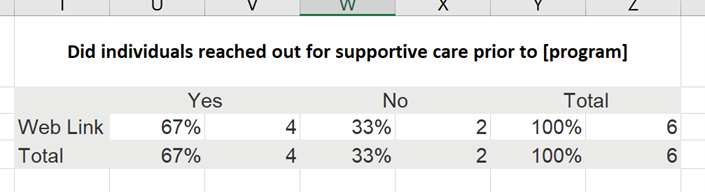
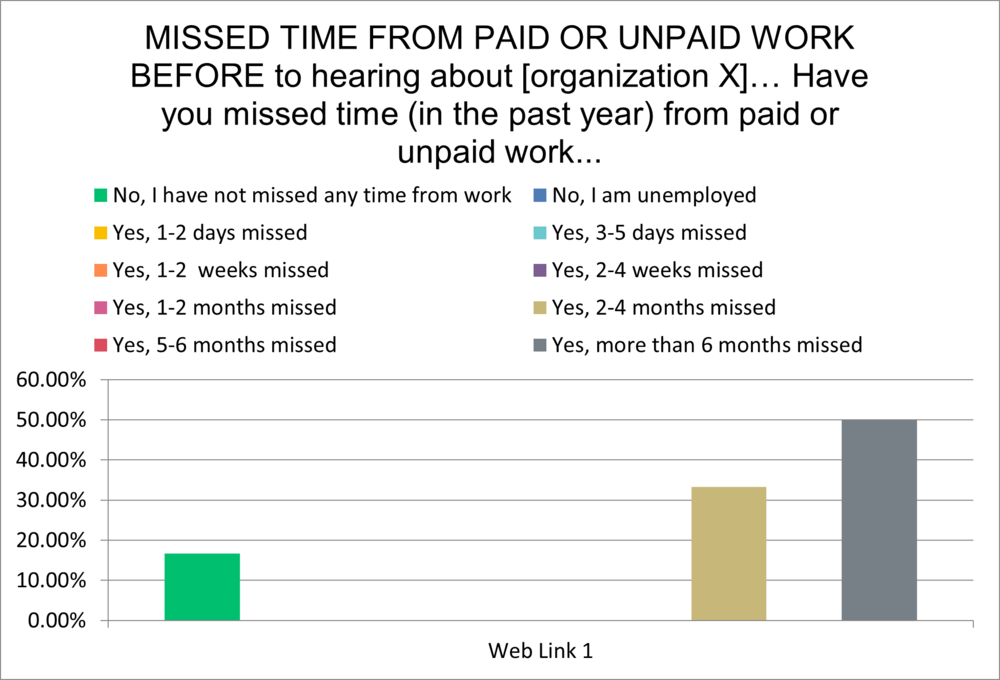
Here’s an example graph from a survey platform; there was a total of 6 responses for this question:

Picture1.png

In this graph alone:

  • The graphs default to %, which over-inflates results when you have small numbers of respondents (usually we say less than 10 respondents).

  • Colours are often random and don’t highlight key findings.

  • While the response categories make sense for gathering the data, they get confusing when you are visualizing the data.

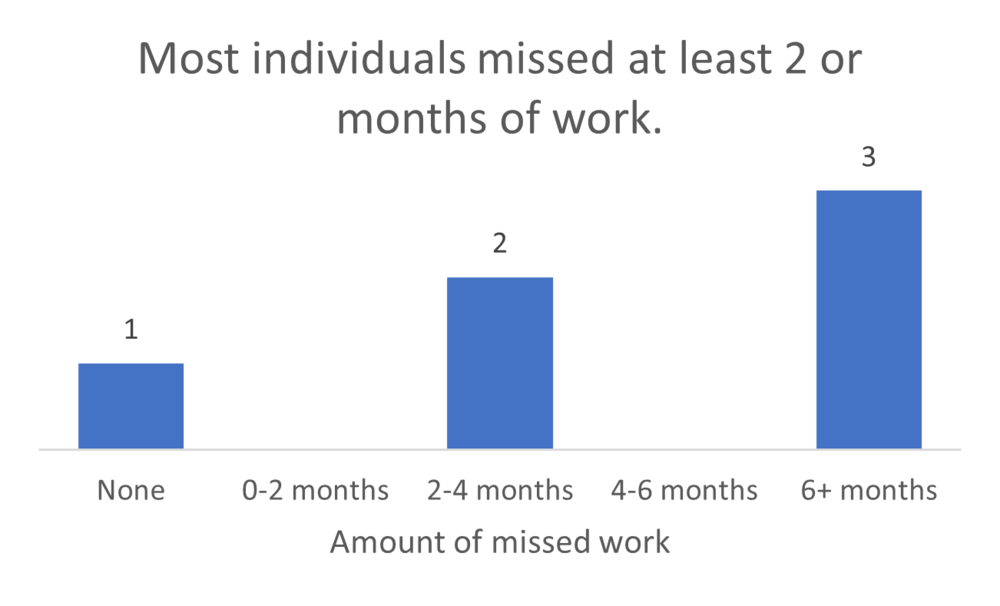
A quick makeover shows something a little different:

Picture2.png

Other issues with the default graphs can include:

  • Inability to compare answers across questions— did people who answered one question one way answer another question in the same way?

  • Inability to combine results across surveys. Say you have a survey after each event you host and want to look at the results of all of the surveys together.

So now what? You go to download your survey results and are faced with a variety of options- do you download responses by question? By respondent? PDF? CSV? Excel? Have no fear, we’ll guide you through this process. 

Step One:

Download the most granular responses available. Select responses by respondent so that you are able to trace responses by participant and link a participant’s response to one question (e.g. demographics, like age or gender) to their response for another question.

Step Two:

Download the responses in an editable format. We prefer Excel, but CSV works as well since you can save a CSV file to Excel. Please, please, please, don’t download the PDF version.

Step Three:

Go forth and analyze with a few tips from us:

1. Label the Questions Clearly

 Sometimes the survey platform exports information in a way that makes it hard to tell what the survey question was; either by importing a very long question or cutting out parts of the question stem. Save yourself the hassle of flipping between your survey and your data by clearly labelling the questions so you understand what questions are linked with the answers. 

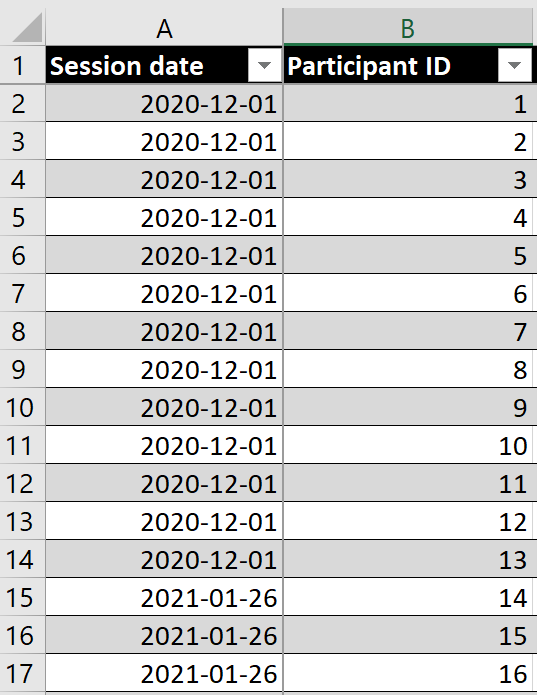
Here’s an example of how column headers show up on exported data from one survey platform:

Picture3.png


Here’s how we suggest formatting it with some simple tweaks:

Picture4.png

2. Leave a bread crumb trail

Want to analyze the same survey delivered a few times, like multiple post-event surveys? We suggest merging them into a single file. However, it’s important to track where the surveys came from. Make one of your columns a description of where the data came from (e.g. March 31 session, Group A session). This allows you to go back to the original data if necessary and allows you to analyze the survey answers by source.

Picture5.png

Notice how in this example, the session date in column A tells you which post-event survey the data is linked to.

3. Keep your data organized

Create a separate “analysis” tab, or even multiple analysis tabs (e.g. demographic analysis, skill analysis) to organize your data. Label your tables and charts in the analysis tab by survey question so you can quickly scroll to find what you are looking for. The goal is to be able to find what you are looking for quickly, with minimal scrolling or clicking between tabs.

Here’s an example of what a survey analysis spreadsheet might look like. All data are in one tab in this example, with separate visualization/analysis tabs for each section of the survey (demographics, resources, mentoring, knowledge). 

Picture6.png


4. Let Excel do the math

Level up your Excel skills with a few formulas and tricks using tips from the next article in our series. 


Now that you’ve got a handle on exporting and organizing the data so that it’s more useful, check out our favourite tips and tricks for cleaning and analyzing data (article to come May 2021) and this article on dialing down your data so that people understand what to look at.


To learn more about applying evaluation in practice, check out more of our articles, or connect with us over on Twitter (@EvalAcadmey) or LinkedIn.


Sign up for our newsletter

We’ll let you know about our new content, and curate the best new evaluation resources from around the web!


We respect your privacy.

Thank you!


Written by cplysy · Categorized: evalacademy

Apr 07 2021

Evaluation Question Examples


A blank page can intimidate any writer. The same goes for evaluators – that “evaluation questions” column in your evaluation plan may be daunting. Looking at examples of real-world evaluation questions just might inspire your own.  

 We’ve already covered how to write good evaluation questions. As a quick reminder, your evaluation questions should be developed collaboratively and be open-ended. You can look to strategic plans or relevant quality frameworks for thematic guidance. Most importantly, be sure to edit until you’re sure the language is just right. 

 The examples below are grouped by content area, but with slight changes, can apply to many different evaluation projects. If you’re new to evaluation, we hope these examples can help you write questions that apply to the initiative you’re evaluating. If you have some evaluation experience already, watch for an upcoming post sharing evaluation question examples at different stages of the evaluation and learning cycle. 


Youth Programming

  • What makes this program unique? 

  • Who are the program participants? 

  • To what extent are children, youth and caregivers participating in programming? 

  • To what extent is programming making a difference in the lives of children, youth and families? 

  • Which groups benefitted most from the program? 

  • To what extent do program staff hold required safety certifications? 

  • In what ways did program operations differ from the original plan? 

Healthcare Initiatives

  • In what ways did program planners consider equitable access to care? 

  • How has the program impacted pathways to and from primary care? 

  • To what extent is the organization demonstrating leadership in community health planning? 

  • To what extent do patients experience an easy referral process? 

  • How do quality of life outcomes compare to norms in the region? 

  • To what extent does the program affect mobility? 

  • How efficient is the patient flow through arrival to admission? 

  • How quickly can patients access the service? 

  • To what extent are patients receiving appropriate preventative screening? 

  • How effective are interdisciplinary teams? 

  • In what ways has the project affected patient safety? 

  • What contribution has the program made to meeting the targets for the Sustainable Development Goal “ensure healthy lives and wellbeing at all ages?” 

Environmental Initiatives

  • How has the campaign impacted local awareness of the incentive program? 

  • What impact has this process had on emissions in the northeast region? 

  • How well aligned are the program activities with the regional strategy? 

  • In what ways have residents changed their use of plastics? 

  • To what extent has recycling capacity increased? 

  • How has the program expanded access to affordable sustainable energy? 

  • How well do the program’s messages resonate with local understanding of forest use? 

  • For how long do sponsored companies maintain these new practices? 

  • Which of the three program options was the most cost-effective? 

  • To what extent did the initiative create unintended outcomes? 
    Collecting Data


Education & Training Programs

  • How well prepared were students upon program entry? 

  • To what extent did the course deliver content students expected? 

  • How successful are program graduates in achieving certification? 

  • How have trainees applied the lessons from the course? 

  • How accurate do students feel their assessments were? 

  • What factors most drove learner success? 

  • To what extent do trainees report changes in confidence? 

  • What changes in organizational performance can be attributed to the training program? 

Collective Impact

  • To what extent are partners collaborating? 

  • How engaged are local leaders in contributing to the network? 

  • How well do chosen outcomes resonate with each partner? 

  • How confident are partners that they can achieve the intended outcomes? 

  • To what extent has the collective impact been measured? 

  • How have the initiatives affected quality of life? 

  • How long do agencies’ collaborative relationships last? 

We hope these evaluation question examples have inspired some of your own. 

 Wondering how to document your evaluation questions? Download our free Evaluation Plan Template. 


To learn more about applying evaluation in practice, check out more of our articles, or connect with us over on Twitter (@EvalAcadmey) or LinkedIn.


Sign up for our newsletter

We’ll let you know about our new content, and curate the best new evaluation resources from around the web!


We respect your privacy.

Thank you!



Written by cplysy · Categorized: evalacademy

  • « Go to Previous Page
  • Go to page 1
  • Interim pages omitted …
  • Go to page 29
  • Go to page 30
  • Go to page 31
  • Go to page 32
  • Go to page 33
  • Interim pages omitted …
  • Go to page 43
  • Go to Next Page »

Footer

Follow our Work

The easiest way to stay connected to our work is to join our newsletter. You’ll get updates on projects, learn about new events, and hear stories from those evaluators whom the field continues to actively exclude and erase.

Get Updates

Want to take further action or join a pod? Click here to learn more.

Copyright © 2026 · The May 13 Group · Log in

en English
af Afrikaanssq Shqipam አማርኛar العربيةhy Հայերենaz Azərbaycan dilieu Euskarabe Беларуская моваbn বাংলাbs Bosanskibg Българскиca Catalàceb Cebuanony Chichewazh-CN 简体中文zh-TW 繁體中文co Corsuhr Hrvatskics Čeština‎da Dansknl Nederlandsen Englisheo Esperantoet Eestitl Filipinofi Suomifr Françaisfy Fryskgl Galegoka ქართულიde Deutschel Ελληνικάgu ગુજરાતીht Kreyol ayisyenha Harshen Hausahaw Ōlelo Hawaiʻiiw עִבְרִיתhi हिन्दीhmn Hmonghu Magyaris Íslenskaig Igboid Bahasa Indonesiaga Gaeilgeit Italianoja 日本語jw Basa Jawakn ಕನ್ನಡkk Қазақ тіліkm ភាសាខ្មែរko 한국어ku كوردی‎ky Кыргызчаlo ພາສາລາວla Latinlv Latviešu valodalt Lietuvių kalbalb Lëtzebuergeschmk Македонски јазикmg Malagasyms Bahasa Melayuml മലയാളംmt Maltesemi Te Reo Māorimr मराठीmn Монголmy ဗမာစာne नेपालीno Norsk bokmålps پښتوfa فارسیpl Polskipt Portuguêspa ਪੰਜਾਬੀro Românăru Русскийsm Samoangd Gàidhligsr Српски језикst Sesothosn Shonasd سنڌيsi සිංහලsk Slovenčinasl Slovenščinaso Afsoomaalies Españolsu Basa Sundasw Kiswahilisv Svenskatg Тоҷикӣta தமிழ்te తెలుగుth ไทยtr Türkçeuk Українськаur اردوuz O‘zbekchavi Tiếng Việtcy Cymraegxh isiXhosayi יידישyo Yorùbázu Zulu