• Skip to main content
  • Skip to footer
  • Home

The May 13 Group

the next day for evaluation

  • Get Involved
  • Our Work
  • About Us
You are here: Home / Archives for allblogs / evalacademy

evalacademy

Feb 16 2021

Photo Love

Six hacks for renovating your evaluation report

PART 5

This article is Part 5 in a six-part series that walks you through how to reno your evaluation reports using six of Canva’s design lessons.

  • Part 1 focused on how to take your audience on a journey using storytelling techniques.

  • Part 2 focused on how to format your report with a consistent, cohesive look using colour and font.

  • Part 3 dove into grouping and spacing elements in your reporting.

  • Part 4 explored how to make elements in your report pop using focal points.

Speaking of focal points, let’s talk more about how to use images as focal points in your reports.

Why you should use images in your reports

Images are naturally dominant elements. In Part 4 of this series, we talked about the importance of dominance, but in a nutshell dominant elements tell our eyes where to look. Directing your audience’s eyes to an image is important because images convey stories. Like we talked about in Part 1, stories are important because they help us store information in our memory for future use. A good example of using images to convey a story is the Save the Children “Lottery of Life” campaign. We know just by looking at two images what is means to win the lottery in life.

Save The Children - Lottery of Life Campaign (Image 1)

Save The Children – Lottery of Life Campaign (Image 1)
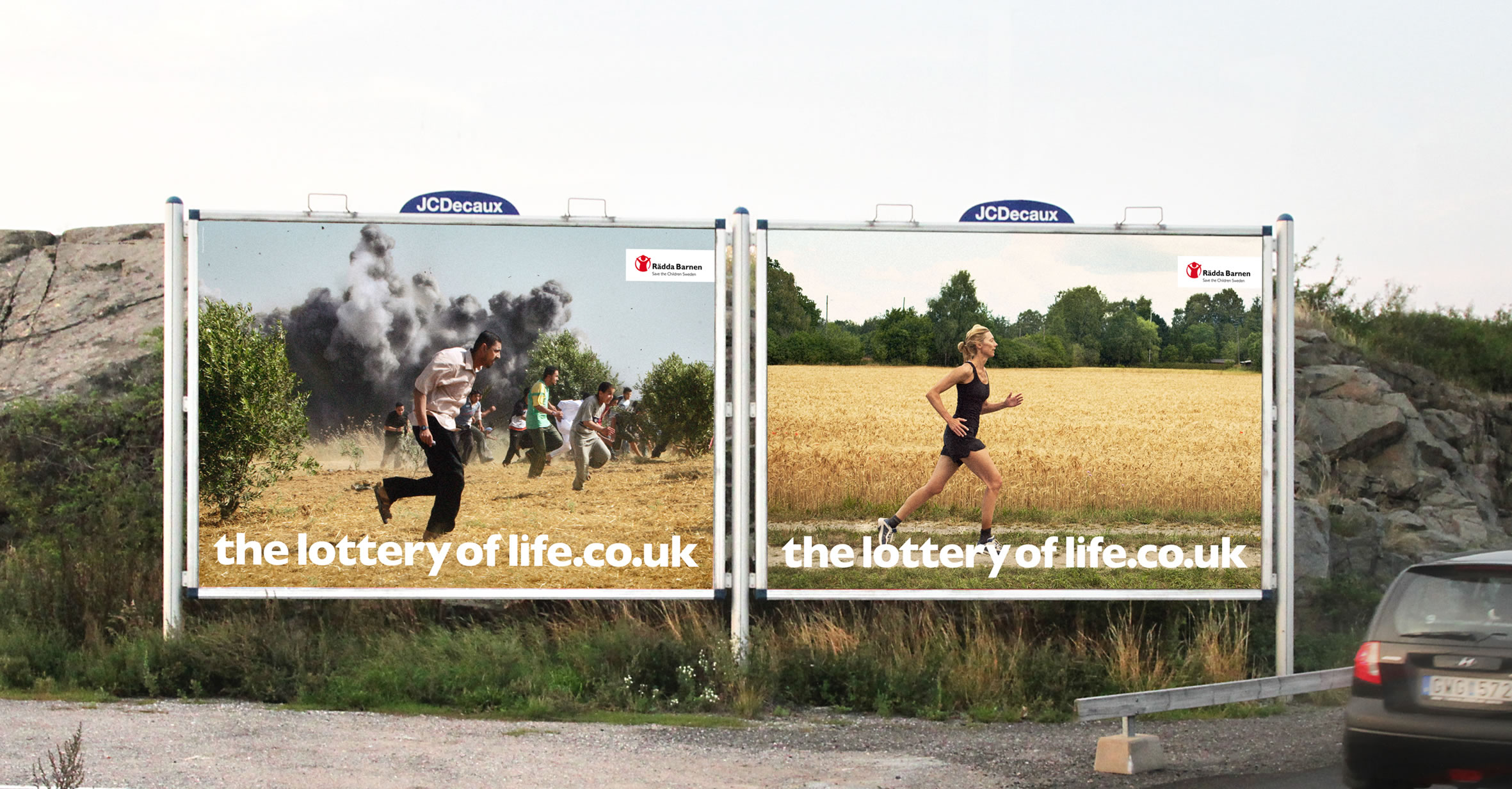
Save The Children - Lottery of Life Campaign (Image 2)

Save The Children – Lottery of Life Campaign (Image 2)

How to select images for your report

Strong imagery

When selecting images, it is important to consider strong imagery. Strong images are simple, clear, and sincere images, like those used in the Lottery of Life campaign. The images are not overly complicated or cluttered. The images are also not grainy or blurred. In addition, the images don’t give off that cheesy stock photo vibe. It’s true that some stock images are definite no-go’s; however, with a discerning eye, you can often find some beautiful images.

We use iStock to find images and illustrations. If you can’t spend money to buy an image there are other options out there, you just might need to spend more time digging to find what you’re looking for. Sometimes Google Images is a good place to look, but make sure to use the ‘tools’ function filter using the appropriate ‘usage rights’ (e.g., creative commons licenses). Pixabay and Flickr are other sites to use for free images. Also, don’t forget your own photo library. You will be surprised at the photos you can find when looking back into your albums. Or, embrace your inner photographer and shoot some images for your report. We used the image below in a report. The picture is art from the side of a building that I took a photo of using my iPhone.
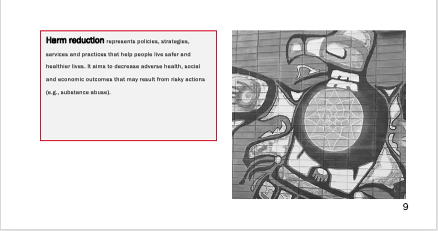
Example of using your own photography in your reporting

Example of using your own photography in your reporting

Relevance

Strong images also need to be relevant to the story you are trying to convey. When drafting my evaluation reports I think about the outcomes that the program is trying to achieve and then search for images that convey those outcomes. It is also important to think about representativeness in your images. If your evaluation takes place in a diverse population then your imagery should represent the diversity of that population. CreateHERstock is a site that was created after realizing “there was a big problem with stock imagery and the lack of representation.” It is a free stock image library focused on representing Black women. Whether it is race, gender or age, make sure the imagery aligns with your narrative. When you have chosen your image(s), send it to your stakeholders to review the image. I once chose an image and designed an entire report around it, only to find out that the image didn’t resonate with my clients.

How to use images in your report

While it is nice to use various images to convey your message, you may not have the budget for that. Not to worry! The following are some tips for how to incorporate and use that image in your report.

Starting and ending with an image

Two of the easiest ways to incorporate images into your reporting are to insert an image on the first and last pages. There is nothing worse than looking at a report that has nothing but a white background and tiny black writing. Inserting a picture on the cover instantly grabs the audience’s attention and gets them thinking about what is inside. Putting the same image on the back page is also a nice way to tie the report together.
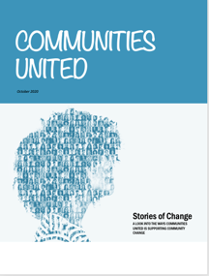
Cover Page

Cover Page

Back Page

Back Page

Call-out boxes

We have talked in previous posts about the importance of breaking up text in your report; I often will do that with call out boxes and sidebars. To help draw the eyes to these areas I will sometimes insert a picture, again to help people understand what is in the box and why it is important
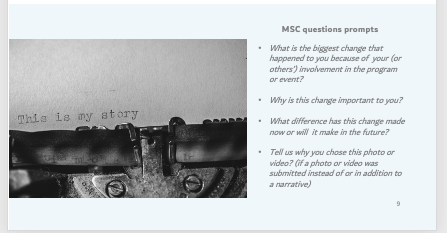
Example of a call-out box with an image

Example of a call-out box with an image

Backgrounds

Another idea is to take the image and add it as a background to certain pages in your report. The image below shows how we took the same cover image used in the rest of the report but used it as a background for a process we wanted to illustrate.
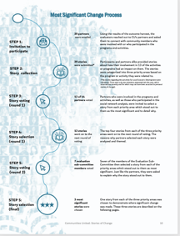
Example of a background image

Example of a background image

Don’t be afraid to crop, scale, re-colour and play with transparency. With some quick manipulations, you can use one image throughout your report without it looking stale. Rather, it looks like you have a report that looks cohesive and engaging.

Take a look at some reports you are creating. Are there opportunities to make incorporate some photo love? Try it out and make sure to stay tuned for the sixth article in our six-part series, “Dial Down Your Data” where I talk about simplifying your data, so it conveys what matters most.


Sign up for our newsletter

We’ll let you know about our new content, and curate the best new evaluation resources from around the web!


We respect your privacy.

Thank you!
Written by cplysy · Categorized: evalacademy

Feb 16 2021

Evaluation Roundup – January 2021

Welcome to our monthly roundup of new and noteworthy evaluation news and resources – here is the latest.

Have something you’d like to see here? Tweet us @EvalAcademy or connect on LinkedIn!

New and Noteworthy — Resources

What is a theory of change?

Stanford’s Social Innovation Review (SSIR) published an article in its fall 2020 magazine titled “Unpacking the Theory of Change.” In this article, Maoz Brown unpacks and organizes into a framework the various meanings to the term “theory of change” and its various objectives. As Brown explains, we would all love one clear and consistent explanation for how ToCs are to be used; however, the article “aims for a more realistic goal” of how to think about and express ToCs differently.

If you’re looking for a quick, light-hearted review of ToCs then check out Chris Lysy’s (@evalcentral) “What is a Theory of Change? Cartoon Glossary.

Systems change – the “do nots”

This recent article by SSIR explores the history of “systems enthusiasm” and how to continue to progress systems thinking. The authors explain there is no consensus on what is working from a “genuine systems perspective.” However, they offer a “thou shalt not” list that compares the principles and characteristics of a systems approach to a traditional approach (i.e., the though shalt nots) as a means for informing how to advance change.

Evaluating organizational change efforts

The Centre for Evaluation Innovation (CEI) recently released a brief that describes an evaluative approach it took to an organizational change process at the Fetzer Institute. CEI describes the “hybrid participatory case study” approach they took, what that means, why they chose this approach, the steps for this approach, the outcomes of this work, and CEI’s reflections on this approach. If you are supporting organizations as they embark on organizational culture change efforts then definitely check out this resource!

New and Noteworthy — Conferences, Webinars and Courses

Conference

Rapid Evaluation in Health Care Conference

Organized by: Nuffield Trust and the Health Foundation

Dates: January 26 – 28, 2021

Webinars

Program Evaluation in Practice: A Case Study of Central State University’s STEM Success Center

Sponsors/Presenters: The Rucks Group and Dr. Morakinyo Kuti, Project Director of the U.S. Department of Education’s funded STEM Success Center

Date: February 4, 2021

Time: 2:00pm – 3:30pm EDT

Competing Agendas: Bridging Funder and Organization Expectations in Evaluation

Presenters:

David Kurfurst and John Biles (Immigration, Refugees and Citizenship Canada)

Dr. Leah Hamilton (Mount Royal University),

Vicki Sinclair and Kathy Sherrell (Manitoba Association of Newcomer Organizations and Immigrant Services Society of BC)

Date: February 5, 2021

Time: 1:00pm EST

Evaluation Crash Course for Non-Evaluators

Presenters: Emma Leeburg, Lyssa Wilson Becho

Date: February 24, 2021

Time: 1:00pm – 2:00pm EST

Courses

Measurement Evaluation and Learning (MEL)

Instructor: Clear Horizon Academy

Start Date: February 12, 2021

Program Monitoring

Sponsor/Instructor: EnCompass Learning Center / Kerry Bruce

Start Date: February 1 (9:00am – 12:00pm EDT); February 3 (9:00am – 12:00pm EDT)

Being an Evaluator

Sponsor/Instructor: EnCompass Learning Center / Donna Podems

Start Date: February 24 (9:00am -12:00pm EDT); February 25 (9:00am – 12:00pm EDT)

Written by cplysy · Categorized: evalacademy

Jan 29 2021

How to Present Your Evaluation Timelines: 4 Simple Ideas


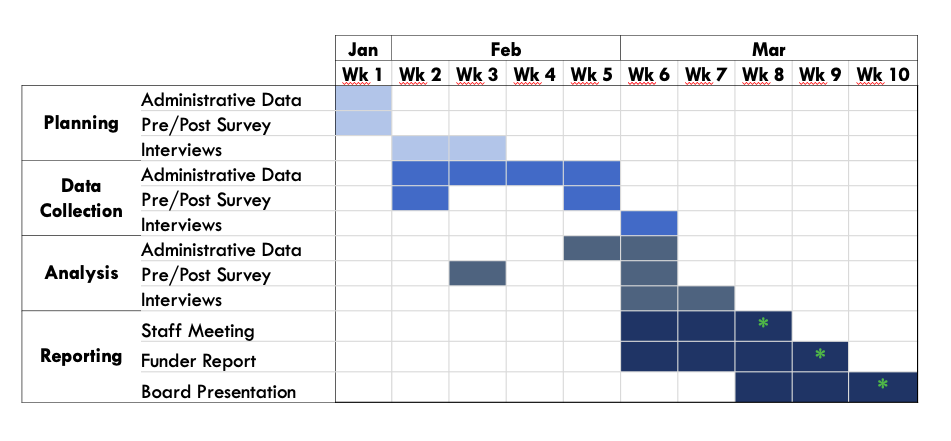
Here at Eval Academy we are big fans of keeping evaluation simple and that includes how we present our evaluation timelines. While the level of detail you require is likely different whether you are using the timeline for your own planning purposes or are sharing it with others, these four simple ideas use basic software (think Microsoft Word, Excel, and PowerPoint) to create clean and easy to understand timelines.

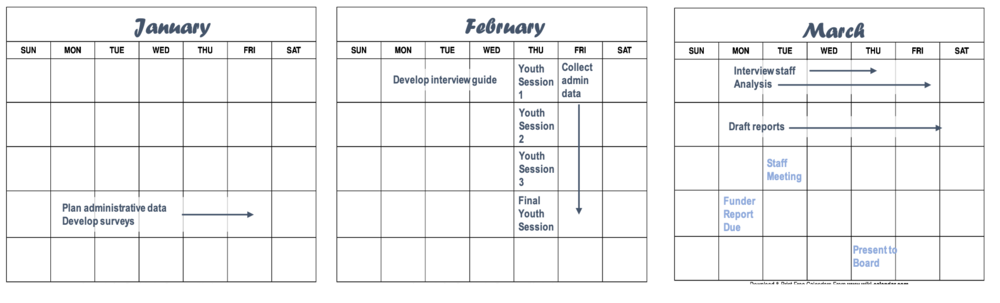
  1. Calendar

    Plot out what needs to happen visually using calendars. A quick online search of “free calendar [month] and [year]” provides you with a plethora of free calendar templates with dates already slotted in. You can add in evaluation milestones and important dates using text boxes and shapes in PowerPoint (or your preferred image editing software), then copy the image into your evaluation plan document.

    This method of visualizing evaluation timelines becomes visually crowded for long projects or overly complicated schedules requiring a lot of detail. Minimizing clutter is the key to a successful calendar visualization (perhaps all visualizations, really).

calendar.png

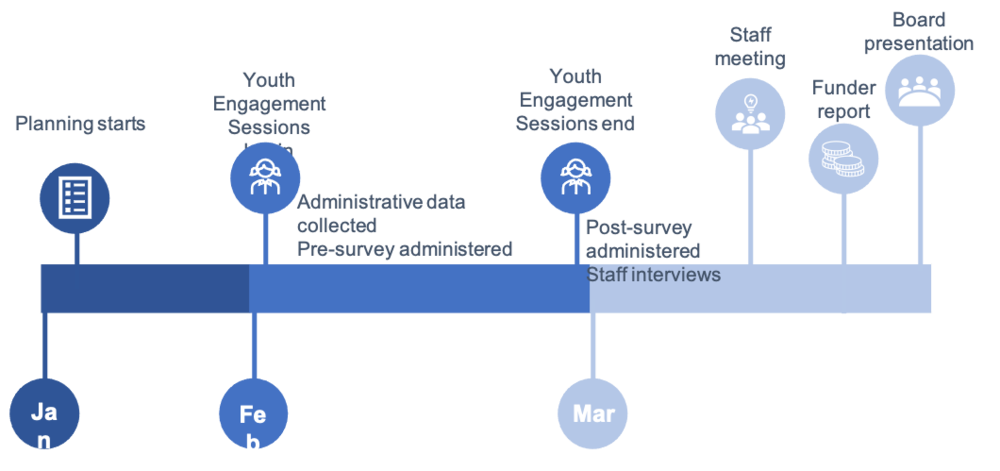
2. Line Graph

A few line and circle shapes put together in PowerPoint or creating an actual line graph in excel can work to highlight key project milestones and high-level timelines. This method of visualizing your evaluation timelines works well when exact dates have yet to be nailed down or in a developmental evaluation where key program milestones will dictate evaluation timing. It’s also great for clients who only need a high-level representation of the work you have planned.

Line graph.png

3. Gantt Chart

Perhaps the most typical method of visualizing project timelines, we prefer a simpler approach than a typical Gantt chart with lines, dependencies, durations, etc. We build ours in excel, slotting in the appropriate timeframes as column headers and use rows for evaluation tasks. We then shade in the corresponding cells to indicate when each task will occur. This method works well when your evaluation timelines change and you can simply copy and paste your cells over to adjust. If you like to get a little fancier, there are some simple Gantt chart templates that are free download, or you can build your own bar chart using Youtube tutorials or your own ingenuity.

Screen Shot 2021-01-20 at 9.58.41 AM.png

4. Chronological List

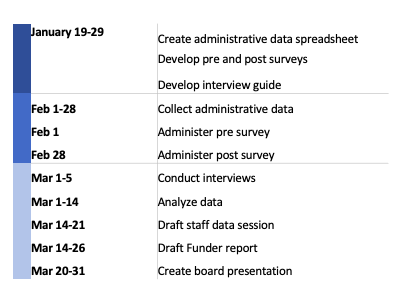
Maybe not the most visually appealing, but this method of visualization evaluation timelines checks the box for simple and easy to create. Putting the information into a table, then hiding the borders gives your list some easy structure. If you want to get fancy, you can add in colour coding or icons.  

Screen Shot 2021-01-20 at 10.00.27 AM.png

As you can see, a chronological list is easy to understand and you can customize the columns to provide the level of detail required. At Three Hive, we tend to use this method during the budgeting and initial planning process, dividing the tasks into each of our three phases and attaching a cost to each of the items.

Hopefully these four ways to visualization evaluation timelines have demonstrated how simple it is to communicate what you’ve planned for the evaluation and have inspired your creativity for the next time you need to communicate timelines to your team or client.

Want more tips on how to plan your evaluation timelines? Check out this article.


Sign up for our newsletter

We’ll let you know about our new content, and curate the best new evaluation resources from around the web!


We respect your privacy.

Thank you!


Written by cplysy · Categorized: evalacademy

Jan 29 2021

How to Plan Your Evaluation Timelines: 5 Simple Tips


Sitting down to figure out how long your evaluation activities will take can be a daunting process. Evaluations are trickier than programs as they often rely on program timelines and external activities. How can you plan and predict your evaluation activities when they are dependent on other activities? How can you ensure you have the information you need when you need it? This article provides 5 tips to answer those questions and help you create a plan that will actually work for your evaluation.

pexels-startup-stock-photos-212286.jpg

Tip 1: Start at the end

Start by clarifying who needs which information by when. Make sure you clarify expectations about the review process to ensure that you have the correct date. For example, the board may need information for an August 10th meeting, but the information may need to be sent with the board package, which is prepared two weeks in advance, and vetted by the Executive Director who requires at least a week to review the information and suggest changes. This drastically changes your “due date” from August 10th to July 20th or earlier.

Tip 2: Work backwards

Now that you know when the information is required by you can work backwards from this deadline to plot out your data collection and analysis timelines. Estimate how long reporting will take. Block out that time. Plot out any evaluation activities which are directly tied to program activities (e.g. pre surveys need to be sent before program activities, post surveys need to be sent a set amount of time afterwards). Plan to analyze data soon after it is collected whenever possible.

The article could really end here as these are the most important tips, but we do have a few more tricks up our sleeves.

Tip 3: Leave a buffer

Wherever possible, leave your team some wiggle room, especially at the analysis and reporting phases. This gives you extra time when data collection activities inevitably get pushed because program timelines change or when you receive catastrophically bad administrative data which takes an extra week to analyze, or when a team member gets sick. The amount of time you leave for analysis and reporting is one of the few things you can exert the most control over when planning an evaluation and can be the first to disappear if evaluation timelines get compressed.

Tip 4: Be flexible

Change happens. Especially in evaluation. Being clear on your own timelines and constraints (and budget!) means that you can be a bit more flexible when conducting your evaluation. As an evaluator, be prepared to jump on fortuitous opportunities to collect and share data. Program changes can present hidden opportunities to gather more data. Having to move when you analyze your data because the program got extended by another week shouldn’t be the end of the world for your evaluation.

Tip 5: Communicate your timelines clearly and consistently

We cannot stress this one enough. Remind your clients, stakeholders, and teammates of relevant evaluation timelines and do so consistently. Reminding others about your deadlines and communicating when you need information by and why (i.e. there’s a hard deadline for the board report) can help ensure that you get what you need when you need it. For some clients, a weekly or monthly status report can signal what information is needed to keep the evaluation on track and delayed data can be presented as a risk; while for others, simply adding evaluation data provision as an action item in a meeting works just fine.

With these five tips under your belt you should be well on your way to planning a well thought out evaluation.

If you need ideas for how to visualize your evaluation timelines, check out 4 different ways in this article.

Sign up for our newsletter

We’ll let you know about our new content, and curate the best new evaluation resources from around the web!


We respect your privacy.

Thank you!


Written by cplysy · Categorized: evalacademy

Dec 30 2020

Evaluation Roundup – Top Ten Posts from 2020


Welcome to our monthly roundup of new and noteworthy evaluation news and resources. This month’s roundup highlights Eval Academy’s top ten posts from 2020.

What posts would you like to see in 2021? Tweet us @EvalAcademy or connect on LinkedIn!


#10 – How we used an outcome harvest

Coming in at #10 is a post where we share how we used outcome harvesting and what we wished someone had told us before we started.

#9 – Evaluation plan template

At #9 is our evaluation plan template. There is no need to reinvent the wheel when planning your evaluation. Download this customizable template for free!


#8 – 7 tips for better data visualizations

At #8 is an article that outlines seven easy tips for improving your data viz. Practice these tips and you’ll “wow” both colleagues and clients.


#7 – Branding and marketing for evaluation consultants

At #7 is the fourth article in a four-part series that rounds up the American Evaluation Association’s (AEA) “New Directions for Evaluation.” The fourth article in this series is about branding your business, and it’s based on the article by Stephanie Evergreen and Nina Sabarre: “Branding for the Independent Consultant: Basic to Advanced.”


#6 – Program evaluation scoping guide

At #6 is another free guide to download! The program evaluation scoping guide is intended for anyone conducting an evaluation of a program to understand the scope of the evaluation. The guide outlines questions evaluators can ask program managers or other stakeholders to better understand the scope of the program and its evaluation.


#5 – My interviewee is drinking vodka: An evaluation ethics case

At #5 is a real-world ethics case that explores why we chose to interview someone who was chronically intoxicated and the ethical considerations for including her in our evaluation.


#4 – How to kick off your evaluation kick-off meeting

#4 is an oldie but a goodie. This article provides you with some pointers and a sample kick-off meeting agenda to kick your evaluation off on the right foot.


#3 – How to “quantify” qualitative data

#3 is for all the “quants” out there who need to quantify anything and everything. The “quals” may hiss at this post, but the framework provided for quantifying qualitative data is one you’ll want to bookmark.


#2 – JCSEE program evaluation standards in practice

One of our top posts for 2020 is another free digital download. This resource gives you the reflective prompts you need to ensure your next evaluation project incorporates all 30 Program Evaluation Standards developed by the Joint Committee on Standards for Educational Evaluation.


#1 – How to write good evaluation questions

Our top post for 2020 outlines what an evaluation question is and pointers to consider when drafting your evaluation questions.


Keep the roundups coming? Sign up for our monthly roundup here:


Written by cplysy · Categorized: evalacademy

  • « Go to Previous Page
  • Go to page 1
  • Interim pages omitted …
  • Go to page 31
  • Go to page 32
  • Go to page 33
  • Go to page 34
  • Go to page 35
  • Interim pages omitted …
  • Go to page 43
  • Go to Next Page »

Footer

Follow our Work

The easiest way to stay connected to our work is to join our newsletter. You’ll get updates on projects, learn about new events, and hear stories from those evaluators whom the field continues to actively exclude and erase.

Get Updates

Want to take further action or join a pod? Click here to learn more.

Copyright © 2026 · The May 13 Group · Log in

en English
af Afrikaanssq Shqipam አማርኛar العربيةhy Հայերենaz Azərbaycan dilieu Euskarabe Беларуская моваbn বাংলাbs Bosanskibg Българскиca Catalàceb Cebuanony Chichewazh-CN 简体中文zh-TW 繁體中文co Corsuhr Hrvatskics Čeština‎da Dansknl Nederlandsen Englisheo Esperantoet Eestitl Filipinofi Suomifr Françaisfy Fryskgl Galegoka ქართულიde Deutschel Ελληνικάgu ગુજરાતીht Kreyol ayisyenha Harshen Hausahaw Ōlelo Hawaiʻiiw עִבְרִיתhi हिन्दीhmn Hmonghu Magyaris Íslenskaig Igboid Bahasa Indonesiaga Gaeilgeit Italianoja 日本語jw Basa Jawakn ಕನ್ನಡkk Қазақ тіліkm ភាសាខ្មែរko 한국어ku كوردی‎ky Кыргызчаlo ພາສາລາວla Latinlv Latviešu valodalt Lietuvių kalbalb Lëtzebuergeschmk Македонски јазикmg Malagasyms Bahasa Melayuml മലയാളംmt Maltesemi Te Reo Māorimr मराठीmn Монголmy ဗမာစာne नेपालीno Norsk bokmålps پښتوfa فارسیpl Polskipt Portuguêspa ਪੰਜਾਬੀro Românăru Русскийsm Samoangd Gàidhligsr Српски језикst Sesothosn Shonasd سنڌيsi සිංහලsk Slovenčinasl Slovenščinaso Afsoomaalies Españolsu Basa Sundasw Kiswahilisv Svenskatg Тоҷикӣta தமிழ்te తెలుగుth ไทยtr Türkçeuk Українськаur اردوuz O‘zbekchavi Tiếng Việtcy Cymraegxh isiXhosayi יידישyo Yorùbázu Zulu