• Skip to main content
  • Skip to footer
  • Home

The May 13 Group

the next day for evaluation

  • Get Involved
  • Our Work
  • About Us
You are here: Home / Archives for allblogs / evalacademy

evalacademy

Jun 27 2024

Evaluation as self-care for your program

This article is rated as:


July 24 is International Self Care Day – who knew that was a day, right? But I think we can all use a reminder to focus on taking care of ourselves, in whatever way is best for us.

The same is true for our work. We’re often so caught up in the day-to-day that we don’t seem to have the time to pause and focus on making our work feel better. My job at Three Hive Consulting is to help people (like program managers and executive directors) to do just that – pause, reflect, and treat their work to a little self-improvement.


If you run programs, or you are an evaluator working with program teams, you can think of evaluation as a way to give those programs some self-care. Just like ourselves, programs might seem to be getting along just fine – but a little reflection and pampering might be in order. Here are a few ways I think evaluation offers your program the opportunity to recharge.

  • Taking stock of strengths and weaknesses: Have you ever tried the Wheel of Life tool, or a similar self-assessment? The Wheel of Life helps people to explore different aspects of their personal life, like career, money, health, and relationships, and decide what they want in the future for each of those domains. People who try these tests often come out of the process with a clearer articulation of existing hunches – for example, they can see that they’re feeling great about friends & family, but perhaps their personal growth could use more attention. Evaluation serves the same function, but for your program or project rather than your life – it helps to identify where the program is doing well, and what areas need some adjustments.

  • Checking in on progress toward goals: Just like you might be aiming for a retirement savings target or eating 30 different plants each week, your program likely has some goals it aims to achieve. Evaluation offers your program a means to measure the extent to which the program is meeting those goals – and remember, what gets measured gets improved.

  • Ongoing improvement is top of mind: When you are regularly evaluating or monitoring your program, you’re more likely to be thinking about improvement as part of ongoing operations. This regular practice of evaluation is similar to establishing strong personal habits – ever find that once you implement a regular physical activity, you also start to think about your eating habits?

  • Knowing where to put your efforts: When thinking about self-care, the options can become overwhelming. Do you go for a run, or visit with a friend for dinner? Should you make time for a massage, or read a book in a sunny spot? We can sometimes get to the point where there are so many options, we’re paralyzed with indecision and end up just scrolling instead. The same can be true for your program – you might be thinking about reallocating staff, changing a registration form, redefining your mission and values, promoting a new offering, and finding budget efficiencies all within the same minute. Evaluation helps you understand where your efforts are most urgently needed, and which actions land in that sweet spot of feasibility and impact.

  • Reducing stress: Stress can often occur when we feel like things are slipping away from us – we don’t have a good enough handle on our finances, that shoulder twinge could probably use some physio, and the kids’ rooms are out of control. Just like implementing planned contributions to your emergency fund, an annual family doctor visit, or a weekly cleaning schedule, implementing ongoing program evaluation helps make sure you can identify risks and weaknesses as you go, rather than letting all those issues pile up and keep you from sleeping. Building an evaluation into a program from the start, rather than force fitting it at the end, means fewer surprises and less stress trying to figure out what went wrong where.

  • Skill-building: Learning something new is a really important part of self-care —it always feels great to learn a new skill, whether it’s a language, a new knitting stitch, or some shortcuts in Excel. Working with an evaluator can help you build skills in evaluation and learning, even when it’s not your job.

  • Future-proofing: Just like self-care helps you build resilience and prepare for whatever your day might throw at you, evaluation helps you think about what your program needs to be sustainable in the future. For example, an evaluation might help you to build in some contingency plans, or supply you with strong evidence to support future grant applications.


So what self-care do you give your program? We’ve got lots of other resources here on Eval Academy to help you scope your evaluation project, write great evaluation questions, choose the right types of survey questions, analyze qualitative data, visualize quantitative data, and turn data into insights. We also offer a course specifically for program managers to learn about evaluation and build their own feasible, relevant, and actionable evaluation plan.

Written by cplysy · Categorized: evalacademy

Jun 27 2024

Data Visualization Applications: Line Charts

This article is rated as:


Here we will continue our Data Visualization Applications series with an introduction to line charts. Line charts are a versatile and effective tool for charting time series or continuous data. Here we will outline how to create impactful line charts within Excel 365 to best communicate compelling data stories.

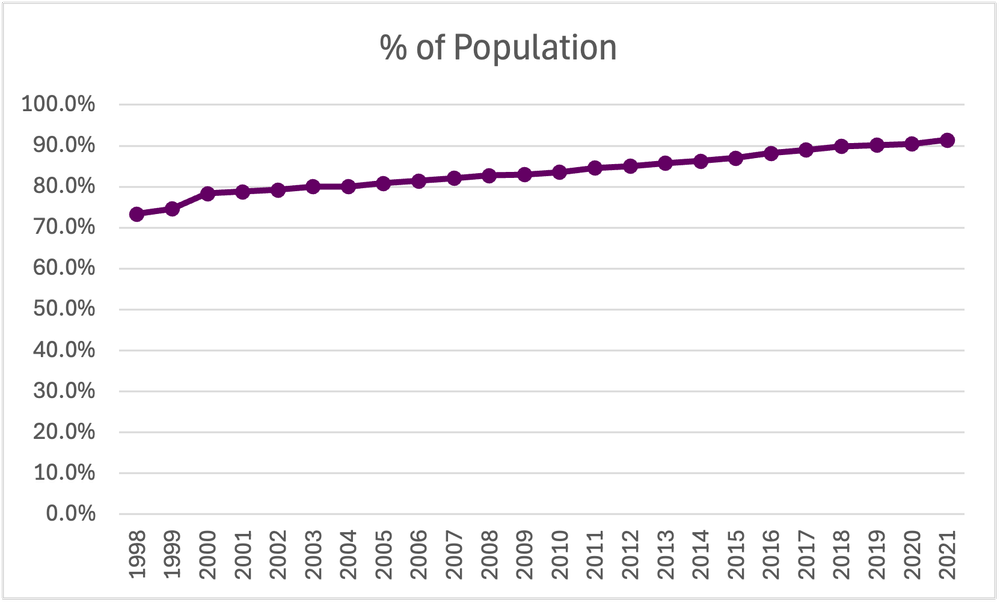
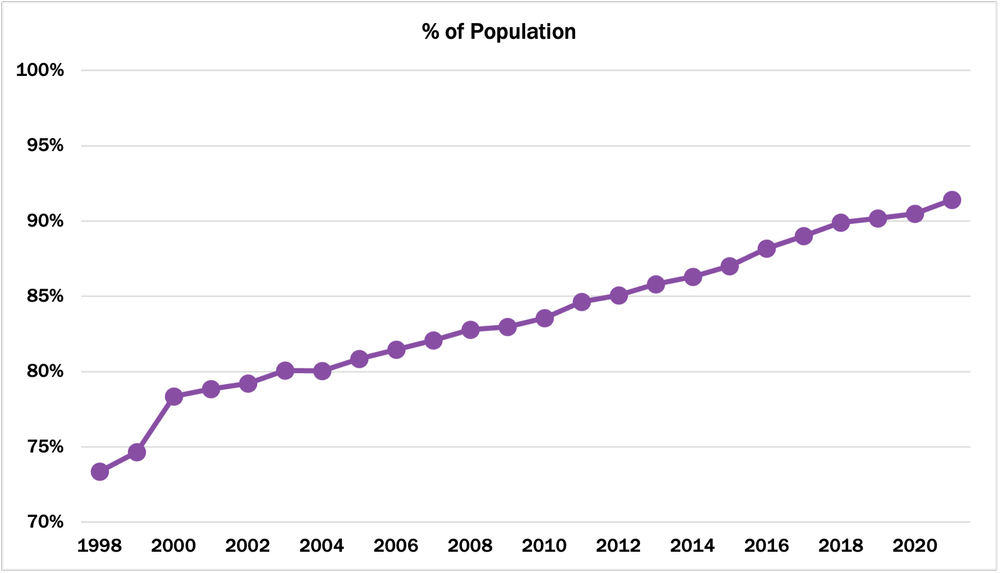
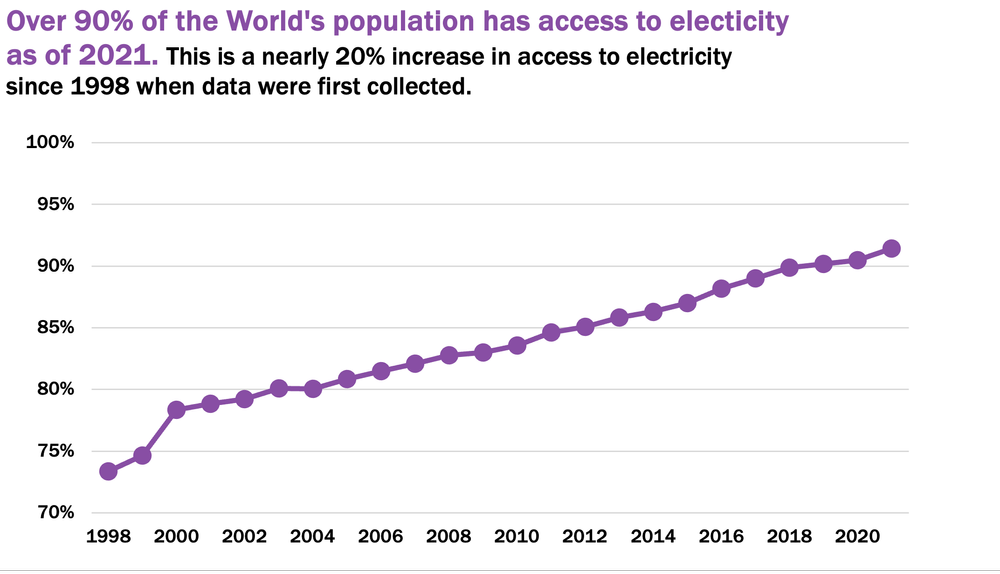
For this tutorial, we will look at the percentage of the World’s population with access to electricity between 1998 and 2021. This data set will provide a clear example of the basics of making effective line charts. The skills learned are applicable to other time series data.

Again, this tutorial assumes data are prepared for charting. However, if your data require cleaning and additional preparation, feel free to review some of our other resources:

  • The Data Cleaning Toolbox

  • Let Excel do the Math: Easy tricks to clean and analyze data in Excel

  • How to combine data from multiple sources for cleaning and analysis

  • A Beginner’s Guide to PivotTables


Initial Chart Selection

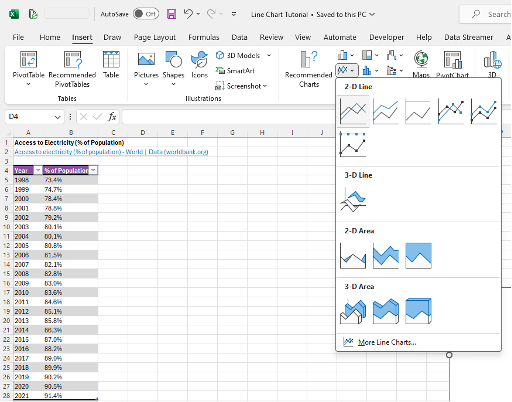
1. Highlight the data to be included in the line chart.

2. Navigate to Insert along the top ribbon of Excel.

3. Within Insert go to Charts > 2-D Line > Line (a basic Excel-formatted chart should appear)


Applying Data Visualization Best Practices

Though you technically now have a line chart, the following sections will outline the process for transforming the default Excel line chart into a compelling, professional-looking line chart by applying data visualization best practices.


First Impressions

It is important to review the initial Excel chart before applying data visualization best practices. When reviewing the initial line chart we should ask:

a) Does the output reflect the raw data? (i.e., Is the correct data range selected? Are there any anomalies in the chart suggesting an error in the data?).

b) Are gridlines cluttering your line chart and need to be removed? Would adding data labels enhance clarity?

c) Are axis ranges indicative of the raw data? (e.g., Percentages capped at 100% should not have an axis exceeding 100%).

d) How can you improve the chart title to accurately describe the main result of the chart?


Simplify

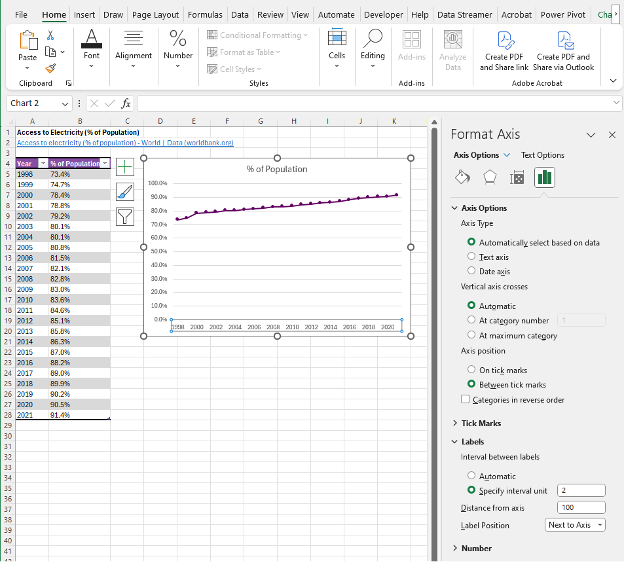
1. Adjust the x-axis to properly display the year values. Horizontal axis labels are easiest to read, enhancing the clarity of the chart.

a) Depending on the number of x-axis labels and the length of the x-axis labels, the chart may need to be resized to fit all the data labels properly.

  • Resize the chart by clicking within the chart and dragging from one of the eight white circles along the edge of the chart. Typically, dragging from the middle right circle or bottom right circle will provide the best results for displaying x-axis values.

  • Or resize the chart by clicking within the chart and navigating to Format > Size where you can manually adjust the Height and Width of the chart.


b) Alternatively, some labels may need to be excluded from the x-axis to better present the x-axis labels (e.g., present even year values only).

  • Right-click on the x-axis labels and select Format Axis.

  • Under Labels you can Specify interval unit (e.g., change to 2 to display every second year).

c) If space is limited and you wish to present all x-axis labels, you may consider using vertical or angled data labels. While more difficult to read than horizontal data labels, these options allow for more labels to be presented in a limited space.

  • Right-click on the x-axis and select Text Options > Text Box.

  • Under Text direction select Rotate all text 270o for vertical labels OR under Custom angle use -45o for angled labels.

Note: We often recommend using a zero baseline on the y-axis and removing the y-axis labels and horizontal gridlines completely. However, some data require adjustments to these recommendations. As in this example, the data would benefit from a scaled y-axis to better visualize improvements in access to electricity over time. Further, as the data points are numerous, using labels for each data point quickly becomes cluttered. Therefore, keeping the y-axis and horizontal gridlines is beneficial to the overall look of this line chart.


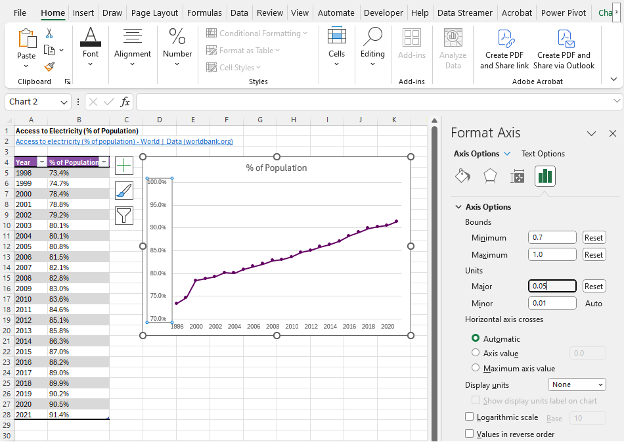
2. Adjust the y-axis labels to better visualize change over time by right clicking on the y-axis and selecting Format Axis and adjust the Bounds of the chart.

  • The Units of the chart may also need to be changed to improve interpretation of the chart.


3. Additional decimal places in the y-axis are unnecessary. To remove the additional decimal values, navigate to Number within the Format Axis menu. Under Format Code change the code from 0.0% to 0% and click Add.


Improve the Appearance

Line Thickness

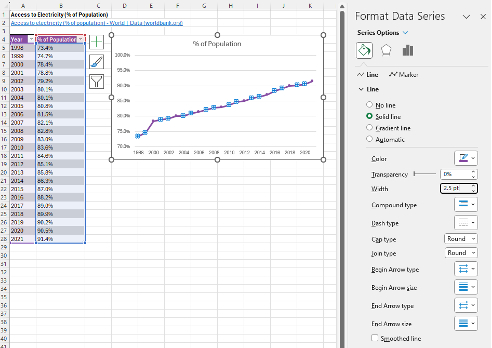
1. Left click anywhere on the line within the line chart.

2. Right click the highlighted line and Format Data Series.

  • This menu can be accessed using the Ctrl + 1 keyboard shortcut.

3. Under Series Options > Line adjust the Width of the line to 2.5 (or your preferred line width – we recommend between 2.5 and 3.0).


Marker Size

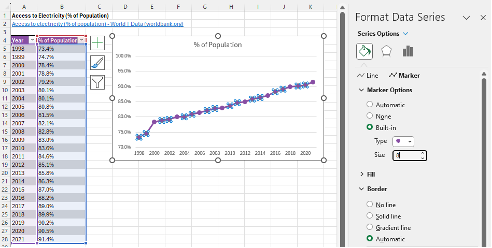
1. Within Format Data Series > Series Options navigate to the Marker options.

2. Under Marker Options > Built-in you can adjust the marker size. We recommend a minimum size of 8. A smaller marker size is better for numerous data points (10+ data points), while a larger marker size is better for fewer data points.

Note: You may wish to change the maker type, although the default filled circle is typically best. However, other marker types may be useful if presenting more than one line in the same chart.


Adjust Colours

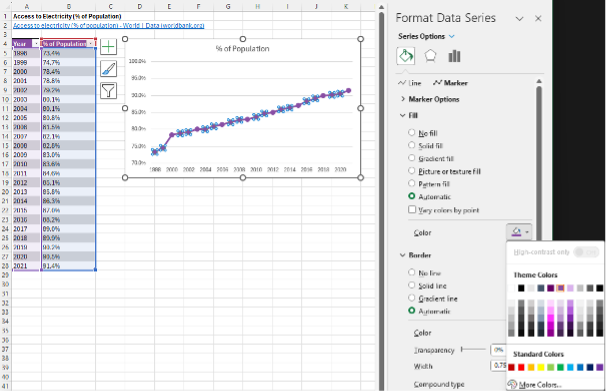
1. Apply your colour palette to the line chart by right clicking on the line and selecting the Fill option.

2. For a line chart with Markers, the colour palette will need to be applied to both the Line and the Marker within Format Data Series.

  • The Marker requires the Fill and Border colours to be adjusted.

  • The line and the markers should be the same colour for best visualization.

When presenting multiple lines within the same chart, you may opt to highlight the main line in a darker colour. This will draw the focus to the primary information within the chart. Other lines can be deemphasized using muted or grey-tone colours.


Adjust Fonts

1. Left click on the chart to highlight the entire line chart.

2. In the Home tab, select your Font of choice.

  • Sans serif fonts work best within charts. Ideally, chart fonts should match the rest of the report/ presentation to ensure consistency. However, if a report uses a serif font, you may opt to use a sans serif font within your charts for better readability.

3. Adjust the Font Size to 9 pt.

  • 9 pt is the minimum font we recommend. Larger fonts may be used depending on the size of the chart and the amount of data presented within the chart.

4. Change the Font Color to Black.

  • The default font colour is a dark grey that does not provide as sharp a contrast as black font. Using black font will improve the readability of the line chart.


Improve the Chart Title

The column heading will automatically default as the line chart title. However, this title is often uninformative. Therefore, update the chart title to be more descriptive and informative.

1. Left click on the Chart Title.

2. Type in your improved title and hit Enter.

  • The chart title may be edited within the function bar at the top of your spreadsheet.

  • You may also opt to right click on the chart title and Edit Text to improve the chart title.

  • You can enter a subtitle by using Alt + Enter to move down a line. 


Final Tweaks

1. Emphasize the chart title by increasing the main point to 14 pt font.

  • A subtitle, if you have one, can be deemphasized using a slightly smaller 12 pt font.

  • When drafting the title within the line chart, you will have to highlight the specific section of text for which you wish to apply changes. Otherwise, all changes to the font will apply to the whole title.

2. Further emphasize the main point by incorporating your primary colour into the text.

3. Remove the border from the chart by right clicking within the chart and navigating to Outline > No Outline within the pop-up menu.


Final Thoughts

Effectively visualizing data requires a few foundational best practices. However, data are complex, and presenting data requires a flexible approach. For example, in this tutorial, we show how to present numerous data points over time, which requires unique chart adjustments to best present the data, such as using a y-axis and gridlines over individual data labels. Therefore, it is important to understand your data and adjust as necessary to best present each unique data piece to best tell your data stories.

Written by cplysy · Categorized: evalacademy

Jun 27 2024

Internal vs External Evaluators: What’s the Difference and Which One is Right for You?

This article is rated as:


Hey Program Managers, I wonder if you’ve ever needed to decide how to evaluate the programs or services you offer; not just the in-the-weeds details about how to write the evaluation plan and measure the outcomes, but who should be helping you conduct that evaluation.

I work for an evaluation consultancy firm, Three Hive, so I should be espousing the benefits of contracted evaluation. But actually, I think there are some key advantages that come with having an internal evaluator. I’ve been fortunate in my career to have experienced a few different work formats:

  • I’ve been a full-time employee evaluator for two different healthcare organizations

  • I have been a solo contractor working for multiple clients

  • I have been a solo contractor, contracted full-time to a single organization for multiple years

  • Now, I work as a consultant for an evaluation firm, as an employee, contracted out to multiple clients.

Let me share some of my insights about the pros and cons of an internal evaluator vs contracted/external evaluation.


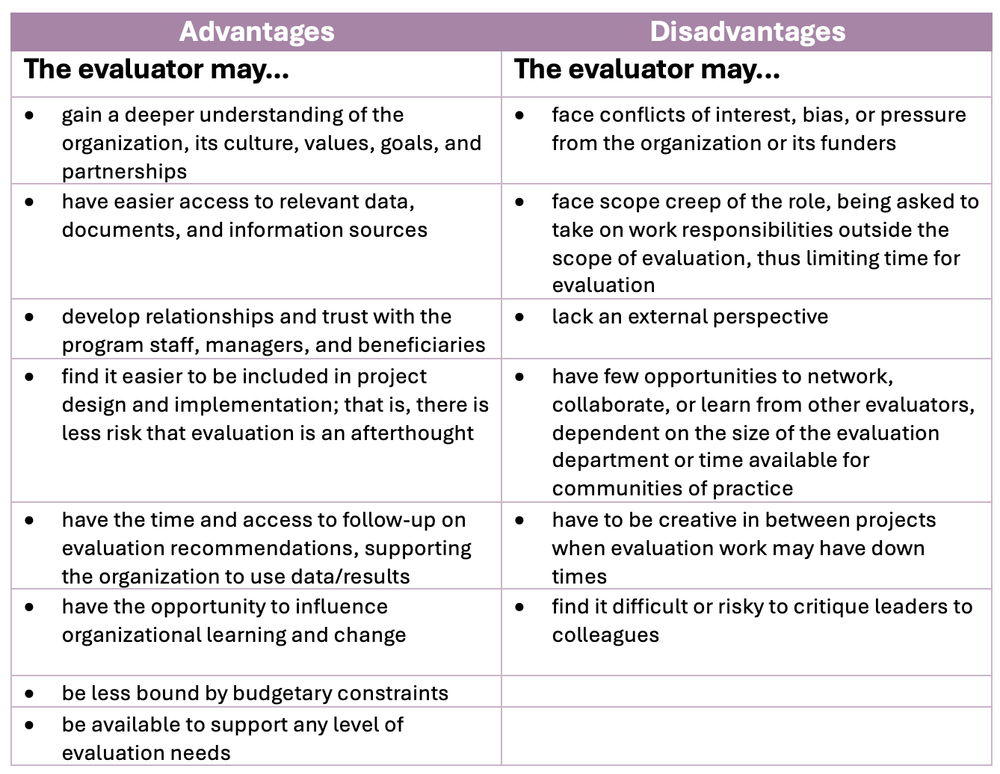
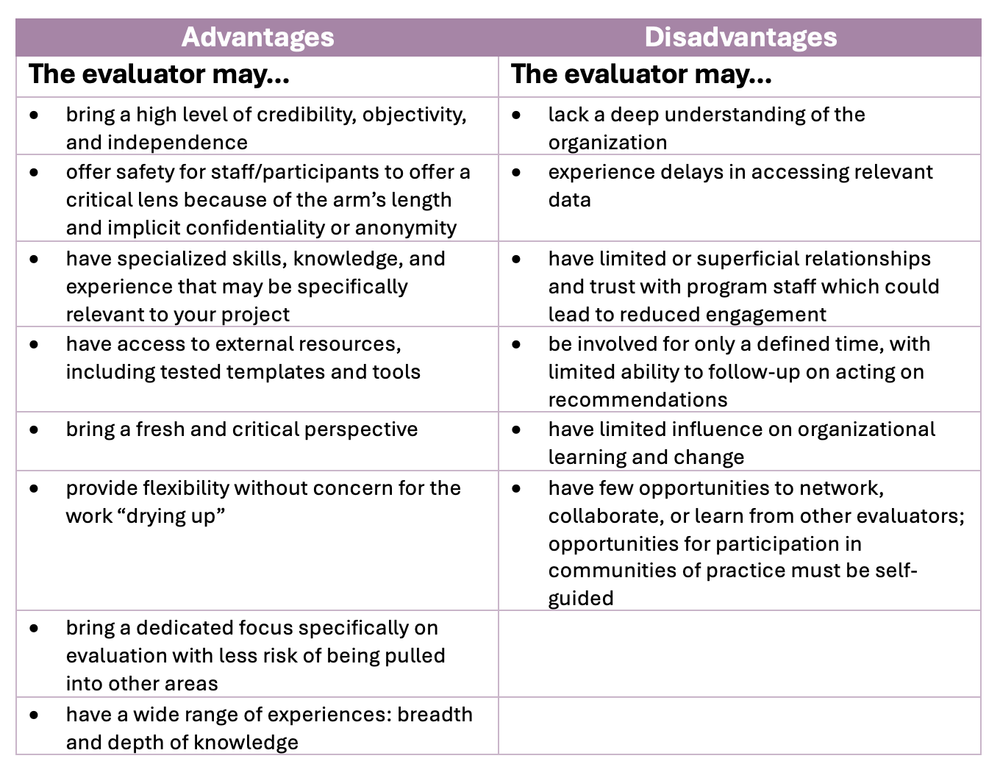
Internal evaluators are those who are part of the organization that is implementing or funding the program being evaluated. Usually, this is as an employee, but I’d count my years as a full-time contracted evaluator for one organization as internal as well. External evaluators are those who are independent from the organization being evaluated. External evaluators are usually hired for a specific project, but less commonly could be retainer-style, available to add evaluation expertise at any time to any project.


Pros and Cons of an Internal Evaluator


In my experience, one of the main benefits of being internal is sitting at the table when a project is being designed. Being included right from the start means that evaluation can be integrated into implementation and can inform your project leads along the way. Being included early as an external evaluator can happen, but it’s a rare treat.

On the other hand, as an internal evaluator, I was constantly being asked to take on non-evaluation projects, including leading full projects as the Program Manager, not the evaluator. I also felt a little lonely as the solo evaluator with the company and struggled to advocate for professional development opportunities related specifically to evaluation.


Pros and Cons of an External Evaluator


In my experience one of the biggest benefits of an external evaluator is finding that perfect match – not only someone who is an expert evaluator, but someone who knows your work area, which could be healthcare, community programming, housing, justice, etc. Chances are there’s an evaluator out there that fits your needs! As a contracted evaluator, I value bringing an outside perspective and asking the silly questions.

On the other hand, one of my pet peeves is that notion of “not knowing what you don’t know”.  It can take some time to get to know an organization and to ask the right questions to get you the data and information you need.


How to Choose the Best Option for Your Evaluation Needs

There is no definitive answer to the question of whether to use an internal or external evaluator. The choice depends on several factors, such as:

  • Your evaluation needs: Do you operate several programs/grants that require evaluation? Or did you just secure a one-time-limited grant with an evaluation requirement?  Think about how valuable an outside perspective might be or the sensitivity around the project. Conversely, think about workload and where an evaluator could help operationally if projects are not numerous.

  • Organizational capacity: Everything from physical space to supervision; how difficult/easy would it be to integrate a new full-time role into your operations?

  • Budget! Of course, it goes without saying that both internal and external evaluators cost money. Think about total costs: internal evaluators may have pensions, benefits, vacation, sick time, equipment and software costs to factor in. Contracted evaluators may charge more per hour, but contracts can put hard limits on the budget available.

  • The skills needed: Maybe you need an evaluator who knows your field well; maybe a Credentialed Evaluator designation is a requirement; or maybe you need someone with the right networks and connections! It may be a matter of finding the right person (or team) and working on the work arrangement after the fact.

  • The “optics” of the project: Often external evaluators are hired when the outcomes of a project may be political or sensitive. That is, when there will be scrutiny on the results, high levels of interest, or when you need to able to ensure reduced bias in your findings and reporting. Consider the ethical and political implications and sensitivities of the evaluation.

Your choice doesn’t necessarily need to be a permanent one. Maybe you start with a contracted evaluator for a specific project but learn over time that you could use evaluation expertise in more areas; you can always look to hire someone or increase the contract with your evaluator.


Internal and external aren’t the only options either. Often, we see someone who has been given the side-of-desk additional responsibility of being the organization’s evaluator. I don’t think this is anyone’s ideal, but we do recognize that sometimes time or budgetary constraints make the less-than-ideal the only option, which is literally why we created our course!  Of course, you can hire part-time, which may mitigate some of the disadvantages of an internal evaluator, or you could look at hybrid models: an internal evaluator supported through external consultants.

If you’re in the market to hire an evaluator, consider your options carefully. A quality evaluator and a quality evaluation can have a significant influence on funding and even operational efficiencies.

Written by cplysy · Categorized: evalacademy

May 30 2024

How to Use World Cafés as an Evaluation Data Collection Method

This article is rated as:


If you want to collect richer data than a survey can provide, but interviews and focus groups are not feasible for your number or availability of participants, a World Café might be your solution!

World Cafés are a great option when participants are already convened together, usually in person (admittedly, I’ve never done this virtually, but I suppose it is possible with breakout rooms!). Instead of handing out a post-event survey, consider hosting a post-event World Café to contribute to your evaluation. Before I jump into some details, I want to let you know that there is a great website dedicated to World Cafés: The World Cafe | Shaping Our Futures Through Conversations That Matter. It’s not specific for evaluation, but it is a great resource.


What is a World Café?

A World Café is a facilitated dialogue process that allows participants to share their perspectives and experiences on a topic of interest or answer a question. It is based on the idea that conversation is a powerful way to create collective knowledge and foster collaborative learning.

A World Café typically involves a series of small group discussions, followed by a report-back session where the main themes and insights are synthesized and reported. It’s called a World Café because the environment is key. A World Café is inviting, casual, and safe. It is not as formal as a focus group, there is no digital recording. The room buzzes with voices as if you were enjoying a latte at your favourite coffee shop. Some hosts will even decorate with tablecloths and a vase of flowers!

Word Cafés are probably more commonly used for purposes outside of evaluation. But in this article, I’ll focus on World Cafés as a data collection method.


Why use a World Café for data collection in evaluation?

A World Café can be a useful data collection method for evaluation when you want to explore complex issues, engage diverse or hard-to-reach participants, or generate new ideas or solutions. A World Café can help you to:

  • Collect rich and qualitative data from multiple perspectives and sources in a relatively short time frame

  • Encourage dialogue and interaction among participants, who may not otherwise interact

  • Foster a sense of community

  • Enhance trust and rapport and create a positive and enjoyable experience

  • Support your participatory evaluation, building engagement and understanding in evaluation activities

The World Café method is particularly useful when you want to be sure to explore a topic from multiple perspectives and dive deep into participant insights. A World Café will help to ensure that everyone in a room contributes.


Isn’t this just a focus group?

A lot of this may sound like a focus group would suffice. For me, the big difference is that a World Café likely explores fewer topics in greater depth; it encourages building on the ideas and experiences of others to address a topic more deeply over several rounds. Focus groups move the same group of participants through a series of questions or topics; everyone gets the same order and experience. In a World Café:

  • the groups change with every question

  • the order changes

  • every round after the first builds upon what previous groups have shared


How to plan a World Café

Most importantly, and a potential barrier for many solo evaluators, is that you need a team of facilitators, sometimes called “hosts”. These hosts stay at the table while your participants circulate. To compile your team of facilitators you might be able to consider other organizational peers, fellow evaluators, or even subcontract to a group to help you out. The facilitators don’t have to be facilitators by occupation, but their role is important, so you’ll want to find individuals with good people skills; a basic knowledge of qualitative data collection is probably an asset.  You’ll need one facilitator per table (more on this later).

Role of the host:

  • Facilitate dialogue and engage participants

  • Record responses

  • Share insights back with subsequent groups

  • Share insights back in The Harvest

Much like an interview or focus group, the host should not dominate the conversation.


World Cafés require no pre-work from the participants, but it’s smart to bring the facilitators together for a huddle ahead of time to chat about goals, strategies, or approaches. They’ll need to know the context of the evaluation, and you’ll want to give them some instruction on facilitation, note-taking, and reporting back.

Secondly, you need the physical (or virtual) space. The larger group will be divided into as many smaller groups as you have tables. Each table has one question or topic. A good rule of thumb is to aim for groups of four to six per table, so the number of tables is roughly the size of your larger group divided by four to six. Depending on how many questions you have, you may have some tables that cover the same question. That’s ok! Ahead of your World Café, prepare the questions on a flip chart or virtual board.

Depending on the number of questions you have, and the time allotment per question, World Cafés likely take 1 – 3 hours.

Some key preparations include:

  • Ensure your questions are well articulated and map back to your evaluation

  • Decide on the number of questions, number of tables, and time allotment

  • Prepare your facilitators with the process and talking points if needed

    • You may also need to give facilitators specific instructions, for example,  if a comment is endorsed or emphasized by more than one participant, facilitators can add a star or underline it. Keeping these notation strategies consistent will be important in transcription and analysis later on


Creating good World Café questions

Much like crafting good evaluation questions, good World Café questions should be open-ended, inviting discussion.

Much like creating interview or focus group guides, the questions should have a clear purpose in your evaluation, aligning back with your key evaluation questions. A key difference is that a World Café question should be able to stand on its own, without a lot of follow-ups or probing questions. Because World Cafés cover one topic at a time before your participants physically move onto another, the conversation needs to be kept focused and on-topic. Conversely, in interviews or focus groups, the conversation can meander a little more, explore some rabbit holes and emerge again to re-focus because there is usually no set time per topic.

Of course, you can still provide your facilitators with probes for questions but the questions should be discrete and require no stage-setting discussion ahead of time or afterward since the order will vary for every participant.


How to conduct a World Café

The World Café starts as a large group. Explain the activity to the group as a whole before they divide up. Consider setting the stage by briefly explaining the purpose and intended use of the overall evaluation, and the purpose of the day’s activity. Much like any other qualitative methodology, prepare your speaking points to cover consent, the voluntary nature of participation, confidentiality of sharing, and risks and benefits of participation.

To start your Café, invite participants to join a table of their choosing, aiming to evenly distribute themselves. The facilitator or “host” of that table will initiate discussion among the smaller group and record responses on a flip chart or board visible to the group. This is where arming your facilitators with talking points or probes if the conversations falter is helpful. A time limit is set for each table. When the time is up, participants move freely to any other table/question.

Importantly, participants DO NOT need to move as a group. Each participant can choose where to go next, so long as it’s not a question they’ve covered before. Groups will vary from session to session. This is one of the strengths of this methodology.


When a new session starts, the table facilitator will briefly recap some themes from the previous session(s). The goal is that each conversation adds new insights and learning or validates/confirms previous discussions without starting from scratch. This building on or layering is a key benefit to the World Café, allowing for deeper exploration of key topics.

Participants are instructed to cover all the tables in the allotted time. When participants have had time to visit all the tables, it’s a good time for a quick break. During the break, the table facilitators may take a few minutes to gather some key themes. Questions your facilitators may consider when preparing their report back include:

  • What are the common or recurring themes or patterns that you see?

  • What are the divergent or contrasting perspectives or opinions that you notice?

  • What are the new or unexpected insights or ideas that you discover?

  • What are the implications or applications of these insights or ideas for the intervention or the evaluation?

  • What are the gaps or challenges that remain to be addressed or resolved?

  • What are the next steps or actions that need to be taken?

After a break, the larger group reconvenes to hear a report-back (sometimes called The Harvest). The facilitators share key themes they heard from the multiple groups who contributed to answering their question. This process is like real-time qualitative analysis and real-time member checking. You can invite participants to share their own key insights (what surprised them, what ideas or questions do they have). You can also have one of your facilitators take notes during this report back, particularly if the audience shares new insights based on the themes.

You may close a World Café with a thank you and reminder of how the results will be used, a timeline for reporting and next steps.  


Analyzing World Café data

The flip charts/notes are your data. Consider photographing them and/or having them transcribed into analysis software. I’ve used Excel in the past where each comment on a flip chart is one line in Excel. This is where it’s important that you understand any shorthand in note-taking from your facilitators. For example, what does that star mean? Or how will you transcribe a note if it’s been underlined to ensure that you are appropriately translating the emphasis?

Then qualitative coding begins as usual. I think World Cafés lend themselves to deductive analysis but that’s just my preference, not a rule. As in any thematic analysis, your analysis can identify patterns, insights, ideas, and divergence. As in any evaluation, you can use the findings in triangulation with other data sources.

Unlike other qualitative data, quotes are tougher to use. You may need to give your facilitators explicit instructions to use quote notations in their notes if it was the exact words or phrase someone used.


Weaknesses of a World Café

  • A World Café is certainly more of an event than a focus group. It requires a team of people and substantial planning. The event itself can take several hours. So, while the benefits are that you capture feedback from a large group of people simultaneously and that you can layer insights allowing for deep exploration of topics, it is resource-intensive.

  • As mentioned, it’s more difficult to get example quotes from this method. It’s also unlikely you’ll be able to segment or stratify your findings by any participant characteristics.

  • The role of the facilitator is somewhat important; getting the right team together can be a significant barrier. These facilitators are simultaneously the interviewers, scribes, and analysts!


Summary

For me, World Cafés blur the lines between a data collection tool for evaluation and a strategy for eliciting ideas and insights from a group, say for strategic planning. World Cafés can also be used for brainstorming innovative ideas or solutions, exploring opportunities, or addressing challenges, usually outside the scope of an evaluation, but that doesn’t mean they can’t double as a solid data collection tool in your evaluations! In fact, World Cafés are also great tools for building logic models or theories of change.

A World Café is a powerful and versatile method that can enrich and enliven your evaluation. A World Café can help you engage and involve your participants, generate and share knowledge, stimulate and foster creativity, and enhance and support learning. A World Café can also help you create a positive and productive evaluation culture, where evaluation is seen as a collaborative and creative process that adds value and meaning to your intervention.

Written by cplysy · Categorized: evalacademy

May 30 2024

Why You Should Evaluate Your Healthcare Program: Lessons From Three Hive Consulting

This article is rated as:


At Eval Academy, we recently wrote about why you should evaluate your non-profit program. If you missed it, you can read it here. In the next installment of our series, we shift our focus to the vital role of evaluation in the healthcare sector.

If you work within the healthcare sector and are curious about how evaluation can transform your practice, keep reading!  


In the complex world of healthcare, understanding how effective your services are isn’t just important, it can be a game-changer. Evaluation does more than just review performance; it’s a crucial tool that helps make decisions, improve patient care, and spark new ideas. With the healthcare sector facing unique challenges and constant changes, using evaluation wisely is key to achieving better outcomes and navigating hurdles toward success.

This article will offer you evidence about why evaluation is so critical for the healthcare sector. We’ll share practical advice and an example from the field courtesy of Three Hive Consulting.


Book Your Consultation With Three Hive


Why Does Evaluation Matter for Healthcare?

Program evaluation supports the healthcare sector in several ways: 

Navigates Complexity: The healthcare sector’s landscape is continually transformed by rapid advancements in technology, evolving patient expectations, and changing public health objectives. Evaluation serves as a guide, helping you navigate through the complexities of the sector, ensuring you stay adaptable and responsive to changes.

Informs Strategy: By offering a comprehensive and systematic approach to assessing programs and policies, evaluation empowers you with data-driven insights. These insights support strategic decision-making, ensuring that strategies are not just well-informed but are also aligned with the overarching goals for optimal patient care and operational efficiency.

Measures Effectiveness: Through objective measurement and analysis, evaluation determines the effectiveness of healthcare services and interventions. This allows you to identify high-impact practices, scale successful interventions, and discontinue or modify those that do not meet desired outcomes, ensuring the best use of resources and maximizing patient benefits.

Enhances Patient Experience: Patient-centered care is at the heart of healthcare. Evaluation can delve into patient experiences, gathering valuable feedback directly from those served by healthcare systems. This insight is critical for tailoring your services to meet patient needs more effectively, improving satisfaction, and ultimately care outcomes.

Boosts Accountability: In an era where transparency is increasingly demanded by patients, funders, and regulatory bodies, evaluation serves as a foundational element of accountability. By documenting processes, outcomes, and challenges, you can transparently demonstrate your commitment to quality care, ethical practices, and continuous improvement.

Justifies Investments: Healthcare organizations often face scrutiny regarding how resources are allocated and the impact of their programs. Through careful evaluation, you can provide evidence of your contributions to public health, justify the need for current and future investments, and secure funding by demonstrating value and effectiveness. This evidence-based approach ensures that resources are directed towards interventions that offer the greatest benefit to patient health and system sustainability.


Three Hive’s Tips for Effective Evaluation of Healthcare Programs: 

  1. Set Clear and Specific Objectives: Whether it’s improving patient outcomes, reducing readmission rates, or enhancing patient satisfaction, having specific goals tailors your evaluation to your program’s unique challenges and sets clear benchmarks for measuring success.

  2. Engage a Wide Range of Partners: Involve diverse partners specific to your healthcare program, such as patients, family caregivers, healthcare professionals, policy makers, and insurance providers. This approach ensures your evaluation captures the multifaceted impact of your services from every angle, providing a holistic view of your program’s effectiveness.

  3. Utilize Mixed Methods for Comprehensive Insights: Combine quantitative data, like patient health metrics, with qualitative insights like patient and provider experiences. This blend is crucial in healthcare, where both statistical outcomes and qualitative experiences play key roles in understanding a program’s success.

  4. Foster a Learning Environment Focused on Healthcare Innovation: Promote a culture where continuous learning, based on evaluation findings, drives improvements and innovations in care delivery. For example, encourage your team to apply these learnings to explore new digital tools, care models, or patient engagement strategies.

  5. Collaborate with Healthcare Evaluation Specialists: For complex evaluations, consider partnering with experts who specialize in healthcare such as us at Three Hive Consulting! We bring not only methodological expertise but also a deep understanding of the healthcare sector’s nuances, contributing to more relevant, actionable evaluation outcomes.

  6. Develop Healthcare-Specific Evaluation Skills: Ensure your team has the right mix of evaluation skills and healthcare knowledge. This might involve training on both general evaluation techniques and their application within the healthcare setting. Leveraging free articles and resources from Eval Academy (and following us on LinkedIn!) can equip your team with the necessary expertise to turn evaluation findings into impactful healthcare improvements. You can also learn more about evaluating your own program through our new, online course: Program Evaluation for Program Managers.


Supporting Healthcare Excellence Through Evaluation: Real-World Experiences from Three Hive Consulting 

Three Hive Consulting combines expert evaluation skills with experience in enhancing healthcare. Dedicated to providing practical insights and fostering growth, Three Hive has helped a myriad of healthcare organizations improve their services and achieve better outcomes.

For example, during the COVID-19 pandemic, the need for remote healthcare solutions became more apparent than ever, particularly for patients with chronic conditions. Three Hive Consulting took on the task of evaluating a home health monitoring project aimed at this demographic, offering a prime example of adapting healthcare services to meet urgent needs while ensuring quality and effectiveness.

Launched in the summer of 2020, the project provided patients with chronic conditions free monitoring kits and tablets for 90 days. The kits enabled patients to regularly report vital health data, which primary care nurses monitored for significant changes, allowing for timely interventions. The initiative aimed to improve care accessibility, reduce COVID-19 exposure risk, enable early symptom detection, optimize physician time, enhance self-management, decrease hospital visits, and maintain or improve quality of life.

The evaluation, conducted with inputs from multiple healthcare partners, focused on project reach, provider experience, patient experience, and patient health outcomes. Using a combination of surveys, document reviews, interviews, and clinical data, the aim was to assess the project’s effectiveness and inform its future scalability.

The evaluation yielded valuable insights, confirming the project’s potential for expansion, and highlighting areas for improvement. It also served as a crucial communication tool for engaging new participants and partners. Armed with lessons from the first phase, the second phase of the project expanded the evaluation scope to include system-level health data, aiming to build a more robust evidence base for operational, policy, and funding decisions.


This case study not only demonstrates the practical application of evaluation in a virtual health context but also underscores the importance of flexibility, communication, and partner engagement in the evaluation process. You can read more on this case study here.

Some of our other healthcare clients include: BC Mental Health and Substance Use Services, Healthcare Excellence Canada, Health Quality Council of Alberta, Vancouver Coastal Health


Embark on Your Evaluation Journey

As healthcare continues to rapidly evolve, the need for robust and sustainable evaluation frameworks becomes more pronounced. Evaluation is not just about measurement; it’s a strategic asset that can propel healthcare organizations toward excellence, innovation, and heightened patient care.

If your healthcare organization is ready to harness the transformative power of evaluation, Three Hive Consulting offers the expertise and experience to guide you.  In the pursuit of healthcare excellence, evaluation is your most strategic ally!


Learn more

Written by cplysy · Categorized: evalacademy

  • « Go to Previous Page
  • Go to page 1
  • Interim pages omitted …
  • Go to page 3
  • Go to page 4
  • Go to page 5
  • Go to page 6
  • Go to page 7
  • Interim pages omitted …
  • Go to page 43
  • Go to Next Page »

Footer

Follow our Work

The easiest way to stay connected to our work is to join our newsletter. You’ll get updates on projects, learn about new events, and hear stories from those evaluators whom the field continues to actively exclude and erase.

Get Updates

Want to take further action or join a pod? Click here to learn more.

Copyright © 2026 · The May 13 Group · Log in

en English
af Afrikaanssq Shqipam አማርኛar العربيةhy Հայերենaz Azərbaycan dilieu Euskarabe Беларуская моваbn বাংলাbs Bosanskibg Българскиca Catalàceb Cebuanony Chichewazh-CN 简体中文zh-TW 繁體中文co Corsuhr Hrvatskics Čeština‎da Dansknl Nederlandsen Englisheo Esperantoet Eestitl Filipinofi Suomifr Françaisfy Fryskgl Galegoka ქართულიde Deutschel Ελληνικάgu ગુજરાતીht Kreyol ayisyenha Harshen Hausahaw Ōlelo Hawaiʻiiw עִבְרִיתhi हिन्दीhmn Hmonghu Magyaris Íslenskaig Igboid Bahasa Indonesiaga Gaeilgeit Italianoja 日本語jw Basa Jawakn ಕನ್ನಡkk Қазақ тіліkm ភាសាខ្មែរko 한국어ku كوردی‎ky Кыргызчаlo ພາສາລາວla Latinlv Latviešu valodalt Lietuvių kalbalb Lëtzebuergeschmk Македонски јазикmg Malagasyms Bahasa Melayuml മലയാളംmt Maltesemi Te Reo Māorimr मराठीmn Монголmy ဗမာစာne नेपालीno Norsk bokmålps پښتوfa فارسیpl Polskipt Portuguêspa ਪੰਜਾਬੀro Românăru Русскийsm Samoangd Gàidhligsr Српски језикst Sesothosn Shonasd سنڌيsi සිංහලsk Slovenčinasl Slovenščinaso Afsoomaalies Españolsu Basa Sundasw Kiswahilisv Svenskatg Тоҷикӣta தமிழ்te తెలుగుth ไทยtr Türkçeuk Українськаur اردوuz O‘zbekchavi Tiếng Việtcy Cymraegxh isiXhosayi יידישyo Yorùbázu Zulu