• Skip to main content
  • Skip to footer
  • Home

The May 13 Group

the next day for evaluation

  • Get Involved
  • Our Work
  • About Us
You are here: Home / Archives for allblogs

allblogs

Aug 03 2022

Ask Nicole: Trust & the Client-Consultant Relationship

Have a question you’d like to be featured? Let me know. A year or so before leaving my old agency, I conducted an intake assessment with a new client. They were in their early twenties and presented as a young man. They were soon assigned to my caseload, and after a few appointments together, they […]

The post Ask Nicole: Trust & the Client-Consultant Relationship appeared first on Nicole Clark Consulting.
Written by cplysy · Categorized: nicoleclark

Aug 02 2022

Exploring Survey Development Dynamics

As an evaluation consultant and strategist, I enjoy reading the questions and response options. I feel like an investigative journalist, exploring new ways of asking questions and scrutinizing response options. Each survey brings a new adventure. Some are exhilarating and some are concerning. Most make me wonder whether we are collectively relying on surveys as a tool of convenience rather than relevance. This blog shares guiding questions to ask when considering developing a survey.

The post Exploring Survey Development Dynamics appeared first on Elizabeth Grim Consulting, LLC.

Written by cplysy · Categorized: elizabethgrim

Jul 28 2022

How to create a two step infographic with Excel and Canva

In today’s blog post I’ll walk you through the creation of a specific type of infographic I call a Two-Step. At the end of the post you’ll also find a link to the underlying Canva template.

Excel and Canva Featured Image

First off, what is a two step infographic?

So I’m not sure if this kind of infographic has a different name, but I call it a two step.

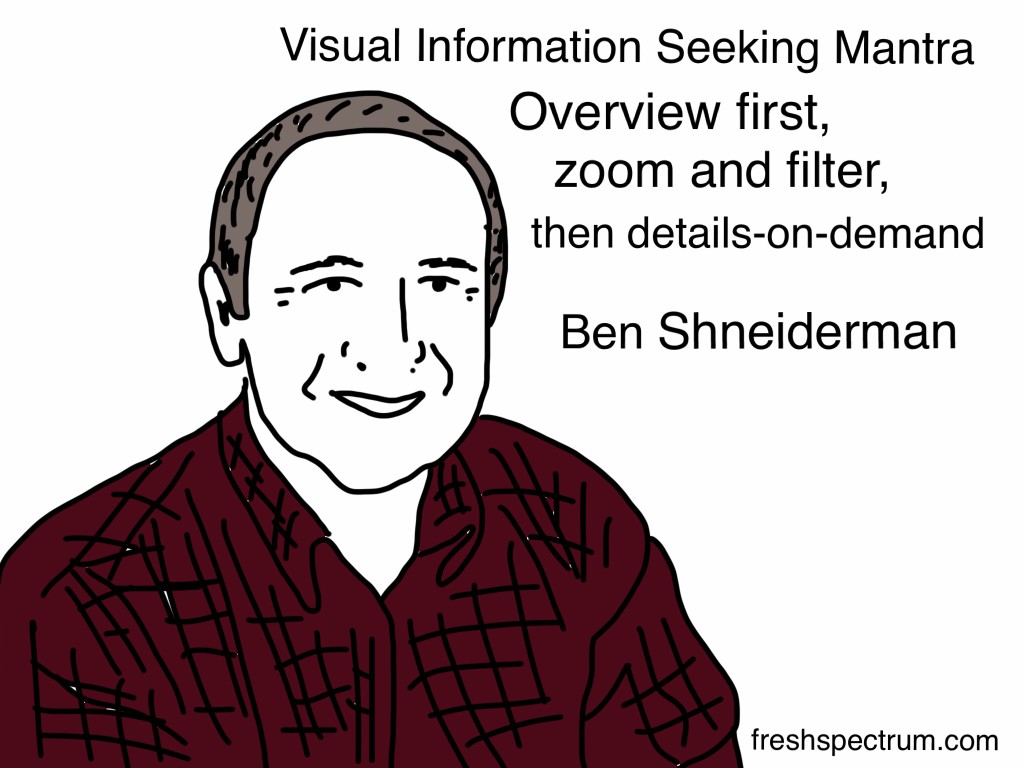
The static infographic mimics what you would expect to find in a data dashboard. When designing dashboards I like to remember Ben Shneiderman’s visual information-seeking mantra; overview first, zoom and filter, then details on demand.

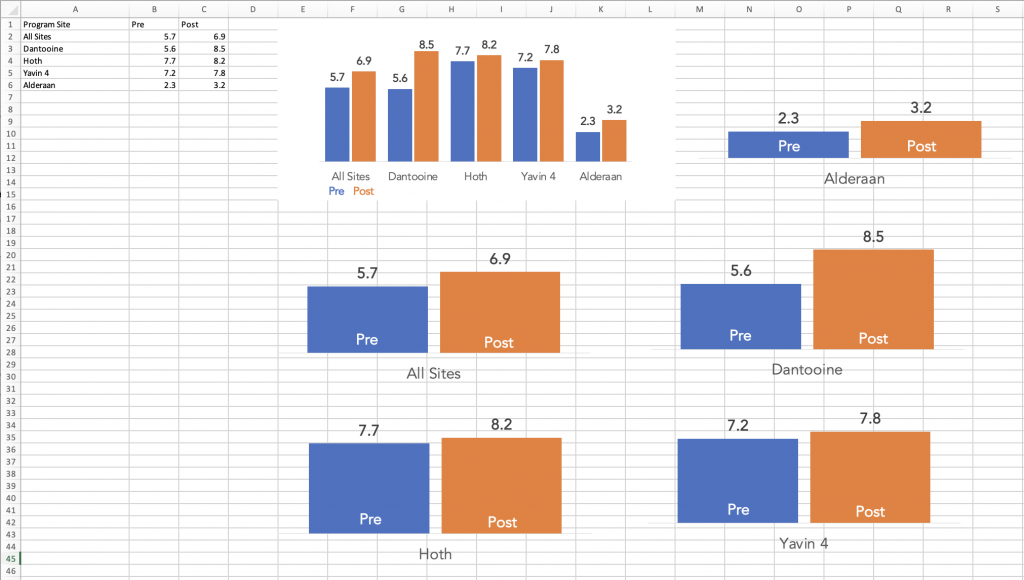
The overview chart is step 1. Step 2 is a small multiple that provides a zoomed in view based on a filter variable. So for instance, the overview might be all program sites and the filter variable might be individual program sites. But that’s just an example, you could break it down using all sorts of variables such as gender, race, location, or anything else you might use to filter your dataset.

The on-demand details part is the annotations you use alongside each individual chart. Usually a takeaway, description, or some other associated sound byte.

Visual Information Seeking Mantra. Overview first, zoom and filter, then details-on-demand. Ben Schneiderman.

Starting with a Clustered Bar Chart.

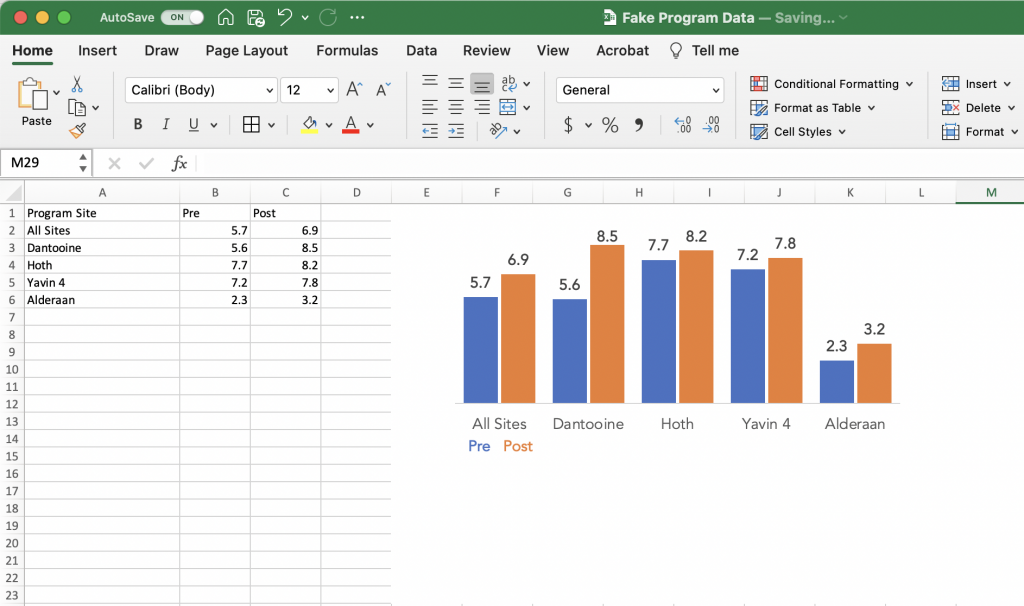
So I’ll use a little fake pre post program data for this example. Here I have pre post scores for four sites and a top level average score from all sites.

One way we might visualize this data is to just use a simple clustered bar chart. This approach is fine, but sometimes based on our audiences, isolating and discussing the individual sites is far more important than comparing the results across sites.

A screenshot of a clustered bar chart created using Excel.

Breaking up your chart into Small Multiples.

The most straightforward way to create small multiples is to just create a separate bar chart for each site. You just basically copy the chart over and over again, for each one only selecting the data for an individual program site.

A screenshot of small multiples charts being created using Excel.

Tip: Make sure to keep your bar charts on the same scale.

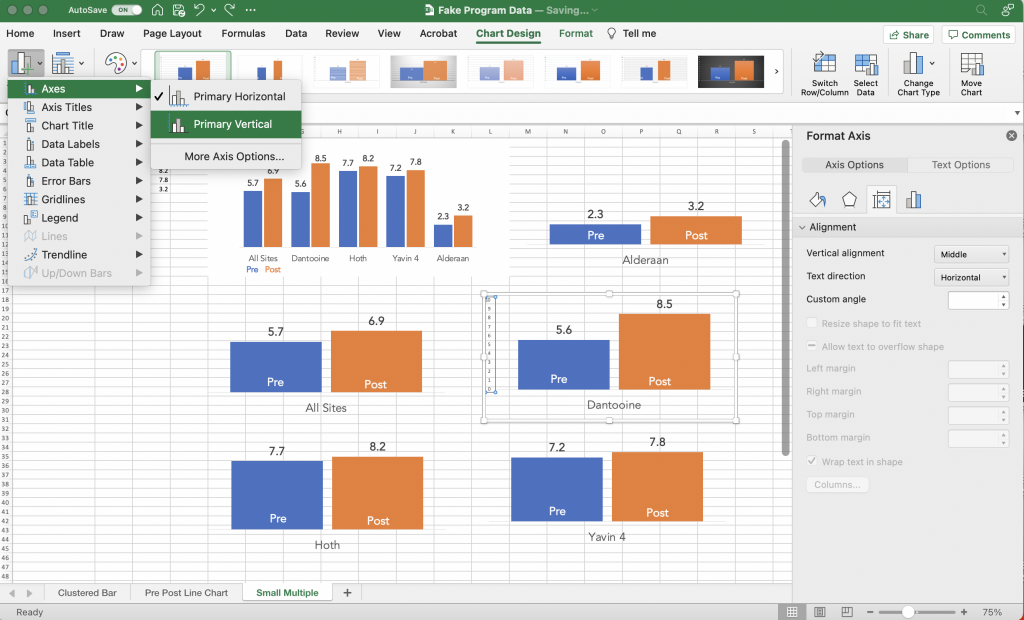
One thing to keep an eye on is that Excel’s defaults are set to change the vertical axis based on the data. It’s a setting you can turn off before you copy and paste your charts.

But if you’ve already recreated your charts and you just want to standardize the axes, you can do that. I prefer to go without axes, opting for on the bar data labels. But in order to change the minimum and maximum bounds I need to add it back in.

A screenshot of adding a primary vertical axis to a chart in Excel

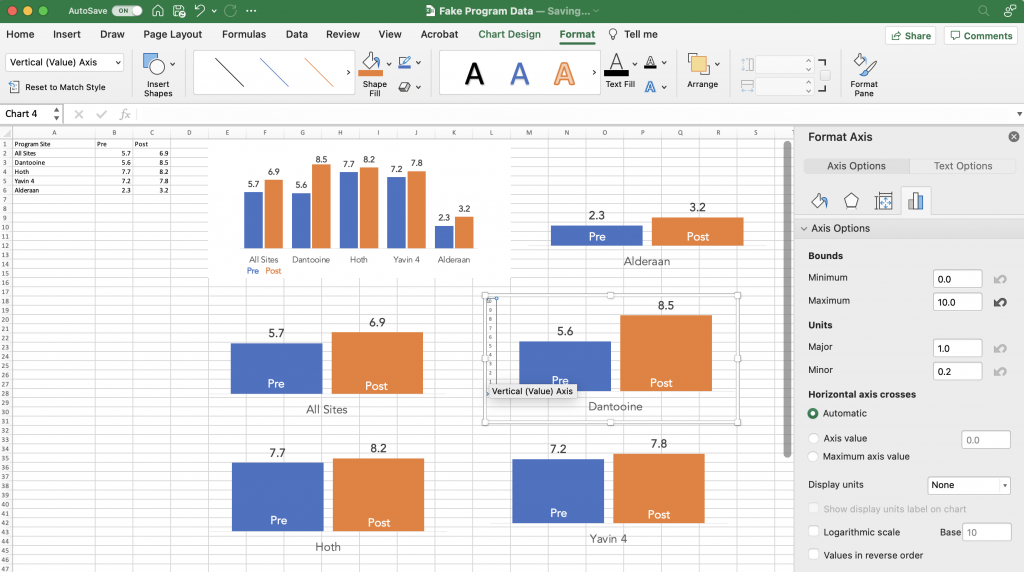
Once you have the vertical axis back you can select the axis and change the minimum/maximum bounds in the Format Pane. Do that for all your charts so that they are all on the same scale. Also make sure each of the charts is the same height and width.

A screenshot showing the vertical axis format pane for a chart in Excel.

Laying out your infographic.

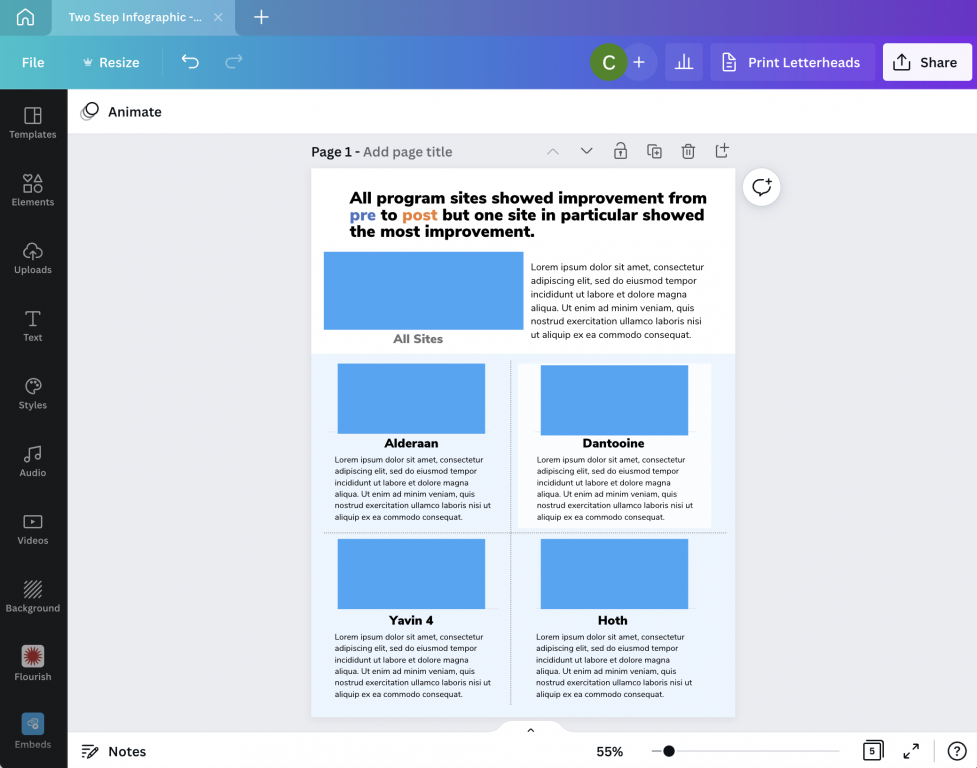
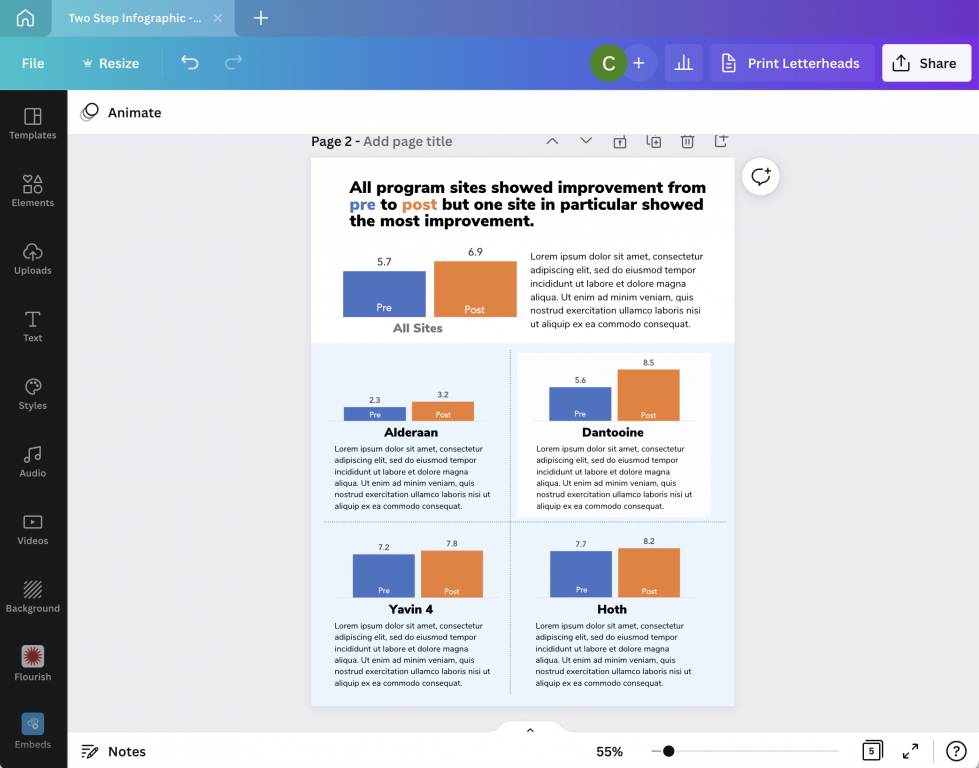
To layout my infographic in Canva, I start with a blank one page report.

At the top of the page I put my title, followed by a space for the overall chart and some descriptive text. Then I create a similar space for each of the step 2 charts.

As one of my diydatadesign community members brought up during a recent session, creating a clear distinction between the overall and secondary charts is a good idea. In other words, make your top chart a bit bigger.

A screenshot of a basic one-pager infographic template.

Bringing over your Excel Charts

I wrote a whole blog post about the different ways to bring Excel charts into Canva. If you’re interested you can find it here: How to Import Excel Charts into Canva, the Right Way

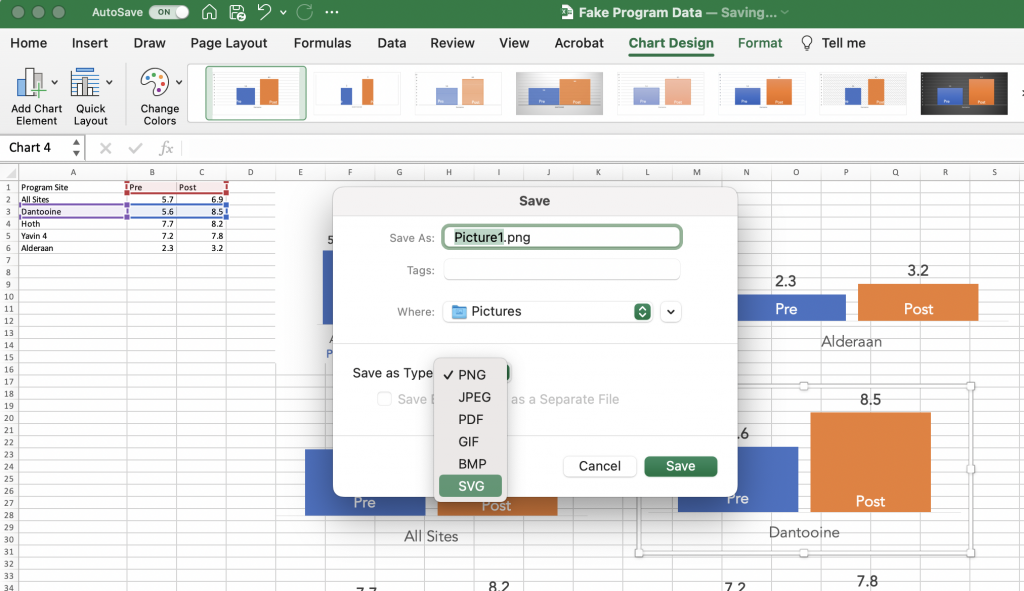
The short version is this. You can either save your individual charts as images (saving as an SVG will prevent it from getting pixelated) or just Copy and Paste. Before I copy and paste thought I first get rid of the

A screenshot of a chart being saved as a picture in Excel.

Bringing it all together.

Once I have all the charts, I can bring it all together. You can use color and shapes to highlight certain key findings but it’s not a requirement.

This type of infographic is particularly good when you want to share all results with a group of smaller subgroups. But you want each of the subgroups to have equal billing. They’ll still get the context of where they stand versus other subgroups, but that’s only secondary.

A screenshot of a Canva one page infographic design.

Want access to the final template?

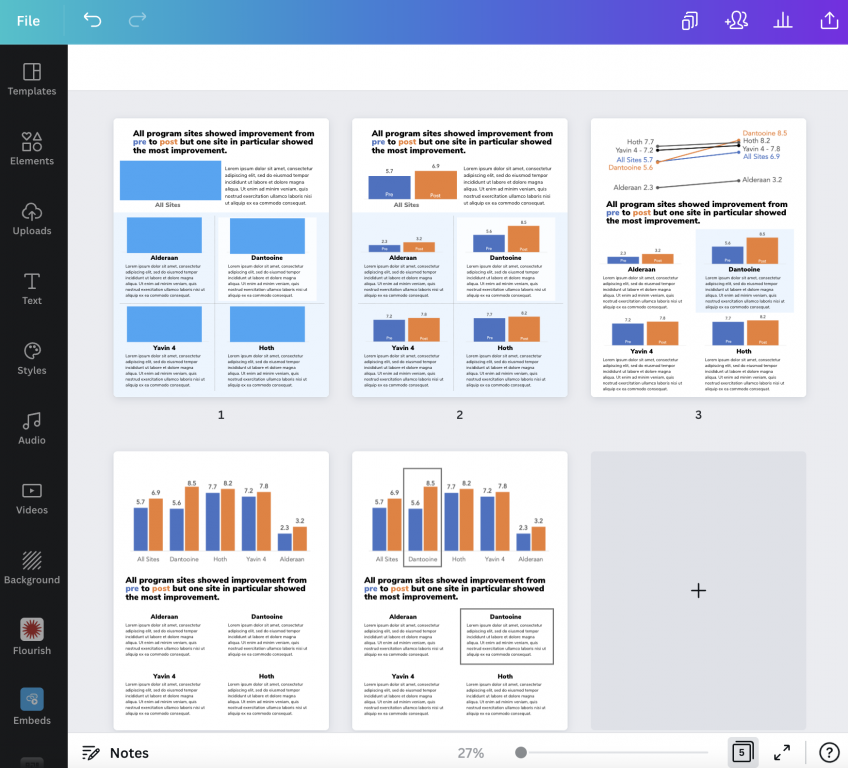
Do you want access to the final infographic Canva template, along with a few other alternative layouts. You can grab the template using this link.

A screenshot of a canva one page report infographic template.
Click on the image to get access to the Canva template.

Written by cplysy · Categorized: freshspectrum

Jul 27 2022

A Project is Never Just a Project

I’m partnering with a health policy research firm on a multiyear contract to support a philanthropic foundation’s work in increasing its ability to thoughtfully invest in community-driven birth equity solutions. A month ago, while administering a pre-assessment in preparation for a staff training, my project partners and I noticed how staff were responding to the […]

The post A Project is Never Just a Project appeared first on Nicole Clark Consulting.
Written by cplysy · Categorized: nicoleclark

Jul 26 2022

The Innovation Walkabout

Did you ever notice how much you take in visiting a new city or town for the first time?

Maybe it’s time to get out more.

The Innovation Walkabout is a simple technique that adopts what we do naturally when encountering something new. The method is as simple as it sounds.

The first step is to pick an issue you’re looking to develop. This might be expanding a market, serving a client better, or changing your focus.

Our second step is to find a physical space where you can learn about this issue. This would be where your customers are, your competition might be, or something else.

The third step is to go for a walk to this place with the mindset of being a newcomer. What do you notice?

What are people doing? Pay attention to the kind of relationships that you see. Are there structures — physical or otherwise — that inhibit or facilitate what happens in that space?

What Do You Notice?

When you notice something, ask yourself: what else? We suggest adopting a coaching stance by asking these questions:

  1. What is going on and what captures your attention?
  2. What else do you notice? Keep asking: what else and you’ll be amazed at what you come up with.
  3. Can you imagine what your collaborators would notice?
  4. How about what your competitors might notice?
  5. What would someone who sees this scene every day notice?

When we ask these questions, we start taking the stance of different audiences — this helps us to learn. Take notes on what you see, sense, think, and hear. By taking better notes you can increase your learning, too.

So What?

This seems almost absurdly simple, but that is where its power lies. We can do this almost anytime. The metrics for success in this exercise are:

  1. New insights.
  2. New ideas.
  3. Number of ideas.
  4. Quality — detail — within those ideas.

If you are looking to innovate and need some new intelligence, try walking outside your door. Be intentional and purposive in your walking. Practice what Rob Walker calls “The Art of Noticing” and you will find you notice a lot more.

You might be surprised at what you see and find to help you out.

We design systems to help integrate simple and complex strategies for learning and innovating. If you want help to grow, learn and innovate, reach out and lets go for a walk. Who knows what we’ll notice together?

Image Credit: yns plt on Unsplash

The post The Innovation Walkabout appeared first on Cense Ltd. .

Written by cplysy · Categorized: cameronnorman

  • « Go to Previous Page
  • Go to page 1
  • Interim pages omitted …
  • Go to page 120
  • Go to page 121
  • Go to page 122
  • Go to page 123
  • Go to page 124
  • Interim pages omitted …
  • Go to page 310
  • Go to Next Page »

Footer

Follow our Work

The easiest way to stay connected to our work is to join our newsletter. You’ll get updates on projects, learn about new events, and hear stories from those evaluators whom the field continues to actively exclude and erase.

Get Updates

Want to take further action or join a pod? Click here to learn more.

Copyright © 2026 · The May 13 Group · Log in

en English
af Afrikaanssq Shqipam አማርኛar العربيةhy Հայերենaz Azərbaycan dilieu Euskarabe Беларуская моваbn বাংলাbs Bosanskibg Българскиca Catalàceb Cebuanony Chichewazh-CN 简体中文zh-TW 繁體中文co Corsuhr Hrvatskics Čeština‎da Dansknl Nederlandsen Englisheo Esperantoet Eestitl Filipinofi Suomifr Françaisfy Fryskgl Galegoka ქართულიde Deutschel Ελληνικάgu ગુજરાતીht Kreyol ayisyenha Harshen Hausahaw Ōlelo Hawaiʻiiw עִבְרִיתhi हिन्दीhmn Hmonghu Magyaris Íslenskaig Igboid Bahasa Indonesiaga Gaeilgeit Italianoja 日本語jw Basa Jawakn ಕನ್ನಡkk Қазақ тіліkm ភាសាខ្មែរko 한국어ku كوردی‎ky Кыргызчаlo ພາສາລາວla Latinlv Latviešu valodalt Lietuvių kalbalb Lëtzebuergeschmk Македонски јазикmg Malagasyms Bahasa Melayuml മലയാളംmt Maltesemi Te Reo Māorimr मराठीmn Монголmy ဗမာစာne नेपालीno Norsk bokmålps پښتوfa فارسیpl Polskipt Portuguêspa ਪੰਜਾਬੀro Românăru Русскийsm Samoangd Gàidhligsr Српски језикst Sesothosn Shonasd سنڌيsi සිංහලsk Slovenčinasl Slovenščinaso Afsoomaalies Españolsu Basa Sundasw Kiswahilisv Svenskatg Тоҷикӣta தமிழ்te తెలుగుth ไทยtr Türkçeuk Українськаur اردوuz O‘zbekchavi Tiếng Việtcy Cymraegxh isiXhosayi יידישyo Yorùbázu Zulu