• Skip to main content
  • Skip to footer
  • Home

The May 13 Group

the next day for evaluation

  • Get Involved
  • Our Work
  • About Us
You are here: Home / Archives for allblogs

allblogs

Jul 14 2022

How to develop a Theory of Change for evaluation

In this follow-up article, we will walk you through a step-by-step process of how you can develop your own Theory of Change (ToC) diagram for evaluation purposes.

You can also find our Theory of Change template here which you can use to support the development process. However, there is no one right way of developing a ToC.

Some people prefer working backwards from the program purpose, and it often depends on the program and the information that is already available to what method would work best. The method described below is one that I have found particularly useful from past experience.


When developing a ToC, it is important to keep the following points front of mind: 

  • A ToC should be credible. It should be based on the insight and experience from different key stakeholders  

  • A ToC should be achievable. You need to have the necessary resources to complete the desired change processes. Setting out to solve world hunger with a small budget isn’t the way to go! 

  • A ToC should be supported. All key stakeholders should have some level of involvement in defining a ToC. Key stakeholders also need to agree with the ToC to ensure buy-in and understanding across all levels 

  • A ToC should be testable. The diagram and accompanying narrative need to be a complete picture of the program. However, they also need to be clear, concise, and not over-complicate the description of the program’s work. Making sure you have indicators of achievement for each outcome will help you to collect the necessary data to test your ToC 


How to Host a Theory of Change (ToC) Workshop

Developing a ToC should be a highly collaborative process. The best method I have found to develop a ToC is by holding a 2-hour workshop (which can be broken up into two parts if needed) with key stakeholders. The first step in your process should be to identify and gather all of the relevant stakeholders and agree on a time to come together for the workshop.

As previously mentioned, the ToC needs to be owned and used by stakeholders, so it is crucial that they believe in it and have a clear understanding of how it works. I have held ToC workshops both in-person (my preferred method) and online.

Some useful materials to gather prior to the workshop include:

  • If holding the workshop in-person: bring some big pieces of paper or have a whiteboard handy. Make sure you have lots of marker pens and different coloured sticky notes so that everyone can take part in workshopping the ToC 

    *Top tip: We suggest using different coloured sticky notes for each step in the ToC diagram (e.g., blue for activities, yellow for outputs, etc.) 

  • If holding the workshop online: there are lots of types of online collaborative software you can use to workshop a ToC. My personal favourite is Miro which allows everyone to participate in adding to the ToC, moving things around, and editing the diagram 

Your main job in the ToC workshop is to act as a facilitator to help the key stakeholders develop the ToC. In this article, we’ve provided a list of steps and some key questions that you can use to facilitate the ToC workshop.

Note that this process is for developing a ToC for evaluating an already established program. For planning and designing a new program, the questions can be reframed slightly to change the tense from “what we’ve done” to “what we’ll do.” 


Key definitions to display for all key stakeholders throughout the ToC workshop

One last point before we get started; it is essential that you clearly define what a ToC is and is not for all stakeholders before you start to make sure they understand the intent of the workshop. This will make sure that everyone is on the same page and that there is a clear understanding of what the final product will be. 

*Top tip: Make sure you have a note-taker on hand in the workshop to capture all the key details that aren’t listed on the sticky notes 

Activities 

  • The actions that will be taken by the program that are expected to contribute to the change. For example, this could include interviews with patients, training of clinicians, etc. 

Outputs 

  • The products or the services that the program will create through the activities. For example, certain pieces of new knowledge (e.g., patients’ opinions) or new processes (e.g., a new clinic workflow).  

Outcomes 

  • The changes in knowledge (e.g., clinicians have a greater understanding of a condition), attitudes (e.g., patients change their perspectives about exercise), or skills (e.g., MOA’s learn how to use TNA) of the key actors that are expected to lead to a change in their behaviour (e.g., clinicians use their knowledge to support patients, patients exercise 3 times a week, MOA’s use TNA for tracking appointments) as a result of the program. Outcomes are sometimes broken down into intermediate, end of program, and high-level depending on when they are expected to be realized in the program life cycle.  

Impacts 

  • The top-level changes that result wholly or in part from the outcomes (e.g., the change process) to which the program contributed to. 

Purpose 

  • The overall goal/aim the program aims to contribute to; it explains the program’s reason for existence. 

Impact Pathways 

  • The pathways through which the program is expected to contribute to change. These are often actor specific to make them more tangible (e.g., Clinician Capacity Building Pathway, Clinic Workflow Pathway). 

Causal Logic 

  • Describes the how and why between each step in a ToC. In the ToC diagram it is often presented using arrows.  

Indicators 

  • A marker of accomplishment that can be used to measure the success of a program (e.g., did the program contribute to a certain outcome?).  

Assumptions 

  • The factors outside of the program’s control that are necessary to ensure the program’s success. 


Creating an Agenda for your ToC Workshop

The way I workshop and develop a ToC is not linear. Here is an agenda of what to expect: 

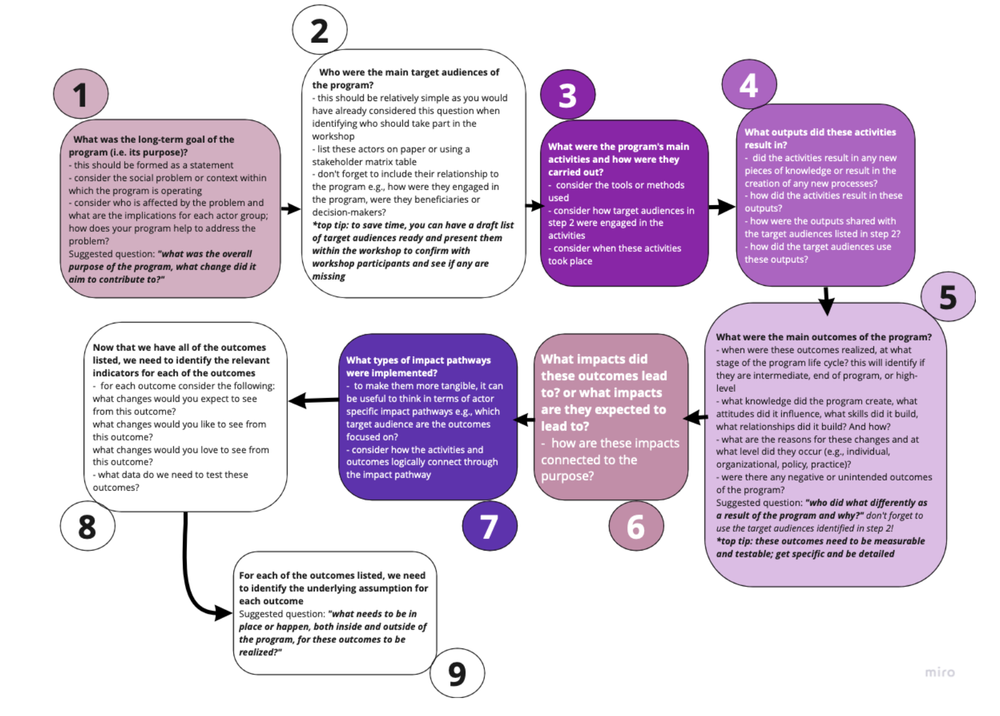
  1. Purpose: What was the long-term goal of the program? 

  2. Target audiences: Who were the main target audiences of the program? 

  3. Activities: What were the program’s main activities and how were they carried out? 

  4. Outputs: What outputs did these activities result in? 

  5. Outcomes: What were the main outcomes of the program? 

  6. Impacts: What impacts did these outcomes lead to and how are they connected to the purpose? 

  7. Impact Pathways: What types of impact pathways were implemented? 

  8. Indicators: How do we measure the outcomes? 

  9. Assumptions: What are the underlying assumptions for each outcome? 

I have also numbered each stage of the workshop process in the following ToC diagram. The steps that should be captured outside of the diagram (e.g., in a ToC tracking table, see part 1; “What is Theory of Change in Evaluation?”) and will be useful for evaluating the program and testing the diagram have also been included below for your reference. 
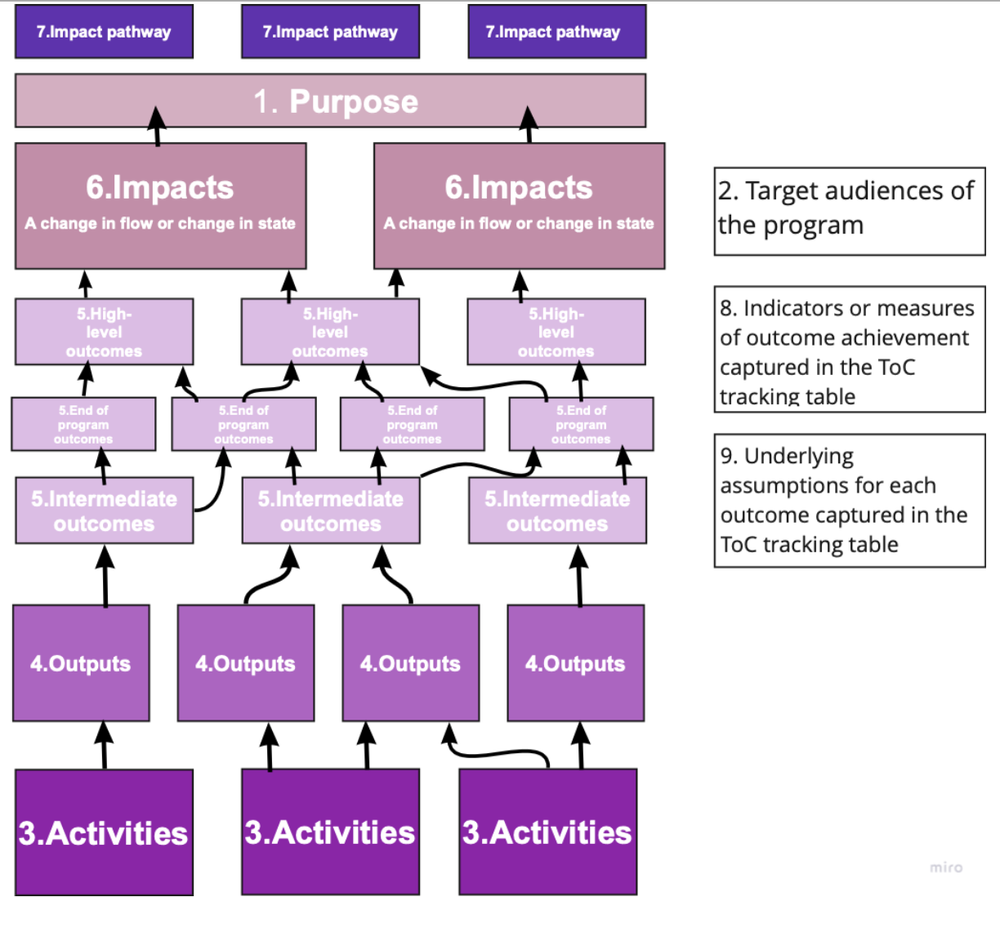
This ToC workshop process follows this basic workflow

*Top tip: take a photo of your whiteboard, sticky wall, or online workshop board after the workshop and keep it safe! You’ll need it to create a more consolidated version of the ToC diagram


Consolidating the Theory of Change (ToC)

The first ToC to come out of the workshop will look very messy, but don’t panic! Your notes will help you to consolidate and make sense of the ToC.

There is no right way to consolidate the ToC and it will take practice, but a useful technique is to think about the different target audiences identified and make sure each step in the change process (e.g., outcomes) is well established; if not, check to see if outcomes can be merged or if any logical steps are missing.

Drafting a supporting narrative is also something that takes practice, but it’s key to focus on identifying the causal logic. You want to clearly explain the theory behind the diagram so that everyone can understand it, even those outside of the program; focus on explaining who is doing what differently and why because of the program and its activities? 

*Top tip: Probe stakeholders during the workshop to identify and determine the causal logic between each step and outcome, and make sure the note-taker writes this down in detail! 


Validating the Theory of Change (ToC)

Once you have a consolidated ToC and draft narrative, the most important thing is to validate it with key stakeholders. Share both the model and narrative with them, walk them through it, and make sure it makes sense to everyone.

Have a list of questions ready to ask them if anything doesn’t quite make sense to you. Don’t forget to make sure that your ToC is credible, achievable, supported, and testable! 


Have you worked with ToC before, do you have a different way of developing a diagram, or have questions? Comment on this article or connect with us on LinkedIn or Twitter! 


Sign up for our newsletter

We’ll let you know about our new content, and curate the best new evaluation resources from around the web!


We respect your privacy.

Thank you!


Written by cplysy · Categorized: evalacademy

Jul 14 2022

What is Theory of Change in evaluation?

We get it, Theory of Change (ToC) doesn’t really sound like the most fun, interesting, or appealing evaluation tool. I certainly wasn’t buzzing with excitement when I first heard the phrase ToC! 

If this also sounds like you, then you’ve come to the right place. This article aims to introduce you to ToC and is aimed at those who may have heard of the tool before but aren’t quite sure as to what it is and how it can be useful for evaluation. After putting my preconceptions of the tool to one side and learning more about its uses, I have found that ToC has been one of the most valuable tools to me so far as an evaluator. 

This article is the first part of our discussion on ToC and answers the question of “what is theory of change in evaluation?”

The second part of our discussion will focus on how to develop and use ToC for evaluation. 


So, what is Theory of Change (ToC)? 

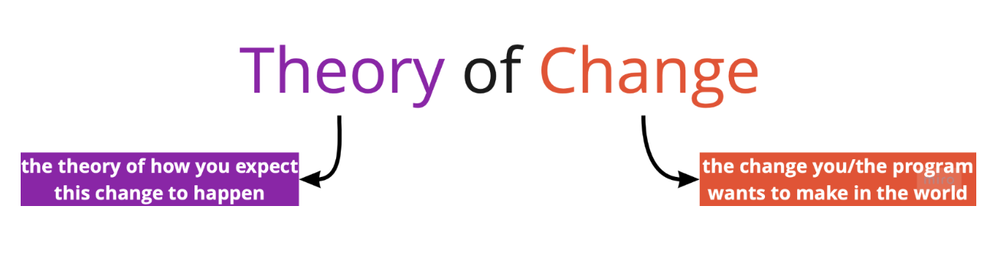
Theory of Change (ToC) explains how a set of activities will solve a problem. It does this by clearly describing the problem and the change you (and the program) intend to create.

Most importantly, ToC depicts change that is not linear. Processes of change actually have multiple feedback loops that need to be understood and described.

In short, ToC is a diagram to describe “if you do this, then these are the intended results.” When we break it down a little more we get … 

Although ToC has similar components to other evaluation tools such as logic models that mainly focus on the what, ToC goes into more detail about the why.

It does this by identifying processes called “causal logic” or “causal mechanisms” which are represented in the diagram using arrows. We will go into further detail about causal logic below.

While logic models also highlight contextual factors and assumptions, they are often focused at a high-level and don’t look at each specific step within the change process (e.g., between each outcome box). This is something that is key to a ToC. 

ToC allows us to map each step towards a long-term goal which provides an explicit and testable diagram of how and why a change is expected to happen in a particular context.

It is not just a list of activities with arrows linking them to their intended outcomes like a logic model, but it explains how these changes will happen and how the program will contribute to this change at each little step in the change process.

You guessed it, ToC creates its own program theory. It also looks at what other external factors outside of the program will affect the desired change. 

ToC can be developed for any level of an intervention – an event, a project, a program, a policy, a strategy, or an organization.

This makes it both useful for program planning and in monitoring and evaluation where it is often captured through a one-page diagram that contains multiple boxes and arrows. This diagram often has a supporting written narrative that explains each step of the theory in more detail to walk the reader through the diagram.

A ToC is a living document; it is not set in stone and should be revisited and revised as the program progresses to make the most of opportunities and address challenges that arise. Depending on the lifespan of the program, a 6-monthly or yearly review of the ToC diagram and narrative might be appropriate. 


What are the main components of a Theory of Change (ToC)? 

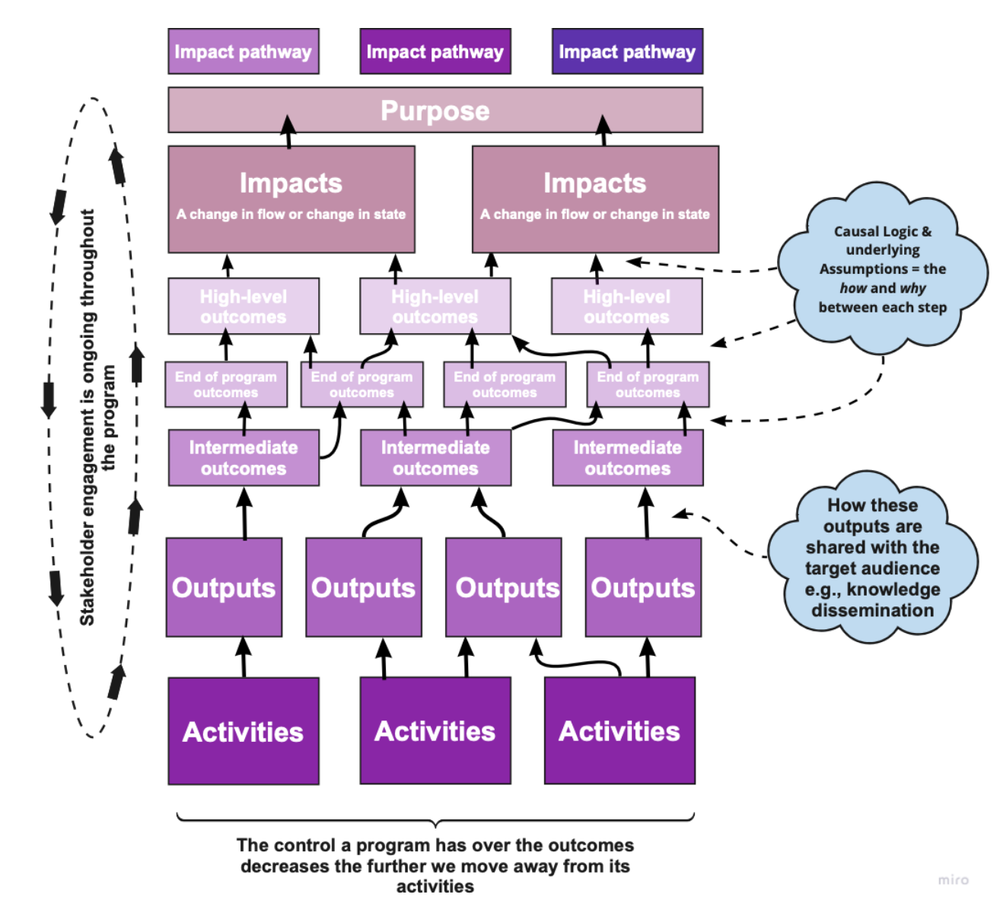
There are several main components of a ToC. Some of these components are included in the ToC diagram itself, while others should be captured in the supporting narrative or an alternate table. This has been explained in further detail below. 

  • Activities are the actions that will be taken by the program that are expected to contribute to the change. For example, this could include interviews with patients, training of clinicians, etc. 

  • Outputs are the products or the services that the program will create through the activities. For example, certain pieces of new knowledge (e.g., patients’ opinions) or new processes (e.g., a new clinic workflow). 

  • Outcomes are the changes in knowledge (e.g., clinicians have greater understanding of a condition), attitudes (e.g., patients change their perspectives about exercise), or skills (e.g., clinicians learn how to use new software) of the key actors that are expected to lead to a change in their behaviour (e.g., clinicians use their knowledge to support patients, patients exercise 3 times a week, MOA’s use TNA for tracking appointments). Outcomes are sometimes broken down into intermediate, end of program, and high-level depending on when they are expected to be realized in the program life cycle. However, there is no right number of outcomes which entirely depends on the program itself and the change process they are describing.  

  • Impacts are the top-level changes that result wholly or in part from the outcomes (e.g., the change process) to which the program contributed to. 

  • Purpose is the overall goal/aim the program aims to contribute to; it explains the program’s reason for existence. Unlike a Vision Statement which is more high-level and focuses on the what, the program’s purpose focuses on the why. For example, why is your program on the journey it’s on? 

  • Impact Pathways are the pathways through which the program is expected to contribute to change. These are often actor specific to make them more tangible (e.g., Clinician Capacity Building Pathway, Clinic Workflow Pathway) 

  • Causal Logic describes the how and why between each step in a ToC. In the ToC diagram it is often presented using arrows. More detail about the causal logic is captured within the supporting narrative. 

Example ToC diagram structure

Main components that need to be captured outside of the TOC diagram: 

  • Key Actors are the people who are crucial to the program. Those developing a ToC should be aware of the key actors’ roles within the context of the program, and how the program will work with these key actors to create change. Key actors can be identified using the framing of “who is doing what differently and why as a result of the program?” and captured using a Stakeholder Matrix (our template can be found here).  

  • Causal Logic describes the how and why between each step in a ToC. Detail about the causal logic which links each step in the ToC diagram is captured using the descriptive narrative that accompanies the diagram. The narrative walks the reader step-by-step through the diagram. 

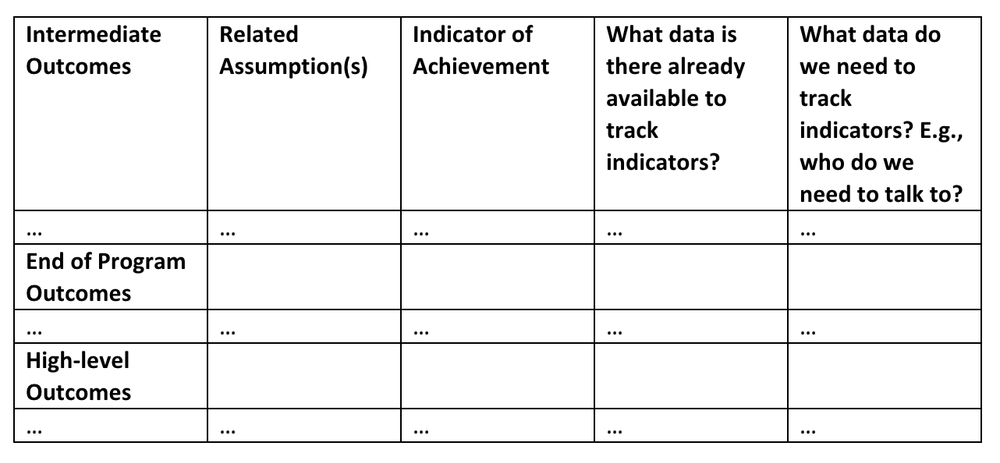
  • Indicators are a marker of accomplishment that can be used to measure the success of a program (e.g., did the program contribute to a certain outcome?). These play a key role in the evaluation plan and can be captured and listed using the suggested ToC tracking table below.  

  • Assumptions are the factors outside of the program’s control that are necessary to ensure the program’s success. This is one of the most valuable parts of the ToC process as stakeholders get to hear each other’s understanding of the goals, challenges, and what is needed in the program’s context for it to succeed. Like indicators, it is very important to list and understand these key assumptions as they relate to each individual outcome. 

Example of a Theory of Change (ToC) tracking table


Why should I use a Theory of Change (ToC)? 

ToC can help you to understand why change is expected to occur by altering the way you think about your program from what you are doing to what you want to achieve. The tool can also help programs respond to changes and guide stakeholder engagement, communication, and support decision-making.

By defining long-term goals and then mapping backwards to identify the necessary preconditions, ToC can provide the basis for arguing that a program is making a difference whilst identifying weaknesses in the argument and providing the opportunity to make changes.

It is well suited to complex programs that are influenced by multiple systems and actors due to its fluid, yet comprehensive approach. 


Why is ToC useful for evaluation? 

  • ToC essentially provides a diagram that can be tested by analyzing relevant indicators to see if the program actually contributed to the intended change 

  • ToC builds a solid foundation for an impact evaluation by providing a reporting framework and identifying what data needs to be gathered to test the theory 

  • A well-developed ToC can help to create better key evaluation questions, identify indicators for monitoring change, and identify gaps in available data 

  • This can help to focus new data collection on areas where there are gaps leading to more effective use of evaluation resources 

  • By identifying the why and how of a program, ToC can help to reflect on what has worked or not worked to understand the past, identify opportunities for learning, and plan for the future 

However, developing a ToC can be challenging as it involves facilitating collaboration with all key stakeholders, synthesizing a range of views and information sources, as well as obtaining agreement and buy-in from stakeholders. The collaborative aspect of developing a ToC is crucial and will be further discussed in part 2 of our series on ToC. 


How has Theory of Change (ToC) helped me in my evaluations? 

ToC has played a BIG part in my role as an evaluator so far in helping me to deliver meaningful results to stakeholders. It has also helped me to build an understanding of change processes and increase the capacities of key stakeholders to do the same. 

Collaboratively developing a ToC before the start of a program has supported my clients in identifying how and why the program is expected to lead to the desired change. It has helped my clients to become clearer in their own understanding, highlight gaps they may not have considered, and document their own underlying assumptions. ToC helped my clients to better understand risk and opportunity within their program’s context to ensure success.  

Collaboratively developing a ToC after a program has been launched for evaluation purposes has also benefitted my clients by helping them to understand why they made certain decisions and why they collaborated with certain actors. As well as providing me with a clear evaluation framework, ToC has helped me to provide actionable recommendations and results. Using ToC as an evaluation tool has also helped my clients to learn more about the benefits of having a clear ToC from the program’s start to help them make decisions and guide their program through challenges. 


Have you worked with ToC before, or have questions? Comment on this article or connect with us on LinkedIn or Twitter! 


Sign up for our newsletter

We’ll let you know about our new content, and curate the best new evaluation resources from around the web!


We respect your privacy.

Thank you!


Written by cplysy · Categorized: evalacademy

Jul 14 2022

Note-Taking for Learning and Innovation

Do your notes bore you? They shouldn’t if you’re serious about learning.

Note-taking is among the most powerful, accessible, and portable means to support innovation and learning. Yet, most of us do it poorly. Do you review your notes after you take them? Do you know why you are taking notes in the first place?

There is an art to good note-taking and to using notes effectively. Notes capture what happens, what is discussed or observed, and record insights and commentary — but only if we use them.

Let’s look at ways to improve this.

Tools of the Trade

Fast Company has a remarkably detailed and useful guide to selecting a notebook. The New York Times annually reviews the best pens. Your choice of both can make a big difference to your willingness to use them. That is the key. The best tools are the ones you use.

If pen-and-paper isn’t your thing, consider using one of many apps. In his new book, Building Your Second Brain, Tiago Forte explores how apps and systems can help us better record and retain information. The secret is that the best app is the one that matches the way that you learn and use notes in your practice.

Forte has conducted research into the use of note-taking apps by canvassing the thousands of people who attend his workshops and he’s found that the top tools are:

  1. Evernote
  2. Obsidian
  3. Notion

These aren’t the only ones out there, but they are the most used. Each of these map on to three different note-taking styles such as those suggested by Anne-Laure Le Cunff, which we’ll explore below.

Note-taking Styles

Anne-Laure Le Cunff from Ness Labs has written extensively on note-taking — read her detailed explanation here. She reviews the literature and suggests a variety of strategies that work depending on your goals and preferences. She also provides recommendations on which app to use based on the kind of note-taker you are.

Le Cunff proposes three main note-taking styles:

  • The architect. They enjoy planning, designing processes and frameworks, and need a note-taking tool that allows them to easily structure their ideas.
  • The gardener. They enjoy exploring, connecting various thoughts together, and need a note-taking tool that allows them to easily grow their ideas.
  • The librarian. They enjoy collecting, building a catalogue of resources, and need a note-taking tool that allows them to easily retrieve their ideas.

The best way to learn is to design your systems to match your needs, preferences, and style of note-taking.

Systems of Use

Once you’ve got tools and matched them to your preferences, the next is building an actual use system. This means getting serious about learning. Learning will fail in bad systems as illustrated in a post over on Censemaking.

We suggest asking yourself the following questions ahead of any learning-based activity like a course or webinar:

  • Will I create the time to review, integrate or reflect on what I am exposed to?
  • Is the delivery of this course suited to the ways in which I make sense of the world and develop new skills?
  • Am I invested in the product — a certificate, degree, or outcome — or the process?
  • Am I engaged with this program (course, webinar, tutorial) to escape from asking myself difficult questions about my work?
  • Do I have a system in place to revisit, re-work, and apply what I’ve learned in place before I start?

A good learning system involves the following:

A good learning system is something that:

  1. Reduces distraction (preserves and hones attention to find, gather, synthesize and sense-make the most useful information)
  2. Protects/creates/utilizes time (is fit-for-purpose in connecting our knowledge to our purpose and our strategy)
  3. Articulates care (creates principles for practice)
  4. Fits the culture of your organization (creates space for integration)

Learn By Design

As you can see, any good learning experience involves good design. Our choice of tools, motivation, and systems all shape what we learn, what we retain, and whether it’s of practical value.

Learning is easy to say, more complicated to do. But it is something we can design into our organization.

You can learn to learn better by design. Remember: the best system is the one that you use.

If you want help creating a learning system for your organization to help get the most out of what you do every day, reach out and let’s grab a coffee and learn from one another.

Photo by Jan Kahánek on Unsplash

The post Note-Taking for Learning and Innovation appeared first on Cense Ltd. .

Written by cplysy · Categorized: cameronnorman

Jul 14 2022

8 Simple Tools for Video Creation

In today’s post I walk you through 8 different tools you can use for easy video creation.

Video used to be the realm of camera lovers, animators, and production studios. But in our modern digital world, anyone can produce a video with the phone in their pocket. The number of tools can be a bit overwhelming so I created this post to ease you into a decision.

This post starts with 4 tools you likely already have in your pocket or on your computer. Then we’ll talk about 4 more web-based tools that you can try out for free.

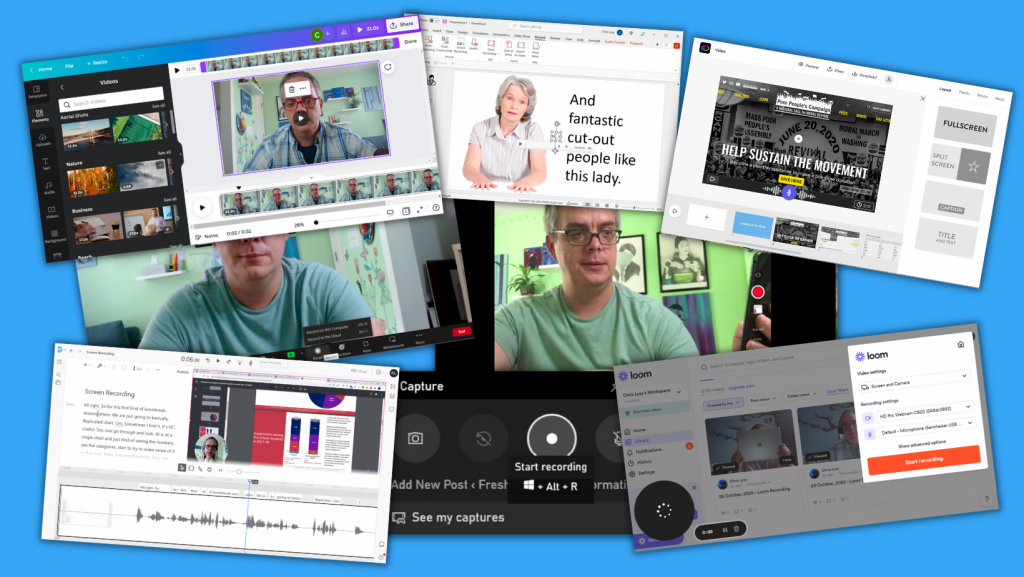
8 Simple Video Tools

1. Pick up your phone, hit record.

Phones have come a long way over the last decade years. We all know how easy it is to just pick up your phone and hit the record button. Even if you are the kind of person who runs away from any cameras turned in your direction, your phone is probably the easiest tool you can use to capture video.

And while holding your phone selfie style while you’re out for a walk might not give you the best video or audio quality in the world, it does create a video. With these types of videos you are not pretending that the recording has a high production value, and in that way they can feel a bit more authentic, conversational, and human.

One thing to keep in mind. Watch your audio. People are pretty forgiving when it comes to poor video quality but nothing will make them stop watching faster than poor quality audio.

Screenshot, picking up phone to record.

2. Use Zoom to record a video.

Do you have a Zoom account? Probably, over the last few years it’s really become an office standard. But have you considered just using Zoom for the sake of creating videos?

Think about it.

  • Zoom already connects to your webcam.
  • It will let you screenshare.
  • You can interview other people 1 on 1.
  • You can present a slide deck and deliver a presentation.
  • Video on, video off, it’s your choice.
  • Nothing stops you from starting a meeting with no other participants and hitting record.

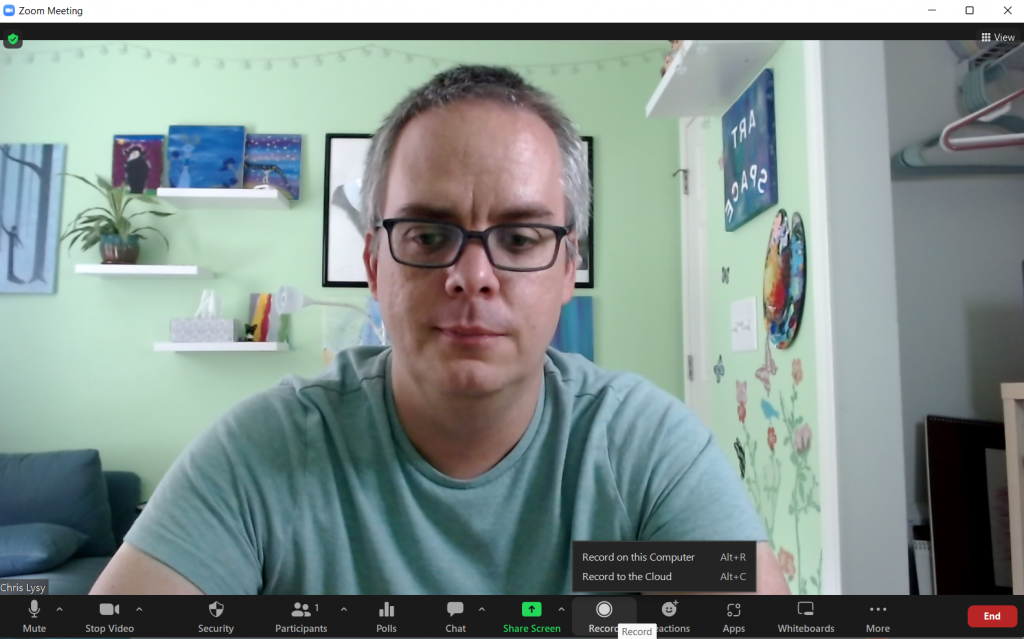
Just a tip. Zoom will give you the option to record to the cloud or record on your computer. I suggest recording on your computer as it’s likely to give you a better quality video.

Zoom call recording screenshot.

3. Screen Record on your PC or Mac with the click of a button.

Just want to do a quick screen recording?

Did you know that you have software already existing on your computer that let’s you do that?

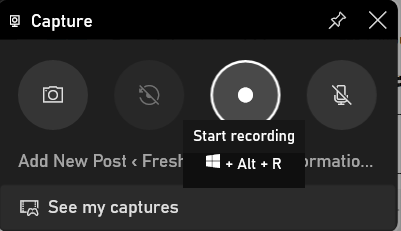
  • To record your screen on a PC, press the Windows Key + G on your keyboard.
  • To record your screen on a Mac, press the Command + Shift + 5 keys on your keyboard. 

Microsoft added this feature particularly for gamers who wanted to screenshare their game playing. But you could share anything, from Excel tutorials to survey tool instructions.

Windows PC screen recording tool

4. Create a Slideshow Video using PowerPoint

There are actually a few ways to create a video using PowerPoint.

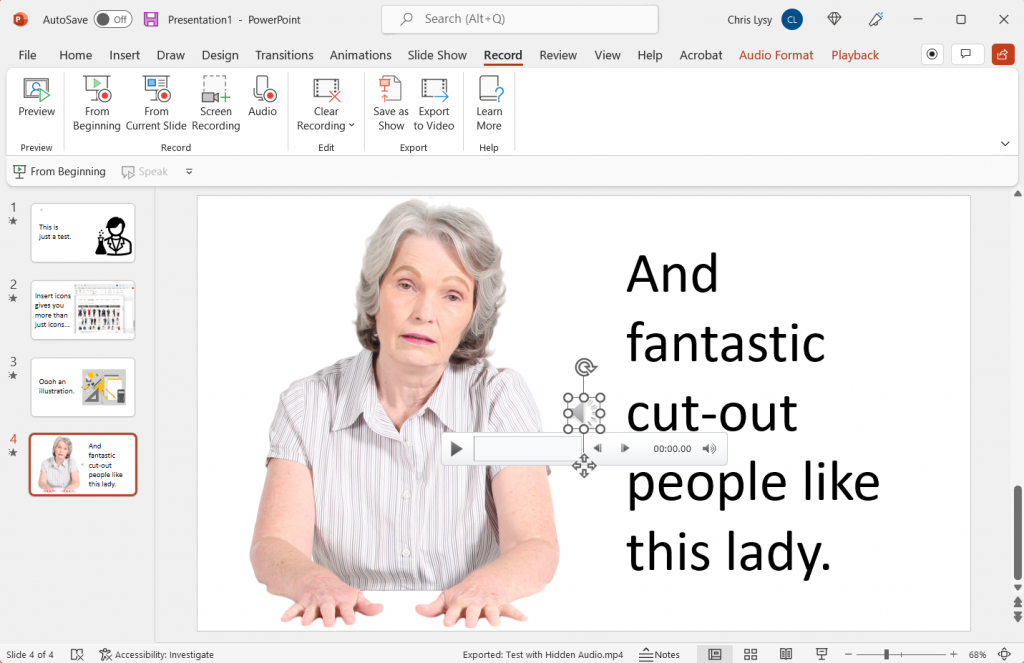
You can record your presentation, which will open up another window and let you present as you flip through your slides. This is an easy option if you are already pretty comfortable presenting and the recording doesn’t throw you off.

Another way to create a video is to embed videos, screen recordings, and other audio onto individual slides. Then export to Video. In this way you can use the slides to record different scenes in your video, and you don’t need to record everything at once.

One tip, adding audio to slides will create a little speaker icon. This speaker icon stays on the screen in your exported video or live slideshow. If you don’t want it there (because why would you) you can click a box in the audio’s Playback menu to “Hide During Show.”

PowerPoint for Video

5. Screen Record with Loom

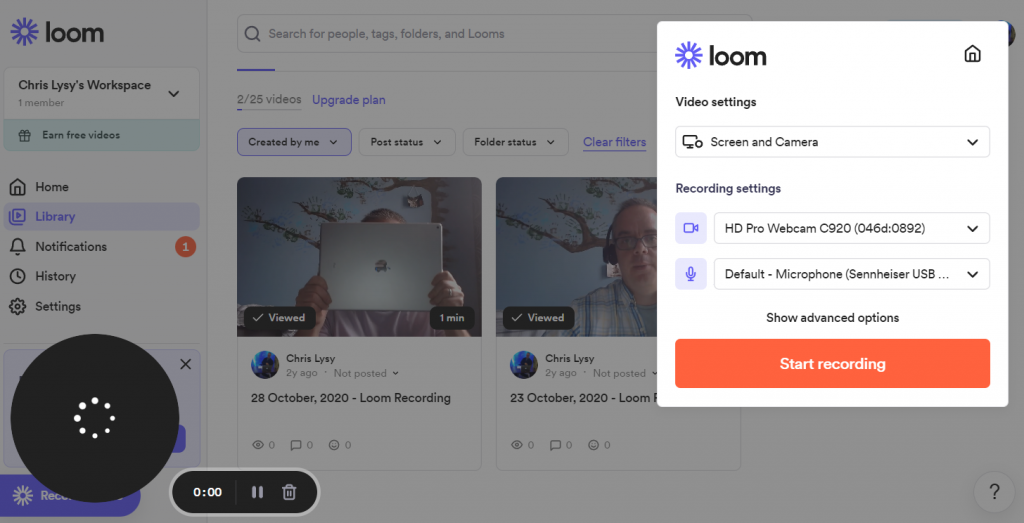
Loom is a nice freemium tool you can use for screen recordings. You can access via the web, but it also has a desktop app and a chrome plugin. For free you can record up to 25 individual <5 minute videos. Loom will also give you some basic editing tools.

Upgrading to a business plan for around $10/month will give you better video quality, unlimited videos, no watermark and other goodies.

Screenshot of Loom

6. Create Your Video with Descript

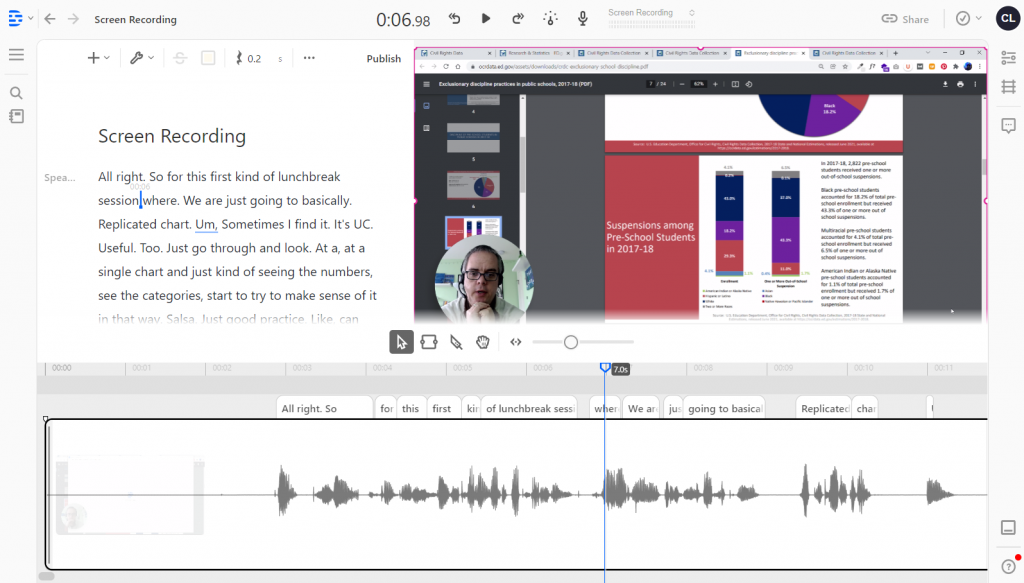
Descript is a newer tool on the market. Like Loom it allows you to screen record or just record via your camera. What makes descript different is a novel approach to video editing.

Descript uses auto-transcription, and you can actually edit the video by editing the transcription. They also have this tool called Overdub, which can clone your voice for use in text-to-speech. Descript is definitely going for easy-to-use but because it’s both new and ambitious with its features, it can still be a bit finicky. But as a freemium tool it’s definitely worth a test.

Screenshot of Descript

7. Use Adobe Express (Formerly Spark)

What is now Adobe Express started as a collection of iPad Apps you might know by the name Adobe Spark. Over time the apps have all been merged together and now make up Adobe’s alternative to Canva. If you’re looking for an easy way to create a slide style video, it doesn’t get much easier than Adobe Express.

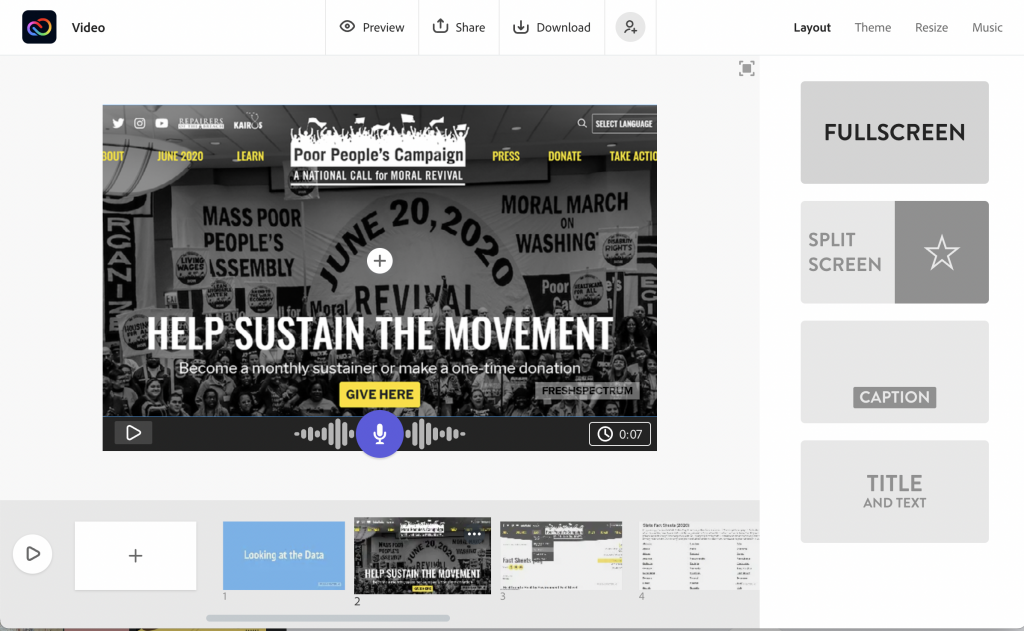
In Adobe Express you record your voiceover on each slide by holding down the microphone button. There isn’t much flexibility in overall design as the layouts you choose dictate the videos look and feel.. But the trade off in features gives you a tool that’s really easy to use. Over the years I always used Spark when I just wanted to create quick eLearning modules and didn’t want to spend too much time making design decisions.

Screenshot of Adobe Express

8. Use Canva to Create Your Video!

So if you’ve been following this blog you probably know that I’m a fan of using Canva for all sorts of design things. Well, that stays true even with video. Over the last few weeks I’ve been using Canva exclusively to create videos for my YouTube channel.

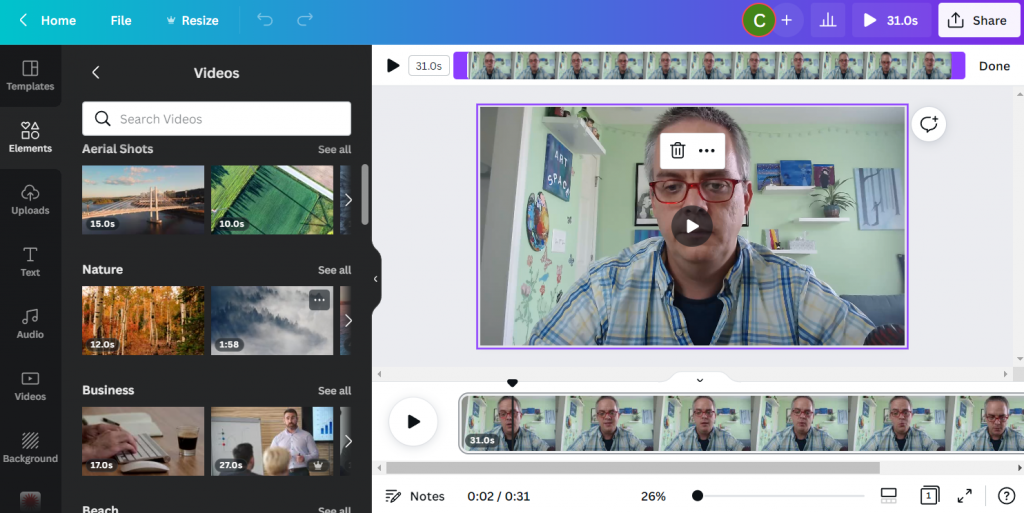
While Canva doesn’t offer the same amount of editing flexibility as a standard video editing tool (i.e Adobe Premiere, iMovie, etc.) it makes up for it in Assets. If you’re interested in learning the two different ways you can use Canva to create videos, check out my own Video on the topic I’ve embedded below.

Screenshot of Canva Video Editor.

How to Create YouTube Videos in Canva

What did I miss?

So there are tons of tools that you can use to make videos. The programs in the post are just a sampling, but I have used each one at different times in the past.

Do you have any favorites you think I should have included, please share in the comments!

Written by cplysy · Categorized: freshspectrum

Jul 14 2022

Perspective: Changing Your Evaluation Lens

Have you seen the new images from NASA’s James Webb Space Telescope? By viewing the same information through a different lens or perspective, we experience the world in a new way. We see a different level of detail, which presents new possibilities, questions, & learning. This is not just relevant to astronomy, it is a great lesson for evaluation too!

The post Perspective: Changing Your Evaluation Lens appeared first on Elizabeth Grim Consulting, LLC.

Written by cplysy · Categorized: elizabethgrim

  • « Go to Previous Page
  • Go to page 1
  • Interim pages omitted …
  • Go to page 122
  • Go to page 123
  • Go to page 124
  • Go to page 125
  • Go to page 126
  • Interim pages omitted …
  • Go to page 310
  • Go to Next Page »

Footer

Follow our Work

The easiest way to stay connected to our work is to join our newsletter. You’ll get updates on projects, learn about new events, and hear stories from those evaluators whom the field continues to actively exclude and erase.

Get Updates

Want to take further action or join a pod? Click here to learn more.

Copyright © 2026 · The May 13 Group · Log in

en English
af Afrikaanssq Shqipam አማርኛar العربيةhy Հայերենaz Azərbaycan dilieu Euskarabe Беларуская моваbn বাংলাbs Bosanskibg Българскиca Catalàceb Cebuanony Chichewazh-CN 简体中文zh-TW 繁體中文co Corsuhr Hrvatskics Čeština‎da Dansknl Nederlandsen Englisheo Esperantoet Eestitl Filipinofi Suomifr Françaisfy Fryskgl Galegoka ქართულიde Deutschel Ελληνικάgu ગુજરાતીht Kreyol ayisyenha Harshen Hausahaw Ōlelo Hawaiʻiiw עִבְרִיתhi हिन्दीhmn Hmonghu Magyaris Íslenskaig Igboid Bahasa Indonesiaga Gaeilgeit Italianoja 日本語jw Basa Jawakn ಕನ್ನಡkk Қазақ тіліkm ភាសាខ្មែរko 한국어ku كوردی‎ky Кыргызчаlo ພາສາລາວla Latinlv Latviešu valodalt Lietuvių kalbalb Lëtzebuergeschmk Македонски јазикmg Malagasyms Bahasa Melayuml മലയാളംmt Maltesemi Te Reo Māorimr मराठीmn Монголmy ဗမာစာne नेपालीno Norsk bokmålps پښتوfa فارسیpl Polskipt Portuguêspa ਪੰਜਾਬੀro Românăru Русскийsm Samoangd Gàidhligsr Српски језикst Sesothosn Shonasd سنڌيsi සිංහලsk Slovenčinasl Slovenščinaso Afsoomaalies Españolsu Basa Sundasw Kiswahilisv Svenskatg Тоҷикӣta தமிழ்te తెలుగుth ไทยtr Türkçeuk Українськаur اردوuz O‘zbekchavi Tiếng Việtcy Cymraegxh isiXhosayi יידישyo Yorùbázu Zulu