• Skip to main content
  • Skip to footer
  • Home

The May 13 Group

the next day for evaluation

  • Get Involved
  • Our Work
  • About Us
You are here: Home / Archives for allblogs

allblogs

Sep 15 2021

Evaluador/a no hay camino, se hace camino al andar

Fuente

Quedarse en el camino significa salir de este campo de la evaluación.

En mi carrera profesional en evaluación, quizás como much@s otr@s evaluador@s que no se quedaron en el camino, me he movido en tierra de nadie, y me pregunto si no soy visto como “pragmático” para la academia y un “teórico” en la práctica. Me sigue haciendo gracia que los “profesionales” en el terreno (a l@s que llaman “practitioners”) te llamen “teórico” como algo despectivo. Con media sonrisa pienso: “no hay mejor práctica que una buena teoría”…pero tú que me llamas teórico, tú, de tu práctica no saco más teoría que la del caos…y claro ni se nos ocurra hablar a esos practitioners de pacotilla sobre la teoría de la complejidad: si lo hacemos seremos etiquetados “además” de rebuscados, embrollados y confusos…

Por suerte o desgracia he estado en diferentes entornos de trabajo siempre en relación a la evaluación (como investigador, gestor o evaluador externo): universidad, administración pública, organismos internacionales, organizaciones locales, consultoría independiente. Ese “caminante no hay camino, se hace camino al andar” (no sé bien si deseado o impuesto o ambos), me ha convertido en un nómada, ambulante, errante, itinerante, vagabundo…y eso me ha dado la posibilidad de reforzar mi independencia.

En aquel tiempo en el que empezamos, sin una carrera profesional, la senda para ser evaluador/a era más un ejercicio de azar y de tesón, o de ambos, que una apuesta segura y de calculado beneficio. Pero tanto ayer como hoy, con tesón y voluntad, aspirando a la calidad, al aprendizaje y a la mejora constante (y tratando de rodearte de otr@s colegas evaluador@s), se puede seguir en el camino de la evaluación. Lo que no está tan claro es si merece la pena marcarse un destino o lugar seguro o fijo, hay sitios donde llegar sigue dependiendo del azar, o de otras fuerzas parecidas…
Written by cplysy · Categorized: TripleAD

Sep 15 2021

Comentario en El arte o la industria de la evaluación por NATALIA LEÓN RAMOS

Muy bueno! es una catarsis de much@s de nosotros

Me gustaMe gusta

Written by cplysy · Categorized: TripleAD

Sep 15 2021

Find Excel Chart Formatting Annoying? Do this instead.

Ever get annoyed with formatting after you create a chart in Excel?

It’s pretty easy to create a chart in Excel. A couple of button clicks and poof, there you go, chart created. But if you want to create a chart that actually looks good, you often have to do a bit more work. For example…line graphs…scatter plots.

But sometimes, formatting in Excel just makes you want to…uh, how do I put this?

Throw your computer out the window.

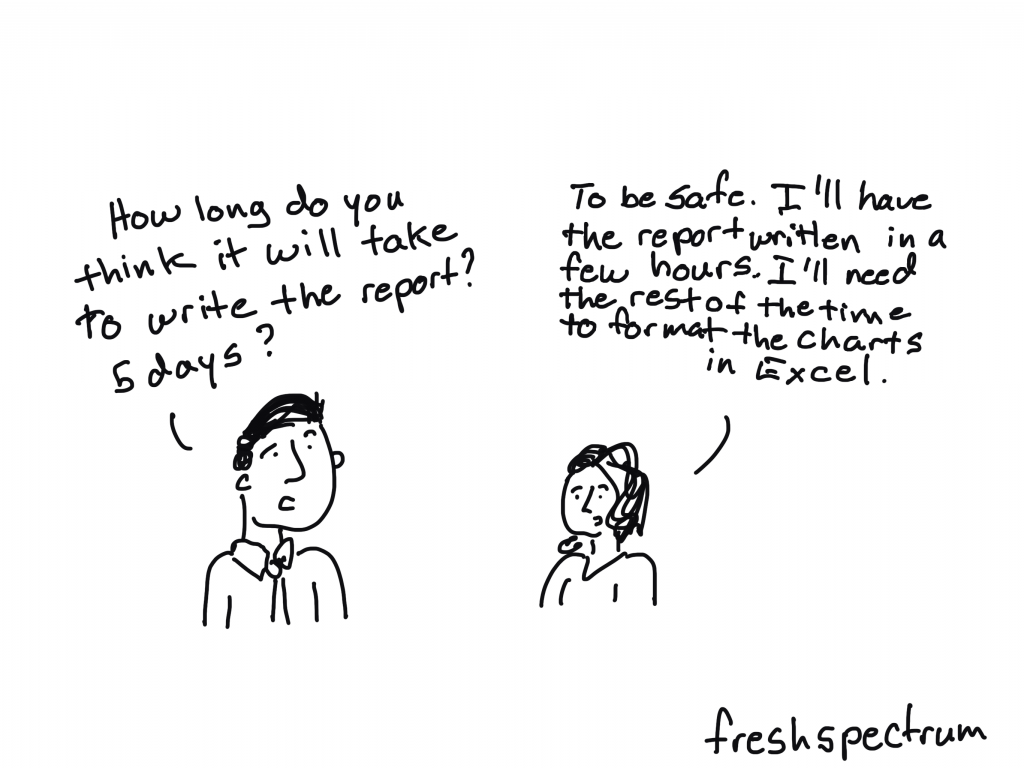
freshspectrum cartoon by Chris Lysy.  "How long do you think it will take to write the report? 5 days?"
"To be safe. I'll have the report written in a few hours. I'll need the rest of the time to format the charts in Excel."

Lucky for us though, just because we created our chart in Excel, doesn’t mean we have to stay there to format the thing.

Believe it or not, Excel is a vector design tool. And even though it’s hard to take advantage of that while using Excel (stupid textboxes won’t go where I want them to go!!!!!) we can take control by sending our chart outside of Microsoft.

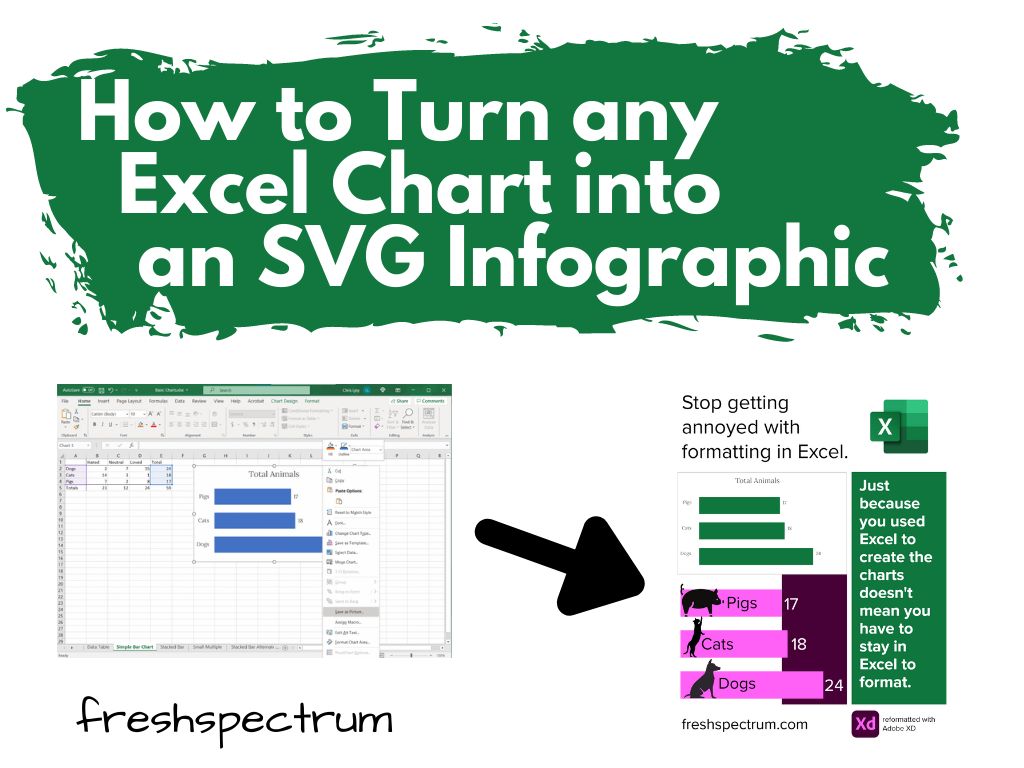
How to turn any Excel Chart into an SVG infographic.

Start with a Chart in Excel

So let’s start with a chart in Excel.

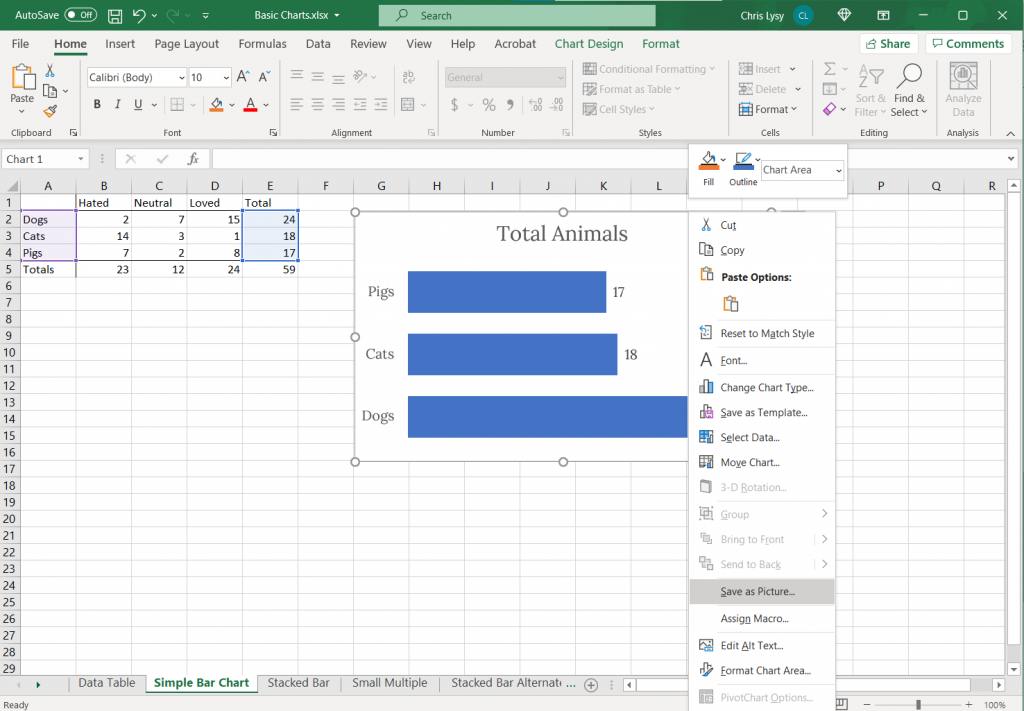
Just right click on the chart you want to format and click on “Save as Picture…”

Screenshot. Clicking on a chart in Excel and saving as a picture.

Export as Scalable Vector Graphics (A.K.A. an SVG)

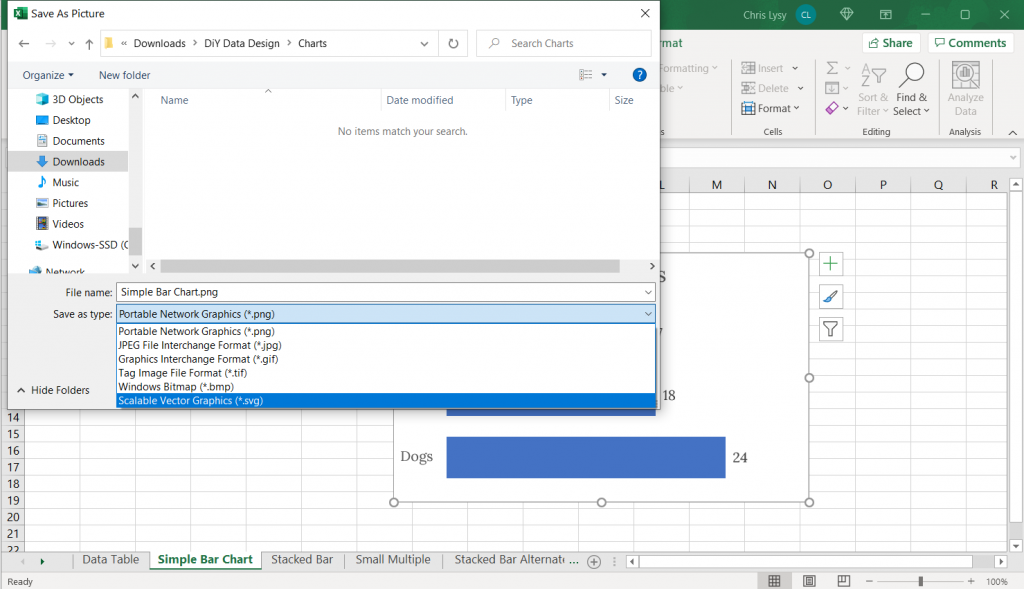
Now when we save it we want to save it as a vector format (or else this won’t work). With my PC Office 365 version of Excel I’m given 6 options.

Of the 6, five are pixel based (aka raster)…PNG, JPG, GIF, TIF, BMP.

But number 6 is the trusty Scalable Vector Graphics format…SVG. This is our vector file format.

Screenshot, saving an Excel chart as an SVG.

Open your SVG in a graphics program.

Now that we’ve saved our SVG somewhere on our computer (or somewhere else) we need a program that works with SVGs.

Luckily there are bunch that fit the bill. Here are three big ones.

  • Adobe Illustrator (ye olde graphic design industry standard that requires a pro creative cloud account)
  • Figma (new fangled UI design tool that is both a pro tool and FREE to use)
  • Adobe XD (also a new fangled UI design tool that is both a pro tool and FREE to use by the same people who brought you ye olde graphic design industry standard Adobe Illustrator)

Any of these three will let you pick apart and redesign this chart. If you are not an Adobe CC person already, I would suggest starting with either Figma or Adobe XD.

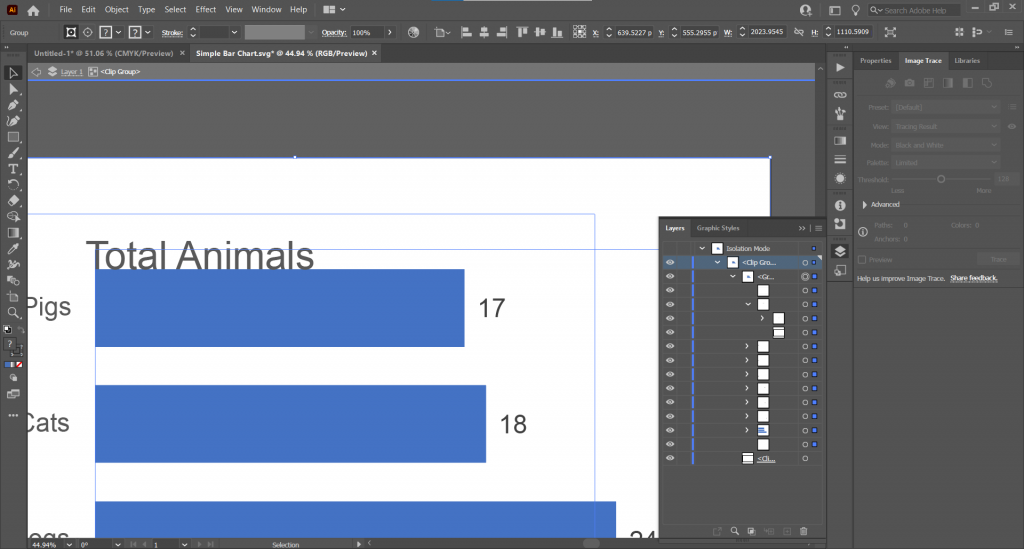
Here is what the Excel Chart looks like in Adobe Illustrator

Screenshot of Adobe Illustrator with an SVG Excel chart.

See that over there on the right side? That’s a layers panel.

Every single element in an Excel chart can be isolated and changed through the SVG. You’re also going to find a bunch of empty rectangles that can be deleted away if they get in your way.

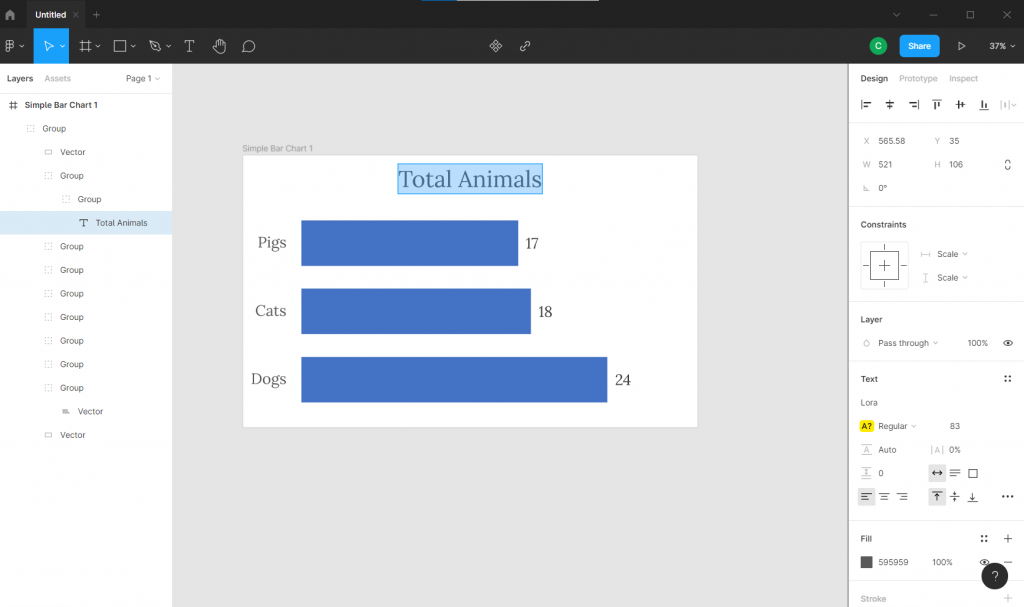
Here is what the Excel Chart looks like in Figma

Here we are in Figma with the layers on the left.

Screenshot of Figma with an SVG Excel chart.

Here is what the Excel Chart looks like in Adobe XD

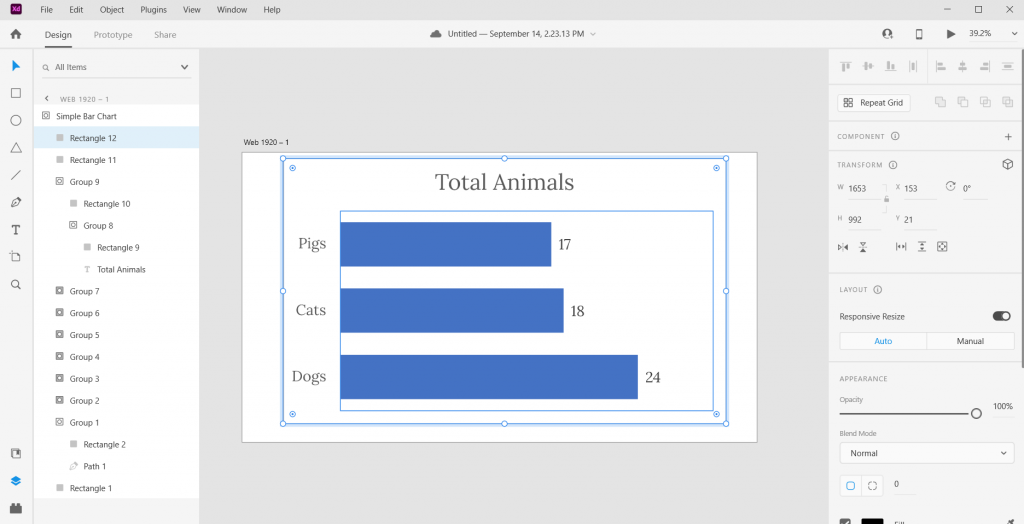
And here we are in Adobe XD. Looks pretty similar to Figma, doesn’t it?

(See also sketchapp).

Screenshot of Adobe XD with an SVG Excel chart.

Pick it apart and rearrange to your heart’s content.

Ultimately the bar graph is just a single vector path buried within one of the groups. We can stretch it or recolor. As long as you keep the main chart pieces together, the graph will remain in the right proportion.

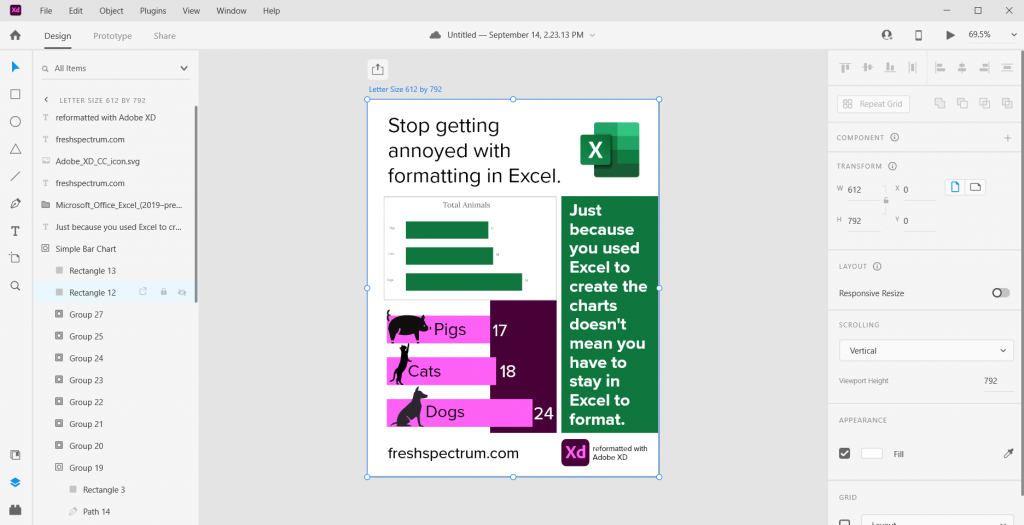
Screenshot of an infographic created from an Excel chart.

The best part about using a tool like this? We have total control over what goes where. And we can shift elements pixel by pixel.

Freshspectrum Infographic 
-Stop getting annoyed with formatting in Excel. 
-Just because you used Excel to create the charts doesn't mean you have to stay in Excel to format.
-Two charts, one generic Excel chart and the other an updated version created with Adobe XD
Started with a fake chart, ended with a random infographic.

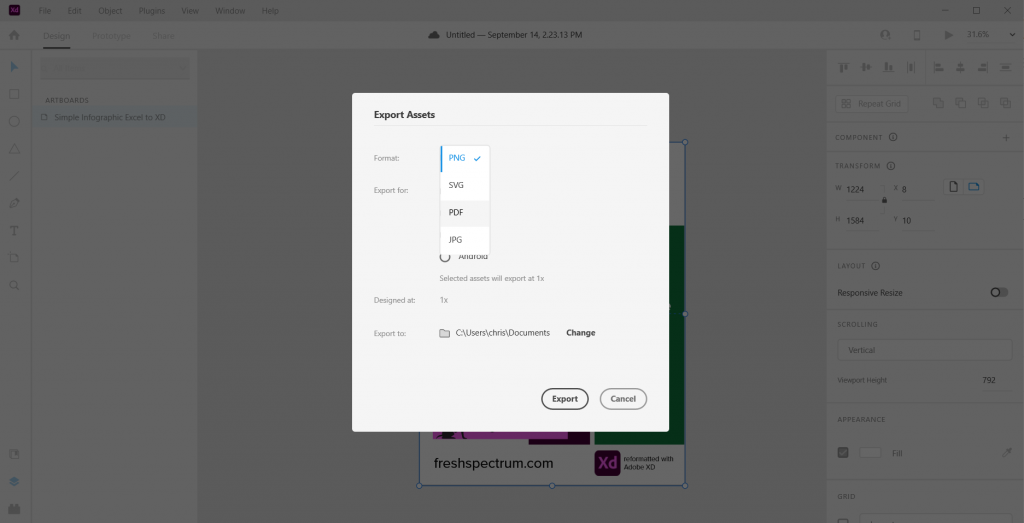
Bonus. Want to save your new infographic as a PDF?

No problem.

Screenshot of Adobe XD, exporting an infographic as a PDF.

Written by cplysy · Categorized: freshspectrum

Sep 14 2021

El arte o la industria de la evaluación

hotbook-94

La evaluación ha sido y, en algunos rincones todavía es, un arte confeccionado por artesan@s, a veces considerados charlatanes, voceras, parlanchines, vende pociones, lenguaraces, bocazas pero, otras veces, sin embargo, apreciad@s y honrad@s como magos, brujos, hechiceros, prestidigitadores, nigromantes, médiums (objetivos evaluativos ocultos), faquires (sí también porque tragan con todo), taumaturgos, prestidigitadores (más de veinte preguntas), ilusionistas (especialmente los que dan alguna recomendación que ya no se sepa)

Y como con l@s mag@s, l@s había, y los hay, buen@s y no tan buen@s. Para bien y para mal este arte arcano poco a poco se va abriendo y extendiendo: es bueno que cada vez se evalúa más (aunque sea en número). A paso de “enefante” (palabra que viene de “mitad elefante mitad enano o enana”) se está asentando una carrera profesional. Se está creando una retórica de la evaluación, de lo que hay que hacer “porque está bien” (sí, todavía estamos explicando por qué hay que evaluar, en lugar de evaluar). Pero aunque falte todavía andar casi todo lo hablado (walk the talk), lo positivo es que estamos en camino. Y me pregunto si al mismo tiempo también corre el riesgo de transformarse en un proceso industrial, como el famoso marco lógico de corta y pega que tantos escribimos para los donantes en la soledad (solitario), en lugar de como procesos de aprendizaje y construcción participativa. El problema no son las herramientas, sino el uso que hacemos de ellas, su verdadero propósito. Y al cabo, como todo lo que se extiende y se populariza, se convierte en un negocio (más)…y con los negocios todo es posible (para bien y para mal)

Habiendo estado en países sin industria y sin acceso a bienes básicos, no digo que el desarrollo industrial sea malo, sino que este nuevo escenario tiene pros y contras. Quizás en el futuro el reto sea que el campo de la evaluación conserve el corazón (y el arte), ponga en valor la participación, al tiempo que vaya ganando en cobertura y sofisticación (e inflando más si cabe la burocrática retórica).

Written by cplysy · Categorized: TripleAD

Sep 14 2021

Creating a Community through Graphs

Maddison Staszkiewicz is a Depict Data Studio student and evaluator. She was part of the 2020 Great Graphs: Excel How-To’s cohort and is sharing her experiences with us. Thanks Maddison! –Ann

—–

I was ecstatic to register for the Great Graphs: Excel How-To’s course and transform my graphs using Excel instead of online data visualization software. I already had Excel, my data was there, and it did not make sense to use another platform to make the graphs I needed.

I had tried other options before, and it was always clunky because instead of focusing on the data and the message I was trying to show, I was inevitably focusing on the different software programs and how they would interact.

Tips, Tricks and Community

Through the Great Graphs: Excel How-To’s course, I learned more tips and tricks than I ever expected. But the most impactful, yet unexpected, outcome was joining a community and making connections with others that were also along their own journey of improving their graphs as a way of sharing messages and insights through data.

Throughout the course, I was exposed to new ways of thinking about graphs, Excel, and how data visualization can be used in the workplace to guide more data-informed decisions.

Now, I look at data visualization differently.

When I see data visualization in the newspaper or on social media, I think about what it was trying to show and whether it was successful. This critical eye helped me be a better peer and colleague when seeking to get the message across from my own data and in collaborating with others.

As we started the course, I got to know my peers also in the course.

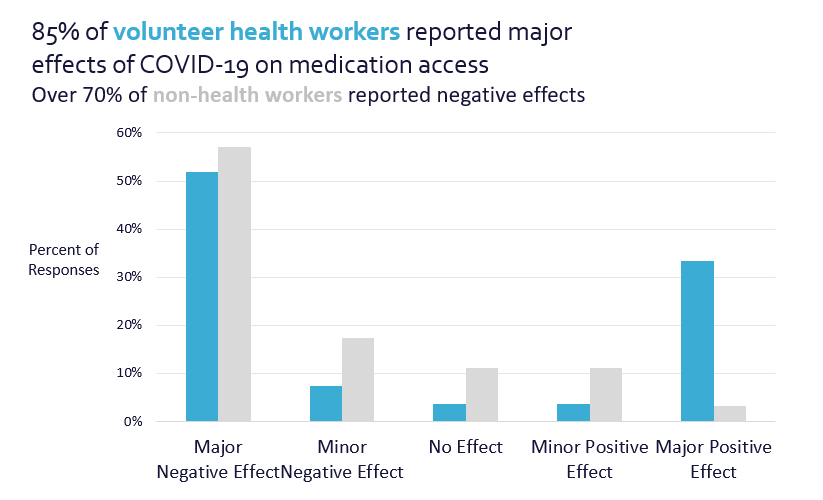
When I was working on producing graphs for a blog based on my graduate work in evaluation surrounding the perceived effects of medication access from COVID-19, we reviewed and workshopped them together with live feedback in an office hour session.

Because of the varied backgrounds of those in the course, I was thinking about my work in a completely new and improved way. I started experimenting with graph types I had not used before, with some having greater success than others.

Before: Audience Left with Questions

My original graph applied many of the lessons we had covered – I used my color palette, I had storytelling titles, but there was room for improvement.

There was much left up for the audience to discern when reviewing the graph – was the 85% or 70% most important? Why were different values mentioned in the heading?

The before graph had a branded color palette and storytelling titles but still left the intended audience with questions.

Live Editing During Office Hours

During the office hours, we mocked up what the graphs could look like and ultimately edited them to produce higher quality, easier to understand visuals. We took the original column charts and turned them into 100% stacked bar charts.

During a live Office Hours sessions, students work with Ann K. Emery to mock up what graphs could look like trying out different styles and techniques.

After: Clear Focus

Focusing on the major effects (both positive and negative) also provided a stronger narrative instead of hoping the audience would understand the message.

 Highlighting the ends of the bars gave not only visual focus, but a clear visual.

The after graph was a stacked bar chart that gave visual focus for the intended audience.

The final product was influenced by the feedback I received throughout the course. Getting feedback from the group changed the style of the graphs, colors, way I utilized text, and I was even encouraged to turn the graphs into a GIF for better online engagement.

Shared Learning is the Best Learning

As much as I looked forward to continuing the lessons, I was excited for the live office hour sessions when I would get to hear from someone else in the field and learn how they might use a graph style as well as how they did it.

Questions and discussions sparked thinking and problem solving about my data visualization in new ways, past the technical work in Excel.

As the course continued, my skills improved, and so did my connections with my peers. We connected on LinkedIn and offline to get to know more about each other’s work – similarities and differences abounded.

I found a great benefit in this as there was so much knowledge to be shared, wherever we were along our data visualization or professional journey. As a new evaluator, learning what others found to be successful also helped me in thinking about what I could apply to my own work.

The supportive community that was built goes beyond the technical skills we learned throughout the course, as I know I have a wider network to connect with for questions, feedback, and advice long after the course ended.

Connect with Maddison

LinkedIn: @maddison-staszkiewicz

Website: www.maddisonstasz.com

Written by cplysy · Categorized: depictdatastudio

  • « Go to Previous Page
  • Go to page 1
  • Interim pages omitted …
  • Go to page 163
  • Go to page 164
  • Go to page 165
  • Go to page 166
  • Go to page 167
  • Interim pages omitted …
  • Go to page 310
  • Go to Next Page »

Footer

Follow our Work

The easiest way to stay connected to our work is to join our newsletter. You’ll get updates on projects, learn about new events, and hear stories from those evaluators whom the field continues to actively exclude and erase.

Get Updates

Want to take further action or join a pod? Click here to learn more.

Copyright © 2026 · The May 13 Group · Log in

en English
af Afrikaanssq Shqipam አማርኛar العربيةhy Հայերենaz Azərbaycan dilieu Euskarabe Беларуская моваbn বাংলাbs Bosanskibg Българскиca Catalàceb Cebuanony Chichewazh-CN 简体中文zh-TW 繁體中文co Corsuhr Hrvatskics Čeština‎da Dansknl Nederlandsen Englisheo Esperantoet Eestitl Filipinofi Suomifr Françaisfy Fryskgl Galegoka ქართულიde Deutschel Ελληνικάgu ગુજરાતીht Kreyol ayisyenha Harshen Hausahaw Ōlelo Hawaiʻiiw עִבְרִיתhi हिन्दीhmn Hmonghu Magyaris Íslenskaig Igboid Bahasa Indonesiaga Gaeilgeit Italianoja 日本語jw Basa Jawakn ಕನ್ನಡkk Қазақ тіліkm ភាសាខ្មែរko 한국어ku كوردی‎ky Кыргызчаlo ພາສາລາວla Latinlv Latviešu valodalt Lietuvių kalbalb Lëtzebuergeschmk Македонски јазикmg Malagasyms Bahasa Melayuml മലയാളംmt Maltesemi Te Reo Māorimr मराठीmn Монголmy ဗမာစာne नेपालीno Norsk bokmålps پښتوfa فارسیpl Polskipt Portuguêspa ਪੰਜਾਬੀro Românăru Русскийsm Samoangd Gàidhligsr Српски језикst Sesothosn Shonasd سنڌيsi සිංහලsk Slovenčinasl Slovenščinaso Afsoomaalies Españolsu Basa Sundasw Kiswahilisv Svenskatg Тоҷикӣta தமிழ்te తెలుగుth ไทยtr Türkçeuk Українськаur اردوuz O‘zbekchavi Tiếng Việtcy Cymraegxh isiXhosayi יידישyo Yorùbázu Zulu