• Skip to main content
  • Skip to footer
  • Home

The May 13 Group

the next day for evaluation

  • Get Involved
  • Our Work
  • About Us
You are here: Home / Archives for allblogs

allblogs

Jul 20 2021

The Inside Scoop on Excel with Bill Jelen (Mr. Excel)

I recently had the honor of speaking with Bill Jelen, a.k.a. Mr. Excel. He was a guest speaker inside our data analysis course, Simple Spreadsheets. He’s a big, big deal in the Excel community! I’ve internet-stalked him for years on his website and his popular YouTube channel. Frankly, I’m still shocked he agreed to come speak with us. 

Watch Our Conversation Here 

What’s Inside 

Here are some of the topics we talked about. 

  • Bill’s background. Bill’s a self-proclaimed “Excel geek” who’s written over 61 books and has more than 2,300 YouTube videos on his popular channel. He’s been an Excel consultant for 30 years and used to speak at more than 35 conferences a year. Though he doesn’t travel outside of Florida as much anymore, he admitted that he loves helping people problem-solve and that “nothing brightens my day more than a good Excel problem.” 
  • Bill’s first spreadsheet experience. Bill shared that his first time with a spreadsheet of any sort was in 1984 while he worked for a company that sold computer software. He also used Lotus 123 until the mid-1990’s when the company he worked for switched to Excel.  
  • His favorite Excel feature. His favorite Excel feature is to double-click the fill handle to avoid having to drag it. He said that when loves hearing people’s surprise when he shares this trick at conferences.  
  • His thoughts on Excel Tables. Bill hates Excel Tables because they turn off features that he uses all of the time like subtotals and custom views. He also dislikes that you can’t copy two sheets from one workbook to another.  
  • His least favorite Excel features. He said that he’s “convinced in Excel 2007 the icons for rows and the icon for columns were reversed.” He said it shows the wrong area where the data is going to be dropped and that it’s really frustrating, especially when teaching someone else how to do pivot tables. He also said while he loves the text join function, he hopes they’ll add the reverse: text split.  
  • How many of the more than 480+ Excel functions he uses (less than you think!). Bill said, “I know them all, but how many do I use? Very few. I probably use 20 on an ongoing basis.” He said that he’s written books where he wrote about every single function and admitted that some threw even him for a loop, like the square root of PI.  
  • How to use text join. At around the 18-minute mark of the video, Bill shares his screen and demonstrates text join in Excel along with other tricks and best practices.  
  • Audience Q&A. At around the 26-minute mark, audience Q&A begins where Bill answers questions.  
  • AutoFilter. Bill said he feels AutoFilter is a hidden gem of Excel and that he “can’t use Excel without this feature.”  
  • Excel features Bill says to skip. Bill said you can skip using the action pen, which allows you to draw the numbers instead of using the keyboard you already have. He’s also not a fan of the Excel app feature that allows you to take a picture of a piece of paper and then it turns that into a table. He said there are too many variables (for example, if your paper isn’t exactly square or has been folded) and that you’re better off starting from scratch.  
  • Features he hopes to see in the future. Bill said that he “has a whole bunch of things” he’d like to see. He said that he lobbied for six years for Microsoft to customize pivot table defaults.  He hopes to see help functions for Lambda in the future and has some ideas of how to make power query better.  
  • His latest book. Bill’s latest book is MrExcel 2021: Unmasking Excel, which is an updated version of MrExcel XL. Updates for 2021 include: LAMBDA, LET, Power Query Fuzzy Match, Sort & Filter in Sheet View, Cut-out people, Save object as image, STOCKHISTORY, Wolfram Alpha Data Types, Custom Data Types from Power Query, Weather data types, bilingual spreadsheets, Performance improvements, Unhide multiple worksheets, Action pen, Collapsible task panes, LET function to re-use calculations, store formulas using LAMBDA, Recursive LAMBDA, Branching LAMBDA, Lambda to return a picture, Excel function quick reference. Click here to learn more: https://www.mrexcel.com/products/mrexcel-2021-unmasking-excel/. 

Connect with Bill 

Website: https://www.mrexcel.com 

YouTube: https://www.youtube.com/c/MrExcelcom  
Written by cplysy · Categorized: depictdatastudio

Jul 19 2021

UX Evaluation: How to Evaluate Dashboards, Reports, and Data Visualization

Is your data dashboard useful? How do you know?

Most of the time it’s a question that gets left unanswered. As if the dashboard getting created is enough, and whether or not it works is really not that important.

Perhaps it’s the data idealist in me, but I think we can do better.

  • TLDR: I created a free UX Evaluation eBook – you can download it here.
UX Evaluation: How to Evaluate Dashboards, Reports, and Data Visualization.  eBook by Chris Lysy of freshspectrum.com

The “How to Evaluate a Dashboard” Question

Up until recently I’ve seen very few organizations really putting any time or effort into evaluating their data products. A dashboard or report is something that often comes at the end of a project. And by that time, everyone is already moving on to the next thing.

That’s starting to change at least. When an organization has had a dashboard live for a few years, or they start building more and more dashboards, that nagging “usefulness” question starts to become more prominent. Especially if a good amount of work is put into to maintaining/updating the tool.

So how do you evaluate a data dashboard?

Freshspectrum cartoon by Chris Lysy.
"Why is the speedometer stuck on 35?"
"The car only collects speed data once a year."

The Problem with Defaulting to a Survey

The knee jerk response from a lot of evaluators is to send out a survey.

And yes, this will give you some insight if you’re good at writing surveys and know how to get a good response rate. But a survey also has some major drawbacks.

  • You don’t want to survey too often, so it’s hard to use in support of new tool development.
  • Even with a well developed survey, you don’t get the depth of information you can with qualitative methods.
  • Lots of user experience issues can be found through just a few tests. So a survey can be overkill.
  • And surveys can be a lot of work. At least if you do it right.

Plus, I think there is a better method.

Freshspectrum cartoon by Chris Lysy.
More Data, Shorter Reports, More Wasted Data.

The Limitations of a Checklist

So another thing to mention would be the checklist approach.

For instance, there is this data visualization checklist designed by Ann K Emery and Stephanie Evergreen.

Now let me go on record to say that it is a good idea to run through a checklist like this one. It can help guide you towards better visualization practice. And that’s a good thing.

But ultimately it’s insufficient.

One of the things I teach a lot in my workshops is that a bad chart with the right data is more useful than an amazing chart with the wrong data.

Checklists can help you towards creating better quality products. But that doesn’t mean the products will be more useful.

Freshspectrum cartoon by Chris Lysy.
"Those are good numbers. Don't just throw them away."

What is UX Evaluation?

UX Evaluation is how I refer to the use of user experience design methods for the purpose of evaluating the usefulness of products or programs.

While UX Design is completed during the development process, UX Evaluation can occur before or after a product has been completed. Insights can inform future iterations or entirely new designs.

Long story short, it’s a qualitative approach that I have found to be really useful for evaluating things like data dashboards, reports, and other data products.

Freshspectrum cartoon by Chris Lysy. "This dashboard is a solid first step. Can the project team suggest a few tweaks?"
"No, we could barely afford the initial development."

UX Evaluation: How to Evaluate Dashboards, Reports, and Data Visualization

Want to know how I would approach UX evaluation for a data dashboard, report, or other type of data visualization product? I wrote up my method in a free eBook you can download.

Download the ebook

Written by cplysy · Categorized: freshspectrum

Jul 16 2021

Innovation Case Studies

If you’ve ever taught a course on an applied subject matter you’ve probably considered introducing case studies.

Case studies are systematic accounts of an activity and aim to provide evidence to illustrate or support an example of something. This might be to show a problem-solving approach, an introduction of a new technology, or demonstrate a particular implementation success or failure.

The case study approach is a core of what Harvard Business School uses and has been replicated in the Harvard Business Review and many other business journals. Harvard even has a structured method that has been adopted by business schools (and other faculties) worldwide.

Case studies are meant to provide us with guides based on practice to help us think through things, follow, or avoid. While this might be true in the abstract, our experience is that they are far better at stimulating discussion in class settings, but lousy at providing innovators with real guidance on what to do.

Partly, this has to do with the stories that are told and partly it’s because of the questions that are asked of the case examples themselves.

A New Case Study Approach

There is another way to approach case studies for innovation.

Innovation is always context-dependent. Complex contexts are those where there is a lot going on at multiple scales, intensities, and connect many different entities like people, organizations and networks. Increasingly, this is what describes the context in which innovators work.

This represents many if not most markets, public policy landscapes, schools, and care institutions today. If you’re involving humans, you’re involving complexity. This requires an approach to understanding and making sense of what happens that accounts for complexity. Consider the Cynefin Framework as a guide in assessment of what kind of situation you’re in.

So it makes sense that case studies — which are designed to take lessons from one context to apply broadly — reflect lessons tied to what’s special about a specific context and not try to reflect too many others.

By understanding what’s special we can better understand what’s general by allowing us to recognize the patterns that make something different and common not one or the other. It sounds simple, but it’s actually something that is lost in the current case study method.

We offer some questions to consider when you look at any case study — including the ones that you write for yourself – to better get value from an case to apply to your own situation. These questions can help you to get to a sense of where an innovation sits within a system and what barriers and facilitators were in place to shape the context, the actors, and the situations that define a case (and are often neglected).

Questions for Cases

For the sake of brevity the term innovator is used to reflect an individual, group, or organization who undertake the design, creation, implementation and ownership of the innovation — which can be a product, service, or policy.

  1. What kind of relationships or ecosystem is the organization/innovator a part of? (Innovation doesn’t exist in a vaccuum — it’s critical to understand what influences were available to shape the culture of innovation creation)
  2. How were these relationships leveraged, connected, or served in the development or execution of the innovation? (Innovations are a culmination of relationships in their creation, growth, and realization into a market to different extents, but never without them so they ought not be ignored).
  3. How was the innovation implemented? (This helps us understand the viable actions that were taken and how much was dependent on other things, what role happenstance (luck) played, and what degree the plan met reality)
  4. How much risk did the innovator assume? (This allows us to gauge how much motivation, fear, and pressure the innovator was under)
  5. What was going on in the immediate environment during the development and implementation of the innovation? (This reflects situational, policy, climate, and local contexts)
  6. What learning processes were put in place? (This speaks to the matter of sustainability and determines if this is likely to be a one-off or something that might be sustained)
  7. What outputs, outcomes, and impact was achieved? (Did the innovators capture what was produced and what effect it had on the world around the innovation, not just whether it was sold or bought)
  8. What evolved? (Scale isn’t about just ‘more’, but whether it evolves to meet the needs)
  9. What is the fit and the purpose? (Innovation is all about fit for purpose and these need to be articulated to assess whether or where it fits and what the purpose(s) are)
  10. Is there a ratchet? (A ratchet is something that gains leverage the more it’s used. Is there something that allows the lessons of the innovation development or the innovation itself to take something — the organization, people, or product/service/policy further with leverage?)

Try asking these of any case study and you might find what’s missing and what you can ask of your own work to learn more, do more, and innovate better. Case studies often reflect ‘one-off’ events that are highly constrained and not always transferable in what can be learned and applied. By asking these questions you might find answers that can help you make more from your own situation.

If you want help asking and answering these, contact us and we’d be happy to help you.

The post Innovation Case Studies appeared first on Cense.

Written by cplysy · Categorized: cameronnorman

Jul 16 2021

Reframing data analysis as meaning-making

Reframing data analysis as meaning-making

This summer on the Engage with Data blog, I’m exploring different ways to answer the question: “So what?” 

My goal is to remind us of the human element of data — we are in the field of student and family engagement, after all! 

But I do get it – data analysis can be a pretty technical and sometimes overwhelming to educators who haven’t been formally trained in using it.

I want to help you see that 1) technical doesn’t have to be scary, and 2) even if you hated your stats in college, you can be successful in collecting, analyzing, and using data to guide your work with kids and families. 

So let’s remind ourselves about WHY we ultimately use data. 

It’s not to simply check a box or satisfy some compliance measure. 

We really use data to: 

  – understand the needs of the people we serve and how well we are or aren’t meeting them. 

 – make meaning of the experiences our colleagues and stakeholders are having and to find ways to make those experiences even better for all involved. 

 – discern our impact on the people and communities we truly care about. 

When you get overwhelmed by those report requests or compliance measures, I challenge you to think about each row in your spreadsheet as the child, family, teacher, or classroom it represents. What does this collection of numbers tell us about them?

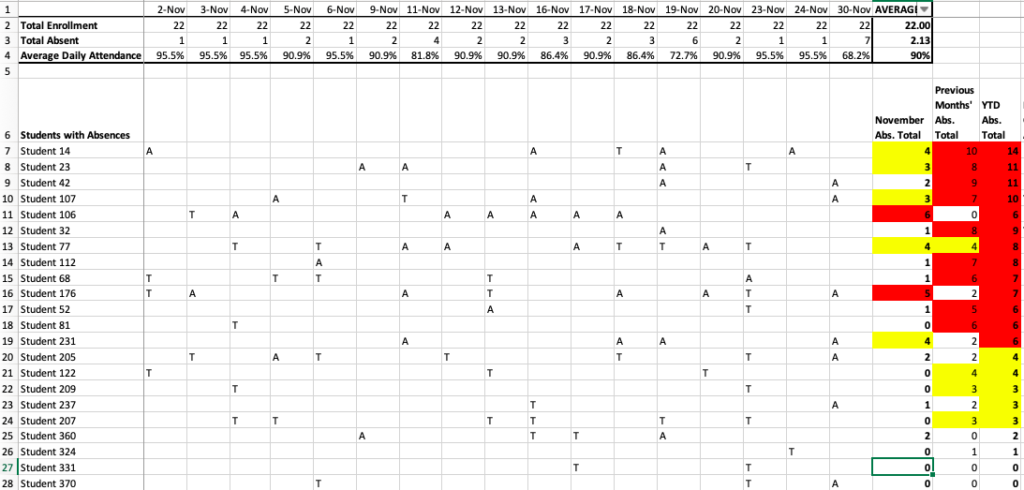
Let’s look at some sample data to practice finding meaning in it. Take a look at the attendance data for the fictional Ms. Hoffman’s first-grade class below. 


Screenshot of attendance tracker spreadsheet

At first glance, the conditional formatting that I used shows me that there are quite a few students who have missed more than five days by November of this school year — a warning that I need to do some kind of attendance intervention, like a letter, phone call or meeting. 

We can also start to think about what might be happening in Ms. Hoffman’s class — are the students excited about learning? Do they feel safe there? Is she engaging their families regularly?

We can also consider what outside influences may impact this particular group of students — did they struggle with attendance in previous years? Are there other barriers, such as transportation or having enough school uniforms, that might get in the way of them getting to school? 

Now let’s go a little deeper.

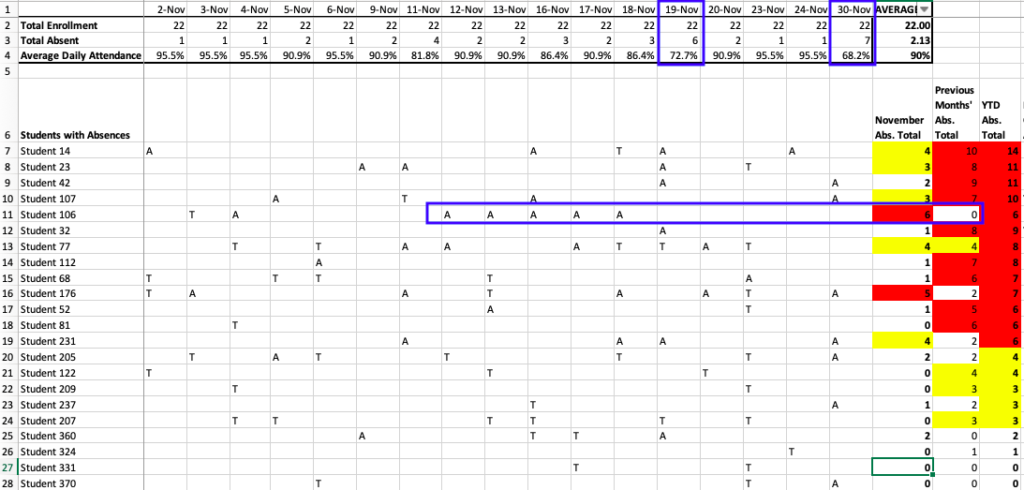
Screenshot of attendance tracker with patterns highlighted

We can look at both the individual and class levels to try to figure out what’s happening with the attendance in Ms. Hoffman’s class and what to do about it.

First, take a look at the student record in the blue box above.

This student hadn’t missed a single day of school in previous months and then missed five in a row!

(Hopefully the student is just on a pre-Thanksgiving vacation, but we certainly want to know if there’s something more concerning or preventable going on.)

Looking at student-level patterns can show us that something is clearly going on here that we need to learn more about through authentic family engagement. 

We can also look at anomalies — in this case, the days in which the class average daily attendance is way below the monthly average. 

Look at the two dates highlighted in the blue boxes. These attendance averages clearly stand out from the other days’ averages and have brought the monthly average down. 

It might take some investigating to figure out why attendance was so low those days – did it rain or snow? Was there an early release day? The 30th may even have been the day after Thanksgiving break when families are still traveling. 

Noting these anomalies helps us see things that our averages and totals don’t tell us and help us troubleshoot how to prevent similar trends in the future. 

By thinking about the human aspects of our data — what is happening to the people those spreadsheet rows represent — we can start to make meaning of the data we collect and position ourselves to positively impact their experiences and lives.

Written by cplysy · Categorized: engagewithdata

Jul 15 2021

Putting Equity in the RFP Process

When I first started doing client work, I responded to a lot of Requests for Proposals (RFPs), spending hours a day on the process (or on the weekends when I was working a 9-to-5.) At some point, I asked myself, “Is this really what I’ll have to do to get clients?” More importantly, “Is this […]

The post Putting Equity in the RFP Process appeared first on Nicole Clark Consulting.

Written by cplysy · Categorized: nicoleclark

  • « Go to Previous Page
  • Go to page 1
  • Interim pages omitted …
  • Go to page 173
  • Go to page 174
  • Go to page 175
  • Go to page 176
  • Go to page 177
  • Interim pages omitted …
  • Go to page 310
  • Go to Next Page »

Footer

Follow our Work

The easiest way to stay connected to our work is to join our newsletter. You’ll get updates on projects, learn about new events, and hear stories from those evaluators whom the field continues to actively exclude and erase.

Get Updates

Want to take further action or join a pod? Click here to learn more.

Copyright © 2026 · The May 13 Group · Log in

en English
af Afrikaanssq Shqipam አማርኛar العربيةhy Հայերենaz Azərbaycan dilieu Euskarabe Беларуская моваbn বাংলাbs Bosanskibg Българскиca Catalàceb Cebuanony Chichewazh-CN 简体中文zh-TW 繁體中文co Corsuhr Hrvatskics Čeština‎da Dansknl Nederlandsen Englisheo Esperantoet Eestitl Filipinofi Suomifr Françaisfy Fryskgl Galegoka ქართულიde Deutschel Ελληνικάgu ગુજરાતીht Kreyol ayisyenha Harshen Hausahaw Ōlelo Hawaiʻiiw עִבְרִיתhi हिन्दीhmn Hmonghu Magyaris Íslenskaig Igboid Bahasa Indonesiaga Gaeilgeit Italianoja 日本語jw Basa Jawakn ಕನ್ನಡkk Қазақ тіліkm ភាសាខ្មែរko 한국어ku كوردی‎ky Кыргызчаlo ພາສາລາວla Latinlv Latviešu valodalt Lietuvių kalbalb Lëtzebuergeschmk Македонски јазикmg Malagasyms Bahasa Melayuml മലയാളംmt Maltesemi Te Reo Māorimr मराठीmn Монголmy ဗမာစာne नेपालीno Norsk bokmålps پښتوfa فارسیpl Polskipt Portuguêspa ਪੰਜਾਬੀro Românăru Русскийsm Samoangd Gàidhligsr Српски језикst Sesothosn Shonasd سنڌيsi සිංහලsk Slovenčinasl Slovenščinaso Afsoomaalies Españolsu Basa Sundasw Kiswahilisv Svenskatg Тоҷикӣta தமிழ்te తెలుగుth ไทยtr Türkçeuk Українськаur اردوuz O‘zbekchavi Tiếng Việtcy Cymraegxh isiXhosayi יידישyo Yorùbázu Zulu