• Skip to main content
  • Skip to footer
  • Home

The May 13 Group

the next day for evaluation

  • Get Involved
  • Our Work
  • About Us
You are here: Home / Archives for allblogs / depictdatastudio

depictdatastudio

May 17 2024

How to Make Interactive Dashboards in Excel (30-Min Demo & Files to Download)

Did you miss my Good Tech Fest conference session?

Catch the replay here!

Materials

Follow along with the spreadsheet: https://depictdatastudio.gumroad.com/…

You’ll have to watch the video to get the coupon code. 🙂

There are codes available for the first 500 people.

Chapters

0:00 Intro

1:14 The 4 Steps

4:28 (1) Excel Table

12:36 (2) Pivot Tables

18:14 (3) Pivot Charts

20:47 (4) Slicer(s)

24:33 A Gift for You

25:55 Q&A
Written by cplysy · Categorized: depictdatastudio

May 13 2024

How to Copy/Paste Graphs from Excel into Word or PowerPoint

You’ve got two options.

(Well, if you like to split hairs, there are more options than that. But what if you’re busy and don’t have time to lose? Here are the main copying/pasting options worth paying attention to.)

Option 1: Excel Object

a.k.a. Ann K. Emery’s preferred approach

Instructions

  1. In Excel, create your graph.
  2. In Excel, format your graph. (Declutter; apply brand colors and dark-light contrast; delete the built-in title; re-size the font and graph; etc.)
  3. In Excel, make sure your Theme Colors and Theme Fonts are selected.
  4. In Word or PowerPoint, make sure your Theme Colors and Theme Fonts are selected.
  5. In Excel, copy your chart (CTRL + C, or right-click and select copy).
  6. In Word or PowerPoint, click CTRL + V to paste.
  7. In Word or PowerPoint, add your graph title.

Branding

Colors and fonts will match the destination.

Editing

You can edit the chart in Word/PowerPoint later if needed.

(You can change the colors, size, labels, etc.)

Resolution

Higher.

File Size

Higher.

Linking

You can link your Word/PowerPoint graph back to the Excel file. (Beware! Errors likely!)

Option 2: Image File

Not a fan.

Instructions

  1. In Excel, create your graph.
  2. In Excel, format your graph. (Declutter; apply brand colors and dark-light contrast; delete the built-in title; re-size the font and graph; etc.)
  3. In Excel, make sure your Theme Colors and Theme Fonts are selected.
  4. In Word or PowerPoint, make sure your Theme Colors and Theme Fonts are selected.
  5. In Excel, copy your chart (CTRL + C, or rightclick and select copy).
  6. In Word or PowerPoint, right-click, select paste, and choose the image option.
  7. In Word or PowerPoint, add your graph title.

Branding

Colors and fonts will match the source.

Editing

You can’t edit the chart in Word/PowerPoint later.

(You’d need to edit the chart in Excel, and then re-paste the graph into Word/PowerPoint.)

Resolution

Lower.

File Size

Lower.

Linking

You can’t link your Word/PowerPoint graph back to the Excel file.

(In other words, if you change the graph in Excel, then the image file in Word or PowerPoint won’t look any different.)

Purchase the Cheat Sheet

It’s here: https://depictdatastudio.gumroad.com/l/CopyPasteGraphsFromExcelIntoWordOrPowerPoint

The first 100 people get a complimentary download with code NOMOREGRAINYSCREENSHOTS.

Written by cplysy · Categorized: depictdatastudio

Feb 12 2024

How to Visualize Population Projections with Small Multiples Population Pyramids

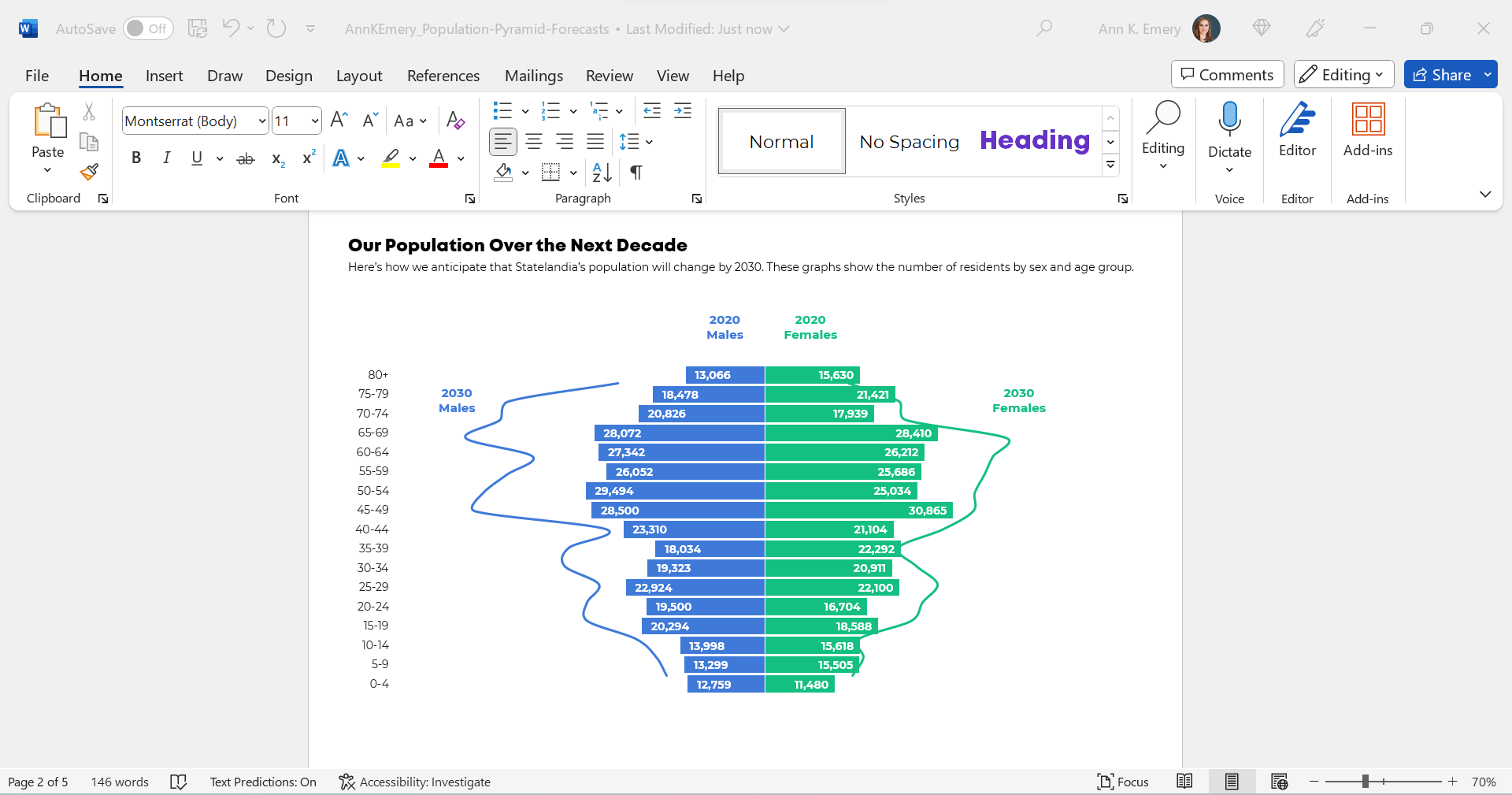
A few months ago, one of my favorite students brought this graph to Office Hours:

(These aren’t the exact numbers, age ranges, or years. But you get the idea.)

She already knew how to make population pyramids in Excel. Population pyramids require Level 4 vizardy skills. Woohoo!

But she wanted to take the population pyramid a step further, and she wanted to show how the population might change over time, especially for older adults.

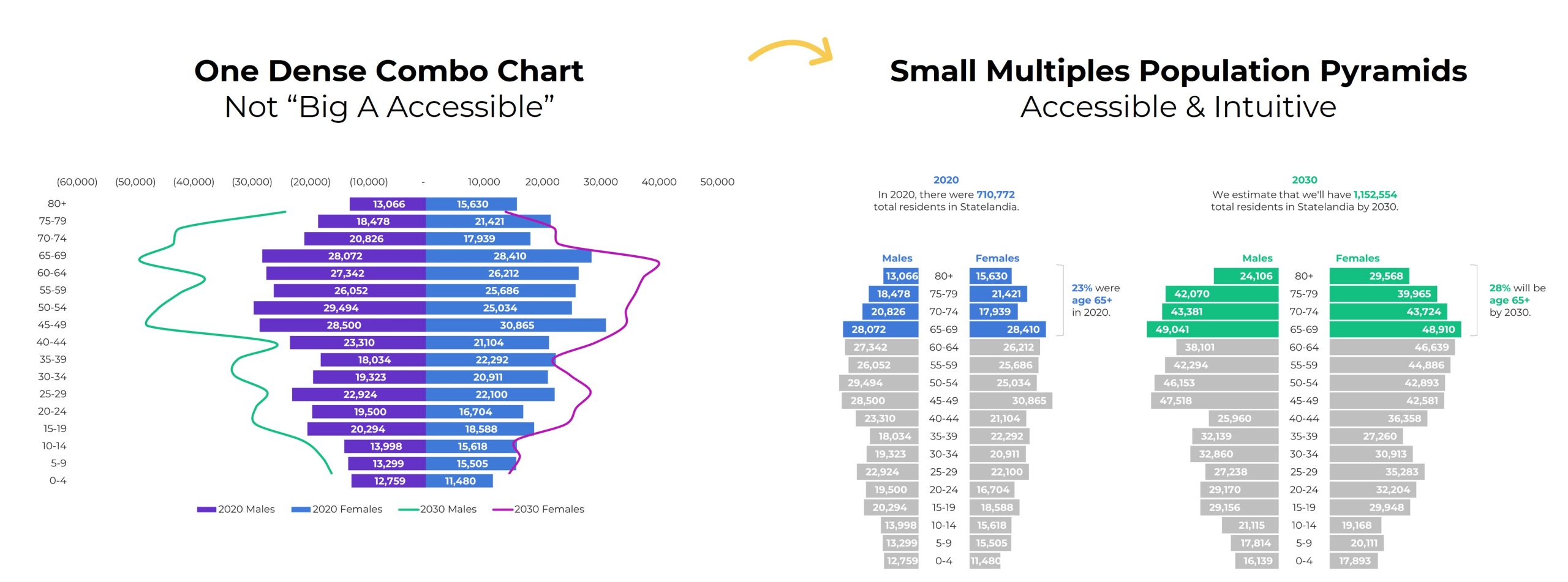
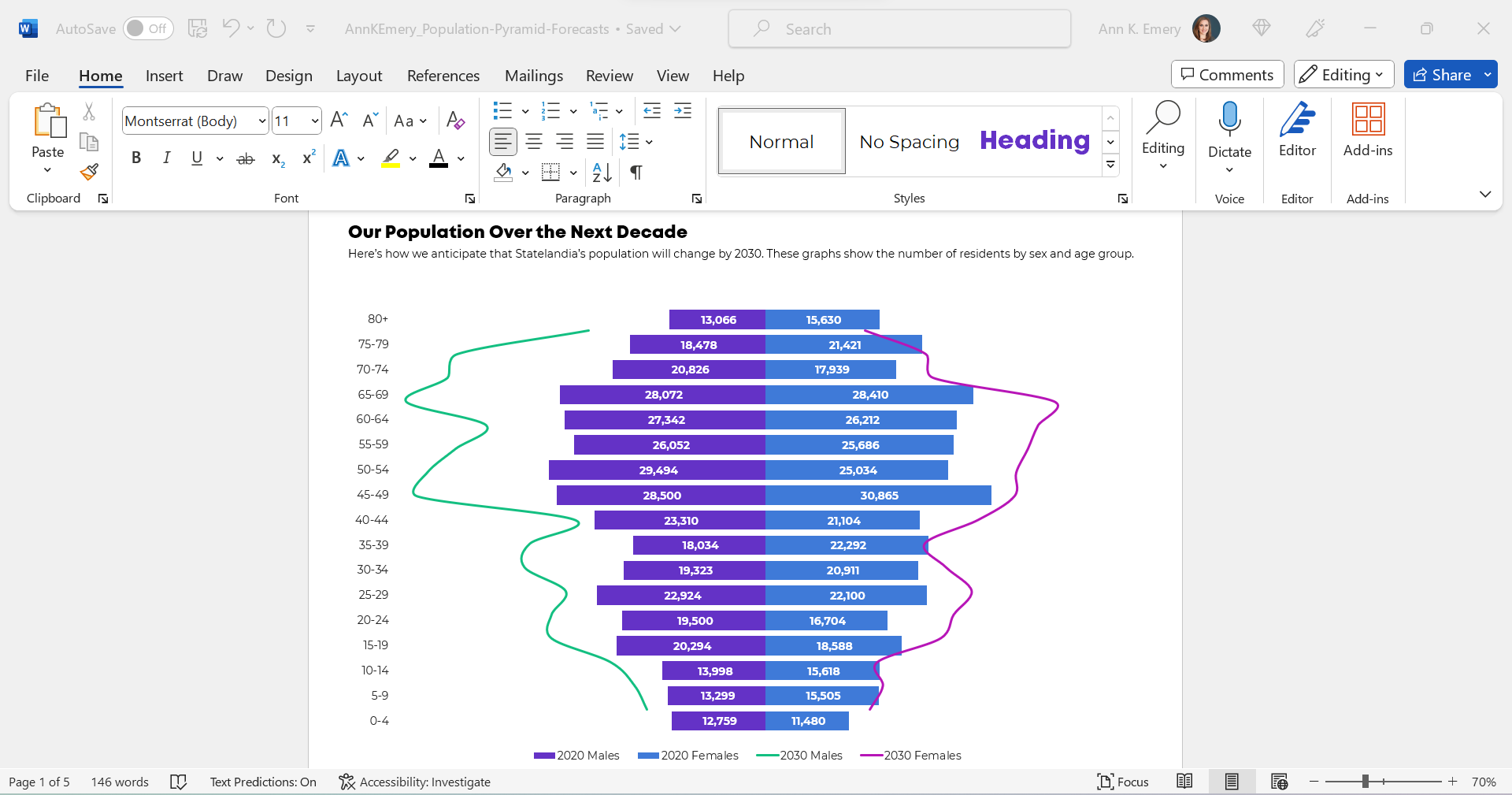
So, she followed this online tutorial to add those curvy lines. (Yep, it’s made with a combo chart in Excel.)

Bare-Minimum Edits

As usual, we tackled the bare-minimum edits first:

  • We removed the legend and directly labeled the data, which helps the graph pass “Big A Accessibility” rules (a.k.a. 508/ADA compliance).
  • We nudged the bars closer together by reducing the gap width to make more of a smoothed-out histogram.
  • We outlined the touching filled-in rectangles in white, a small detail that helps with grayscale printing.
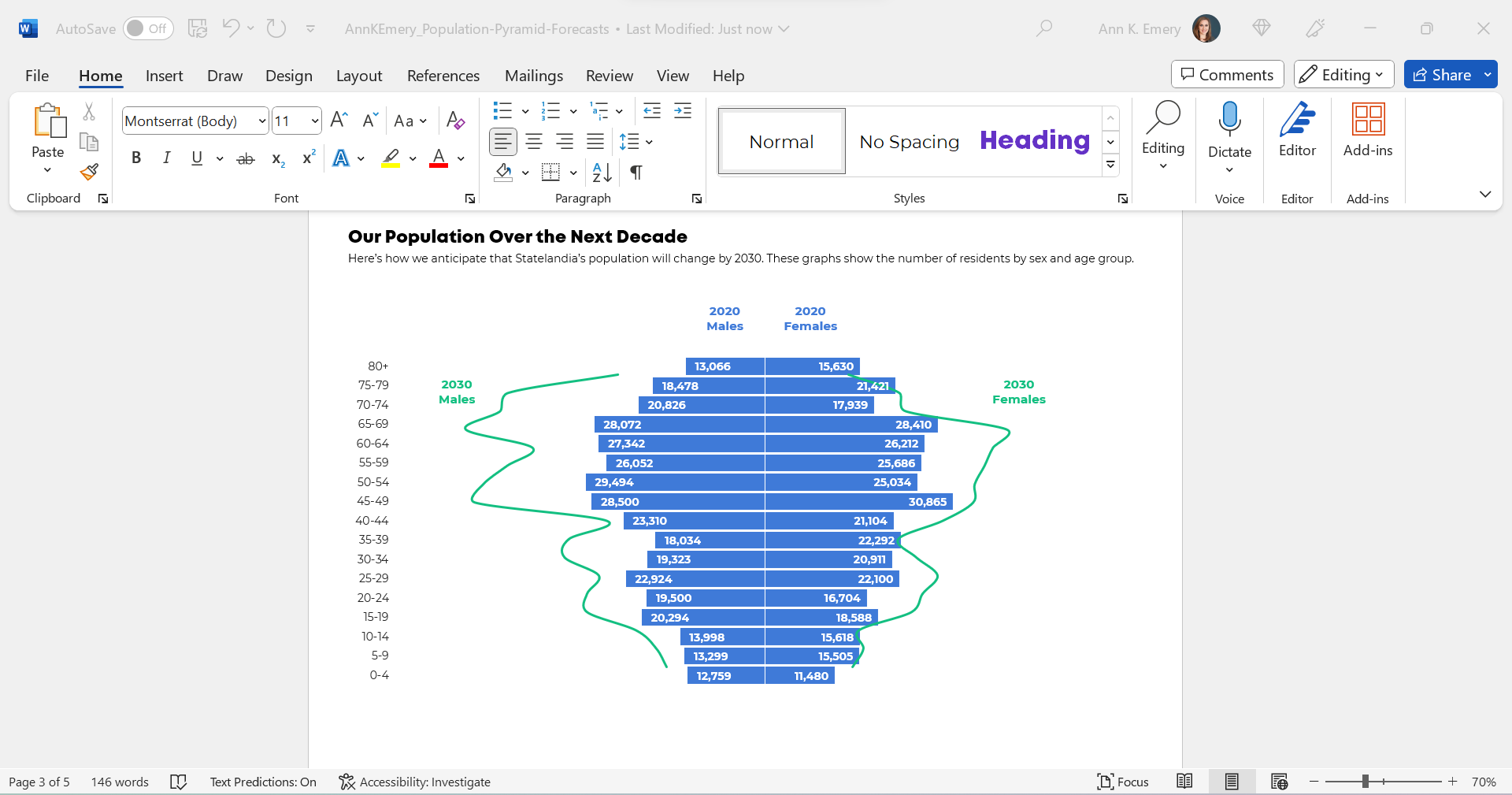
  • We used fewer colors. Before, there were 4 different hues: for 2020 males, 2030 males, 2020 females, and 2030 females. That’s a lot to keep track of! Instead, we color-coded by category (one hue for males, and another hue for females).

We also tried color-coding by year, instead of color-coding by sex, like this:

We were getting closer!

But we wanted to make sure that the forecasted numbers for 2030 were extremely obvious to viewers. For most of us, this isn’t a chart type that we see every day.

I was hesitant to keep the combo chart. This was an apples-to-apples comparison, so I wanted to use all bars.

(The bars/lines combo seemed more like an apples-to-oranges comparison, which this isn’t.)

Small Multiples Population Pyramids

Here’s a Dataviz Rule of Thumb:

Anytime your graph feels too dense… try creating more graphs.

Small multiples layouts can save the day!

The Traditional Version

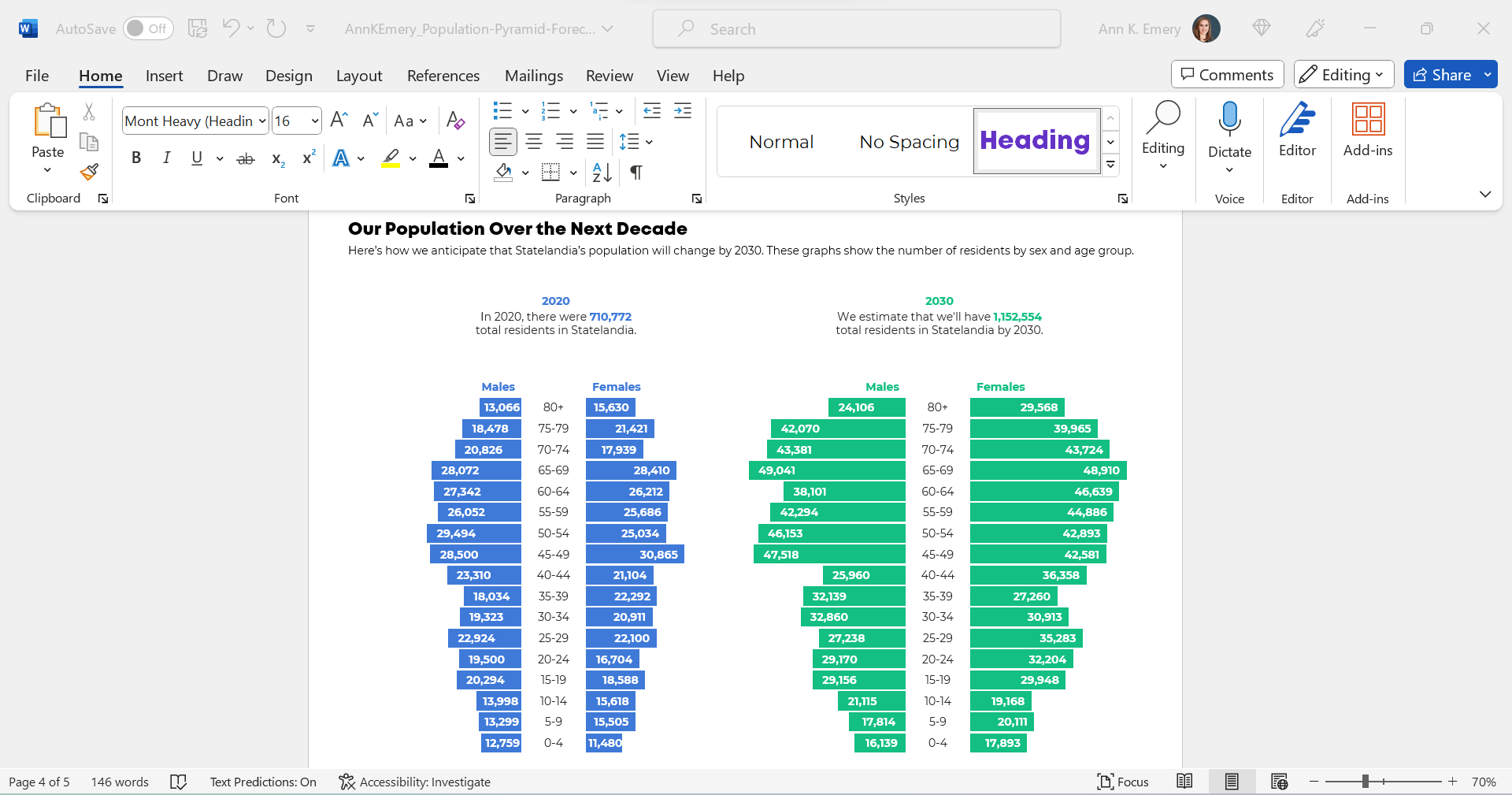
We tried traditional and storytelling versions of a small multiples population pyramid.

Here’s what the traditional version would look like inside her report.

You’ll notice the topical titles, color-coding by category (one hue per year), and how the graphs are all one color.

The Storytelling Version

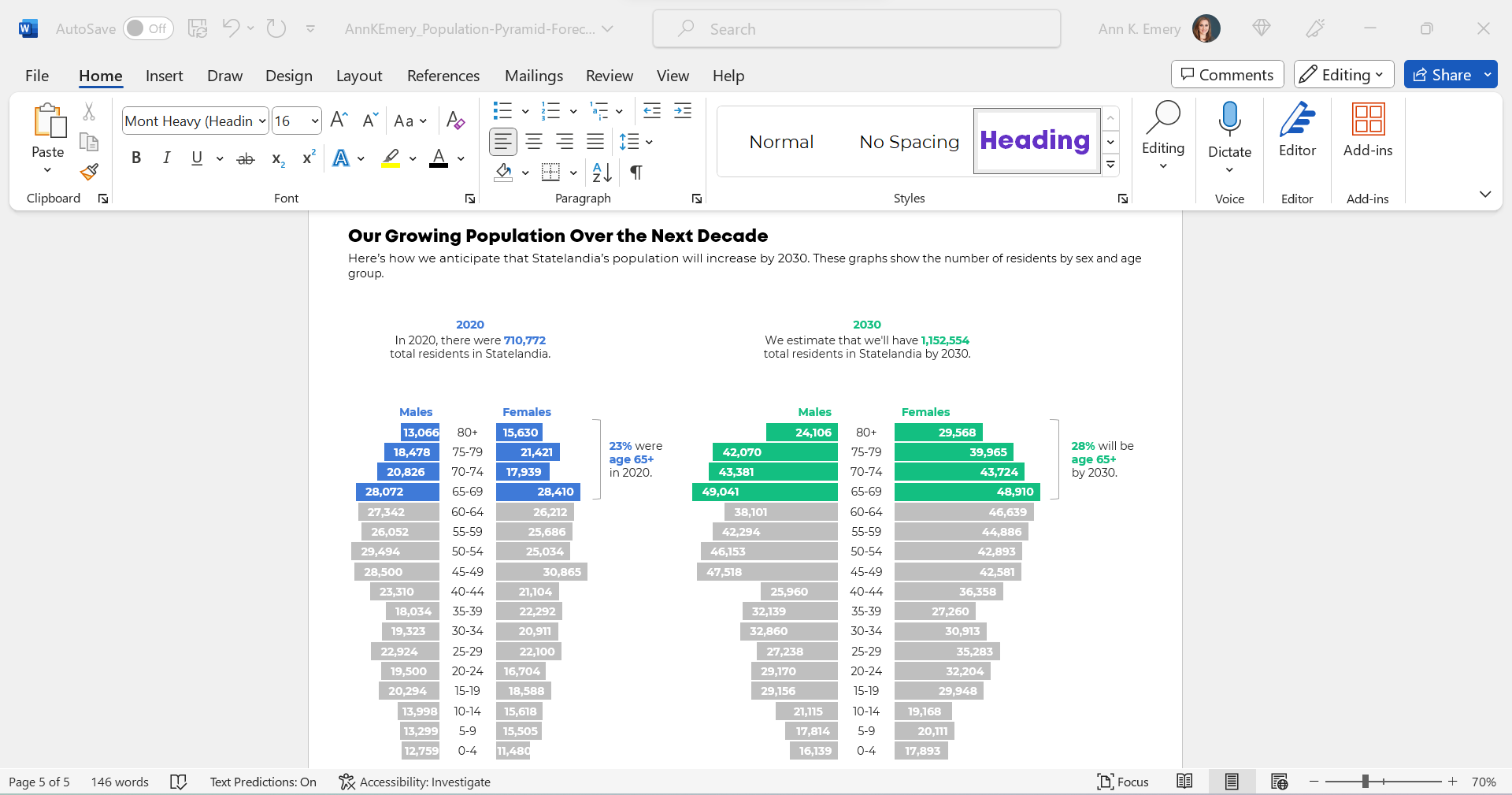
And here’s what the storytelling version would look like inside her report.

This version draws attention to the 65+ age group, which she wanted.

You’ll notice the takeaway title, the color-coding by category (one hue per year), the dark-light contrast (highlighting the residents who are ages 65+), and the annotations.

The Bottom Line

Even with the bare-minimum edits, I wasn’t a fan of the original combo chart. The bar-line combo was suggesting an apples-to-oranges comparison.

Instead, anytime your chart feels too dense (when there are literally lines and bars combined within one chart), try a small multiples layout instead!

We can format the chart as a traditional or storytelling version. In this case, storytelling was a perfect fit because we especially wanted to highlight the 65+ age group.

Written by cplysy · Categorized: depictdatastudio

Jan 29 2024

Looking Ahead to 2024: What’s Coming to Depict Data Studio 

Wondering what I’ve got planned this year? 

Here’s what’s in store for 2024 related to: 

  • Online Courses, 
  • Private Training, 
  • Conference Keynotes, and 
  • My Personal and Professional Goals. 

Online Courses 

The biggest improvement for 2024 is that all 6 courses will be offered LIVE (!!!).

We’ll meet over Zoom on Monday, Tuesday, Wednesday, and Thursday afternoon from 1 – 4:30 pm Eastern each day. We’ll have 10 minute breaks every hour, and the last 30 minutes is reserved for extra Q&A time.

Classes are highly interactive. I’ll teach a skill for ~10 minutes, and then you’ll immediately apply it. I’ll teach, you’ll immediately practice, and so on. Within our four half-days, you’ll spend 25% of the time listening and 75% of the time doing. No more pressure to find time in your already-packed schedule for implementation.

Yes, sessions are recorded and immediately uploaded and captioned in case you can’t make it live. You’ll get lifetime access to the latest recordings.

Why?? The #1 roadblock is that participants don’t have time for recorded courses. Something always comes up. A rescheduled meeting. A shifting deadline. With live classes, you’ll simply show up, learn, and implement.

And, selfishly, offering live classes means personal satisfaction; i.e., I know that the latest and greatest version of the course is available. I spend weeks every year re-recording, re-editing, re-uploading, re-making handouts, re-writing ebooks, and re-creating templates. It’s a logistical nightmare to keep online courses up to date! I block off a day for recording, and then a client deadline shifts. I block off another day for recording, and then another deadline shifts. And so on. In 2023, for example, I re-recorded a 1-hour module in January… but didn’t edit and upload those videos until November! Eek. It was weighing on my mind all year. Never again.

By offering all 6 courses live, participants will get the best learning experience. And I’ll get the personal satisfaction that all 6 of my courses have been fully upgraded this year.

Calendar

  • Simple Spreadsheets, our data analysis course: March 4 – 7, 2024 from 1 – 4:30 pm Eastern each day. Register here by March 1.
  • Great Graphs, our software-agnostic dataviz course: April 15 – 18, 2024 from 1 – 4:30 pm Eastern each day. Register here by April 12.
  • Great Graphs in Excel, our Excel-specific dataviz course: May 20 – 23, 2024 from 1 – 4:30 pm Eastern each day. Register here by May 17.
  • Report Redesign, our deep dive on creating reports that people actually read: October 7 – 10, 2024 from 1 – 4:30 pm Eastern each day. Register here by October 4.
  • Powerful Presentations, our public speaking and slide design course: November 4 – 7 , 2024 from 1 – 4:30 pm Eastern each day. Register here by November 1.
  • Dashboard Design, our deep dive on building static and interactive dashboards: December 9 – 12, 2024 from 1 – 4:30 pm Eastern each day. Register here by December 6.

Tuition

Registration is $997/participant for 2024, which includes the 4 half-day classes AND lifetime access to the recordings AND supplemental materials like handouts and ebooks AND Office Hours for the entire calendar year.

No price increases for the fourth year in a row.

We also have group rates available. Group rates for online courses will always be more cost-effective than a private training.

Private Training 

Want to bring me in to speak to your team? 

Each year, I lead ~200 private sessions for foundations, nonprofits, universities, and government agencies who work on social good issues. 

Here’s more info about my workshops, which can be held virtually or in-person. 

Package 1: Private Training

What’s included:

  • Live Training for up to 25 Staff. You’ll get live, custom training for up to 25 people. (Yes, we have per-person rates for events with more than 25 attendees.) The most popular option is 1 day on-site, or 2 half-days virtually. For example, we might meet from 9 – 5 in your conference room. Or, we might meet from 12:30 – 4:30 virtually for two days in a row (e.g., a Tuesday-Wednesday).
  • 6 Classes to Choose From. I have 6 full-length topics to choose from (e.g., dataviz best practices, or dashboards, or reports, or Excel how-to’s). We’ll work together to choose one class that’s best for your team.
  • Review of 5-10 Sample Materials. Seeing your staff members’ real projects will help me customize the agenda for their exact needs.
  • Customized Agenda. After I review your sample materials, I’ll customize the agenda to fit your team’s current skill level. For example, we might skip over beginner-level topics and move right into advanced techniques. We’ll cover your Wish List topics, too. In the past, groups have opted to cover qualitative dataviz, maps, before-after graphs, and longitudinal data.
  • Zoom Set-Up and Hosting. If we’re meeting virtually, I’ll handle the behind-the-scenes Zoom setup so you don’t have to worry about it. You’ll send your staff a link to RSVP for the sessions. I’ll set everything up on my own account. I’ll host the trainings so you can take it off your to-do list. You’ll receive weekly registration updates so we can monitor how many people have RSVP’d. I can also send you Zoom attendance reports afterwards so you can see exactly who attended, and for how long.
  • Recordings for 1 Full Year. YES, we can record everything! YES, for virtual and in-person events! Recordings are helpful because: scheduling conflicts are inevitable; staff get stressed that they might forget something; and new staff can watch the recordings as part of their onboarding process. You’ll get access to your password-protected site for an entire year.
  • Materials. Worried you won’t remember everything? You’ll get the PDF’d slides of everything we cover. Your staff will love the side-by-side examples showing them exactly how to fix common graphical mistakes. Depending on which class we choose, you’ll also get handouts, checklists, ebooks, and graph templates.
  • Recommended Resources. Don’t want to lose time googling for the best resources? You’ll get my curated resource list with my favorite books, blogs, podcasts, and software tools.
  • Certificates of Completion. Want to build your portfolio as part of your annual review process? You’ll get personalized Certificates of Completion after our private training.
  • Satisfaction Surveys. I’m sure you can handle this on your own, but I’ll take care of the satisfaction surveys to save you time. You’ll get a copy of the results to help with future planning.
  • Email Recaps. I’ll also send emails before and after the sessions to keep the conversations going.
  • Alumni-Only Community. Everyone will be invited to our students-only LinkedIn group, where you can network, post drafts, and get feedback from others.
  • Swag. For in-person workshops, I’ll bring plenty of stickers, magnets, pins, and buttons.

Package 2: Private Training + Longer-Term Support

Want to make sure your staff are supported for the long-run, so they can apply everything they’ve
learned to your projects?

I’ll provide consulting, weekly technical assistance sessions, and style guide and accessibility support.

You’ll get everything from Package 1: Private Training and:

  • 5 Hours of Follow-Up Zoom Support. Have questions after the private workshop? Don’t want to post your drafts in the LinkedIn group? You’ll get 5 hours of follow-up consulting – via email or Zoom, your choice. For example, you can email me with quick questions and pick my brain. Or, we can hop on Zoom, share screens, and troubleshoot together. You can use your follow-up consulting anytime within 12 months of the workshop.
  • 3 Before-After Makeovers. Want to see exactly how these principles can be applied to your own data? I’ll create 3 quick makeovers of your work. For example, I’ll transform a text-heavy slide or revamp a page of your report.
  • Lifetime Course Access. All 25 staff will get lifetime access to my online course, which goes broader and deeper than our training together. For example, if you choose the Simple Spreadsheets class for our live training, then your staff will also get access to the Simple Spreadsheets online course (!). Your private training is 8 hours of highlights… but the online course has dozens more tutorials and gets updated regularly. Your staff will have lifetime access to the latest and greatest lessons.
  • Makeovers. We’ll create 3 quick makeovers of your work. For example, we’ll transform your report’s cover, revamp a text-heavy slide, etc.
  • Accessibility Audits. Are you required to make 508-accessible graphics? We’ll meet for 60 minutes over Zoom and review one of your publications, slideshows, or dashboards. I’ll use a fine-toothed comb to check for “Big A Accessibility” (legal 508/ADA requirements) and “little a accessibility”(making sure it’s easy to understand). You’ll leave with a detailed to-do list of edits from my Dataviz Accessibility Checklist.
  • Data Visualization Style Guides. Even your intern can make great graphs—if they’re using branded, accessible, intuitive templates as their foundation. In our first 90-minute session, I’ll review your existing branding materials, like style guides, colors, fonts, photographs, and/or icons. We’ll go through my Checklist for Dataviz Style Guides so you know exactly how to improve your resources in the future. Then, I’ll create a Data Visualization Style Guide and Chart Templates for you. In our second 90-minute session, we’ll walk through your Guide and Templates together.
  • Office Hours for 1 Year. All 25 staff will be invited to weekly Q&A sessions—for an entire year! These are “consulting lite” sessions where I’ll review your draft dashboards, reports, and slides. You’ll get a list of: What you’re already doing well; Quick Wins that you can tackle with ~15 minutes of editing; and Not-So-Quick Wins to keep in mind for your future projects.

Want to learn more about private training? Book a call.

Conference Keynotes

I’m looking forward to providing keynote speeches, pre-conference workshops, and breakout sessions at a variety of in-person and virtual conferences this year.

Want to learn more about conference keynotes? Book a call.

Personal Goals 

I’m going to continue working the K12 school calendar. When my kids are home from school, the Depict Data Studio office is closed. No courses or private trainings over spring break, summer break, Thanksgiving, winter holidays, etc.

We might be moving in a month or two (just down the street in the greater Orlando area – with a bit more room). The paperwork should be finalized today, fingers crossed! We bought our current house when we had 2 kids. Now we have 5. So.

I’m still obsessed with edible gardening. At our current house, we’ve got papayas, bananas, avocados, lemons, oranges, guavas, cherries, figs, blueberries, blackberries, raspberries, mulberries, grapes, and pineapples. If/when we move, I’ll start anew in that backyard.

I might start bicycling again, TBD. Pre-kids, I’d ride 50-80 miles every weekend, plus commuting to/from work on nice days. I signed up for a 50-mile ride in February. But it’s January 29 and I haven’t even pumped up my tires yet, let alone started training, so. When the twins are 6 months old, they can safely ride in the bike trailer. That’s when I can realistically start riding again. They’re only 4 months old, so it’s a bit soon.

In the meantime, I’m still using my walking pad while I work. Most days, I can easily walk ~10 miles during the workday. Walk an hour, stand still for a Zoom, walk an hour, grab some lunch, walk an hour, stand still for a meeting, etc. I even walked a marathon a few weeks ago! My goal is to walk 2,000 miles on the walking pad in 2024 (10 miles per work day x 20 work days a month x 10 working months).

Professional Goals

I’m going to focus on blogging again this year. Little to no YouTubing, podcasting, guest lectures in universities, free talks, etc. My time’s limited, and blogging is the most efficient one to many structure.

In past years, my goal has ranged from 24-36 new blog posts (2-3 new articles every month). This year, I’ll focus on revamping the existing blog posts rather than publishing brand new posts. I started 2024 with ~330 posts. I already deleted ~30 blog posts that were no longer relevant. I’ll revamp existing posts by adding new photos, new examples, and new screenshots.

(“Ann, WHY are you deleting precious blog posts?? What if someone needs those tips??” No, they don’t. Internet clutter makes it harder for everyone to find what they need. Less is more.)

I’m also taking a year-long break from social media, sort of. I realized that I’ve been on Facebook for 20 years, since it came out in 2004 (!). And, I used AOL Instant Messenger and chat rooms before that. My entire adolescence and adulthood has been online. In December 2023, I deactivated Facebook; I no longer log into Instagram or Twitter; and I stopped scrolling through TikTok. I still use LinkedIn here and there for work. The instant result: My attention span is instantly improved, and I’m loving long-form content again. My brain prefers movies over short clips; my brain prefers books over online articles; and my brain prefers audiobooks and podcasts over soundbites. Social media isn’t black and white. I wish it was! There are pros and cons to being connected with online communities. For example, I love seeing photos of my cousins’ children. But I don’t need to see photos of other peoples’ beautiful kitchens and living rooms and vacations that I just get jealous of. Hence the year-long experiment: to see whether social media is actually a net positive for me and society. A month into my experiment… I’m pretty sure it’s not.

I’m continuing to focus on building my own Excel skills. I’ll be speaking at and attending the Excel Sum(it) in a couple weeks. I’ll likely find some online or in-person workshops to attend, too. I’d rather have elite skills in a single software program than mediocre skills in a handful of programs.

Administrative & Logistical Tasks

I hesitated to mention these, since they’re so boring.

Are you interested in behind-the-scenes details??

If so, here’s what’s also on my radar:

  • Lean staffing. I tried virtual assistants a few years ago. I tried subcontracting projects to colleagues a few years before that. I’m happily continuing as a one-woman company. It’s not that I don’t need help; I don’t need help with work. Thanks to Zapier, ConvertKit, and Teachable, I’ve automated nearly everything behind the scenes. And, we’ve got the pool company, landscapers, babysitters, preschool, a stay-at-home husband, etc. to help on the household side. The popular business advice is to hire, hire, hire. More staff usually means higher gross income, but not higher net income. What’s the point of complicating anything? Simple is best.
  • Accounting. I’ve upgraded accountants and software over the years. I’ve switched from a sole proprietor to LLC to S Corp. There’s nothing left to fine-tune.
  • Website. I did a website revamp in 2022. I’ll probably do another one in 2025. Websites are usually an every-3-year thing in my world, with minor tweaks in between that.
  • Newsletters. I’ll continue sending newsletters ~weekly throughout the year; scrubbing the list; A/B testing the subject lines; and keeping the open rate and click-through rates high.
  • Digital resources. I’ll continue posting digital resources, like ebooks and chart templates, on Gumroad.
  • Hiring my kids. I’ve been working with my accountant to start legally and ethically hiring my 8-year-old. We’re putting her on payroll; she’ll put 100% of her earnings into a Roth IRA; and we’ll likely write blog posts and submit conference sessions together. The theme will be something like “how to make graphs so accessible that even an 8-year-old can understand them.”

Your Turn 

What are you focused on in 2024?  

Are you hoping to learn a new software program? Achieve a personal goal?  

Comment anytime and let me know! 

Written by cplysy · Categorized: depictdatastudio

Dec 18 2023

Top 23 Dataviz Resources of 2023

9,200 total participants in my dataviz courses so far (and ~25,000 taught in-person and virtually over the past decade).

A dozen in-person workshops (with trips to Dubai & Tanzania) and several dozen virtual workshops.

32 new blog posts: 28 from me, and 4 from guest authors.

2 more YouTube videos (115 total).

2 more podcast interviews.

2 more babies.

6 months off.

What a year. 

Top 23 Dataviz Resources of 2023 

Want to do some year-end learning as 2023 winds down? 

Here are my favorite data visualization resources from the past year. 

  1. The Progression of Sue Griffey’s Year-End Infographic: Sue Griffey explained how she edited her infographic and we discussed it together during Office Hours. I love going behind the scenes like this!
  2. Watch Out for Mars! 6 Data Cleaning Steps to Save You Millions: Hudson Kelley teaches us how to check for duplicates; check for changes in the survey instrument; check for outliers; use counts; recode variables with IF statements; and combine datasets with lookups.
  3. How to Influence Others with Your Data: SuperDataScience Podcast Interview: I was invited to speak on the #1 podcast in the data field. Host Jon Krohn asked me to summarize some of my favorite tips for data storytelling, spreadsheets, reports, and presentations. This is a great listen for people who are new to my work.
  4. Embedded Legends Aren’t Enough: I see this accessibility mistake way too often. Take a peek and make sure you aren’t messing up your graph titles and legends.
  5. How to Visualize “Overall” Data or Averages in Bar Charts: Probably my most practical post of the year.
  6. 39+ Amazing Graphs You Can Make in Excel: Probably the community’s favorite post of the year. This isn’t an exhaustive list, and I’ll add to it someday. In all my spare time.
  7. 3 Simple Steps that Took My Graph from Good to Great: In this before-after makeover from a museum evaluation project, Maia Werner-Avidon teaches us how to use grouping, spacing, and icons.
  8. How to Make Great Graphs in Excel: 4 Levels of Excel Vizardry: Probably my personal favorite of the year. Everyone wants to jump into advanced graphs, and then they flail and drown. In this post, you’ll see which skills you should start with.
  9. How to Analyze Nonprofit Data with Excel’s Pivot Tables (No Formulas Required!): I shared the recording and materials from my how-to workshop at the Good Tech Fest conference.
  10. Building a Business that Fits Your Family: Disrupt Your Money Podcast: I was invited to speak on Meg Wheeler’s financial podcast. I shared a lot of personal and business details.
  11. From Formulaic to Meaningful: Constructing a Useful “Table of Contents” Page for an Evaluation Report: Barbara Klugman shared her before-after makeover on the discussion boards inside Report Redesign, and I invited her to write a blog post so others could learn from her, too. Thanks, Barbara!
  12. How to Visualize Multi-Year Patterns: Another super-practical post. It would’ve been a personal favorite if people on social media didn’t prefer the terrible, horrible, before version better than the redesigned options. Sigh.
  13. Two Types of Tables: Datasets vs. Tabulations: If everyone followed this advice, I could retire. Someday!!!
  14. Two Types of Datasets: Contiguous vs. Non-Contiguous: The most important time-saver I’ll teach you all year.
  15. Two Types of Tabulations: Formulas vs. Pivot Tables: To my knowledge, none of the Excel bloggers worldwide have written about the implications of formulas vs. pivot tables for data visualization. Maybe 5 people in the entire world will appreciate this advanced, niche post. Are you one of those 5 people?
  16. How to Make Your First Tableau Dashboard: It’ll take less than an hour, promise.
  17. How to Make a Series of Matching Dashboards in Excel: I gave away all the behind-the-scenes secrets in this one. Companies pay me $10,000 – $30,000 for these types of automations in consulting projects. Please, just follow these instructions and do it yourself. I’d love to retire someday.
  18. How to Make Interactive Dashboards in Excel: You’ll learn how to link Excel Tables, pivot tables, pivot charts, and slicers.
  19. Redesigning a Thesis Chapter: Farihah Malik does the very hard work of applying what she learned in Report Redesign to academia.
  20. Use Icons to Visualize Data (Not Just Decorate): An advanced, niche post that maybe 5 people worldwide will appreciate. Maybe you’re one of them?? It had to be written.
  21. How to Visualize Small n’s with Icon Arrays: A quick before-after table makeover. Please steal this idea.
  22. Bring Technical Tables to Life: A real (sort of) before-after makeover from when I keynoted the National Birth Defects Prevention Network Conference in Atlanta this summer.
  23. Don’t Start from Scratch! Make One of These Dashboards Instead: A few of my favorite dashboard case studies, all in one place, to make them easier for your to find.

Your Turn

What types of tutorials should I create in 2024?

Comment below with your requests!

Written by cplysy · Categorized: depictdatastudio

  • « Go to Previous Page
  • Go to page 1
  • Interim pages omitted …
  • Go to page 10
  • Go to page 11
  • Go to page 12
  • Go to page 13
  • Go to page 14
  • Interim pages omitted …
  • Go to page 37
  • Go to Next Page »

Footer

Follow our Work

The easiest way to stay connected to our work is to join our newsletter. You’ll get updates on projects, learn about new events, and hear stories from those evaluators whom the field continues to actively exclude and erase.

Get Updates

Want to take further action or join a pod? Click here to learn more.

Copyright © 2026 · The May 13 Group · Log in

en English
af Afrikaanssq Shqipam አማርኛar العربيةhy Հայերենaz Azərbaycan dilieu Euskarabe Беларуская моваbn বাংলাbs Bosanskibg Българскиca Catalàceb Cebuanony Chichewazh-CN 简体中文zh-TW 繁體中文co Corsuhr Hrvatskics Čeština‎da Dansknl Nederlandsen Englisheo Esperantoet Eestitl Filipinofi Suomifr Françaisfy Fryskgl Galegoka ქართულიde Deutschel Ελληνικάgu ગુજરાતીht Kreyol ayisyenha Harshen Hausahaw Ōlelo Hawaiʻiiw עִבְרִיתhi हिन्दीhmn Hmonghu Magyaris Íslenskaig Igboid Bahasa Indonesiaga Gaeilgeit Italianoja 日本語jw Basa Jawakn ಕನ್ನಡkk Қазақ тіліkm ភាសាខ្មែរko 한국어ku كوردی‎ky Кыргызчаlo ພາສາລາວla Latinlv Latviešu valodalt Lietuvių kalbalb Lëtzebuergeschmk Македонски јазикmg Malagasyms Bahasa Melayuml മലയാളംmt Maltesemi Te Reo Māorimr मराठीmn Монголmy ဗမာစာne नेपालीno Norsk bokmålps پښتوfa فارسیpl Polskipt Portuguêspa ਪੰਜਾਬੀro Românăru Русскийsm Samoangd Gàidhligsr Српски језикst Sesothosn Shonasd سنڌيsi සිංහලsk Slovenčinasl Slovenščinaso Afsoomaalies Españolsu Basa Sundasw Kiswahilisv Svenskatg Тоҷикӣta தமிழ்te తెలుగుth ไทยtr Türkçeuk Українськаur اردوuz O‘zbekchavi Tiếng Việtcy Cymraegxh isiXhosayi יידישyo Yorùbázu Zulu