• Skip to main content
  • Skip to footer
  • Home

The May 13 Group

the next day for evaluation

  • Get Involved
  • Our Work
  • About Us
You are here: Home / Archives for allblogs / freshspectrum

freshspectrum

May 25 2023

Your Report is a Website

It’s time to stop designing reports for that one person who one time printed and then, subsequently, read your report.

For the vast majority of people, your report is a website. It is read using a digital device, connected to the internet, and served from someone else’s computer (a.k.a. a server probably owned by Amazon).

So what does that mean? Well, it’s time to design your report like the website it truly is, taking advantage of better/more useful technology.
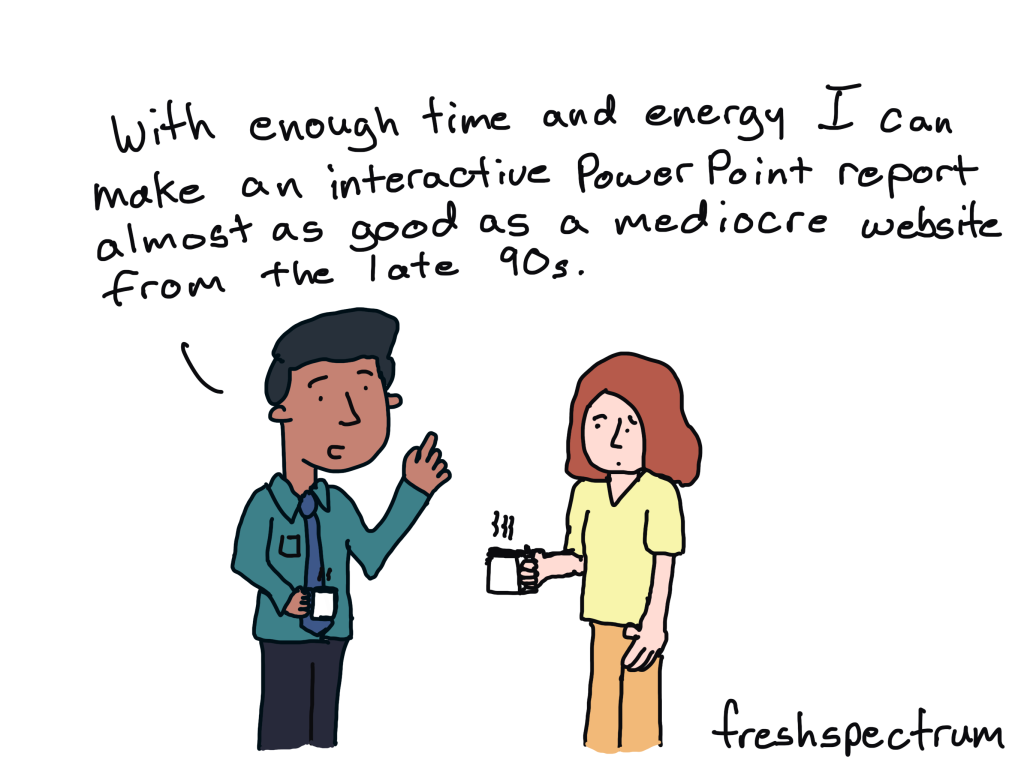
“Did you know that you can create interactive reports in PowerPoint?!? Or PDF! Or Canva! Or Google Docs! Or Tableau! Or Word!”

With linking and basic menus you can make almost anything work like a website.

You can also write a novel with pencil on post it notes. The fact that you CAN do something, doesn’t mean you should.

Creating an effective interactive report using non-web design tools is going to result in a mediocre report design that will likely take much longer than just using a tool like WordPress.

Why WordPress?

  • WordPress powers over half of the internet. It’s open source and has continued to evolve over decades.
  • Using WordPress doesn’t require huge software license investments.
  • There are tons of WordPress developers in the world, so if something goes wrong, you don’t have to find that one expert to fix stuff. Or pay some consultant at Tableau hundreds of dollars an hour to fix what broke.
  • You can do SOOOOO much with a modern WordPress site, even without any plugins. Far more than any of our standard reporting tools.
  • WordPress can easily be built for accessibility.
  • Since WordPress is such a popular platform it has had a profound influence on shaping the evolution of modern web design.
  • You can build both privately and publicly, on in-house servers or through a myriad of cloud based hosting services with the proper encryption.
  • WordPress sites are way better for SEO than any PDF, PowerPoint, or data dashboard tool could hope to match.
  • WordPress sites work really well with social media, email marketing, video, and other modern dissemination channels.

Don’t believe me, I’ll prove it!

This is my new mission (alongside teaching data design).

I’m going to build cutting edge interactive reports and data dashboards using WordPress.

Right now I’m developing out a concept gallery that I can use to show off certain concepts I have only shared with specific clients. Stay tuned.

Written by cplysy · Categorized: freshspectrum

May 02 2023

Alt Text in Canva

Remember how I said you couldn’t add alt text in Canva? Well, you can now!

Transcript

Hey, so you may already know that I am a huge fan of Canva. And I use it for all sorts of things from presentations to infographic design. And last year they came out with a web design tool. Which is great. Except that one thing. There was absolutely no way. To add alternative text. Meaning. You couldn’t add any kind of descriptions. You couldn’t change the header structure, all sorts of things that you would need to do.

To make a web design accessible.

And this is really important. In general. But especially if you work on government kind of projects, It’s essentially a killer. You can’t. Do the work, if you can’t make it accessible. Well, I was playing around with Canva the other day and I clicked on an image. And what do you, what did I find? I found a little button.

That says alternative text. Yes. Now Canva at least has the bare minimum of what you need to create. Something that is accessible to share online. ? Just to show you here’s a picture up here somewhere. Of. Website, I was creating just a little simple test website I created in Canva. And then put in a picture.

Now if you right. Click on the picture, you’ll see on the menu. You’ll see a little alternative text button. And here let’s zoom in. Okay. Now, if you go ahead and click on that. A box will pop up. ? And you have up to 250 characters of alternative texts that you can add in this box. You can also click the little button to say that it’s decorative and it doesn’t really have a meaning other than to add decoration to the page.

?So that’s it. Those were really standard requirements. Now, if you’re doing kind of serious design work it’s still, probably better to work with WordPress or PDFs. If you need to do some good accessibility work, there are things you can’t do in Canva still because you can’t really adjust underlying HTML code. You can’t change like the header structure.

In a way you can’t mark down H one and H. and paragraph markings. It’s getting there. I think it’ll be there. Eventually. There is some reordering elements. But this is they’re coming. Along and it’s a long way from where it was before. ? And here it actually even past. A test. I went ahead and put it into an accessibility checker.

And yeah, it’s the bare minimum pass, but it Passed. And that’s something I can say before. ?So there you go. That’s it. Canva has all text. So rejoice and hopefully they’ll continue to improve accessibility and we’ll be able to use it more often in the future. All right. That’s set for today. Have a great one. I’ll talk to you soon. Bye.

Written by cplysy · Categorized: freshspectrum

Apr 28 2023

What is Descript?

Have you ever heard of/used Descript? If not, you have now. It’s one part transcription too, one part easy to use video editor. What’s not to love?

Links

You can check out the tool for yourself at descript.com.

Transcript

?Hey, so it’s Friday. So you know what that means? It’s Tool day. And today I wanted to talk about my new favorite video creation tool called descript.

Now, I don’t know about you. If you’ve ever tried to create video before. But it can be a pain. And then, you know, here’s my general feeling on technology. If something requires this few minutes, I have a higher interest, but pretty quickly, the longer something takes the lower my interest goes.

It’s kind of why I didn’t start cartooning until I had an iPad. Because it made it super easy. And then all of a sudden I started drawing cartoons. Well, the same thing goes with video. Like over time, it’s gotten a little bit better, a little bit better, a little bit easier. And with a tool like descript, which is what I’m using right now to record this. Video becomes even easier to go ahead and record and create.

So descript is different. Let’s start there. Descript basically when you record a video. It transcribes the video. And instead of just working with a timeline and cutting and trying to merge the other clips.

You just edit it. Like it’s a word document. And you erased different sections like that. It’s not always the smoothest transition and there’s stuff that you can do about that. But it’s way easier.

And way easier is better because way easier means I will actually do it. So let’s walk through my process. So I open up. The script. And I record a video. I just hit the record button. It asks me if I want like studio sound. If I want separate clips, there are a couple of things that I can. Do. In the setup options.

Then after it’s done it, auto transcribes and there’s this little button I can click to get rid of all the filler words. So the ums and the AHS, which I use a lot. They get to be erased automatically and replaced with like blank clips. Hopefully you don’t notice. Sometimes I do. But it’s good enough.

Then I listen and edit the transcript. So I’ll listen to myself. Talk. It’ll go through. I’ll erase anything. If I feel like I need to clip certain parts of the video. And then I’ll have a clean ish transcript. I don’t clean and fix everything because again, My goal here is speed and just conveying information and quickly and efficiently so that I keep doing this kind of stuff.

Then after that, I just export, the video and upload it into YouTube. And I paste a transcript to my blog. I’ve used descript for a couple other things too. I’ve used it to transcribe zoom recordings. It can be really helpful if you’re doing qualitative research, that kind of thing. To be able to just auto transcribe.

And it works pretty well. And I’ve also used descript to create a podcast. So it will. Take the audio. You can edit the audio and export as an audio file. Two not just video file. And it’s perfect for creating a nice, simple. Podcast. Now pricing. There are a few different levels. The nice thing about descript is you can start for free.

It doesn’t cost anything to record up to an hour. A month or really transcribe up to an hour each month. That’s not a lot of time, but it’s enough time to get you started and see if you like the tools or not. There’s a creator level right after that. And it cost 15 bucks a month. And that will give you 10 hours of content each month, along with some additional features not available in free.

And then finally there’s a pro. Version, which is $30. You also get. 20% off if you sign up for a year. And that gives you 30 hours. And unlimited all sorts of other things like HD and. Getting rid of the ums and AHS and that sort of thing. It, some of the features that go along with it. So that’s it.

That’s descript. I think he should check it out. You’ll find the link in the show notes. So that’s it. I have a great day, great weekend. Or whenever you watch this, have a great day and I’ll talk to you soon. Alright, bye.

Written by cplysy · Categorized: freshspectrum

Apr 27 2023

Data Dashboard FOMO

Does a data dashboard really have to support decision making to be useful?

Links

In the video I mention my workshop, if you’re interested, check it out here > diydatadesign.com.

Transcript

?So I teach a data design virtual workshop. It’s called DIY data design. And each week we get together and have conversations. So I’ll give a little presentation and then we’ll just chat about stuff. The last week we were talking about data dashboards. And one of the things that came up, it was interesting.

It was one of the participants was talking about how she has access to a set of dashboards. And she looks at them they’re about libraries and books and. Mostly because she’s interested. Not because she has any particular need for that data. Just because she’s interested and they have the data.

And when we were talking a little bit more. This idea came out about data dashboard FOMO. And. How sometimes. We need dashboards or we want dashboards, not because there’s any particular decision-making need. Just because we have this fear of missing out on data that we don’t know exist. And so you end up with this large, huge dashboard of like tons and tons of pages.

And he asked the question like why does anybody want to use this? What are they going to use this for? And the more I thought about it, the more I could see a counterpoint to that, the idea that. That there needs to be a use. So here’s a, here’s like a little story. So you have a person.

And they go, can I see the data? And they come up to the data person. And the data person says why. Now there might be all sorts of reasons why the data person is wondering why maybe they want to set up the dashboard in a way. That it could help facilitate decision-making. And, the person’s just like sheepishly just, interested.

And I think this happens often actually. Or maybe if, an organization is data savvy or you have people who are interested in understanding some of the data. That there is a world of data. Inside of organizations. That we don’t really know what exists. you don’t know what you don’t know. And for a lot of people, the way that they have to go and find that data is to go to a middleman. Somebody who knows enough about the data who has access, who can get the right information.

And they control the access point. And. It ends up becoming like a sort of gatekeeper. Even if unintentionally. I think there are two reasons that you might want to create that data dashboards. You don’t want is to use support decision-making so this is the idea that, okay, this is actionable data.

There is a very Clear reason. Why we have this data, why we’re sharing this data? Why this date is going from one place to the other. So the person can learn and make decisions about their work. This is the data as decision-making. Everybody can agree on, but there’s this other part that.

Dashboard is really. An access tool. It’s about taking something that is inaccessible. Because people don’t have the access rights or the skill or. The time to find a way to get to that data. So it becomes like this mysterious thing. And honestly, This person, the person that says why. They don’t know what. Necessarily might be interesting to know. And sometimes you just need to create a dashboard. You just need to create an interface. So that people who are interested. In an organization can find data that is available. And make their own decisions as to why they might want to see it.

And perhaps just following an interest. Perhaps, they just have some data dashboard FOMO. Yeah, that’s it for today? Hope you’re having a great week. We’ll talk soon. Alright, bye.

Written by cplysy · Categorized: freshspectrum

Apr 25 2023

What is social object theory?

You might know a lot about social networks, but what do you know about social objects?

Resources

Social Objects for Beginners (Gaping Void)
What are Social Objects? [I totally forgot I created this random podcast episode…]

Transcript

?Hey. So I think social objects are really important. To sharing information over the web. Or really sharing information in general. But over the web especially. But to start understanding what is social. Objects are, I think we should talk about social networks in general. So you probably already, have an idea of what are social networks.

There are people connected to people to connected to people. And this is how information spreads, person, a person. Or maybe all these people are connected through a school or through some other way. But we don’t tend to think about when we think about social networks is that usually there are objects involved here too.

It’s not just people connected to people. It’s people connected to other people for some reason. They’re talking about something. Social objects. Could be all sorts of things. It could be like talking about a phone. And how the weather is today.

It could be an object. An idea, a concept. It could be something physical. It could be a report. It could be a cartoon. So that’s actually where I got the idea.

I remember a while ago, back in 2007 I used, follow this guy named Hugh McLeod. And he had this cartoon called gaping void and he talked a lot about social. Objects. And in his cartoon. He used to draw on the back of business cards. Shared a lot about creative confidence, marketing, that sort of thing.

But a lot of my, cartooning theory why a draw cartoons stems from this? So I draw cartoons to illustrate a blog post. But then those cartoons can then be lifted from the blog posts and put into presentations. They can also be lifted from the blog post and put into books and put in on social media.

And those cartoons themselves have a life of their own. They, can be a center point for discussion. And ground everything. Social objects are a way too. Export your ideas. So you have an idea, you turn it into some kind of object so that it can travel.

And then you share it out. Across the web or across the world in some other way.

And it’s really helpful. I think when you’re talking about creating a report that you think about it as a social object, what is it about that report? That can create conversation among different people can have its own like gravity. And pull people in and create its own orbit. And that’s, basically it. So I have some links.

In the show notes. And I would say start considering. How your work can be turned into objects that can take your ideas.

Further than just a PDF archive. So that’s it for today. I’ll talk to you soon. Alright, bye.

Written by cplysy · Categorized: freshspectrum

  • « Go to Previous Page
  • Go to page 1
  • Interim pages omitted …
  • Go to page 17
  • Go to page 18
  • Go to page 19
  • Go to page 20
  • Go to page 21
  • Interim pages omitted …
  • Go to page 54
  • Go to Next Page »

Footer

Follow our Work

The easiest way to stay connected to our work is to join our newsletter. You’ll get updates on projects, learn about new events, and hear stories from those evaluators whom the field continues to actively exclude and erase.

Get Updates

Want to take further action or join a pod? Click here to learn more.

Copyright © 2026 · The May 13 Group · Log in

en English
af Afrikaanssq Shqipam አማርኛar العربيةhy Հայերենaz Azərbaycan dilieu Euskarabe Беларуская моваbn বাংলাbs Bosanskibg Българскиca Catalàceb Cebuanony Chichewazh-CN 简体中文zh-TW 繁體中文co Corsuhr Hrvatskics Čeština‎da Dansknl Nederlandsen Englisheo Esperantoet Eestitl Filipinofi Suomifr Françaisfy Fryskgl Galegoka ქართულიde Deutschel Ελληνικάgu ગુજરાતીht Kreyol ayisyenha Harshen Hausahaw Ōlelo Hawaiʻiiw עִבְרִיתhi हिन्दीhmn Hmonghu Magyaris Íslenskaig Igboid Bahasa Indonesiaga Gaeilgeit Italianoja 日本語jw Basa Jawakn ಕನ್ನಡkk Қазақ тіліkm ភាសាខ្មែរko 한국어ku كوردی‎ky Кыргызчаlo ພາສາລາວla Latinlv Latviešu valodalt Lietuvių kalbalb Lëtzebuergeschmk Македонски јазикmg Malagasyms Bahasa Melayuml മലയാളംmt Maltesemi Te Reo Māorimr मराठीmn Монголmy ဗမာစာne नेपालीno Norsk bokmålps پښتوfa فارسیpl Polskipt Portuguêspa ਪੰਜਾਬੀro Românăru Русскийsm Samoangd Gàidhligsr Српски језикst Sesothosn Shonasd سنڌيsi සිංහලsk Slovenčinasl Slovenščinaso Afsoomaalies Españolsu Basa Sundasw Kiswahilisv Svenskatg Тоҷикӣta தமிழ்te తెలుగుth ไทยtr Türkçeuk Українськаur اردوuz O‘zbekchavi Tiếng Việtcy Cymraegxh isiXhosayi יידישyo Yorùbázu Zulu