• Skip to main content
  • Skip to footer
  • Home

The May 13 Group

the next day for evaluation

  • Get Involved
  • Our Work
  • About Us
You are here: Home / Archives for allblogs / freshspectrum

freshspectrum

Apr 10 2023

Touching the Brain & Experience Design

What does touching the brain have to do with user experience design?

Transcript

?So, what does touching the brain have to do with experience design? All right. So a few years ago. I had the privilege of being able to deliver a keynote speech for the visitor studies association. These are like evaluators who work in museums and zoos and other places where people visit.

Well in preparing for the talk, I was thinking a lot about all the different museums I would travel to and see with my daughter. We would go out like pretty much every weekend. There are a bunch of cool museums around the Raleigh Durham area.

So one of those museums was the natural sciences museum. And this was an interesting case because there were like two sides of it. There’s like the old side and the new side. And the old side had a lot of like traditional exhibits that, that you probably remember if you ever visited the smithsonian and some of the older exhibits.

And in those, you have a lot of things where you’d have like maybe some dinosaur bones. And then you have a plaque on it. And basically the whole idea of the plaque is to give you a tidbit of information about something interesting about this thing. And this is what I would call what we know version 1.0.

Now as time went on. And technology got a little bit better and fancier, and we could have pushed buttons and all sorts of things that interactive and you’d have videos and stuff. But it was still on that same model. It was just kind of like what we know 2.0. It’s a different version where you hit buttons and things, flash and other things, but ultimately it’s really about delivering information. Now, some of that information might be dated and it might take a little while to update the exhibit.

The challenge is, as time’s gone on now we have the internet. So, if you want to know the answer to something, if you want to know about something, you just go Google it. And try to figure out some information. So the idea behind the museum being there to give us all the information we need. It’s kind of dated because we don’t really need all that information.

We’re looking for experiences. Which brings us to touching the brain. So one of the museums around here, the life and science museum. They had a program one day. And part of that program was they had a real human brain. On a platter. And the children were able to walk up. Put on gloves and touch the brain.

Now think about it. Uh, you know, I’m squeamish. So I’m back away from the brain. My wife went up with my daughter. They both touched the brain. I did not, but if you’re going for an experience. Touching the brain is an experience you’re going to remember. But is it any more educational than if they just had a model of the brain?

Yeah. What is the difference between touching the brain? And looking at a diagram of brain. Which is more educational. And I think it comes down to what you think of as being educational and what you think of as being an experience. And the more we can turn what we know into experiences for people, the more it will stick with them.

Because I bet if any of the kids you know, grew up to be brain surgeons or doctors. And they were to look back on their time. They’re not going to remember that diagram that they saw when they were a kid. But they might remember touching the brain. Okay. And, and that’s the difference?

Now in research and evaluation, I think we’re still very much in version 1.0 of this is what we know.

And sometimes version 2.0 a flashy version of this is what we know. But we need to get to version three. We need to get to the idea of touching the brain. We need to create experiences that give people something they can latch on to. And I think the more we do that and the more successful we’ll be as designers of the information that we want to share about evaluation, research, other data.

And things that can really. Jumpstart people and get them engaged with the materials we want to share with them. All right. That’s it for today. thanks for watching. And I’ll talk to you soon.
Written by cplysy · Categorized: freshspectrum

Apr 06 2023

What is the difference between CX design and UX design? (Ep. 2)

What is the difference between Customer Experience Design and User Experience Design? That’s what I discuss in today’s vlog.

Links

  • Executive Order on Transforming Federal Customer Experience and Service Delivery to Rebuild Trust in Government
  • Digital.gov – User Experience (UX) vs. Customer Experience (CX): What’s the Dif?
  • Nielsen Norman Group – The Definition of User Experience (UX)
  • Nielsen Norman Group – User Experience vs. Customer Experience: What’s The Difference?

Transcript

So I found myself reading and executive order from the president of the United States of America. It was an executive order on federal customer experience. Which made me think, like what the heck is customer experience and how is it different from user experience design?

Well, You know, if you were to look at that executive order the answer is U X does not exist. Not at least in that executive order. It’s all about customer experience, it was mentioned 21 times, user experience was mentioned zero. I was trying to figure out, okay, well, I’ve seen the two terms used interchangeably. What do different people think about this?

So I came across this article on GSA, on digital.gov from the GSA office of citizen services and innovative technologies. And there they said, you know, well, it is not. UX and CX they’re not the same thing. They’re not different things either. And they’re not even just like overlapping terms. Instead, what they said is that UX is a subset of CX.

So user experience design is encapsulated within customer experience design. And I thought that was interesting, at least that’s the way they perceived it. So I decided to go back because I was under a different kind of. Running with a different definition of what user experience design is. I went back to this Nielsen Norman group post.

And they say UX encompasses all aspects. Of a person’s interaction with a customer its services and its products. Which of course sounds very much like customer experience. . Is explained by the GSA. But then I found another little article. This is also from the Nielsen Norman group. And they say that CX is UX over long periods of time. Now this one was the one that really made sense to me. Because. It’s an evolution. All definitions are wrong. Some are useful. Okay. That’s really about models. It’s a quote by George box.

But I think it applies here too. I think the definitions have changed a little bit. UX is often associated with kind of digital, like user experiences as something specific., customer experience tends to be more over time. And that’s it. Alright. I hope that helps. Talk soon. You can find the stuff I’ve been reading.

And the post down below or on my website. At fresh spectrum.com and I hope you have great day. See you later.

Written by cplysy · Categorized: freshspectrum

Apr 05 2023

How to Create Simple User Personas (Ep. 1)

How you design better websites, reports, presentations, toolkits, and all sorts of other things, really does start with the audience. But what does actually mean? In this vlog I’ll talk you through creating super simple user personas that can help you design better information products.

Transcript

All right. So in the research and evaluation world, there are tons and tons of websites and tool kits and reports and videos and presentations.

Now, if you were to ask the people who designed this stuff, if they thought about the audience while they were designing this stuff. The answer is yes, of course we did. I mean, we have teachers, we’re trying to reach politicians. We have some managers. It would just go on like that. They would just have like this laundry list. It could be just like a long bullet point list.

Of all the different people that they created, a report or video or website, whatever to help serve. The problem. It’s not really all that useful. Like when you think of a big group of an audience like that, it doesn’t really help you design. Because ultimately. Design is really about people and their experience.

So, yeah, I’m a user experience designer human centered designer. So of course. It’s always about people. It’s always about the user experience. But. Even just in general. If you can see your products, the things that you’re creating through the eyes of the person you’re serving. And you can get really specific about the person. You can understand how to start making it better.

Now, if we really want to start getting into this person’s head. One method that we can use is the user persona method. Now it doesn’t have to be really complicated or complex. You can find all sorts of things. If you hit up Google and ask about user personas or avatars or these kinds of things. Well, we can make it really simple.

So I like to call these simple user personas. Because, well, that makes sense. All right. Here we go. Here’s one. This is the overworked. Project manager. And on this card, I just have a little picture of a person. This is my overworked project manager. And it a little thing that they’re telling me, like if I were to talk to them.

And say, okay. Tell me about what you need. And they’re like, well, I’ve got 10 things on my plate. So tell me what I need to know. All right now, let’s go with another one. Here we go. This is the big boss. Now the big boss is telling me I’m interested, but super busy. So just give me the highlights.

Now the thing about these two people is they’re two different people. They have very similar needs, they want something short, like an executive summary presentation side doc, something like that. But, just seeing them as two different people can help you start thinking through your design a little bit.

Because they’re different. So if you can put like a real person behind it, it helps even more. The idea is that if you start creating these kinds of things, and then you go into a discussion with your team about how to make a report better, or a website better. You can pull out one of your little avatars and go.

Well, what would this person. Our overworked project manager. Think about this thing that we created. And you can see it creates a different conversation. And then if you were just to talk about the design without talking about the person. And that’s what we’re trying to do. We’re trying to better inform our designs by including people in them.

And user personas, even simple user personas, scribbled on a note card. Can do a lot to help with that. Alright, until next time. Talk to you later.

Written by cplysy · Categorized: freshspectrum

Apr 04 2023

I have a VLOG Now

Join me as I explore all sorts of topics related to both data and design. I’ll talk methods, define concepts, review tools, share inspiration, and hopefully provide some useful practical advice. So subscribe to this channel, write comments, ask questions, and let’s explore the wide world of data design together.

Transcript

Hi. My name is Chris, and this is my brand new vlog. About 13 years ago, I started a new website. I called fresh spectrum. Now why a person with the list would create a website called fresh spectrum is anybody’s guess.

?Now, over that time period, I have drawn thousands of cartoons. Like the ones you see up here on the wall. And I’ve also written hundreds and hundreds of blog posts. All around topics related to data and design.

So I’m both a program evaluator and an information designer professionally, but I really like exploring both of these topics.

?And here on YouTube in this vlog, which is a really hard word to say, I’m going to continue that work of exploring data and design. The stuff that happens in the middle and all around this area.

So if you like those topics, Hang around, hopefully I can make it enjoyable and interesting and answering some questions you might not even know you had, so stay tuned.

All right. See you later.

Written by cplysy · Categorized: freshspectrum

Mar 29 2023

How to make a mood board.

Mood boards can be really useful design tools, especially early in the design process. In today’s post I will give you guidance on how to create your own mood boards using Canva’s whiteboard feature.

I have actually written a guide on creating report mood boards in a past blog post. As much as I think the approach I laid out for the report mood board can be useful, I think it misses a bit of the point in creating mood boards in the first place.

What is a mood board?

Wikipedia gives us a nice definition.

A mood board is a type of visual presentation or ‘collage’ consisting of images, text, and samples of objects in a composition. It can be based on a set topic or can be any material chosen at random. A mood board can be used to convey a general idea or feeling about a particular topic. They may be physical or digital, and can be effective presentation tools.

https://en.wikipedia.org/wiki/Mood_board

When to use a mood board?

There is a time in every design process where you’re trying to get a sense for what exactly you are creating. It’s usually after you’ve come up with a design challenge and scope but before you’ve narrowed down potential design solutions.

Often during this time you’ll have a bunch of ideas floating around in your head, but nothing substantial to share with colleagues. This is the perfect opportunity to dump all your ideas into a mood board so you can start communicating the general feel behind the potential design.

Showing your work early and often (even before you have a concept) can help get your team on board with whatever crazy/not-so-crazy ideas you have floating around your head.

How to make a mood board with Canva.

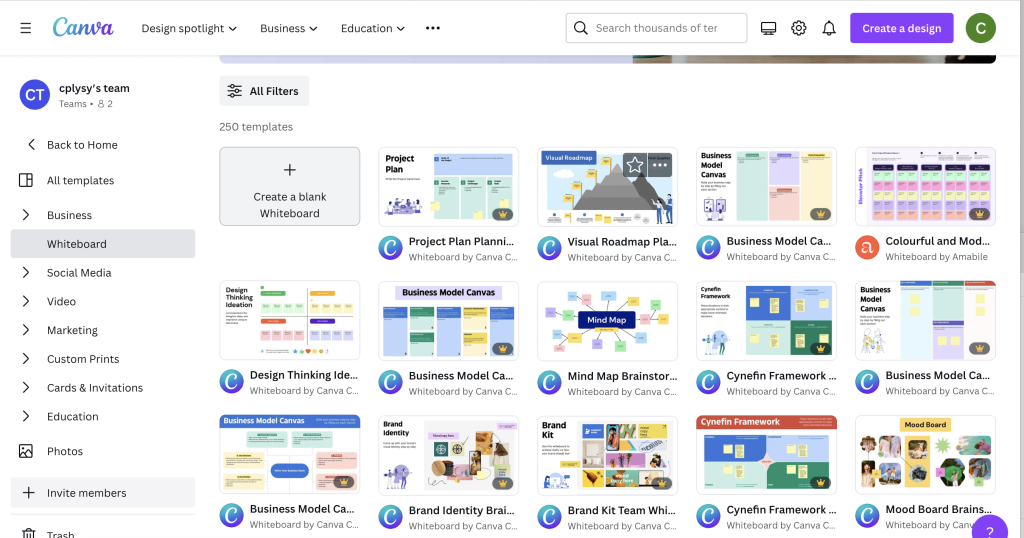
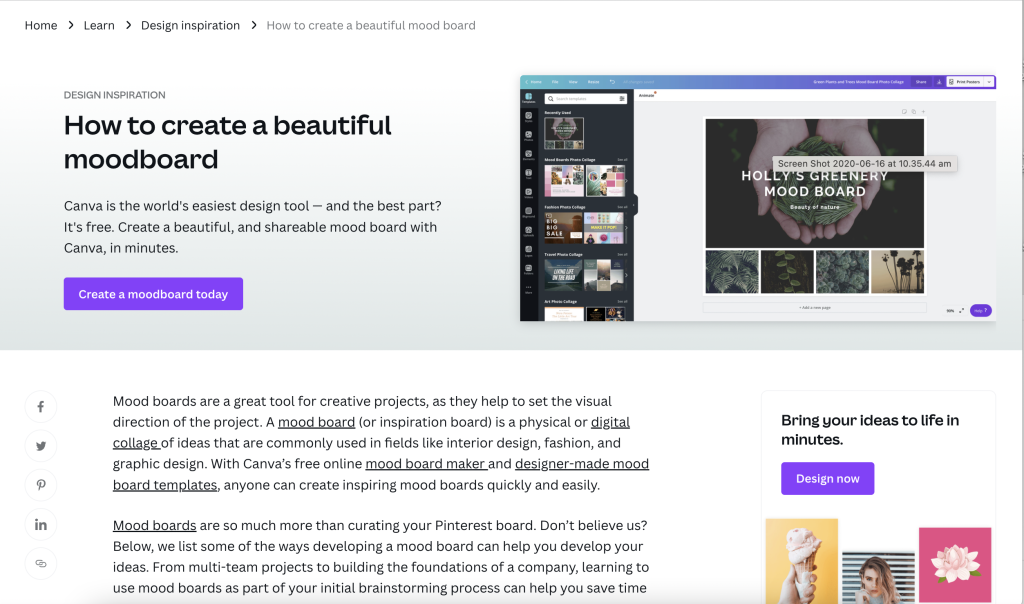
So before we jump in, just know that Canva has a huge post on creating mood boards.

My problem with Canva’s post is that their mood boards are too polished. It’s the same problem I had with my own report mood board guide.

Polished mood boards have their uses.

But let’s get messy.

Start with a Canva Whiteboard

Before Canva introduced whiteboards you had to pick specific dimensions before you could start a project. But with the whiteboard feature you don’t have those limits.

I suggest starting with a Blank Whiteboard. While there technically are Moodboard templates, they pin you down too much to be useful for this kind of free form design.

Drop stuff on the board.

Now here comes the fun part.

For a good board you just want to drop in a bunch of sample images, photographs, fonts, colors, quotes, etc. The goal is to create a feel for what you’re trying to create.

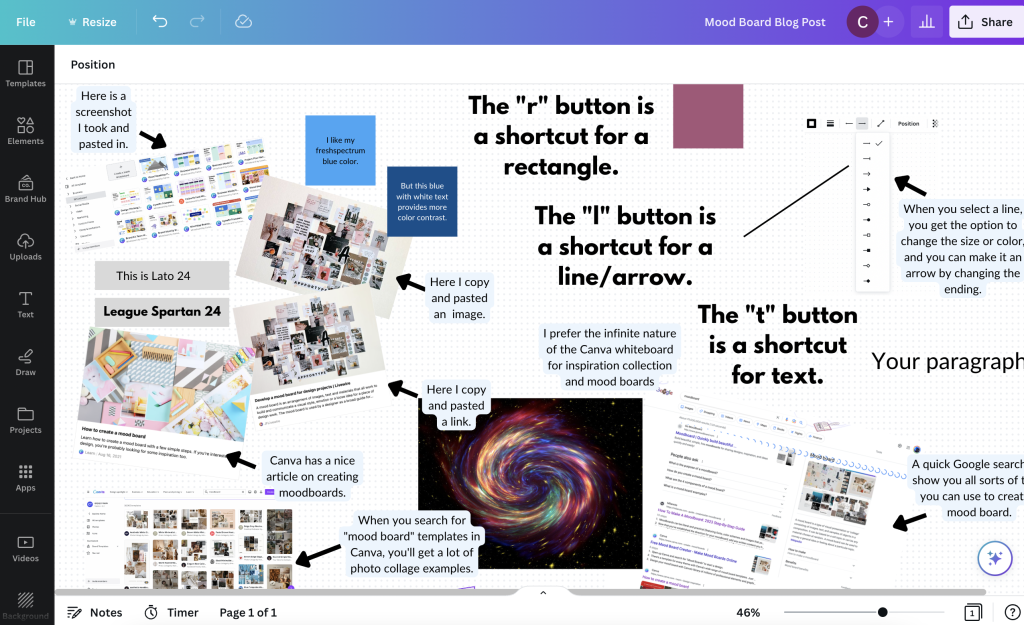
The example I show here is really just a mood board I created prior to creating this mood board blog post. So it’s a mood board for a mood board post.

Drop in screenshots and html links.

Here is the cool thing about this being digital.

If you find something you want to drop on your mood board, just take a screenshot on your computer. Then paste it right into Canva from your clipboard.

Have a link to an article you want to include for inspiration. If you paste the link onto the whiteboard Canva will even pull the featured image and descriptive text. Not only that, it’s still a live link, so you can use it to actually remember other sites you might want to return to for further inspiration.

Colors, Fonts, and Text Blocks

For colors, fonts, and text blocks, use short cuts.

Inside of Canva, with the whiteboard feature open, clicking the “r” button on your keyboard will create a rectangle on the page. I use these single color solid rectangles to share color ideas.

Clicking the “t” button will drop in a line of text…”your paragraph text”. If you’ve copied text from a page, you can also just paste it right into the page (as long as you don’t have anything specific selected).

When placing in fonts I like to just use the font name for the text and the font size so it’s easier to get a sense of scale.

Clicking the “l” button will drop in a line. Select the line and you can change the weight, color, and end points. One of the end points you can select makes it an arrow.

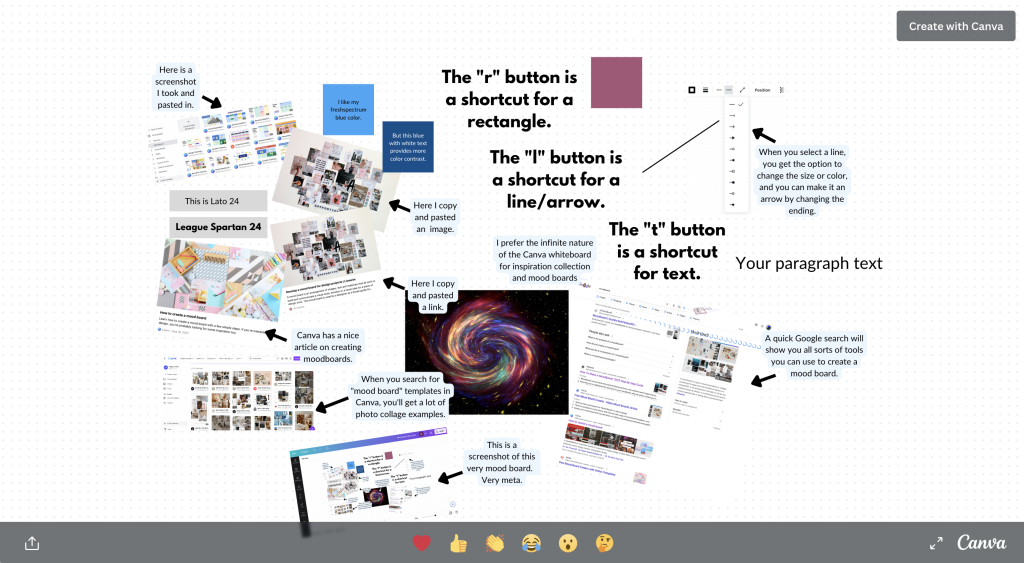
Want to take a closer look at my mood board example?

Click on the image, or this link, to go to the mood board on Canva

Now go get “messy.”

When creating a mood board, it’s tempting to try and be very specific about things you like or want. Being specific can stifle the exploration of an idea or concept and limit the designer you are working with. Try to keep things loose when creating your mood board and aim for a general style or feeling as opposed to trying to define specific aspects of a design in your mood board.

From how to develop a mood board for design projects.

Okay, so ironically, my mood board mood board isn’t really a good example of a mood board. But my goal was to give you a sense of how to make one. You’ll find tons of examples on the web of mood board styles you might want to emulate.

Now go create something.

Written by cplysy · Categorized: freshspectrum

  • « Go to Previous Page
  • Go to page 1
  • Interim pages omitted …
  • Go to page 19
  • Go to page 20
  • Go to page 21
  • Go to page 22
  • Go to page 23
  • Interim pages omitted …
  • Go to page 54
  • Go to Next Page »

Footer

Follow our Work

The easiest way to stay connected to our work is to join our newsletter. You’ll get updates on projects, learn about new events, and hear stories from those evaluators whom the field continues to actively exclude and erase.

Get Updates

Want to take further action or join a pod? Click here to learn more.

Copyright © 2026 · The May 13 Group · Log in

en English
af Afrikaanssq Shqipam አማርኛar العربيةhy Հայերենaz Azərbaycan dilieu Euskarabe Беларуская моваbn বাংলাbs Bosanskibg Българскиca Catalàceb Cebuanony Chichewazh-CN 简体中文zh-TW 繁體中文co Corsuhr Hrvatskics Čeština‎da Dansknl Nederlandsen Englisheo Esperantoet Eestitl Filipinofi Suomifr Françaisfy Fryskgl Galegoka ქართულიde Deutschel Ελληνικάgu ગુજરાતીht Kreyol ayisyenha Harshen Hausahaw Ōlelo Hawaiʻiiw עִבְרִיתhi हिन्दीhmn Hmonghu Magyaris Íslenskaig Igboid Bahasa Indonesiaga Gaeilgeit Italianoja 日本語jw Basa Jawakn ಕನ್ನಡkk Қазақ тіліkm ភាសាខ្មែរko 한국어ku كوردی‎ky Кыргызчаlo ພາສາລາວla Latinlv Latviešu valodalt Lietuvių kalbalb Lëtzebuergeschmk Македонски јазикmg Malagasyms Bahasa Melayuml മലയാളംmt Maltesemi Te Reo Māorimr मराठीmn Монголmy ဗမာစာne नेपालीno Norsk bokmålps پښتوfa فارسیpl Polskipt Portuguêspa ਪੰਜਾਬੀro Românăru Русскийsm Samoangd Gàidhligsr Српски језикst Sesothosn Shonasd سنڌيsi සිංහලsk Slovenčinasl Slovenščinaso Afsoomaalies Españolsu Basa Sundasw Kiswahilisv Svenskatg Тоҷикӣta தமிழ்te తెలుగుth ไทยtr Türkçeuk Українськаur اردوuz O‘zbekchavi Tiếng Việtcy Cymraegxh isiXhosayi יידישyo Yorùbázu Zulu