• Skip to main content
  • Skip to footer
  • Home

The May 13 Group

the next day for evaluation

  • Get Involved
  • Our Work
  • About Us
You are here: Home / Archives for allblogs / freshspectrum

freshspectrum

Nov 10 2022

How to create carousels with Canva

A carousel is like a social media slide deck. The format has been around for years, but it’s making a comeback. In today’s post I’ll show you how to create one using Canva.
How to Create a Carousel - Featured Image

Do you remember slideshare? Basically it was a site that let you put your slidedecks on the web.

Like a lot of web things, it never really went away. LinkedIn bought it and owned it for a bit, and then recently Scribd bought it from LinkedIn. But for years now you have been able to directly embed PowerPoints and Google Slides, so the tool became a bit redundant.

Social media carousels are like slideshares built into different social media platforms. Posting a handful of photos that you can peruse by scrolling horizontally has been a native feature on tools like Instagram, but it just wasn’t something you would see often on platforms like LinkedIn or Twitter.

But that’s changing.

Here is an Example from the United Nations

I’ve seen new carousels popping up all over the place, but here is an example carousel post from the UN. You can find the post on LinkedIn, but they also shared the same post on Twitter and a similar one previously on Instagram.

How to Create a Carousel using Canva

So a carousel is just a sequence of images.

Depending on the social media platform you’ll either share your carousel as a set of images, or in the case of LinkedIn, a PDF.

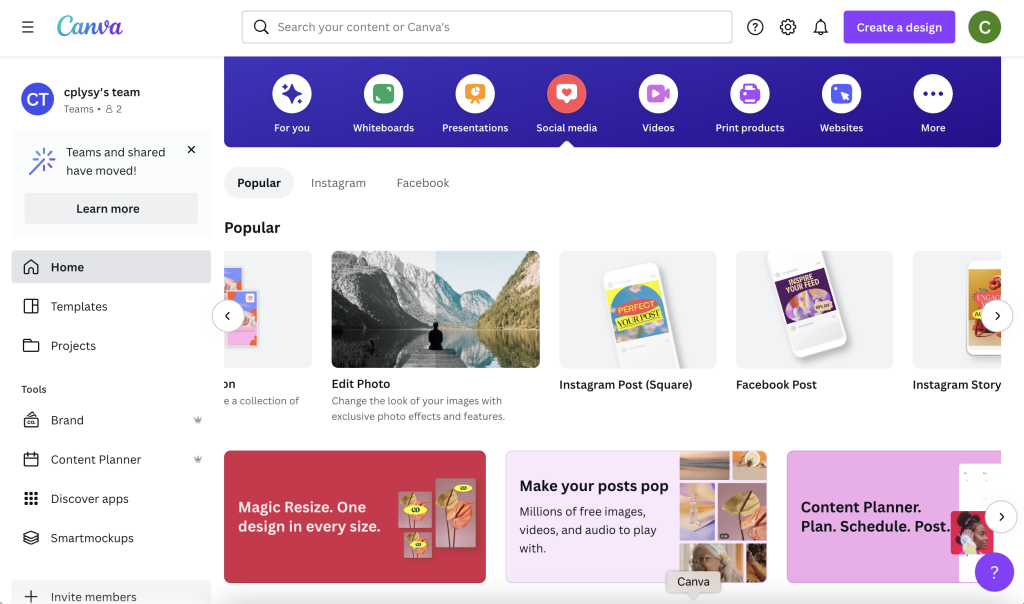
Luckily with Canva it doesn’t really matter because you can turn any design into a collection of images or a PDF. You have some flexibility on size, but I like just going with a social media square.
How to Create a Carousel - Canva Screenshot

Picking and laying out your content.

A lot of the carousels I’ve seen lately are listicles (Buzzfeed style numbered lists).

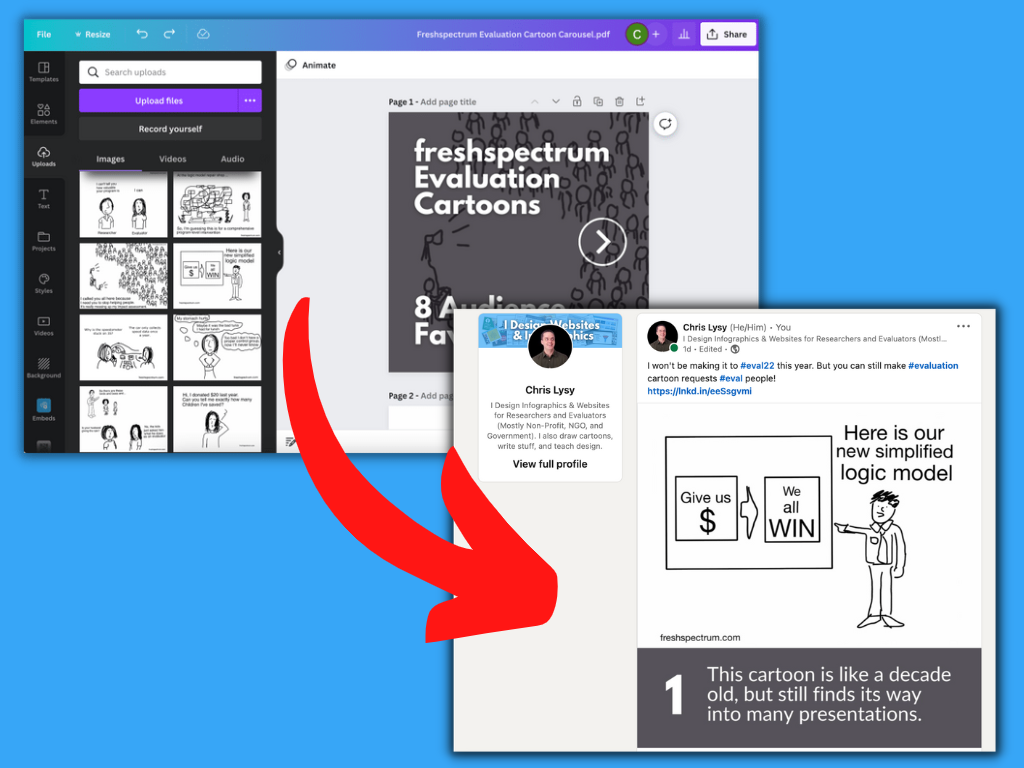
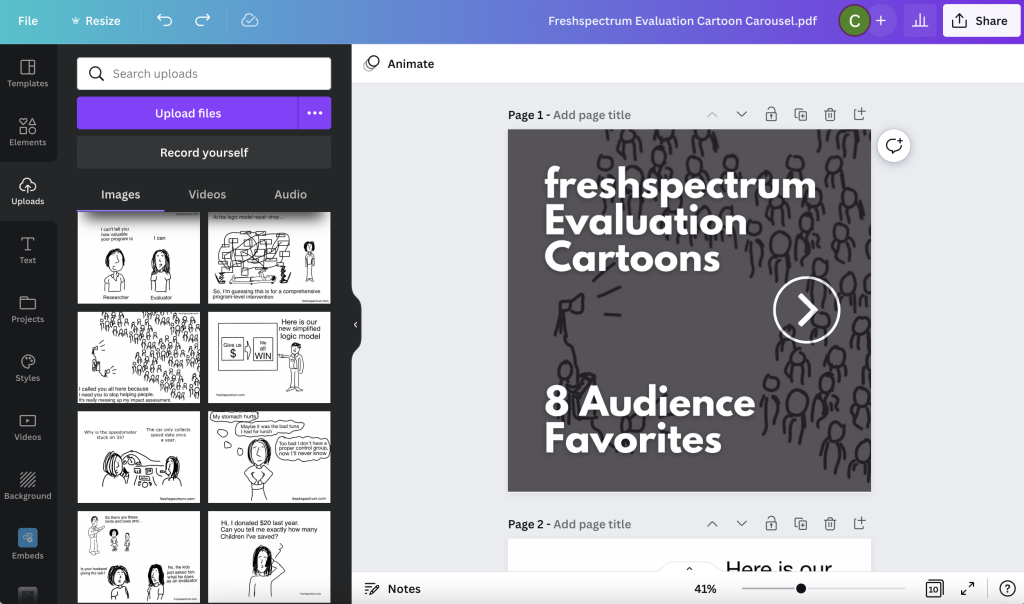
I decided to do the same thing and share some of my old cartoons. I picked 8 audience favorites from my archives to act as my starting point. My cartoons are rectangles, so the square format will give me some space to caption each one.

I have 8 cartoons but want an intro image and closing image, so that gives me 10 images. My plan is to share this on LinkedIn so that will work just fine. Most platforms have limits on their carousels, so check out the requirements before you design (currently Twitter 6; Facebook 10; Instagram 10; LinkedIn 300!).

On my first page I put in a zoomed in version of one of my cartoons as a background. If you want to actually read the cartoons you’ll need to scroll through the carousel. I also put a big white arrow on the cover because it’s not always immediately obvious on LinkedIn that you’re looking at a carousel.
How to Create a Carousel - Canva Screenshot

Think Slidedoc, not Slidedeck

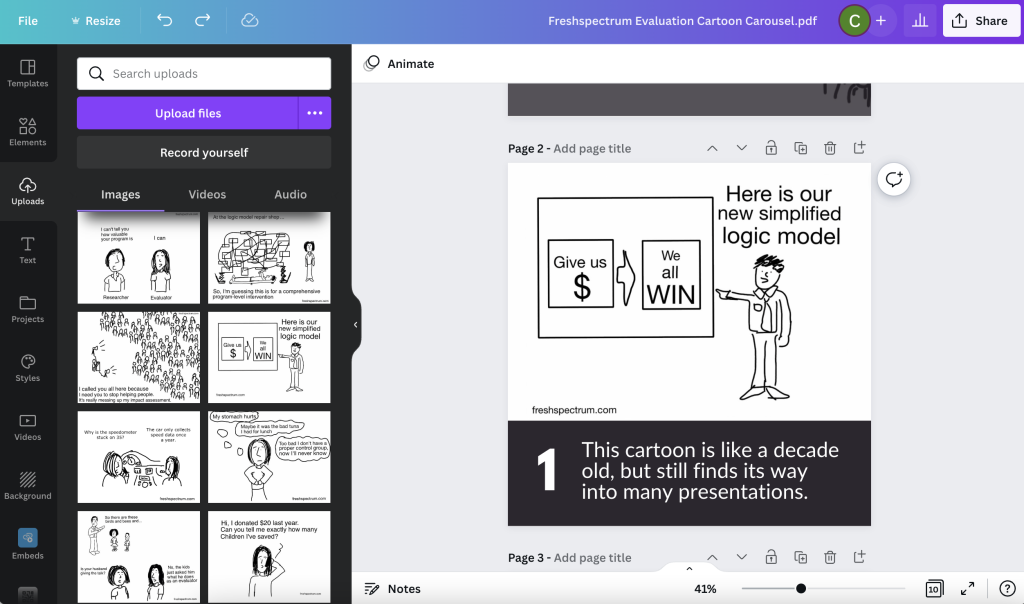
So carousels are more like a slidedoc than a slide deck. You’re not going to be standing in front of them walking through each slide. So it needs to be readable, not just viewable.

This is also meant for social media, so I want any text I use to be pretty large and fairly short. For my cartoon carousel I did a numbered list and put a personal caption under each cartoon.
How to Create a Carousel - Canva Screenshot

Download your Carousel

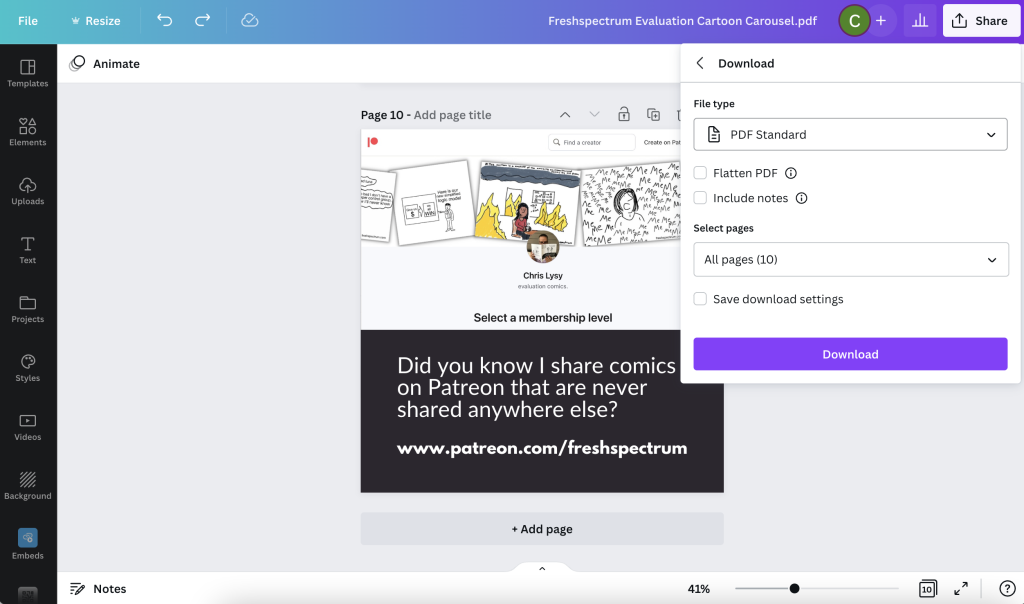
If you’re planning on using the carousel on LinkedIn, you’ll want to download your image set as a standard PDF. If you’re planning on using the carousel on Facebook, Twitter, or Instagram, you’ll want images.
How to Create a Carousel - Canva Screenshot

Publishing the Carousel on your Chosen Platform.

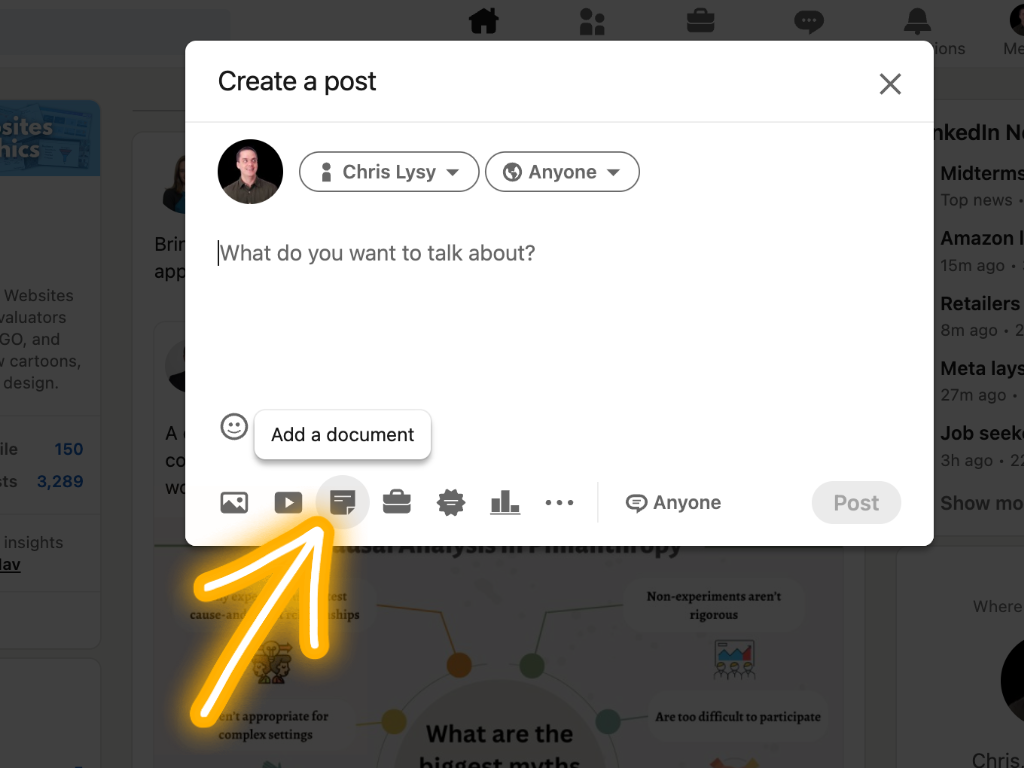
Sharing a Carousel on LinkedIn is simple.

You really just click on “Add a document” and then choose your pdf.
How to Create a Carousel - LinkedIn Screenshot
  • Sharing a Carousel on Instagram is also super easy. You can even make it seamless!
  • Sharing a Carousel on Twitter and Facebook are both do-able, but a little more annoying. Especially with Twitter as you can only do it right now through their Ad platform.

Want to see my final cartoon Carousel?

Here it is, I shared it on my LinkedIn account.
Written by cplysy · Categorized: freshspectrum

Nov 02 2022

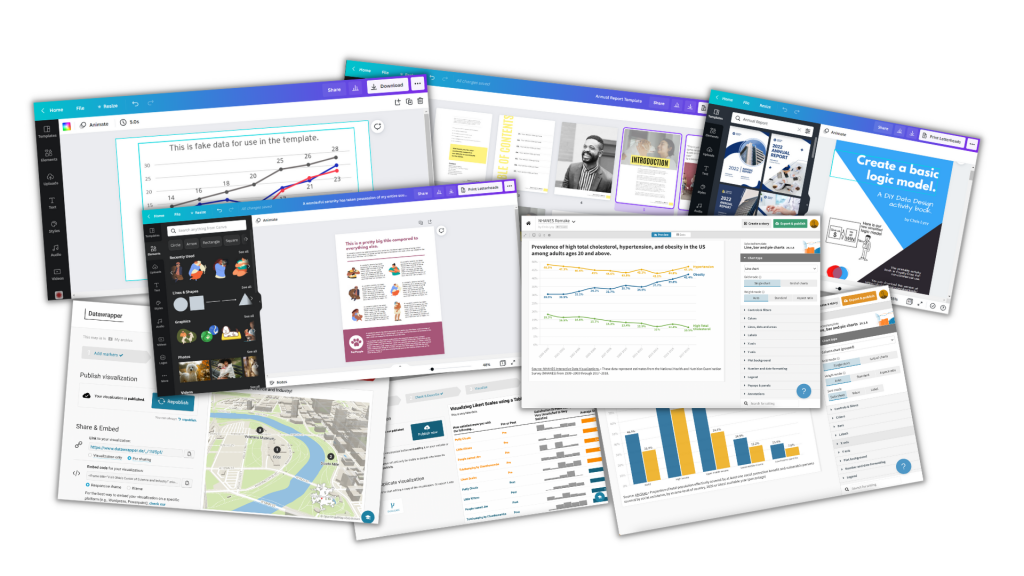
Canva Free, Canva Pro, or Canva for Teams?

Is it worth upgrading your Canva Free account to Canva Pro? Is Canva for Teams a different thing? Is Canva Pro really free for Nonprofits & Schools?

So if you read my blog, you probably already know I’m a big fan of Canva. I have posts on creating logic models using Canva, creating timeline infographics, creating line graph infographics, and even a post on converting Canva reports into Microsoft Word. I also talk about Canva a lot with my online workshop participants.

I like Canva enough that it’s one of the very few tools where I’m part of their partner program. Which basically means they gave me an affiliate link, and if you click and purchase using that link I’ll get a kick back.

This isn’t to say Canva doesn’t have its negatives. The biggest fault is in accessibility > Canva Accessibility is bad, here is how you fix your design. This means there are things I would suggest you never do using Canva in its present state, such as create a Web Site. Until they fix their accessibility issues.

All this to say, I think I know Canva enough to give some guidance on if Canva Pro is worthwhile and which kind of Canva you should consider using.

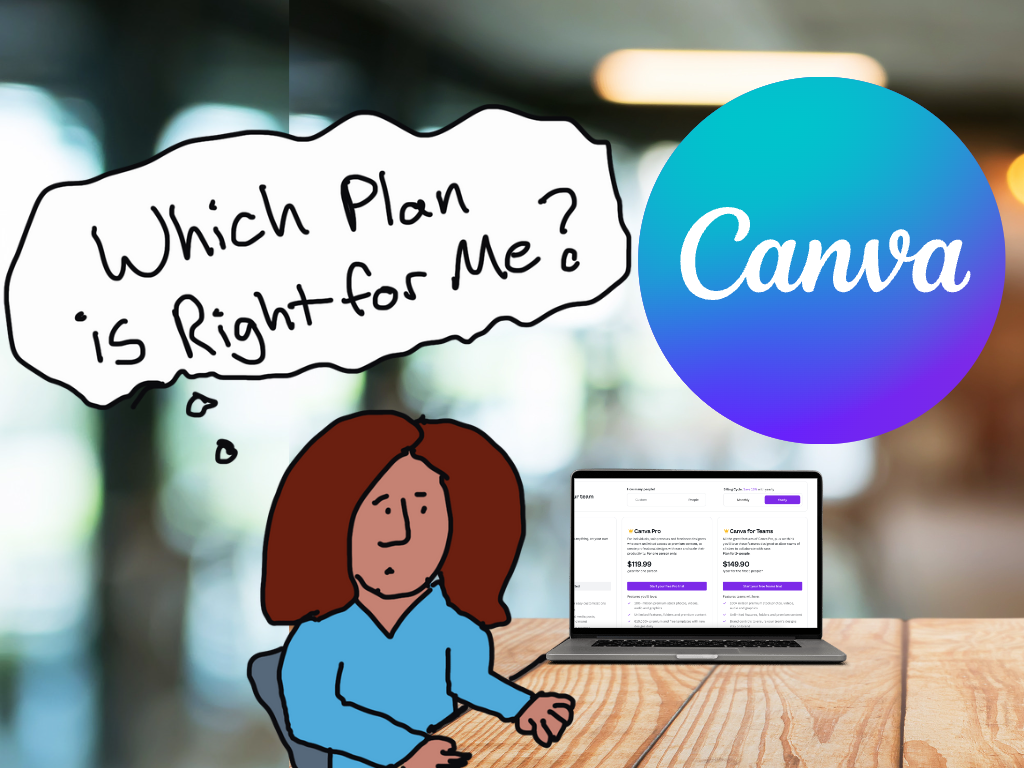
Which Canva Plan is Right for Me?

TLDWTR (Too Long Don’t Want to Read)

In this post I’m going to walk you through all the different iterations of Canva. Unlike other articles I’m not just going to copy/paste feature lists from the Canva sales page. Instead I’m going to give the gist of what each plan offers and why you might consider it for yourself.

But if you don’t want to read any of it at all, here is my advice.

Should you pay for Canva?

No, don’t pay.

  • If you are out of work, a poor college student, or really just don’t have expendable cash, you can do almost everything using Canva Free.

Yes, pay up.

  • If you are an indie business person like me, Canva Pro is a great deal. I would even suggest it if you are just running a side hustle or use a lot social media for professional development and networking.
  • If you run a small business, definitely consider at least the base version of Canva for Teams. It will cost significantly less than two Canva Pro subscriptions and includes up to 5 accounts.

No, get it for free.

  • If you are a K-12 student, teacher, or inside a K-12 district, Canva for Education is free. Teachers need to get verified, other school personal need to contact Canva, and K-12 students need teacher invites.
  • If you work in a NonProfit, Canva for Nonprofits is also free. You just need to register.

Canva Free

Canva is a freemium product. Meaning it’s free but you can pay for more features.

Sometimes freemium is just another way to say demo version. The software company gives you just enough features to act as a never ending trial, but if you want to use the software professionally, you need to pay up.

Canva Free is not like that. Canva Free is a professional product with or without an upgrade to Canva Pro. There are really no limits to what you can create. Images, Infographics, Whiteboards, Presentation Slide decks, eBooks, Video, Reports, and even Websites (although I would recommend against that use given the accessibility thing I mentioned earlier).

Cartoon Person 1, "I hear you consider yourself a Canva pro."
Cartoon Person 2, "Oh, I am. I pay $120 a year for that."

Canva Pro

The biggest reason to upgrade to Canva Pro is the shift from 1 million + free photos and graphics to the 100 million + premium stock photos, videos, audio, and graphics.

There are bunches of free stock photo sites and icon libraries on the web. But bouncing back and forth between Canva and stock libraries can get a little tiresome. It’s so much easier to just use the full stock icon and photo archive embedded within the tool.

Yes, there are some cool features you get when you upgrade. Like the Background Remover, the ability to Magic Resize designs, a personal Brand Kit, and a Social Media Content Scheduler. But while these are nice to have and can certainly be useful features, they don’t make a huge difference in your design workflow. But having a huge growing royalty free archive at your disposal, that just makes everything so much faster.

At the time of this writing Canva Pro costs $119.99/year or $12.99/month.

Cartoon person 1, "With the report deadline coming up I'm surprised to find you so calm."
Cartoon person 2, "Most of us are pretty good now. Except for Jenny, but she's the only one with a Canva pro account."
Cartoon person 3 looks frazzled working on her computer.

Canva for Teams

For a little while, if you signed up for Canva Pro you also received the basic membership for Canva for Teams. So if you were already a Canva Pro user, you may already have Canva for Teams (just check your account status).

Canva for Teams is basically a shared group version of Canva Pro. This lets you share brand kits and brand templates between team members. I’ve seen a lot of small teams where the responsibility for the design falls on a single person’s shoulders (the one with the Pro account). This is a surefire path to creative burnout or turnover.

By team creating, you give all your team members the ability to tweak items. This means anyone on your team can open, edit, and download your designs (as long as they are shared with the entire team). This can be incredibly important, especially with looming deadlines.

Right now Canva for Teams is $149.90/year or 14.99/month for up to the first 5 team members. That’s the Canva sweet spot (average is less than $30/year for each of 5 members)

Increasing your team above 5 members gives you a pro-rated increase in rates that goes up as you add more members. By the time you get to 23 team members you are essentially paying the Canva Pro full price for each member of your team (average $119.99/year for each of 23 members).

Canva for Education

Canva for Education is 100% free for primary and secondary teachers and their students. You just have to start by getting verified as a teacher. But for a student to get the plan, they need an invite from their teacher.

If you are another staff member who is part of a K-12 school or district you can also get in touch with Canva as they offer enterprise-level deployment.

Sorry College Students & Preschoolers, this free offer does not currently include you.

Canva for Nonprofits

Canva for Nonprofits is another free offering. But just like most other software services with NonProfit plans, you need to fill out an application and get verified first.

Speaking of Discounts.

Are you a researcher or evaluator wanting help in learning how to design? I have an ongoing online workshop for that.

Not only that, I offer No Ask Necessary Scholarships that instantly give you 25%, 50%, or 75% off the full registration price.

Written by cplysy · Categorized: freshspectrum

Oct 26 2022

Human Centered Report Design

Are you searching for a modern reporting strategy that leads to visual reports other human beings would actually appreciate? I wrote you an eBook.

Human Centered Report Design
A visual guide to the freshspectrum content & communications strategy.
You can download the new eBook here.

Here is what you’ll find inside the 35 page visual eBook. It’s a super easy picture book that should only take you a few minutes to get through.

The Why Behind it All

This is my digital audience theory. I walk through the usual stages of modern development based on my experiences with how most organizations currently approach this work. It’s a pretty inefficient process.

What to Prioritize

In this chapter I talk about the freshspectrum Content Design Strategy. The goal is to be more efficient and focus first on the reporting pieces that provide you with the most value for the time.

Feed the Media Monster

Knowing what to create is one thing. The next thing you need to know is how to share your reporting. In this chapter I walk through my basic communications strategy.

Personal Next Steps

Finally I close with a few suggested next steps if you’re looking to take your work further.

Grab the eBook

Download Here

Written by cplysy · Categorized: freshspectrum

Oct 19 2022

Make Dissemination Easy

Sharing our work well takes skill and experience. But not every data person has these skills. Should they?

Qualified to Do the Work ? Qualified to Share the Work

The vast majority of PhD and MA programs are not going to give their students enough training around digital dissemination to make them experts in sharing their work online. It’s just not how the programs are designed. Their dissemination focus is on sharing work via academic journals, conference presentations, and traditional reports (aka documentation).

Subsequently, there are a LOT of highly qualified researchers & evaluators who do not have the qualifications necessary to properly share their work over the web.

This isn’t a dig, there is a lot that you need to know in order to do the work. And you don’t need to know how to share the work to do the work. And for a large share of academics, the web is still, more or less, uncharted territory. We have to stop pretending otherwise.

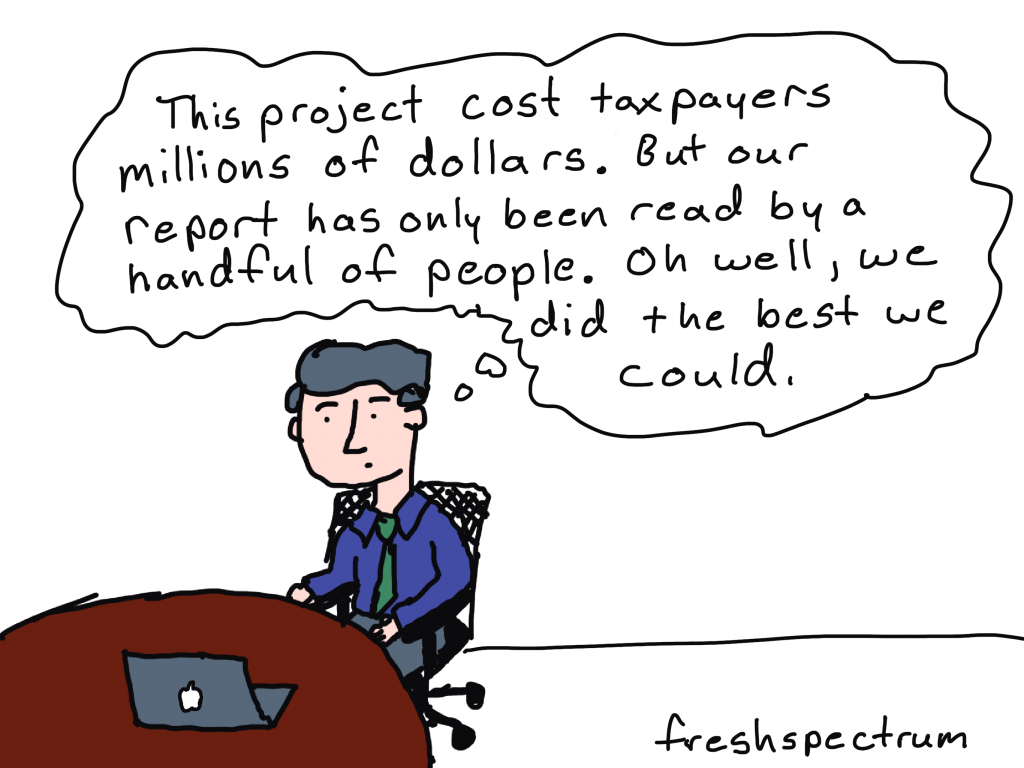
Far too often government agencies, large Non-Profits, and NGOs trust highly educated PIs and project directors to lead the public dissemination of their work. And because of that, millions upon millions of public dollars go into projects that ultimately get shared poorly.

It doesn’t have to be that way.

Cartoon person sitting at desk thinking, "This project cost taxpayers millions of dollars. But our report has only been read by a handful of people. Oh well, we did the best we could."

Right information, wrong format.

In a nutshell, sharing requires more than just the right information.

Information needs also extend to the format of the information shared. One large well designed PDF is insufficient to meet modern information sharing needs.

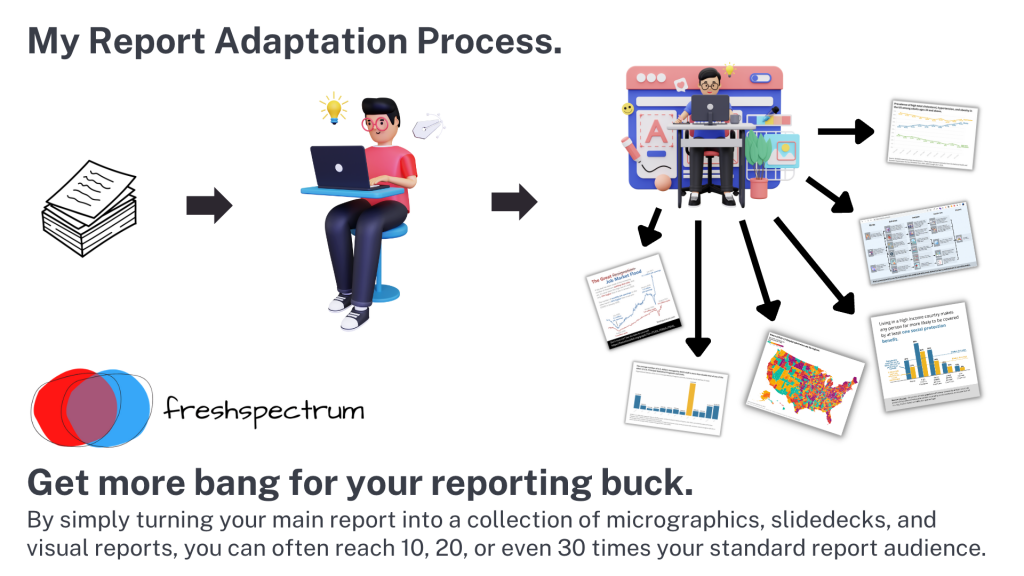
Your reports should be diverse collections of micrographics, infographics, slidedocs, GIFs, videos, short visual reports, and, yes, long PDFs. This is the only way they can really meet broad audience needs.

Don’t add a step, add a role (or a partner).

There are people who have the skills necessary to create reports fast enough to make creating more reports feasible. Yes, I am one, and I also train others to do this kind of work.

If you’re struggling to create a bunch of different types of reports, it’s because you don’t yet have the skillset or the team that is needed to do the reporting work effectively and efficiently. This is a capacity problem.

But you should also stop thinking about dissemination as the last step in the research or evaluation process. If your project is big enough, you should have a person on your team (or multiple persons) who have the responsibility for disseminating your work. And that person (or persons) should have the qualifications necessary to perform this role.

The Easy Dissemination Process

You want to know the easy dissemination process?

  1. Do the work.
  2. Then have someone with the right qualifications share the work.

It can be that simple.

The person who shares is responsible for understanding your audience’s needs and adapting your work to meet those needs. They are the ones who know how to quickly create micrographics, infographics, slidedocs, gifs, videos, interactives, visual reports, and all the other things modern audiences desire.

And if you want to be that person who know how to do those things. Put some time and effort into learning the skills and developing the qualifications necessary to take on that role.

Want Help?

  • Hire me.
    -or-
  • Learn from me.

Written by cplysy · Categorized: freshspectrum

Oct 13 2022

Designing a Seesaw Graph with Canva and Flourish [Walkthrough]

So welcome to a new series of blog posts. Each will be a type of design walkthrough. In these posts I will start with a chart or piece of information found in a real report and adapt it into something different (not always better, but always different).

I’ll walk you through my design process as I go and show you my reasoning throughout.

Designing a Seesaw Graph featured image.

My starting point. A 2022 NAEP Long-Term Trend Assessment Report.

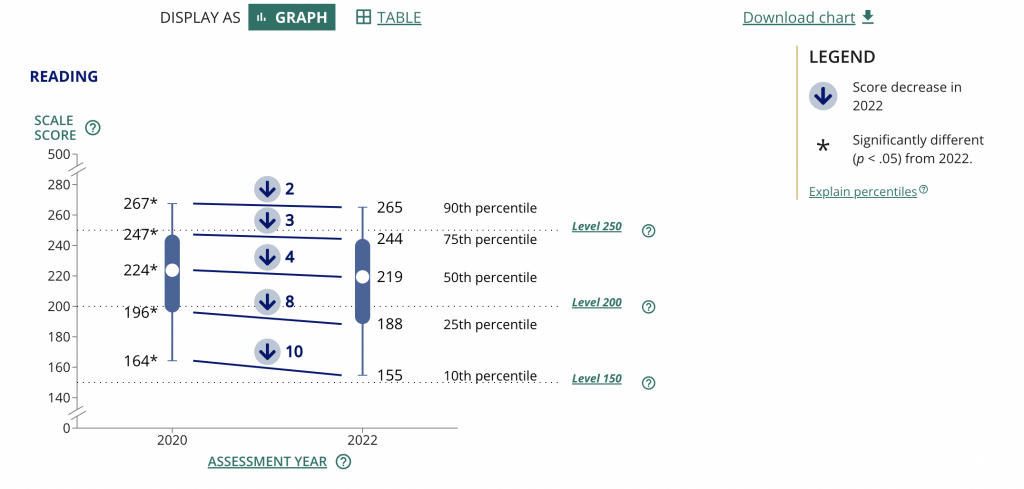
So I was strolling through some report highlights from a recent National Assessment of Educational Progress (NAEP) report (Reading and mathematics scores decline during COVID-19 pandemic) when I came across this chart.

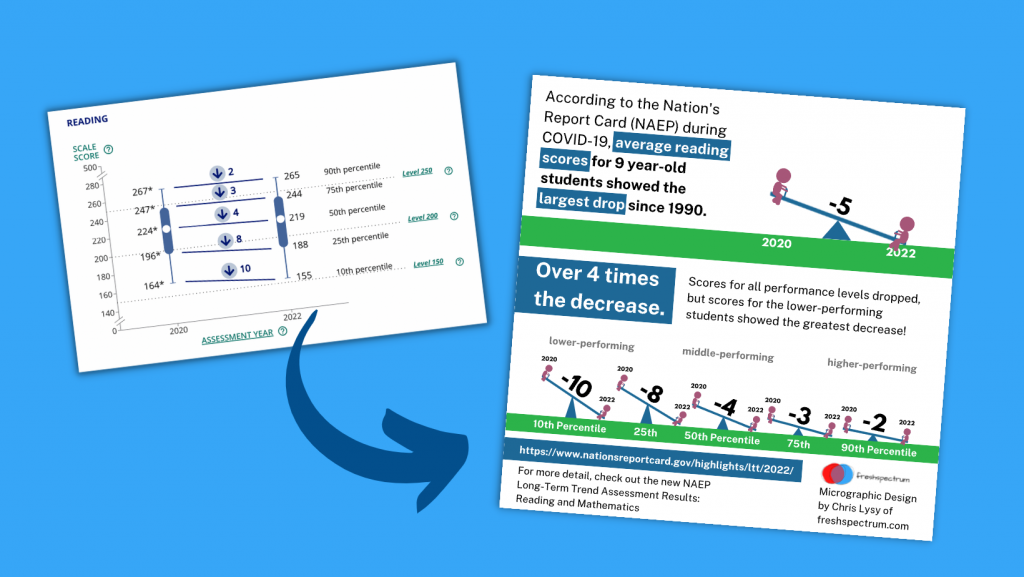
Chart from the NAEP report.

It kind of looks like some version of 5 string guitar tablature and it took me a minute to decipher. It’s a little busy but all in all it does deliver a little story if you can figure out how to read the chart.

Basically reading scores for 9 year old students dropped between 2020 and 2022. The drop was bigger for lower performing kids. Students in the 10th percentile scored 10 points lower in reading in 2022 compared to how students in the 10th percentile scored in 2020.

The gist: COVID happened and the NAEP reading scores went down, but it was worse for lower performing students.

Same was true for math, but for this adaptation I’m going to stick with just reading.

Are the percentiles hiding the story?

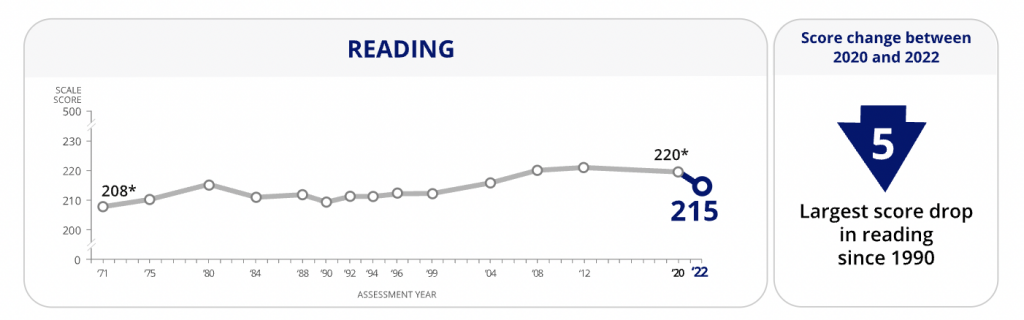
So the drop of scores from 2020 to 2022 across all percentiles is pretty clear. On the NAEP page they shared this through a line graph starting in 1970. Across that entire span the numbers don’t change very often or by very much.

There is only a total 12 point shift between 1970 and 2020, and most of the changes were gradual. Except for last year. That’s an interesting story all on its own, but for the graphic I want to create I’m going to focus on the differences between low performers and high performers.

Chart from the NAEP report showing Reading scores over time.
https://www.nationsreportcard.gov/highlights/ltt/2022/

One thing I learned early in my career is that it’s a good idea to start with the basics, even if they feel completely clear. In this case, since I’ll be zooming in on 2020 to 2022 for the percentiles, it’s a good idea to just start with a matching chart that just shows the overall 2 year average drop.

Now that I have that one, it’s time to break down the data into the percentiles. While the original NAEP chart is accurate, the focus we really want is on the differences between 2020 and 2022 for each of the percentile groups. So separating each percentile into its own chart will help provide that focus.

Can you see how simply splitting up a chart can make it easier to process the information? We already know by default that the 90th percentile is going to have higher scores than the 10th, we don’t need to see them in the same chart to confirm that point.

Is that a seesaw?

Alright, that’s the boring stuff, now let’s play a little.

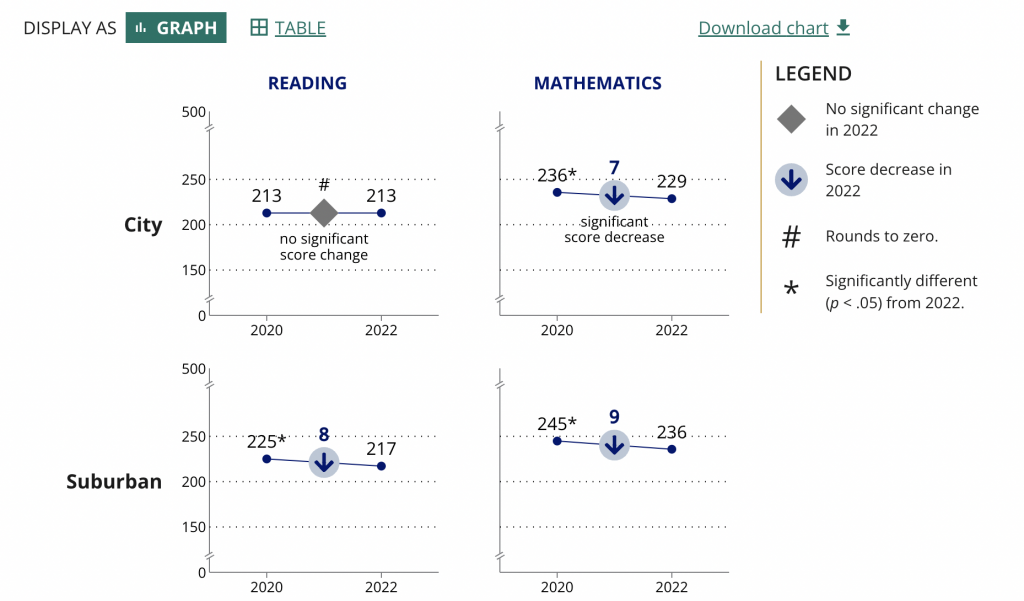
So after scrolling down the page, I noticed they had other charts as well.

Chart from the NAEP report showing a breakdown of the data.
https://www.nationsreportcard.gov/highlights/ltt/2022/

Essentially it’s a two data point line graph. Some people will call this a slope graph.

Given that we’re looking at just the averages we could probably zoom in a little on the actual data by reducing the range on the Y axis.

They ended up using the same scale for all the charts in the report (which I understand). But the average doesn’t vary that much over time so you only get a little bit of a drop. The scale is larger because of the larger range between the 10th and 90th percentiles.

So to make the point a little clearer as to how much of a drop happened, they put the number in bold in the middle above an arrow in a circle. It definitely calls attention to the change.

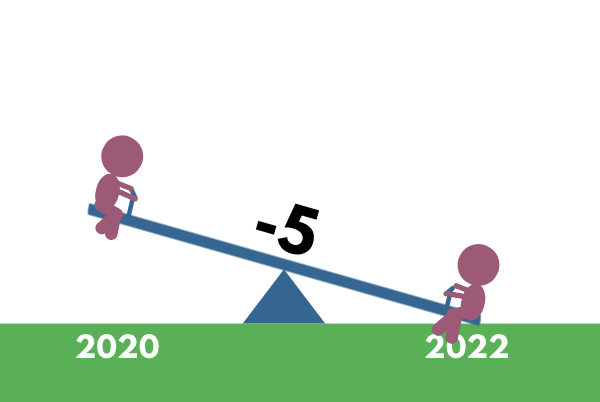
These ones seem very reminiscent of a seesaw…which gave me an idea.

A little seesaw graph.

The seesaw graph. Yes, technically you could call it a line graph or a slopegraph. But do they have little children on each end? I think not.

The difference though is that my goal with this one is to present year to year change. And since I’m visualizing change, and not specific scores, I can go ahead and put all the percentiles on the same plane.

As with all line graphs & slopegraphs (and charts in general) the actual comparative size of the y-axis and x-axis is going to make a big difference.

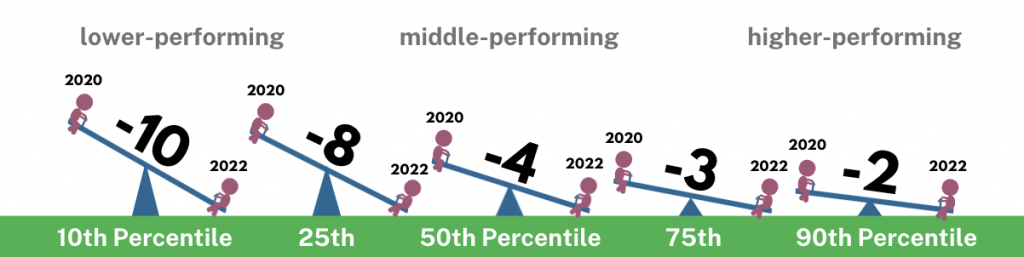
A 5 part seesaw graph.

Even if you couldn’t see the story quickly before, I’m sure you can now. That’s quite a difference between the lower performing percentiles (10th & 25th) and the higher performing percentiles (75th & 90th).

And in defense of my more extreme comparison, a ten point difference is extreme when you consider that the average scores didn’t fluctuate more than 12 total points in the last 50 years.

Pulling it all together into a Micrographic.

Micrographics can be little illustrated stories like this one, that you can easily share on social media. If you’re interested, I have a free 10 part email course on Micrographic design.

Here is the micrographic I pulled together from today’s charts.

Canva NAEP Reading Seesaw Graph Template by cplysy

Want the Canva & Flourish Templates from Today’s Post?

All my templates are available exclusively to members of my Designing with Chris workshop. If you’re in the workshop, here is the link for the set of templates.

If you’re not in the workshop, just know it’s always open, and you can join us today!

Written by cplysy · Categorized: freshspectrum

  • « Go to Previous Page
  • Go to page 1
  • Interim pages omitted …
  • Go to page 24
  • Go to page 25
  • Go to page 26
  • Go to page 27
  • Go to page 28
  • Interim pages omitted …
  • Go to page 54
  • Go to Next Page »

Footer

Follow our Work

The easiest way to stay connected to our work is to join our newsletter. You’ll get updates on projects, learn about new events, and hear stories from those evaluators whom the field continues to actively exclude and erase.

Get Updates

Want to take further action or join a pod? Click here to learn more.

Copyright © 2026 · The May 13 Group · Log in

en English
af Afrikaanssq Shqipam አማርኛar العربيةhy Հայերենaz Azərbaycan dilieu Euskarabe Беларуская моваbn বাংলাbs Bosanskibg Българскиca Catalàceb Cebuanony Chichewazh-CN 简体中文zh-TW 繁體中文co Corsuhr Hrvatskics Čeština‎da Dansknl Nederlandsen Englisheo Esperantoet Eestitl Filipinofi Suomifr Françaisfy Fryskgl Galegoka ქართულიde Deutschel Ελληνικάgu ગુજરાતીht Kreyol ayisyenha Harshen Hausahaw Ōlelo Hawaiʻiiw עִבְרִיתhi हिन्दीhmn Hmonghu Magyaris Íslenskaig Igboid Bahasa Indonesiaga Gaeilgeit Italianoja 日本語jw Basa Jawakn ಕನ್ನಡkk Қазақ тіліkm ភាសាខ្មែរko 한국어ku كوردی‎ky Кыргызчаlo ພາສາລາວla Latinlv Latviešu valodalt Lietuvių kalbalb Lëtzebuergeschmk Македонски јазикmg Malagasyms Bahasa Melayuml മലയാളംmt Maltesemi Te Reo Māorimr मराठीmn Монголmy ဗမာစာne नेपालीno Norsk bokmålps پښتوfa فارسیpl Polskipt Portuguêspa ਪੰਜਾਬੀro Românăru Русскийsm Samoangd Gàidhligsr Српски језикst Sesothosn Shonasd سنڌيsi සිංහලsk Slovenčinasl Slovenščinaso Afsoomaalies Españolsu Basa Sundasw Kiswahilisv Svenskatg Тоҷикӣta தமிழ்te తెలుగుth ไทยtr Türkçeuk Українськаur اردوuz O‘zbekchavi Tiếng Việtcy Cymraegxh isiXhosayi יידישyo Yorùbázu Zulu