• Skip to main content
  • Skip to footer
  • Home

The May 13 Group

the next day for evaluation

  • Get Involved
  • Our Work
  • About Us
You are here: Home / Archives for allblogs

allblogs

Jan 15 2021

What is a Needs Assessment? Cartoon Glossary

This is a series of posts providing quick of overviews of important topics in research and evaluation. Each post in this series will include at least 3 cartoons from my archives and at least 3 links to recommended resources.

What is a Need?
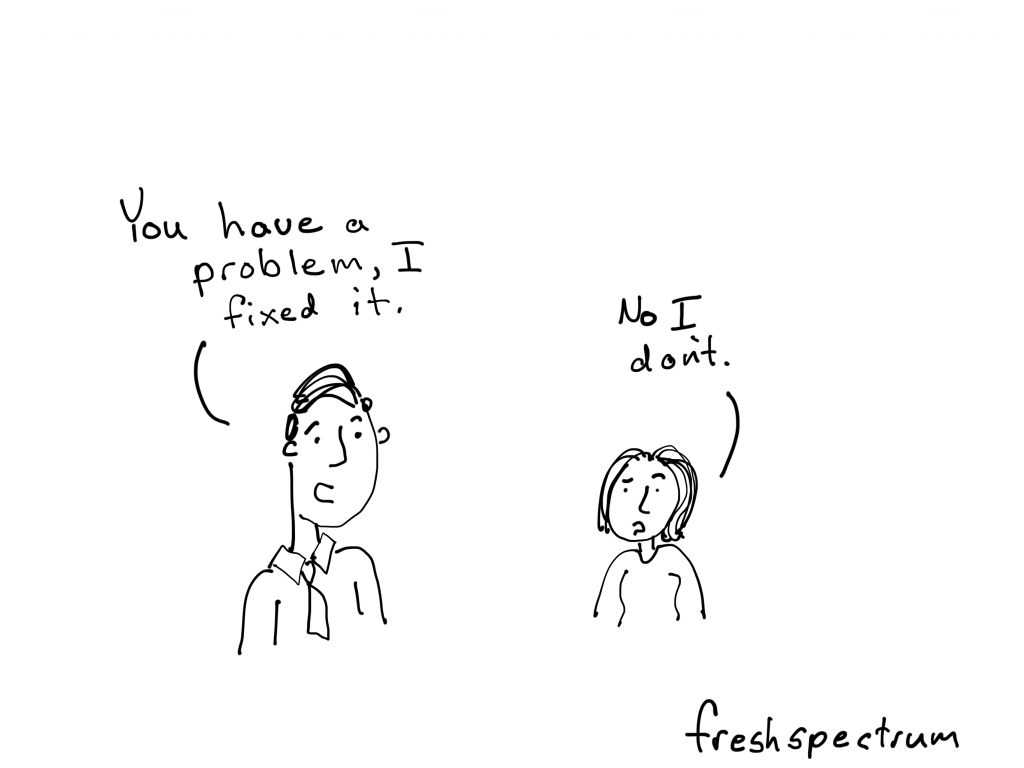
Needs Assessment Cartoon by Chris Lysy for freshspectrum.

"You have a problem, I fixed it.

No I don't."

In most needs assessment surveys, a need means something that specifically relates to a particular group or community. It’s not usually a universal need, such as the need for food or affection. But it’s more than an individual need, as in I need a new couch for the living room, or I really need a vacation. Those may truly be needs, but they are not generally the types of needs that are assessed in needs assessment surveys.

The Community Toolbox – Conducting Needs Assessment Surveys

What is your scope?

Needs Assessment Cartoon by Chris Lysy for freshspectrum.

"Hello, I'm doing a community needs assessment, could you spare five minutes to answer a few questions? No pressure, we are currently not funded beyond this survey and nobody is likely to even read my report."

It is important to limit the scope of a needs assessment to what can be reasonably addressed. For example, there would be little point examining health data or asking community members about health if there is no scope to address health needs. At the scoping stage, it is also helpful to record any other pre-existing priorities or limitations (e.g. funding limitations, geographic boundaries).

Australian Institute of Family Studies – How to do a Needs Assessment

Considering your Audience.

Needs Assessment Cartoon by Chris Lysy for freshspectrum.

"Hello, you don't know or trust me, but can I ask you a bunch of deep probing questions about your work?"

Given your objectives and resources, consider the target audiences and data sources that will help you assess your needs. Is it most effective to administer a survey to a wide range of community members, to hold several focus groups with hospital administrators, examine existing reports, or directly observe project participants? Sometimes you’ll need to conduct several, complementary needs assessment activities to collect data for a range of stakeholders.
National Institute for Children’s Health Quality – Seven Steps for Conducting a Successful Needs Assessment

Written by cplysy · Categorized: freshspectrum

Jan 14 2021

Comment on Museums and Climate Change: A Form-follows-Function Perspective by Molly Paul

Fascinating commentary on the role of museums in educating visitors on climate change! It seems like it would be difficult to reconcile both the multi-million-year perspective a geoscientist might have with the year to year perspective a beach house owner may have, yet both are interested in the same climate issues. What is an example of a tool museums could employ to help close that gap in perspective? How could other sectors of our society support museums in this endeavor to merge science and humanity?

Written by cplysy · Categorized: rka

Jan 14 2021

Museums and Climate Change: A Form-follows-Function Perspective

Emlyn Koster, PhD, delves into why museums should illuminate the environmental and societal impacts of climate change.

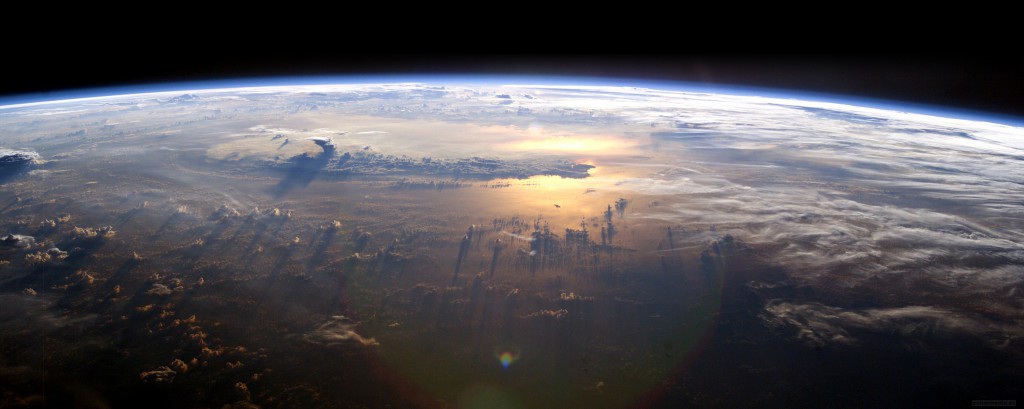
An image of the Earth from space showing the Earth's wafer-thin atmosphere looking like a blue rim
The Earth’s wafer-thin atmosphere, looking like a blue halo, is life’s protective envelope. Image credit

An undergraduate geologist in the UK in 1969, I was glued to the live transmission from NASA’s astronauts on the Moon with their mesmerizing panorama of the Earth. Not until recently though did I become aware that a British astronomer in 1948 predicted that the first photography of the Earth would unleash “a new idea as powerful as any in history.”

At university, I learned that the Earth’s environments are ecological responses to massive forces from above and below: climate changes that fluctuate sea-level and cause ice ages, plate tectonics that move continents and raise mountains. Although these processes are imperceptibly slow in the context of the geological nanosecond of human evolution, we are reminded of their power by sudden catastrophes such as tsunamis and developing disasters such as coastal inundation. Geologists get used to talking in timeframes of tens, hundreds and thousands of millions of years. Now rapidly, all of us ought to grasp the unwitting geological scale of our impacts on the Earth.   

In 1992, 2017 and 2019 — while board chair of the Geological Association of Canada and CEO of four relevancy-minded nature and science museums — thousands of concerned scientists, including most Nobel laureates, issued warnings about escalating rates of climate change and other environmental impacts. In 2015 a joint commission of the medical journal Lancet and the Rockefeller Foundation concluded that human health hinges on flourishing natural systems. The Covid-19 pandemic has begun to raise public awareness of the impacts of climate change on human health.

In 2016 the UN’s Paris Agreement began a global focus on the perilous outcomes of human-caused 1.5-2.0°C (2.7-3.6°F) warming of the lower atmosphere. While this difference seems trivial when compared to night-and-day temperature ranges that often exceed 10°C (18°F), ice sheets and glaciers, sea level, ecosystems and food chains, and extreme weather are susceptible to minor shifts in average temperature. On Earth Day 2020, a former UN official shared a jolting view that civilization has become “estranged” from the Earth.

As with severe storms like Katrina and Sandy, it has proven invaluable for communication purposes to name the dangers we face as they unfold. Whether or not it becomes added to the Geological Time Scale, I am an advocate for the value of using the term Anthropocene as transdisciplinary shorthand for human disruption of the Earth System. This encompasses the interconnected atmosphere, hydrosphere, cryosphere, biosphere with its predominant human species, and lithosphere.

With many megacities and much key infrastructure on low-lying coasts, ‘sea level rise’ unequivocally pinpoints one of the most severe, and unsustainable, outcomes of ‘climate change.’ An article in the latest issue of Anthropocene: Innovation in the Human Age states: “Like it or not, retreat from the coasts has begun … The only question left is whether it will be managed or chaotic.” As surmised in a book review about museums and climate change: “no one gets to sit this one out.” Terms such as ‘climate change’ and ‘sea level rise’ must also beckon our understanding of related crises, such as ‘climate refugees’.

The form-follows-function principle in architecture is an echo of John Cotton Dana’s opinion of a century ago that a museum should know its community’s needs and then align itself with those needs. With major gaps between wants and needs commonplace across society, visionary leadership of museums is vital. When Sesame Street’s Grover left The Everything in the Whole Wide World Museum, he exclaimed: “You know, I have seen many things in this museum … But I still have not seen everything in the whole wide world … Where did they put everything else?”. His curiosity points to a dilemma for museums that they are as accountable for what they present as much as for what they omit. I worry that much of society as well as many in the museum sector do not yet know enough to be also worried. In its year-end report for 2020, the UN Environment Program warned that, despite a brief dip because of the pandemic, the world is heading for a temperature rise of 3.2°C (5.8°F) this century.

Emlyn Koster, PhD (koster.emlyn@gmail.com) is a geologist, museologist and humanist with UK, Canadian and US citizenships. He was the CEO at the Royal Tyrrell Museum of Paleontology, Ontario Science Centre, Liberty Science Center and the North Carolina Museum of Natural Sciences. With recognition including the University of Ottawa’s 2019 Alumni Award of Excellence, he is an adjunct professor in Marine, Earth and Atmospheric Sciences at North Carolina State University.

The post Museums and Climate Change: A Form-follows-Function Perspective appeared first on RK&A.

Written by cplysy · Categorized: rka

Jan 13 2021

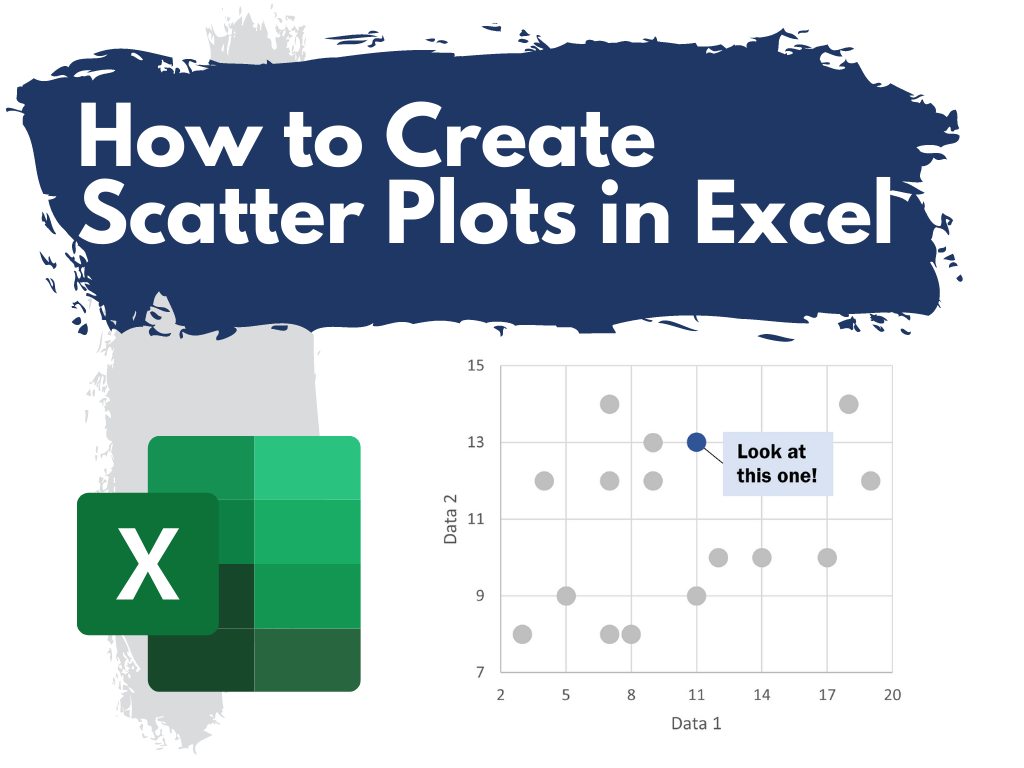
How to Create Scatter Plots in Excel

This is the third in a series of posts on chart design in Excel. In each post we will take on a different chart type. Today we’ll go with the chart that brings correlations to life, the Scatter Plot.

What you’ll find in this post:

  • An Oversimplified How To
  • How to create a good looking scatter plot.
  • A little bit of inspiration.
  • Some other considerations.
How to Create Scatter Plots in Excel

An Oversimplified How To

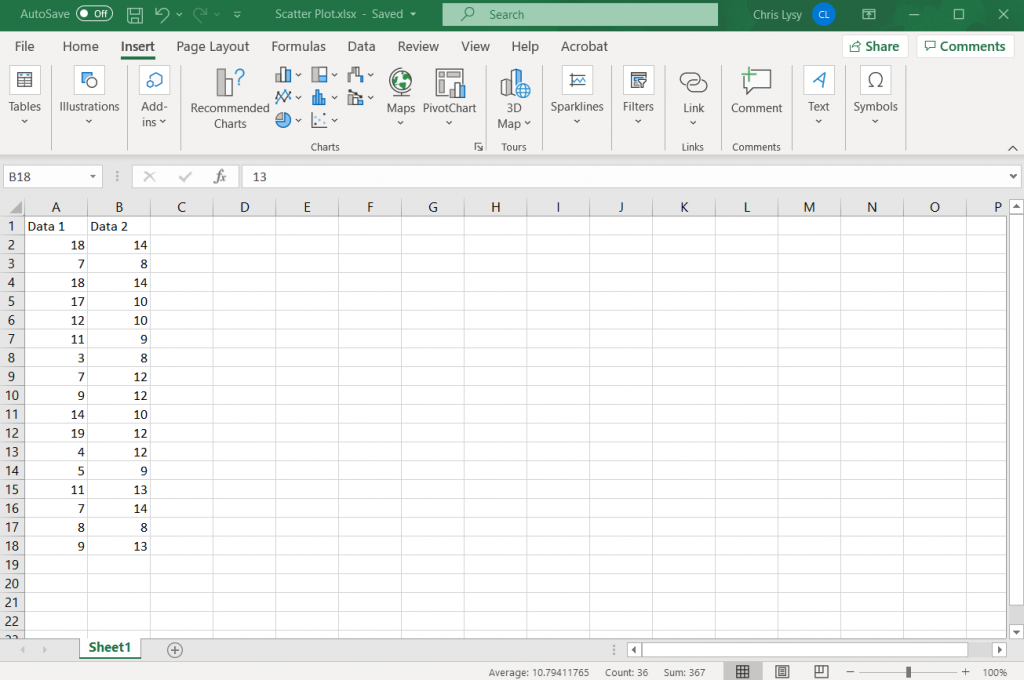
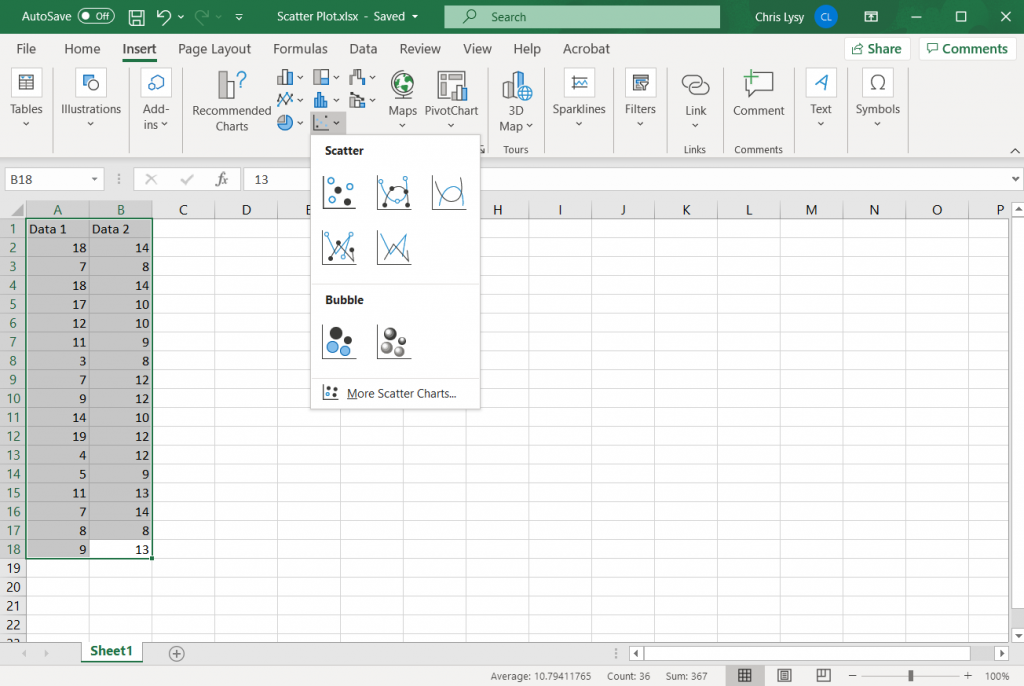
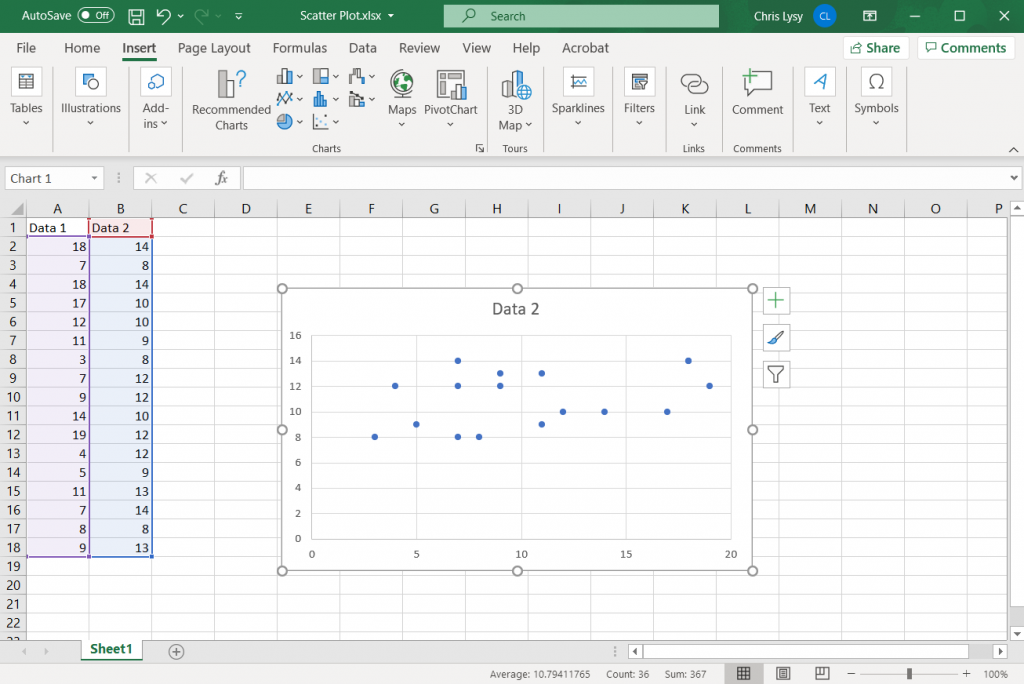
Creating a scatter plot is really simple in Excel. It just takes two columns of data and a couple of buttons.

How to Create Scatter Plots in Excel - Simplified How To Step 1 Illustration

Step 1. Highlight two columns of numbers.

How to Create Scatter Plots in Excel - Simplified How To Step 2 Illustration

Step 2. Click on the insert tab, then the scatter plot icon. Then select the first option.

How to Create Scatter Plots in Excel - Simplified How To Step 3 Illustration

Step 3. Woohoo, you created a scatter plot!

How to create a good looking scatter plot.

Okay, so that’s the most basic of basics. Here are some more steps you probably want to take to create something worth sharing.

How to Create Scatter Plots in Excel - Setting up your Axes Illustration

Setting up your Axes

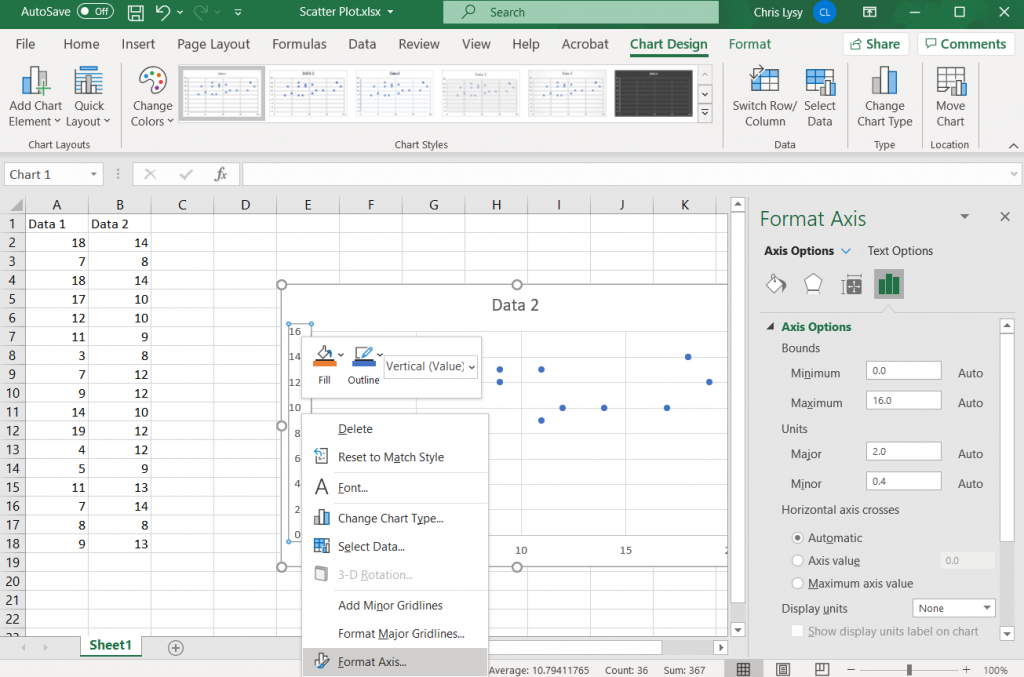
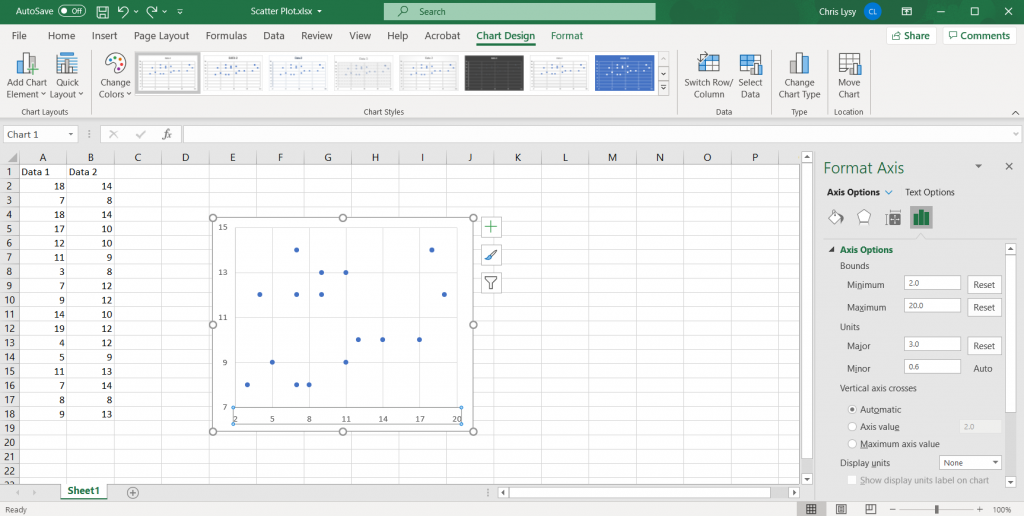
With any scatter plot, the range you choose for each axis is going to heavily impact the look of the chart. You don’t have to start your axis at 0, unless it makes logical sense. Your X and Y axis also do not need to share ranges (especially if the data is fundamentally different).

For my random data set I’ll just use the value ranges for each data column to set the minimum and maximum values.

How to Create Scatter Plots in Excel - Setting Major Units Illustration

Setting Major Units

While setting up the Axis bounds, also setup your major grid units. This will control what numbers are shown on each axis. If you choose to use grid lines, this will also set where there the gridlines appear.

How to Create Scatter Plots in Excel - Setting Gridlines Illustration

Setting Gridlines

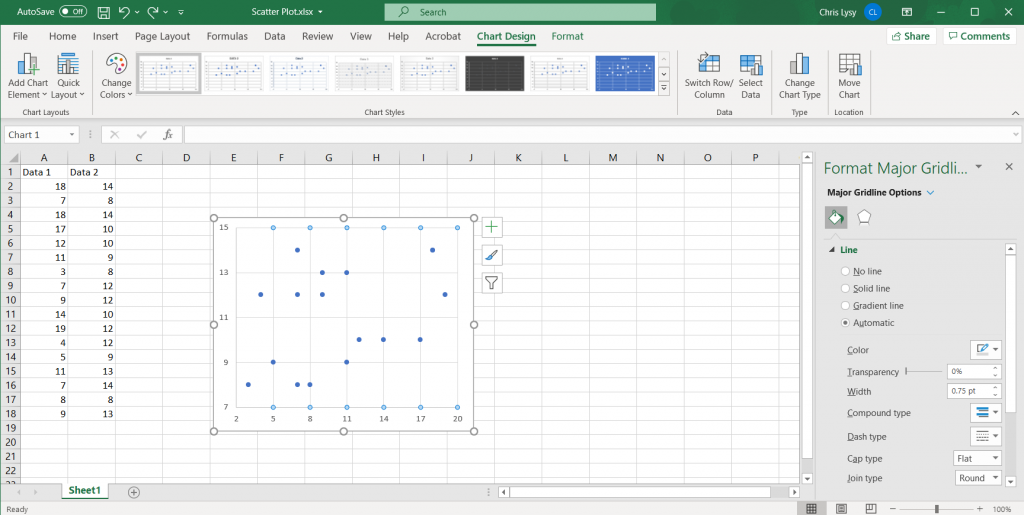
Often with scatter plots you have far more data than you really want to label individually. So setting up grid lines is important. I try to space my gridlines so it feels a lot like a map’s latitude and longitude. The default lines are a light gray, I usually just stick with those lines.

How to Create Scatter Plots in Excel - Labeling each Axis Illustration

Labeling each Axis

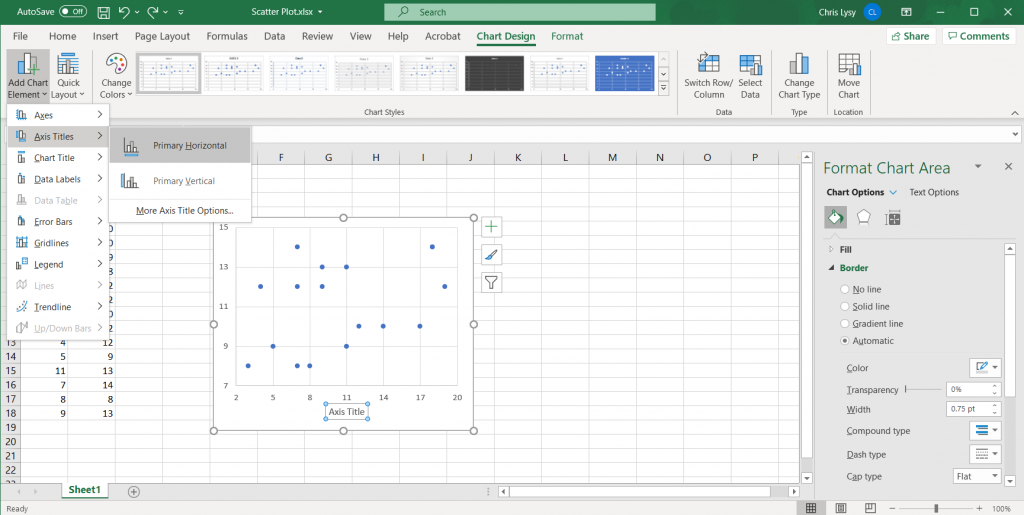
Since we are dealing with two different variables, labeling each axis is important. We can add axis labels quickly in the Chart Design tab, by clicking on Add Chart Element > Axis Title and then Primary Horizontal and Primary Vertical.

How to Create Scatter Plots in Excel - Tweaking the Marker Size Illustration

Tweaking the Marker Size

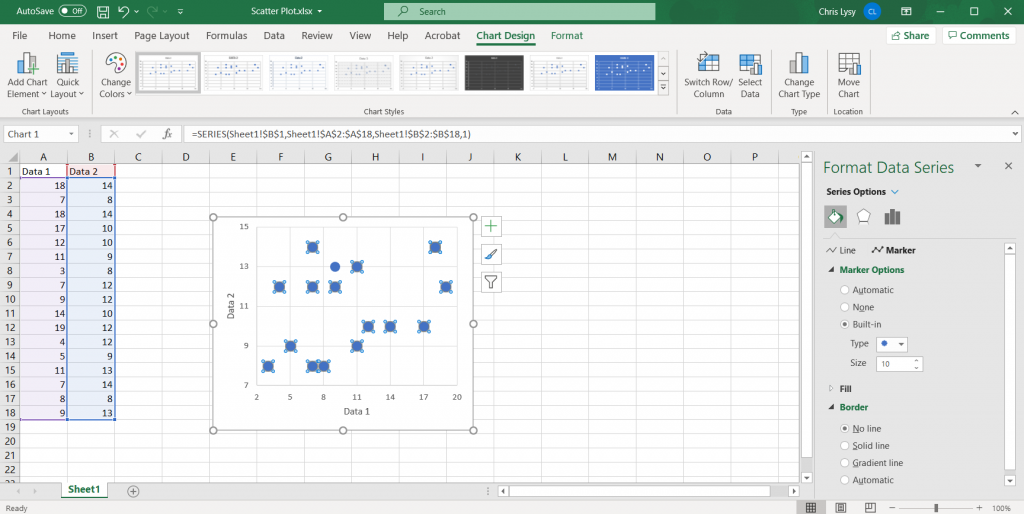
Depending on how many data points you have in your data set, you might want to increase or decrease the marker size. You can do so by clicking on the individual markers and going to the format tab. Here you can also change the marker type and size.

Since I only have so many markers, and there isn’t any overlap, I’ll go ahead and increase the marker size.

How to Create Scatter Plots in Excel - Highlighting an Individual Marker Illustration

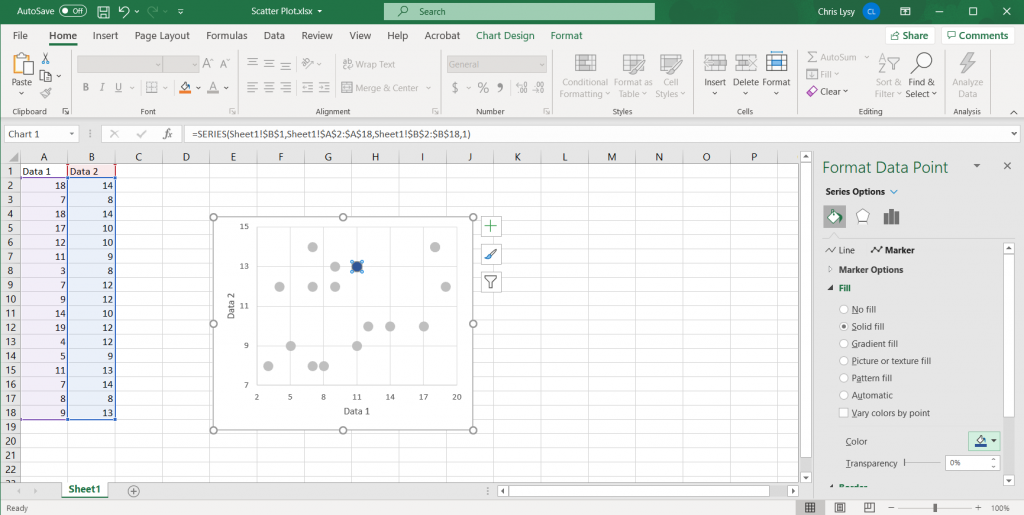
Highlighting an Individual Marker.

Highlighting individual data points can be useful in scatter plots. Especially if you are attempting to localize a larger dataset. The easiest way to call attention is to lighten the color of all data points (and possibly turn to gray). Then use a darker color to spotlight the specific data points you would like to highlight.

How to Create Scatter Plots in Excel - Adding Annotations Illustration

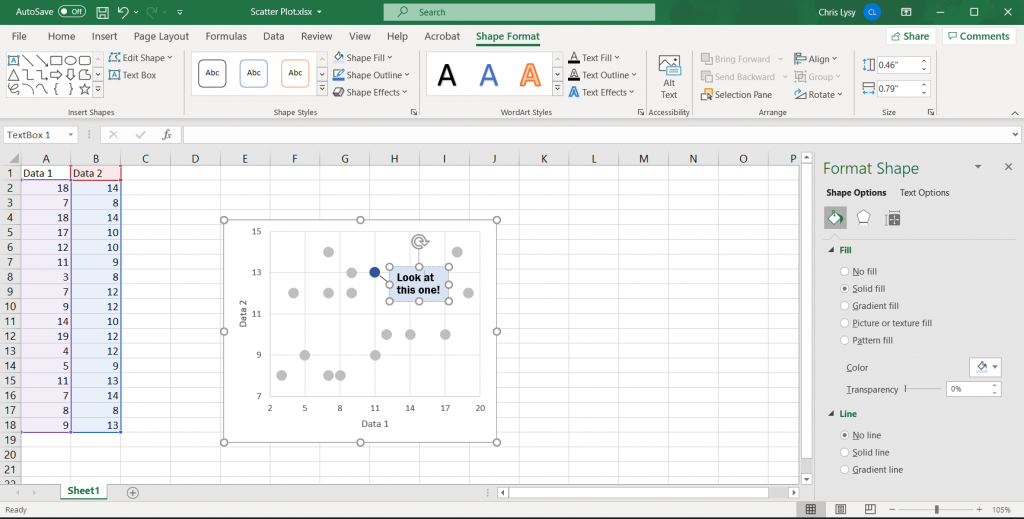
Adding Annotations

Simple annotations can give scatter plots added value, especially if you chose to highlight certain data points. Just select the chart, then go to the insert tab. And then insert a text box.

To draw a connection to a specific point on the line, insert a shape (line).

How to Create Scatter Plots in Excel - Saving the Image Illustration

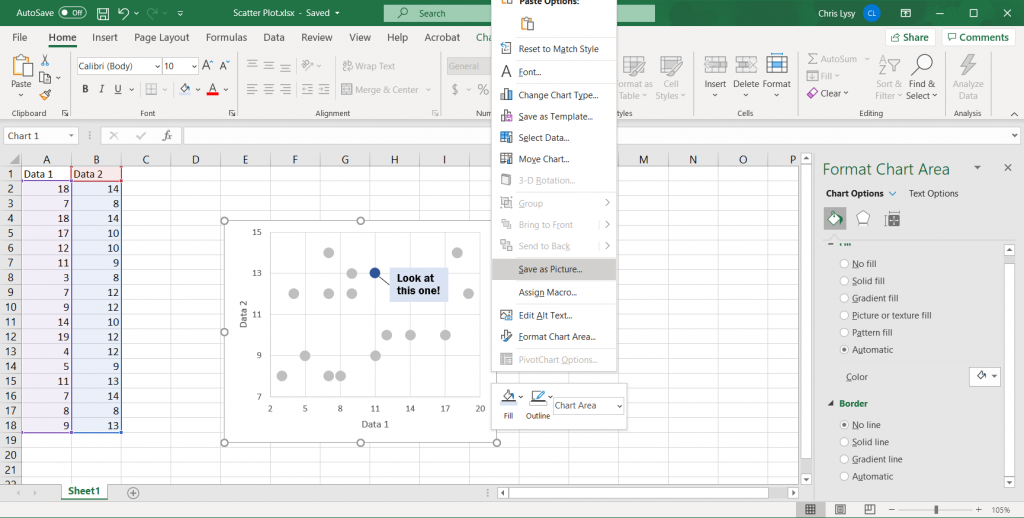
Saving the Image

Once you have made all the changes you want to the chart you can save it as a picture. Just right click on the chart area and click “Save as Picture.”

Alternatively, you can just copy and paste the chart from Excel into Word or PowerPoint. If you’re staying within the Office suite, this is the ideal way to move the image as it retains your full ability to reformat the graphic.

Also, just a note, if you notice your text box or inserted shape is missing this is why. When you insert a shape you need to have the chart selected. If not, it will live in the spreadsheet but not the actual chart image!

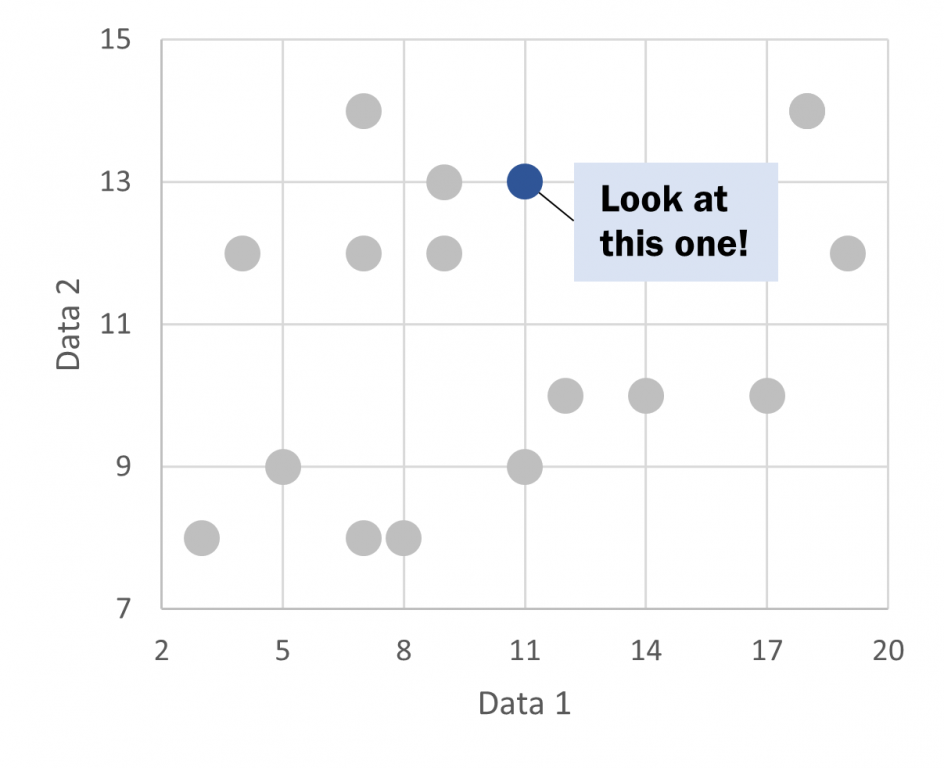
How to Create Scatter Plots in Excel - Scatter Plot Illustration

Beyond the Basics

This is just the basics. There are all sorts of things you can do with scatter plots.

A little bit of inspiration.

I love scatter plots.

They are one of the best ways to pack a ton of data into a single chart.

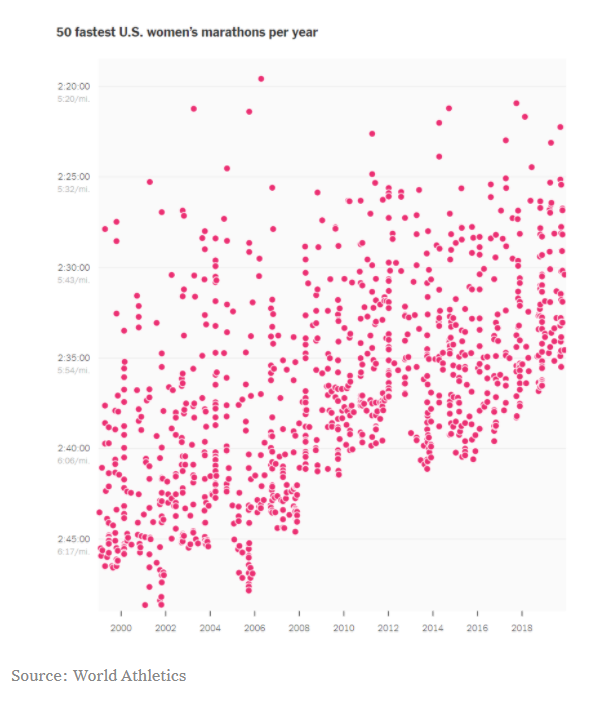
Take a look at the following chart. It shows the fastest women’s marathons each year. Ultimately, it tells the story of marathon runners getting faster.

They could have instead, taken the average of the top 50 times for each year and drawn a line chart. The line chart would have told the same story, but seeing the underlying data lets us see that it’s not just a few outliers bringing up the average.

NY Times Scatter Plot Example
NY Times – Learning Network – What’s Going On in This Graph? | Women Marathoners’ Running Times

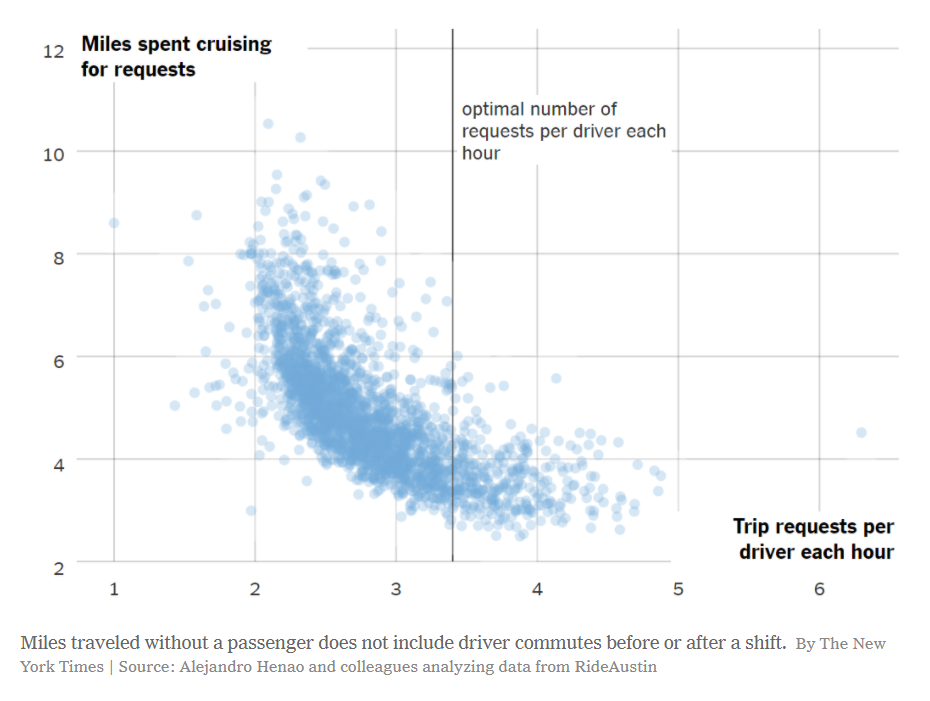
The following scatter plot tells a story of how much cruising time is spent by rideshare drivers compared to trip requests. It’s not a simple linear relationship, and the distribution of data points shows that.

The creator of the chart also added a single reference line, communicating what they see in the chart to the user. Annotations and reference lines are incredibly useful in scatter plots.

NY Times Scatter Plot Example
NY Times – Learning Network – What’s Going On in This Graph? | Nov. 6, 2019

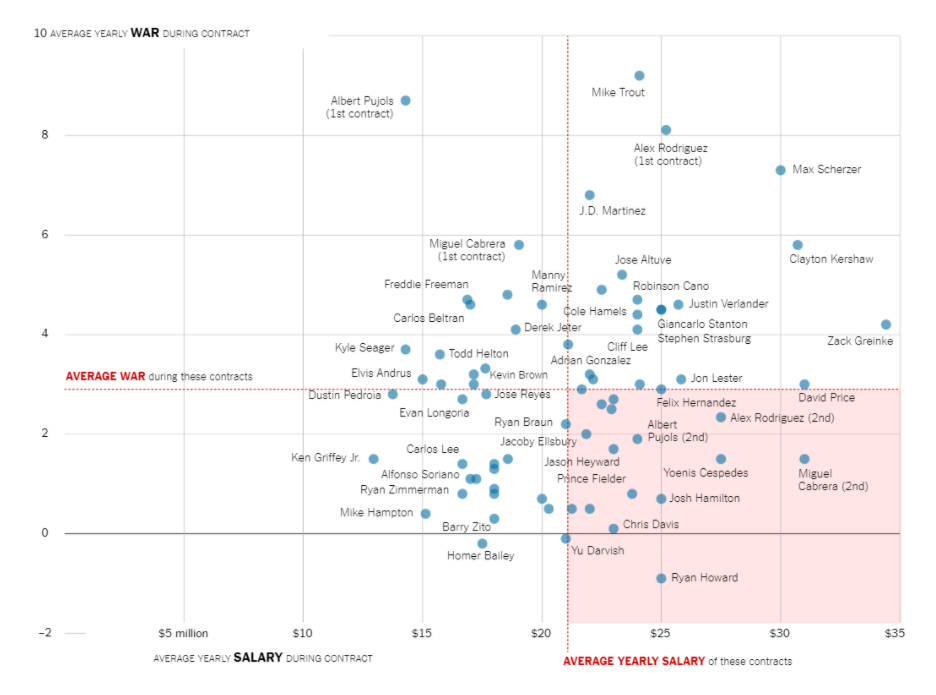
The following chart shows a baseball stat (wins above average) against a players salary. It includes two reference lines showing average (one for the x axis and the other for the y axis) which splits the chart into 4 quadrants.

Basically the chart suggests that the players in the upper left quadrant are paid less than average but contribute more than average to their team’s success. The players in the lower right contribute less but are paid more. With these reference lines you get to take a bunch of random points and tell a cohesive story that is easy for the reader to grasp.

One other thing to note, is that instead of the focus being on the overall distribution (as it was for the previous two examples) the focus is now on individual baseball players. Which is why each point (well most points, including every point on the outer edges) is labeled with the players name. In this way, it’s still a scatter plot but it’s used to illustrate more of an individual-focused story.

NY Times Scatter Plot Example
NY Times – Learning Network – What’s Going On in This Graph? | April 17, 2019

Other Considerations

Correlation is not causation.

With scatter plots we are showing the relationship between two variables. But just because we can see a relationship does not make it meaningful. One of the most commonly used examples is ice cream sales and murder rates.

Visualization can be powerful, and even if you are not lying with the data, understanding that spurious correlations exist should influence your data design choices.

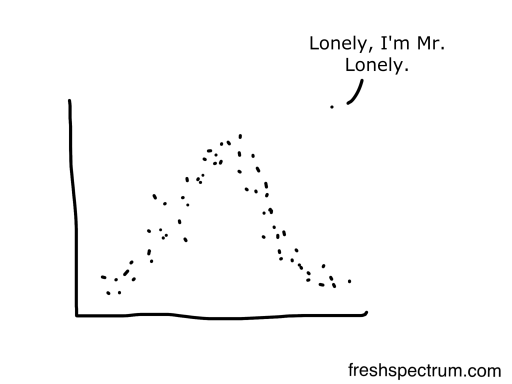
Outliers Pop

Any outliers in a scatter plot will become visually prominent. The white space and separation will naturally draw the eyes of your reader.

If this outlier is important, fantastic, that’s what you want. If the outlier is un-important (easily explained away by some known quirk in the data) you should use an annotation (perhaps below the chart with an asterisk in the chart) to explain it. We can’t help but focus on the outliers.

Freshspectrum Outlier Cartoon by Chris Lysy

Written by cplysy · Categorized: freshspectrum

Jan 12 2021

La función de evaluación central en el Sistema de Naciones Unidas

La función de evaluación del sistema de las Naciones Unidas ha evolucionado. A medida que evolucionaba se han ido desarrollando diversos conceptos y constructos y, en relación con estos, una terminología bastante confusa. Los términos empleados significan cosas distintas o tienen matices diferentes.

A continuación definimos el concepto de “Función de evaluación central”

En el sistema de las Naciones Unidas, la función de evaluación central se apoya en dependencias de evaluación que operan independientemente del control de la dirección ejecutiva y la dependencia programática por lo que respecta a la planificación, la gestión y la realización de la evaluación, así como la presentación de informes conexos.

Podemos encontrar diferentes casos de “función de evaluación”, según organizaciones donde la oficina de evaluación central:

1) Opera como oficina autónoma, y puede hacerlo de dos maneras, a saber:

a) fuera de la oficina del jefe ejecutivo; o

b) como dependencia autónoma en dicha oficina.

2) Opera en la oficina del jefe ejecutivo como parte integrante de las dependencias de investigación, políticas y planificación estratégica (y, por tanto, no es autónoma).

3) Opera junto con otras funciones de supervisión en la oficina de supervisión de la organización, y nuevamente lo hace de dos formas, a saber:

a) como dependencia separada en la oficina de supervisión; o

b) como parte integrante de otras funciones de supervisión.

La característica distintiva de la función central es que:

(1) Produce evaluaciones para apoyar de manera general la adopción de decisiones sobre políticas, programas y estrategias de la organización a nivel central, si bien son numerosas las funciones centrales que llevan a cabo evaluaciones de proyectos en diversa medida.

(2) Los informes se dirigen principalmente a órganos intergubernamentales, órganos consultivos de alto nivel y personal directivo superior con miras a introducir cambios en toda la organización y mejorar las políticas, los programas generales (en los ámbitos nacional, regional o mundial), así como las cuestiones transversales y las reformas institucionales.

(3) Las funciones centrales presentan niveles variables de independencia:

(a) Según los distintos criterios de valoración de la independencia estructural, funcional, profesional, inclusiva y con respecto a las conductas.

(b) El nivel de independencia puede ser bajo, alto o medio.

(c) Esa independencia no es automática, sino que conlleva la puesta en marcha de mecanismos que persigan la independencia estructural, funcional, técnica y respecto de la transparencia y las conductas.

Algunas organizaciones describen la función central como institucional, dando a entender que las evaluaciones tienen más efecto en ese nivel. Sin embargo, ese término también es aplicable a las evaluaciones descentralizadas.

Fuente: ANÁLISIS DE LA FUNCIÓN DE EVALUACIÓN EN EL SISTEMA DE LAS NACIONES UNIDAS (2014)

Written by cplysy · Categorized: TripleAD

  • « Go to Previous Page
  • Go to page 1
  • Interim pages omitted …
  • Go to page 210
  • Go to page 211
  • Go to page 212
  • Go to page 213
  • Go to page 214
  • Interim pages omitted …
  • Go to page 310
  • Go to Next Page »

Footer

Follow our Work

The easiest way to stay connected to our work is to join our newsletter. You’ll get updates on projects, learn about new events, and hear stories from those evaluators whom the field continues to actively exclude and erase.

Get Updates

Want to take further action or join a pod? Click here to learn more.

Copyright © 2026 · The May 13 Group · Log in

en English
af Afrikaanssq Shqipam አማርኛar العربيةhy Հայերենaz Azərbaycan dilieu Euskarabe Беларуская моваbn বাংলাbs Bosanskibg Българскиca Catalàceb Cebuanony Chichewazh-CN 简体中文zh-TW 繁體中文co Corsuhr Hrvatskics Čeština‎da Dansknl Nederlandsen Englisheo Esperantoet Eestitl Filipinofi Suomifr Françaisfy Fryskgl Galegoka ქართულიde Deutschel Ελληνικάgu ગુજરાતીht Kreyol ayisyenha Harshen Hausahaw Ōlelo Hawaiʻiiw עִבְרִיתhi हिन्दीhmn Hmonghu Magyaris Íslenskaig Igboid Bahasa Indonesiaga Gaeilgeit Italianoja 日本語jw Basa Jawakn ಕನ್ನಡkk Қазақ тіліkm ភាសាខ្មែរko 한국어ku كوردی‎ky Кыргызчаlo ພາສາລາວla Latinlv Latviešu valodalt Lietuvių kalbalb Lëtzebuergeschmk Македонски јазикmg Malagasyms Bahasa Melayuml മലയാളംmt Maltesemi Te Reo Māorimr मराठीmn Монголmy ဗမာစာne नेपालीno Norsk bokmålps پښتوfa فارسیpl Polskipt Portuguêspa ਪੰਜਾਬੀro Românăru Русскийsm Samoangd Gàidhligsr Српски језикst Sesothosn Shonasd سنڌيsi සිංහලsk Slovenčinasl Slovenščinaso Afsoomaalies Españolsu Basa Sundasw Kiswahilisv Svenskatg Тоҷикӣta தமிழ்te తెలుగుth ไทยtr Türkçeuk Українськаur اردوuz O‘zbekchavi Tiếng Việtcy Cymraegxh isiXhosayi יידישyo Yorùbázu Zulu