• Skip to main content
  • Skip to footer
  • Home

The May 13 Group

the next day for evaluation

  • Get Involved
  • Our Work
  • About Us
You are here: Home / Archives for allblogs

allblogs

Aug 30 2024

El poder transformador de la Psicología Social en las Organizaciones

Enfoque de Psicología Social en las Organizaciones

La psicología social de las organizaciones se centra en cómo las personas interactúan y se comportan en el entorno laboral. Este enfoque estudia las dinámicas grupales, el liderazgo, la motivación, la comunicación y el cambio organizacional. Su objetivo es comprender y mejorar el comportamiento de los individuos dentro de las organizaciones para aumentar la eficacia y el bienestar de los empleados.

Relación entre Psicología Social y Organizaciones

La psicología social y la psicología organizacional están estrechamente relacionadas. Ambas disciplinas estudian cómo los comportamientos y las relaciones sociales influyen en el entorno laboral. La psicología social aporta conocimientos sobre la influencia de los grupos y la cultura en el comportamiento individual, lo cual es crucial para entender y mejorar las dinámicas organizacionales.

(a) Liderazgo, Poder e Influencia Social

  • Liderazgo: En el contexto organizacional, el liderazgo se define como la capacidad de influir en un grupo para alcanzar objetivos comunes. Un buen líder puede motivar, inspirar y guiar a sus subordinados, lo que resulta en un clima laboral positivo y una mayor productividad.
    Ejemplo: En 2023, durante una misión de las Naciones Unidas en Sudán del Sur, los líderes de equipo utilizaron técnicas de liderazgo transformacional para motivar a los trabajadores humanitarios. Al establecer una visión clara y proporcionar apoyo emocional, lograron mejorar la moral del equipo y aumentar la eficacia en la entrega de ayuda humanitaria.
  • Poder e Influencia Social: El poder en las organizaciones se refiere a la capacidad de un individuo para influir en las decisiones y acciones de otros. La influencia social es el proceso mediante el cual las personas cambian sus actitudes o comportamientos en respuesta a la presión social. En las organizaciones, el poder y la influencia social son fundamentales para la toma de decisiones y la resolución de conflictos.
    Ejemplo: En 2021, en una misión de Médicos Sin Fronteras en Yemen, los coordinadores de proyectos utilizaron su influencia social para implementar cambios en los protocolos de salud. Al involucrar a los equipos locales y utilizar la persuasión en lugar de la imposición, lograron una mayor aceptación y cooperación en la adopción de nuevas prácticas médicas.

(b) Conflicto, Cooperación y Toma de Decisiones

  • Conflicto: El conflicto en las organizaciones puede ser tanto funcional como disfuncional. Los conflictos funcionales pueden fomentar la creatividad y la innovación, mientras que los disfuncionales pueden obstaculizar el rendimiento y la cohesión del equipo. La gestión efectiva del conflicto implica identificar las causas subyacentes y aplicar estrategias adecuadas para su resolución.
    Ejemplo: En 2022, durante una misión de paz de la ONU en la República Centroafricana, surgieron conflictos entre diferentes grupos étnicos dentro del equipo de trabajo. Utilizando técnicas de mediación y resolución de conflictos basadas en la psicología social, los mediadores lograron transformar el conflicto en una oportunidad para fortalecer la cohesión del equipo y mejorar la colaboración3.
  • Cooperación: La cooperación es esencial para el éxito organizacional. Fomenta un ambiente de trabajo colaborativo donde los empleados trabajan juntos para alcanzar objetivos comunes. La cooperación se puede mejorar mediante la creación de una cultura organizacional que valore la colaboración y el trabajo en equipo.
    Ejemplo: En 2020, en una ONG como Oxfam en Guatemala, se implementaron proyectos interdepartamentales para fomentar la colaboración entre diferentes áreas. La psicología social ayudó a diseñar actividades de team-building y a establecer sistemas de recompensa que incentivaron la cooperación y mejoraron el rendimiento del equipo.
  • Toma de Decisiones: La toma de decisiones en las organizaciones implica seleccionar la mejor opción entre varias alternativas para resolver un problema o alcanzar un objetivo. Este proceso puede ser influenciado por factores como la comunicación, la estructura del grupo y la dinámica del poder. La toma de decisiones efectiva requiere una evaluación cuidadosa de las opciones y la consideración de las posibles consecuencias.
    Ejemplo: En 2021, en una agencia de la ONU en México, se utilizó el brainstorming y otras técnicas de toma de decisiones en grupo para generar ideas y soluciones innovadoras para la implementación de los Objetivos de Desarrollo Sostenible. La psicología social proporcionó herramientas para mejorar la comunicación y la participación de todos los miembros del equipo, lo que resultó en decisiones más informadas y efectivas.


Written by cplysy · Categorized: TripleAD

Aug 30 2024

Using AI to do an Environmental Scan

This article is rated as:

As we all know by now, using AI (artificial intelligence) tools can greatly enhance your productivity. However, the gains from using AI can only be realized if you can fit it into your workflows. But how do you do that?

This article is going to give you some tips on how to integrate AI tools (specifically ChatGPT, Google Gemini, or Claude 3.5) into the steps you would take to complete an environmental scan. To keep things simple, we’re going to modify the steps for completing an environmental scan from another Eval Academy article – How to complete an environmental scan: avoiding the rabbit holes. That article has detailed instructions for completing an environmental scan the conventional way.

Note: In this authors opinion, it is always good to know the slow(er) way of doing things before trying to take any shortcuts. The tips in this guide are suggestions for enhancing your existing workflows.

But first, what is an environmental scan?

“An environmental scan (a.k.a. e-scan) is a tool for collecting information about factors that could affect the future of an organization. It is used to learn about current conditions (social, economic, technological, and political) and plan accordingly for the future.”

– Eval Academy Dictionary, Environmental scan

Why would I want to use AI to do my environmental scan?

In my opinion, environmental scans can be very tedious. They involve time-consuming searching, reading, and systematic cataloguing. Using AI can shorten the amount of time it takes to do all the tedious work involved in an environmental scan! Furthermore, AI tools like  ChatGPT, Google Gemini, or Claude 3.5 are based on large language models (LLMs). LLMs are known to be very useful when you are trying to brainstorm and explore ideas. And I don’t know about you, but for me, using AI makes the whole experience of doing an environmental scan a little bit more interesting.

Quick Guide to Using AI in an Environmental Scan

Don’t forget to follow along with our step-by-step guide on How to complete an environmental scan: avoiding the rabbit holes. This article expands on how to integrate AI into those existing steps.

Step one: identify the topics of interest and the purpose of the environmental scan

If you know that you need to do an environmental scan, you probably have a topic in mind. However, you can also use AI to brainstorm and refine your topic ideas. Like I mentioned earlier in this article, AI tools are based on LLMs. They’re known to be great at brainstorming and can help you explore ideas you haven’t even considered.

An example prompt to brainstorm a topic could be: I need to conduct an environmental scan for a project about [idea]. What are some possible topic ideas?

Step two: identify the research question(s)

Sometimes, it isn’t easy to come up with a clear research question. You could call a friend… or you can ask an AI. If you tell the AI tool your topic and ask it to generate some research questions, it can give you a starting point.

An example prompt could be: I am doing an environmental scan on the topic of [topic]. What are some research questions I should be asking?

I asked ChatGPT, “I am doing an environmental scan on the topic of how collective impact initiatives set up measurement systems. What are some research questions I should be asking?” It generated 9 categories of questions. The first two questions were:

  • What are the common frameworks or models used for measurement in collective impact initiatives?

  • How do collective impact initiatives define and agree upon shared outcomes and indicators?

Not bad, right? I wouldn’t use all the questions ChatGPT generated for me. But now I can filter through the ones it suggested and refine my research questions for the environmental scan.

Step three: identify what environmental scan activities you will complete and where you will look for the information

AND

Step four: for online searches, you’ll need to create a list of keywords and search terms that you will use

During steps three and four of the environmental scan, we’re going to level up our usage of the AI. In these stages, you can ask the AI to generate a search strategy. In your prompt to generate a search strategy, you can include as many details as you’d like. Anything that you would like the AI to help you generate can be added such as keywords and search terms using Boolean operators,  potential activities, and sources where you could find relevant information.

The search strategy that the AI generates will be more useful if it has more background information on your environmental scan. You can feed this information to the AI manually by giving a prompt that says to generate a search strategy based on X information. If you have been using the AI to brainstorm for your environmental scan up until now and ask it to generate a search strategy using the same conversation thread, that information will also be taken into account. The more information and details you can give the AI in your prompt and thread history, the more likely it is that you’ll be able to generate something usable. Just make sure that you do not feed any sensitive information to the AI, such as personal identifying information or health information.

An example prompt to generate a search strategy could be: Generate a search strategy for an environmental scan on [topic]. The environmental scan should answer the following research question(s): [research questions].

Include potential sources such as Academic databases, websites, publicly available reports, and other similar sources. Also include a list of keywords and search terms using Boolean operators.

[OPTIONAL] Use the information pasted below as background information for generating the search strategy: [additional context information].

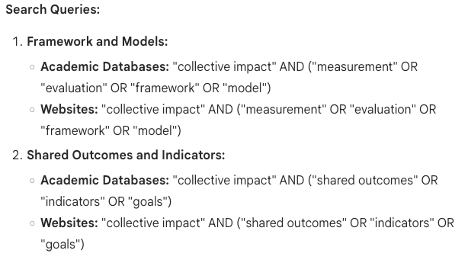
I tried using Google Gemini for this prompt, just to try something different: “Generate a search strategy…. on how collective impact initiatives set up measurement systems. The environmental scan… research question(s): a) What are the common frameworks or models used for measurement in collective impact initiatives? and b) How do collective impact initiatives define and agree upon shared outcomes and indicators?” I also attached an image of a chart with sample outcomes and indicators for measuring collective impact as additional context information.

I won’t share the whole search strategy that Google Gemini generated, but I’ll highlight some key parts that I found to be useful. For example, under the heading of “Potential Sources,” it suggested specific websites I could search – and all the suggested sites are known to be thought leaders on the topic of collective impact.


Google Gemini also suggested some potential keywords and search queries using Boolean operators, as I had requested.


You may not get the perfect search strategy on the first try, but the nice thing about these AI tools is that you can continue to refine your searches by giving it additional editing prompts.

Step five: catalogue the information systematically

Once you found your sources, you need to catalogue your information systematically. I would recommend using a table like this Environmental Scan Template in Excel to record your information. You should be able to come up with the categories yourself because they will be determined by what you need to know from the environmental scan. But if you really do get stuck you can always use the AI.

This step is where you will probably see the most amount of time saved by using an AI. Simply upload all your sources into the AI and ask it to catalogue the information according to your categories, preferably in a table format. I like using Claude 3.5 for this step because it can read PDF files and process many sources. However, other AI tools may have similar capabilities depending on the version that is available to you. Again, please do not upload any files that have sensitive information. If your source is not already in an upload file format (e.g., website text), you can just copy and paste the information that you need into an empty Word document and upload that instead.

An example prompt to catalogue the information systematically could look like:
Scan the attached documents and sort the contents into the following categories using a table format that also lists the corresponding source document: [list categories].

[OPTIONAL] Use the following definitions for each of the categories.

[category 1]: [definition]
[category 2]: [definition]

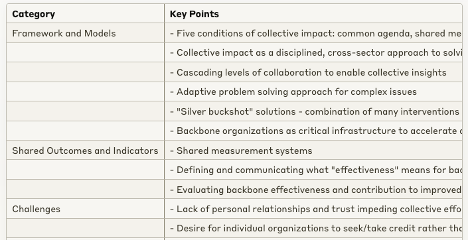
For my own environmental scan on collective impact, I used the following prompt on Claude 3.5: “Scan the… source document: Framework and Models, Shared Outcomes and Indicators, Challenges.

Use the following definitions for each of the categories.
Framework and Models: Theoretical or practical approaches used for measurement in collective impact initiatives.
Shared Outcomes and Indicators: Processes for defining, agreeing upon, and measuring shared goals and outcomes in collective impact initiatives.
Challenges: Common challenges faced in measurement and evaluation of collective impact initiatives.”

I also attached a couple articles on the topic of collective impact and measurement for this example. Depending on the type of AI tool you’re using, whether it’s a free version or a paid version, and the current volume of usage by other people, you may not be able to attach all the articles you want in one prompt. You’ll have to batch them and build on the information in the generated table.

The resulting analysis was a simple, scrollable table with some key points from each article.


After the AI has sorted all the information for you, you should still verify it. This could look like reading all the sources yourself to make sure that it has been categorized properly. This would still take less time than systematically cataloguing the information yourself. Once you verify the information, you can copy paste the AI generated information into an offline Excel table or text document, so that you’ll be able to edit the content as needed.

You can also conduct further analysis with the AI. This could look like asking about any themes that it sees in the information that it has catalogued. You could likewise ask specific questions that you might have about the information. This type of AI analysis would only work if you continued to use the same conversation thread because the AI would already have all the context it needs.

An example prompt to conduct further analysis could look like:
Highlight any key themes found across all documents that would answer the research question(s): [research question(s)].

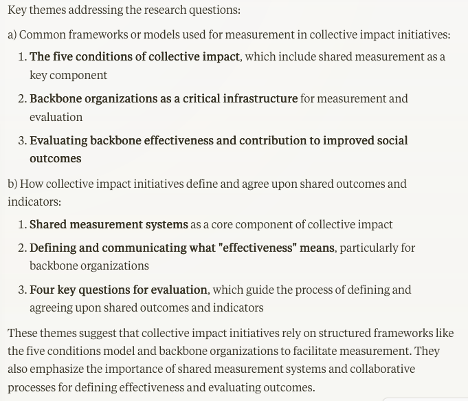
Using the same conversation thread in Claude 3.5 where I generated my environmental scan table, I entered another prompt about highlighting key themes using the research questions I generated earlier. I said, “Highlight… research question(s): a) What are the common frameworks or models used for measurement in collective impact initiatives? and b) How do collective impact initiatives define and agree upon shared outcomes and indicators?”

The resulting analysis was interesting and relevant, even though it was based on only a couple articles. I would be able to use this to sift through the environmental scan table and delve deeper into my own conclusions.


If you chose to categorize your information manually, you could try copy pasting some of your findings into an AI tool as context if you want to use it to do further analysis. However, you’ll need to enter the findings as text only. As of this writing, the AI tools mentioned in this article struggle with reading Excel files. I am optimistic that this will change in the future with how fast things are developing.

Step six: present the information in a way that is useful to your organization

If you can continue to use the same thread that you used to analyze the information, you can ask the AI to generate a report outline based on that context. Even if you were not using the same thread, you can still ask the AI to generate a report outline for your environmental scan and upload any findings that would give it enough context to generate the outline.

An example prompt could look like: Generate a report outline for an environmental scan based on the previously generated table and key themes. The outline should have no more than [number] headings and is targeted towards [audience]. The main focus of the report should be [main focus].

[OPTIONAL] I want the report to highlight the following findings: [list of key findings].

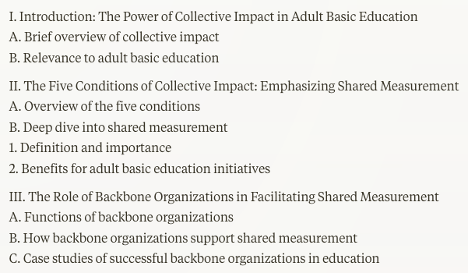
I continued to use the same conversation thread in Claude 3.5 so that I wouldn’t have to give any additional background information in my prompt. I said, “Generate… The outline should have no more than 5 headings and is targeted towards leaders in the non-profit sector who are part of a collective impact for adult basic education. The main focus… should be making a case for developing a shared measurement strategy for their collective impact.”

I won’t share the entire outline, but I included a screenshot of the first few that were generated. It’s not perfect, but it’s decent for 2 seconds of work.


Other Notes to Consider

If you are conducting a literature review, you can use the same strategies in this article to integrate AI into your workflow. For both a literature review and an environmental scan, make sure you credit the use of the AI tools that you used. You can include it in the method section of your report.

Example credit: This report was analysed with the assistance of OpenAI’s ChatGPT. ChatGPT is a large language model that was used to generate the initial search strategy, initial themes, and an outline for this report.

If you found this information useful, please leave us a comment to let us know!

Written by cplysy · Categorized: evalacademy

Aug 30 2024

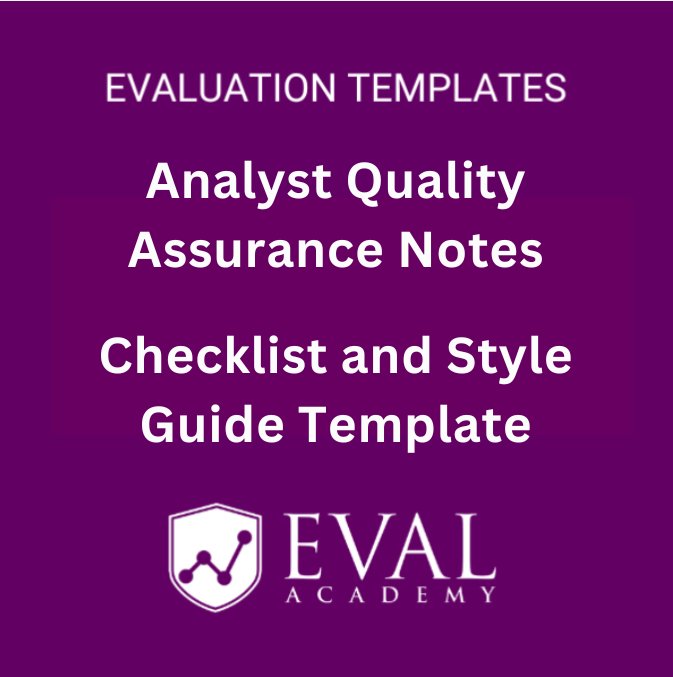
New Template: Analyst Quality Assurance Notes, Checklist and Style Guide Template

This article is rated as:


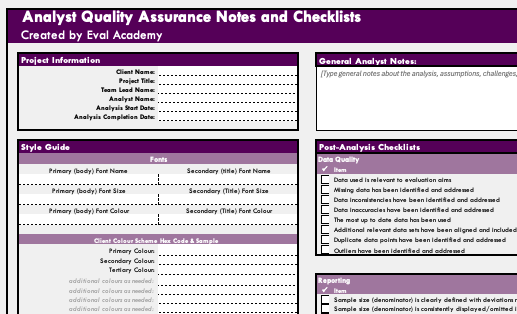
Eval Academy just released a new infographic, “Analyst Quality Assurance Notes, Checklist and Style Guide Template”!


When working with data, it is important to keep track of data-related assumptions, decisions, and analytic steps. This is particularly helpful when preparing analyses for a client where you are not the primary contact person as it allows your team members to easily understand the steps you took to arrive at your conclusions. Organizing these notes consistently across analysts within your team can make this process even smoother – your colleagues will always know exactly where to look for what information, regardless of who analyzed the data, making communication about the analysis with clients a breeze! 

While there are many ways to track your analytic steps, I find it easiest to stick with one file whenever possible, which is why we developed the Analyst Quality Assurance Notes, Checklist, and Style guide template. This template has a section to input client and project information, details about the data visualization styles used, and checklists to ensure that reporting is consistent and accurate throughout the report.

After downloading the template, you can adjust it to your needs by adding rows, copy and pasting formatting, and updating checklist and project information list items.

Analyst Quality Assurance Notes - Checklist and Style Guide Template

Quick View

Analyst Quality Assurance Notes – Checklist and Style Guide Template

CA$0.00

Add To Cart

Who’s it for?

Anyone who analyzes evaluation data in Microsoft Excel or Google Sheets who is looking for a concise but comprehensive way to communication analytic decisions and steps will benefit from this template! This resource provides you with prompts on ensuring consistency in data visualization and checklists to make sure the values you are reporting are accurate and consistent.


What’s the purpose?

To streamline the process of communicating data analysis, visualization, and reporting steps with team members and clients to ensure transparent, consistent, and accurate reporting of evaluation findings.


What’s included?

A fully-customizable template in Excel with key considerations used by analysts at Three Hive Consulting for ensuring high-quality data, visualizations and reporting.


Related articles and links:

You can learn more about high-quality data preparation and analysis tips through these links:

  • Power Query for Data Preparation in Excel: An Introduction and Walk-Through for Beginners

  • How to Combine Data from Multiple Sources for Cleaning and Analysis

  • The Data Cleaning Toolbox

  • Let Excel do the Math: Easy tricks to clean and analyze data in Excel

  • A Beginner’s Guide to PivotTables


Some helpful Eval Academy articles and resources for top-notch data visualization include:

  • Data Visualization Best Practices: A Practical Guide for Getting the Most out of your Data Viz

  • 7 Tips for Better Data Visualizations

  • Infographic: Data Viz Decision Tree

  • Data Visualization Applications: Line Charts

  • Data Visualization Applications: Lollipop Charts – An Alternative to Bar Charts

  • Data Visualization Applications: Bar Charts

  • Video: How to Create a Visually Impactful Column Chart

  • Optimizing Excel Charts by Right Justifying Y-Axis Labels

  • Chart Templates: The Time Saver You Should Be Using

Written by cplysy · Categorized: evalacademy

Aug 29 2024

La Importancia de la Línea de Base en el Propensity Score Matching

Siguiendo con posts anterios relacionados, el Propensity Score Matching (PSM) es una técnica estadística utilizada para estimar el efecto de una intervención al emparejar grupos de tratamiento y control con características similares. Sin embargo, la ausencia de una línea de base en el grupo de intervención puede afectar significativamente la validez de los resultados.

Impacto de la Falta de Línea de Base

  1. Comparabilidad Reducida: Sin una línea de base, es difícil garantizar que los grupos de tratamiento y control sean comparables en términos de características iniciales. Esto puede llevar a una mala estimación del efecto del tratamiento.
  2. Sesgo de Selección: La falta de datos de línea de base puede introducir sesgos de selección, ya que no se puede ajustar adecuadamente por las diferencias iniciales entre los grupos.
  3. Validez Interna: La validez interna del estudio puede verse comprometida, ya que las diferencias observadas en los resultados podrían deberse a diferencias iniciales no medidas en lugar del efecto del tratamiento.

Estrategias para Superar la Falta de Línea de Base

  1. Uso de Variables Proxy: Identificar y utilizar variables proxy que puedan aproximar las características iniciales de los participantes. Estas variables deben estar correlacionadas con las características de línea de base que faltan.
  2. Datos Longitudinales: Si se dispone de datos longitudinales, se pueden utilizar medidas repetidas de las características de los participantes antes y después del tratamiento para inferir las condiciones iniciales.
  3. Modelos de Imputación: Utilizar técnicas de imputación para estimar los valores de las características de línea de base faltantes. Métodos como la imputación múltiple pueden ser útiles en este contexto.
  4. Análisis de Sensibilidad: Realizar análisis de sensibilidad para evaluar cómo diferentes supuestos sobre las características de línea de base afectan los resultados del estudio.
  5. Ajuste por Covariables: Incluir tantas covariables relevantes como sea posible en el modelo de PSM para ajustar por las diferencias iniciales entre los grupos.
  6. Diseño de Estudio Alternativo: Considerar el uso de diseños de estudio alternativos que no dependan tanto de los datos de línea de base, como los estudios de cohortes o los ensayos controlados aleatorios.

Ejemplo Práctico

Supongamos que estamos realizando un estudio sobre el efecto de un programa de ejercicio en la salud cardiovascular, pero no tienes datos de línea de base sobre la condición física inicial de los participantes. Podríamos:

  • Buscar Variables Proxy: Utilizar datos sobre la frecuencia de visitas al médico o el historial de enfermedades cardiovasculares como proxies para la condición física inicial.
  • Datos Longitudinales: Si tienes datos sobre la actividad física de los participantes en los meses anteriores al inicio del programa, podrías utilizarlos para inferir su condición inicial.
  • Imputación: Aplicar técnicas de imputación para estimar la condición física inicial basada en otras variables disponibles, como la edad, el género y el índice de masa corporal (IMC).
  • Ajuste por Covariables: Incluir variables como la edad, el género, el IMC y el historial médico en el modelo de PSM para ajustar por las diferencias iniciales.

Estas estrategias pueden ayudar a mitigar los efectos negativos de la falta de datos de línea de base y mejorar la validez de los resultados obtenidos mediante PSM.

Written by cplysy · Categorized: TripleAD

Aug 29 2024

How to open a PDF in Canva (3 simple ways).

Did you know that you can open a PDF using Canva?

For years and years, the PDF has been the status quo way to share any kind of research or evaluation report. I think that’s changing a little as organizations push for more accessible formats (like what I offer through ReportPress), but there are still tons and tons of PDFs.

Unlike a Word document or web page, a PDF can be hard to edit or update without the right tools. PDFs are one of the things that keep Adobe Creative Cloud in business. And if you work with a PDF first organization, you will still get a lot of value out of Acrobat Pro or Adobe Illustrator.

But PDFs are not the proprietary formats they were in the past. There are other tools that you can use to open and edit a PDF, outside of Adobe.

When to open a PDF using Canva (and when not to open a PDF using Canva).

Okay, first things first, just because you “can” open a PDF using Canva doesn’t mean you should.

I don’t believe I have ever opened a PDF in Canva and felt it was ready to republish. It is not the perfect editable version you would get opening up the PDF in Acrobat Pro, so if you’re just looking to tweak a PDF this is probably not the go to approach.

But that doesn’t mean there is not value in opening the PDF using Canva. Here are a few of the major benefits.

  1. It makes it easy to pull brand colors into Canva. Since Canva will parse the colors in individual shapes. You will also be able to use Canva’s color dropper on any of the elements.
  2. You can pull out things like icons and logos. These are often individual elements, sometimes available as vector images embedded inside of the PDF.
  3. You can copy out individual photos and other images.
  4. Sometimes the text blocks are actually well formatted in the Canva translation.

One more thing to keep in mind is that PDFs are weird in that they are technically an image file but can include vector elements, pixel based elements, text, and shapes. How the PDF was constructed will impact how it will come into Canva. PDFs that were originally scanned images, or flattened PDFS, will have a lot less to break apart.

Three simple ways to open a PDF using Canva.

For these examples I downloaded this PDF report from UNICEF.

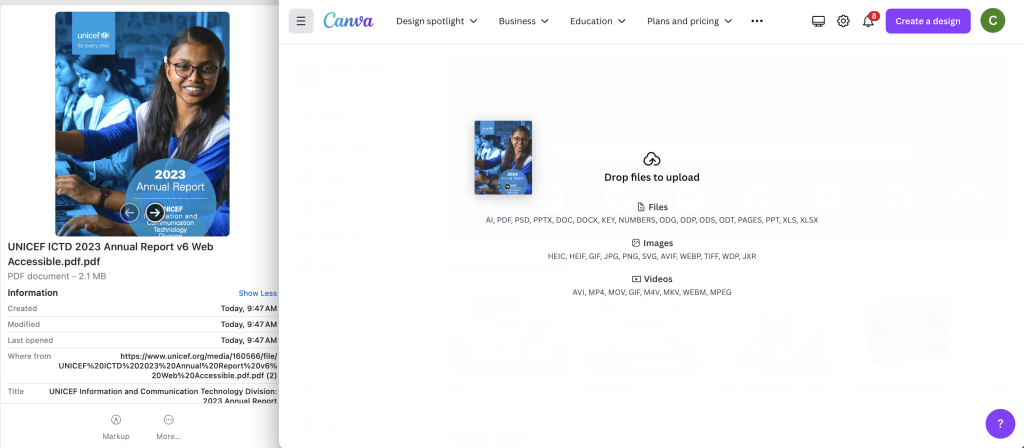
1. Drag and drop into the Canva main page.

Just log into your Canva account.

Then while on your home page, just drag the PDF over the page. You’ll be able to drop the file right in and it will be uploaded.

After it uploads you’ll find it on the main page under recent designs. (No idea why Canva labeled it as a Payment Request but that label doesn’t really matter).

2. Use the Canva main page upload button.

If you don’t like dragging and dropping you’ll also see an “Upload” button on the front page. Here you can click “Choose files” and search your computer.

This will do the same thing as the first method, the design will show up under Recent designs.

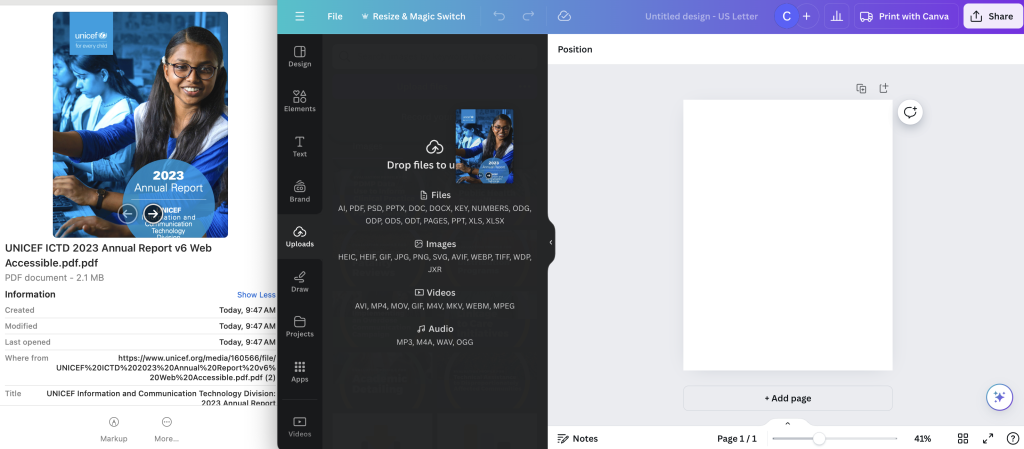
3. From within a Canva Design file.

You can also drag and drop (or upload) directly into a Canva design. This lets you choose the orientation and formatting before adding your file as sizing can sometimes be a bit wonky.

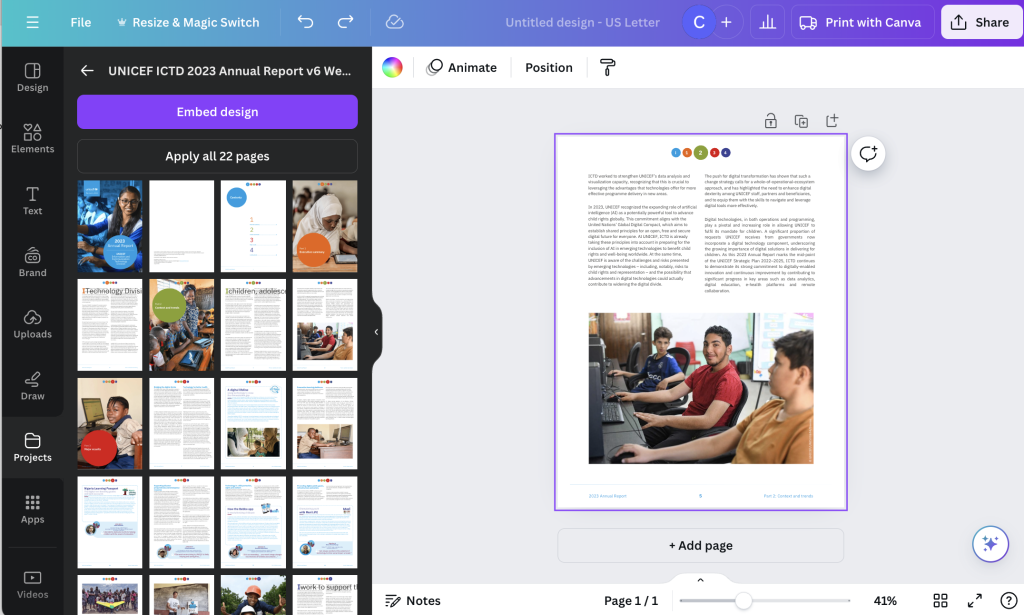
There is an added benefit to doing this as you don’t need to add in all the pages. The uploaded design will show up in the projects tab. From here you can actually choose which pages you would like to add (or simply add all of them).

You’ll notice there are no pictures for the individual pages. The order of the pages is just the page order (counting left to right and then top to bottom).

But this is a reason you might want to use one of the other ways. As once you have a document uploaded, it is still available from within your Canva designs.

Just head over to the Canva Projects folder and now you can see all the individual pages.

Have you given this a try?

Anything you think I missed, or other tips you would like to share? Let me know in the comments.

Written by cplysy · Categorized: freshspectrum

  • « Go to Previous Page
  • Go to page 1
  • Interim pages omitted …
  • Go to page 36
  • Go to page 37
  • Go to page 38
  • Go to page 39
  • Go to page 40
  • Interim pages omitted …
  • Go to page 310
  • Go to Next Page »

Footer

Follow our Work

The easiest way to stay connected to our work is to join our newsletter. You’ll get updates on projects, learn about new events, and hear stories from those evaluators whom the field continues to actively exclude and erase.

Get Updates

Want to take further action or join a pod? Click here to learn more.

Copyright © 2026 · The May 13 Group · Log in

en English
af Afrikaanssq Shqipam አማርኛar العربيةhy Հայերենaz Azərbaycan dilieu Euskarabe Беларуская моваbn বাংলাbs Bosanskibg Българскиca Catalàceb Cebuanony Chichewazh-CN 简体中文zh-TW 繁體中文co Corsuhr Hrvatskics Čeština‎da Dansknl Nederlandsen Englisheo Esperantoet Eestitl Filipinofi Suomifr Françaisfy Fryskgl Galegoka ქართულიde Deutschel Ελληνικάgu ગુજરાતીht Kreyol ayisyenha Harshen Hausahaw Ōlelo Hawaiʻiiw עִבְרִיתhi हिन्दीhmn Hmonghu Magyaris Íslenskaig Igboid Bahasa Indonesiaga Gaeilgeit Italianoja 日本語jw Basa Jawakn ಕನ್ನಡkk Қазақ тіліkm ភាសាខ្មែរko 한국어ku كوردی‎ky Кыргызчаlo ພາສາລາວla Latinlv Latviešu valodalt Lietuvių kalbalb Lëtzebuergeschmk Македонски јазикmg Malagasyms Bahasa Melayuml മലയാളംmt Maltesemi Te Reo Māorimr मराठीmn Монголmy ဗမာစာne नेपालीno Norsk bokmålps پښتوfa فارسیpl Polskipt Portuguêspa ਪੰਜਾਬੀro Românăru Русскийsm Samoangd Gàidhligsr Српски језикst Sesothosn Shonasd سنڌيsi සිංහලsk Slovenčinasl Slovenščinaso Afsoomaalies Españolsu Basa Sundasw Kiswahilisv Svenskatg Тоҷикӣta தமிழ்te తెలుగుth ไทยtr Türkçeuk Українськаur اردوuz O‘zbekchavi Tiếng Việtcy Cymraegxh isiXhosayi יידישyo Yorùbázu Zulu