What a wonderful summary here, Dr. Snow. I just landed on this one this morning and I’m wondering why I had not seen it earlier. It is ‘detailed’ and gives a clear picture of the Conference, such that even those who did not attend, will not feel like they missed anything. Good work!
allblogs
Alt Text in Canva
Remember how I said you couldn’t add alt text in Canva? Well, you can now!
Transcript
Hey, so you may already know that I am a huge fan of Canva. And I use it for all sorts of things from presentations to infographic design. And last year they came out with a web design tool. Which is great. Except that one thing. There was absolutely no way. To add alternative text. Meaning. You couldn’t add any kind of descriptions. You couldn’t change the header structure, all sorts of things that you would need to do.
To make a web design accessible.
And this is really important. In general. But especially if you work on government kind of projects, It’s essentially a killer. You can’t. Do the work, if you can’t make it accessible. Well, I was playing around with Canva the other day and I clicked on an image. And what do you, what did I find? I found a little button.
That says alternative text. Yes. Now Canva at least has the bare minimum of what you need to create. Something that is accessible to share online. ? Just to show you here’s a picture up here somewhere. Of. Website, I was creating just a little simple test website I created in Canva. And then put in a picture.
Now if you right. Click on the picture, you’ll see on the menu. You’ll see a little alternative text button. And here let’s zoom in. Okay. Now, if you go ahead and click on that. A box will pop up. ? And you have up to 250 characters of alternative texts that you can add in this box. You can also click the little button to say that it’s decorative and it doesn’t really have a meaning other than to add decoration to the page.
?So that’s it. Those were really standard requirements. Now, if you’re doing kind of serious design work it’s still, probably better to work with WordPress or PDFs. If you need to do some good accessibility work, there are things you can’t do in Canva still because you can’t really adjust underlying HTML code. You can’t change like the header structure.
In a way you can’t mark down H one and H. and paragraph markings. It’s getting there. I think it’ll be there. Eventually. There is some reordering elements. But this is they’re coming. Along and it’s a long way from where it was before. ? And here it actually even past. A test. I went ahead and put it into an accessibility checker.
And yeah, it’s the bare minimum pass, but it Passed. And that’s something I can say before. ?So there you go. That’s it. Canva has all text. So rejoice and hopefully they’ll continue to improve accessibility and we’ll be able to use it more often in the future. All right. That’s set for today. Have a great one. I’ll talk to you soon. Bye.
Tipos de auditoría de la gestión del conocimiento
Ya hemos tratado con anterioridad sobre auditoría de la gestión del conocimiento.
Nick Milton nos describe diferentes tipos de auditoría de la gestión del conocimiento y son los siguientes:
· Una auditoría del Marco de gestión del conocimiento de nuestra organización, para identificar las fortalezas y los elementos que faltan, de modo que pueda implementar un plan de acción para cerrar las brechas;
· Una auditoría de la cultura de Gestión del conocimiento, para que pueda desarrollar un plan y una estrategia para fortalecer los elementos culturales de apoyo y eliminar los elementos de bloqueo;
· Una auditoría del conocimiento en sí mismo, para que pueda identificar aquellos temas de conocimiento que más necesitan atención, y así priorizar y enfocar sus esfuerzos de GC donde darán mayor valor añadido y harán la mayor diferencia;
· Una auditoría de una o más Comunidades de Práctica, para que pueda ayudarles a desarrollarse a través de una serie de etapas;
· Una evaluación de madurez de GC de alto nivel de la organización, para obtener una visión general muy rápida de las fortalezas y debilidades;
· Una auditoría contra un estándar GC, con fines de acreditación.
Un marco o sistema de gestión del conocimiento
Un marco de gestión del conocimiento (GC) es un sistema completo de personas, procesos, tecnología y gobernanza, que garantiza que la gestión del conocimiento se aplique de manera sistemática y eficaz para mejorar los resultados organizacionales.
– Gobierno de GC: sin un sistema de gobierno (y asignación de responsabilidades/accountability) que promueva, reconozca, valore e incentive el intercambio y la reutilización del conocimiento, cualquier intento de introducir la GC será una lucha difícil (una batalla casi perdida).
– Personas: en las organizaciones y comunidades los roles y responsabilidades para la gestión del conocimiento (1) deben establecerse y clarificarse, (2) deben configurarse para compartir y reutilizar el conocimiento tácito, los comportamientos tales como buscar y compartir el conocimiento deben ser incentivados y convertirse en ‘la forma en que trabajamos’
– Procesos de la GC: tiene que haber un proceso probado y comprobado para capturar, filtrar/destilar, validar, almacenar, aplicar y reutilizar el conocimiento, y también para innovar.
– Tecnologías de GC: las personas y el proceso deben contar con el apoyo de la tecnología habilitadora, que permita encontrar y acceder al conocimiento donde sea que se encuentre (en las bases de datos, en la Intranet, en las cabezas de las personas). La Tecnología de la Información (TI) juega un papel importante en GC, al proporcionar la tecnología para permitir que las personas se comuniquen.
Questions to Get You Thinking about Your Data
This article is rated as:

Data are only useful when used! They do no good buried in reports, sitting on shelves (or shared drives) hidden away. Data, particularly data from an evaluation, are begging to be discussed, contemplated, and put into action!
Let’s chat about some ways to make sure your data are used. One place to start is to think about why an evaluation was conducted to begin with. Evaluations can serve many purposes – check out these 10 reasons to evaluate. If you can articulate why an evaluation was conducted, you can review your data with a focused lens.
Another place to look is to explore your program goals, objectives, or intended outcomes and see how your data can help you to meet them or speak to them. Or perhaps you have targets or Key Performance Indicators that will help to frame your review of the data. It goes without saying that your data should be answering your evaluation questions, but still, this isn’t helping the move into the “now what” phase of an evaluation.
One important step is to put together an engaged and passionate team of representatives from across your organization, like described here: Three Ways to Increase the Chances your Evaluation Results will Actually Get Used. This team can help to interpret the data (often called sense-making) and can help to identify actions that can be taken on data. They can also help build organizational engagement and spread key messages.
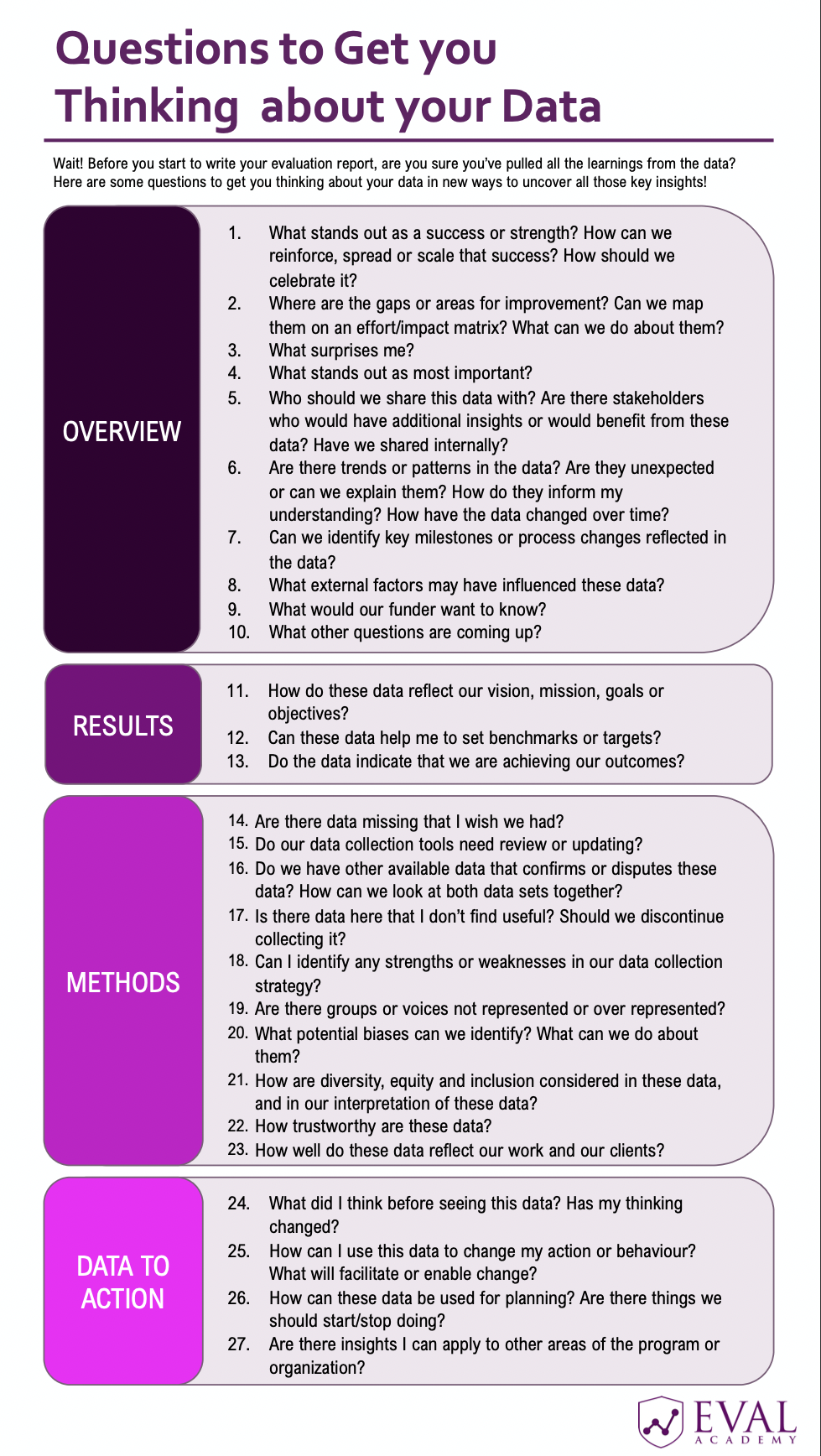
Once you have your dream team, check out our new list of reflective questions that can help to uncover new insights buried in your data.
Trying to answer all of the questions in this checklist will be too many to tackle at once. But pulling out, say, 5 can get some discussion started. I’ve often used these questions in my sense-making sessions or even final presentations to stakeholder audiences to get them talking about the data and really thinking about what it means.
Of course, talking about the data assume that your data are high quality and presented in a way that your audience can learn from them. Here are some final tips to make sure your data are working for you: From Data to Actionable Insights
 English
 Afrikaans
 Shqip
Shqip አማርኛ
አማርኛ العربية
 Հայերեն
 Azərbaycan dili
 Euskara
 Беларуская мова
 বাংলা
বাংলা Bosanski
 Български
 Català
 Cebuano
 Chichewa
 简体中文
简体中文 繁體中文
繁體中文 Corsu
Corsu Hrvatski
 Čeština
 Dansk
Dansk Nederlands
 Esperanto
 Eesti
Eesti Filipino
 Suomi
Suomi Français
 Frysk
Frysk Galego
 ქართული
 Deutsch
 Ελληνικά
 ગુજરાતી
 Kreyol ayisyen
 Harshen Hausa
 Ōlelo Hawaiʻi
 עִבְרִית
 हिन्दी
 Hmong
Hmong Magyar
 Íslenska
 Igbo
Igbo Bahasa Indonesia
 Gaeilge
 Italiano
 日本語
日本語 Basa Jawa
 ಕನ್ನಡ
ಕನ್ನಡ Қазақ тілі
 ភាសាខ្មែរ
 한국어
한국어 كوردی
كوردی Кыргызча
 ພາສາລາວ
 Latin
Latin Latviešu valoda
 Lietuvių kalba
 Lëtzebuergesch
 Македонски јазик
 Malagasy
 Bahasa Melayu
 മലയാളം
 Maltese
 Te Reo Māori
 मराठी
मराठी Монгол
 ဗမာစာ
ဗမာစာ नेपाली
 Norsk bokmål
 پښتو
پښتو فارسی
فارسی Polski
 Português
 ਪੰਜਾਬੀ
 Română
 Русский
 Samoan
 Gàidhlig
 Српски језик
 Sesotho
 Shona
Shona سنڌي
سنڌي සිංහල
සිංහල Slovenčina
 Slovenščina
 Afsoomaali
 Español
 Basa Sunda
 Kiswahili
 Svenska
 Тоҷикӣ
 தமிழ்
தமிழ் తెలుగు
 ไทย
ไทย Türkçe
 Українська
 اردو
اردو O‘zbekcha
 Tiếng Việt
 Cymraeg
 isiXhosa
 יידיש
יידיש Yorùbá
 Zulu
Zulu