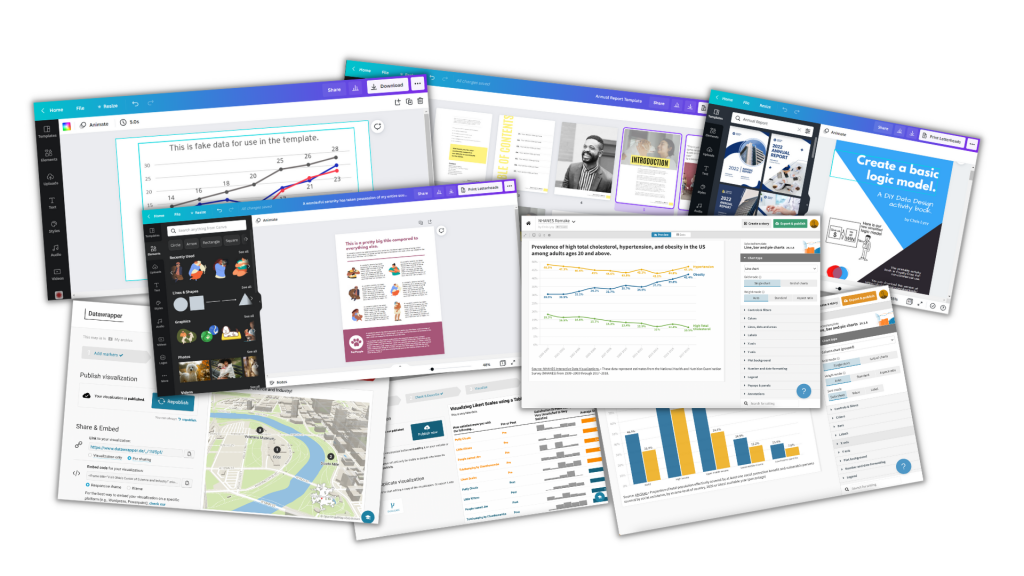
• Skip to main content
  • Skip to footer
  • Home

The May 13 Group

the next day for evaluation

  • Get Involved
  • Our Work
  • About Us
You are here: Home / Archives for allblogs

allblogs

Nov 07 2022

“Big A Accessibility” and “little a accessibility” Tips for Data Visualization

“Ann, how can I make my graphs more accessible??”

Accessibility means different things to different people.

I see two main types: Big A and little a.

  1. Big A Accessibility means that our graphs meet official accessibility guidelines so that they’re understandable for people with disabilities. In the United States, that means 508 Compliance.
  2. Little a accessibility means that our graphs are understandable for non-technical audiences; skimmable; and generally not a garbage heap of jargon.

Both Big A and little a are central in my work.

Here’s where you can learn more.
Ann K. Emery is holding a laptop. The words say, "Big A" Accessibility: Making sure graphs pass official 508 compliance guidelines.

Big A Accessibility

Here’s a (partial) list of everything you’d need to do to pass 508 compliance guidelines.

Directly Label

Remove legends and directly label the data.

Add White Outlines

Outline the touching, filled shapes with white borders (i.e., cells in a heat map, slices in a pie chart, locations in maps, rectangles in stacked bar charts).

Make Sure Graphs are Legible for People with Color Vision Deficiencies

Red-green colorblindness isn’t the only type, but it’s most common.

And, it’s the most problematic for data visualization. We love to use “stoplight coding,” especially in dashboards. We’ve all seen dashboards where green means “we met the target” and red means “we didn’t.”

For people with color vision deficiencies, those reds and greens just look like yellows all blended together.

Tips:

  • Avoid red-green color combos (try red-blue, orange-green, or orange-blue for stoplight coding instead).
  • Use direct labels.
  • Test your drafts.

Make Sure Graphs are Grayscale-Friendly

Printing is less common nowadays, especially with so many people working from home indefinitely. Who wants to pay for their own color ink?!

Your infographics, reports, slideshows, and reports might still be printed.

And they might be printed in grayscale.

Let’s plan for grayscale printing ahead of time to make sure the visuals will still be legible, just in case they’re printed.

Tips:

  • Use direct labels.
  • Add white outlines.
  • Test your draft.

Use Plenty of Color Contrast

The other night, as I was reading my 4-year-old a bedtime story, I was struggling to read the words on the page. The book used colored font against a colored background, and the words were kinda small. Those were all fixable problems!

Tips:

  • Don’t use colored text against a colored background. Here’s how to place text on top of photos so that it’s legible.
  • Make sure all your colored text (e.g., for headings) is bold.
  • Make sure your grays are dark enough. Software defaults are terrible at this. Enlarge and darken those defaults!!

Use Larger Fonts

Increase the font size (I recommend 11+ for documents and 18+ for slideshows, not Excel and Tableau’s puny size 9 defaults).

Again, the software defaults don’t help us here. Their defaults are usually way too small.

Add Alt Text

Add alt text to all images for standalone documents (reports, dashboards, infographics, etc.), including graphs.

Molly Burke’s Instagram is my favorite alt text inspo.
Ann K. Emery is holding a laptop. The words say, "little a" accessibility: Making sure graphs are easy to read, especially for non-technical audiences.

little a accessibility

These are techniques that won’t necessarily help you pass official accessibility guidelines… but are still a good idea if you want to make charts that people actually understand and use.

Actually Use Graphs

Use less text and more graphs!!!

Add graphs alongside those boring bullet points.

Choose the Right Chart

Go beyond the bar chart.

Use Data Storytelling

Use data storytelling, which I define as:

  • writing takeaway titles instead of topical titles and
  • highlighting one key finding at a time in a darker color.

Color-Code by Category

One of my favorite techniques of all time.

Color-coding by category helps us chunks the information into manageable pieces.

We can color-code in presentations, reports, dashboards, and one-pagers.

Lower the Reading Level

I’ve written about reading levels several times:

  • In this blog post, you’ll see a re-written chart title for a conference slide.
  • Here are some common data phrases, re-written.
  • Here are some common research methods phrases, re-written.

Lower the Numeracy Level

Here’s how.

Use a Consistency Text Hierarchy

Make sure all the Heading 1s match, all the Headings 2s match, and so on.

Use Horizontal Text

It’s faster to read than diagonal and vertical text.

Avoid Underlines

Only use underlines for hyperlinks (not for headings).

Avoid ALL CAPS

It feels like shouting and takes longer to read than mixed case letters.

Place Text Next to the Graph

Not on the next page so that it’s faster to read.

Add Symbols and Icons

They make graphs easier to navigate and they boost the memorability of our findings.

  • Here’s an example with state icons.
  • Here’s how to use the StateFace font.
  • Here’s an example with realistic human icons (instead of gingerbread people).
  • And the realistic human icons, in a GIF!

Presentation-Specific Techniques

Talk about one thing at a time so that what your audience is hearing and seeing match.

Use a microphone!!! In-person and online. I don’t care if you think your voice can fill the room. It can’t, especially for people who are hearing-impaired. For virtual presentations, purchase a microphone. Or, at the bare minimum, wear the earbuds that came with your phone (because they likely have a built-in microphone). Tinny, echo-y sounds are hard for all of us.

Report-Specific Techniques

Follow the 30-3-1 approach. Limit the body to 30 pages (or less!), and then create a separate 3-pager and 1-pager.

Use visual appendices instead of black and white appendices to make the patterns more obvious.

Dashboard-Specific Techniques

Don’t expect busy, non-technical audiences to interact with your dashboards.

Involve the End Users

Involve the end users in the sensemaking process, e.g., by using data placemats and by following the Choose Your Own Adventure method in presentations.

Listen to what users say they need… but give them what they actually need.

Remember the Humans Behind the Data

I love this example.

Your Turn

Which of these techniques are you already using?

Why techniques might you try in the future?
Written by cplysy · Categorized: depictdatastudio

Nov 04 2022

Celebrating 10 Years of Dataviz YouTubing!

I published my first video on November 4, 2012…

…and the rest was history!

YouTubing, blogging, and speaking at conferences just for fun quickly transformed into a fulfilling, creative business that’s taken me all over the world and enabled me to work with dream organizations. I never intended to start a business; it just kind of happened naturally thanks to YouTubing and blogging.

Here’s what the YouTubing portion of the journey looked like.

Why I Started YouTubing

A decade ago, I was working full-time as an evaluation consultant in Washington, DC.

I was also finishing my master’s degree at a nearby university, tackling one course at a time in the evenings after work.

And, I was starting to give data presentations at conferences as a regular part of my job. I also went to plenty of lunchtime brown bags around the city to meet people who worked in similar areas.

After the events, we’d stay in touch, and I started getting requests for data tutoring. “I loved your talk!” the emails would say. “Can I hire you to teach me how to do that?” Or, “I have a job interview coming up. Can I hire you to help me prep for the Excel tests that I’ll have to take as part of the hiring process?”

I’d been a formal statistics tutor and Spanish tutor in college through a small invite-only program. I got paid $25/hour back then, which felt like a million dollars for an 18-year-old college student.

So, in my mid-20s, I started tutoring colleagues after work in coffee shops around D.C. I started charging $25/hour and worked up to months-long projects at $125/hour.

Pretty soon, my schedule was way too busy. Again. Story of my life!!

“How can I help more of my colleagues with their datasets?!” I wondered. I decided to start YouTubing! My plan was to make one video that could help infinite colleagues. Then, I’d make another video that could help infinite colleagues. And so on. I’d help more people in less time.

The Earliest Videos

In between regular work and grad school assignments, I’d record short tutorials on common Excel formulas and post them to YouTube.

I didn’t have a webcam; I used my laptop’s built-in camera.

I didn’t have a microphone; you can hear my fingers clacking on the keyboard. Subscribers complained about the poor sound quality, so I bought a $15 microphone after a few videos.

I didn’t know how to edit videos; I’d record them in a single take with a “show must go on” approach.

I was awkward on camera; I rushed through my speaking points, afraid that I’d say “um” or “uhh” if I stopped to breathe between sentences. I didn’t want people to get bored while watching the videos, so I talked reallyreallyreally fast in an effort to hold their attention.

I didn’t know where to post videos – online courses hadn’t really been invented yet – so they were created out-of-order and posted in random places around my blog’s pages. At one point, I had a single webpage with ~50 videos embedded in it. As you’d imagine, it loaded really slow! I created an html Table of Contents to make the page easier to navigate. I added toggle buttons to hide the videos that you weren’t currently watching. I added buttons with links to download the supplemental materials. I was essentially creating a structured online course before that technology had been invented. I saw the need for organized videos and materials, and was thrilled when tech like Teachable, Thinkific, Kajabi, and all the others were released later on.

If you want a good laugh, you can watch my very first YouTube video here!

The Middle Years

By 2014, thanks to blogging and YouTubing, there was so much demand for my dataviz training that I left the corporate world and started my own company.

I started having kids, which left me without any “let me YouTube just for fun!” time.

I’d also finished grad school, so I didn’t need any “productive procrastination” away from my papers anymore. 😊

For a few years, I didn’t create any YouTube videos. (Although I did continue blogging 2-3 times each month.)

This Year

I don’t focus on revenue growth as a business goal. I’m not here to help you make a million dollars a year.

Instead, I’ve focused on mastery and quality: leading the best private workshops I can, creating the best online course experience I can, and producing the best public resources like blog posts and YouTube videos that I can. As you can imagine, revenue growth is a natural byproduct. When you master your craft and produce high-quality experiences, you grow your business.

Here’s how I’ve focused on mastery and quality on YouTube this year.

Upgrading My Equipment, Tech, and Skills

Here’s what I’m currently using:

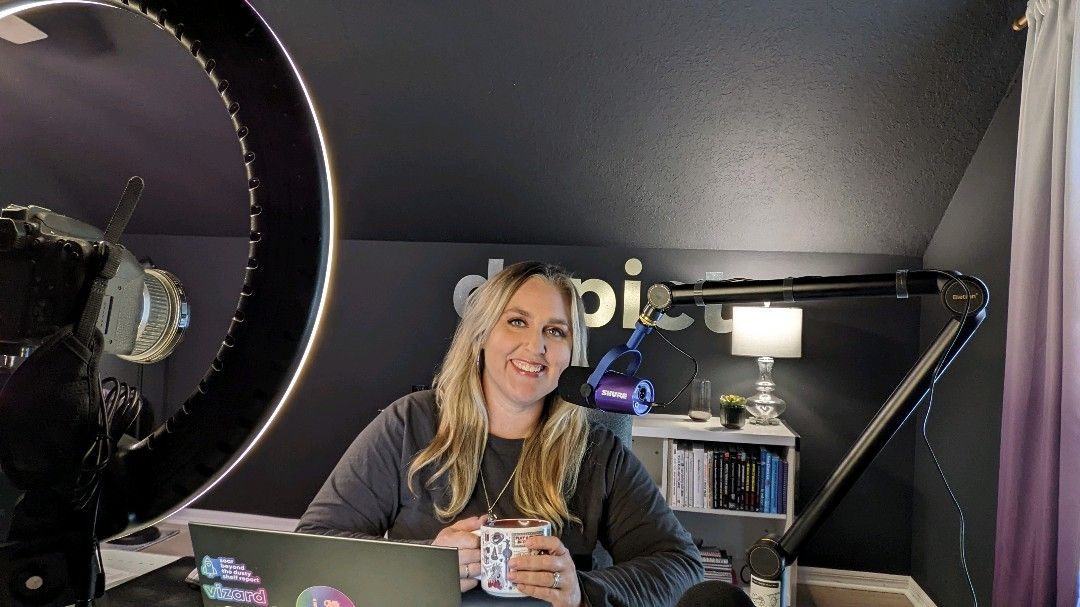
  • Shure microphone, custom-ordered in brand purple (farewell Yeti mic).
  • Mic arm so the mic is an inch from my mouth and I stop slouching over.
  • Windscreen to cut down on background noise.
  • Circle light to make up for working in a one-window room.
  • Colored LEDs for fun.
  • Canon camera (farewell webcams) so that I’m in focus and the background is slightly blurred.

I upgrade my set-up every few months. The full, updated list of equipment is here.

Here’s what it currently looks like behind the scenes:

I invested in public speaking training so that I sound like myself on camera, don’t rush, and vary my tone and cadence.

I learned basic video editing so I can use a variety of imagery: full-screen direct-to-camera shots; the webcam embedded in the corner; B-roll; and so on. I currently use Camtasia to both record and edit videos.

I hired an animator to create intro and outro animations.

I add transcriptions with Descript instead of relying on YouTube’s auto-generated captions. Descript’s captions are more accurate than YouTube’s. And, uploading a transcription file helps with SEO. (When people are Google-searching for dataviz topics, then Google searches through my transcripts and figures out if my video is relevant to their question.)

Upgrading My Content Creation Approach

Most importantly, I’ve upgraded my entire content creation approach.

In January 2022, as I was setting my business goals for the year, I wanted to master what I call the Long-Form-Short-Form approach to content creation.

My approach involves:

  • Choosing a topic to share publicly (typically, anonymized case studies from past projects or Quick Wins for daraviz best practices and accessibility).
  • Creating new slides about that topic (so I’d have the option of turning that into a YouTube video, online course lesson, and/or conference presentation).
  • Writing a blog post about that topic with the images inside the post. The video gets embedded in the blog post, too.
  • Creating a downloadable resource to share, like a checklist, cheat sheet, or dataviz template. I share these free and low-cost resources via Gumroad.
  • Recording a YouTube video (which is easy once you’ve already got the slides created, the speaking points written out in your blog post, and a resource to share).
  • Making a thumbnail image. I have quarterly photoshoots with a brand photographer and make the thumbnails in good ol’ PowerPoint.
  • Transcribing the video on Descript.
  • Adding timestamps (chapters) to the video.
  • Writing a newsletter to my mailing list (ConvertKit) to let them know about the new resources.
  • Breaking up that long form video and blog post into several social media images (the “short form” version), which I make on Canva and schedule on Buffer.

Phew! That’s a lot of ways to repurpose and recycle content across multiple platforms.

I realize this is jargon for most of you. 🙂

But for the fellow bloggers, podcasters, YouTubers, and course creators reading this, I hope you can appreciate my mega transformation over the past decade. I’ve gone from “let me create this quick video just for fun” to “let me create conference slides AND write a blog post AND make a downloadable resource AND make a video AND add captions to help with accessibility and SEO AND add timestamps to break it up into chapters AND share it better than ever on social media.”

The Long-Form-Short-Form Approach in Action

Here’s an example of that workflow.

  • I was invited to speak at a conference.
  • I chose a topic (an anonymized version of a project I worked on a few years ago).
  • I made a downloadable resource (the graphs that I’d be talking about in the presentation).
  • I made slides and presented them at the conference.
  • An hour after the conference, I recorded the YouTube video (since the speaking points were already fresh in my mind). This was a free public event for a small audience, so it was the perfect opportunity to repurpose the content for my own larger audience.
  • I created a thumbnail image.
  • I added captions (Descript) and timestamps to make the longer video easier to navigate.
  • I wrote up my speaking points and turned them into a blog post. (I usually write the blog post before the conference presentation/YouTube video to help me organize my thoughts, but this time, I made the video before I did the writing.)
  • I made several images for social media (Canva), scheduled the blog post (WordPress), scheduled a newsletter to my email subscribers (ConvertKit), and scheduled the social media posts (Buffer).

It takes a full workday to complete that entire process, which is much longer than my “lemme make whatever video I feel like, whenever I feel like” approach from a decade ago. But, it’s more effective, so it’s worth the time investment.

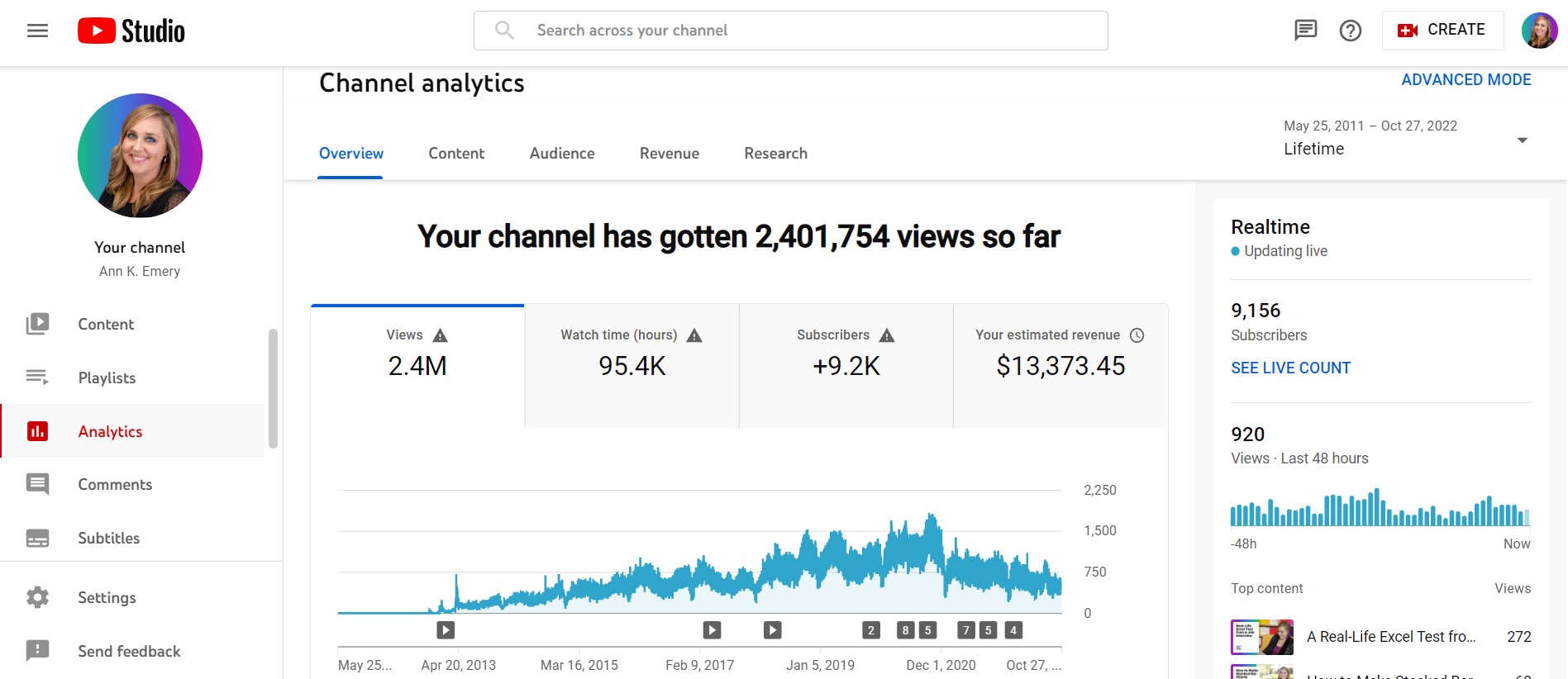
My Latest YouTube Stats

Between 2012 and 2022:

  • 109 videos (and hundreds more inside my online courses)
  • 9,100 subscribers
  • 2,400,000 views
  • $13,000 made directly from video ads
  • $22,000 made directly from the downloadable resources that accompany the videos
  • Millions made indirectly from people who watch the videos and hire me for private workshops and/or join my online courses

I do wish I had more subscribers. If I was a full-time YouTuber–and gave up my private workshops and online courses entirely–I know I could grow my channel to millions of subscribers.

Being a full-time YouTuber is an entirely different business model from being a dataviz speaker and course creator. I’m not interested in switching careers at the moment.

Video Highlights

Here are some notable videos over the years.

Most Views

I made this one in the middle of the night, “thanks” to my never-ending battle with insomnia. And it’s made me thousands of dollars in ad money. A couple hours well spent!

Most Controversial

People either think the Excel test is way too hard or way too easy.

I didn’t create the test!! I just recorded myself taking it.

Video That’s Led to the Most Paid Jobs

What a nice surprise!

(Executives recognize these “dashboard don’ts” in their staff, and they hire me to come and train their staff to make simpler dashboards.)

Underdog Award

I’m surprised this one doesn’t have more views.

The downloadable resource–the templates to create all the one-pagers–is such a gem.

But, the video itself is too long, and it was posted on aea365, which doesn’t get as many views as my own blog.

Favorite Videos on Other Channels

So many!!! Some of my favorite videos have been collaborations for my friends’ YouTube channels.

I especially love this lesson on using colored phrases for qualitative data visualization, which I made for Jon Schwabish’s channel.

I also love this video on starter dashboards for the “Data Is Not Scary” theme for Kate Strachnyi’s channel.

What’s Next

For years, I’ve dreamed about focusing on YouTube, rather than treating my channel as an afterthought around my private workshops and online courses.

For years, I haven’t made the time. And I haven’t been interested in switching from a private workshop/online course business model to a YouTube business model.

I’m not sure whether I’ll ever choose to make the time or make the switch, though.

I love teaching dataviz through videos. Learning software how-to’s through screenshots is the worst. It’s so much better to watch someone’s mouse move on the screen!

But, I’ve done that. I’ve created 6 online courses that involve recorded tutorials, live Office Hours Q&As each week, 1:1 consultations, swag bags, downloadable resources, guest speakers, and more.

YouTubing is still a fun hobby, but with running a business… raising 3 kids… going to the gym… gardening in my backyard… planning fun outings with neighborhood families… I already have a life full of wonderful hobbies. As usual, there isn’t time for much more.

That being said, there are some specific tweaks I’m working towards in 2023:

  • Finally adding intro music to accompany the intro animation.
  • Upgrading my recording/editing software. Camtasia only lets you record full-screen, direct to camera videos in 720p resolution, which is grainy. I want to record in 1040p resolution. Sometimes YouTubers record their full-screen, direct to camera shots entirely on their camera’s memory card. Then, they record their software demos and screensharing from their laptop. Then, they have to merge the various files inside their editing software (Camtasia, etc.). That’s a lot of extra files to keep track of! I’d prefer to find a single software program that does everything. If you have suggestions, please comment on this blog post and let me know.
  • Keeping all videos to 10 minutes or less. People complain about short videos. People complain about long videos. I think the sweet spot for my topics is around 10 minutes.
  • Figuring out which topics can/should be shared on YouTube. Everyone wants Excel dataviz tips, but I’ve got a course on that. Everyone wants dataviz accessibility tips, but I’ve got a course on that. I’ve also got courses on dashboards, reports, presentations, and formulas/pivot tables. So what goes on YouTube?? This is the most challenging aspect of YouTube and blogging for me: finding one-off topics that aren’t already covered comprehensively inside my online courses.
  • Setting a realistic goal for videos. For 2022, I wanted to publish 20 blog posts, 10 of which would involve the long-form-short-form approach with the embedded YouTube videos and downloadable resources. I’ll finish the year with ~24 blog posts and just 6 videos. I’m not sure what’s realistic for 2023 given my other goals for online courses and private workshops, which take up the majority of my time. We’ll see! Stay tuned.

Your Turn

Have any YouTube questions for me? Post them here and I’ll respond ASAP.

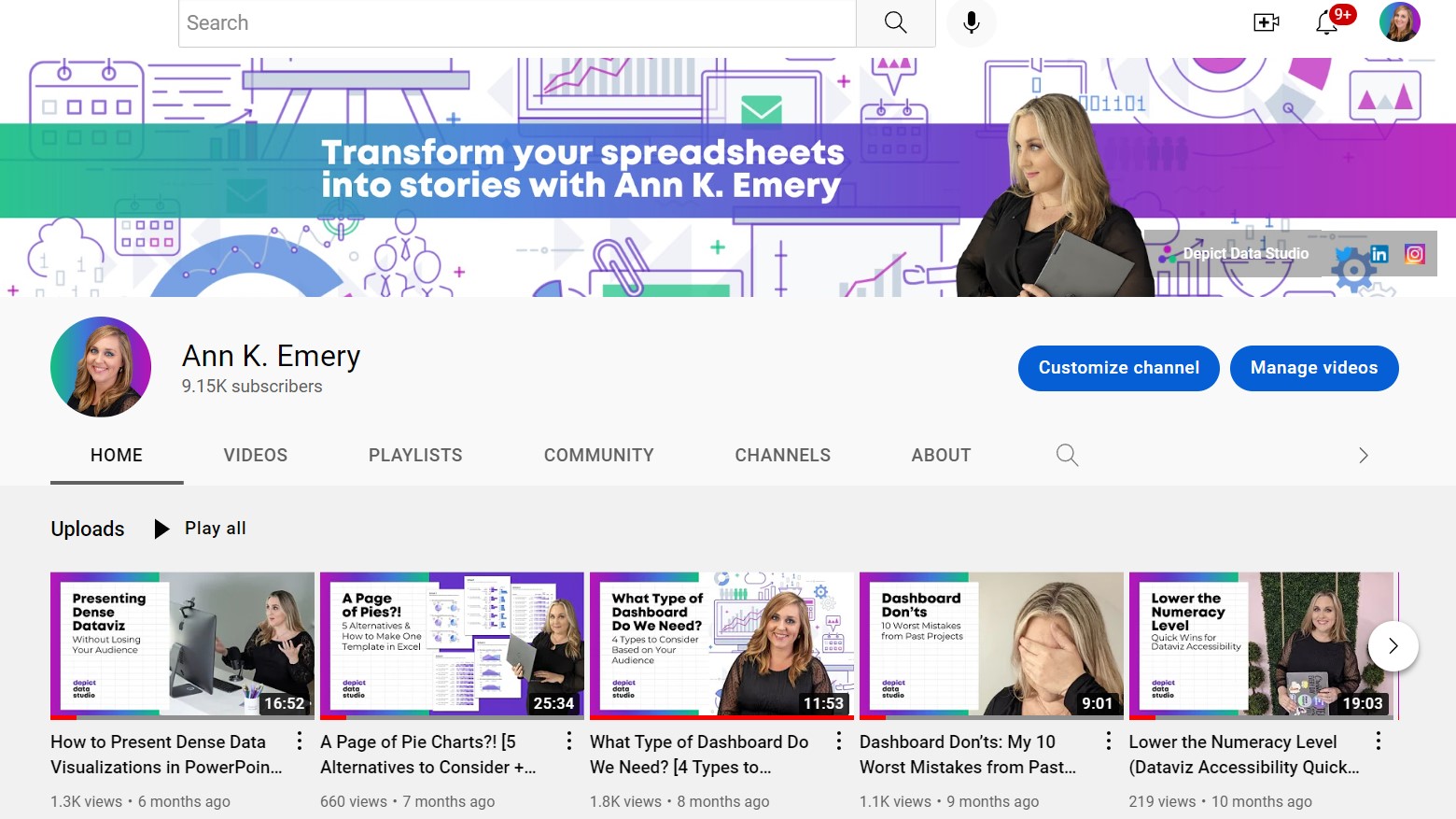
It would mean the world to me if you’d subscribe to my YouTube channel here.

Written by cplysy · Categorized: depictdatastudio

Nov 03 2022

Equitable Facilitation: Tips, Tricks, and Tools

This blog post is co-authored by Anvi Mridul and Rebecca Perlmutter.

“Before we begin, I want to acknowledge the power dynamics created by virtue of me leading this meeting. I also want you to know that while I would like this to be a safe space, I recognize this is a brave space, and I deeply appreciate your courage and candidness throughout this process”. This is how one of our Co-interim Directors, Virginia Roncaglione, opened our meeting as we started our collaborative work to create more equitable decision-making structures and processes and mainstream equity across Innovation Network. Our powerful and ongoing transformation is motivated by our team’s commitment to walk the talk as practitioners and individuals. Equity is one of the core values of our organization and we make conscious efforts to incorporate it into our practice.

We believe that equity will help us move away from an evaluation approach traditionally focused on numbers and impact without providing context, accounting for less tangible outcomes and growth, and broadening our definition of what success looks like to participants and community members. Instead, equitable evaluation is designed to support learning and improvement of the projects we are evaluating. In this way, equitable evaluation can challenge power structures, encourage participant ownership, and build collective power. One of the ways to incorporate equitable evaluation is through equitable facilitation of meetings.

Equitable facilitation enables us to collect diverse and comprehensive perspectives, data, and feedback that can otherwise be silenced by the loudest or most powerful voices in the room. Equitable facilitation can also help us achieve stronger processes and projects because the perspectives that we gather affect the focus of our project and everything we do afterward. As individuals and practitioners, our team strongly believes in the importance of incorporating equity in our daily lives and work.

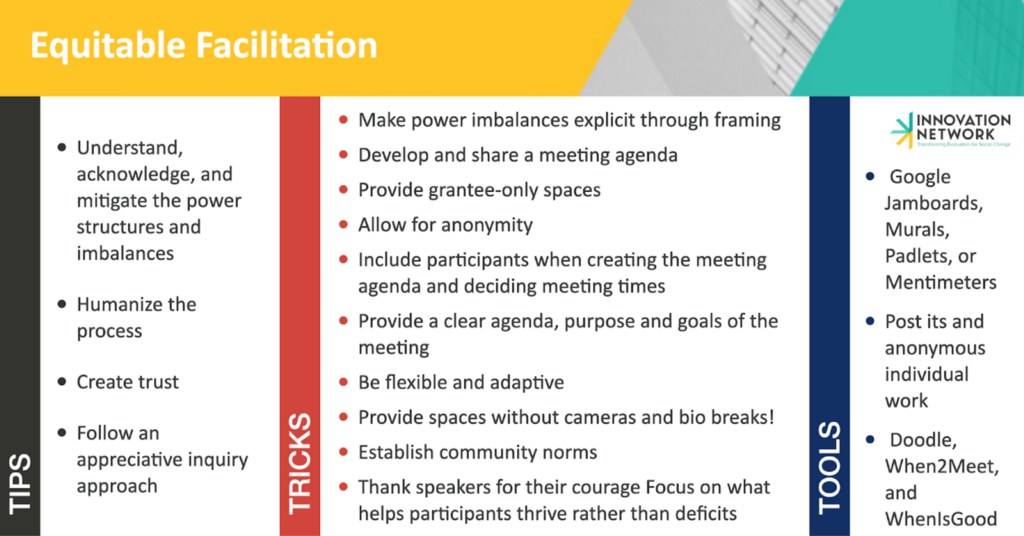
As we continue to explore this method, we want to share some insights–tips, tricks, and tools– we have collected along the way that have helped us facilitate with intention and equity.

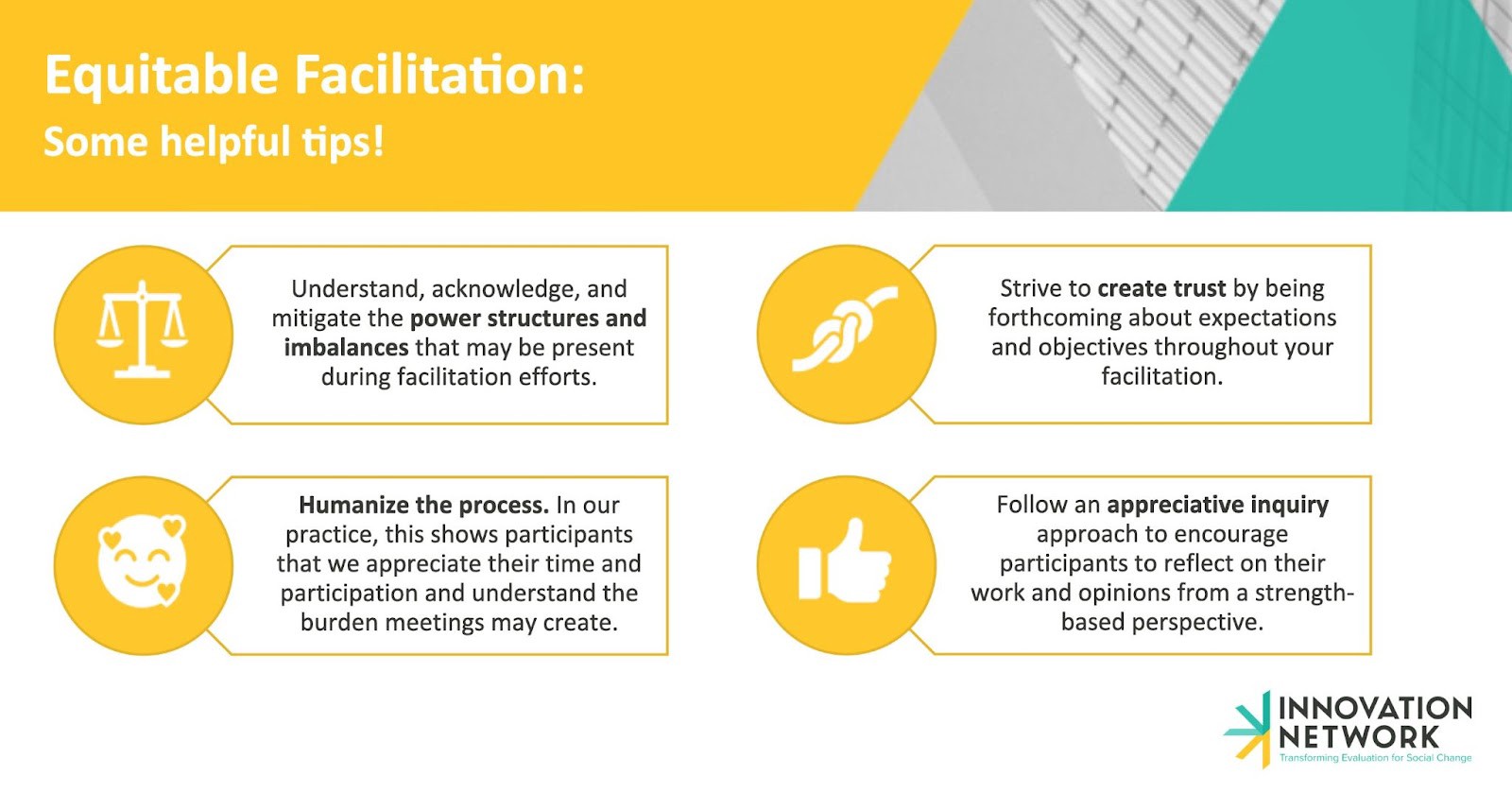
1) Understand, acknowledge, and mitigate the power structures and imbalances that may be present during facilitation efforts.

As our Co-Interim Director modeled, setting the stage can be a good way to acknowledge power structures. Explicitly recognizing the context and power imbalances that exist in the room helps address some discomfort and create a more honest and transparent space. In our experience, when those with more power, like foundations, frame the conversations to invite open feedback, it allows for more authentic engagement from the other participants.

While developing a meeting agenda, we think about who will be invited into the space, and how the power dynamics in the room may affect the contributions or answers to the questions posed. A trick we’ve often used to mitigate power dynamics is to have grantee-only spaces. Having a funder in the room when conversations about progress on outcomes or challenges are going on may limit the ability of some participants to provide their honest opinions. When this is not possible, we make conscious efforts to provide activities or spaces where those with the least power can fully engage. A tool that is particularly helpful in this effort is the breakout groups feature for online meetings. Using tools that introduce anonymity in your session can help ensure people feel safe sharing their opinions and elicit more honest feedback. In these cases, we create Google Jamboards, Murals, Padlets, or Mentimeters where we use the online equivalent of post-its, providing time for participants to answer questions and write down their thoughts without them being attached to an individual or organization. This provides opportunities for those who need time to process and takes away some of the fear of negative repercussions. In other instances, we have invited cohort members to facilitate breakout conversations with their peers, rather than an evaluator who could disrupt the dynamic and conversation.

It can be helpful to host different focus groups for different types of participants, allowing for those in different positions in an organization to freely provide opinions and feedback.

2) Humanize the process. In our practice, this shows participants that we appreciate their time and participation and understand the burden meetings may create.

Some tricks to humanize this process are to include participants in meeting agenda and timing decisions, provide a clear agenda, and provide spaces without cameras (in virtual meetings).

When we include participants in the decisions behind what topics will be included in the agenda and when meetings will take place, participants are encouraged to take ownership and participate more actively. Recognizing their agency within the process, shows how we, as evaluators, value their time and the burden our additional meeting requests may create. It can also help us create more equitable projects that challenge traditional hierarchies and value participants. While including many parties in the scheduling process can be challenging, there are some tools that help simplify the process. We’ve used Doodle, When2Meet, and WhenIsGood. While all are slightly different, these tools will help you find overlaps in the availability of participants and select the most popular time for your meeting.

Once the meeting is organized, it’s helpful to share the purpose and goals of the conversation, along with a defined agenda prior to the meeting so participants are informed and expectations are clear. Despite having a set agenda, we prepare to be flexible to accommodate additional agenda items that may come up at the beginning of each meeting, and try to recognize what parts of the conversation are inspiring more curiosity or energy, and adapt our focus to meet the needs and interests of participants.

For us, flexibility also means recognizing that while having cameras on can help us check the levels of engagement, people may have different situations that preclude them from turning on their cameras, especially at home and surrounding care responsibilities. And don’t forget to provide bio breaks, especially in sessions over an hour!

3) Strive to create trust by being forthcoming about expectations and objectives throughout your facilitation.

To establish trust, and create safer spaces, we like to start meetings by setting out community norms. These can be co-created with a quick brainstorm and carried over for future conversations. Some community norms we like include: have grace for people’s long days and other extenuating circumstances, avoid interrupting each other, it’s okay to have pauses or silences, acknowledge and respect that we come to these conversations with different experiences, and call in, rather than call out.

Another trick to create trust is to openly acknowledge and respect each individual’s situation. A way to do this is to always assume the best intentions, and hold back any judgment. When receiving comments, we also make a point to genuinely thank the speaker for their courage in speaking out and contribution to the conversation.

4) Follow an appreciative inquiry approach to encourage participants to reflect on their work and opinions from a strength-based perspective.

An appreciative approach has been particularly helpful for us in facilitating conversations, such as focus groups for data collection because participants stop thinking about what is missing and reflect on what helps them thrive. In a field overly focused on deficits, it is helpful to use this when funders are in the room and reduce pressure on grantees or evaluees. In some of our most creative data collection sessions, we have encouraged participants to respond to our questions by creating a collage of text, photos, and graphics to give them the space to visualize their responses and identify supports they need from a place of strength. This way we introduce a growth mindset, where evaluation participants can acknowledge the things they are good at, recognize where they are thriving, and help us create conditions to do forward-facing visioning.

While these are some tips, tricks and tools we use within our practice, our path to becoming more equitable facilitators is ongoing. We also recognize that there is no one size fits all approach, so it is important to understand the differences in context and how this can call for different approaches to equitable facilitation.

As we continue to learn and reflect on our path toward a more equitable evaluation practice, we recognize we do not have all the answers and are still exploring how to improve every day. We would love to hear your advice, or how you implement any of these suggestions. Please let us know the challenges you or your team face as practitioners, or other tips, tricks, and tools we may have missed!

You can also check out our August Evaluation Highlights for more helpful resources on this topic.


Equitable Facilitation: Tips, Tricks, and Tools was originally published in InnovationNetwork on Medium, where people are continuing the conversation by highlighting and responding to this story.

Written by cplysy · Categorized: innovationnet

Nov 02 2022

Canva Free, Canva Pro, or Canva for Teams?

Is it worth upgrading your Canva Free account to Canva Pro? Is Canva for Teams a different thing? Is Canva Pro really free for Nonprofits & Schools?

So if you read my blog, you probably already know I’m a big fan of Canva. I have posts on creating logic models using Canva, creating timeline infographics, creating line graph infographics, and even a post on converting Canva reports into Microsoft Word. I also talk about Canva a lot with my online workshop participants.

I like Canva enough that it’s one of the very few tools where I’m part of their partner program. Which basically means they gave me an affiliate link, and if you click and purchase using that link I’ll get a kick back.

This isn’t to say Canva doesn’t have its negatives. The biggest fault is in accessibility > Canva Accessibility is bad, here is how you fix your design. This means there are things I would suggest you never do using Canva in its present state, such as create a Web Site. Until they fix their accessibility issues.

All this to say, I think I know Canva enough to give some guidance on if Canva Pro is worthwhile and which kind of Canva you should consider using.

Which Canva Plan is Right for Me?

TLDWTR (Too Long Don’t Want to Read)

In this post I’m going to walk you through all the different iterations of Canva. Unlike other articles I’m not just going to copy/paste feature lists from the Canva sales page. Instead I’m going to give the gist of what each plan offers and why you might consider it for yourself.

But if you don’t want to read any of it at all, here is my advice.

Should you pay for Canva?

No, don’t pay.

  • If you are out of work, a poor college student, or really just don’t have expendable cash, you can do almost everything using Canva Free.

Yes, pay up.

  • If you are an indie business person like me, Canva Pro is a great deal. I would even suggest it if you are just running a side hustle or use a lot social media for professional development and networking.
  • If you run a small business, definitely consider at least the base version of Canva for Teams. It will cost significantly less than two Canva Pro subscriptions and includes up to 5 accounts.

No, get it for free.

  • If you are a K-12 student, teacher, or inside a K-12 district, Canva for Education is free. Teachers need to get verified, other school personal need to contact Canva, and K-12 students need teacher invites.
  • If you work in a NonProfit, Canva for Nonprofits is also free. You just need to register.

Canva Free

Canva is a freemium product. Meaning it’s free but you can pay for more features.

Sometimes freemium is just another way to say demo version. The software company gives you just enough features to act as a never ending trial, but if you want to use the software professionally, you need to pay up.

Canva Free is not like that. Canva Free is a professional product with or without an upgrade to Canva Pro. There are really no limits to what you can create. Images, Infographics, Whiteboards, Presentation Slide decks, eBooks, Video, Reports, and even Websites (although I would recommend against that use given the accessibility thing I mentioned earlier).

Cartoon Person 1, "I hear you consider yourself a Canva pro."
Cartoon Person 2, "Oh, I am. I pay $120 a year for that."

Canva Pro

The biggest reason to upgrade to Canva Pro is the shift from 1 million + free photos and graphics to the 100 million + premium stock photos, videos, audio, and graphics.

There are bunches of free stock photo sites and icon libraries on the web. But bouncing back and forth between Canva and stock libraries can get a little tiresome. It’s so much easier to just use the full stock icon and photo archive embedded within the tool.

Yes, there are some cool features you get when you upgrade. Like the Background Remover, the ability to Magic Resize designs, a personal Brand Kit, and a Social Media Content Scheduler. But while these are nice to have and can certainly be useful features, they don’t make a huge difference in your design workflow. But having a huge growing royalty free archive at your disposal, that just makes everything so much faster.

At the time of this writing Canva Pro costs $119.99/year or $12.99/month.

Cartoon person 1, "With the report deadline coming up I'm surprised to find you so calm."
Cartoon person 2, "Most of us are pretty good now. Except for Jenny, but she's the only one with a Canva pro account."
Cartoon person 3 looks frazzled working on her computer.

Canva for Teams

For a little while, if you signed up for Canva Pro you also received the basic membership for Canva for Teams. So if you were already a Canva Pro user, you may already have Canva for Teams (just check your account status).

Canva for Teams is basically a shared group version of Canva Pro. This lets you share brand kits and brand templates between team members. I’ve seen a lot of small teams where the responsibility for the design falls on a single person’s shoulders (the one with the Pro account). This is a surefire path to creative burnout or turnover.

By team creating, you give all your team members the ability to tweak items. This means anyone on your team can open, edit, and download your designs (as long as they are shared with the entire team). This can be incredibly important, especially with looming deadlines.

Right now Canva for Teams is $149.90/year or 14.99/month for up to the first 5 team members. That’s the Canva sweet spot (average is less than $30/year for each of 5 members)

Increasing your team above 5 members gives you a pro-rated increase in rates that goes up as you add more members. By the time you get to 23 team members you are essentially paying the Canva Pro full price for each member of your team (average $119.99/year for each of 23 members).

Canva for Education

Canva for Education is 100% free for primary and secondary teachers and their students. You just have to start by getting verified as a teacher. But for a student to get the plan, they need an invite from their teacher.

If you are another staff member who is part of a K-12 school or district you can also get in touch with Canva as they offer enterprise-level deployment.

Sorry College Students & Preschoolers, this free offer does not currently include you.

Canva for Nonprofits

Canva for Nonprofits is another free offering. But just like most other software services with NonProfit plans, you need to fill out an application and get verified first.

Speaking of Discounts.

Are you a researcher or evaluator wanting help in learning how to design? I have an ongoing online workshop for that.

Not only that, I offer No Ask Necessary Scholarships that instantly give you 25%, 50%, or 75% off the full registration price.

Written by cplysy · Categorized: freshspectrum

Nov 01 2022

Speed Versus Depth

There are many threats to quality action and behaviour change, but the most persistent and pernicious of these is brevity.

Speed and efficiency are two twins tied to productivity, value, and innovation. At least, in theory.

We have yet to see any substantive value created from a fast, quick fix or rapid change initiative. Change takes time and if we were to recommend anything to prospective clients or those seeking it in their work, this is it.

You can not dodge through the work required to prime people for change and to support them through it.

We can’t speed past a process of innovation development to get a high-quality product faster. There are rare cases where things go much faster than anticipated, but those are just that: rare. No one can design for this.

Better Living Systems

One of the significant issues is that we have to design for living systems. These systems adhere to the laws of complexity. This means we can’t control systems or predict outcomes; we can only create means to influence behaviour and limit the effects of actions on us. Design principles for living systems also require us to account for things like evolution, relationships, network effects, and feedback.

Organizations operate the same way. We see our clients wrestle with the expectations of their boards, staff, funders, and communities for change and have to deal with pressures to do it fast. Yet, we also see the enormous benefits of taking things slower — at the pace of a living system. This allows organizations to learn, reflect, and design their pathway wisely.

Just as we can’t rush growing a garden (even if we wanted to), we can’t do this for organizations and change, either.

We are much like a car driving through the woods; our engine is powerful, and our capacity for speed might be significant. But the journey is beautiful, the leaves are falling, and change is everywhere. If we go too fast we might miss what’s going on.

Image by Roberto Nickson on Unsplash

The post Speed Versus Depth appeared first on Cense Ltd. .

Written by cplysy · Categorized: cameronnorman

  • « Go to Previous Page
  • Go to page 1
  • Interim pages omitted …
  • Go to page 112
  • Go to page 113
  • Go to page 114
  • Go to page 115
  • Go to page 116
  • Interim pages omitted …
  • Go to page 310
  • Go to Next Page »

Footer

Follow our Work

The easiest way to stay connected to our work is to join our newsletter. You’ll get updates on projects, learn about new events, and hear stories from those evaluators whom the field continues to actively exclude and erase.

Get Updates

Want to take further action or join a pod? Click here to learn more.

Copyright © 2026 · The May 13 Group · Log in

en English
af Afrikaanssq Shqipam አማርኛar العربيةhy Հայերենaz Azərbaycan dilieu Euskarabe Беларуская моваbn বাংলাbs Bosanskibg Българскиca Catalàceb Cebuanony Chichewazh-CN 简体中文zh-TW 繁體中文co Corsuhr Hrvatskics Čeština‎da Dansknl Nederlandsen Englisheo Esperantoet Eestitl Filipinofi Suomifr Françaisfy Fryskgl Galegoka ქართულიde Deutschel Ελληνικάgu ગુજરાતીht Kreyol ayisyenha Harshen Hausahaw Ōlelo Hawaiʻiiw עִבְרִיתhi हिन्दीhmn Hmonghu Magyaris Íslenskaig Igboid Bahasa Indonesiaga Gaeilgeit Italianoja 日本語jw Basa Jawakn ಕನ್ನಡkk Қазақ тіліkm ភាសាខ្មែរko 한국어ku كوردی‎ky Кыргызчаlo ພາສາລາວla Latinlv Latviešu valodalt Lietuvių kalbalb Lëtzebuergeschmk Македонски јазикmg Malagasyms Bahasa Melayuml മലയാളംmt Maltesemi Te Reo Māorimr मराठीmn Монголmy ဗမာစာne नेपालीno Norsk bokmålps پښتوfa فارسیpl Polskipt Portuguêspa ਪੰਜਾਬੀro Românăru Русскийsm Samoangd Gàidhligsr Српски језикst Sesothosn Shonasd سنڌيsi සිංහලsk Slovenčinasl Slovenščinaso Afsoomaalies Españolsu Basa Sundasw Kiswahilisv Svenskatg Тоҷикӣta தமிழ்te తెలుగుth ไทยtr Türkçeuk Українськаur اردوuz O‘zbekchavi Tiếng Việtcy Cymraegxh isiXhosayi יידישyo Yorùbázu Zulu