• Skip to main content
  • Skip to footer
  • Home

The May 13 Group

the next day for evaluation

  • Get Involved
  • Our Work
  • About Us
You are here: Home / Archives for allblogs

allblogs

Jun 06 2022

Humanity in Data Visualization: Designing a One-Pager for My Grandma’s Caregivers

I registered for the Simple Spreadsheets course because I was a beginner with using Excel and I knew I was utilizing only a fraction of its capabilities. 

I also had the good fortune of attending some of Ann’s in-person presentations about data visualization at a conference for Continuous Quality Improvement hosted by the California Department of Social Services, which had an unquantifiable impact on the personal project I will be sharing with you today. 

Although I signed up for learning from Ann to benefit my professional life, I was also able to apply the learnings in my personal sphere as you will see below! 

Although this example was in the personal realm, I think there are potentially a lot of other applications for visualizing data in this way.

The Challenge

At the beginning of the coronavirus pandemic, my mom and aunt had to fire my grandma’s caregiver due to a personality mismatch and not being on the same page about grandma’s needs.  

This was the second time it happened in a few months and it seemed like part of the challenge was in the matching process and educating the caregivers about grandma’s unique needs, and her personality.

Getting Everyone on the Same Page

I wanted to do something to help, so I created a 11×17 one sheet introduction for the new caregiver with input from my grandma, auntie and mom. 

My grandma’s previous caregivers were not native English speakers, so I wanted to make something that was approachable, and also captured my grandma’s personality. 

I remembered in one of Ann’s presentations that she told us about the icons at The Noun Project website, so I used icons accompanied by brief descriptions. 

It made sense to me to organize the info into two columns, and I made the text as clear and simple as possible.

The Result

Here’s the one-pager that I made for my grandma’s caregivers.

Outcome

Unfortunately, grandma is no longer with us. 

But I’m happy to report that after providing the caregiving agency with the 11×17 sheet, she was matched with a caregiver that she LOVED, and who told us she loved our grandma too. 

The caregiver was with her for a year and a half, until she passed. 

I can’t tell you how comforting it was to know that she was in the hands of someone who was not only competent, but genuinely cared for her. 

The caregiving agency kept a copy of the sheet in grandma’s file and shared it with substitute caregivers when the primary caregiver had time off.  This helped the substitute caregivers provide more consistent care for grandma.

Potential Applications

Since its creation, I’ve shared this sheet with many of my friends who have made similar sheets for their loved ones. 

Some of my friends have all joked that they need something like this for their dating life.  Maybe it has other applications too?  What do you think? 

Sharing with Gratitude

Here is an editable Word copy that you can use for your own purposes! 
Download the One-Pager

Connect with Mieko Yeh

linkedin.com/in/miekoyeh

Written by cplysy · Categorized: depictdatastudio

Jun 02 2022

How to create an infographic in an hour

If you are not used to creating your own infographics, creating a professional infographic quickly might seem like a tall order. But sometimes deadlines call or you just need to create lots of infographics in a short amount of time.

In this post I’ll show you how to create an infographic quickly.

Just a note, I’m assuming you already know some information worth putting into an infographic format (such as a timeline) or you have some other kind of content you want to adapt into an infographic (like a report). If you don’t have information worth sharing, find that first!

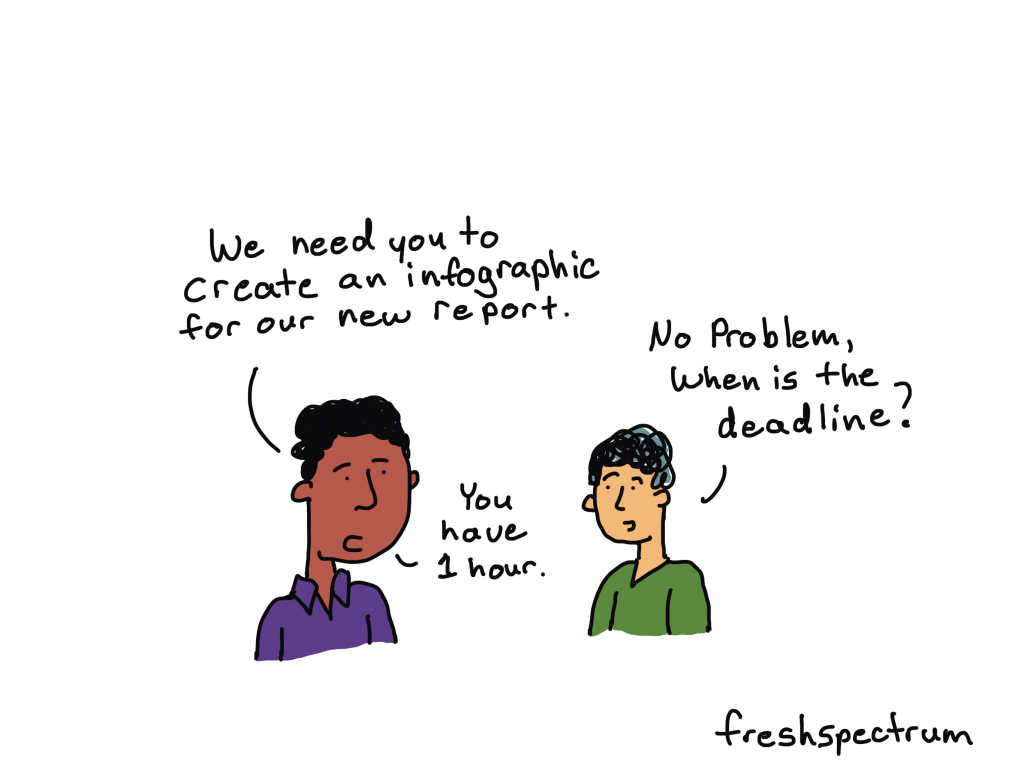
Fresh Spectrum Cartoon "We need you to create an infographic for our new report."

"No Problem, when is the deadline?"

"You have 1 hour."

1. Pick easy-to-infographic information.

A lot of times you’ll be creating an infographic from an existing report. But what inside the report should go into the infographic? There are certain things you’ll find in your report that are easier to infographic than others.

For example, these things are usually pretty easy to infographic:

  • Recommendations
  • Key Insights
  • Chosen Methods
  • Timelines
  • Surprising Results

If a quick infographic is your goal, stay away from anything that requires a lot of explanation or subtlety. Infographics are engagement tools, ultimately you’ll want to send your audience back to the primary report for more detailed information.

2. Choose a simple infographic formula and style.

There are all sorts of infographic formulas and styles.

Start with shape and size. If you plan to print your infographic, make sure to design it in an easy to print format (such as letter size paper, legal paper, tabloid, A3, or A4). If you are sharing it on the web keep in mind where you are sharing the infographic and the platform limitations that might exist.

As for formulas, here are a few that make for easy infographics:

  • Listicle infographics (i.e. 5 lessons learned)
  • Timeline infographics (i.e. Successes over our last 4 years)
  • Side by side comparisons (i.e. A tale of two program sites)

3. Find an infographic template.

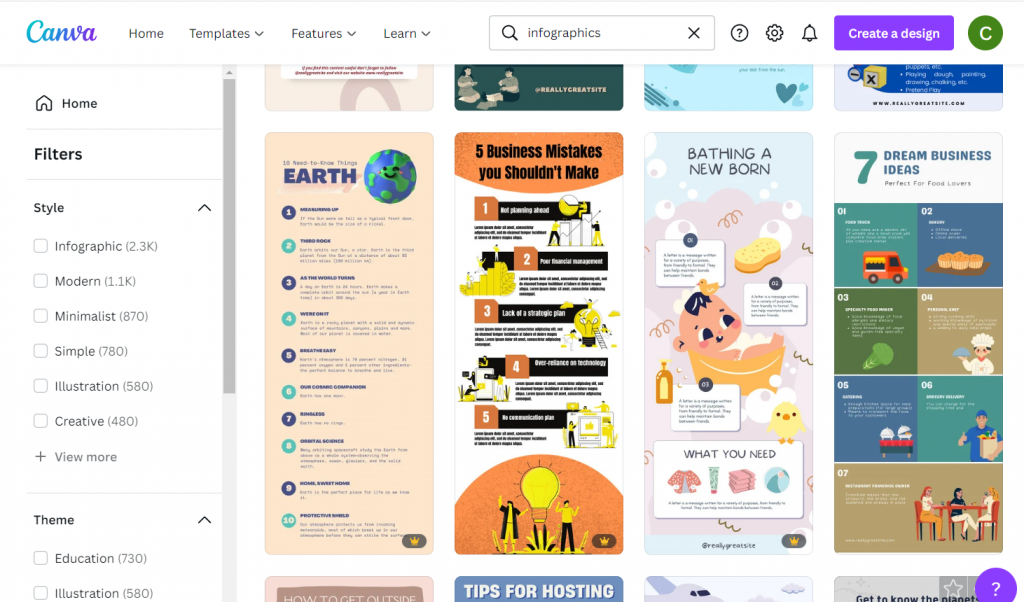
Screenshot of canva infographic templates.
Canva has tons of infographic templates!

Once you have a basic idea of the type of infographic you are going to create, try to find a template before you start writing. There are other infographic template sites out there in the world, but I usually suggest starting with Canva.

There is a tendency to write too much when you are writing content for an infographic. You spend a lot of time making sure the words are just right only to find that they look super busy once you put them on the page. Choose a template that more or less matches the amount of content you want to share.

A template you like is also going to take care of a bunch of design choices around colors and fonts. If you have make the template match your brand it might take you a little more time.

4. Write an infographic script.

I prefer writing my infographic text outside of the infographic. It makes it easier to track change and edit if necessary. Then I just paste the text into the template.

Use the template you chose in step 3 to give yourself target word counts for each block of content. If you go far above or below the word count, it could really distort the look and feel.

Cartoon showing Jack from Titanic's scribble drawing of stick figure Rose.

5. Illustrate your infographic.

Now that you have the text, it’s time to add the pictures.

I suggest being consistent. Choose between photographs, illustrations, charts, cartoons, and icons as each will give your infographic a different look. Since we are creating this infographic quickly, I would suggest using stock visuals already included as part of Canva.

Another option is to upload your own charts and pictures.

6. Bring it all together, save, and share.

Now that you have your infographic all together and filled with content it’s time to give it the final touches. If you want to print your infographic (or share it as a printable) I would suggest saving it from Canva as a PDF. If you plan on sharing it via social media I would suggest saving it as a PNG.

If you share it on a website or on social media as a PNG, make sure to add alternate text wherever you share (i.e. WordPress, Twitter, etc.).

Want some resources, including a few Canva templates and an infographic script worksheet? Register for my free upcoming webinar.

Next week I’m holding a webinar to go along with the Summer registration kickoff for DiY Data Design. Hope you can attend!

Join us at 2PM on Thursday, June 9, 2022. Register on Eventbrite through this link.

How to Create an Infographic in an Hour - Webinar.

Written by cplysy · Categorized: freshspectrum

Jun 01 2022

Ask Nicole: Pros & Cons of Naming Your Business After Yourself

Have a question you’d like to be featured? Let me know. Today marks 6 years since leaving my employer to run my business full time. While I no longer talk about the ins and outs of running a business anymore, today is an exception. Six years ago, I was more excited, more hopeful, less secure in whether […]

The post Ask Nicole: Pros & Cons of Naming Your Business After Yourself appeared first on Nicole Clark Consulting.

Written by cplysy · Categorized: nicoleclark

May 31 2022

When the data speaks for itself

When the data speaks for itself

(I’m back! Let’s just say that working from home full-time with an infant and no childcare is not for the faint of heart. I’m hoping to share with you more regularly throughout the summer and beyond.)

As I’m sure has been the case with you, the past few weeks have weighed heavily on my heart. 

With the news of the racially motivated slaughter of Black Americans at a grocery store in Buffalo and then the shooting rampage at an elementary school in Uvalde, Texas, I have felt a range of emotions.

I remember doing active shooter drills with elementary school students at the last school where I worked — both as a precaution and also when we thought there was an intruder in the building. Thankfully, nothing happened, but as we saw this week (and so many times before), we might not have been so lucky. 

I’m also thinking about my young daughter and the world we’ve brought her into. 

I’m sad for the victims and their families, enraged at our country for being the only developed country to continue to have mass shootings and do nothing about it, and I’m fearful for what might come without action on the part of our government.

But my feelings really don’t matter. This isn’t a political blog. This is, however, a prime example, of how some data tells quite the story without us having to do much to it. 

Every Town for Gun Safety is skillful at letting this truly horrifying data stand on its own.

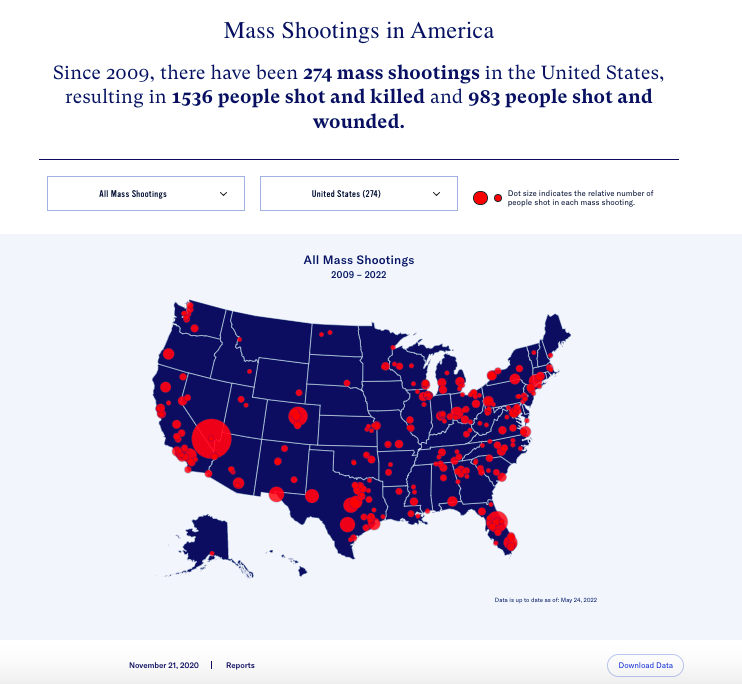
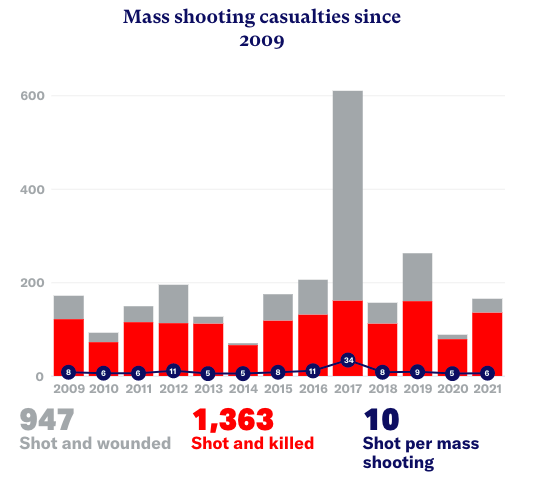
Take, for example, their interactive map of all of the mass shootings in this country in the past 13 years (274 of them). 


Interactive map of all mass shootings in the US from 2009 to 2022

It takes only a glance to see that:

  1. There are far too many red dots on this map,
  2. There have been some particularly catastrophic shootings in the past decade, and
  3. Some parts of our country have been especially impacted by brutal gun violence. Texas alone has had 30 of these 274 mass shootings (11%).

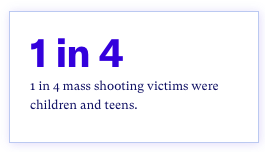
Every Town does a great job of data visualization, as seen in the graph below, but sometimes, all it takes is focusing on a single statistic to drive the point home. 


1 in 4 mass shooting victimes were children and teens


Stacked bar graph showing the number of mass shooting casualties since 2009

I truly believe that their use of data is helping spread their message in a clear and concise way, at a time when that is more crucial than ever. 

Think about your organization’s message and the key data points that are important for you to share. 

Which data points tell your story for themselves?

This week, I’ll be presenting at the 2022 National Community Schools And Family Engagement Conference (CSxFE) with my clients from Greeley-Evans District 6 in Colorado.

 They are doing a GREAT job of using their data to make change for students and families in their district (more on that in a future post!).  

If you’ll be at the conference, we’d love to have you at our session, Using Data to Build a Culturally Responsive District Equity Strategy. 

Written by cplysy · Categorized: engagewithdata

May 31 2022

Carrying an Equitable Innovation Network Forward

Photo by Dom J

This blog post is part of a series of posts about Innovation Network’s transformation towards equity.

The work of equity starts with our own internal work, and by now you have read about our transformation towards equity and new values that center social justice. Though many of the individuals who helped to shape our transformation have moved on to other opportunities, we are committed to carrying forward our collective lessons and vision for equity.

This work has been personal, forcing us to confront our perceptions of ourselves and the way we engage with each other. We have also seen the power of transparent decision making, trust, and a human-centered approach on our practice and our relationships to one another.

We are making structural changes to our organization that embed equity, and allow future generations of Innovation Network team members to shape it by:

  1. Participating in externally- and internally- facilitated authentic conversations, such as healing circles facilitated by Dr. Wenimo Okoya. These experiences provided a model for how we engage with each other as colleagues, and most importantly as human-beings. While relationships, including working ones, require ongoing care, healing circles resulted in a deeper sense of trust, transparency, and connection amongst our team.
  2. Intentionally shifting our culture toward distributed leadership and transparent decision-making. This framework grounds our commitment to disengaging harmful power dynamics and centers the needs of every person, regardless of experience or role, within our organization. This can be seen in our commitment to holding weekly full team decision making conversations that range from making decisions about time-tracking software to equitable salary policies.
  3. Learning about some of the deep work that is required to become activists for equity through evaluation and learning. Doing this work internally has allowed us to engage more authentically with our clients and realize what it takes to deconstruct power structures that are inherent in our projects. A future blog post will focus on how we are embedding equity in our day-to-day learning and evaluation work.

As we broaden our team, new staff are invited to join an organization where they can be themselves while taking an active role in molding the organization according to their collective beliefs; and furthering equity outside of the borders of our organization through our projects and initiatives.

We know there is much work still to do. As we look forward to the future of our organization, we are excited to experiment with ways to engage one another as contributors to a new more equitable way of working and learning. We believe that this is only possible because of those in the field who have been leading by example and sharing their experiences. We are grateful for their guidance and expertise. Following in their footsteps, we invite you to join us as collaborators and welcome your feedback as we experiment and create opportunities to learn together about how to create new equitable structures that start with us.


Carrying an Equitable Innovation Network Forward was originally published in InnovationNetwork on Medium, where people are continuing the conversation by highlighting and responding to this story.

Written by cplysy · Categorized: innovationnet

  • « Go to Previous Page
  • Go to page 1
  • Interim pages omitted …
  • Go to page 126
  • Go to page 127
  • Go to page 128
  • Go to page 129
  • Go to page 130
  • Interim pages omitted …
  • Go to page 310
  • Go to Next Page »

Footer

Follow our Work

The easiest way to stay connected to our work is to join our newsletter. You’ll get updates on projects, learn about new events, and hear stories from those evaluators whom the field continues to actively exclude and erase.

Get Updates

Want to take further action or join a pod? Click here to learn more.

Copyright © 2026 · The May 13 Group · Log in

en English
af Afrikaanssq Shqipam አማርኛar العربيةhy Հայերենaz Azərbaycan dilieu Euskarabe Беларуская моваbn বাংলাbs Bosanskibg Българскиca Catalàceb Cebuanony Chichewazh-CN 简体中文zh-TW 繁體中文co Corsuhr Hrvatskics Čeština‎da Dansknl Nederlandsen Englisheo Esperantoet Eestitl Filipinofi Suomifr Françaisfy Fryskgl Galegoka ქართულიde Deutschel Ελληνικάgu ગુજરાતીht Kreyol ayisyenha Harshen Hausahaw Ōlelo Hawaiʻiiw עִבְרִיתhi हिन्दीhmn Hmonghu Magyaris Íslenskaig Igboid Bahasa Indonesiaga Gaeilgeit Italianoja 日本語jw Basa Jawakn ಕನ್ನಡkk Қазақ тіліkm ភាសាខ្មែរko 한국어ku كوردی‎ky Кыргызчаlo ພາສາລາວla Latinlv Latviešu valodalt Lietuvių kalbalb Lëtzebuergeschmk Македонски јазикmg Malagasyms Bahasa Melayuml മലയാളംmt Maltesemi Te Reo Māorimr मराठीmn Монголmy ဗမာစာne नेपालीno Norsk bokmålps پښتوfa فارسیpl Polskipt Portuguêspa ਪੰਜਾਬੀro Românăru Русскийsm Samoangd Gàidhligsr Српски језикst Sesothosn Shonasd سنڌيsi සිංහලsk Slovenčinasl Slovenščinaso Afsoomaalies Españolsu Basa Sundasw Kiswahilisv Svenskatg Тоҷикӣta தமிழ்te తెలుగుth ไทยtr Türkçeuk Українськаur اردوuz O‘zbekchavi Tiếng Việtcy Cymraegxh isiXhosayi יידישyo Yorùbázu Zulu