• Skip to main content
  • Skip to footer
  • Home

The May 13 Group

the next day for evaluation

  • Get Involved
  • Our Work
  • About Us
You are here: Home / Archives for allblogs

allblogs

Jul 06 2020

Evaluation Roundup – June 2020


Welcome to our monthly roundup of new and noteworthy evaluation news and resources – here is the latest.

Have something you’d like to see here? Tweet us @EvalAcademy or connect on LinkedIn!


New and Noteworthy — Reads


Last month we highlighted Khalil Bitar’s blog post from May 11 where he talked about how the evaluation community is not immune to prejudice, discrimination and racism. He went on to say that the evaluation community is in fact practicing racism by primarily producing and sharing evaluation knowledge by white men from the Global North. Two weeks after this blog post George Floyd was killed. George Floyd’s killing ignited protests across the world, but it also ignited more reflection and conversation about what could be done about systemic racism in our societies. Evaluators reflected through their blogs on how evaluators can begin to move the needle. Some relevant blog posts to check out include:


Jara Dean-Coffey – Musings + Machinations

Jara Dean-Coffey is the Founder and Director of the Equitable Evaluation Initiative (EEI). If you haven’t checked out the EEI then make a point to do so. There are resources that evaluators can access to better understand how evaluation can and should be “utilized in a manner that promotes equity.” But as Jara stated on LinkedIn, she felt the need to write outside of EEI and recently began a blog called musings + machinations  – writings by jdc. In June she posted 12 posts! Read them all and make sure to subscribe to this blog – her musings are insightful and and her machinations inspiring.  


Engage R+D –  It’s Time to Let Go of Tired Narratives about Talent in Evaluation

We hear a lot about narratives these days. In this blog post on Engage R+D, Clare Nolan talks about narratives – what they are, the power they can have, and how they have been used to support oppression. She talks about some of the tired narratives about talent and expertise in evaluation that “get in the way of effective and equitable solutions” and then counters those with ideas of potential new narratives that can help advance equity. For example, we’ve all heard the “diverse applicants don’t meet our standard qualifications.” A potential new narrative is looking at how implicit bias and white-dominant norms are constraining our ability to recognize valuable knowledge, experience and credibility.


Michael Quinn Patton’s Rules for Privileged Straight White Males and Andrea Guerrero-Guajardo’s Rewrite

MQP published a blog post on his website that outlined rules for straight white males. He outlined ten rules that privileged white males don’t necessarily have to like or agree with but do have to follow. If you scroll down to the comments you can find many people who definitely disagree and not in a constructive manner. Someone who did provide constructive feedback was Andrea Guerrero-Guajardo who put time and thought into rewriting MQP’s rules, which can be found here.


Chris Lysy –  Evaluation, Compassion, Fatigue and Health Inequity

Chris’ blog post talks about a number of different topics, as the name suggests. He explores how as evaluators we need to not only do something but stand for something. He suggests the Equitable Evaluation Initiative as a resource and approach for how evaluators can channel their efforts and keep the momentum moving forward because “failing to channel our efforts can quickly lead to fatigue.” In this blog post, he also explores inequity in public health data.


New and Noteworthy — Tools


Code for America’s Quantitative Research Practice Guide

Code for America has come out with a timely guide that can be used by anyone looking to conduct qualitative research “in ways that can help everyone ensure that their products and services are as inclusive as possible.” The guide outlines specific methods for conducting research and analysis, but to be honest my favourite part of this guide is Code for America’s core research philosophy and guiding principles. The fact that this organization has a research philosophy and guiding principles is swoon-worthy enough, but how they have articulated their philosophy and guiding principles is so on point I found myself re-reading it several times. They conclude their research philosophy by stating: “Ultimately, research is a tide that lifts all boats. It is fundamental to developing government services that better and more equitably meet the needs of communities. Raising the bar on quality of research raises the bar on quality and effectiveness for everything that we seek to do for the world.” Well said.


New and Noteworthy — Courses, Events and Webinars


July 2020

  1. Results-based Management & Theory of Change Workshop during and after COVID-19

    Instructor: Mosaic.net International Inc.


  2. IPDET Evaluation Hackathon

    July 7 – 13

  3. Claremont Graduate University – The Evaluator’s Institute

    A variety of courses starting July 20 that are being conducted by various instructors, including some big names like Michael Quinn Patton, Ann K. Emery, and Ann Doucette.


We have a free guide:

Applying the JCSEE Evaluation Standards in Practice

Whether you’ve read The Program Evaluation Standards cover to cover or not, you may be wondering how to ensure you’re applying them to your evaluation practice. This free digital download will give you the reflective prompts you need to ensure your next evaluation project incorporates all 30 Standards.


Subscribe to Our Newsletter

Sign up with your email address to receive news and updates from Eval Academy every month.


We respect your privacy.

Thank you!


Written by cplysy · Categorized: evalacademy

Jul 01 2020

Ask Nicole: How Can I Raise My Voice When No One is Around to Hear Me?

Have a question you’d like to be featured? Let me know. I received an overwhelming number of responses from one of my recent blog posts, “Your Values Always Come at a Cost”. So much so, that the majority of that post’s comments came directly from subscribers to my Raise Your Voice newsletter via email replies. […]

The post Ask Nicole: How Can I Raise My Voice When No One is Around to Hear Me? appeared first on Nicole Clark Consulting.

Written by cplysy · Categorized: nicoleclark

Jun 30 2020

Improve Your Logic Model Using 3 Simple Design Principles


A recent study in the American Journal of Evaluation showed how three simple visual design principles could be applied to logic models to make them more effective and understandable. This article summarizes the findings of that study so you can improve your logic model.


What are logic models?

Logic models are widely used in evaluation to visually summarize how a program is expected to work: what resources will be used, what activities will be undertaken, and how those activities will cause desired outcomes. These are often a staple in our evaluation work, whether we are starting with a logic model that has already been created, or we are creating one for the program from scratch.


Why visual design?

Visualizing information effectively is important for evaluators because we are “communicators and knowledge brokers” at our core. The way we visualize and present information affects how it is used, and who is able to use it. Therefore, logic models could be made more useful and understandable by improving their visual design. The goal of the study was to make a logic model better by applying visual design principles. A good visualization:

  • Is clear, useful, and memorable;

  • Supports audience understanding;

  • Is easy to mentally process; and

  • Is organized into memorable chunks.

These visualization principles, along with the relevant research on data visualization and visual design, were used to make some simple (yet effective) improvements to the basic logic model.


Visual improvements to the logic model

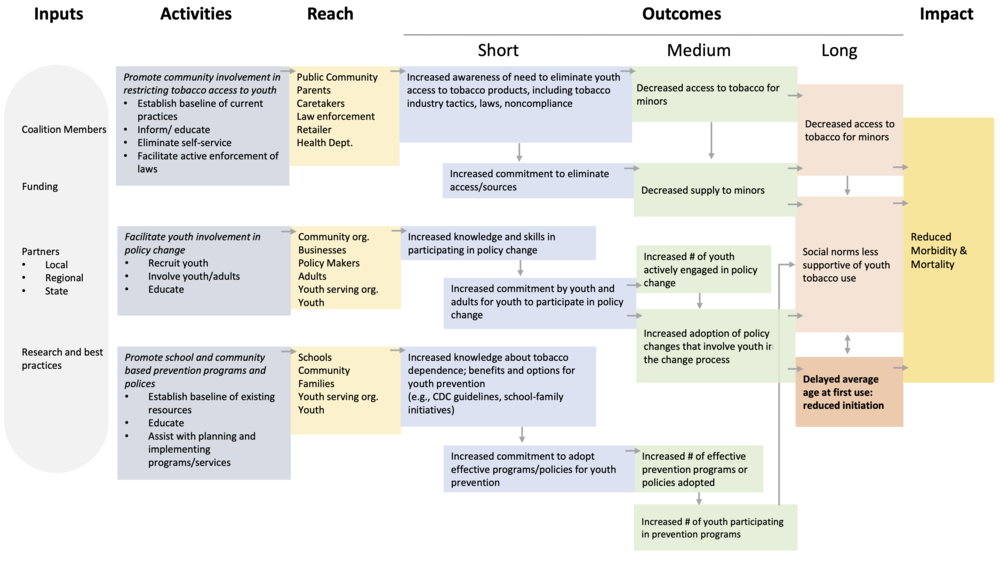
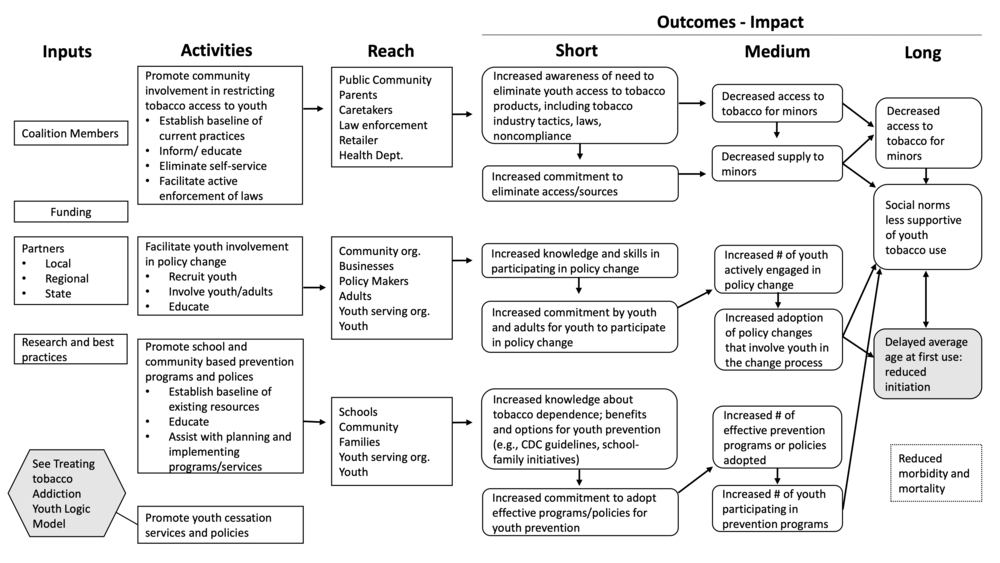
The original logic model looked like this:

AJE824417_Supplemental_Appendix_A ORIGINAL.png

This is a fairly standard logic model that evaluators are used to seeing. It outlines the program’s inputs, activities, reach, and outcomes, and shows the interconnections between them.

This logic model was revised by incorporating the following visualization best practices:

  1. Colour: Colour was used to group similar items together (i.e., each column was a different colour)

  2. Proximity: Elements that were connected to each other were moved closer together, which reduced the emphasis on arrows

  3. Reducing ink: unimportant elements were de-emphasized or removed to keep the focus on the most important elements. For example, by removing the black borders around boxes.

After making these improvements, the revised logic model looked like this:

AJE824417_Supplemental_Appendix_A REVISED.png


The revised logic model was easier to understand

After testing these logic models with a survey of the general U.S. population, the researchers found that the revised logic model was:

  • Faster to review

  • Interpreted more accurately

  • Easier to understand

  • More aesthetically pleasing

  • Perceived as more credible


With relatively simple visual changes, which can be implemented in Microsoft Word or PowerPoint, the researchers were able to improve their audience’s understanding of the logic model. We can leverage these 3 design tweaks (colour, proximity, and reducing ink) to help our audiences read our logic models faster and more accurately.


Notes on study methodology

The original study (linked below) has more detail about how exactly the research was conducted, but in short:

  1. A survey was conducted with the general U.S. public.

  2. Respondent were shown one of six possible variations of the logic model, which were combinations of:

    • Original vs. revised logic model

    • With vs. without a written narrative

    • Greyscale vs. colour logic model

  3. Respondents were then asked a series of questions about the logic model they were shown, including their understanding of the program, the effort it took to understand, their perception of the credibility, and the aesthetic qualities.

  4. Responses to the different types of logic models were compared to determine if the visual design elements helped improve the original logic model (and it did!).


The full study can be found here:

Jones, N. D., Azzam, T., Wanzer, D. L., Skousen, D., Knight, C., & Sabarre, N. (2019). Enhancing the Effectiveness of Logic Models. American Journal of Evaluation, 1098214018824417. https://doi.org/10.1177/1098214018824417


Sign up for our newsletter

We’ll let you know about our new content, and curate the best new evaluation resources from around the web!


We respect your privacy.

Thank you!


Written by cplysy · Categorized: evalacademy

Jun 30 2020

Sensemaking in Crisis

Sensemaking is a social process that helps us make sense of data, information, and knowledge in a time of complexity. It’s used often in innovation contexts when we are fitting data to a unique situation.

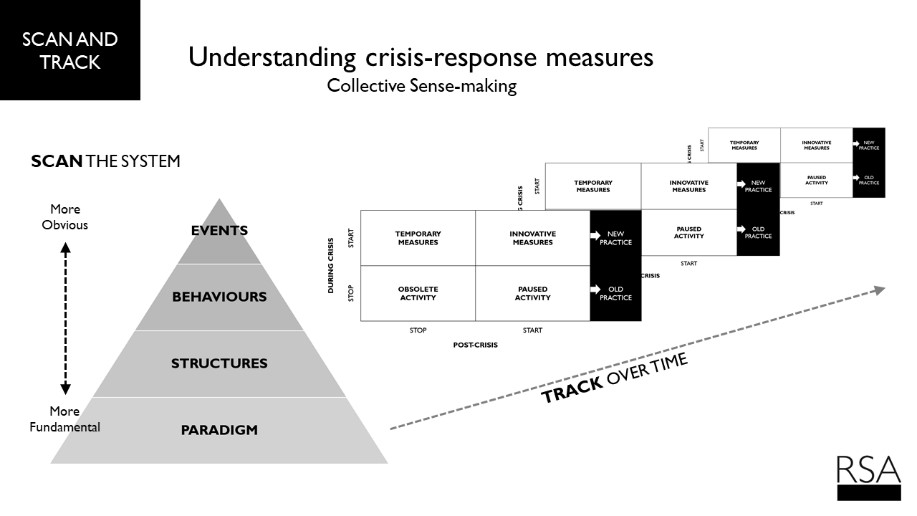
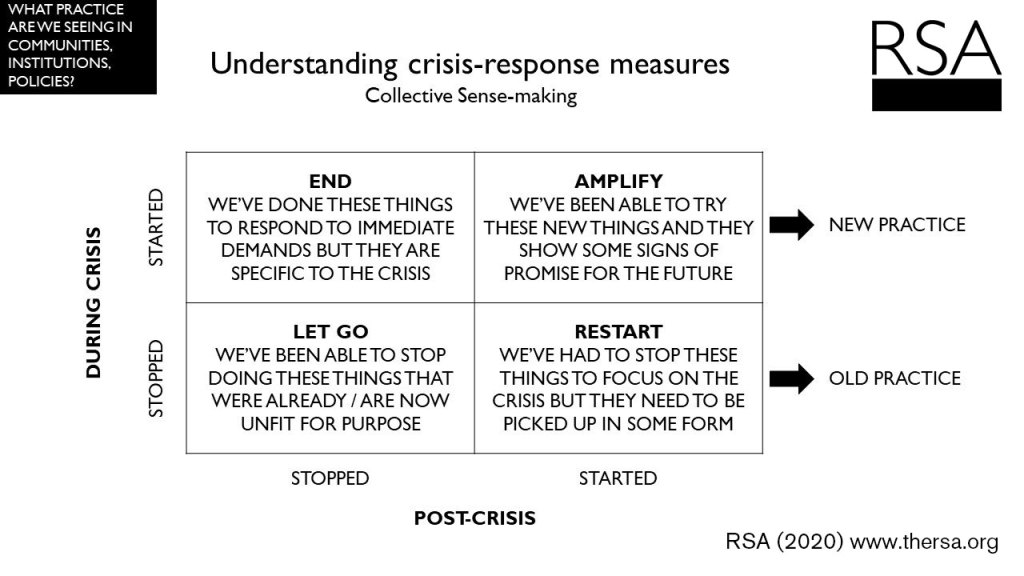
The RSA (the Royal Society for the encouragement of Arts, Manufactures and Commerce) a UK-based charity and think-tank has recently updated and revised its collective sense-making framework which provides a clear example of ways to consider change-making and leading in times of crisis.

The 2×2 framework, presented below, helps to frame activities that may have stopped or started during a crisis and what activities we may wish to amplify, end, abandon, and re-start.

Developmental Thinking

What the RSA framework embodies is what we call developmental thinking. This is the kind of thinking embedded in Developmental Evaluation, design and innovation. This thinking is about taking information and feedback from the activities in the system and making adaptive, strategic decisions to keep the organization developing (evolving) through learning.

Learning is about taking action based on new information and in some cases — such as those in complex situations with lots of change and activity — this learning must come from sensemaking. It tells us when to stop, start, pause, and wind-down activities.

The RSA proposes conducting this sensemaking over time through a process that is akin to developmental design and developmental evaluation through the crisis which, in the case of events like COVID-19, might be protracted and evolve. As noted below, it also recognizes that sensemaking is tied to systems thinking where events (the most visible parts of a system) are actually built upon larger sets of behaviours, structures, and paradigms.

To make use of this requires a monitoring and evaluation system tied to an overall developmental, design-driven process. It’s not difficult, but it does require substantial mindframe shifts and organizational supports. Yet, the payoff is that your organization is adaptive and working with what’s happening and what’s emerging, rather than stuck trying to make what used to work come alive in an environment that has not only changed, but might be different altogether.

If your organization needs help in reshaping your work to make the most of what you have and pivot to what’s needed next, contact us. This is what we do.

Written by cplysy · Categorized: cameronnorman

Jun 30 2020

Three Takeaways from the User Experience (UX) Field to Up Your Data Viz Game

This article–and four video lessons!–come from Brenna Butler, who researched user experience as part of her doctoral program. Thanks for your contributions to our field, Brenna! –Ann

Hi all, Brenna Butler here to walk you through what the field of User Experience (UX) is all about and how it relates to our data visualizations.

Maybe you’ve heard of UX here and there over the years and read a few articles about the field, or maybe you’ve only heard of it for the first time when you read the title of this blog post…either way is fine, as this article will provide a quick introduction on what UX is all about and how takeaways from the field can enhance our data visualizations.

What is User Experience (UX)?

UX can be thought of as evaluating something (in this case, our data visualizations) based on its effectiveness and accessibility in conveying a message.

UX is unique because it also focuses on people’s emotional reactions (such as if people are excited as much as we are about the visualizations we create).

Why Does UX Matter in Data Visualizations?

We live in a world where SO much is trying to capture our attention – emails, texts, videos, the latest social media trend – so how can you be sure that your data visualization is capturing the attention of your audience?

The field of UX is here to the rescue to show us design aspects to incorporate into our data viz to ensure they are effective, efficient, and enjoyable to view.

Overall, we can learn a few lessons from UX that can make your data visualizations and reports perform better, which are discussed in detail below.

Takeaway #1: Harness the Power of Icons in Visualizations

Icons used in visualizations, such as through simple images, pictographs, or icon arrays, can be really effective for a number of reasons.

First off, icons make your visualizations more accessible, as I explained in a guest lecturer video below:

Icons can make your data viz more accessible for people that have a color vision deficiency that have trouble distinguishing some colors from others.

Think about all of the times information is communicated in a data visualization through color…

Now think about if you couldn’t distinguish between the different colors…

It’s not very easy to understand what the main takeaways displayed in the data viz are now, right?

But what if that data viz had icons to indicate the different categories? Bingo. The message is now clearly communicated without relying on different colors. Additionally, for people that have a learning disability or difficulty, simple icons can help increase the interpretability of the visualization. The icons provide an additional “clue” as to what type of information is displayed in your data viz.

Not only do icons make your visualizations more accessible, but there’s evidence to indicate that icons also increase the memorability of your visualizations, as covered in my “Developing Memorable Visualizations” video below:

Want to make a “main takeaway” in your report really stand out in your readers’ minds? Convey that information in a pictograph or icon array – bonus points if your icons match the overall theme or type of data you’re communicating (e.g., apple icons for data on school lunches in the U.S.).

Takeaway #2: When You Think You’ve Already Said it… Say it Again

Ever find yourself repeating yourself over…and over in a report?

Research would indicate that you’re doing something right, because the more times data are repeated or main trends are restated in a report, then the more likely our audience can remember the information.

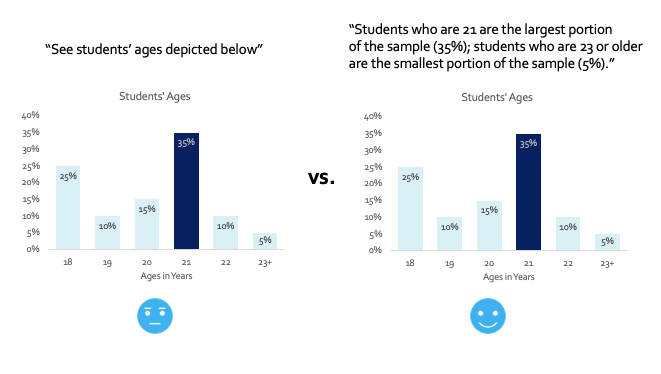
It’s also important to clearly spell out the main trends that are shown in your data visualizations. While it can be interesting to analyze a data viz to better understand all of the trends and themes occurring in the data, this takes brain power – aaand our audience might not want to invest that brain power into our visualizations. It’s best to just spell out the main takeaways shown in your visualizations somewhere in the report, or even in the title of your data viz.

Here’s another plus about stating the main takeaways of your data visualizations several times in your report – it makes the report more accessible.

There is no guessing game as to what message you’re conveying, helping people with a learning disability or difficulty better understand your message. Plus, people who are blind or visually impaired can’t see trends displayed in your data visualizations, so they will be solely relying on a screen reader to read the text of the data viz/report out loud to them. If your main takeaway isn’t explicitly stated, then people that are blind or visually impaired won’t get the message – meaning you’re not reaching a chunk of your audience.

Bar chart shown on the left with generic description in the report of the trends occurring, and bar chart shown on the right with informative description of the main trends occurring.

Takeaway #3: Get Creative with Your Data Viz Design!

Do you like to get your creative juices flowing when developing data visualizations?

If so, this is the takeaway for you, because researchers have found that what they call “embellished visualizations” are more enjoyable and more memorable than plain visualizations, as covered in my “Developing Intriguing Visualizations” video below:

What’s an embellished visualization?

It’s incorporating the overall theme of the report or data that you are depicting and adding icons into the data viz design that matches this theme.

Take a bar chart, for example. Instead of having a bar chart with plain old bars depicting the number of K-12 students enrolled at a school over the years, we would replace those bars with an icon, such as a pencil.

But here’s the catch – the icons need to relate to the theme of your data or report instead of being something random.

Double check that you can still understand the data depicted when icons are added to the data viz, too (so, control those creative juices and don’t get too out of hand with this tip!).

“Plain” bar chart shown on the left with normal bars, and “embellished” bar chart shown on the right with the bars replaced with different sized pencils.

Learn More about UX for Data Visualization

If you found this blog post interesting and want to learn more, then please check out the references below for additional information.

  • Want to learn more about UX and data visualization? Check out the study in more detail that I talked about at https://dl.acm.org/doi/10.1109/IV.2012.69
  • Link to the color vision deficiency tool featured in the video: https://www.color-blindness.com/coblis-color-blindness-simulator/
  • Tutorial on adding alt-text in Microsoft Word: https://support.office.com/en-us/article/add-alternative-text-to-a-shape-picture-chart-smartart-graphic-or-other-object-44989b2a-903c-4d9a-b742-6a75b451c669#PickTab=Windows
  • Tips for writing effective alt-text: https://cfpb.github.io/design-manual/data-visualization/accessibility.html#alt-tags
  • Want to learn more about the research behind what makes a visualization intriguing? Check out this article: https://dl.acm.org/doi/10.1145/2993901.2993903 and this article: https://firstmonday.org/article/view/6389/5652
  • Why are pictographs more intriguing than a bar chart or text alone? More information can be found at https://dl.acm.org/doi/10.1145/2702123.2702275
  • Curious to learn more about “embellished charts”? Check out https://dl.acm.org/doi/10.1145/1753326.1753716
  • Want to learn more about the research behind what makes a visualization memorable? Check out this article: https://dl.acm.org/doi/10.1145/2993901.2993903 and this article: https://ieeexplore.ieee.org/document/7740509
  • How does repeating main takeaways in a report increase the memorability of the information? Details can be found at: https://vcg.seas.harvard.edu/publications/beyond-memorability-visualization-recognition-and-recall
  • Why are “embellished charts” more memorable than “plain charts?” Learn more by checking out this article: https://ieeexplore.ieee.org/document/6327282 and this one: https://dl.acm.org/doi/10.1145/1753326.1753716

Connect with Brenna Butler

If you have any questions, or just want to say, “hello,” please feel free to email me at bberry10@vols.utk.edu or connect with me on LinkedIn at https://www.linkedin.com/in/brenna-butler-b80474b1/.

Written by cplysy · Categorized: depictdatastudio

  • « Go to Previous Page
  • Go to page 1
  • Interim pages omitted …
  • Go to page 251
  • Go to page 252
  • Go to page 253
  • Go to page 254
  • Go to page 255
  • Interim pages omitted …
  • Go to page 310
  • Go to Next Page »

Footer

Follow our Work

The easiest way to stay connected to our work is to join our newsletter. You’ll get updates on projects, learn about new events, and hear stories from those evaluators whom the field continues to actively exclude and erase.

Get Updates

Want to take further action or join a pod? Click here to learn more.

Copyright © 2026 · The May 13 Group · Log in

en English
af Afrikaanssq Shqipam አማርኛar العربيةhy Հայերենaz Azərbaycan dilieu Euskarabe Беларуская моваbn বাংলাbs Bosanskibg Българскиca Catalàceb Cebuanony Chichewazh-CN 简体中文zh-TW 繁體中文co Corsuhr Hrvatskics Čeština‎da Dansknl Nederlandsen Englisheo Esperantoet Eestitl Filipinofi Suomifr Françaisfy Fryskgl Galegoka ქართულიde Deutschel Ελληνικάgu ગુજરાતીht Kreyol ayisyenha Harshen Hausahaw Ōlelo Hawaiʻiiw עִבְרִיתhi हिन्दीhmn Hmonghu Magyaris Íslenskaig Igboid Bahasa Indonesiaga Gaeilgeit Italianoja 日本語jw Basa Jawakn ಕನ್ನಡkk Қазақ тіліkm ភាសាខ្មែរko 한국어ku كوردی‎ky Кыргызчаlo ພາສາລາວla Latinlv Latviešu valodalt Lietuvių kalbalb Lëtzebuergeschmk Македонски јазикmg Malagasyms Bahasa Melayuml മലയാളംmt Maltesemi Te Reo Māorimr मराठीmn Монголmy ဗမာစာne नेपालीno Norsk bokmålps پښتوfa فارسیpl Polskipt Portuguêspa ਪੰਜਾਬੀro Românăru Русскийsm Samoangd Gàidhligsr Српски језикst Sesothosn Shonasd سنڌيsi සිංහලsk Slovenčinasl Slovenščinaso Afsoomaalies Españolsu Basa Sundasw Kiswahilisv Svenskatg Тоҷикӣta தமிழ்te తెలుగుth ไทยtr Türkçeuk Українськаur اردوuz O‘zbekchavi Tiếng Việtcy Cymraegxh isiXhosayi יידישyo Yorùbázu Zulu