• Skip to main content
  • Skip to footer
  • Home

The May 13 Group

the next day for evaluation

  • Get Involved
  • Our Work
  • About Us
You are here: Home / Archives for allblogs

allblogs

Jul 14 2020

Seis Ps para l@s campeones del conocimiento

http://www.greenchameleon.com/

Nick Milton en su post: “6 Ps para l@s campeones del conocimiento“, nos habla de Andrew Trickett, Gestor de Conocimiento para el negocio de Ove Arup Rail, quien cree que l@s campeones necesitan 6 cualidades, todas comenzando con P:

1.tener pasión por el KM.

2.tener persistencia.

3. resolver problemas.

4.buscar mejorar siempre para progresar.

5.cumplir sus promesas.

6. ayudar a las personas a estar orgullosas de su trabajo (ésta siendo la única que no empieza con “p” en castellano 😉 como sí lo hace “proud”)

Written by cplysy · Categorized: TripleAD

Jul 14 2020

The Best Laid Plans…Getting to Root Causes

Have you ever planned a meeting complete with a well thought-out, organized agenda, only to toss it because your group had more important needs? That was exactly what I experienced last week.

In a call I was leading this past Friday, one of the participants, a community collaborative leader, went right to what is on a lot of minds these days, especially community collaborative and coalition leaders. He asked, how he as a community collaborative leader could respond to his community’s need to talk about the racial tension in his community?

We had a really great conversation.

One of the leaders on the call shared his pastor’s challenge to his congregation to understand the difference between remedies and solutions. Remedies are short term fixes. For example, a backpack program that sends food home to families experiencing food insecurity is a remedy. Remedies might be necessary, but they aren’t solutions because they don’t address root causes.

If we really want to make a difference, we need upstream solutions.  We need to understand why people are falling in the river in the first place. In our example, why are so many families experiencing food insecurity?

In my last blog, I suggested that we all have the tendency to look at simple solutions. Usually we identify individuals as the sole cause of their problems. I spend a lot of time working with community coalitions. When I ask what change they want to see in their community, people- often default to finding fault with individuals without considering the systems that make their life harder.

Root Cause Analysis is a method that you can use to get your organization to examine root causes and these my friend, will help you identify the solutions that can lead to lasting change.

Here are 3 root cause analysis methods you might want to use with your organization. Note that the examples I use here are not extensive and are just meant to get you thinking.

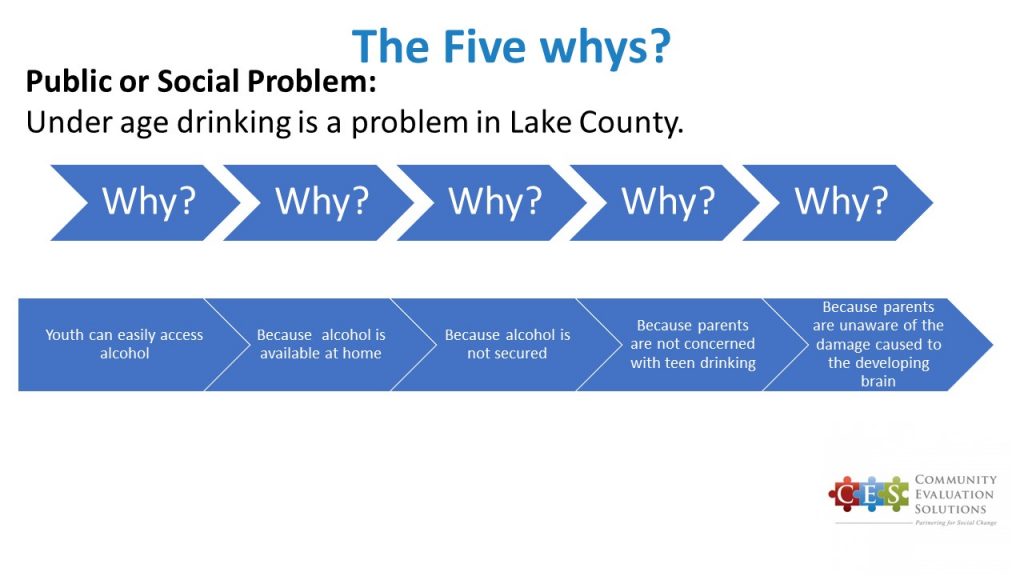
The Five Whys

This technique asks the question “Why?” five times. Each time you should ask your group to think more deeply about the social problem you are focused on and drill down into it.

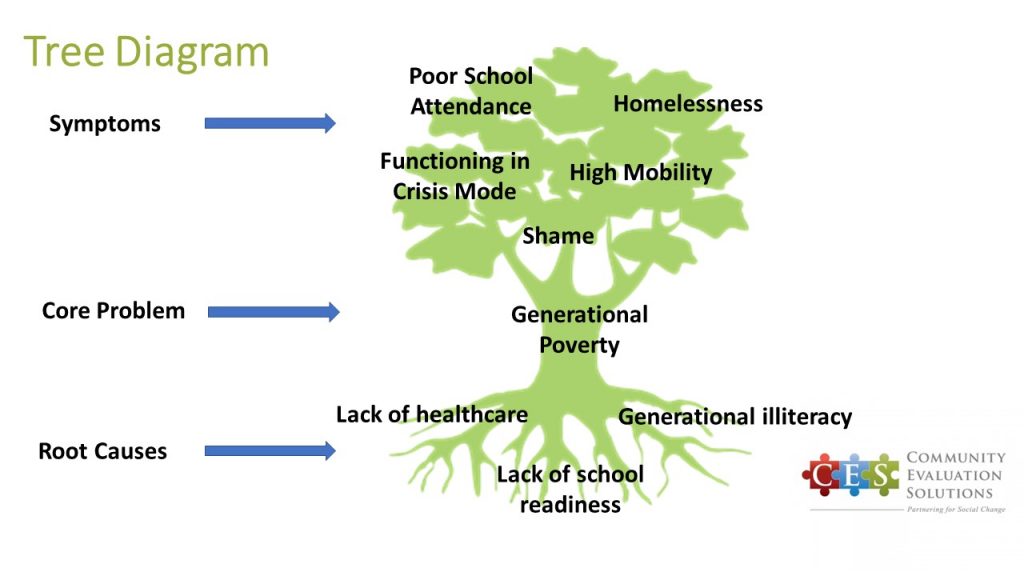
The Tree Diagram

The tree diagram helps you identify a problem and the symptoms of that problem, as well as the root causes. The diagram displays the structure of causes for a problem and provides insight into possible solutions.

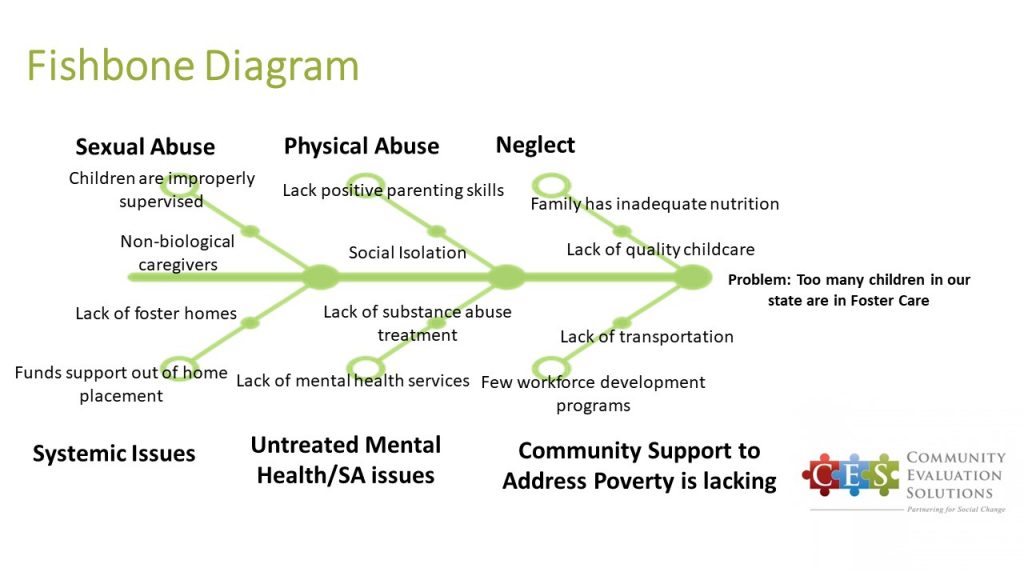
The Fishbone Diagram

The Fishbone Diagram (aka Ishikawa Cause and Effect Diagram) helps visualize a problem (the fish head) and then drills down via categories in this cause and effect model, forming what resembles a fishbone appearance.

Take a moment and consider the social problem or public health issue your community is grappling with. What root causes affect the people you most want to serve?

Your turn.

Written by cplysy · Categorized: communityevaluationsolutions

Jul 14 2020

How to Create a Data Visualization Style Guide to Tell Great Stories (Part 2)

Did you see Sara DeLong’s post on Why You Need to Create a Data Visualization Style Guide to Tell Great Stories? You’ll love Part 2. –Ann

—

So you decided your organization needs a style guide to save lots your team lots of time when creating charts, enhance brand cohesion, and improve trust with your stakeholders.

In my previous post I described how to identify if your team needs a Data Visualization Style Guide, how to secure buy-in from leadership and your coworkers, and some great resources to review before you get started.

This post will outline the key components of your Data Visualization Style Guide and how to ask for feedback that will make this new resource actionable.

GIF showing different examples of charts and how they should look.

Every guide might be a little different depending on your field and your data.

Here are the key components of my Data Visualization Style Guide.

Note: The instructions in green type in the pictures below are for style guide users. These instructions help the user better understand the components of each chart type.

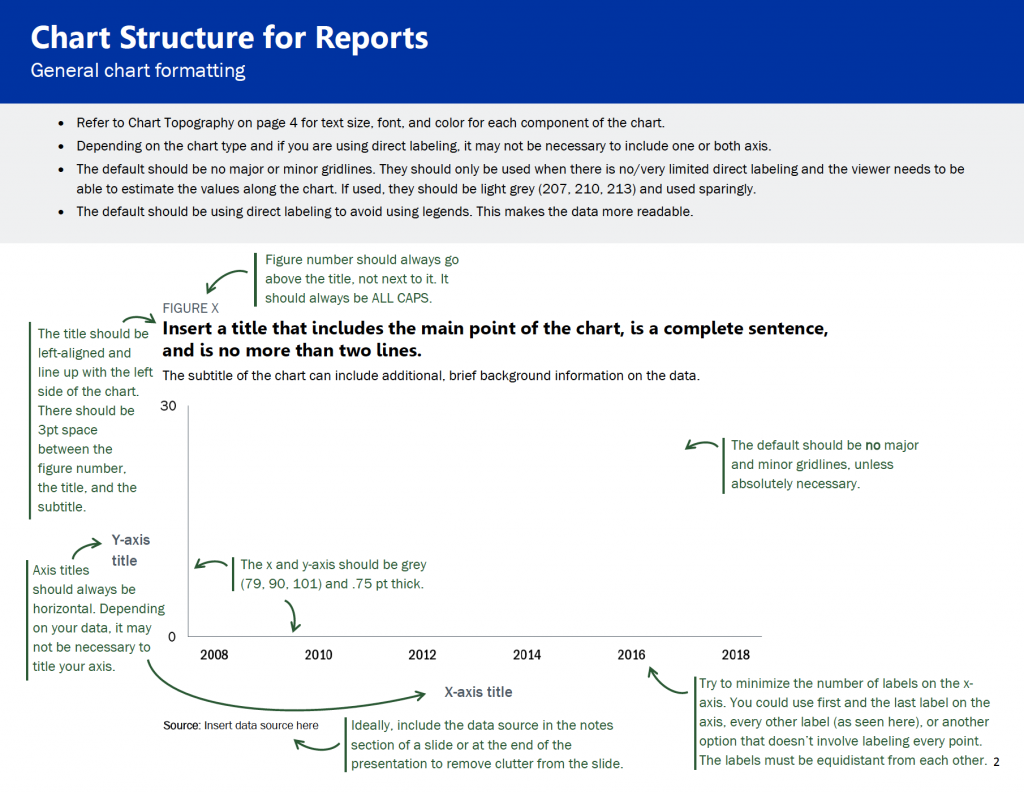
Chart Structure

This is a general overview of how charts should look for your team. This includes some of the basics of each chart, such as formatting for figure numbers, chart titles, chart subtitles, and axes.

This is a general overview of how charts should look for your team. This includes some of the basics of each chart, such as formatting for figure numbers, chart titles, chart subtitles, and axes.

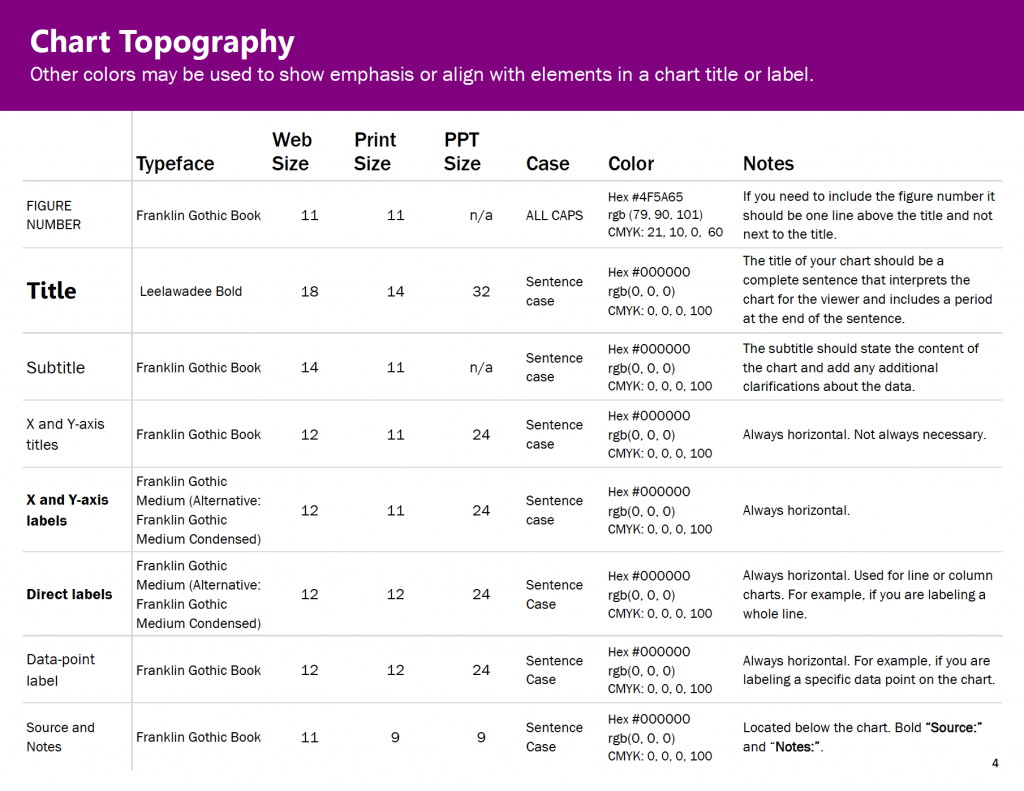
Chart Typography

I used Amy Cesal’s Sunlight Foundation Data Visualization Style Guide and Jon Schwabish’s Urban Institute Style Guide as my starting points for choosing font size for different components of our charts. I was redesigning our reports at the same time I was making my style guide, so through trial and error my team determined what font sizes worked for different kinds of materials, e.g., reports vs. PowerPoints.

I was redesigning our reports at the same time I was making my style guide, so through trial and error my team determined what font sizes worked for different kinds of materials, e.g., reports vs. PowerPoints.

Color Palette

If you have agency colors, you should use those as a starting point.

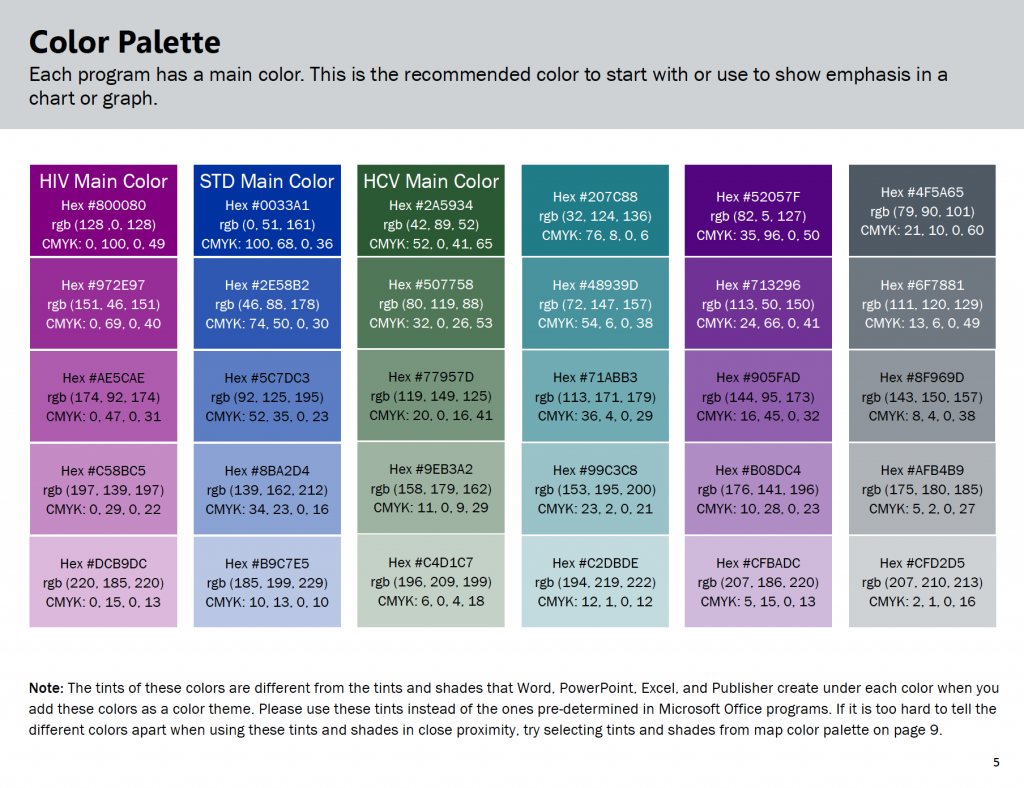
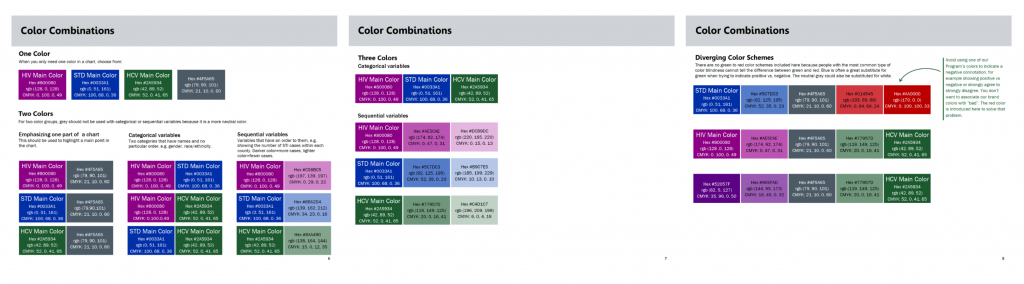
The picture of the color palette below shows the different colors assigned to my public health programs for HIV, STDs and HCV. Each program is encouraged to start with their main color and then use the other colors in the palette as needed.

This color palette shows the different colors assigned to my public health programs for HIV, STDs and HCV. Each program is encouraged to start with their main color and then use the other colors in the palette as needed.

Your Data Visualization Style Guide should start with the same fonts and colors from your organization’s existing branding guidelines, if they exist.

If you need to create your own color palette or add colors to your agency’s color palette, here are some great tools:

  • For inspiration on color combinations used by other businesses: https://brandcolors.net/
  • To test out your color combinations, adjust your palette, and identify tints (lighter versions of your main color and shades (darker versions of your main color): https://coolors.co/.

Identifying Tints and Shades

Here is how I identified the tints and shades for each color in my color palette.

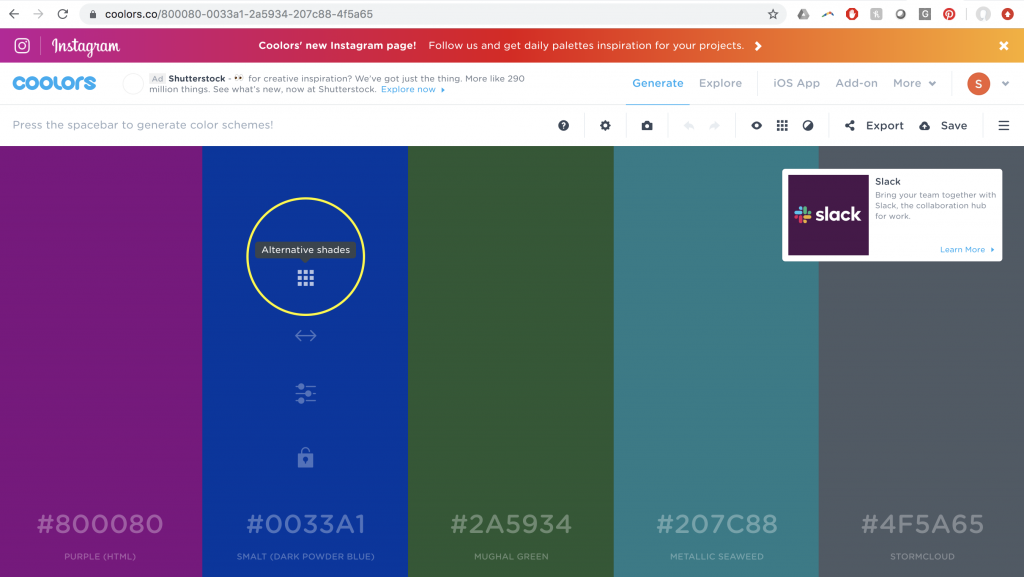
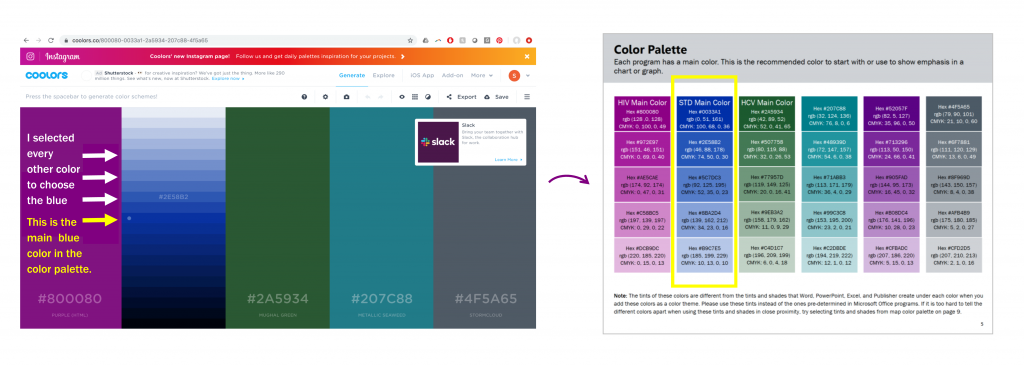
Step 1: Once you have your color palette identified, select the symbol inside the yellow circle below:

Step 1: Once you have your color palette identified, select the symbol inside the yellow circle.

Step 2: Then use a system to select the additional tints and shades for your style guide. By system, I mean I selected every other color (see the arrows and instructions in the picture below) for my tints and shades. I repeat steps one and two with each color in my color palette.

Step 2: Then use a system to select the additional tints and shades for your style guide.

Check for Sufficient Foreground/Background Color Contrast

To ensure your colors are contrast compliant based on the Americans with Disabilities Act, here is an accessibility checker: https://webaim.org/resources/contrastchecker/.

Including Lots of Color Codes

Ideally, a Data Visualization Style Guide should be user friendly with several different kinds of chart-making software.

By including all the different color codes, it minimizes the number of steps a person has to take to convert a color into the code they need (e.g. from RBG to HEX).

Also, maybe your whole team just uses RBG and CMYK color codes now, but by including all three, you are increasing the sustainability of this style guide if your team adds new software that uses a different color code in the future.

Ideally, a Data Visualization Style Guide should be user friendly with several different kinds of chart-making software. By including all the different color codes, it minimizes the number of steps a person has to take to convert a color into the code they need (e.g. from RBG to HEX).

Recommended Color Combinations

This was really important to my team members. Some people don’t want to spend lots of time making decisions about colors. Providing color combination recommendations in the style guide saves my coworkers lots of time, but still allows room for creativity and autonomy.

Fewer decisions to make = timer saver.

This was really important to my team members. Providing color combination recommendations in the style guide saves my coworkers lots of time, but still allows room for creativity and autonomy.

Map Color Palette

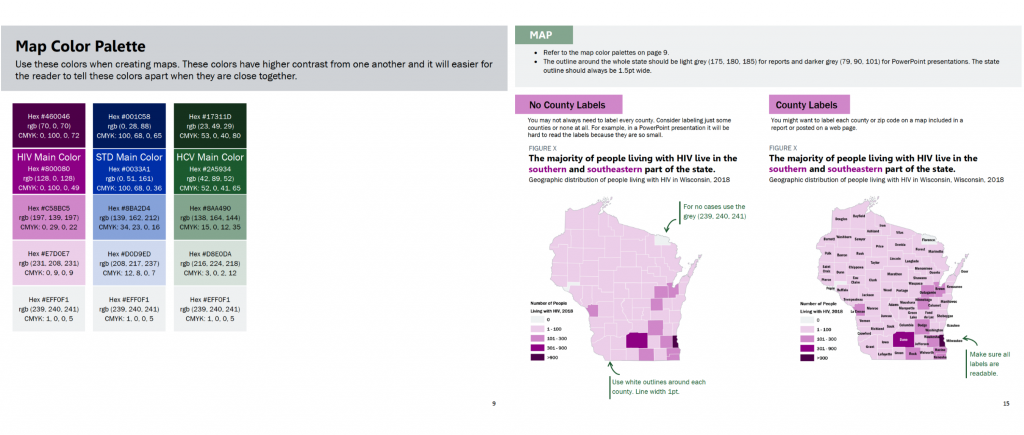
We determined through trial and error that the overall color palette in the style guide could not be applied as is to maps because we needed colors with higher contrast between one another.

The viewer has to be able to tell the difference between the colors when they are in close proximity to one another.

I adjusted the colors slightly for my map color palette to ensure they would be distinguishable from one another when the colors are close together.

I adjusted the colors slightly for my map color palette to ensure they would be distinguishable from one another when the colors are close together.

Map labeling is tricky. We ran into many different opinions about how maps should be labeled. It’s easy to over label a map, especially when you are dealing with small spaces, such as counties in a state. Also sometimes there are limitations with the mapping software when it comes to colors and labels. The maps above were made in GIS.

It’s important to ask yourself if the audience is really going to look for the label on each county, or do they just need to get a sense of the color scale.

Ask the question, what do I want my audience to understand from this map? How will the map be presented? Presentation? Report? Online? Interactive?

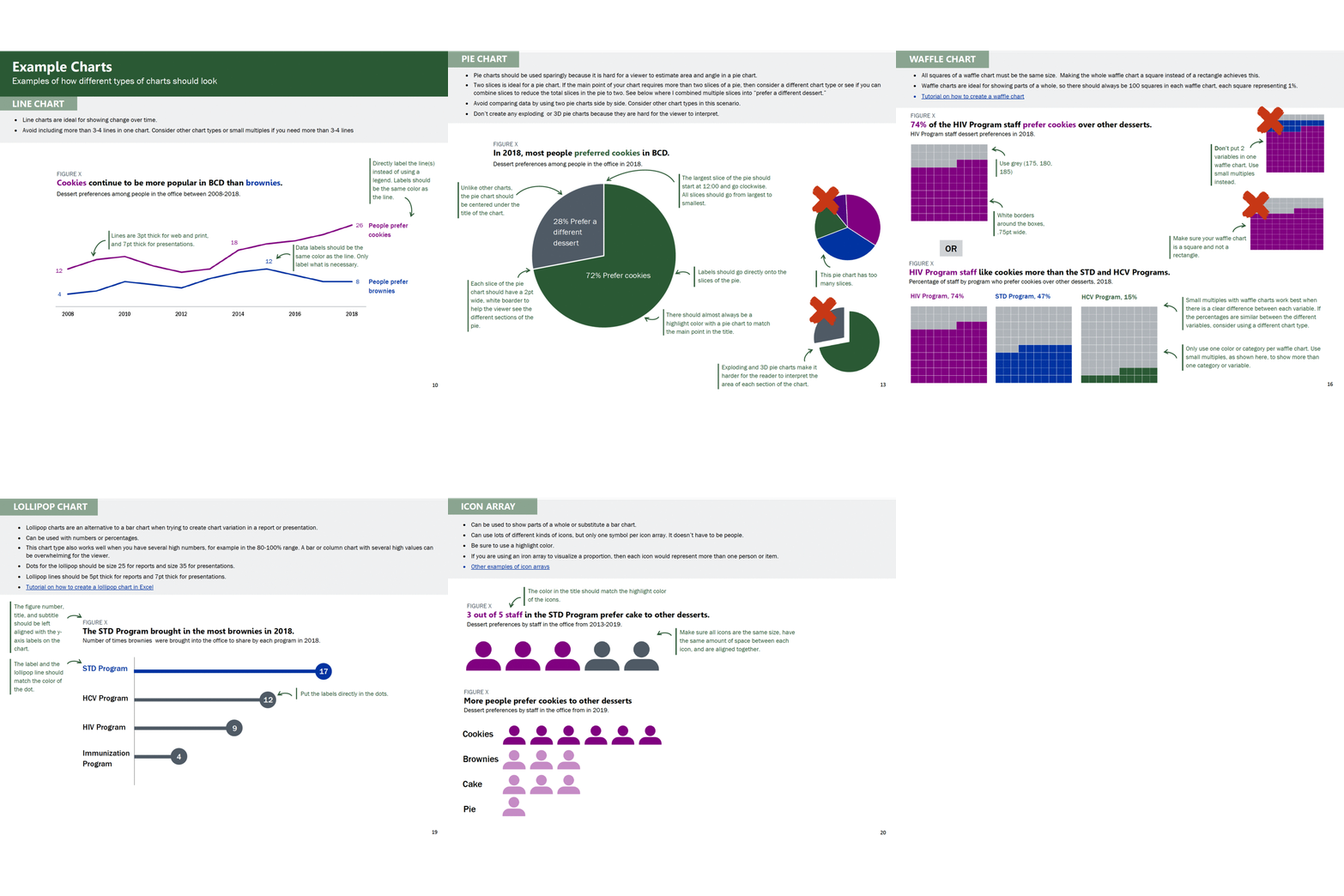
Example Charts

This is one of the most important sections!

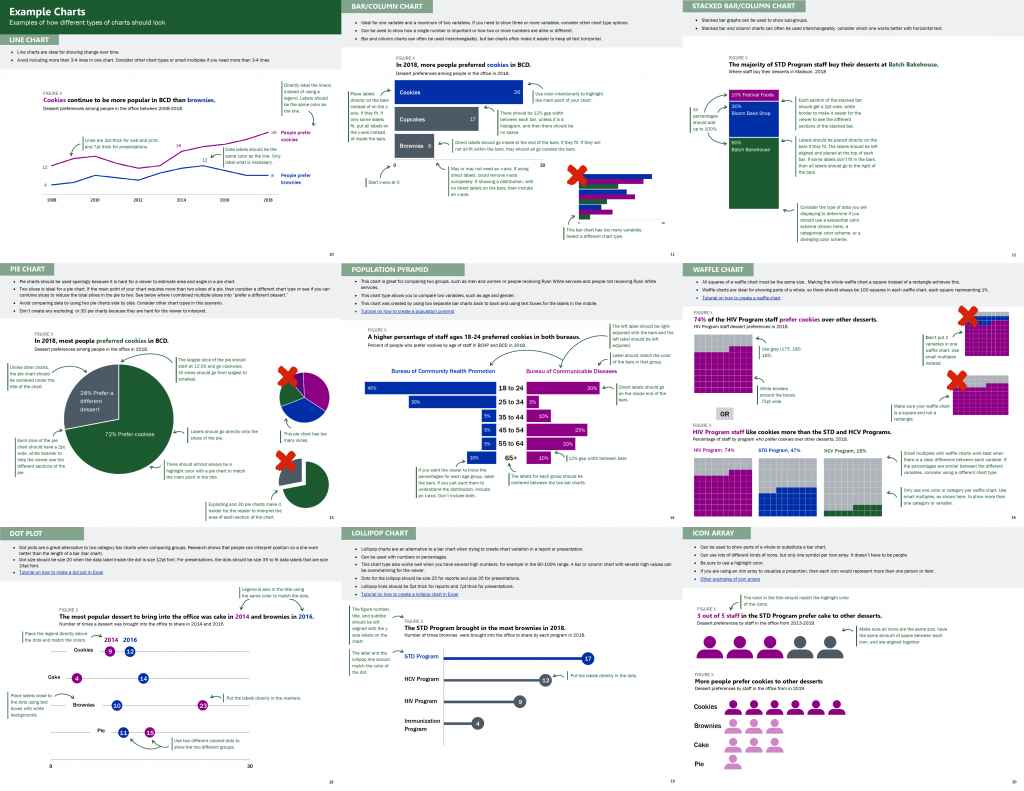
Example charts are very important!

This section can feel like a big undertaking. Start by looking at your organization’s existing data documents. Identify the chart types that your colleagues use regularly and then consider adding a few other chart types to increase chart variation options for your staff. For example, include a lollipop chart in addition to a bar chart, and a waffle chart in addition to a pie chart. This section can include as many or as few charts as you see fit for your organization.

This is another example where the trial and error process is so important. Because we created this style guide while redesigning large data reports, we were able to test different sample charts for the style guide. We adjusted line and dot thickness, label placement, chart sizes, and font size to figure out what worked best. Then we used the style guide to standardize our decisions for future data deliverables. Our decision process was a balance of data visualization best practices, the story we were telling with our data, and my colleagues’ input.

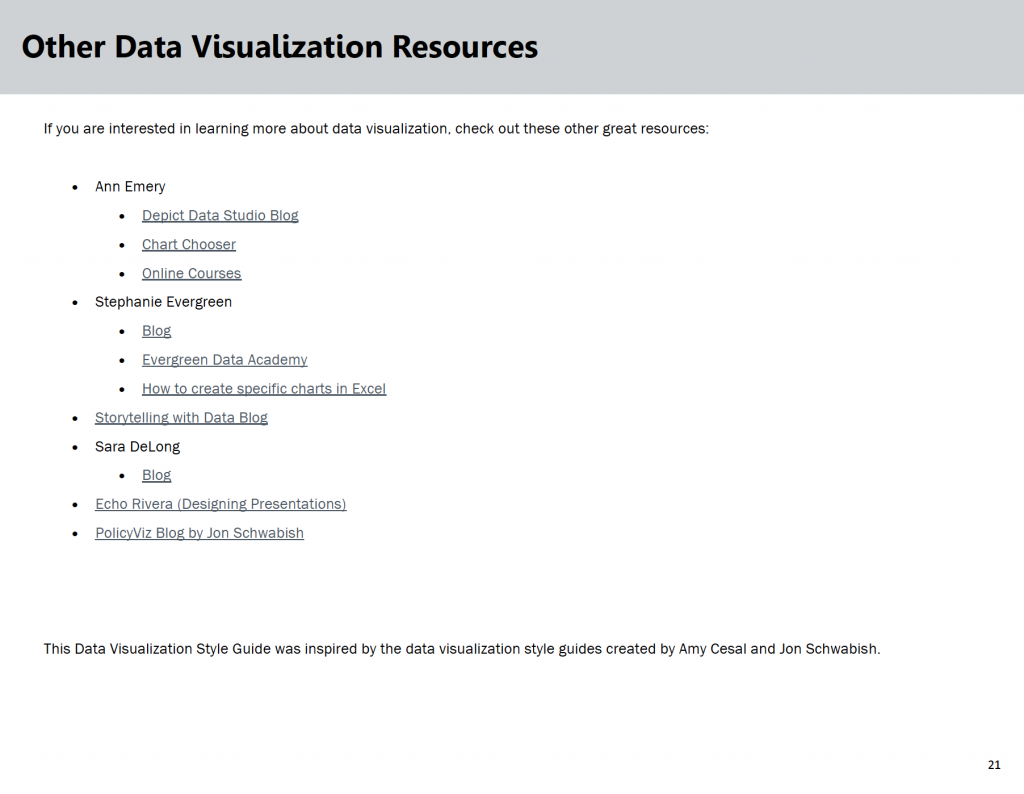
Other Data Visualization Resources

If you think your team is interested in other data visualization information, then you could include additional resources at the end of the document.

List of data visualization resources

How to Ask for Feedback about Your Data Visualization Style Guide

**This is really important.**

About halfway through the development process of my Data Visualization Style Guide, I sent the guide around for feedback from coworkers I knew were going to use it. I asked for specific feedback on what is working and not working. Am I on the right track? Is this resource useful and clear?

Then I incorporated their feedback and created an almost final draft of the guide.

When I had an almost final draft I asked for even more feedback! What doesn’t make sense? What would make this resource more useful to you? What should be included to make this useful to a future new employee of our team?

In this final feedback stage, it was important to share our evolving style guide with team members who hadn’t seen earlier drafts and maybe were only going to make charts occasionally. These folks could provide feedback on what made sense and where guidance was missing. Ideally, a new employee could pick up our new Data Visualization Style Guide and use it to make charts that align with the program’s brand without needing additional guidance.

Reminder: Don’t ask for feedback unless you plan to use a good percentage of it. It wastes people’s time and sends a message that you don’t value their opinions. Not using their feedback at all could reduce the number of people who use your guide because your colleagues don’t feel invested in it.

How We’ve Used Our Data Visualization Style Guide

Here are some examples of data materials created using our Data Visualization Style Guide:

  1. Wisconsin HIV Annual Data Report
  2. Wisconsin HIV Data Two-Page Summary
  3. Wisconsin Hepatitis C Annual Data Report
  4. Wisconsin Hepatitis C Data Two-Page Summary

Key Takeaways for Creating Data Visualization Style Guides

Here are three lessons learned.

  • Before you create a Data Visualization Style Guide it is crucial to secure buy-in from leadership and the majority of your colleagues who will be using the style guide. This buy-in will help ensure this document is relevant and will be used for future data-intensive materials.
  • Before you start creating this resource, ask future Data Visualization Style Guide users: “What should be included in our style guide that would make this resource useful to you and increase the chances that you will use this tool to guide chart creation?” This is key because it ensures that you include what is important to your data team.
  • Create a style guide as you are redesigning data documents. Don’t try to create a style guide and then apply it to lots of documents. Working on the style guide and data materials side by side will ensure you create a resource guide that actually works. This will set you and your new tool up for success.

The Benefits of Having a Data Visualization Style Guide

Designing a Data Visualization Style Guide may sound like a lot of work, but the benefits for your organization are enormous.

You will:

  • Save your colleagues valuable time when designing data deliverables
  • Enhance your organization’s brand, communications, and professionalism
  • Increase the accessibility and communication of your data to key stakeholders because of your consistent use of data visualization best practices.

Bonus: Purchase Our Guide

The ideas and examples shared here and my previous post should give you all the tools you need to get started.

Or, save time and download our guide.

Buy the Guide

Written by cplysy · Categorized: depictdatastudio

Jul 14 2020

Simple Systems Scoping

Systems thinking done broadly allows us to take into consideration the various factors — structures, activities, relationships, interconnections — that can influence our organization, market, and domain of inquiry.

One of the fundamental qualities of systems is that they have boundaries. For example, when we consider an organization as a system we need to place boundaries on that organization such as who to include (e.g., all employees? full-time vs part-time? paid staff vs volunteers? settings or sites? etc..). There is no correct choice, just a useful one. Your boundary choices are to reflect what you are seeking to understand and how you’re seeking to act.

But how do you tell? We share with you a remarkably simple, but powerful way to scope your systems and determine if you have set the right boundaries.

Two Criteria

If you set your boundaries of inclusion in the system and find that you are lost and struggling to identify, map, or monitor the various interconnections, actors, actions, and outcomes within a system because there is too much to focus on then that is a sign you have bounded your system too loosely.

If you’re continuously finding yourself trying to explain what happened in the system by things outside of the boundaries, then you have bounded your system too tightly.

That’s it.

It may take some experimentation to get your boundaries right, however these two criteria can tell you if you’re on the right track or not.

Systems-informed strategy, mapping, and evaluation can be complicated, but understanding the boundaries does not have to be. This simple strategy has consistently allowed organizations to focus on what matters and avoid getting lost. The key is to make sure you have the ‘just right’ amount of detail and focus to allow you to make a meaningful sense of things and guide your action.

If you want help implementing a systems strategy for innovation and change in your organization or network, contact us.

Written by cplysy · Categorized: cameronnorman

Jul 13 2020

Solo hay 4 tipos de barreras para la gestión del conocimiento

Fuente: Nick Milton


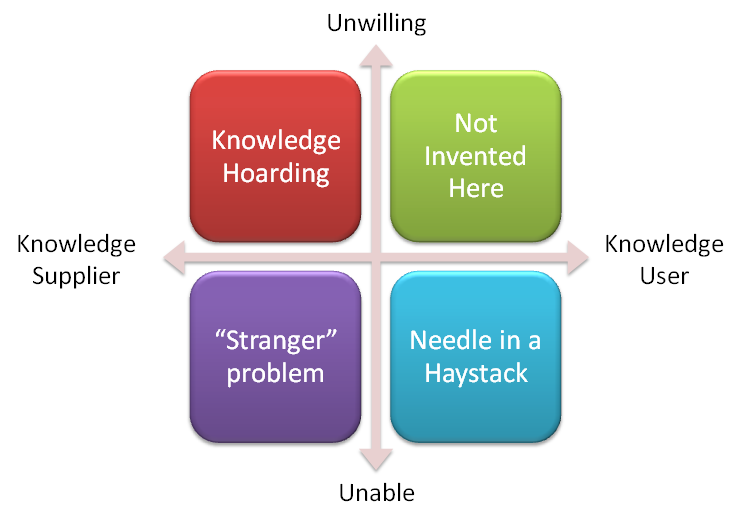
Nick Milton en “Solo hay 4 tipos de barreras para la gestión del conocimiento (GC)” analiza la falta de voluntad y la incapacidad que pueden afectar tanto al proveedor del conocimiento como al usuario del conocimiento. Cualquier combinación de estos es un bloque para la gestión del conocimiento.

Estas son las cuatro barreras para la GC de manera genérica:

-El Proveedor del conocimiento: (a) No está dispuesto a compartir (b) No puede compartir

-El Usuario del conocimiento: (a) No está dispuesto a aprender (b) No puede encontrar conocimiento

Las cuatro barreras son muy reales. Las cuatro pueden ser superadas. La capacidad de compartir y aprender es proporcionada por la creación y puesta en marcha de un marco de gestión del conocimiento, mientras que la voluntad de compartir y aprender es proporcionada por el cambio cultural y las actividades de comunicación, y consolidada por el gobierno de la GC.

Written by cplysy · Categorized: TripleAD

  • « Go to Previous Page
  • Go to page 1
  • Interim pages omitted …
  • Go to page 249
  • Go to page 250
  • Go to page 251
  • Go to page 252
  • Go to page 253
  • Interim pages omitted …
  • Go to page 310
  • Go to Next Page »

Footer

Follow our Work

The easiest way to stay connected to our work is to join our newsletter. You’ll get updates on projects, learn about new events, and hear stories from those evaluators whom the field continues to actively exclude and erase.

Get Updates

Want to take further action or join a pod? Click here to learn more.

Copyright © 2026 · The May 13 Group · Log in

en English
af Afrikaanssq Shqipam አማርኛar العربيةhy Հայերենaz Azərbaycan dilieu Euskarabe Беларуская моваbn বাংলাbs Bosanskibg Българскиca Catalàceb Cebuanony Chichewazh-CN 简体中文zh-TW 繁體中文co Corsuhr Hrvatskics Čeština‎da Dansknl Nederlandsen Englisheo Esperantoet Eestitl Filipinofi Suomifr Françaisfy Fryskgl Galegoka ქართულიde Deutschel Ελληνικάgu ગુજરાતીht Kreyol ayisyenha Harshen Hausahaw Ōlelo Hawaiʻiiw עִבְרִיתhi हिन्दीhmn Hmonghu Magyaris Íslenskaig Igboid Bahasa Indonesiaga Gaeilgeit Italianoja 日本語jw Basa Jawakn ಕನ್ನಡkk Қазақ тіліkm ភាសាខ្មែរko 한국어ku كوردی‎ky Кыргызчаlo ພາສາລາວla Latinlv Latviešu valodalt Lietuvių kalbalb Lëtzebuergeschmk Македонски јазикmg Malagasyms Bahasa Melayuml മലയാളംmt Maltesemi Te Reo Māorimr मराठीmn Монголmy ဗမာစာne नेपालीno Norsk bokmålps پښتوfa فارسیpl Polskipt Portuguêspa ਪੰਜਾਬੀro Românăru Русскийsm Samoangd Gàidhligsr Српски језикst Sesothosn Shonasd سنڌيsi සිංහලsk Slovenčinasl Slovenščinaso Afsoomaalies Españolsu Basa Sundasw Kiswahilisv Svenskatg Тоҷикӣta தமிழ்te తెలుగుth ไทยtr Türkçeuk Українськаur اردوuz O‘zbekchavi Tiếng Việtcy Cymraegxh isiXhosayi יידישyo Yorùbázu Zulu