• Skip to main content
  • Skip to footer
  • Home

The May 13 Group

the next day for evaluation

  • Get Involved
  • Our Work
  • About Us
You are here: Home / Archives for allblogs

allblogs

Jun 21 2024

Historia de la Psicología Social: Hitos 

Estos son los hitos más importantes en la historia de la psicología social:

1.Primeros trabajos (siglo XIX):

    • Wilhelm Wundt (1832-1920): Este psicólogo alemán estudió los productos mentales generados en comunidad y los vínculos que producían. Su enfoque estaba en comprender cómo la mente individual se relaciona con la mente colectiva.
    • Sigmund Freud (1856-1939): El famoso psicoanalista austriaco sostenía que el vínculo se sostiene por los lazos afectivos y los procesos de identificación colectiva, especialmente en relación a un mismo líder.
    • Émile Durkheim (1858-1917): Desde la sociología, Durkheim hablaba sobre la existencia de una conciencia colectiva (un saber normativo) que no puede ser entendida como conciencia individual sino como un hecho social y una fuerza coactiva1.

    2. Surge la psicología social (1908) como disciplina con los trabajos de William McDougall (énfasis en lo psicológico) y Edmund A. Ross (énfasis en lo social). Ambos académicos norteamericanos contribuyeron al desarrollo de esta disciplina.

    3.Hitos notables:

      • Norman Triplett (1861-1931): Realizó uno de los primeros estudios sobre la influencia social en el rendimiento humano. Observó que la presencia de otras personas afectaba el desempeño en tareas como el ciclismo.
      • Solomon Asch (1907-1996): Condujo el famoso experimento de conformidad, donde participantes debían elegir la línea más parecida a otra línea de referencia. Reveló cómo la presión del grupo puede influir en las respuestas individuales.
      • Stanley Milgram (1933-1984): Investigó la obediencia en su controvertido experimento. Los participantes administraban supuestos choques eléctricos a otras personas bajo la autoridad de un investigador, mostrando la disposición a seguir órdenes incluso cuando causaban daño.
      • Experimento de la cárcel de Stanford (1971): Philip Zimbardo llevó a cabo este estudio, donde estudiantes voluntarios asumieron roles de guardias y prisioneros en una simulación de prisión. El experimento reveló cómo las situaciones pueden influir en el comportamiento y la identidad de las personas.
      • Efecto Pigmalión o Profecía autocumplida: Investigado por Robert Rosenthal, este fenómeno muestra cómo las expectativas de los demás pueden afectar el rendimiento de una persona. Si se espera que alguien tenga éxito, es más probable que lo logre.
      • Experimentos sobre adicción a la heroína con ratas: Bruce K. Alexander y Rat Park: Desafiaron la idea de que la adicción es simplemente una cuestión de droga versus cerebro. Mostraron que el entorno y las conexiones sociales son cruciales para comprender la adicción.

        En resumen, la psicología social ha evolucionado a lo largo del tiempo, explorando la interacción entre individuos y la sociedad desde diferentes perspectivas y con contribuciones valiosas de diversos autores
        Written by cplysy · Categorized: TripleAD

        Jun 21 2024

        How to create an annotated column chart with Excel and Canva

        In this video I’ll show you step by step how to create a simple infographic. We start with a column chart in Excel (a.k.a. bar graph or bar chart) and then bring it into Canva for annotations.

        Video Transcript

        Hey data designer! Welcome to my new recipe series.

        The goal with this series is to inspire researchers and evaluators to get out of their heads and start creating stuff.

        Before we get started, I’m trying to get to one thousand subscribers on YouTube. So if you could hit the subscribe button, like this video, or leave a comment, it would be much appreciated.

        Have you ever used the back of a screwdriver to hammer a nail into a wall? I certainly have.

        Would it have been easier to use a hammer, yes. But that would require going out to the garage and finding one. The screwdriver works in a pinch.

        What’s the point?

        The first rule of just creating stuff is to use the tools you have at hand. Or the tools that you are most comfortable using.

        And for many of you, the chart building tool that you have at hand and are probably most comfortable using, is Excel.

        Today I’m going to walk through the steps of creating a simple annotated column chart.

        We’re going to start to create the column chart. Then we’ll move over to Canva for the annotation.

        To start I made up a little data table in Excel. I then highlighted the data table and inserted a 2-D column chart.

        Just in case you are wondering, it doesn’t really matter if you choose clustered column or stacked column. Since I only have one column of data, it will look the same.

        Now that we have the chart, let’s start cleaning it up. This is a preference, but my goal is to strip the chart down to its essence.

        This means deleting the grid lines. I also get rid of the y axis values.

        Then I get rid of the title. After that I right click and go to format data series.

        This is where I can drop down the gap width. Also known as the space between the bars. My preference is usually 25%.

        After that I get rid of the random box around the chart by clicking on the full chart and taking away the outline.

        And if you prefer not to have an X axis line, this is also removable by choosing the X axis and clicking no outline.

        Finally, for any bar that I plan to color in the final infographic. I change the color.

        Right now it doesn’t need to be the final color, it just needs to be different than the other bars. You’ll see why in a minute.

        After I’ve cleaned everything up to the essentials. I right click and hit save as picture.

        Then I want to save it as an SVG. This will give us the most flexibility and best resolution when we work on the image in Canva.

        Now I’ll open up canva and create a blank presentation.

        I use the standard 16:9 presentation format for a lot of charts and small infographics. It’s just easy. It works well on social media, inside of visual reports and slide docs. And of course, this way it also works well inside of presentations.

        Once I have a blank document, I just drag and drop the svg chart I just created in excel.

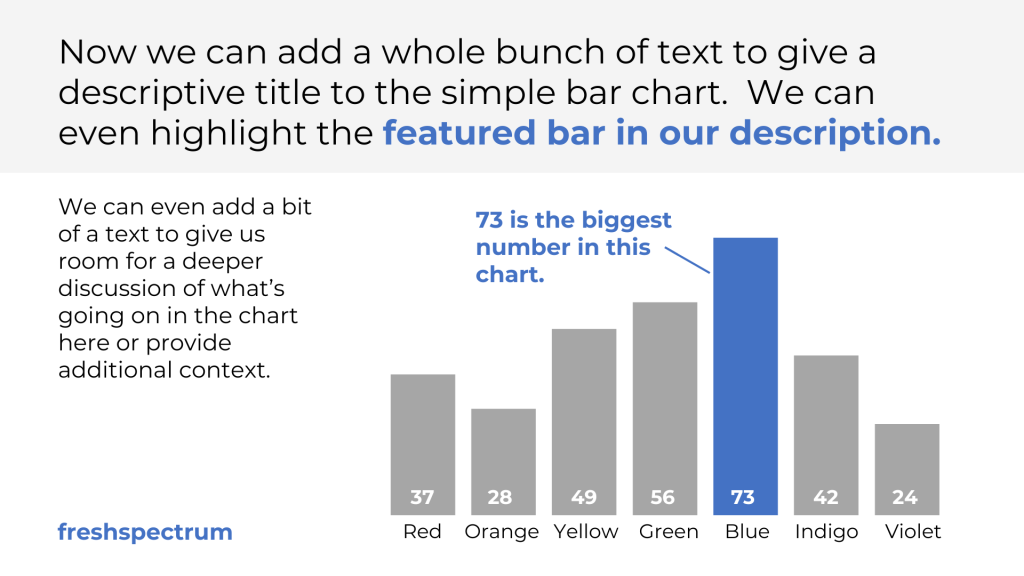
        Okay, now that the chart is in Canva, let’s make a little annotated infographic.

        If you click on the chart image inside of Canva, you’ll notice that it came in with 3 colors. The blue (for the bars) the orange (for my highlighted bar), and white (for the background). This lets us switch the colors around as much as possible.

        I brought over the x axis category names, but I want to recreate them inside Canva with a different font.

        I could go back and redo this in Excel, but since it’s just at the bottom I can also just crop it away inside Canva with a double click on the image.

        To add new category names I just use text boxes. There is a keyboard short cut for text in Canva, just hit the T button.

        I ended up changing the bar colors to gray with a blue highlight. Boring I know, but a lot of professional stuff ends up on the boring gray blue scale.

        Now for placement I like to use a little bit of measurement. And the easiest way to measure is to use grids inside of canva.

        I use this three column grid all the time, just so I can get a sense of space.

        For this one I’ll keep a margin around the page and just use the two right hand columns for my chart, aligned to the bottom of the page.

        Once I have a sense I’ll delete the grid. I can always get it back, but it’s a start.

        The first thing to do is create a nice little intro paragraph at the top of the page.

        This is your takeaway. You can even bold and match the color of your highlighted bar inside the text.

        Next I’ll add a bit of text to use as a kind of sub-heading or for further detail and context.

        Then I’ll add a simple annotation box the color of the highlighted bar. Putting in a little line collecting the annotation to the bar.

        Since I didn’t include data labels in my original Excel chart, I’ll go ahead and add those now using text boxes.

        And really, that’s the trade off between doing this kind of thing in Canva versus Excel. It requires a little more manual work, but you get a lot more control over the design.

        Everything looked a little too plain, so I added a rectangle behind the text at the top to separate a bit.

        The final touches are really just tweaking things until I like how everything looks. Then making sure I sign it with my name or website.

        Then we’ll go ahead and export it as an image. At this point, unless I plan to bring it into another design program, I’ll usually export as a PNG. And that’s it. Here is our final visual.

        Infographics don’t have to be complicated. A nice clean chart annotated with takeaways can provide a lot of value.

        If you enjoyed this video, please go ahead and like, subscribe, and leave a comment. It means a lot and I will always read every comment.

        And if you’re interested in free resources like eBooks and courses, visit my resource library at freshspectrum.com/library

        Now…

        Get out of your head and go create some stuff.

        Written by cplysy · Categorized: freshspectrum

        Jun 18 2024

        How to Keep Headings in View When You Print or PDF (So Your Excel Table is Easier to Read)

        Are you printing or PDFing that Excel table? If it’s a long table, and spills onto a second page, then you’ll need to keep the table headings in view.

        Here’s how you can repeat a few rows at the top of each page.

        What’s Inside

        0:00 Welcome to Dataviz On The Go

        0:08 The Visual Appendices

        0:22 The PDF/Print Issue, Oops!

        0:42 The Best Solution

        1:42 3… 2… 1…

        Written by cplysy · Categorized: depictdatastudio

        Jun 17 2024

        Teorías del Cambio: Perspectivas Críticas para el Futuro de la Evaluación

        El libro recientemente publicado, “Theories of Change in Reality | Strengths, Limitations and Future Directions”, es un análisis profundo de las teorías del cambio y su aplicación en la evaluación y desarrollo de intervenciones. Durante más de medio siglo, los evaluadores han empleado estas teorías para esbozar la lógica causal que subyace en cómo una intervención busca lograr el cambio deseado.

        Desde su concepción en la evaluación de programas, este enfoque se ha adoptado de manera más generalizada para propósitos que abarcan desde el diseño hasta la gestión de programas. Dado que las teorías del cambio siguen siendo utilizadas para múltiples propósitos, es un momento oportuno para que la comunidad de evaluación (donde se originó el enfoque) ofrezca su perspectiva sobre las fortalezas y limitaciones del enfoque, así como sus direcciones futuras.

        Para proporcionar estas perspectivas, se invitó a casi 30 de los principales evaluadores y teóricos de programas del mundo a proporcionar un breve ensayo sobre el pasado, el presente y el futuro de las teorías del cambio. Este libro presenta sus ideas, organizadas en cinco temas principales:

        1. El uso de teorías del cambio en contextos más amplios de políticas públicas.
        2. Utilizar teorías del cambio para establecer la causalidad.
        3. Desarrollar teorías de cambio que reflejen las perspectivas de múltiples partes interesadas.
        4. Utilizar teorías del cambio para comprender procesos de cambio social más amplios.
        5. Aplicar enfoques de teorías del cambio para múltiples propósitos.

        Al compartir estas diversas perspectivas, el libro busca proporcionar a los evaluadores y a los teóricos de programas emergentes, perspectivas críticas para informar la práctica futura.

        Resumen de las ideas principales del libro:

        • El libro aborda la importancia de las teorías de cambio en la evaluación y el desarrollo de intervenciones.
        • Las fortalezas de las teorías de cambio incluyen su capacidad para establecer la lógica causal de una intervención y su amplio uso en diversos contextos.
        • Las teorías de cambio se utilizan para modelar los procesos y las consecuencias de las evaluaciones.
        • Los propósitos de las teorías de cambio incluyen la construcción de modelos causales, procesos compartidos y visiones futuras.
        • Los desafíos pendientes incluyen avanzar en la incorporación efectiva de múltiples perspectivas en los diagramas y en la comprensión de la complejidad en los procesos de cambio.
        • Se sugiere explorar futuros alternativos y apoyar el cambio y la transformación de sistemas a gran escala.
        • Las limitaciones discutidas se centran en la falta de un enfoque único o mejor para participar en un proceso de teoría de cambio y en el desafío de incorporar múltiples perspectivas de manera efectiva en los diagramas.
        • Además, se menciona la importancia de considerar quién está incluido o excluido en el proceso de desarrollo de teorías de cambio y cómo esto puede tener consecuencias significativas.

        El propósito principal de desarrollar un modelo causal de cómo funcionan las cosas es desarrollar una explicación de los procesos de cambio entendidos como procesos causales y mecanismos. Se enfatiza la importancia de la lógica, el razonamiento crítico, las relaciones causales y la evidencia de la teoría de las ciencias sociales para el desarrollo y la refinación del modelo. La complejidad es crucial al modelar cómo funcionan las cosas, especialmente cuando hay múltiples componentes interactivos y relaciones no lineales y dinámicas.

        El enfoque propuesto para co-desarrollar una visión compartida de cómo deberían ser las cosas o los futuros deseados es comenzar con un pensamiento radicalmente abierto y creativo, alejándose de la comprensión de problemas pasados o presentes. Se sugiere articular la visión o el objetivo deseado, incluso si parece distante de la situación actual, para inspirar la imaginación y la creatividad. Se destaca que el modelado en este contexto se centra en la imaginación, la creación y la visualización de futuros deseables, más que en la representación de la realidad actual.

        Written by cplysy · Categorized: TripleAD

        Jun 17 2024

        Schools kill creativity, graduate schools bury it.

        Every now and again I rewatch one of my favorite TED talks, and one of the most popular TED talks of all time.

        And like every favorite thing that you watch over and over again, the talk keeps changing as I age. A new little thing that I might have missed before, or simply forgotten, sticks out as super relevant.

        In today’s rewatch, this stuck out:

        “I say this out of affection for them: there’s something curious about professors. In my experience — not all of them, but typically — they live in their heads. They live up there and slightly to one side. They’re disembodied, you know, in a kind of literal way. They look upon their body as a form of transport for their heads.”

        A quote from Ken Robinson’s super popular TED talk, “Do schools kill creativity?”

        So many of you, who follow this blog, have graduate degrees.

        I do too. A masters in sociology. This was my ticket into a social science research and program evaluation career.

        My selfish reason for loving Ken Robinson’s talk is not a fear for my daughter’s education. It’s that it feels so true to my own evolution as a professional.

        I was a kid who loved to draw. I went everywhere with a pad of paper and pencils. I wasn’t that good, never creating the kind of work that makes people say, “that kid is talented.” As art classes continued through middle school into high school, they become more and more about technique and analysis. I did not excel in these courses.

        But I was good at math. I was in the gifted classes and told by teachers with the best of intentions, that one day I would become an engineer.

        So the math part was encouraged, and the drawing part…not so much. I went to college as an engineering major.

        And during my freshman year, I almost failed out.

        A switch to social science kept me going forward. It wasn’t about creativity, but it was about critical thinking. And that was enough to keep me interested and moving forward.

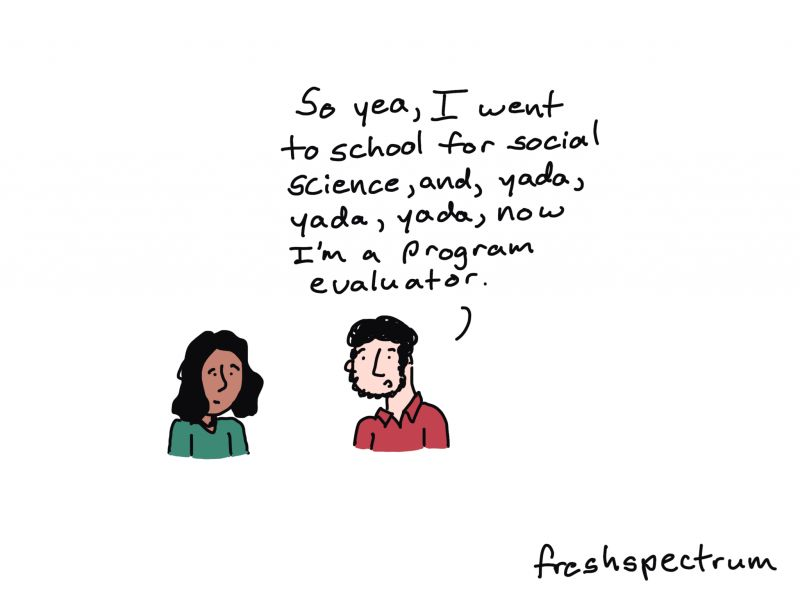
        Comic - one person talking to another person, "So yea, I went to school for social science, and, yada, yada, yada, now I'm a program evaluator."

        Educated out of creativity.

        With only a couple of exceptions, I was educated out of creativity.

        High school gave me barely any creative training, my BA degree next to nothing, and my MA degree even less.

        My master’s thesis and the one and only published paper I have written, are probably a couple of the least creative things I have ever produced.

        Luckily, I was able to eventually revive my creativity.

        My comics have made a bigger impact on my chosen field of program evaluation than I anything I could have published in a journal. My personal blog and newsletter have made a bigger impact on the professional lives of researchers and evaluators than the work I contributed to as part of my professional research career.

        Comic with two people talking.
Person 1, "I wish I could be as creative as you."
Person 2, "

        The way we teach design is flawed.

        The biggest barrier keeping program evaluators, researchers, and academics from truly meeting the rising creative expectations isn’t technical.

        If you have a lot of education, you were likely educated out of your creativity like I was. (I’m sure there are plenty of exceptions, but if my story resonates with you I would love to hear about it in the comments).

        And the ONLY WAY to get it back, is to actually create stuff. Not read more blog posts. Not watch more tutorial videos. Not learn new software tools.

        You need to just CREATE STUFF.

        Before you can move forward, you need to stop living in your head.

        This is why I believe the way we tend to teach design is flawed. We talk a lot about design process, thinking about your audience, and picking the right methods, charts, or software.

        Almost every design process starts with a whole lot of in your head stuff.

        But the real way forward is to get out of your head and just CREATE STUFF.

        Want an eBook that uses 50 pages to tell you the same thing I just told you in two words.

        Here it is, I wrote it last week. There are lots of pictures, an official looking colorful model, an alliterative 5 word method, and 20 example data designs for you to try to recreate.

        Let me know what you think!

        Written by cplysy · Categorized: freshspectrum

        • « Go to Previous Page
        • Go to page 1
        • Interim pages omitted …
        • Go to page 44
        • Go to page 45
        • Go to page 46
        • Go to page 47
        • Go to page 48
        • Interim pages omitted …
        • Go to page 310
        • Go to Next Page »

        Footer

        Follow our Work

        The easiest way to stay connected to our work is to join our newsletter. You’ll get updates on projects, learn about new events, and hear stories from those evaluators whom the field continues to actively exclude and erase.

        Get Updates

        Want to take further action or join a pod? Click here to learn more.

        Copyright © 2026 · The May 13 Group · Log in

        en English
        af Afrikaanssq Shqipam አማርኛar العربيةhy Հայերենaz Azərbaycan dilieu Euskarabe Беларуская моваbn বাংলাbs Bosanskibg Българскиca Catalàceb Cebuanony Chichewazh-CN 简体中文zh-TW 繁體中文co Corsuhr Hrvatskics Čeština‎da Dansknl Nederlandsen Englisheo Esperantoet Eestitl Filipinofi Suomifr Françaisfy Fryskgl Galegoka ქართულიde Deutschel Ελληνικάgu ગુજરાતીht Kreyol ayisyenha Harshen Hausahaw Ōlelo Hawaiʻiiw עִבְרִיתhi हिन्दीhmn Hmonghu Magyaris Íslenskaig Igboid Bahasa Indonesiaga Gaeilgeit Italianoja 日本語jw Basa Jawakn ಕನ್ನಡkk Қазақ тіліkm ភាសាខ្មែរko 한국어ku كوردی‎ky Кыргызчаlo ພາສາລາວla Latinlv Latviešu valodalt Lietuvių kalbalb Lëtzebuergeschmk Македонски јазикmg Malagasyms Bahasa Melayuml മലയാളംmt Maltesemi Te Reo Māorimr मराठीmn Монголmy ဗမာစာne नेपालीno Norsk bokmålps پښتوfa فارسیpl Polskipt Portuguêspa ਪੰਜਾਬੀro Românăru Русскийsm Samoangd Gàidhligsr Српски језикst Sesothosn Shonasd سنڌيsi සිංහලsk Slovenčinasl Slovenščinaso Afsoomaalies Españolsu Basa Sundasw Kiswahilisv Svenskatg Тоҷикӣta தமிழ்te తెలుగుth ไทยtr Türkçeuk Українськаur اردوuz O‘zbekchavi Tiếng Việtcy Cymraegxh isiXhosayi יידישyo Yorùbázu Zulu