• Skip to main content
  • Skip to footer
  • Home

The May 13 Group

the next day for evaluation

  • Get Involved
  • Our Work
  • About Us
You are here: Home / Archives for allblogs / depictdatastudio

depictdatastudio

Jul 20 2021

The Inside Scoop on Excel with Bill Jelen (Mr. Excel)

I recently had the honor of speaking with Bill Jelen, a.k.a. Mr. Excel. He was a guest speaker inside our data analysis course, Simple Spreadsheets. He’s a big, big deal in the Excel community! I’ve internet-stalked him for years on his website and his popular YouTube channel. Frankly, I’m still shocked he agreed to come speak with us. 

Watch Our Conversation Here 

What’s Inside 

Here are some of the topics we talked about. 

  • Bill’s background. Bill’s a self-proclaimed “Excel geek” who’s written over 61 books and has more than 2,300 YouTube videos on his popular channel. He’s been an Excel consultant for 30 years and used to speak at more than 35 conferences a year. Though he doesn’t travel outside of Florida as much anymore, he admitted that he loves helping people problem-solve and that “nothing brightens my day more than a good Excel problem.” 
  • Bill’s first spreadsheet experience. Bill shared that his first time with a spreadsheet of any sort was in 1984 while he worked for a company that sold computer software. He also used Lotus 123 until the mid-1990’s when the company he worked for switched to Excel.  
  • His favorite Excel feature. His favorite Excel feature is to double-click the fill handle to avoid having to drag it. He said that when loves hearing people’s surprise when he shares this trick at conferences.  
  • His thoughts on Excel Tables. Bill hates Excel Tables because they turn off features that he uses all of the time like subtotals and custom views. He also dislikes that you can’t copy two sheets from one workbook to another.  
  • His least favorite Excel features. He said that he’s “convinced in Excel 2007 the icons for rows and the icon for columns were reversed.” He said it shows the wrong area where the data is going to be dropped and that it’s really frustrating, especially when teaching someone else how to do pivot tables. He also said while he loves the text join function, he hopes they’ll add the reverse: text split.  
  • How many of the more than 480+ Excel functions he uses (less than you think!). Bill said, “I know them all, but how many do I use? Very few. I probably use 20 on an ongoing basis.” He said that he’s written books where he wrote about every single function and admitted that some threw even him for a loop, like the square root of PI.  
  • How to use text join. At around the 18-minute mark of the video, Bill shares his screen and demonstrates text join in Excel along with other tricks and best practices.  
  • Audience Q&A. At around the 26-minute mark, audience Q&A begins where Bill answers questions.  
  • AutoFilter. Bill said he feels AutoFilter is a hidden gem of Excel and that he “can’t use Excel without this feature.”  
  • Excel features Bill says to skip. Bill said you can skip using the action pen, which allows you to draw the numbers instead of using the keyboard you already have. He’s also not a fan of the Excel app feature that allows you to take a picture of a piece of paper and then it turns that into a table. He said there are too many variables (for example, if your paper isn’t exactly square or has been folded) and that you’re better off starting from scratch.  
  • Features he hopes to see in the future. Bill said that he “has a whole bunch of things” he’d like to see. He said that he lobbied for six years for Microsoft to customize pivot table defaults.  He hopes to see help functions for Lambda in the future and has some ideas of how to make power query better.  
  • His latest book. Bill’s latest book is MrExcel 2021: Unmasking Excel, which is an updated version of MrExcel XL. Updates for 2021 include: LAMBDA, LET, Power Query Fuzzy Match, Sort & Filter in Sheet View, Cut-out people, Save object as image, STOCKHISTORY, Wolfram Alpha Data Types, Custom Data Types from Power Query, Weather data types, bilingual spreadsheets, Performance improvements, Unhide multiple worksheets, Action pen, Collapsible task panes, LET function to re-use calculations, store formulas using LAMBDA, Recursive LAMBDA, Branching LAMBDA, Lambda to return a picture, Excel function quick reference. Click here to learn more: https://www.mrexcel.com/products/mrexcel-2021-unmasking-excel/. 

Connect with Bill 

Website: https://www.mrexcel.com 

YouTube: https://www.youtube.com/c/MrExcelcom  

Written by cplysy · Categorized: depictdatastudio

Jul 13 2021

Why Nonprofits Shouldn’t Use Statistics

Today’s article comes from Maryfrances Porter, Ph.D. & Alison Nagel, Ph.D of Partnerships for Strategic Impact. They were recently guest speakers in our Simple Spreadsheets course and had so many great insights! – Ann

—

Thank you to Ann Emery, Depict Data Studio, and her Simple Spreadsheets class for inviting us to talk to them about the use of statistics in nonprofit program evaluation! If there’s one thing that we never want to miss, it’s an opportunity to tell people their job is easier than they think!

This is why we created ImpactStory™ Coaching – because it’s actually within reach of small- and medium-sized nonprofits to be clear, confident, and convincing when talking about their impact!

It was also just nice to talk to a group of smart, creative, data-minded professionals who also (yes – that’s right – also) feel overwhelmed by the prospect of having to use statistics.

We used to think our feelings of statistical overwhelm in the nonprofit space was because we were wimps (even though we have literally taken a combined SIX YEARS of graduate-level statistics*).

But then we realized that much of the time, statistics just don’t have much of a role in nonprofit work. And here’s why!

Why Nonprofits Shouldn’t Use Statistics

When working in the nonprofit world sample size is usually very small (i.e., the number of clients served in any given year is usually 40 to 400 people).

Even if you have more people than that (e.g., a school district’s worth of students), it’s still unlikely you need statistics, unless you are trying to answer a scientific-type question (and what scientific-type questions nonprofits with a lot of data might ask is for another blog post on another day).

Simply having a statistically significant group of survey respondents for such a small number of people means you have to get surveys from A LOT of people: 37 of 40 and 196 of 400! This is really hard to do (although we do have tricks for making sure you get surveys from almost 100% of your clients)!

Statistical significance is often mistaken to mean a big difference, but what it really means is a not random difference (e.g., if you looked at a different group of people, you’d find that difference again… it’s a reliable difference). When you have a small number of people, it also means you must have a GREAT BIG DIFFERENCE to get statistical significance.

The math just works out that if you look at 1 million people, just about any finding is statistically significant (e.g., a tiny difference in a big group is almost always not random), but when you’re looking at 100 people, you must have a really big difference to get statistical significance. In the science world, if you have a small group of people and do not find statistical significance, one thing you can do is test a much bigger group!

An older man and a younger man facing each other and smiling.

A Nonprofit’s Mission is to Serve as Many People as Possible to Address an Identified Need

In order to use statistics to identify the impact of a program, you usually need a comparison group (e.g., a random group of people who do not get the program) to which you compare your clients. Ideally, both groups are selected randomly: the people getting the program, and the people not getting the program. (We all know that’s not happening!)

Realistically, the comparison groups available to a nonprofit are either people the nonprofit randomly refused serve – or – a very nonrandom group of people who didn’t want the services the nonprofit was offering. Scientifically, neither of these are good options for comparison groups.

And we’ve never met a nonprofit so flush that they had money to track people they don’t serve. Even if a nonprofit had money to spare, spending this way would not be aligned with its mission to serve as many people as possible.

A sidewalk that has written on it, "PASSION LED US HERE" as two people stand looking down at it and their feet.

Nonprofits are Not Set Up to Follow People for a Long Time after Service Provision (e.g., 6 Months to 40 Years)

Most nonprofits provide a service for a specific amount of time, people graduate from that service, and then they go on with their lives (hopefully with more strategies to reach their goals). Staying in touch with people over time is very time consuming and very, very expensive – especially if you want to stay in touch with at least 80% of people (which is a minimum in the scientific world).

If you’re a smaller nonprofit that means you have to track 32 to 320 people over time (to follow up on those 40 to 400 clients you served). Frankly, this is both impossible and still too small to analyze with statistics (see point #1 about statistics with small groups of people).

Using scientific methods to test hypotheses (which are what statistics test) are what scientists do; delivering programming and tracking client progress is what nonprofit practitioners do. 

We have used this example before:  Scientists discover and test medicines to make sure they work. Doctors deliver what’s been shown to work and make sure the people they treat get better.

Two. Separate. Jobs. 

You – our nonprofit friends – are doctors.

A healthcare professional is taking the blood pressure of a seated patient.

Nonprofits Focus on Working with Individual People and Complexity Not Populations and Averages (Which is the Realm of Science)

It’s a cognitive error to assume that statistics (which typically focus on averages) applies to individuals.

For example, the average number of car crashes a person gets into in a lifetime is four (this is scientific knowledge derived from statistics) – but we all know people who get in many more crashes and people who never get in a crash (this is the reality of being an individual in the complexity of life).

And, if you – as an individual – get into four crashes that does not mean that you are now immune to getting in crashes (this is the cognitive error of applying statistics to individuals)!

So, drive safe and buckle up!

Also, if you are concerned about diversity and equity then you need to have more people from marginalized groups from whom you gather data so you can really hear what they have to say. Period.

You do not want to just have a representative number (e.g., a number equal to the proportion in the larger population) because their voices get washed out in the average.

When doing nonprofit work: Each. Individual. Voice. Matters.

What Can Nonprofits Do?

Nonprofits Should Think of Themselves as Conducting Qualitative Analysis with Numbers and Stories

Qualitative analysis basically means you are looking for patterns and changes in patterns in both your numbers data (what people report on surveys) and your stories data (what people tell you in words).

You’re examining how the data look – the shape, the themes, the patterns that emerge, and when the patterns change.

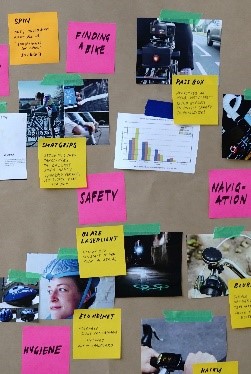
Your Data Team is the litmus test for determining which things are important and meaningful and which things are not.  Data Teams are for answering questions in real life; experimental design and statistics are for answering scientific questions. (Ask us more about Data Teams!  We love to talk about them!)

Board showing notes and pictures trying to determine which is the most important information.

You HAVE TO GRAPH Your Data to See How it Looks

If you do use math at all it’s probably only to calculate the percent difference, the percent change, and maybe a risk ratio. This means you count how many people say something and how many people didn’t say that.

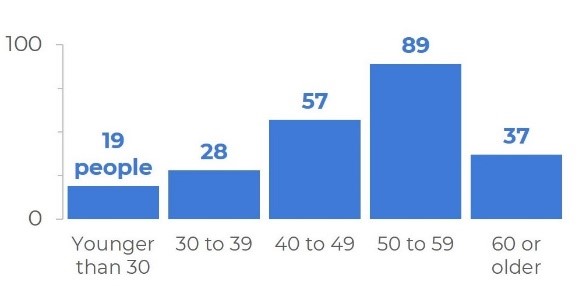
Graph all the answers in both groups. Then break the groups up differently to better understand the patterns of responses (e.g., males and females, comparisons based on race or income or zip code or classroom or age. . . you get the picture). If you don’t graph your data, you’re sunk. 

You simply have to graph it to see what it’s doing. Mostly bar charts (to compare groups) and line graphs (to look at stuff over time).

Bar chart showing ages from 0 to 100 broken down.

Here are some examples:

  • Count how many people said “Strongly Agree” and “Agree” compared to “Disagree” and “Strongly Disagree.” What’s the percent difference between the two groups?
  • Decide how different these counts are: meaningfully different or slightly different? The best way to make the most valid assessments of how meaningful the differences are is to use a Data Team. (We love a good Data Team!)
  • Based on what you know about the people you serve, as well as changes in the community and at your organization, what do you think might be the reasons for those differences? (These are follow-up questions your Data Team can ask during their data review meetings.)
  • Think about how you might divide the groups into different groups, or subgroups, to explore deeper questions (e.g., males and females, wealthy and financially struggling, graduated and not graduated, etc.). If you are looking at disparities, what’s the risk ratio of one group having a poor outcome compared to the other?
  • If you have data over time (i.e., surveys from the same people at different times) – you may want to look at percent change happened over time?
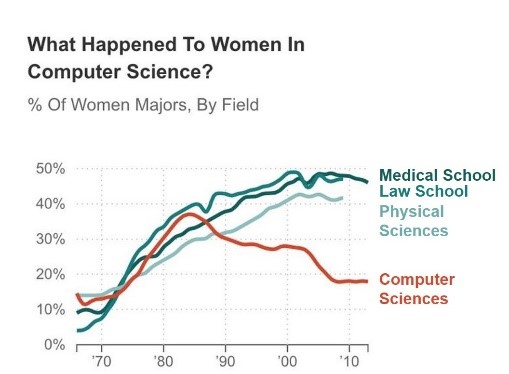
Line chart with headline that reads, "What happened to women in computer science?"

What Software Should Nonprofits Use?

99% of the time. . . Excel.

If you have data with lots of complex relationships (e.g., data from parents and children, over time, in different programs) you probably want to be using a database like Apricot.

Then you can create and run reports that graph your data with the touch of a button!  And you can still can create downloads of the data behind those reports and create your own graphs in Excel.

If you have many hundreds or thousands of people you are serving, then it’s just easier to clean and sort that data in a statistical package like SAS, SPSS, or R. 

In these cases, we choose to hire someone who’s very good at these programs (like a graduate student taking a stats class) and pay them like $30-$40/hour to clean the data, maybe do some descriptive statistics and show us some averages. Then we have them download the clean dataset (a delimited CSV) and we pull that into Excel for graphing!

Tableau is great for being able to create dashboards you can manipulate and post on the web. But you actually have to know what graphs you want before creating them.

So, we’ll create the graphs we want (in Excel!), and then hire someone to transform the data and recreate those graphs in Tableau so nonprofit leadership can manipulate them or post them on the web.

We hope all this is some weight off your shoulders!  Sign up here to stay connected with us and follow us on all the social media! We have lots more to share!

Connect with MaryFrances Porter & Alison Nagel

Partnerships for Strategic Impact: https://impactstorycoaching.com/

Maryfrances Porter, Ph.D.  – LinkedIn: @maryfrances-porter-psi/

Alison Nagel, Ph.D. – LinkedIn: @alison-nagel-41493a125

Written by cplysy · Categorized: depictdatastudio

Jul 06 2021

The 30-3-1 Approach with Unlimited Visual Appendices: The Bare Minimum for Designing Reports that Actually Inform Decisions

Want to design reports that actually inform decisions? With software you already have??

Nobody wants to pour blood, sweat, and tears into a document that sits on a dusty shelf.

In May 2021, I co-presented with Elizabeth Grim at the Eastern Evaluation Research Society’s annual conference.

Our session was titled, “How to Design Reports that Actually Inform Decisions with Software We Already Have.”

Attendees learned about:

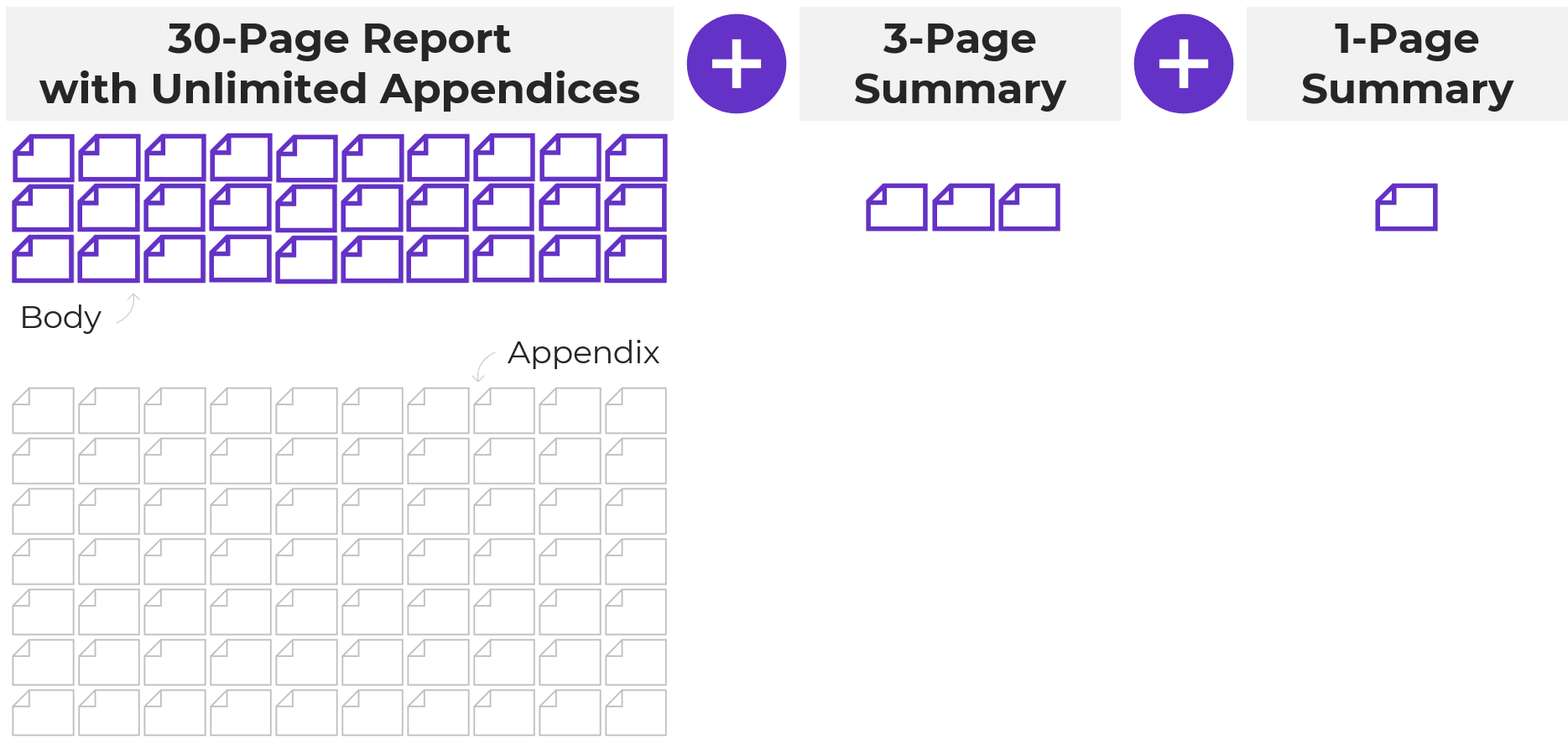
  • The 30-3-1 approach to reporting with unlimited visual appendices
  • Adding a 20-minute report cover
  • Adding color-coded divider pages
  • Aiming for 1+ visual on every single page
  • Including a variety of visuals
  • Using inclusive, non-violent language

Today, let’s focus on one of those techniques: following the 30-3-1 approach to reporting, which is the bare minimum for designing useful reports.

Watch the 10-Minute Tutorial

I recorded a portion of our presentation for you. Here’s a 10-minute lesson about the 30-3-1 approach.

Hopefully you recognize this technique already; I’ve been speaking about it on panels for a decade. 😊

I’ve raised the bar over the past decade though. I used to simply encourage us to follow 30-3-1. I’ve clarified my advice to add visual appendices, too.

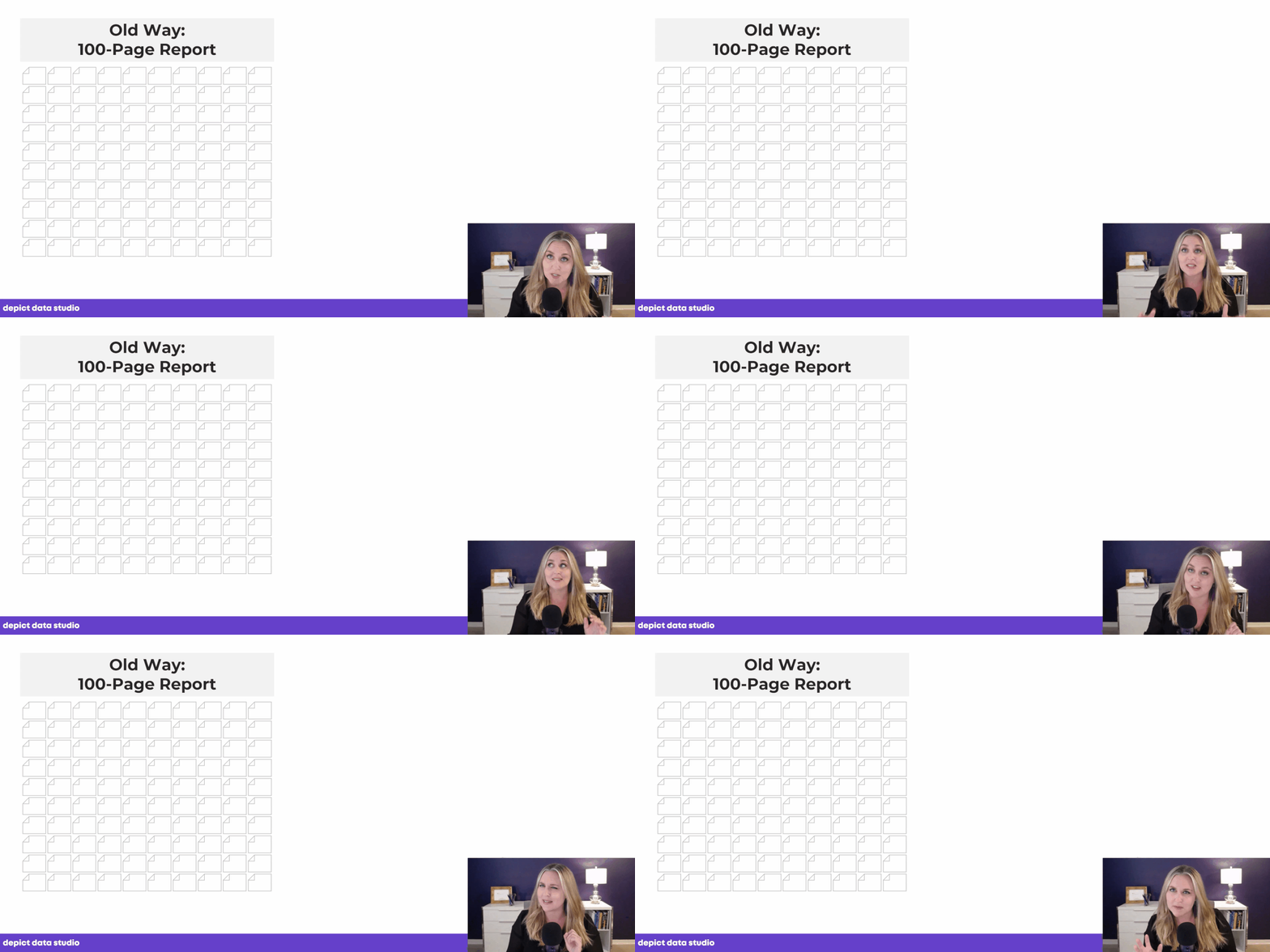
The Old Way: The 100-Page Technical Report

In the video, I show you the old way of writing reports in research and evaluation settings.

The single, 100-page technical report used to be the norm. And in some settings, it still is. (I’m thinking of the government agencies and government contractors that I work with.)

Nobody’s got time to read all 100 pages. I think we’ve known that for a while. 30-3-1 to the rescue!

The single, 100-page technical report used to be the norm. And in some settings, it still is. (I’m thinking of the government agencies and government contractors that I work with.)

The 30-3-1 Approach

Don’t want your reports to sit on a dusty shelf?

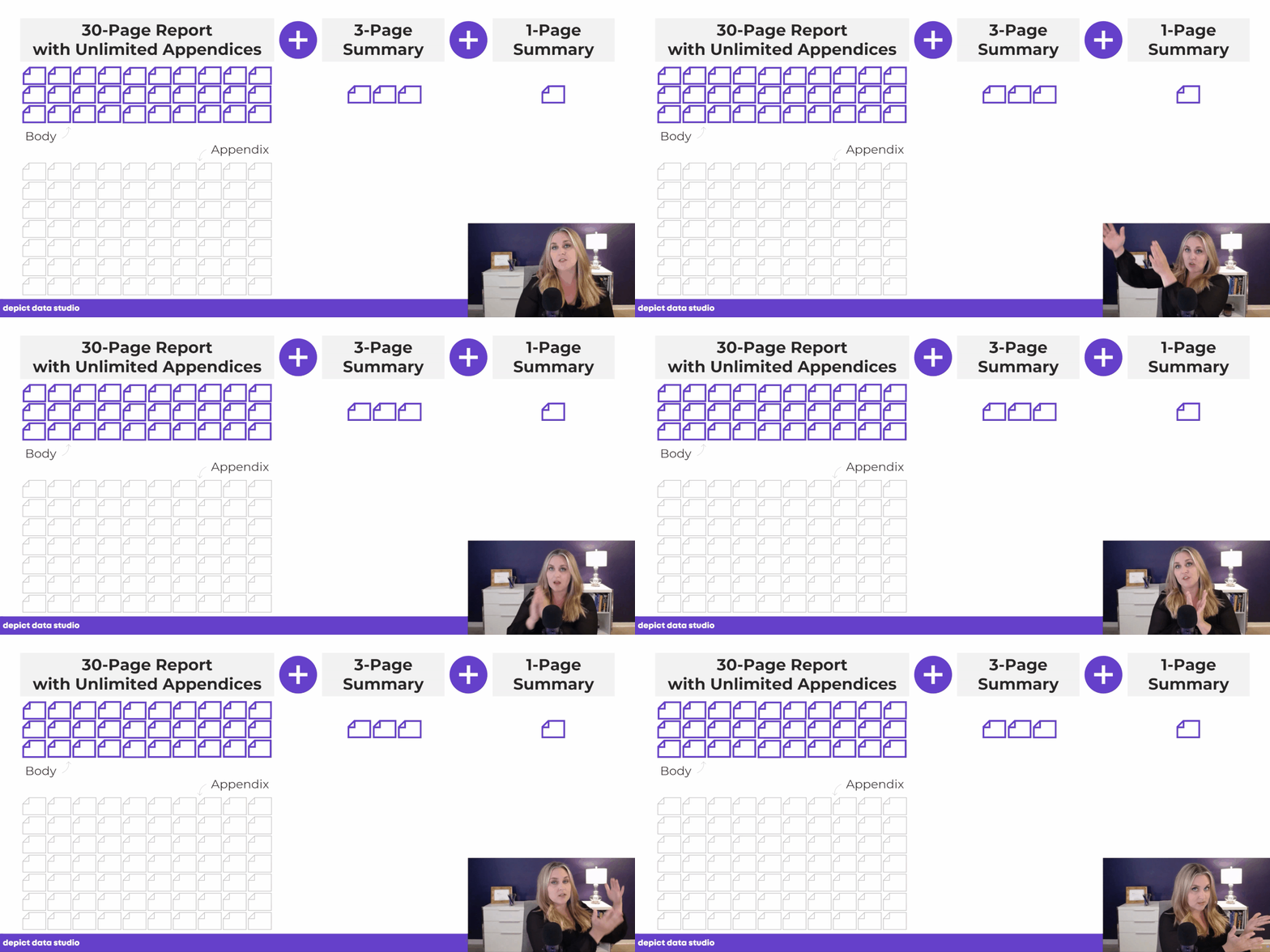
At a bare minimum, I suggest following the 30-3-1 approach, which includes:

  • A 30-page report (30 pages maximum) with unlimited visual appendices
  • A separate 3-page PDF
  • A separate 1-page PDF
At a bare minimum, I suggest following the 30-3-1 approach, which includes a 30-page report with unlimited visual appendices plus a 3-page PDF plus a 1-page PDF.

In a perfect world, with more time and a bigger budget, I’d love to see slideshows, dashboards, and infographics for every single project, too.

Reports are a good starting point.

The 30-3-1 approach with unlimited visual appendices is even better.

And adding slideshows, dashboards, and infographics is even better.

This approach is all about tailoring for our audiences. Rather than pouring everything into a single document, we design a 30-pager with one audience in mind, a 3-pager with another audience in mind, and so on.

Paring Down 100 Pages into 30 Pages or Less

This is the hardest step. You’ll need to get input from your boss, your report’s audience, a stakeholder group, etc.

I suggest following Marie Kondo’s advice: Focus on what you’re keeping, not on what you’re letting go of. In the video, I discuss her technique for decluttering our closets: Make a big pile of all your clothes, and then look at each item to decide what sparks joy.

We focus our mental energy on the best pieces that are worth keeping, rather than getting stressed by what we’re discarding.

We can apply the same strategy to paring down reports. Focus on the charts, pages, or chapters that are so valuable that they need to stay within the 30-page report body.

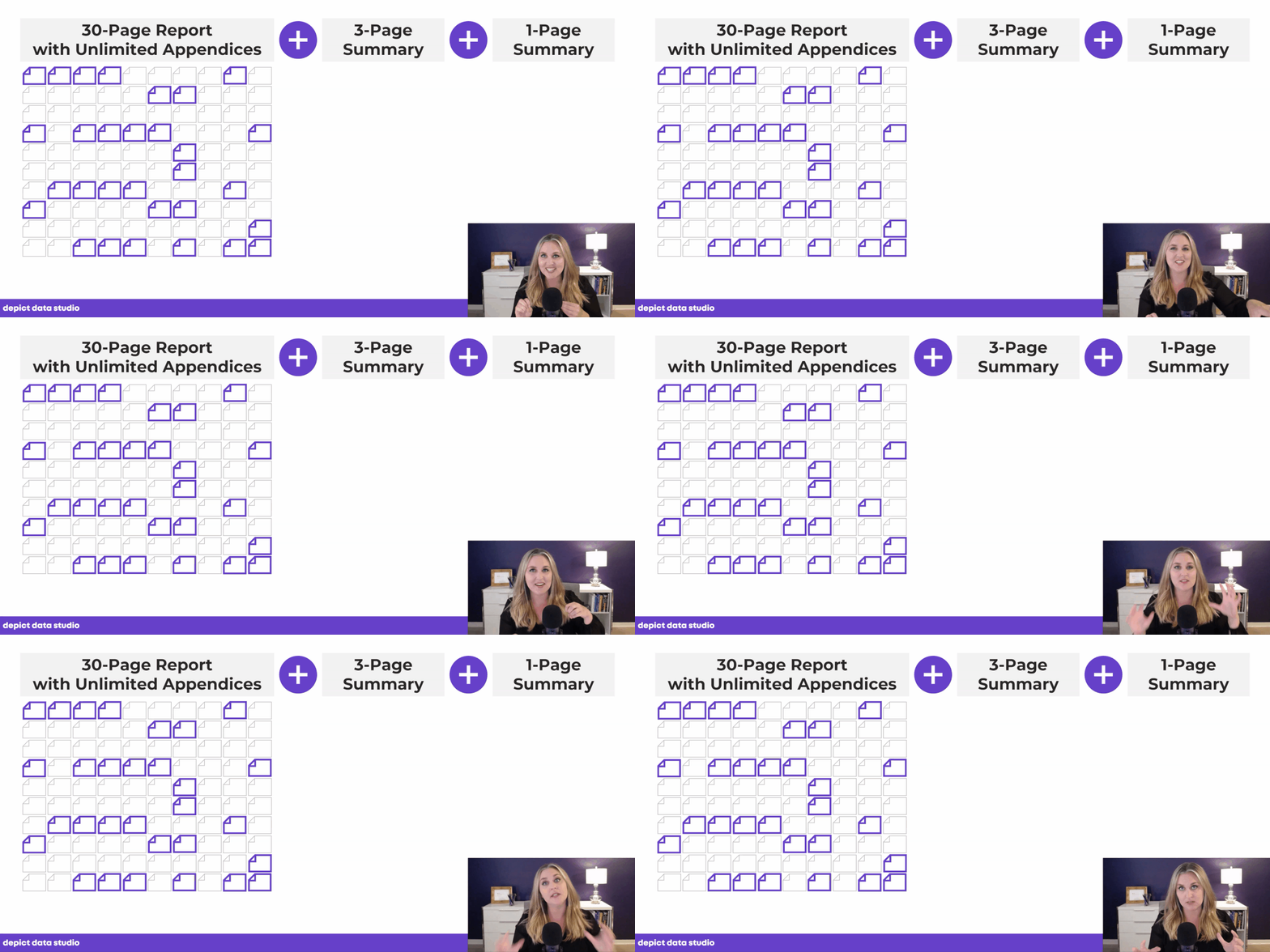
We don’t have to delete the rest of the pages. We simply move them to the back of the report, and they form the appendices.

Pairing down a 100+ page report can be hard but we don’t have to delete the rest of the pages. We simply move them to the back of the report, and they form the appendices.

The 3-Pager and 1-Pager

When we’re done with the 30-page report, we also need a separate 3-page report and a separate 1-page report.

Sometimes we’re tempted to count the executive summary as the 3-pager or 1-pager. That’s not enough!!! I recommend creating separate PDFs altogether.

And of course, we don’t have to follow the 30-3-1 approach exactly. We’re aiming for a full version, a mid-length version, and a short-n-sweet version. Your 3-pager might actually be 5 pages, for example. The spirit of the 30-3-1 approach is still there. I want us to avoid only writing a 100-page technical report. 20-10-2 or 30-5-2 will still help our readers tremendously.

A Case Study from a Public Health Agency

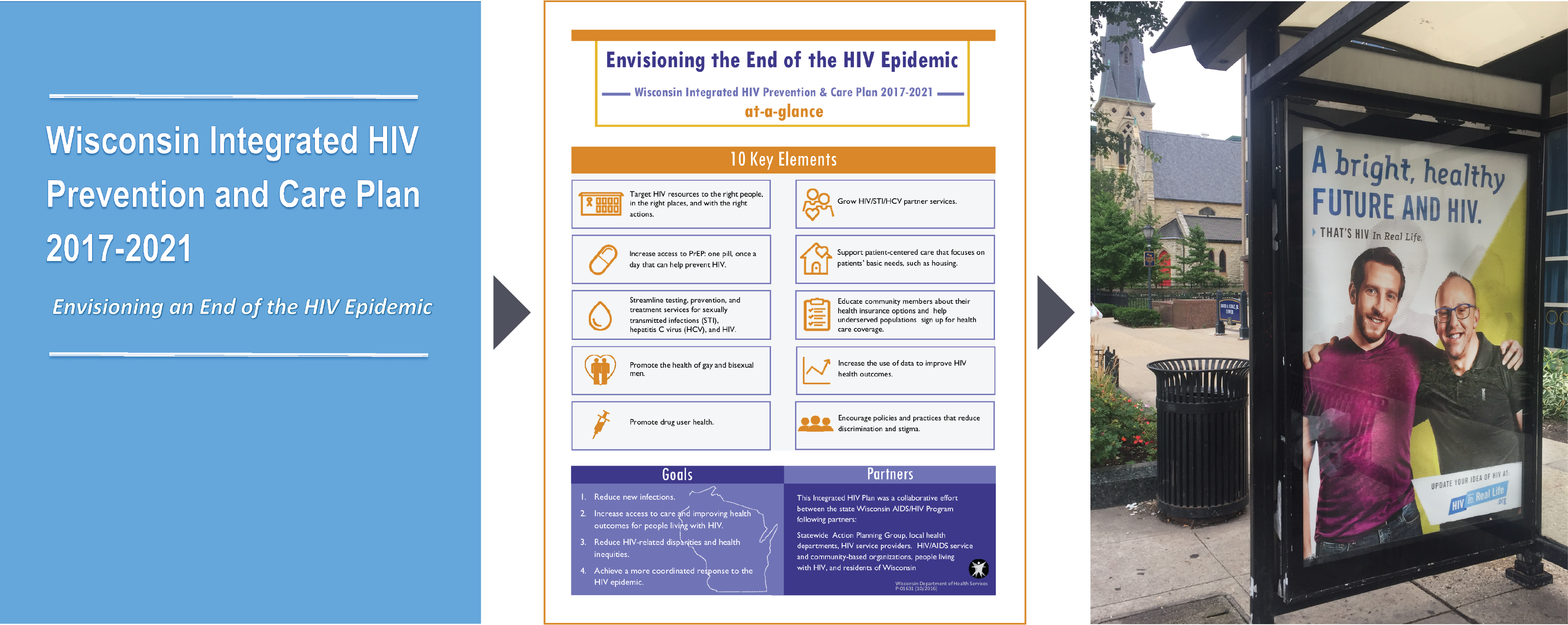
In the video, I mentioned a guest blog post from Sara DeLong about how the Wisconsin Division of Public Health applied this technique.

Her agency developed a 130-page report, a 10-page summary, and a 1-page summary. Then, they also created videos, images, and billboards (!!!) to ensure that the messages got off the dusty shelf and into the community.

One agency developed a 130-page report, a 10-page summary, and a 1-page summary. Then, they also created videos, images, and billboards (!!!) to ensure that the messages got off the dusty shelf and into the community.

Add Unlimited Visual Appendices

In the video, I also discussed adding unlimited visual appendices to the end of our reports.

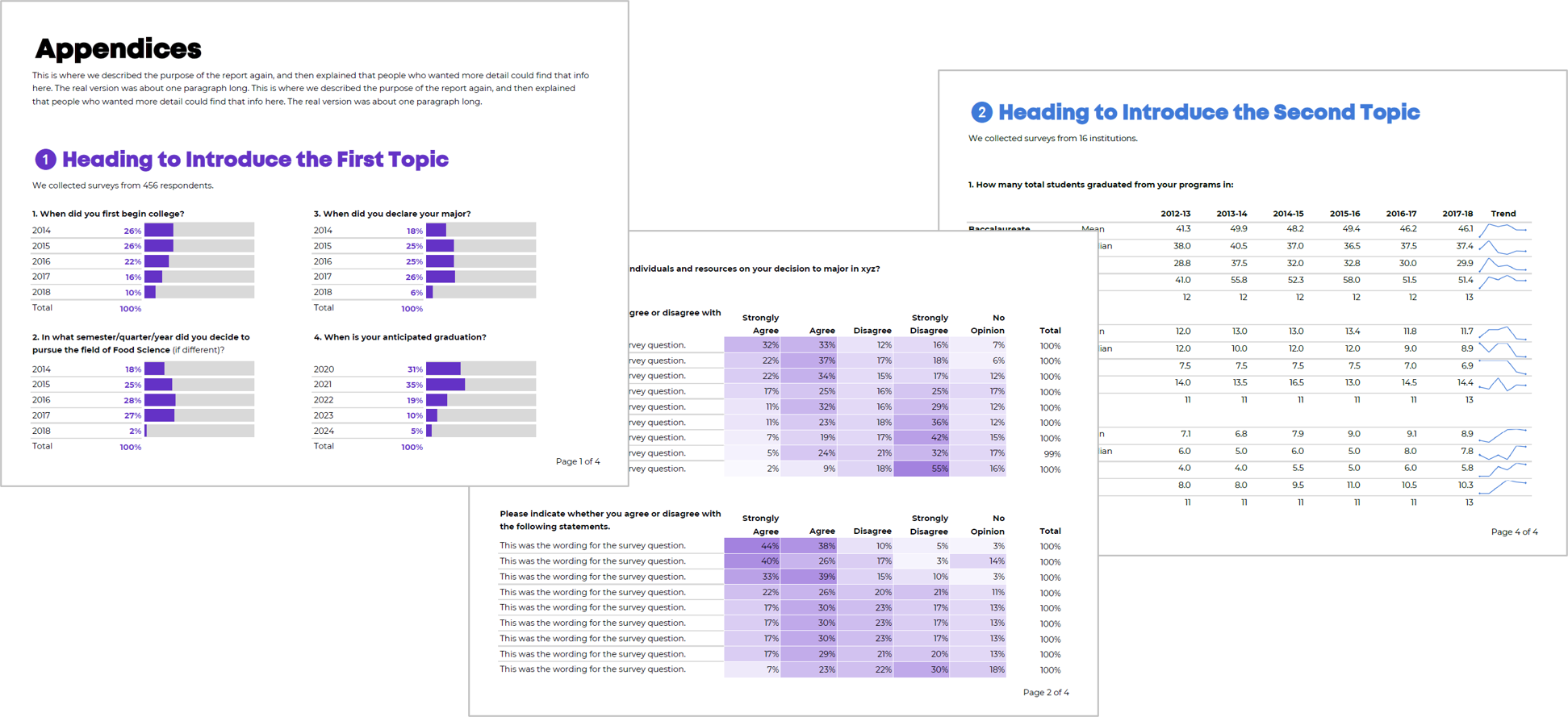
Here’s the blog post where you can learn about visual appendices and get tips for creating them yourself.

Spoiler alert: I create these tables in Excel; add Data Bars, Color Scales, and Spark Lines; and then save them as PDFs.

You can add unlimited visual appendices to your report.

Learn More

My co-presenter, Elizabeth Grim, also wrote a conference session recap.

Your Turn

Have you followed 30-3-1? Have you created unlimited visual appendices? Please comment below and link to your public-facing examples or describe your project. I’d love to learn from you.

Written by cplysy · Categorized: depictdatastudio

Jun 22 2021

3 Common Reporting Hurdles—and How to Overcome Them

I work with a lot of different groups — government, universities, foundations, nonprofits, for-profits and many others.

One thing I’ve learned is that organization has a little bit different communication style.

Some groups are report-heavy. Think lots of paragraphs, portrait, Calibri size 11 turned into a PDF.  

Other groups are dashboard-heavy. They either have lots of static dashboards (short PDF reports) or lots of interactive dashboards and databases.

While other groups are presentation-heavy, kind of. They use PowerPoint, but they’re making standalone documents, not slides for presentations.

One thing these groups all have in common: Everyone has reports of one kind or another. And I often see three common report hurdles over and over again.

The Data Viz Today Podcast with Alli Torban

I recently spoke with Alli Torban on her podcast, Data Viz Today. Alli is an information design consultant who discovered data visualization while on maternity leave. She started the podcast as a way to grow and learn more about the data viz field.

She and I discussed those three common report hurdles we all run into and I gave solutions of how to overcome them.

Watch Our Conversation Here 

Challenge 1: Soaring Beyond the Dusty Shelf Report

The first common challenge I see is going beyond the report.

Most organizations have a report of some kind, but it’s hard to get into the mindset of a report AND a dashboard, slideshow, handout, etc.

In many workplaces, we definitely still need a report as one of our formats (e.g., grant reports that are required to be submitted at the end of a multi-year, multi-million-dollar project).

But our data can inform more decisions if we can offer a report plus other formats.

There’s often a misperception that it’s going to be time-consuming or costly to design a report and some other formats.

But, there’s a cost-effective and time-efficient solution: 30-3-1 with unlimited visual appendices.

The 30-3-1 approach is this: you take your dusty shelf report and you limit the body of the report to just 30 pages, the most important data. The rest of it doesn’t get deleted, you simply push it to back of the report in a visual appendix (which unlimited in terms of page numbers).

Then when you’re done with the 30-page report, you also make a 3-pager and a 1-pager. Each format will reach a different audience and will help your data reach more people and actually inform decisions.

The 30-3-1 approach: a 30-page report with unlimited appendices plus a 3-page summary plus a 1-page summary.

Not sure how to incorporate a visual appendix? You can learn more about how to start using this technique here: https://depictdatastudio.com/designing-visual-appendices-for-your-next-report-in-under-an-hour/

Challenge 2: Packing a Lot of Dense, Technical Information into a Report – Without Overwhelming Our Readers 

Another common challenge we all run into is needing to pack a lot of dense, technical information into a report—without overwhelming our readers.

I worked with a county to help create their 100+ page public health report card.

There was one page for each variable: traffic accidents, cancer deaths, pregnancy rates, environmental/ozone data, etc. Our challenge was to find a way to chunk all that data into a few categories that would make easier to read and navigate.

Our solution: Color-coding by chapter.

After categorizing the data, each chapter was designated its own different brand color.

The headings and visuals all used that brand color throughout the chapter (heading 1s, heading 2s, call-out boxes, sidebars, graphs, maps, bullet points, etc.).

The end result allowed readers to easily tell when a new topic began.

Your brain recognizes new color; the content must have changed as well.  

Color-coding by chapter lets your audience know that a color change means a new topic.

Here’s another example of when I worked with a university library to use color-coding to simply their report:  https://depictdatastudio.com/how-to-transform-a-text-heavy-report/ 

This technique can also be applied to slideshows, dashboards and infographics.

I use this technique when I give presentations as well:  https://depictdatastudio.com/visually-structure-your-presentation-around-key-points/

Challenge 3: Incorporating a Variety of Visuals—Not Just Graphs 

The final challenge I see are reports that are ALL narrative, or ALL graphs, or ALL photos.

We all tend to gravitate towards what we’re comfortable with but there are so many great types of visuals you can include.

In the video, you’ll hear Alli and I talk through this list of 15 visuals to include in our reports:

  1. Graphs 
  1. Photographs 
  1. Icons 
  1. Lists 
  1. Maps 
  1. Diagrams 
  1. Timelines 
  1. Logos 
  1. Screenshots 
  1. Text overlaid on images 
  1. Columns 
  1. Shapes 
  1. Handwriting 
  1. Cartoons 
  1. GIFs 
Using a variety of visuals in your reports helps to keep your audience engaged.

Your Turn 

I’d love to hear from you. What challenge have you dealt with (or are currently dealing with)? Which of these techniques have you use in your work? Comment and let me know.  

Connect with Alli 

Website: www.allitorban.com 

LinkedIn: @allisontorban

Data Viz Today Podcast: https://dataviztoday.com/ 

Written by cplysy · Categorized: depictdatastudio

Jun 15 2021

Data Placemats: A 3-Step Process for Increasing Data Use

Want to make sure that your data gets used to inform decisions?

Get your stakeholders involved in the sense-making process!

Are you familiar with data placemats?

Here’s how they work:

  1. Design Data Placemats
  2. Facilitate an Interpretation Meeting
  3. Include those Insights in the Final Report or Slideshow

Step 1: Design Data Placemats

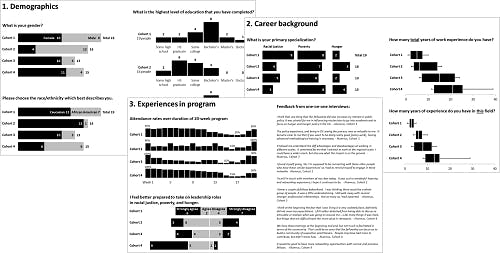
First, we analyze the data and display key findings in data placemats. You might display survey responses, for example.

These placemats should include traditional graphs. That means the graph titles contain the topic area, not the takeaway finding, and there’s no color contrast. Imagine a bar chart where every bar is the same color, so that nothing stands out. It’s up to the viewer to figure out the “so what?” for themselves.

We can make data placemats in any software program. You know I’m a champion for everyday software. PowerPoint’s my top choice for data placemats because it’s easy to arrange multiple graphs on the slide.

Your placemats might look like this, with one page per survey topic.

Step 2: Facilitate an Interpretation Meeting

Next, we gather people together, either virtually or in-person.

During the meeting, we’re facilitators, not lecturers.

It’s a conversation, not a presentation.

We ask questions like:

  • “What surprises you about the data?”
  • “What factors might explain the patterns we’re seeing?”
  • “What additional questions do you have?”

The goal is to get attendees to verbalize the takeaway findings in their own words. We listen, listen, listen.

Step 3: Include those Insights in the Final Report or Slideshow

Finally, we go back to our offices and create a final deliverable for the project, like a report or slideshow (if needed).

The final version should include storytelling graphs, which means the graphs have the takeaway findings in the graph titles, and include color contrast. Imagine a bar chart where everything’s grayed-out except for the one important bar in a darker color.

The interpretation meeting becomes a data collection event; we quote the meeting attendees and include that qualitative data in the final report.

This process not only gets stakeholders involved in the process–making it more likely that they’ll use the findings–but makes the final report or slideshow even richer.

Learn More

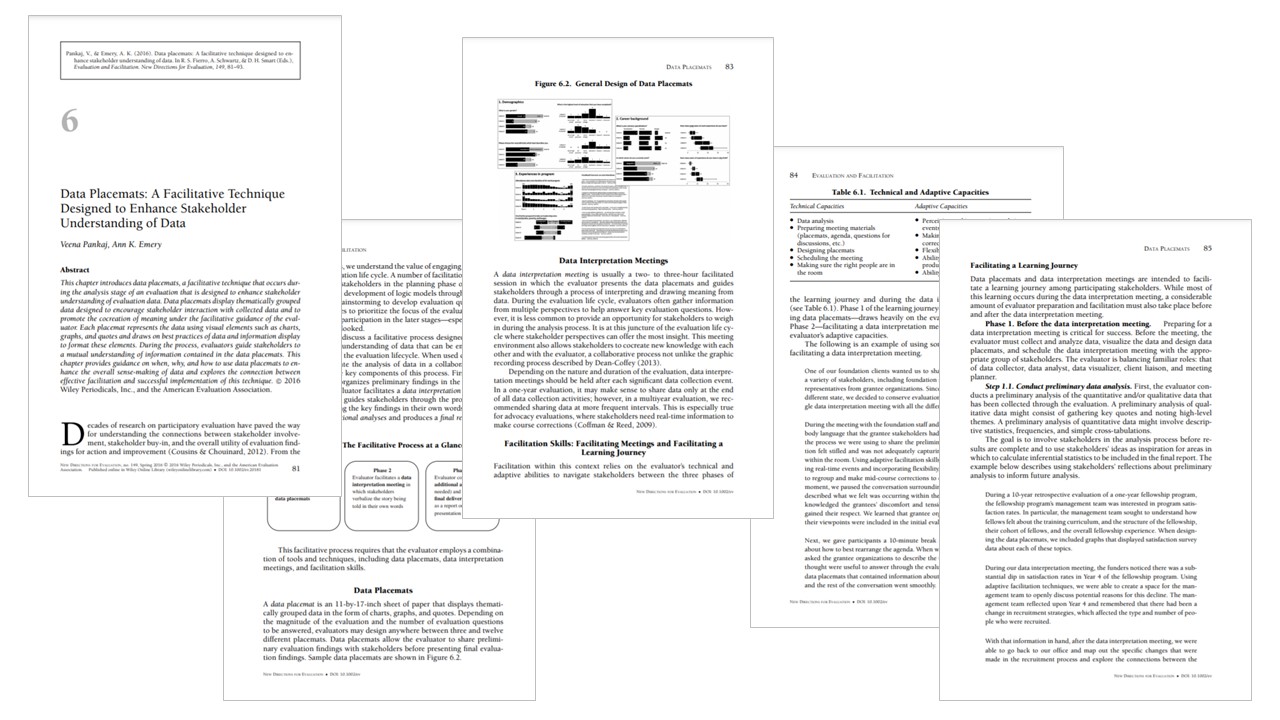
I learned this technique years ago from Veena Pankaj. Veena and I published an article about placemats together that you read can here: https://onlinelibrary.wiley.com/doi/pdf/10.1002/ev.20181

Your Turn

Have you used data placemats in your project? Comment and share tips of your own!

Written by cplysy · Categorized: depictdatastudio

  • « Go to Previous Page
  • Go to page 1
  • Interim pages omitted …
  • Go to page 26
  • Go to page 27
  • Go to page 28
  • Go to page 29
  • Go to page 30
  • Interim pages omitted …
  • Go to page 37
  • Go to Next Page »

Footer

Follow our Work

The easiest way to stay connected to our work is to join our newsletter. You’ll get updates on projects, learn about new events, and hear stories from those evaluators whom the field continues to actively exclude and erase.

Get Updates

Want to take further action or join a pod? Click here to learn more.

Copyright © 2026 · The May 13 Group · Log in

en English
af Afrikaanssq Shqipam አማርኛar العربيةhy Հայերենaz Azərbaycan dilieu Euskarabe Беларуская моваbn বাংলাbs Bosanskibg Българскиca Catalàceb Cebuanony Chichewazh-CN 简体中文zh-TW 繁體中文co Corsuhr Hrvatskics Čeština‎da Dansknl Nederlandsen Englisheo Esperantoet Eestitl Filipinofi Suomifr Françaisfy Fryskgl Galegoka ქართულიde Deutschel Ελληνικάgu ગુજરાતીht Kreyol ayisyenha Harshen Hausahaw Ōlelo Hawaiʻiiw עִבְרִיתhi हिन्दीhmn Hmonghu Magyaris Íslenskaig Igboid Bahasa Indonesiaga Gaeilgeit Italianoja 日本語jw Basa Jawakn ಕನ್ನಡkk Қазақ тіліkm ភាសាខ្មែរko 한국어ku كوردی‎ky Кыргызчаlo ພາສາລາວla Latinlv Latviešu valodalt Lietuvių kalbalb Lëtzebuergeschmk Македонски јазикmg Malagasyms Bahasa Melayuml മലയാളംmt Maltesemi Te Reo Māorimr मराठीmn Монголmy ဗမာစာne नेपालीno Norsk bokmålps پښتوfa فارسیpl Polskipt Portuguêspa ਪੰਜਾਬੀro Românăru Русскийsm Samoangd Gàidhligsr Српски језикst Sesothosn Shonasd سنڌيsi සිංහලsk Slovenčinasl Slovenščinaso Afsoomaalies Españolsu Basa Sundasw Kiswahilisv Svenskatg Тоҷикӣta தமிழ்te తెలుగుth ไทยtr Türkçeuk Українськаur اردوuz O‘zbekchavi Tiếng Việtcy Cymraegxh isiXhosayi יידישyo Yorùbázu Zulu