• Skip to main content
  • Skip to footer
  • Home

The May 13 Group

the next day for evaluation

  • Get Involved
  • Our Work
  • About Us
You are here: Home / Archives for allblogs

allblogs

Aug 10 2023

The Key to Making Actionable Logic Models

Let’s get straight to the point. When logic models are viewed as a valuable planning and learning tool, rather than solely as a grant making reporting requirement, it increases the likelihood that your organization will use them. When logic models are viewed in connection to other tools you have at your disposal, that also increases […]

The post The Key to Making Actionable Logic Models appeared first on Nicole Clark Consulting.
Written by cplysy · Categorized: nicoleclark

Aug 08 2023

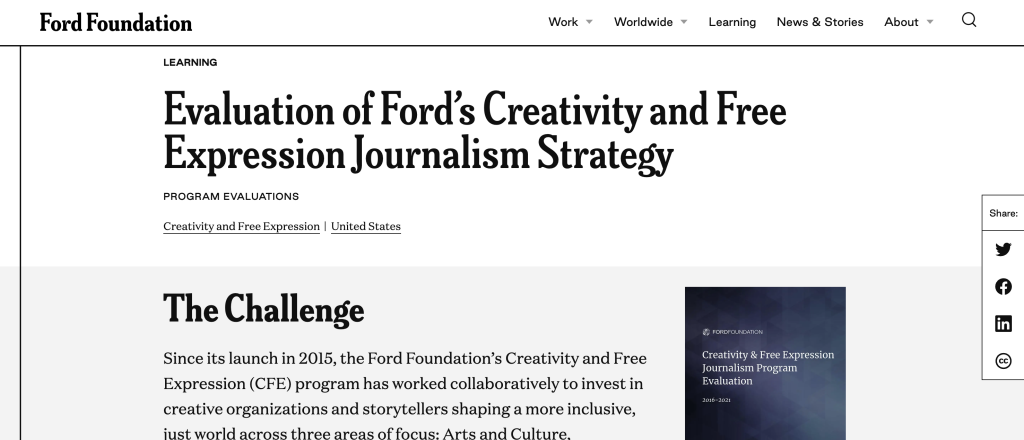
Report Study – Ford Foundation Evaluations

In this series of blog posts I will share examples of professionally designed modern reports. For each report I’ll also write out a list of things to notice. My goal is not to critique but to show you real life examples of design concepts to help you become a better report designer.

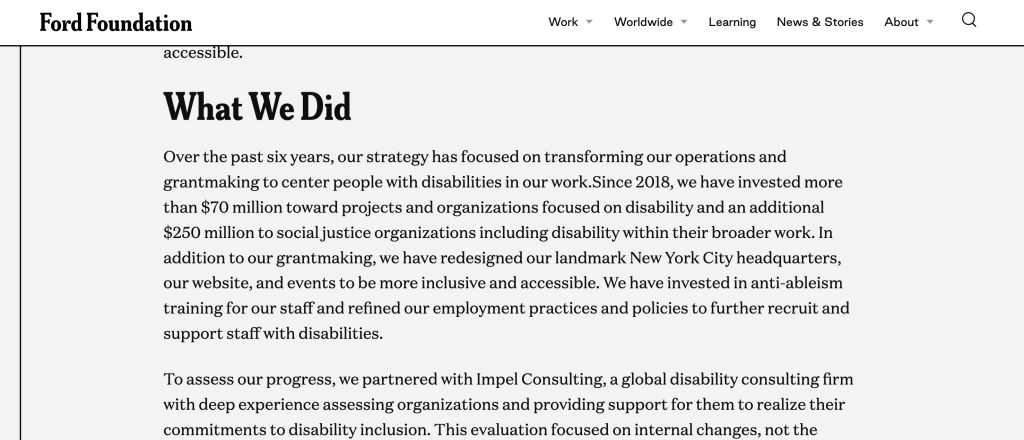
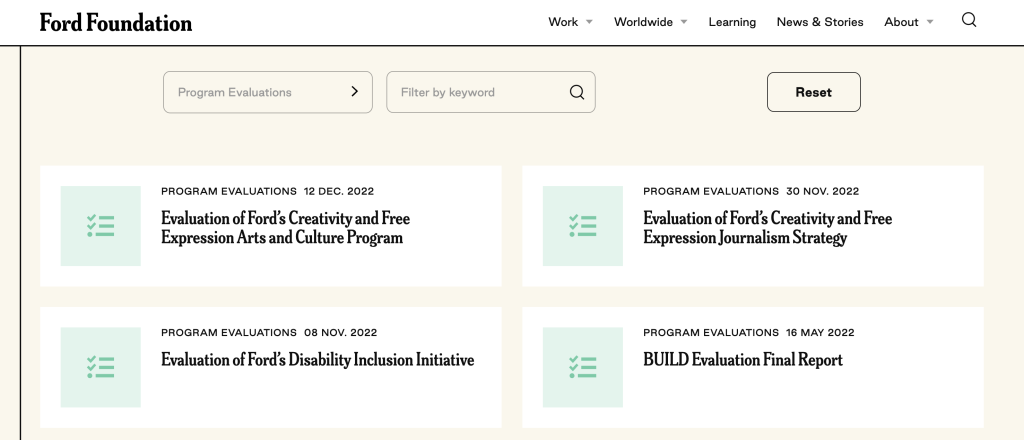
This week I want to look at content that you might not consider to be “reports” but are totally reports. It’s the Program Evaluation Landing Pages in the Ford Foundation’s Learning Library.

To get the most out of this post I suggest opening the report in another browser tab so you can bounce and forth as your read this post.

1. How do you define the word, “report?”

So for this week I want you to explore just the landing pages for several different Ford Foundation evaluation reports. Don’t download the PDFs (unless you really want to) as they are not my focus this week.

For me, a report is just a type of communication vehicle. It could be a PDF but it could also be a person delivering a presentation through a webinar. In this case, I want you to notice how the landing page acts as its own report.

2. What is a landing page?

The landing page is the web link people go to when they download your report. You might also refer to this as the download page.

I find that for most evaluators the report they refer to is just the document at the end. Which I think misses a huge amount of opportunity. Instead, think about every point in a reporting process as a kind of audience touch point.

In that way, a social media post would be an audience touch point. Same goes for the descriptive blurb that might go into an organization’s newsletter. The landing page would also be an audience touch point. And all of these things come before anyone ever gets to the document at the end.

3. Notice how the structure of each landing page is standardized?

There are three sections.

  • The Challenge
  • What We Did
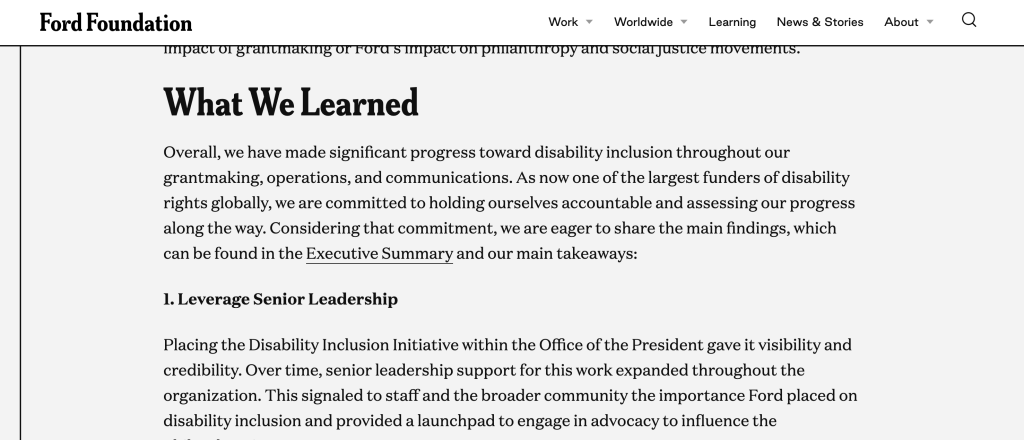
  • What We Learned

It can be really hard to standardize reporting inside large organizations. They work with so many different individual projects and consultants. Yes, you can introduce design standards, but is it always worth the effort?

4. It’s like a blog post!

I really like how the “What We Learned” section is built like a listicle blog post. This isn’t an infographic, there really are no graphics here. The landing pages are just like a blog series introducing each individual report.

That said, if you wanted to make an infographic out of these it would be super simple. I mean they are already 75% of the way to a final product.

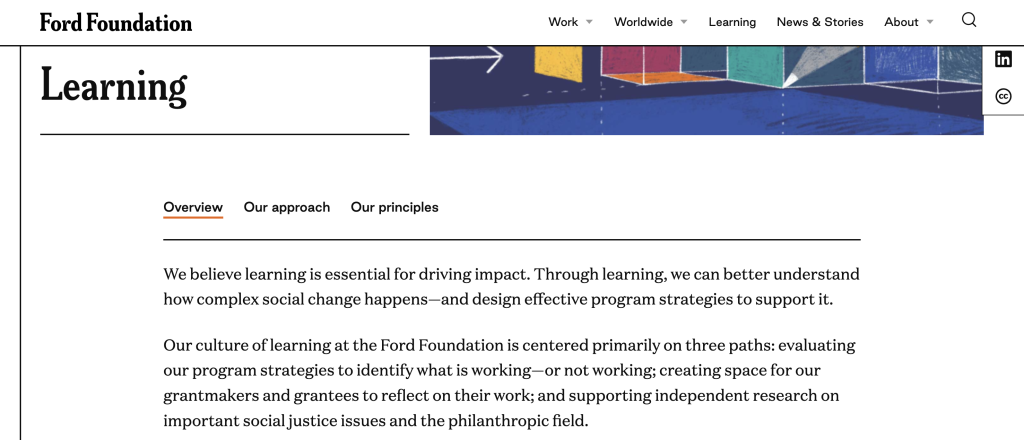
5. Bonus, check out the overview, approach, and principles at the top of the Learning page.

I think it’s cool how the Learning “search” page leads in with an overview.

Since this information is universal across all the reports, it makes sense to include it on the page you visit to search through all the reports.

How are your report landing pages formatted?

Are you using this space for more than just a simple abstract? If not, why not? Let me know in the comments.

Written by cplysy · Categorized: freshspectrum

Aug 07 2023

How to Visualize Multi-Year Patterns

I recently worked with a healthcare system to visualize their multi-year patterns.

Are you lucky enough to have historical data at your fingertips?! Woohoo! What a treat.

Let’s weigh the pros and cons of a few different viz options.

The Table

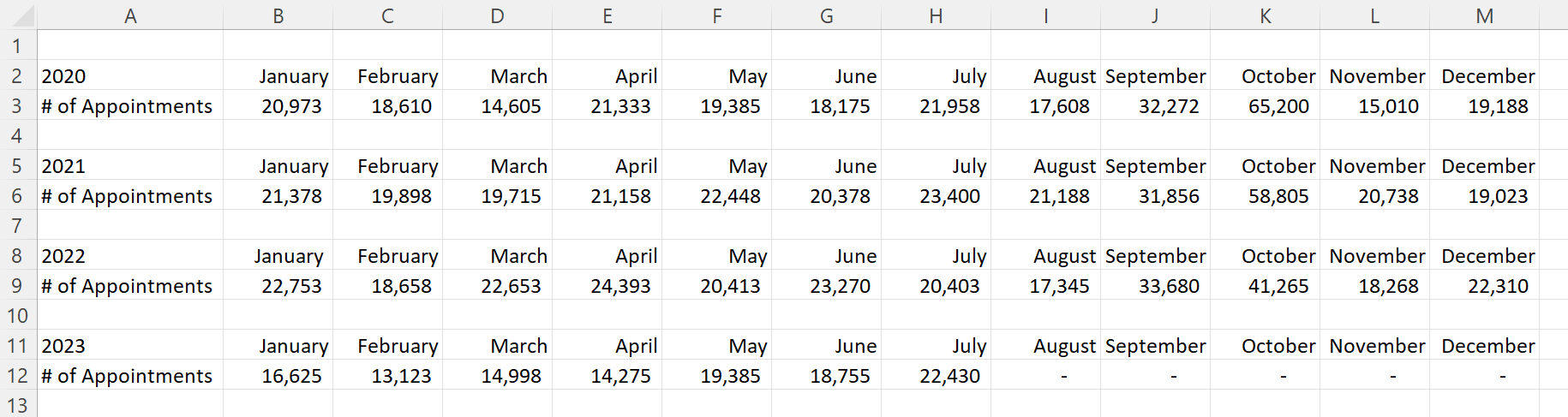
Here’s what their tabulated data looked like, sort of.

Let’s pretend we’re looking at the number of doctor’s appointments that took place within their healthcare system.

That’s not the real variable, and these aren’t their real numbers, but you get the idea: They wanted to visualize patterns over the past four years.

Before: 1 Graph per Year

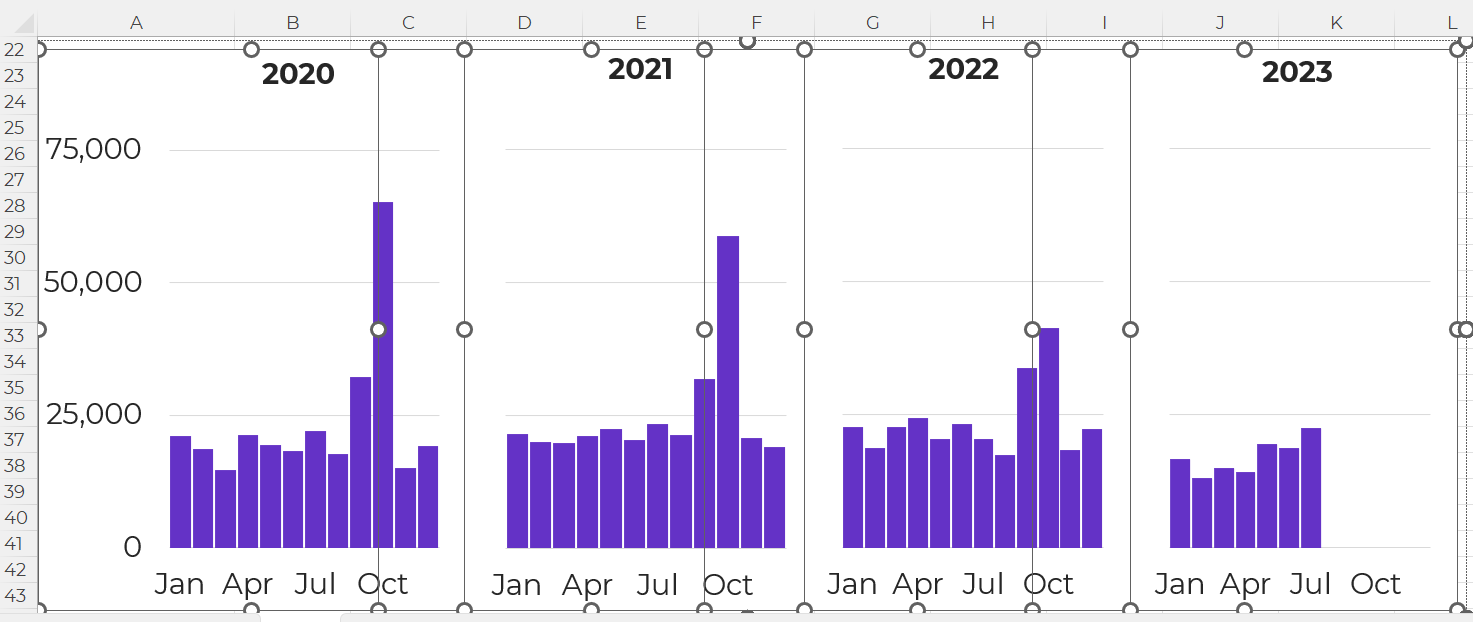
And here’s what their initial visualization looked like: a separate graph for each year.

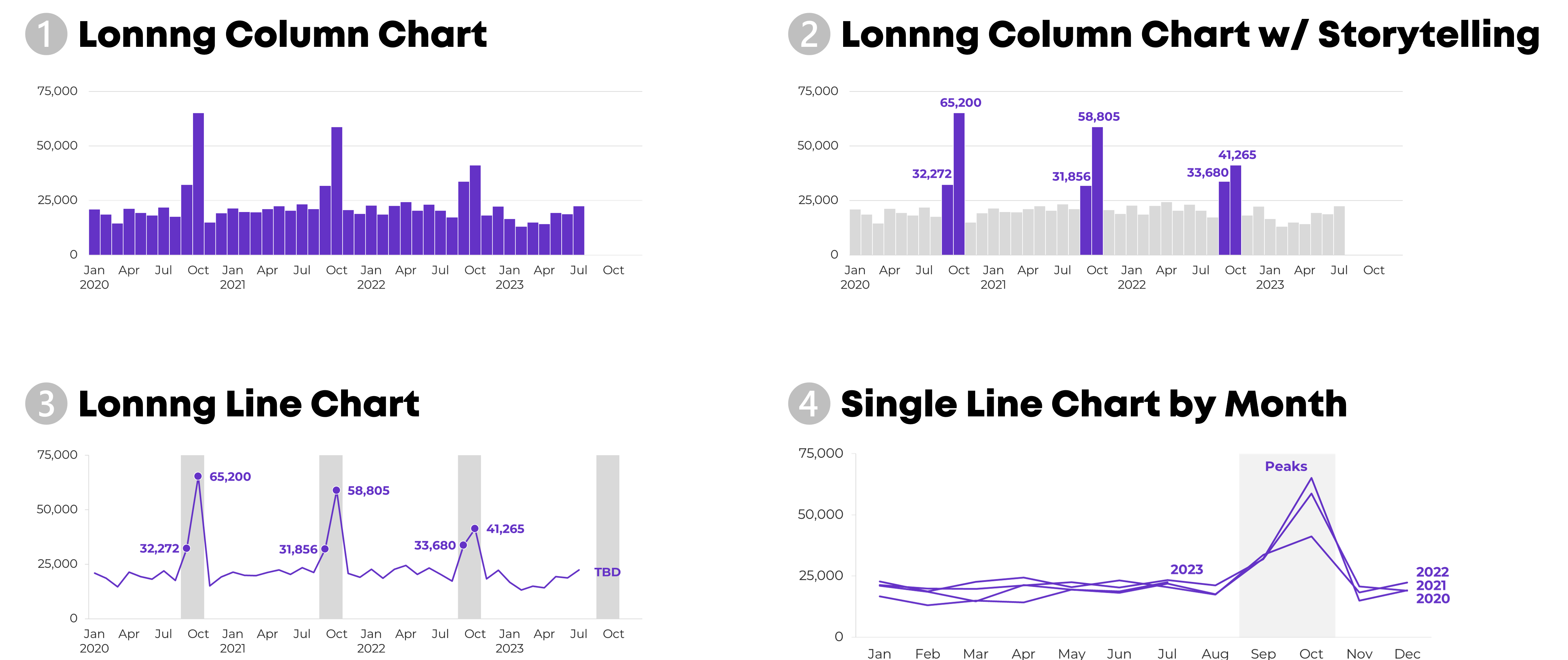
Idea 1: Lonnng Column Chart with Bare-Minimum Edits

First, let’s tackle the Quick Wins, a.k.a. the Bare Minimum edits for branding and “Big A” Accessibility:

  • Brand colors and fonts
  • Darker font for better color contrast
  • Sized for a slide (size 18-point font, 13 inches wide, 5 inches tall)
  • Arranged left to right, rather than a grid
  • “Grouped” all the graphs together for easier copying and pasting into a slide
  • Horizontal text only
  • Consistent scales to make comparisons across graphs easier
  • Fewer demarcations on the y-axis (one label every 25,000 units)
  • Changed the y-axis to a “number” format so that a zero appears at the bottom, not just a dash
  • Then, only showing the left-most y-axis
  • Wider columns, a.k.a. a smaller gap width

It felt inefficient to keep four separate graphs — too much extra work to align everything and then group everything — so I turned this into a single column chart.

Yep, I had to rearrange the four tables into one table in order to transform the four graphs into one graph. At the bottom of this blog post, you’ll see a link to download my Excel file so you can explore the behind-the-scenes tables and graphs for yourself.

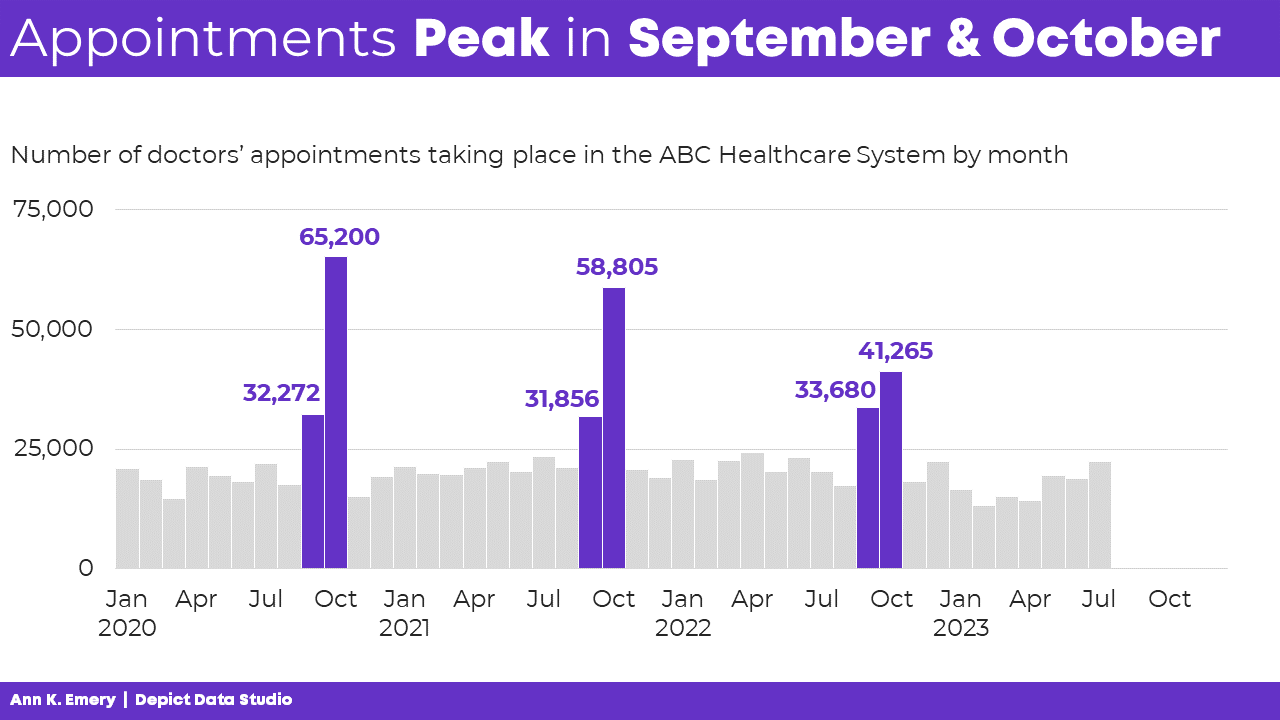
Idea 2: Lonnng Column Chart with Data Storytelling

I’ve written about spoken about traditional vs. storytelling graphs a lot over the past decade. If these terms are new, then you can watch the most recent public-facing conference talk here.

In this version, I intentionally used data storytelling. This data was intended for a busy upper-management office, and leaders often prefer when we cut to the chase, instead of burying them in graphs that don’t say anything.

The presentation slide might look something like this:

  • A takeaway slide title
  • The topical graph title underneath
  • Dark-light contrast
  • Labels only one the columns of interest – for September and October

And no, I don’t love how the September labels are right-aligned while the October labels are centered, but this probably isn’t the winning approach, so who cares.

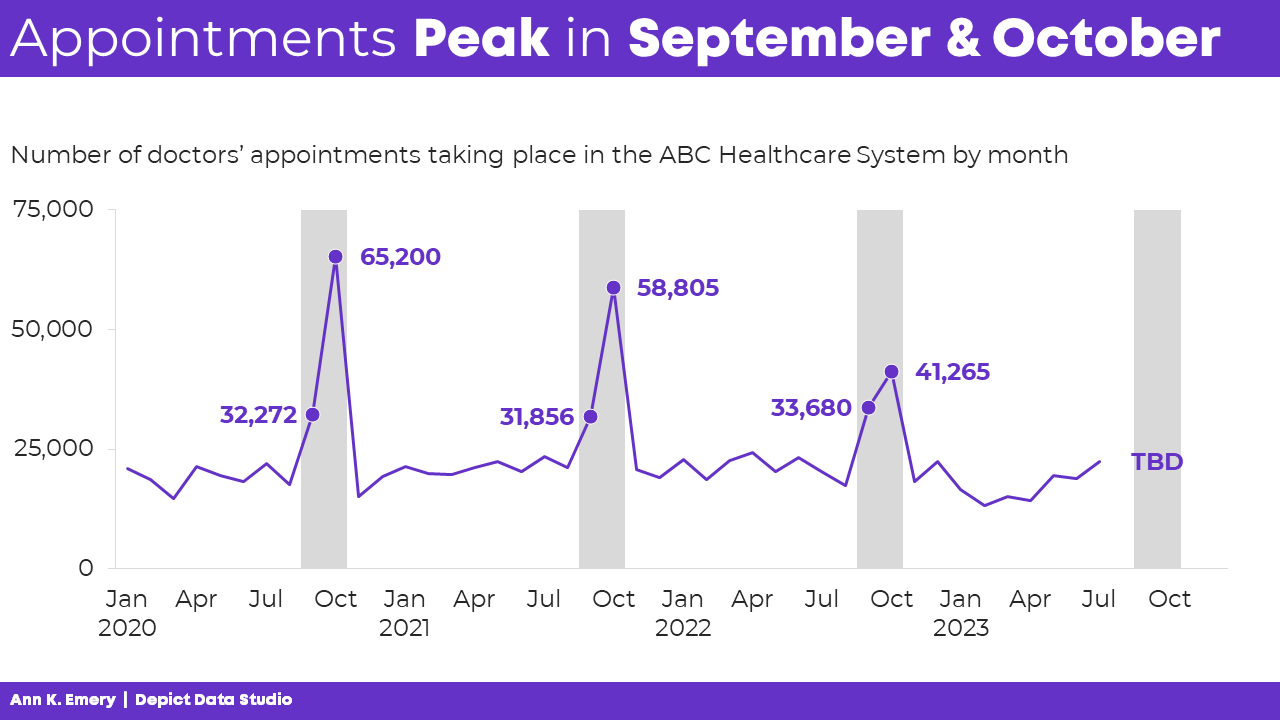
Idea 3: Lonnng Line Chart with Data Storytelling

Another option is a line chart with gray shading for the peaks.

Yes, this is a combo chart in Excel.

The presentation slide would look like this:

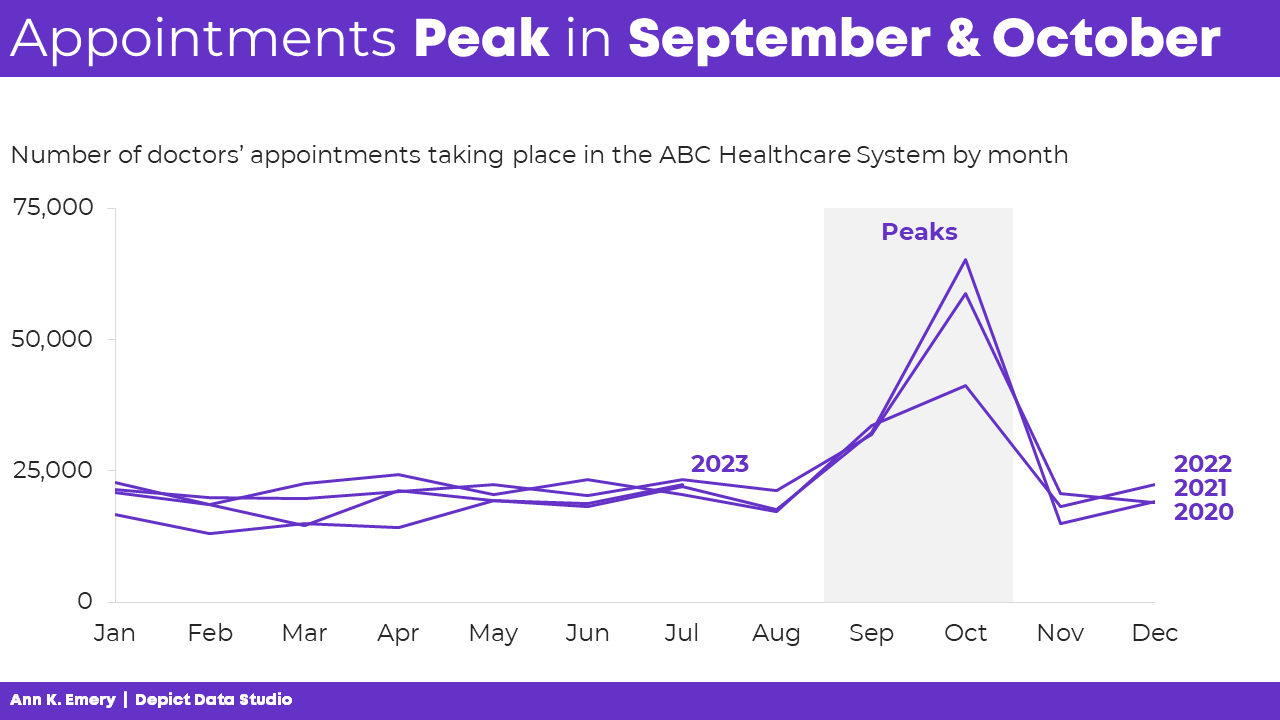
Idea 4: Single Line Chart with Data Storytelling

A final option is a single line chart that stretches from January to December, with each year’s data “stacked.”

Comparing All 4 Ideas

My favorite is Idea 4 because we can easily see the seasonal peaks.

Which one is your favorite, and why? Comment below.

This isn’t an exhaustive list.

Can you think of additional options? Comment below.

Giving a Powerful Presentation

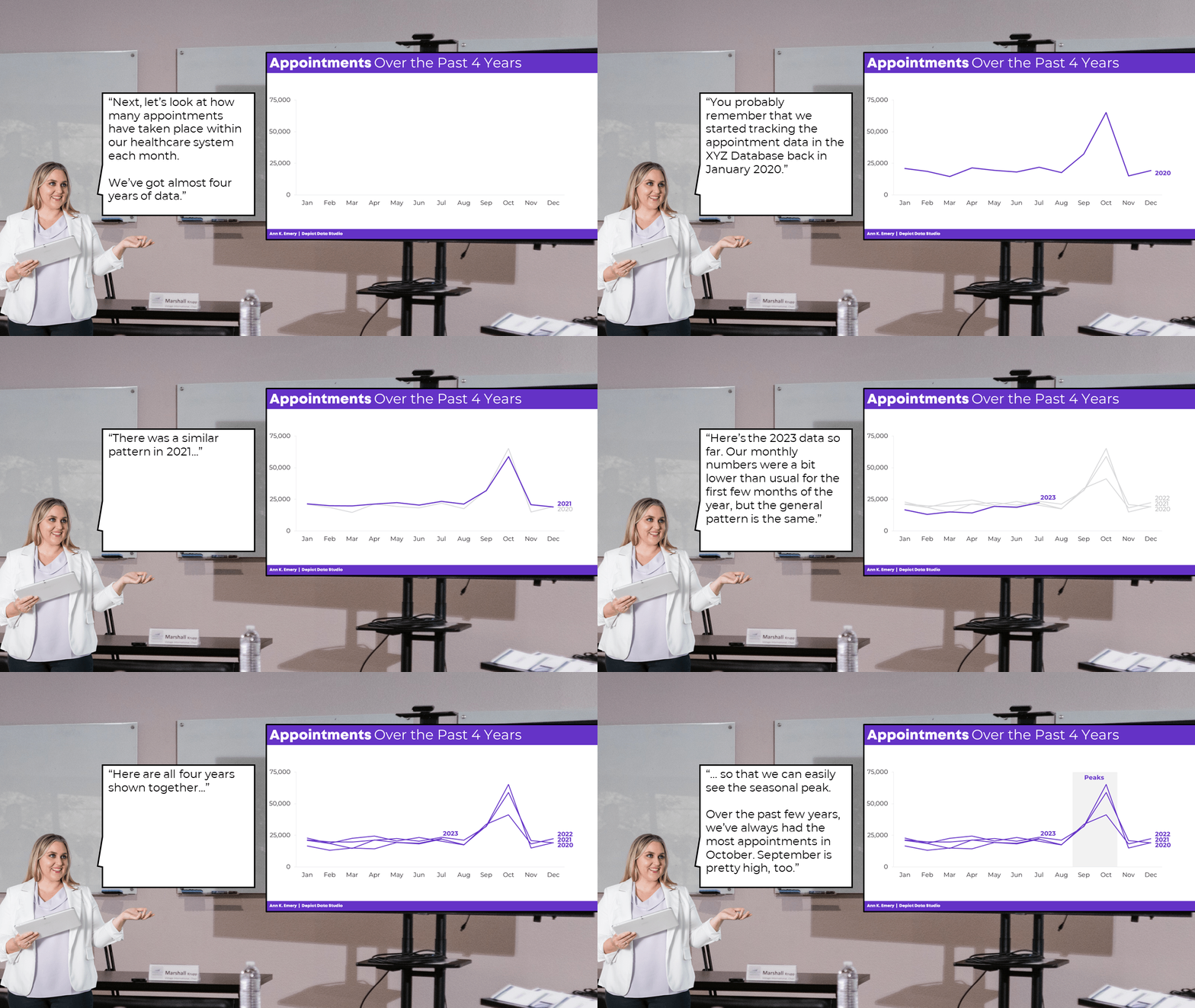
Idea 4 is a sort-of dense graph — and it’s definitely a spaghetti line graph, so we’ve gotta continue adjusting it.

We’ll want to present it piecemeal to match our speaking points.

Otherwise, our audience will die of boredom.

Our bosses will wonder why they hired us.

And nobody will be able to make data-driven decisions based on the data… because while we’re explaining one piece, they’re looking at something else (the very definition of Death by PowerPoint).

The meeting might sound something like this:

I hope you enjoy my kindergarten photoshopping skills. 🙂

PowerPoint’s animation works fine for bullet points.

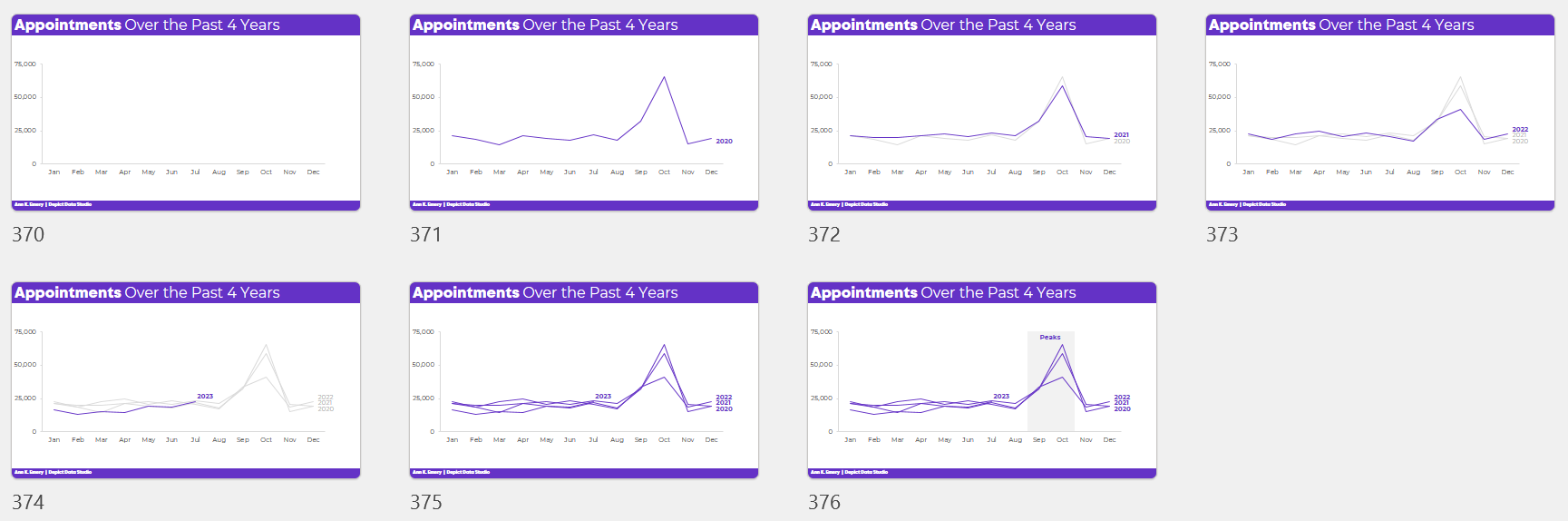
But, to “animate” graphs to match our voice, it’s usually easiest to create a bunch of different slides.

Download My Excel File

Want to explore how I made each graph?

You can download my spreadsheet here.

Written by cplysy · Categorized: depictdatastudio

Aug 05 2023

Collective Impact

Collective Impact is  the commitment of a group of actors from different sectors with a common agenda to solve a specific social problem, using a structured form of collaboration . The concept of collective impact was first articulated in the Stanford Social Innovation Review article 2011 Collective Impact, written by John Kania, CEO of FSG, and Mark Kramer, Kennedy School at Harvard and co-founder of FSG. Collective Impact was voted the #2 Philanthropic Buzzword for 2011, and has been recognized by the White House Council on Community Solutions as an important framework for progress on social issues.

The concept of collective impact is based on the idea that in order for organizations to create lasting solutions to large-scale social problems, they must (1) coordinate their efforts and (2) work together around a clearly defined goal . The collective impact approach (a) contrasts with «single impact,» where organizations work primarily alone to solve societal problems, and (b) builds on earlier work on collaborative leadership ., focused on collective goals, strategic partnerships, collective and independent actions aligned with those goals, shared responsibility, and a backbone with “institutional concern.” Collective Impact argues that organizations must form cross-sector coalitions to achieve meaningful and sustainable progress on social issues.

Five conditions for collective impact: Initiatives must meet five process criteria to be considered “collective impact”:

Common Agenda: All participating organizations (government agencies, non-profit organizations, community members, etc.) have a shared vision for social change that includes a common understanding of the problem and a joint approach to solving the problem through agreed actions.

Shared Measurement System: Agreement on the ways in which success will be measured and reported with a short list of key indicators across all participating organizations.

Mutual reinforcing activities: Engagement by a diverse set of stakeholders, generally from all sectors, coordinating a set of differentiated activities through a mutually reinforcing action plan.

Ongoing Communication: Frequent communications over a long period of time between key players within and between organizations, to build trust and inform continuous learning and adaptation of strategy.

Backbone or Backbone Organization: Ongoing support provided by an independent team dedicated to reinforcing a given collective impact. This backbone organization tends to play six roles to move in that direction: (1) Guidelines for Vision and Strategy; (2) Support for the alignment of actions; (3) Establish joint measurement practices; (4) Strengthen political “will” and commitment; (5) Political Influence; and (6) Mobilize financial resources.

Written by cplysy · Categorized: TripleAD

Aug 03 2023

Ask Nicole: Why Logic Models Set Nonprofits Up for Failure

Have a question you’d like to be featured? Let me know. During a project meeting, I had a conversation with an executive director on structuring their organizational evaluation framework. Understanding programs and all their many parts helps me determine an appropriate evaluation strategy, consisting of data collection and analysis, engaging participants in the process of […]

The post Ask Nicole: Why Logic Models Set Nonprofits Up for Failure appeared first on Nicole Clark Consulting.
Written by cplysy · Categorized: nicoleclark

  • « Go to Previous Page
  • Go to page 1
  • Interim pages omitted …
  • Go to page 78
  • Go to page 79
  • Go to page 80
  • Go to page 81
  • Go to page 82
  • Interim pages omitted …
  • Go to page 310
  • Go to Next Page »

Footer

Follow our Work

The easiest way to stay connected to our work is to join our newsletter. You’ll get updates on projects, learn about new events, and hear stories from those evaluators whom the field continues to actively exclude and erase.

Get Updates

Want to take further action or join a pod? Click here to learn more.

Copyright © 2026 · The May 13 Group · Log in

en English
af Afrikaanssq Shqipam አማርኛar العربيةhy Հայերենaz Azərbaycan dilieu Euskarabe Беларуская моваbn বাংলাbs Bosanskibg Българскиca Catalàceb Cebuanony Chichewazh-CN 简体中文zh-TW 繁體中文co Corsuhr Hrvatskics Čeština‎da Dansknl Nederlandsen Englisheo Esperantoet Eestitl Filipinofi Suomifr Françaisfy Fryskgl Galegoka ქართულიde Deutschel Ελληνικάgu ગુજરાતીht Kreyol ayisyenha Harshen Hausahaw Ōlelo Hawaiʻiiw עִבְרִיתhi हिन्दीhmn Hmonghu Magyaris Íslenskaig Igboid Bahasa Indonesiaga Gaeilgeit Italianoja 日本語jw Basa Jawakn ಕನ್ನಡkk Қазақ тіліkm ភាសាខ្មែរko 한국어ku كوردی‎ky Кыргызчаlo ພາສາລາວla Latinlv Latviešu valodalt Lietuvių kalbalb Lëtzebuergeschmk Македонски јазикmg Malagasyms Bahasa Melayuml മലയാളംmt Maltesemi Te Reo Māorimr मराठीmn Монголmy ဗမာစာne नेपालीno Norsk bokmålps پښتوfa فارسیpl Polskipt Portuguêspa ਪੰਜਾਬੀro Românăru Русскийsm Samoangd Gàidhligsr Српски језикst Sesothosn Shonasd سنڌيsi සිංහලsk Slovenčinasl Slovenščinaso Afsoomaalies Españolsu Basa Sundasw Kiswahilisv Svenskatg Тоҷикӣta தமிழ்te తెలుగుth ไทยtr Türkçeuk Українськаur اردوuz O‘zbekchavi Tiếng Việtcy Cymraegxh isiXhosayi יידישyo Yorùbázu Zulu